Some time ago, I published what has turned into a pretty popular post on how to count the words in your PowerPoint 2007 document. This is something that is a little tricky to find, so perfect for one of these how-to posts.
All was well and good, then I had some editing to do on a PowerPoint document and my PC automatically opened it in PowerPoint 2013. Where on earth did I find out how to count the words now? Here’s how …
Why would I want to count the words in a presentation?
You might have a word limit imposed by a course tutor, or, more likely, you’re an editor with a per-word rate who needs to check how many words you’ve actually edited.
How do I count the number of words in a PowerPoint 2013 presentation?
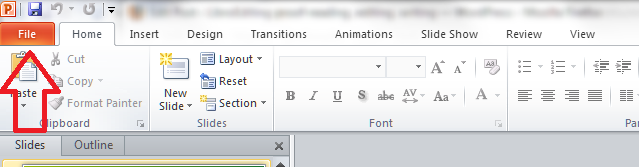
To do this, with your document open, you need to go into the FILE tab at the extreme left of the tab list … (one day I’ll work out how to get those tab titles out of capitals and let you know!)

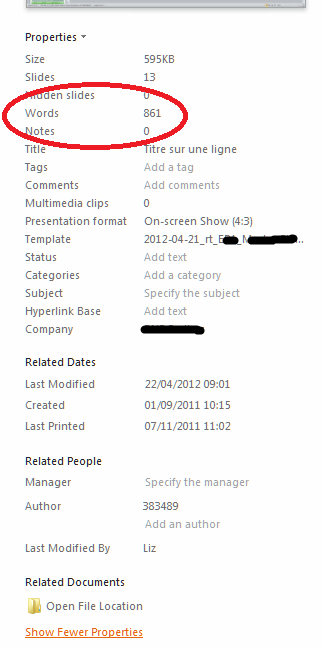
Once in the File tab, stay in the Info area where you land, and click on the arrow next to Properties in the right hand column. Once clicked, you will have a choice between Show Document Panel and Advanced Properties. Click on Advanced Properties:

This is, dare I say it, a little easier than in PowerPoint 2007. Once you’ve clicked on Advanced Properties, you’re given a list of properties. Click on the Statistics tab at the top and you’ll find your Word Count, among other information.
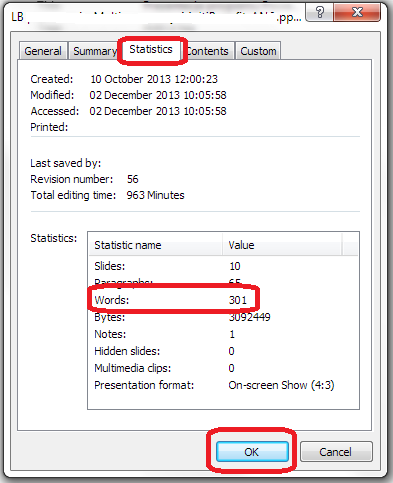
To return to your document, click OK and then back to the Home tab in your document.
How do I count the number of words in a PowerPoint 2010 presentation?
Please see the post on PowerPoint 2010.
Related posts:
How do I count the number of words in a PowerPoint 2007 presentation? (this is a little different).
How do I count the number of words in a PowerPoint 2010 presentation? (different again!)
If you’ve enjoyed this post or found it useful, please do comment, or share using the buttons below! Thank you!
Please note, these hints work with versions of Microsoft Office currently in use – Office 2007, Office 2010 and Office 2013, all for PC. Mac compatible versions of Word should have similar options. Always save a copy of your document before manipulating it. I bear no responsibility for any pickles you might get yourself into!
Find all the short cuts here …


 LibroEditing proofreading, editing, transcription, localisation