RSS

Category Archives: Errors

Fair or fare?

I saw this one at the weekend – it’s another one where people know the difference between the two words but sometimes get into a pickle with phrases (see rein, rain or reign, peak, peek or pique, bear or bare or cue or queue for more examples of this issue).

So, fair means “just or appropriate” and “treating people equally” and “moderately good” as well as “blond(e)”, and the adverb fair means “in a fair manner”. So, “I said I will give all applicants fair treatment and judge them solely on their ability”; “Yes, the process was fair and everyone was treated appropriately”. “It’s not FAIR”, of course, too, when you expect to get something and you don’t. A fair is also a public entertainment made up of stalls and attractions, but I don’t think that is the version that gets confused.

Phrases associated with fair include fair and square (honestly and accurately); fair game (a reasonable target).

Fare, however, has a few disparate meanings, which is probably how the confusion creeps in. It refers to the money paid for a journey on public transport – “have you got change to pay the bus fare to get into town?”. It refers to a range of food – “traditional English fare is available at the pub”. And it is used in the sense of to perform in a specified way – “he fared badly in the local elections”. The archaic meaning of travel also survives in farewell (fare thee well, travel well).

So none of them are a fayre (that’s just a pseudo-archaic spelling of fair), and you fare badly, you don’t fair badly, which is the one I tend to see.

You can find more troublesome pairs here and the index to them all so far is here.


Tags: , , ,

Homogeneous or heterogeneous?

Well, I have to admit that I don’t often see these two mixed up as such, but because they look quite similar, there is a need, in my opinion, to have a quick and easy way to distinguish them laid out. And that’s what these Troublesome Pairs are for, after all. I do monitor how many searches I get on the pairs, and it’ll be interesting to see how many people search for these in a search engine and come through to here. (If you have a website or blog, statistics are your friend, and can give you surprising results, too!)

Anyway …

Homogeneous means of the same kind, consisting of parts all of the same kind (it is also the name for a chemical process involving substances in the same phase, i.e. all liquids or all gases, if that helps you remember it). It comes from the Greek for same race or kind. Yes, the same as homosexual. The way I remember this is that homogenised milk is the one where the cream is mixed into the milk rather than sitting on the top (that made me feel a bit nauseous for a moment, as I only drink skimmed milk, myself!)

Heterogeneous, on the other hand, means diverse in character or content (a heterogeneous chemical process is one involving substances in different phases, e.g. mixing a gas with a liquid, in case that helps you remember). It comes from the Greek, again, for other race/kind. And, yep: heterosexual.

Note the spelling, by the way: -geneous, not genous. Not even if you’re in the US, I believe.

So a word pair and a pair of prefixes defined for you today: extra value!

You can find more troublesome pairs here and the index to them all so far is here.

 
1 Comment

Posted by on March 30, 2012 in Errors, Language use, Troublesome pairs, Writing


Tags: , , ,

Though or although?

Here is another pair of words with an identical meaning but subtly different uses. There’s a style warning at the end, too. We like a style warning, don’t we!

Both though and although mean” in spite of the fact that”, “however”, “but”. “Although he’s messy at home, he’s very organised at work”, “She was a plainly dressed woman, though with a flamboyant taste in hats”, “The dogs, though fierce in appearance, were friendly”.

Although is the more formal of the two. I prefer it to though at the beginning of a sentence, which is the traditional way of doing things. “Though he was firm, he was fair” just looks better to me as, “Although he was firm, he was fair”.

You cannot replace though with although in adverbial uses – “it was nice of him to write, though”. or with as or even – “she doesn’t look as though she’s reading that book, even though she says she is”

And finally, you shouldn’t start a sentence with either of these if it’s actually acting as a linking word between the previous sentence and this one: “He was firm. Although he was fair too”, or if it’s making a link between two concepts in the upcoming phrases: “Although he was firm. He was fair too”. Make sure both of the linked ideas are in the same sentence.

You can find more troublesome pairs here and the index to them all so far is here.


Tags: , , ,

Pore or pour?

Another pair of words that sound the same but don’t mean the same, and that get mixed up more times than I’d care to mention. Read on to find out how to differentiate between pore and pour.

First off, the more uncommon one. To pore (over) something is to be absorbed in the reading of it. “She was so busy poring over the article on semiotics that she missed her stop on the Tube”. A pore is also a minute opening in the skin (etc.) through which liquids and gases can pass. But I don’t think that’s the usage that gets mixed up with this pair.

To pour (over, out, etc.) is to flow or cause to flow in a steady stream. “Water poured down the wall as the shower leaked from above”; “she poured herself a cup of tea”.

Short but sweet. The same sound, but different spellings, meanings and, well, words.

“As she pored over the ancient manuscripts, it began to pour with rain”.

You can find more troublesome pairs here and the index to them all so far is here.


Tags: , , ,

My short cuts – how to create a contents page in Word

This is part of my series on how to avoid time-consuming “short cuts” and use Word in the right way to maximise your time and improve the look of your documents.

Today we’re going to look at how to create a contents page or contents list in Word. I am breaking this series up into small pieces, so we have already learned about setting up headings and then numbering them.

You will use this to save yourself time and ensure consistency when you’re setting up a large document and you want it to have a contents page. You can do it manually, but it is FAR easier to do it this way.

First, have a look at the two headings articles to make sure you understand how to assign headings and how to number them (if you want to).

Now, for the purposes of making a more interesting contents page, I’ve popped each heading onto a separate page (and we all know how to do that, don’t we!)

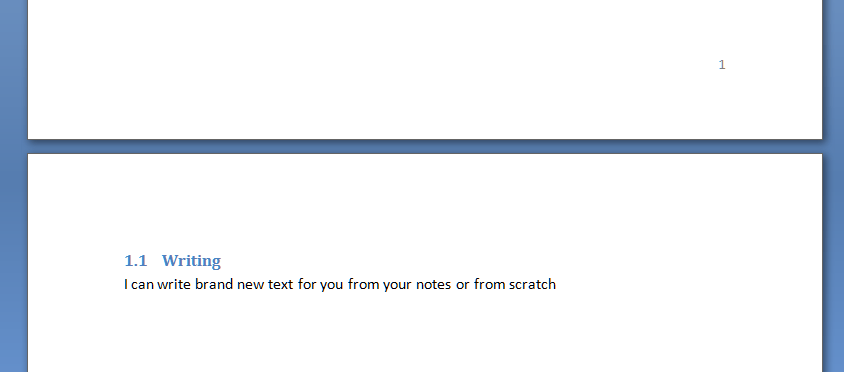
So the text is all set up, with headings that are also numbered, and each heading is on a separate page. Now we’re going to put our cursor at the beginning of the document, and make sure we’re in the References tab.
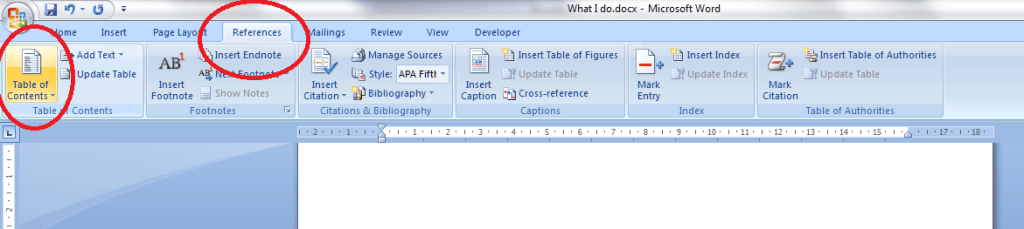
You can see the Table of Contents button highlighted – click on that and have a look at the box that comes up:

Here we have lots of different styles of contents page to choose between. Either double click on the one you want – I clicked on the first one – or click once to highlight it and then Insert Table of Contents. And look what appears! Magic!

You can see lots of lovely headings and their numbers, all laid out nice and clearly (imagine if this was a PhD or another long document with lots of sub-headings.

But what happens if we need to change something in the text? Look – there’s a problem with the document here …

I can see that I should have typed “How Much it Costs” for section 3, and it’s on page 8 along with Section 2, when it should be on page 9. Oh no!

So let’s go to page 8, move the heading onto page 9 and amend the heading itself:
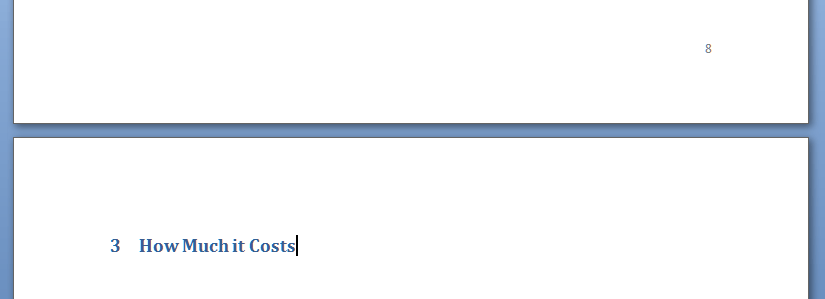
Great – so now the text is sorted out and the heading is on page 9, where it should be. How do we update the Table of Contents to reflect this change?

Go back to the Table of Contents and highlight it (it all comes up in blue if you click on one bit of it). Left click and you should find it puts everything in grey and gives you a little tab at the top like this.
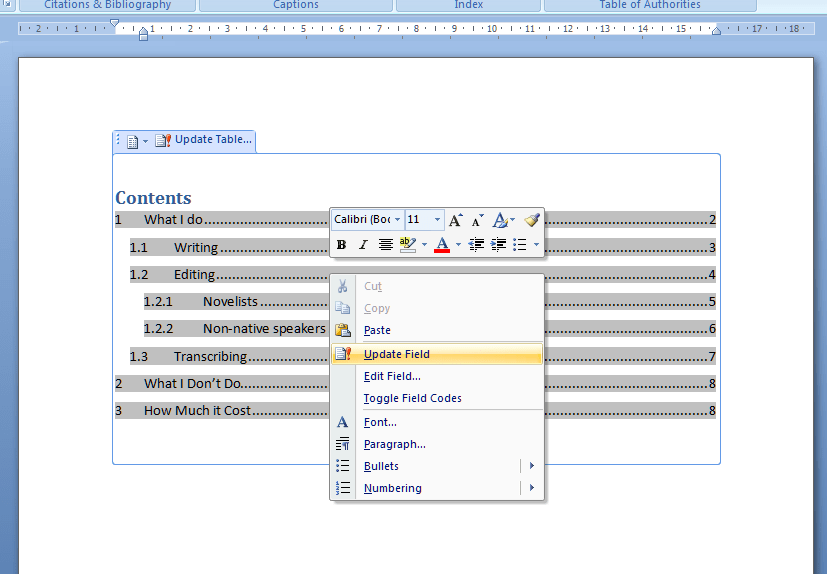
You can use this to change all sorts of attributes on the contents page, or you can just click on Update Field from here or left click when you have the contents list in blue in the last step, and you get this choice:
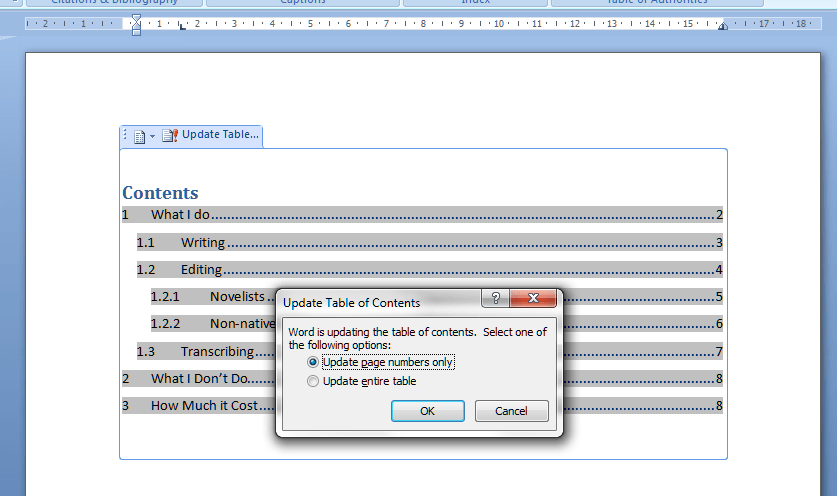
I always choose Update entire table, just in case. And with one click, it’s updated the Contents list to match the document.

So, no more fiddling around doing a contents page by hand. As long as you set up your headers, you can insert and update your Contents page however you want and whenever you want – so much easier!

This is why, if you use my proofreading services, I will put a note on your contents page reminding you to update it at the last minute, to take into account any changes we might have made to your pagination or heading numberings. Update the Contents page at the very last stage, and it’ll be completely accurate and up to date.

If you have enjoyed this post and found it useful, please click on the “share” buttons below or tell your friends and colleagues about it! Thank you!

Please note, these hints work with versions of Microsoft Word currently in use – Word 2003, Word 2007 and Word 2010, all for PC. Mac compatible versions of Word should have similar options. Always save a copy of your document before manipulating it. I bear no responsibility for any pickles you might get yourself into!

Find all the short cuts here


Tags: , , , ,

Peek, peak or pique?

We have an extra value Troublesome Triplet today, with a look at peek, peak and pique. These all sound the same, but not only are they spelled differently, they mean very different things, too.  But this doesn’t stop them getting mixed up – presumably the fact that they sound the same overrides all other factors!

To peek is to look furtively or quickly, and the noun means a quick or furtive look. “I’ll just take a peek at your first chapter but I’ll read it properly later”; “She peeked in through his window and saw him reading a book”. Going along with this shifty, round-corners type of feel, to peek can also mean to protrude slightly so as to be just visible: “the end of the dog’s tail peeked out from under the duvet, revealing his location”.

Moving on (or up) to the peak, this is the pointed top of a mountain (or refers to a mountain with a peak) and in a similar way, a point of highest achievement or activity (“The peak of his achievement in running was winning a gold medal”), point in a curve or on a graph that is highest point, and, well, the brim at the front of a cap (it sticks out/up). The verb to peak means to reach the highest point (“the hits on my website peaked at 229 in one day and never achieved that heady height again”) and the adjective peak refers to maximum or utmost – “he’s at peak fitness right now, just in time for the big athletics meeting”) or characterised by maximum activity or demand – “phone call charges increase at peak hours”.  There is a secondary, archaic, meaning, from the 17th century, to decline in health and spirit – we use this one when we refer to someone as looking a bit peaky, if they look a bit pale and unwell.

Pique has two linked meanings to do with prickings and prickliness: it’s either a feeling of irritation or resentment resulting from a slight especially to one’s pride – “he stormed off in a fit of pique” – or refers to stimulating interest or curiosity, again with a little prick or prod: “he piqued her interest with his fascinating talk of shower sealant, and she resolved to take a plumbing course”.

So, in essence, “She piqued his interest in mountaineering when she scaled the highest peak in the range and peeked at him from behind the cairn at the top”.

You can find more troublesome pairs here and the index to them all so far is here.


Tags: , , ,

Comprise, compose or consist?

Comprise, compose and consist have come to my attention quite forcibly this week, as I keep coming across examples of them being used incorrectly. Or, rather, comprise being used incorrectly. “Comprise of” and, in the past tense, “comprised of” seem to be getting more and more common, and the three words do have a similar meaning, in that they are all about larger things being made up of smaller things. But the way they are used, and the constructions that are built around them, are different and do need care. There is also a subtle shift in emphasis from the parts to the whole, which I’ll describe as I go through them.

The problem creeps in when they are not adequately differentiated in the writer’s mind, in which case the constructions leak across from one to another, causing (gasp!) incorrect sentence structures. And yes, there is a school of thought that says “if you can understand it, it doesn’t matter if it’s a bit incorrect or clumsy”, but I don’t think there’s any need to be incorrect and clumsy if you don’t have to be. There, I’ve said it. Anyway, here goes!

To comprise is to consist of (yes, I know), be made up of: “the country comprises four regions”. But not (please!) “the country comprises of four regions”. If you are desperate to use “of”, then you can turn the verb around and make the country the subject, so: “the country is comprised of four regions”. But I’ll repeat again, it’s not comprises of, and really I don’t much like is comprised of much, either, when it comes down to it, and if you write that in something I’m editing, I’m likely to suggest changing it!

The emphasis here is very much on the smaller constituent parts. We’re talking about what the larger thing is made up of, and they are the important things, rather than the whole.

Note that the large thing comprises the small things. The small things don’t really comprise the big one, or at least we don’t write it that way round.

To consist of means to be made up of – “the country consists of four regions”.  You can use that “of” as much as you like with consist! The emphasis here is on the parts that make up the whole, but also on the fact that they do make up a whole, so there’s an equal balance of importance.

And a little bonus: to consist in means to have as an essential feature – “Bob and Tom look very similar: their difference consists in the way they talk”.

If you can replace “consists” with “lies”, then use in. If you can replace “consists” with “is made up” then use of.

To be composed of, again, means to be made up of, although the emphasis shifts here subtly to the whole: the parts compose the whole, and the whole is what is important. “The work is composed of four movements”.

You can find more troublesome pairs here and the index to them all so far is here.


Tags: , , ,

My short cuts – headings (part 2)

This is part of my series on how to avoid time-consuming “short cuts” and use Word in the right way to maximise your time and improve the look of your documents.

Today we’re going to look at how to set up numbered headings in Word. I am breaking this series up into small pieces, so we have already learned about setting up headings and next time we’ll learn about creating contents pages, too.

You will use this to save yourself time and ensure consistency when you’re setting up a large document with lots of headings and sub-headings.

So, here’s our text with lots of headings and bits of text under them as we left it last time. We have assigned heading 1, heading 2 etc. styles to them so they make sense and are consistent. But they’re still a bit unclear and I think we would all agree that it would make things a bit clearer if we numbered the headings. But how to do that so the sub-headings have sub-numbers, etc.?

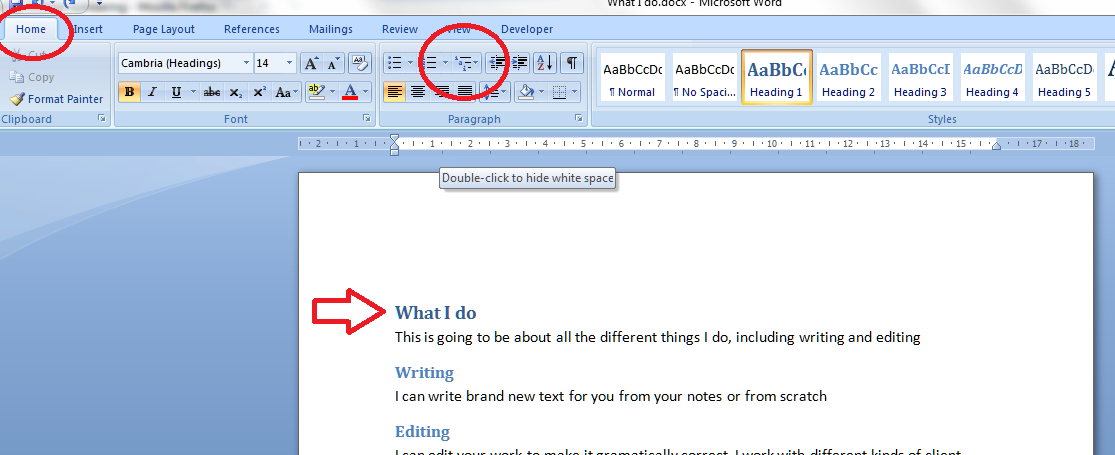
Here’s how to do it. First, make sure you’re on the Home tab in Word. Then, concentrate on the paragraph section. There should be a little icon like the one I’ve circled; when you hover the mouse over it you’ll get a note that this is the multilevel list tool. Make sure your cursor is next to the first heading and click on the multilevel list button.

Up will pop a menu which gives you lots of choices – a list library. We’d like to go for the one that gives us 1, 1.1, 1.1.1 etc. (see arrow) so we pick that and click on it.

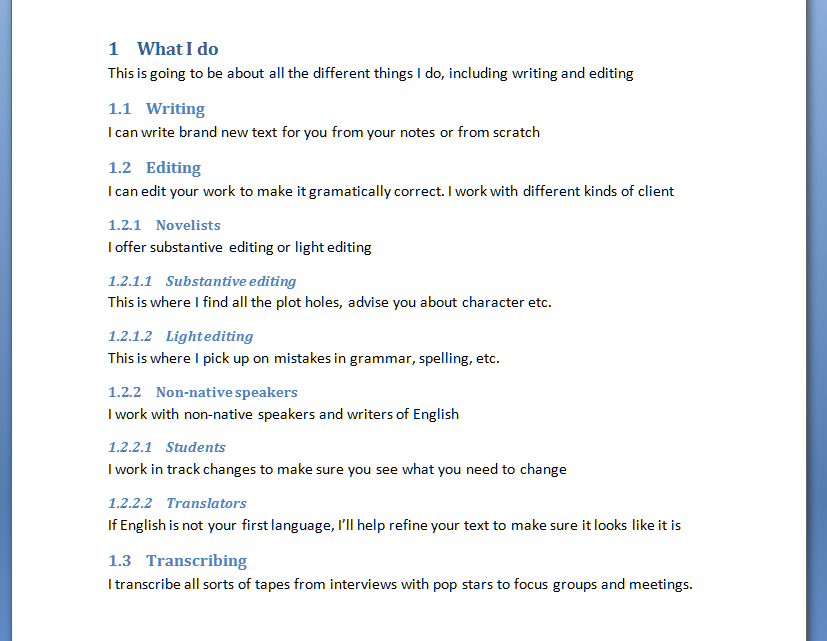
Select the kind of list you want and look back at your text. Amazing – it’s now got heading and sub-heading numbers!

And look what’s happened to your heading style buttons now you’re back in your document. The numbering style has been added to them. Note: there is a way to change the style of the headings when right-clicking on them. That’s all lovely and useful, but when you want to make your headings and their numbers behave themselves throughout your text, you need to do it the way I’ve shown you above.

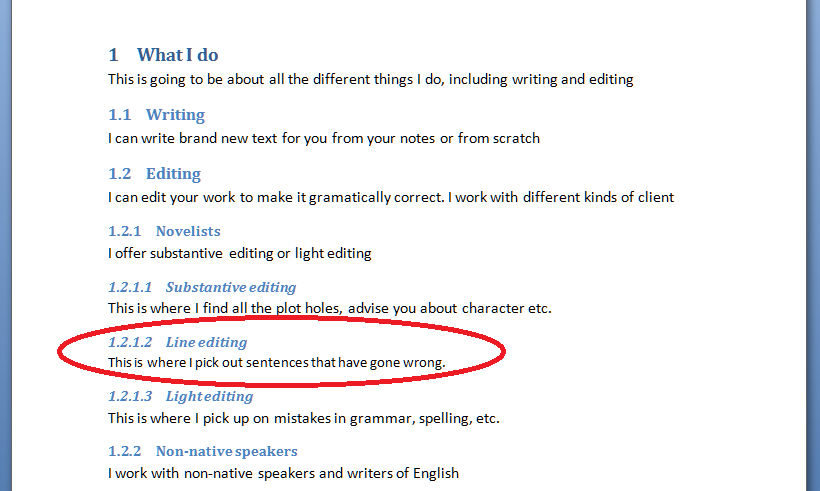
Now let’s try adding a new sub-heading in the middle of the others. In this example, I’ve added “Line editing” in between “Substantive editing” and “Light editing” which were headings 1.2.1.1 nand 1.2.1.2 respectively (look up the post to check that if you want to). I put the cursor in the space after “Line editing”, chose Heading 4, typed my heading … and not only has it assigned number 1.2.1.2 to that heading, it’s also handily moved the next heading, “Light editing” to have number 1.2.1.3 – all by itself! You can see how useful this is if you’re writing a big document and adding in sub-sections but want to keep the numbering consistent. What a nightmare it would be to do it all by hand!

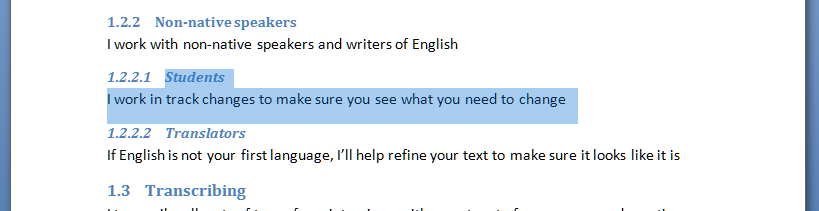
And what about if you want to remove a section with a sub-heading and make sure the numbering follows suit? Here I have highlighted 1.2.2.1 “Students”, ready to delete it. Note that “Translators” has number 1.2.2.2 at the moment …

I delete “Students”, and “Translators” now has number 1.2.2.1 instead. Magic!

So, in summary, if you have a document with lots of headings and sub-headings, and you want to number them, for example in a report, thesis or non-fiction book, use this method to apply a numbering scheme to the headings, and whatever you delete or add, as long as you tell Word that you’re adding a heading and what kind of heading it is, it will sort out all the numbering for you and ensure it makes sense. Hooray, frankly!

Next time, we’ll look at creating an automatic contents page, and how that will help make your document easy to navigate …

If you have enjoyed this post and found it useful, please click on the “share” buttons below or tell your friends and colleagues about it! Thank you!

Please note, these hints work with versions of Microsoft Word currently in use – Word 2003, Word 2007 and Word 2010, all for PC. Mac compatible versions of Word should have similar options. Always save a copy of your document before manipulating it. I bear no responsibility for any pickles you might get yourself into!

Find all the short cuts here


Tags: , , , ,

Disorganised or unorganised?

Having become known as someone who writes about this kind of thing, I was asked on Twitter the other day to explain the difference between unorganised and disorganised. It’s another one of these subtle shades of meaning, with one being more specific and the other more general – we seem to have quite a few of those in English and I do like them!

Being unorganised is all about the specific thing that is unorganised; it’s the acute version, if you like. A party where you haven’t planned any food for people to eat, an essay that has no plan to it and is that bit harder to write – that’s unorganised

Being disorganised is a general, holistic thing, more of a character point than a specific item. Following the medical analogy above, the chronic version of lack of organisation. So a disorganised person is generally chaotic and inefficient, and a disorganised committee or event is not properly planned and controlled. A disorganised desk is one in constant disarray, a disorganised essay has been written from that unorganised plan and is pretty unreadable.

I said it was subtle!

You can find more troublesome pairs here and the index to them all so far is here.


Tags: , , ,

Persuade or convince?

I have to admit that I thought there was more of a difference between persuade and convince than there actually turns out to be, but there is some interesting background that we can look at too.

To convince someone of something means to cause them to believe firmly in the truth of something, or – aha – persuade them to do something.

And to persuade someone to do something means to cause them to do something through reasoning or argument; to cause someone to believe something; to provide a sound reason for someone to do something.

So, all very similar. But here’s the interesting bit, and it does come across a little bit in the above explanations … Traditionally, convince is used in situations in which someone’s belief is changed but no action is taken – “I convinced her to believe in the tooth fairy”, whereas persuade is traditionally used in situations in which someone’s belief is changed and action is taken – “I persuaded him to buy the red trousers, even though he usually wore black”. Feel free to keep that distinction going if you want to!

You can find more troublesome pairs here and the index to them all so far is here.


Tags: , , ,