RSS

Author Archives: Liz Dexter

Unknown's avatar

About Liz Dexter

Book blog is at http://www.librofulltime.wordpress.com Writer, proofreader, editor, transcriber. Also runner, gym-goer, volunteer and BookCrosser! My married name is Liz Dexter but my maiden name and the name on the books I write is Liz Broomfield.

Persuade or convince?

I have to admit that I thought there was more of a difference between persuade and convince than there actually turns out to be, but there is some interesting background that we can look at too.

To convince someone of something means to cause them to believe firmly in the truth of something, or – aha – persuade them to do something.

And to persuade someone to do something means to cause them to do something through reasoning or argument; to cause someone to believe something; to provide a sound reason for someone to do something.

So, all very similar. But here’s the interesting bit, and it does come across a little bit in the above explanations … Traditionally, convince is used in situations in which someone’s belief is changed but no action is taken – “I convinced her to believe in the tooth fairy”, whereas persuade is traditionally used in situations in which someone’s belief is changed and action is taken – “I persuaded him to buy the red trousers, even though he usually wore black”. Feel free to keep that distinction going if you want to!

You can find more troublesome pairs here and the index to them all so far is here.


Tags: , , ,

Competition results!

Prize!

Here are the answers to the competition I set a month ago

Text 1

you shoul’dnt have gon eto the pub last night, it was a misstake,” She said, “how did i nkow that!’ said him.

14 mistakes:

you shouldnt have gon eto the pub last night, it was a misstake,” She said,how did i nkow that!’ said him.

1 – quote marks at beginning
2 – capital on You
3 – apostrophe mis-placed in shouldn’t
4 – gap mis-placed in gon eto (could be counted as 2 too)
5 – comma after night should have been a semi colon
6 – misstake spelling mistake
7 – She after quote should be she
8 – starting a new quote should start a new sentence, so a full stop after said …
9 – … and a capital for how
10 – capital I
11 – nkow spelling mistake
12 – exclamation mark should be a question mark
13 – single quote mark should be a double to match the others
14 – said he

“You shouldn’t have gone to the pub last night: it was a mistake,” she said. “How did I know that?” said he.

Text 2

We need to concern about the incidences of bad spellling in the document and how they can be made made better. It influences on perception of the text in readers. However it makes it harder to understand. Because clearity is the main aim of all writing unless its v creation.

This is how I would rewrite it:

We need to be concerned about the incidences of bad spelling in the document and how they can be made better. It influences the readers’ perception of the text. Moreover, it makes it harder to understand, because clarity is the main aim of all writing, unless it is very creative.

And the winner is …

Michelle Austin! Michelle got the correct combination of number of errors and a close but clear re-write of the text, including the bit about creativity. Well done, Michelle – your exciting parcel of Libro goodies will be on its way to you soon!

 
Leave a comment

Posted by on March 7, 2012 in Copyediting, proofreading, Writing


Tags:

What I got up to in February

Yes, it’s that time again when you get to find out what a busy self-employed editor/writer/transcriber gets up to. I’ll carry on writing these while people carry on letting me know they enjoy them!

I’ve had another amazing month in February. I can’t really believe it’s going so well – I have described it as like that expanding foam you put into a space in your house – pff and it’s filled up the space allowed!  My new blog has been useful as an outlet through which to express myself from time to time! So, here’s a snapshot of what I got up to …

The first part of the month was heavily devoted to transcription – the client I worked for just before Christmas came back to me with another international conference to transcribe. My experience with minuting meetings and with non-native speakers of English really helped here, as I was typing out presentations and discussions by people from all around the world. Fun and interesting work, I got to share the work with some colleagues by recommending them to the client, but, my goodness, I typed a lot – I transcribed over 20 hours of conference (remembering that each hour of speech takes several hours to transcribe) and actually wore the letters off some of the keys on my computer keyboard! I put into practice the lessons I learned about avoiding RSI from the last lot, took lots of breaks, went to the gym every day for some heavy sessions on the rowing machine, and got through it fine. I like this client a lot, too, because they always come back to me quickly if I have a query.

I also did more transcription for two other regulars; a writer teaching people about marketing and a journalist interviewing musicians. Those ones were in British English and also interesting to do.

And I did do other things, too (somehow),  writing a library of 42 short articles for one regular client, articles on medical subjects for another, and putting together marketing letters/emails and web text for another.

I edited some texts that had been translated from Polish, Finnish, Dutch and Chinese, and ones written by people with French as their first language.  I edited the Moseley B13 magazine again – I do that for free and enjoy it greatly, finding out what’s going on in my local area and using my powers for good at the same time. I also did a bit of localisation for US and other clients.

There was some of the usual academic work – bits of theses, dissertations and articles. I had some more short essays from my coaching clients, who are all progressing through their Master’s courses nicely – it’s great to see their English improving as they take on board my suggestions and tips.

So a nice busy time of it! In other news, I got back into my giving back and networking, helping at a one-off local Social Media Surgery session, and attending Social Media Cafe as usual (I wouldn’t miss that for the world) although I missed the Central SMS owing to a clash with another meeting. In response to my need to have people to talk to now and then, and after testing the waters, I’ve established a Kings Heath Home Workers group on Facebook and blogged about it.

Coming up – I have some academic work booked in and I’ll be doing more transcribing towards the end of the month. I am hoping to get some time to work on my research project, as I’ll be presenting on my research at the Iris Murdoch Society Conference in September. I’ll be going to Jelly co-working session this Friday – now I’ve been to one and know how they work, I’ll be taking along some draft blog posts to write up.  I ran a competition in my newsletter last month and I’ll be announcing the winner later on today or tomorrow – if you would like to receive a short summary of Libro goings-on and interesting facts and links, do sign up here!

Libro offers copyediting, copy writing, proofreading, transcription, typing and localisation services to other small businesses, individuals and corporations. Click on the links to find out more!


Tags: , , , , , ,

Infer or imply?

Infer or imply is a classic troublesome pair, especially in the context of academic writing.

And they actually represent two sides of the same story, meaning that it’s important to be able to distinguish them and use them the right way round. But then again, that’s true of all my Troublesome Pairs, isn’t it!

To infer is to deduce from evidence and reasoning.

To imply is to indicate by suggestion.

So the main difference here which needs to be remembered is the viewpoint from which the word operates. The two words can even describe the same situation, but from different sides.

If a person implies something, they are suggesting that something but not stating it directly: “By mentioning the high-priced bath accessories, but not going through the details of the newspaper report, the speaker was implying that the MP was over-claiming her expenses”.

On the other hand, if you infer something from what has been said or written by that person, you infer something from what they say: “Having been told about the high-priced bath accessories listed on the MP’s claims, we inferred that she was over-claiming her expenses”.

So the evidence implies this conclusion, or we can infer this conclusion from the evidence. Different sides of the same story, and two more words that require careful handling.

You can find more troublesome pairs here and the index to them all so far is here.


Tags: , , ,

Subsequently or consequently?

These two words are to do with cause and effect (or not), and of Thing B happening after Thing A. But they don’t mean the same, even if people think they do!

Something is consequent when it follows on from something else as a consequence, i.e. as the result or effect of that first thing. “She dyed her brown hair platinum blonde and consequently stood out in the crowd” – so, she stood out from the crowd because she had platinum blonde hair.

Something is subsequent when it merely follows on from something else in time, i.e. not as a result or effect of that first thing. “She had brown hair and subsequently went blonde” – she didn’t go blonde because she had brown hair, it was just the next thing that happened. She could have had black, red or blue hair first; the original hair colour doesn’t affect the outcome.

“She had black hair before she dyed it red, consequently she had to bleach it first before applying the red dye subsequently”. I don’t think anyone would actually ever utter that sentence, but hopefully it explains matters!

You can find more troublesome pairs here and the index to them all so far is here.


Tags: , , ,

My short cuts – headings (part 1)

This is part of my series on how to avoid time-consuming “short cuts” and use Word in the right way to maximise your time and improve the look of your documents.

Today we’re going to look at how to set up headings in Word. I am breaking this series up into small pieces, so we will be learning about setting up numbered headings and creating contents pages too.

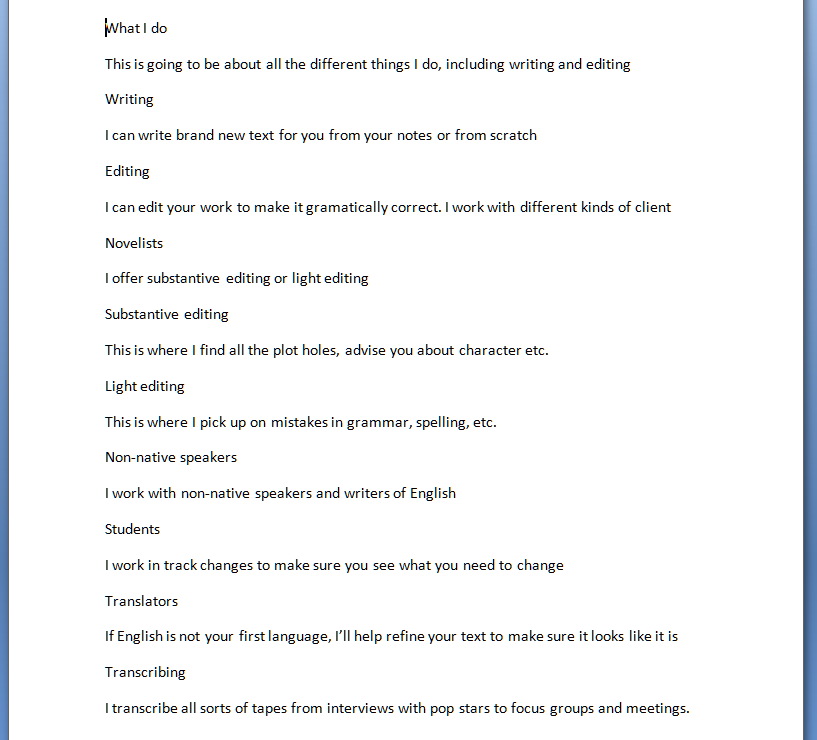
You will use this to save yourself time and ensure consistency when you’re setting up a large document with lots of headings and sub-headings. Imagine I’ve written a document about what I do in my business. I might write it up like this (you can imagine the one-word sentences are longer paragraphs if that helps!)
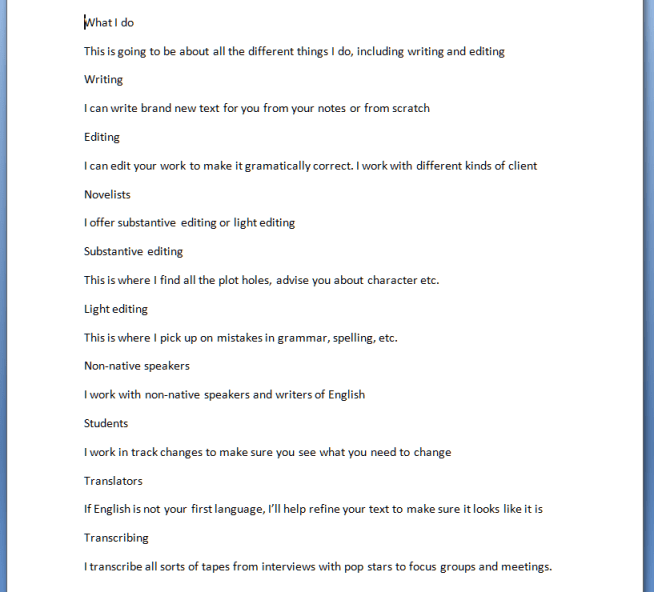
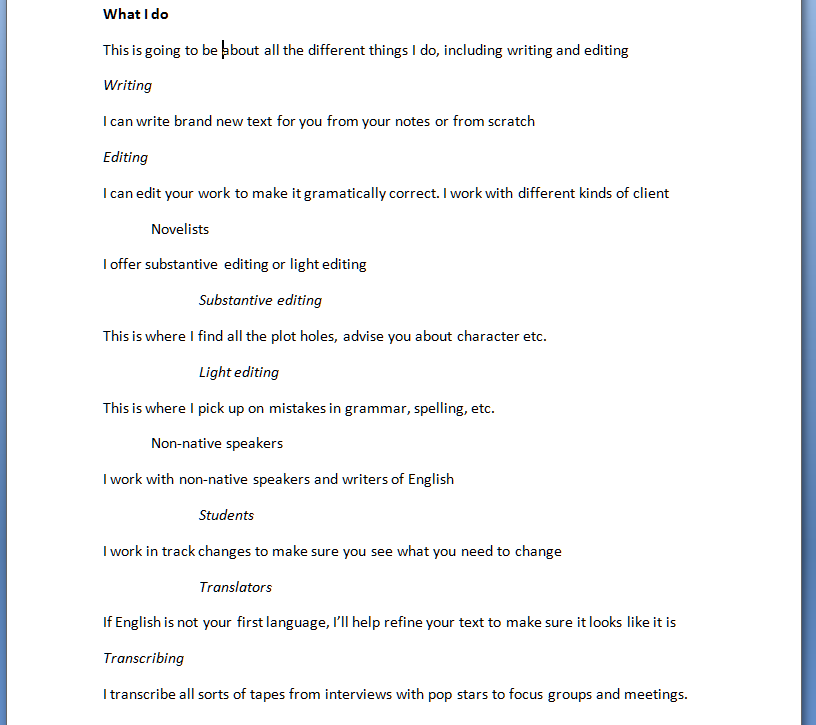
It’s not very easy to see what’s a heading and what’s the text, though. So I might think up my own styles of headings or sub-headings (yes, I might number them, too, but let’s keep it simple for now) and do this:
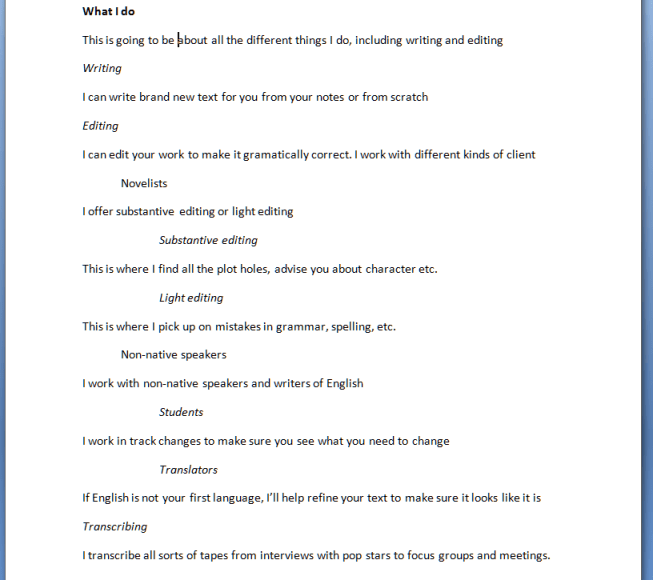
All well and good, but if this is a great big document: am I going to remember that I put main headings in bold, sub-headings in italics, etc., etc.? Or am I going to get in a mess and make my document confusing, so when you read it you don’t know which kind of section you’re in?

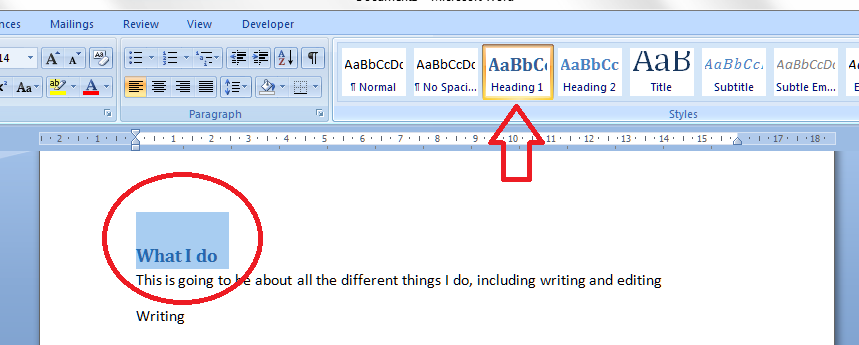
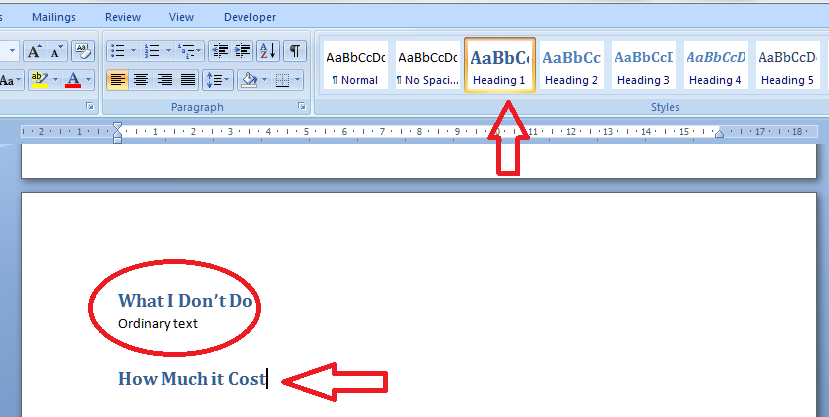
This is where the pre-set headings available in Word come into their own. If you’re using Word 2003, you’ll need to be using the formatting toolbar, then styles. If you’re using Word 2007 or Word 2010, then you’re on the Home tab of the ribbon at the top. Have a look: can you see some boxes labelled Heading 1, etc.?

I’ve circled Heading 1, and the arrow points at a scroll bar that will let you see a whole range of different things you can do.

Now you’ve located the headings buttons, you need to highlight the text you want to mark as Heading 1, and click on the Heading 1 button
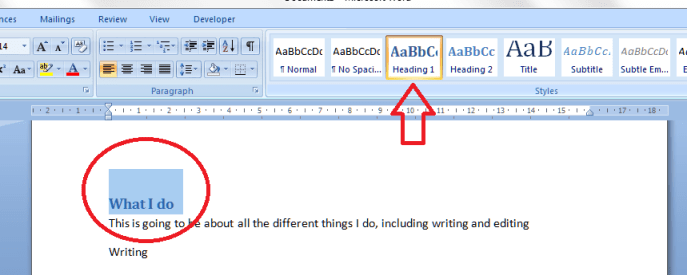
And there it is, changed into blue (it doesn’t have to be blue, or that size; we’ll look at that in the next session) and every time you mark a heading as Heading 1, it will look like that.

Note: you don’t have to have all the text already written, highlight and click. You can also click Heading 1 (or whatever) when you want to type a new heading; the text on that line will adopt the Heading 1 format until you press return.
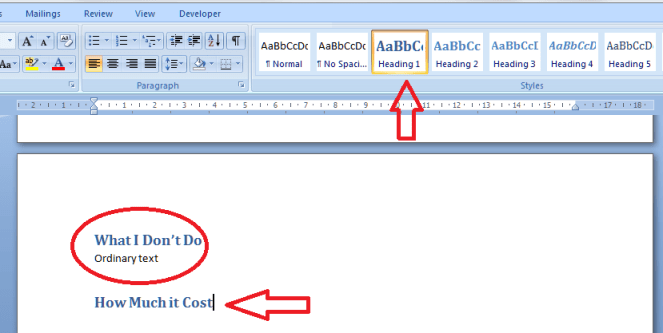
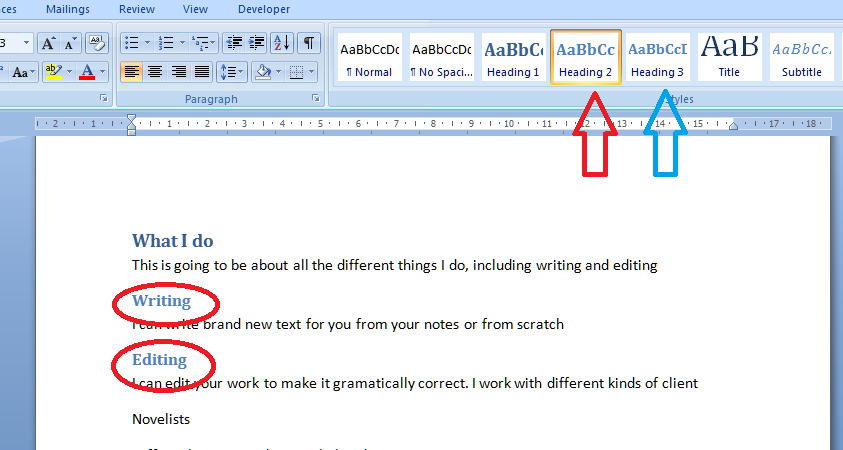
Time to do the Heading 2 level now. Oh – if you want to be clever, highlight each example of a heading you want to change to Heading 2, keeping the Control button pressed on your keyboard as you do so. This will highlight all the text you want to alter at once, saving a few clicks.

Anyway – highlight your Heading 2 text, all together or one at a time, and click on the Heading 2 button.
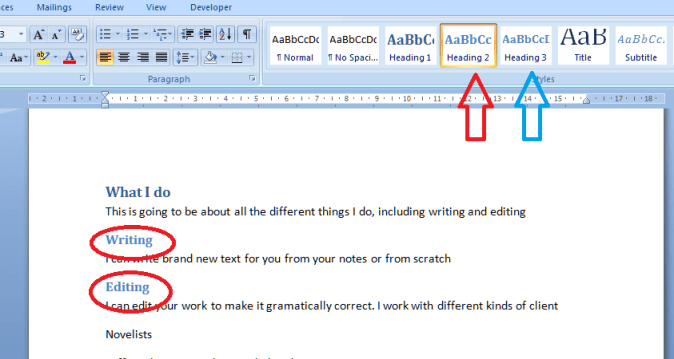
You’ll notice that Word has realised you’re setting levels of headings and has helpfully moved the button for Heading 3 up to the top row now, to save you looking for it (see the blue arrow). How useful!

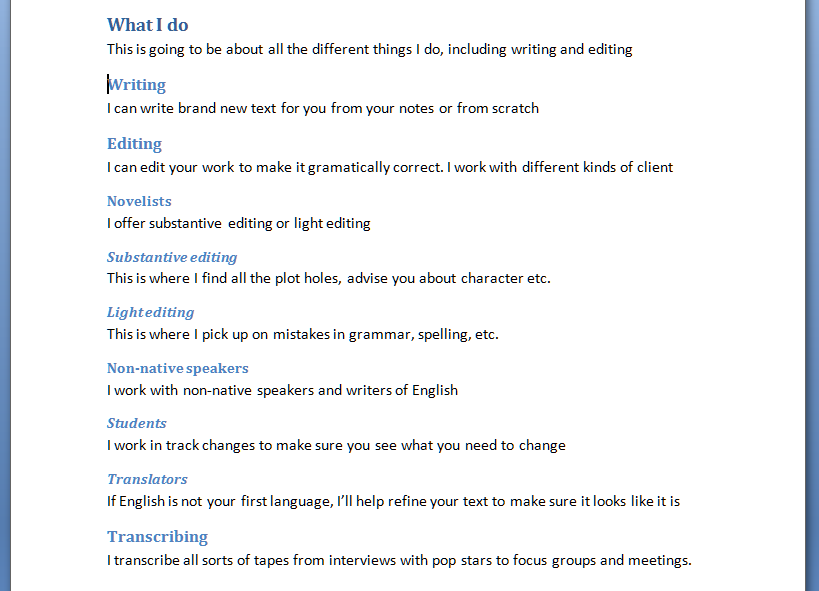
Now, carry on highlighting and choosing heading levels until the whole document is done. You’ll end up with something like this:
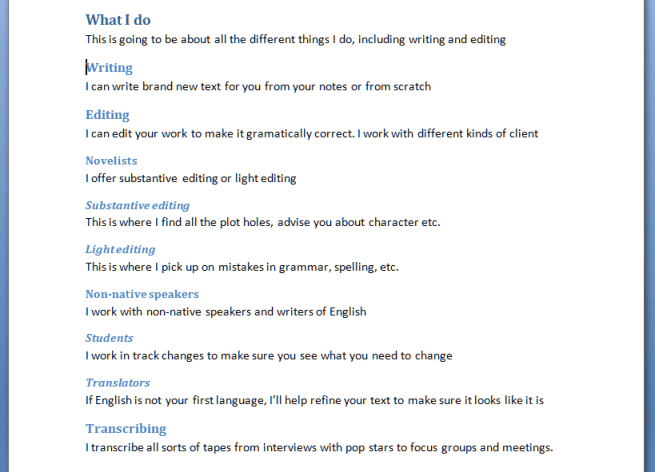
Now, maybe this doesn’t look very different from what we started off with. But three things make this better than what we started with:

  1. You don’t have to remember what look you’re using for each level of heading; it does it all for you
  2. If you want to number your headings, that’s going to be really easy to do, AND if you change sections, swap them around, add or delete them, the numbering will change automatically
  3. You will be able to create an automatic Table of Contents

Next time, we’ll look at assigning numbers to all the different heading levels, and how that will help make your document easy to navigate …

If you have enjoyed this post and found it useful, please click on the “share” buttons below or tell your friends and colleagues about it! Thank you!

Please note, these hints work with versions of Microsoft Word currently in use – Word 2003, Word 2007 and Word 2010, all for PC. Mac compatible versions of Word should have similar options. Always save a copy of your document before manipulating it. I bear no responsibility for any pickles you might get yourself into!

Find all the short cuts here

 
9 Comments

Posted by on February 29, 2012 in Copyediting, Errors, New skills, Short cuts, Word, Writing


Tags: , , , ,

Be careful! Alot vs. a lot

I was reminded of this one again over the weekend: I see it used over and over again, and sometimes by people and in places that surprise me. I’m not even sure how it started, as it seems rather odd and not really explicable. With many of the words I’m including in this little Be Aware series, you can see how the error has come about, as in the thought processes. But this one seems to be just about missing a space while typing and doing nothing about it. Or maybe people DO think it’s correct in some way: if you use it (or used it until you read this post), please explain, because it does, genuinely, leave me baffled.

So, the word is alot. As in, “I did alot of homework today”; “Alot of people believe it is correct to miss out this space”, “I know alot of you do this, but it doesn’t mean it’s correct”.

And it really shouldn’t be. The phrase, and correct usage, is a lot. “I did a lot of homework today”. A being the indefinite article and lot referring to many. It’s exactly the same construction as a little, a few, a bunch, a collection: two separate words, with a space in between. And that’s how, really, it should stay.

There is a word, allot, which means to give or apportion something to someone – “I will allot you a corner to watch while you are marshalling for the marathon”, and although it’s brought us the good old allotment, I really don’t think this has crept in and influenced our word under discussion today.

I think it’s one you are just going to have to train yourself out of, if you do tend to use it – put that space in, please!

Update: a fab person has created an ALOT MONSTER on their blog! Thanks to the commenters who mentioned this: I think it deserves a place here in the post, too!

Note: I’ve been asked if “a lot of” is suitable for academic writing. I would suggest avoiding it and replacing it with “many” (“many people feel this is correct”) or “a great deal of” (“a great deal of research went into Dexter’s Theorem but it remains unproved”) or another similar phrase.

Be careful! is a series of posts about words that are misused commonly – but really shouldn’t be. It’s not a new variant of meaning, it’s an error that gets duplicated as people see the word misused and copy it.

Contact me via email or via my contact form.

 
5 Comments

Posted by on February 27, 2012 in Be careful, Errors, Language use, Writing


Tags: ,

Perquisite or prerequisite?

I’m going to be honest here. I have only ever seen prerequisite written perquisite when the writer clearly meant the former. And I didn’t actually know what a perquisite was until I looked it up when I sat down to write this post. But just in case you ever need to know … here you go!

A prerequisite, which is the word I really feel most people will be looking for and using out of this pair, is a thing which is required or necessary as a prior condition to something else. So a prerequisite for working as a French teacher is the ability to speak French.  A prerequisite for being a proofreader is being able to spell. Oh, and it’s one word: no hyphen.

A perquisite, it turns out, is a special right or privilege that you enjoy as a result of  your position.  I would say a perquisite of being a freelancer is the ability to wear pyjamas all day, but I don’t think that’s what it’s really about: it’ll be something to do with those special rights to walk your sheep over London Bridge or some such. If anyone reading this actually HAS a perquisite, I’d love to know!

Stop press: My clever friend Jen pointed out – rightly – that the word perk comes from perquisite. A perk is a benefit to which one is entitled to as an employee (or shareholder) of a company and, by extension, a benefit or advantage that comes from a particular situation. I still miss my borrowing perks from when I worked at the library. Interestingly, the dictionary says that this is an abbreviation dating from the 19th century. Thanks, Jen!

You can find more troublesome pairs here and the index to them all so far is here.

 
2 Comments

Posted by on February 24, 2012 in Errors, Language use, Troublesome pairs, Writing


Tags: , , ,

My short cuts – top and bottom margins

This is part of my series on how to avoid time-consuming “short cuts” and use Word in the right way to maximise your time and improve the look of your documents.

I have already published instructions on how to manipulate your left and right margins, but I’ve noticed some search engine searches have come through to Libro looking for information on top and bottom margins, so here are a few words about them.

First of all, make sure you can see your rulers! If you can’t see what I’m pointing to in the screenshots, go to this post and follow the instructions on making your rulers visible. I’ll wait here while you do that …

OK, all set, and rulers visible?

So, sometimes we might want to make the area we can use on the page a bit bigger. Classic reasons include wanting to fit a whole document on one or two pages, for example if you are making up a poster and you want to use the largest print area possible. Within reason, you can extend the upper and lower margins of your text to fit in a few more words.

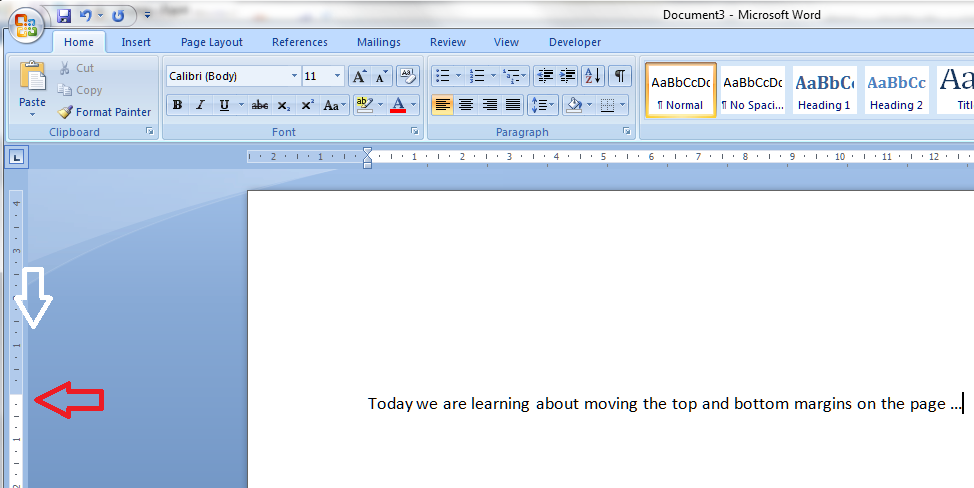
Let’s have a look at these top and bottom margins. Look over to the left-hand ruler in your document. You should see this, which you will notice looks very similar to your top ruler:

You will notice that the white section indicates the area where you can type: where the space for text starts at the top (above) and where it finishes at the bottom:

Hover your cursor over the division between blue and white and you’ll see a slider and an arrow indicating that you can move them up and down. In this example, I’ve moved the top margin down – see how the first line of text has followed it down the page …

But of course you can also move it up if you want more room to type.

Do note, that you can’t move it infinitely and eventually, when you go to print, you will get an error message telling you that you have gone outside the print margins. So be careful, but within reason this will allow you to create that little bit more space on your page.

Please note, these hints work with versions of Microsoft Word currently in use – Word 2003, Word 2007 and Word 2010, all for PC. Mac compatible versions of Word should have similar options. Always save a copy of your document before manipulating it. I bear no responsibility for any pickles you might get yourself into!

If you have enjoyed this post and /or found it useful, please click the share buttons below or comment!

Find all the short cuts here

 
3 Comments

Posted by on February 22, 2012 in Copyediting, Errors, New skills, Short cuts, Word, Writing


Tags: , , , ,

Perspective or prospective?

Today’s troublesome pair is perspective and prospective. Why do I think these two get mixed up? Because they are longish words that are spelled very similarly!

The main meaning of perspective is the art of representing three-dimensional reality on a two-dimensional surface to give an impression of objects’ relative distance and size (a classic example of this is painting a picture of a tiled floor; an example of using this for amusing means is found when you take a photo that you have the Pyramids in your hand, or similar) and by extension it means the appearance of objects with regard to their relative position and distance from the person viewing them. Other meanings, which you can see are linked to this idea, include a particular way of viewing things (“from the rioters’ perspective, they had every right to take the trainers”), and an understanding of the relative importance of things (“you need to keep a sense of perspective about what he has done: stealing a tube of Polos is not as bad as mass murder”).

Prospective, more simply, means likely or expected to happen or be in the future – “I’d like to welcome my prospective son-in-law into the family – he will marry my daughter in September”; “with my prospective earnings for 2012, I will be able to retire in 2050”.

“From Mrs Brown’s perspective, having a prospective neighbour who was good at picking locks was a godsend, as she was always losing her front door key.”

So the meanings should not be that easily mixed up; it just requires a moment of pause, perhaps, before writing down the particular word you choose.

You can find more troublesome pairs here and the index to them all so far is here.

 
4 Comments

Posted by on February 20, 2012 in Errors, Language use, Troublesome pairs, Writing


Tags: , , ,