RSS

Category Archives: Business

Infographic – social media etiquette

Today I have a guest post with a difference – an infographic, for the first time on this blog. It’s from writer and infographic specialist Ivan Serrano, and talks about many different kinds of social media and how to interact with them. It acts as a complement to my more detailed social media posts.

What do you think? Should I have more infographics on this blog? Do comment below with any thoughts …

——————————————————————————-

“Have you seen what (insert important person or business here) posted on (insert social network here)?” seems to be a question that people hear quite often nowadays. Depending on how you word your message and conduct yourself on social media, it can go viral and your business can get brand recognition, or, on the flip side, it can go viral for all the wrong reasons.

That’s why it’s important for businesses to conduct themselves properly on social media. In addition to following general social media etiquette, certain social media networks have their own rules of etiquette as well. Businesses must remember that they have a reputation to consider—one inappropriate tweet or post could leave your reputation reeling, and that may take quite a while to recover from depending on how well you handle it. The infographic below gives you a guide on how to present yourself on the numerous social media networks.

social media etiquette infographic

Ivan Serrano is a writer and infographic specialist from Northern California. Ivan covers topics ranging from global business to tech and social media. He is an avid “Bay Area” sports fan and tries to attend as many games as possible.

 
7 Comments

Posted by on August 13, 2014 in Business, Social media


Tags: , , , , , , ,

How to leverage your social capital

handshakeHow to leverage your social capital, eh? What a lot of jargon! I thought you didn’t like jargon, Liz? – Well, I don’t, and that’s why I’m going to take a few minutes to explain what this little chunk of jargon means.

Social capital is a fancy term for the people you know and, to be blunt, the favours they owe you. You build it up through networking, doing things for other people, being a linking person, an information provider, a helpful person. You build it through knowing people, through having worked with people, through keeping in touch with people. Then, when you need it, something like karma springs into action, and the work you’ve put in comes back to you in bucketloads.

Now I’m sounding cynical as well as jargon-filled! Goodness me! Let’s break it down with some heavily disguised but based-on-reality examples, to show you that leveraging your social capital isn’t really the cynical and shallow procedure you might imagine, but a new way for an old process that is made easier to build and use through social media and our networked society.

Social capital gets leveraged, everyone goes away happy

Here are some examples of people leveraging their social capital to gain freelance jobs and repeat clients. Note that in NONE of these cases does Person A directly ask for something. Instead, the connections they’ve built up do it all for them.

Example 1: Person A, Bob, ‘meets’ Person B, John, online via a mutual interest group that’s applicable to the industry they’re both in. Bob is about to go full-time with his freelance career but doesn’t have many clients. John is a full-time freelancer of a few more years’ experience. He’s looking for people to recommend enquirers on to when he can’t fit them in. He’s also keen to get some holiday cover set up so he can go and play golf without worrying about his graphic design clients. They make friends and build trust – they even start to meet up to play golf together. When John gets yet another enquiry about leaflet design, it’s easy for him to recommend Bob. Bob worries sometimes that all of his jobs come through John’s recommendations, but soon he has his own string of client referrals because he does a good job. And when Bob goes on holiday, he passes John a big project that he hasn’t got time for – from a client originally recommended by John!

Who benefits: both of them. Bob gets new clients and builds his customer base. John has people he can refer clients on to and that all-important holiday cover.

Bonus social capital leverage: When Bob, now nice and busy himself, finds out that a friend he’s made at a networking event is looking for clients, not only can he recommend his own overflow to Tony, but he can advise John to, as well!

Example 2: Person A, Millie, used to work with Jeremy before they both left and went their separate ways. But they’ve kept in touch via Facebook and chat online every month or so. Jeremy moves between jobs and continents, so knows lots of people. When he hears from Simon, an ex-colleague in Australia that they’re looking for someone with the skillset Millie possesses, and that they don’t need someone on the spot, Jeremy puts Millie in touch with Simon, and they work on the project together.

Who benefits: both of them. Millie gets a job out of it, and Jeremy maintains contact with an ex-colleague and does them a favour, which could well be repaid in the future.

Example 3: Person A, Tim, meets person B, Shona, at a local networking event. They’re not in the same line of work at all, but they have a good chat and get on well. They say hello at a few other monthly events. One day, Tim is contacted by Sean, who wants to use him for a major new contract; he’s been recommended by Shona, even though she has no direct experience of his work (of course, Sean has checked out Tim’s website and references before contacting him). Not only does Tim get the job, but Sean recommends him on his website and to other clients of his.

Who benefits: In this case, it looks like it’s mainly Tim, however, he is so grateful to Shona that he goes out of his way to retweet and share messages Shona sends out on social media, and to introduce her to useful people at the networking events they attend.

How to build social capital

So, how do you build this social capital? Note that it’s not social MEDIA capital, although social media makes it easier to do. But you can build social capital through networking and more old-fashioned face-to-face contact, too. In both Examples 2 and 3, the initial contact was in person, and social media only comes into play to make the contacts between the people who want the work doing and lucky old Person A.

Building social capital shouldn’t be a cynical process, but a natural one that involves making a bit of effort. Ways you can increase your social capital include:

  • Getting out there – the more people you meet, the more people can help you
  • Telling people what you’re looking for – whether it’s announcing to your Facebook friends that your violin-making business is looking for commissions or joining a networking group and explaining what services or products you’re promoting
  • Making yourself memorable – whether you’re the “good hair lady” (true example) or the person who always brings cakes to the meetup, make yourself memorable in a good way
  • Making yourself easy to explain – this comes down to your elevator pitch. Do people know you as “the man who makes violins on commission” or “that music chap”? The more precise your description, the more likely you are to have people sent your way who you can actually work with
  • Being gracious – if someone is introduced to you who you can’t help (or with whom you’re not interested in working), see if you can recommend them on, or have a chat anyway. You need to leave a positive impression on everyone you meet if you possibly can
  • Do things for other people – this should go without saying, but I’m going to say it. More below on this one

It’s cynical to say that someone “owes you one”, and it can be far more complex than that, but it can’t be ignored: the more you help other people, the more they will help you in return. How can you do things for other people?

  • If they’re in the same business as you, see if you can pass overflow work to them
  • If they’re in a closely related business to you, mention them to your clients as someone who can help them – e.g. the violin maker might know a musicians’ agent who they can recommend to their clients
  • If they’re in a fairly different business to you, bear them in mind and mention them – e.g. the violin maker might be chatting to a musician and mention that he knows an event organiser who’s looking for entertainment for a summer party
  • If they’re in a completely different business to you, still bear them in mind and suggest them – e.g. the violin maker is chatting to a musician whose wife needs a web page to be designed
  • You could create a Links page on your website with links to known and trusted contacts in your field and others
  • You could put a poster for their event in your shop window or volunteer at an event they run
  • You could introduce a friend with a different kind of business to one of the networking events you go to
  • You could share tweets and Facebook posts by your contacts with your audience (you should be doing this anyway)
  • You could cross-guest-post on each other’s blogs

 What has worked for you?

Knowing and trusting people + getting out and about and meeting them face to face or online x helping people out yourself = increased social capital

Have you got good examples of your contacts creating opportunities for you with third parties? I’d love to hear about your successes and how they came about …

Further reading on this blog:

Reciprocity and social media

Networking and social media marketing

Networking for newbies

If you’ve enjoyed this post and found it useful, please comment below or use the sharing buttons to share it with your network. If you’re considering setting up a new business or have recently done so, why not take a look at my books, all available now, in print and e-book formats, from a variety of sources.


Leave a comment

Posted by on August 6, 2014 in Business, Social media


Tags: , ,

Happy fifth birthday, Libro!

Libro birthday cartoonI started working for myself (very much part time) in August 2009 – so now it’s Libro’s fifth birthday!

What am I doing to celebrate? Well …

I’m having a little party today over on the Libro Facebook page … including a draw to win a free Kiva loan

I’m making some loans to Kiva (see below) and donating one to someone else

I’m celebrating the relaunch of my two main business books, with their new titles and covers …

… And I’m launching my new website devoted entirely to the books I write, where people can find info, links, reviews and news in one place

I hope you’ll join me in celebrating Libro’s birthday by popping over to say hello on the Facebook page or by doing a Kiva loan yourselves.

Happy Birthday to me!

Quick update: the Kiva competition in now CLOSED. Alison Mead won the free loan and was sent a voucher. I started new loans to a man selling spare parts in Benin, a travelling salesman in Paraguay and a food stall in Bolivia. These were all people who friends of mine had already lent to.

Kiva is an organisation that facilitates loans to small businesses around the world, who traditionally find it hard to raise capital. You commit from $25 upwards, and you can choose by gender, country, industry sector and individuals within those areas. They then pay the loan back to you in small increments – you get an update email on repayments once a month and sometimes updates on the individual or group you’ve loaned to, if the organisation handling the loan provides them. Once the money’s paid back, you can reinvest it or withdraw it if you want to. I love helping people to help themselves in this way; it feels like I’m helping to make a difference to another small business somewhere far away from me.

 
19 Comments

Posted by on August 1, 2014 in Business, Celebration, Ebooks


Tags: , ,

Using Twitter for your business

Using Twitter for your business

Twitter is an absolutely brilliant tool for business owners – if you use it in the right way. If you use in the wrong way, it can be a nightmare, as bad (or embarrassing) news travels very fast in the Twitter universe!

I personally got a lot out of Twitter in the early days, actually securing clients through using it – and long-term clients who recommended me on to more clients, too. I’d go as far as to say that it’s my number four source of work, after repeat business, personal recommendations and the Proz website. My clients still recommend me to other clients via Twitter, even several years on (the other month, a music journalist tweeted that she was looking for a transcriber. FIVE of my current clients tweeted her with my name!).

Benefits of Twitter: it’s quick and easy to use. Disadvantage: it can be a time-sink. Most important thing to remember: People only tend to see a snapshot of their tweets every day. I only know one person who reads ALL of the tweets in his timeline. This means that your tweeting strategy should be a bit different from your other social media posting strategies.

Setting up your Twitter profile

When you join Twitter, it’s very quick and easy to set up your profile. Your profile is a quick guide to who you are. Anyone clicking on it or searching for it needs to know that they’ve found the right Liz Broomfield / Libro (or whatever) and to see easily what you do.

Twitter profile

I would recommend including the following on your profile, and I’ve seen plenty of other people recommend this, too:

  • Your real name when you log in, as well as your company name for your Twitter ID
  • Your photograph on your profile, rather than your company logo (you can add that to your background)
  • Your company URL in the field where you can provide that
  • Use your 140 letters of profile to the max, including what you do and any extra URLs

As with any profile, you can change it at any point; just click on your image and choose Settings,  Edit profile of in the Home Screen, click on your Twitter ID and the Edit Profile button.

Following and followers

Once you’ve set up your Twitter account, you can start following a few people. Twitter will suggest ones that you don’t really want, based on who’s popular, but you can find interesting people to follow in a variety of ways:

Ask someone for their Twitter ID when you meet them or glean it from their business card or website. Then enter that ID in the search field on Twitter. Or you can search for the person’s name or company name in the search field on Twitter.
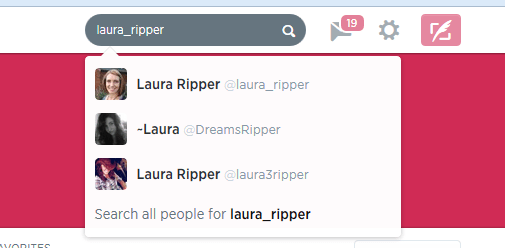
Twitter search

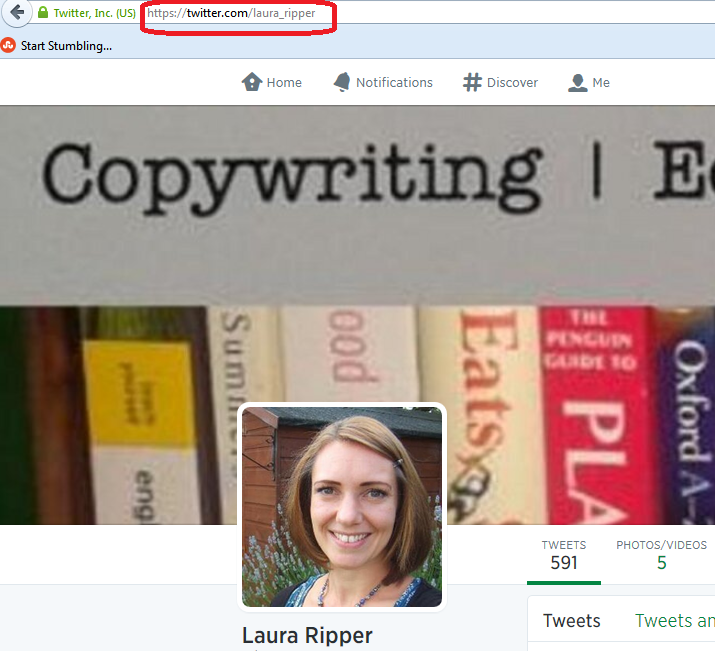
Or you can go to http://www.twitter.com/%5BID without an @ sign]:
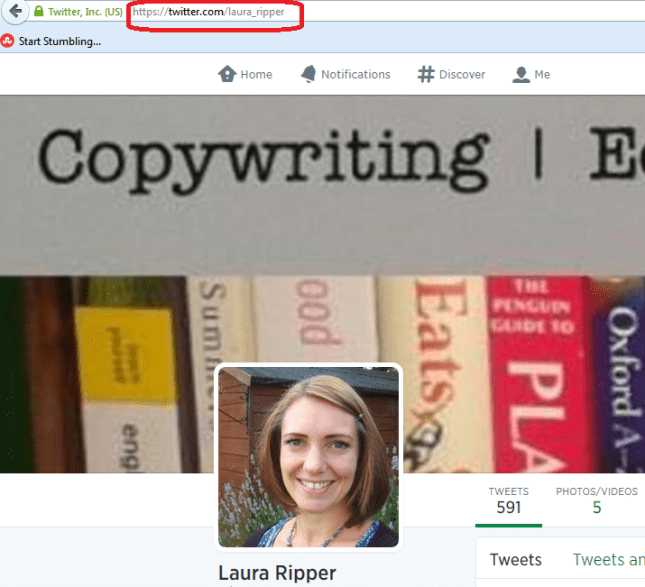
search using Twitter url

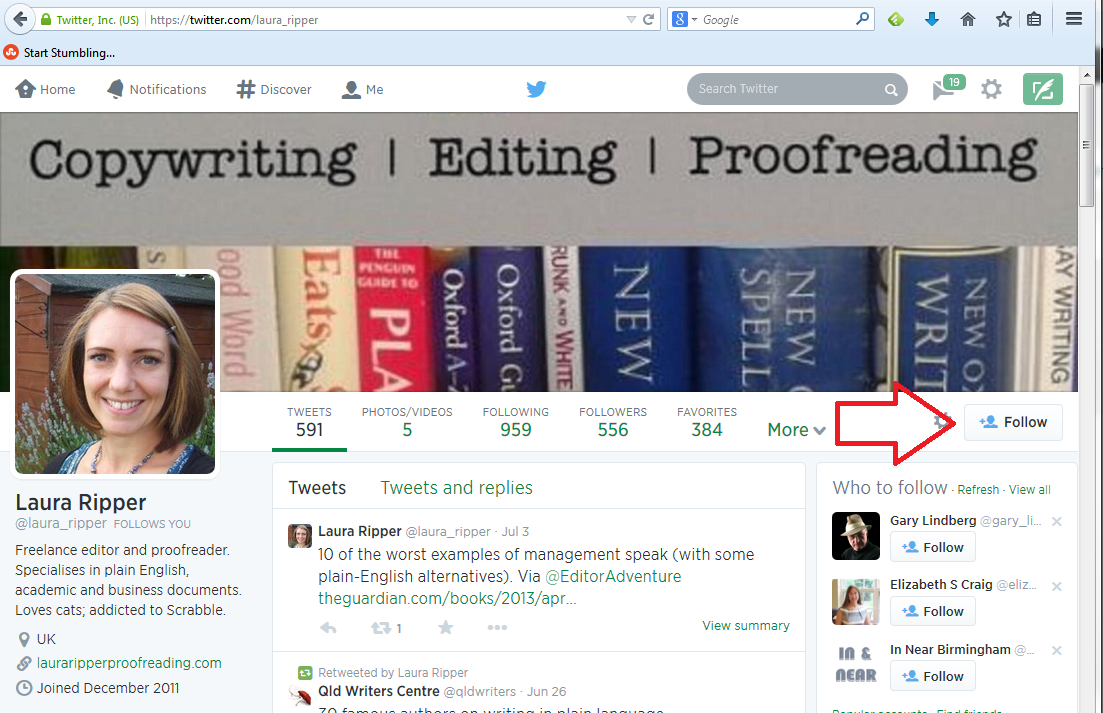
Have a look at their profile to check it’s the correct person, then press the Follow button if it is:
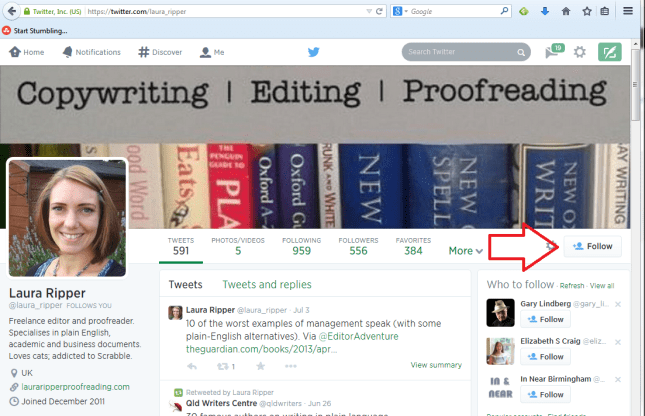
follow on Twitter

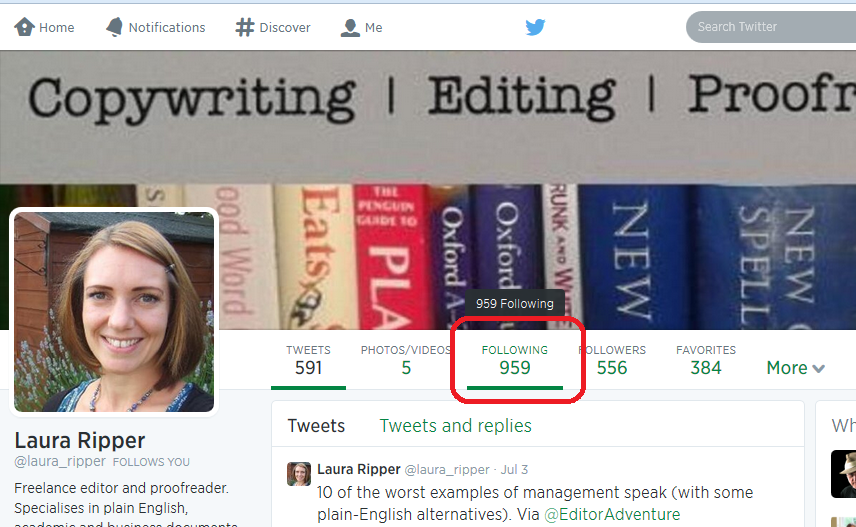
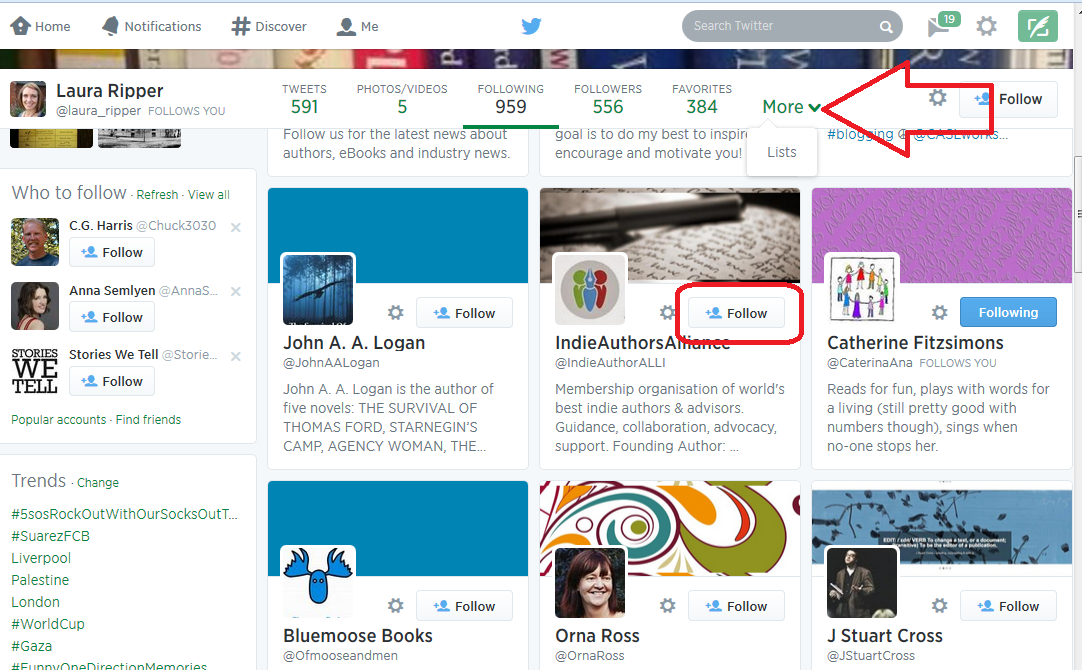
If you’re following someone in an interesting field, have a look at who they’re following. If you click on their profile, you will see links to Tweets, Following and Followers. Click on Following

Following button

and have a look – there will be a handy Follow button by each name so you can simply follow from there (if you’re already following someone, it will be marked as such). Once you’re viewing who someone is following, you will see a dropdown button marked More which will take you to their Lists.
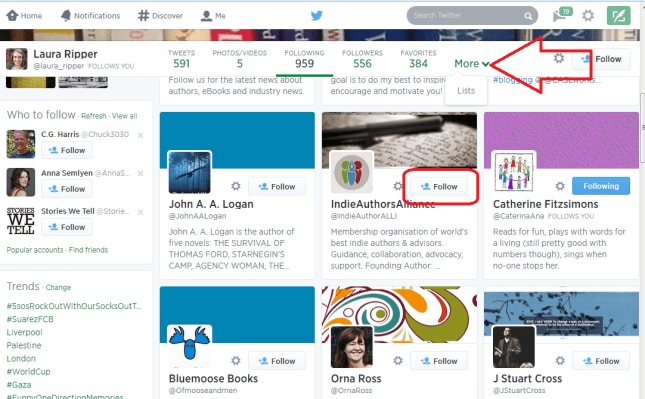
Who someone is following on Twitter

See more about Lists later on, but you can follow either  an entire list or members of one by clicking on the list, and this is another good way to glean people to follow in a particular area of interest.

How do I choose who to follow?

It’s entirely up to you how many people you follow and whether you organise them in any way. When I’m deciding whether to follow people who I’ve found, or who have followed me (you don’t HAVE to follow everyone who’s followed you, but it’s polite to have a look at least), this is what I do:

  • Check their profile to see whether they’re interesting to me
  • Check their list of tweets to see if they tweet interesting information
  • Check their tweets for the same tweet repeated over and over again – this means a lack of imagination, something akin to spamming or an automated response
  • Check their tweets for regularity and date of tweeting – if someone tweets once a week or hasn’t tweeted for a number of months, unless they’re hugely important to me, I won’t bother to follow them because their tweets will get lost in the general melee

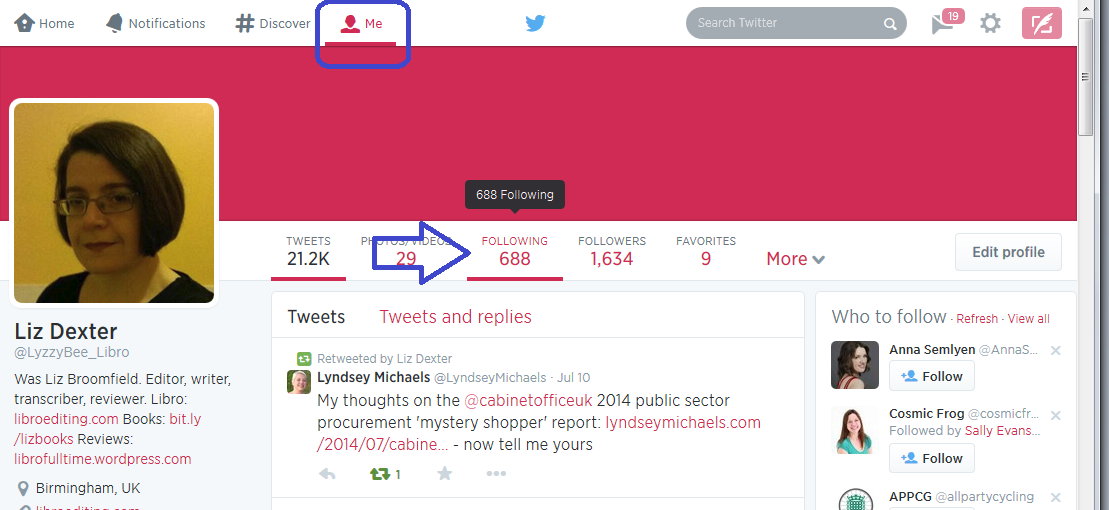
I do also regularly run a check over the people I’m following (click on Home, your own Twitter ID and Following) to make sure they’re still active. If not, I tend to cull. Sorry!
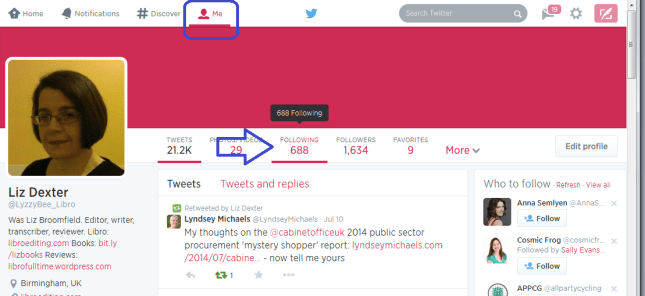
Who am I following?

Lists

Lists are a great way to put the people who you follow into categories or filters that you can look at independently. For example, I have a “Must know” list which includes all of the real-life friends plus some news feeds that I follow, so that if I only have time for a quick dip into Twitter, I can see what’s really important. I also have a “Journos” one so that I can see what my music journalist clients and a few others are up to, for some entertainment.

To add someone to a list …

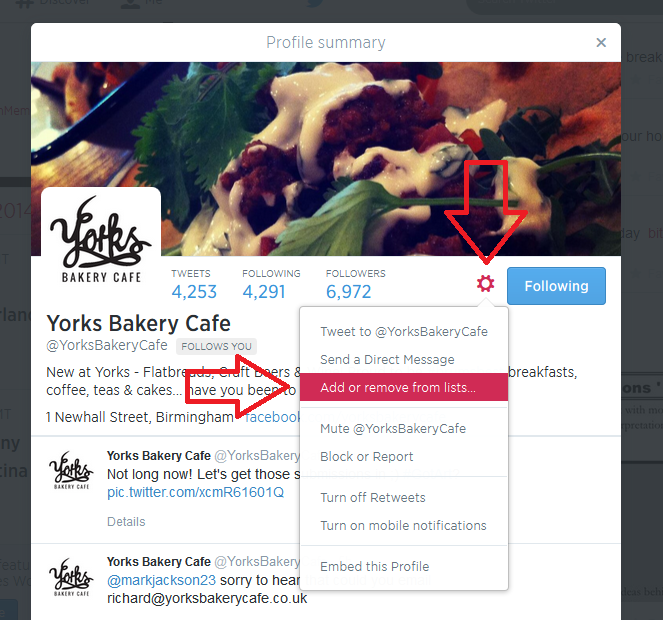
Click on their name in your timeline to view their profile …
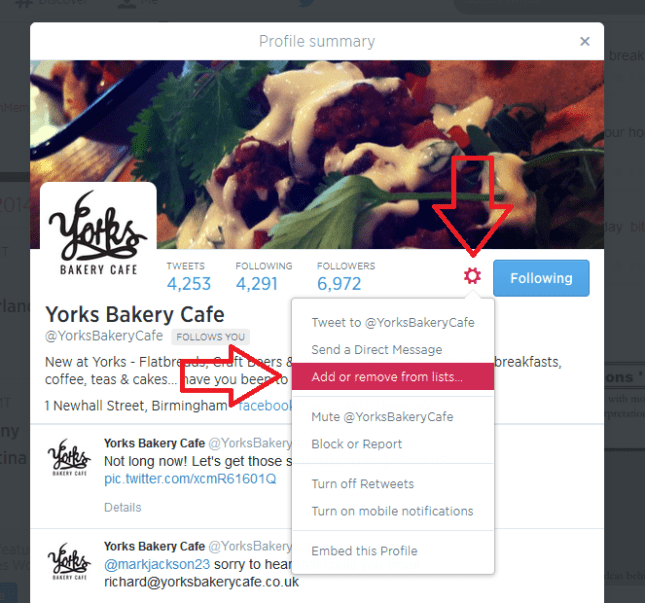
Add to list from profile

… or go to your list of accounts followed (Me – Following)
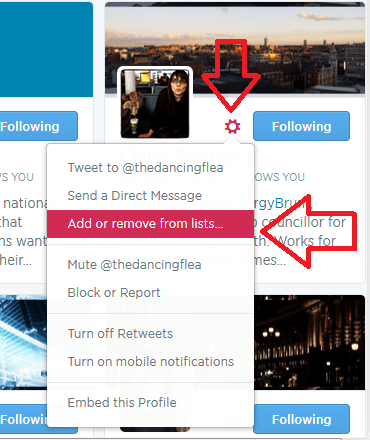
add to list from me - following

Click the User Options button (next to Following, it looks like a cog)

Click on Add or Remove From Lists

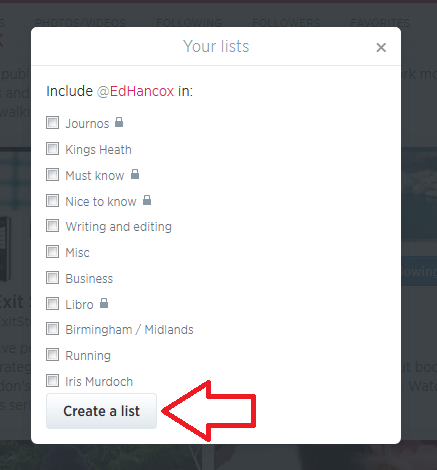
You’ll see a list of all of the lists you’ve already set up (if you have set any up) plus a button, Create a List

Either click on a list name to add that person then press the X in the top right corner to close the dialogue box:
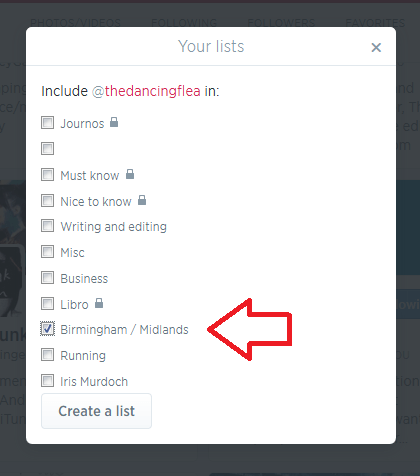
Add to twitter list

or click on Create a List

create a twitter list

and make up a new list name to add this person to:
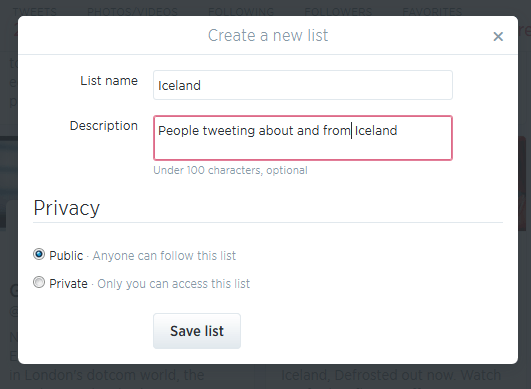
create new list

(if you make a list private, only you can see it – you’ll know when a list is private because it will have a padlock symbol next to the list name). Once you hit Save list, you will need to tick the particular list you want to add this person to:
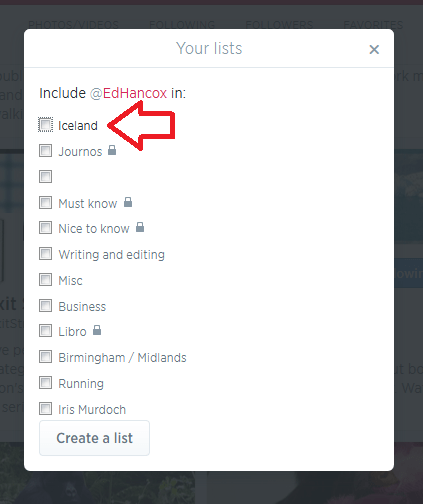
add person to new list

Once you have some lists, you’ll see a Lists entry under More when you click on Me. Ideas for lists include friends, particular interests, your business sector, news feeds, sport – anything you want.

You can follow other people’s lists or mine them for good accounts to follow – just click on a particular person’s Twitter ID and you’ll get their following, followers and lists.

Note – this doesn’t work exactly the same on mobile devices or third-party Twitter management dashboards as it does on the basic web-based Twitter interface. These instructions are for the latter.

How Twitter works – @ and #

One thing that you’ll see a lot of on Twitter is the symbols @ and #

@ is used in front of a Twitter ID to notify the person that you’re talking to them or to point someone else to their account. For example, someone might recommend an account for me to follow:

Megmac: @lyzzybee_libro have a look at @thecreativepenn for a good feed for writers

This makes the message appear in my Connect list (see below) and TheCreativePenn’s Connect list, so I will see the recommendation and she will see that she’s been recommended to me. If she wants, she can then reach out to me, and say thank you to the recommender.

# is used to create clickable links that will pull information on a particular topic together in one view. It’s often used at events and conferences – so, for example, #cbsms is used by people tweeting about the Central Birmingham Social Media Surgery. When you see a hashtag (as this is called) in a tweet, it will be a clickable link. Click on the hashtag and you will see all of the recent tweets with that hashtag, giving you a view of what’s going on and who’s talking about it.

Lyzzbee_libro: Off to the social media surgery to help a few people today #cbsms

It is also used to link tweets on a wider topic, e.g. #amwriting, which writers use to talk about the writing process. You can pop a hashtag on a tweet when you want it to come up in such searches, for example I might tweet about my book on transcription and add #transcription at the end, so that anyone looking at that hashtag will see my tweet.

Your Twitterstream and mentions

Whether you’re viewing Twitter online on a computer or via a phone or a third party dashboard, you will have a twitterstream and then various other views.

Your Home will show you your twitterstream: all the most recent tweets by people / companies / whatever that you’re following.

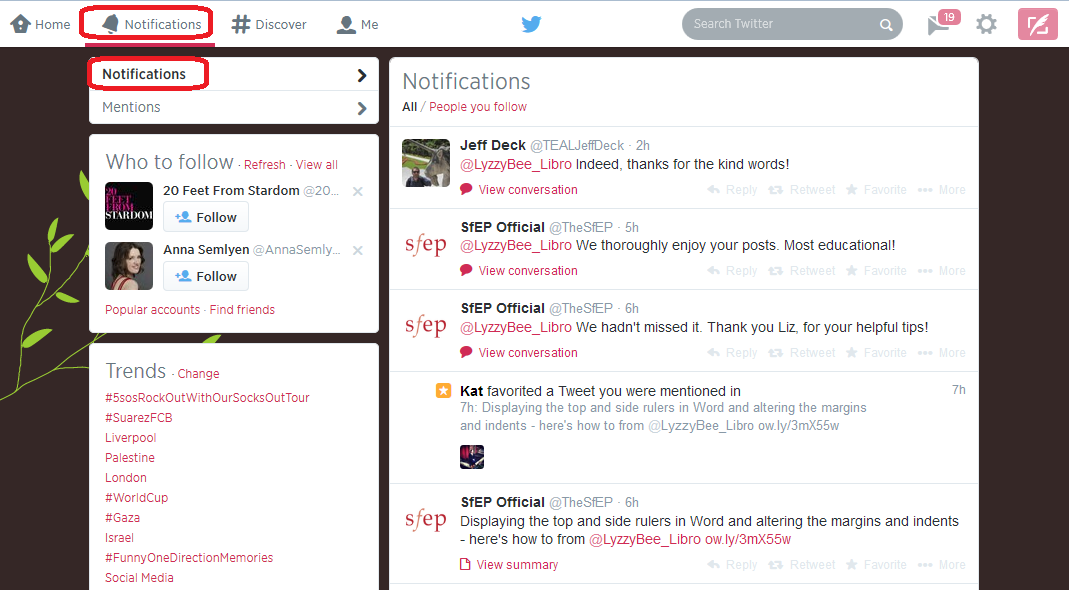
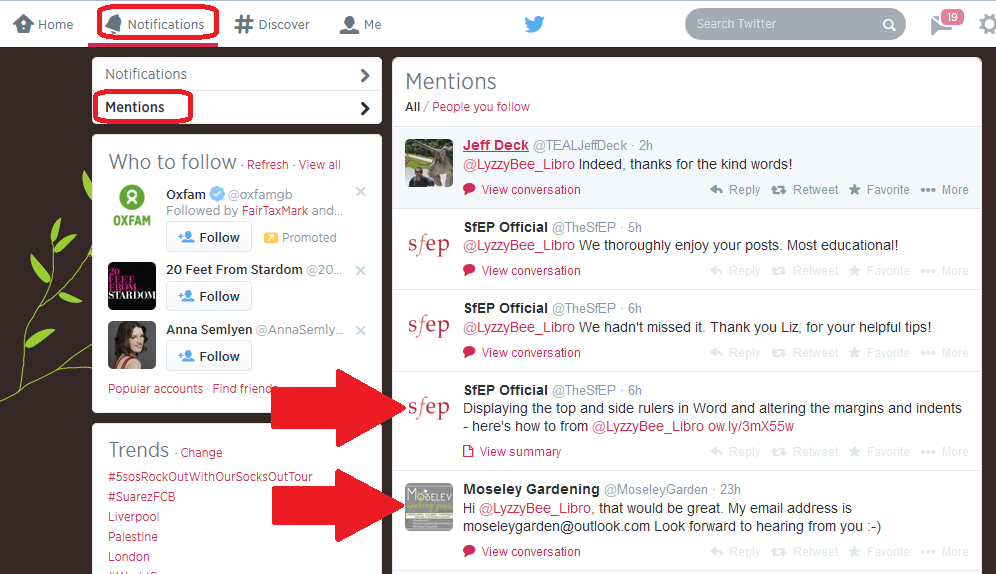
Your Notifications list will show you anything directly concerning your own Twitter account – so messages that have been sent to you with an @[your Twitter ID] as well as people who have followed you. It’s good practice to keep an eye on this so that you can reply to any messages sent to you and say thank you for recommendations and follows. Note here that Notifications gives you information on who’s followed you and favourited your messages, and any messages that start with your name:
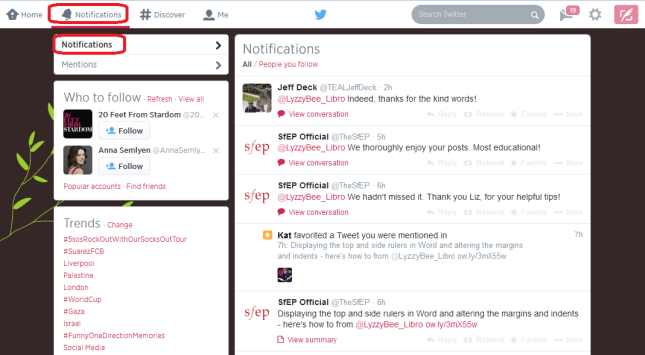
Twitter notifications

while Mentions will also show you when you’ve been @ mentioned by someone else:
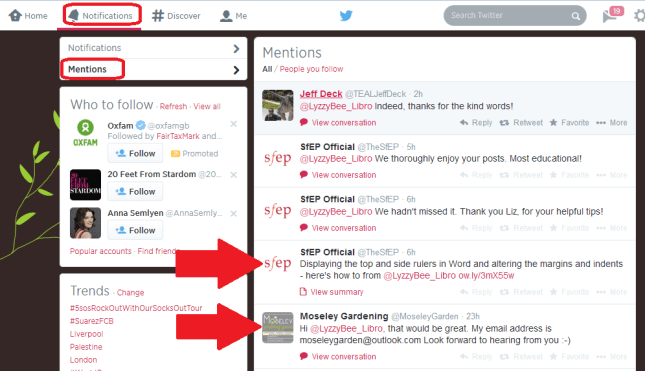
Twitter mentions

Getting rid of spammers

Everyone gets spammed by Twitter accounts, dodgy or otherwise, that are usually either looking for random followers to boost their numbers or clicks to their undesirable links. The ones with links often only have a link in the text – this is a real red flag and you should never click on a link in a tweet, even from a friend, if there’s only a link and no text (your friend could have had their account hacked).

If you receive an odd tweet or one with just a link, click on the photo or name of the sender. You will typically see that they’ve sent the same short message or no message and link to multiple people. Click on the User Actions button on their profile and you have options to Block or Report: [Note: I’m just using this chap as an example, he’s a good guy really!]
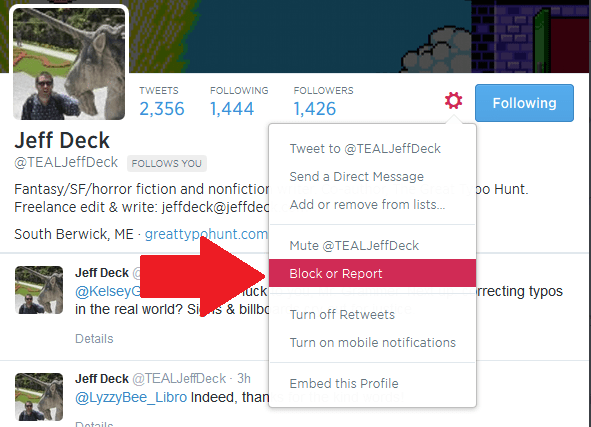
Block on twitter

Once you’ve clicked on Block or Report you will see this screen, which allows you to tell Twitter why exactly you are blocking or reporting the person:
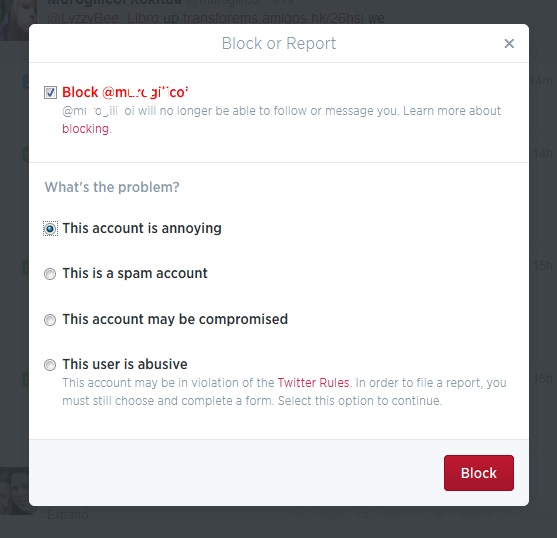
Block and report on Twitter

This alerts Twitter that the person is spamming, and will help to save someone not as savvy as you from clicking on a dodgy link and going who knows where in cyberspace!

If you’re just getting annoyed or bored by a Twitter account that you follow, you can click on their photo or name and press the button marked Following – this will change to Unfollow as you hover over it; click it and you’ll unfollow them and no longer see them in your Twitterstream.

Rules for using Twitter effectively

Using Twitter effectively is a matter of knowing how it works and how people view it, and being sensible and polite.

Posting multiple times

The main point about tweeting is that very few people read every single tweet on their timeline. People typically check Twitter on the way to work, at lunchtime, on the way home, and some time in the evening. Once you’re following more than about fifty people, there’s no way that you’re going to see all of their tweets – so think of people as viewing a snapshot of their Twitterstream rather than everything.

This means that it’s fine to tweet a message multiple times, where it would be seen as rude and intrustive to post a Facebook status multiple times in one day.

You also need to be aware of your markets and their time zones – if you have a lot of Australian clients, and you’re in the UK, you will need to tailor your tweets to their time zone, maybe investing in a Twitter dashboard that will allow you to pre-schedule your tweets.

Using a dashboard

It can be very useful to use a dashboard such as Tweetdeck to manage your Twitter accounts. You can view multiple accounts at a time and post as them (handy if you have, say, a personal and a work account) and view your lists in their own feeds. Some of them will also allow you to schedule your tweets to be published at a certain time or on a certain date, which can be very useful (although watch out that you still keep an eye on when these go out, as there have been numerous examples of an auto-tweet posting when it’s really not appropriate, such as after a disaster).

Sharing other people’s material

The other main rule is to be polite and reciprocate and say thank you.

If you retweet other people’s tweets, they are more likely to share your tweets with their network. To retweet, click on the word retweet underneath the tweet, or look for that ‘arrows-in-a-square’ icon which has the same effect. Some people reckon that you should share five other tweets to every one of your own that you post. I’m not that scientific, but I do try to share as much as I post.

Saying thank you and being proactive

If other people retweet or otherwise share your tweets, which you will find out about by reviewing your Connect feed, do drop them a message to say thank you.

If someone recommends your Twitter account or your services to someone else, contact the person to whom you’re being recommended with a polite “how can I help you” and a way to contact you, and say thank you to the recommender.

Not automating too much and not spamming

I’m not a big fan of the automated message when I follow someone’s Twitter account, and many other people find this annoying, too. I like to know that there’s a person behind the account. Similarly, all sales and no sharing, or all automated tweeting and no replying to @ messages will probably get people irritated.

Other useful posts

On this blog: Using Twitter to find jobs

Using LinkedIn for your business

Social media resource guide for this blog

My friend Sandy’s post on Twitter for professional development

 
9 Comments

Posted by on July 16, 2014 in Business, Skillset, Social media


Tags: , ,

Spring cleaning your budget for the new financial year

spring clean your financesToday we have a guest post by Chinny Ogbuagu from Pitney Bowes, who’s going to share with us her tips for spring-cleaning your budget as you submit your tax return and move through the new financial year. It’s always good to get other people’s views on these matters, and it’s timely for me as I sort out my bank statements and records and get them all sent off to my accountant. You don’t leave it until January, do you? Read on for plenty of handy tips and hints … 

Many of us think of spring cleaning as dusting away those cobwebs, sorting out your clothes and tidying up your house. Many business owners don’t often think about the new financial year: here are some top tips on how you can start planning by streamlining your budget for the coming year.

Review Your Budget

Have you ever heard of the saying “in with the new and out with the old”? You may want to spend a day going over your expenditure during the past few months and work out if there is anything you aren’t putting enough money aside for or maybe areas where you are spending too much. Look at areas in which your company can save costs such as business phones or internet providers, and maybe even costs of office rent and stationery. It’s always a good idea to review this on a monthly basis, as it can save you time and money in the long run.

Sort out your paperwork

This is the perfect opportunity to look thorough all of your paperwork and files and shred any documents you no longer need, especially if they contain any personal information such as names, bank details, addresses or phone numbers. You might need to invest in an industrial shredder for this and there are a number of affordable options for you to choose from at a number of office suppliers such as Pitney Bowes. Do take advice from your accountant on what you are allowed to shred and what you must keep for a statutory number of years.

Create Your Own Financial Calendar

Create an online financial calendar. This will help you to set reminders throughout the year to do things such as review policies and outlines tasks you should complete every month. You can even set this up in Gmail and set reminders to your mobile phone, or alternatively invest in an online financial calendar so you don’t forget when something important needs to be paid for or relooked at.

Go Paperless

You know that you have made progress when you clean out your sock drawer and you can finally close it after years or months of storing items you no longer wear.
According to the HMRC, you are advised to hang onto tax records for a particular accounting period for normally six years from the end of that period. For example, if the accounting period ends on 31 December 2012, the records have to be kept until 31 December 2018.

It might be easiest to keep the hard copies of those. But things such as bank and credit card statements, as well as pay stubs, can be scanned and stored in a cloud-based filing provider, such as Dropbox or Google Drive.

An article on Learnvest claims that you should keep your documents for the following before shredding (again, do check with your accountant and note that this can be different for different regions of the world):
Destroy in a few days:
• ATM receipts, once you record the transaction
• Bank deposit slips, once the funds appear in your account

Destroy after 1 month:
• Receipts for things you bought on a credit card, once you get your statement, unless you need it for a return or a warranty
• Credit card statement, unless it has a tax-related expense on it

It’s important for businesses to keep on top of this so that you don’t spend more than you have to:: just like you would with your shopping or household expenses, look at the best value for money. This will help to you keep up with today’s rising costs.

This article was written by Chinny Ogbuagu who works for Pitney Bowes helping small businesses to save time and money with their range of equipment and services. She’s also an avid social media user, following and commenting on industry trends.
 
Leave a comment

Posted by on June 25, 2014 in Business, Guest posts, Organisation


Tags: ,

Developing your Business: Expanding into Regional Offices

Sneak preview of the image from my new bookWelcome to another expert post in my series on growing your business. Today we’re going to take a look at why it makes sense to have a physical presence around the country (or beyond), written for us by Juliet Martin, representing Regus. Linked to this post, you can read about small business owners’ own experience moving out of the home office here, and Sam Barnes’ post about what to consider when planning to move outside the home here. Juliet’s going to share with us the value of renting offices in different places.
Advantages of Renting Corporate Settings around the Country

Today’s ever-growing business world is taking with it the ability for any one enterprise to be localised in a particular place. This means you should at least consider setting up new branches or virtual offices in multiple locations across the nation. Even though you will have to then manage a number of settings, you will gain plenty of benefits in the long run. Adapting to these modern, global times will provide you with the following five corporate advantages.

A commercial building

It pays to have more than one branch for your business Image

1. Access to Local Resources

If you produce any kind of goods, you may find that the various materials and components required are sourced from multiple areas around the country. For example, you may find the following are located in different regions:

• Mines
• Factories
• Ports
• Plantations
• Refineries

By opening up small branches near each of these facilities, you will then give your company greater access to a range of materials and services directly from the source. This means you won’t have to rely on a third party to bring these essentials to you.

2. Lowering Your Monthly Rent

Believe it or not, it may actually be more cost-effective to run a number of bare-bones offices around the country than a fully functional corporate setting in a single location. After you have negotiated to reduce the rent of your many branches, you can then look forward to even more savings thanks to the smaller and more compact premises that your company is now working from. If you can simplify how your work settings are planned out, eliminating excess features and only renting what is necessary, you can streamline your outgoing cash flow and still benefit from a number of corporate environments located around the country.

3. Honing Your Corporate Marketing

One difficulty that any localised business has is that its target audience is fairly limited, being restricted to a single geographical area. You can get around this by working from several different locations across the country. In general, people will wish to work with a business that has a presence in their neighbourhood because:

• It provides a local face to the company
• Contacting the enterprise is much easier
• Delivery times won’t be needlessly long
• Employees will be much more relatable

By branching out across the nation, you can tap into a wider consumer base than ever before, enabling you to find additional customers and boosting your sales to help cover the rental costs of your various corporate locations.

4. Added Convenience for Clients

Another advantage to the consumer is that it is far easier for them to come and visit your workplace if you are found scattered across the country. To cater to all your client’s needs, rent some office space at business centres around the nation. This will give them additional convenience as they can deal with your company in a number of ways thanks to your now local business setting. For example, they should be able to:

• Visit your office without driving for hours
• Post parcels and letters to you cheaply
• Phone without expensive long distance rates

There are times when your clients want some personal attention. In these cases, email won’t suffice. Video conferencing can be difficult to set up properly too. A better solution is just to have a local branch available so they can arrange for an appointment with you or a company representative without having to go through a lot of hassle to get there.

5. Broadening the Talent Pool

Lastly, by making the effort to rent corporate premises around the country, you will then have access to a greater range of skilled workers for your business. The truth is that having the right resources is crucial to helping you identify new talent. In this case, the resources in question are your local offices which can then tap into the growing number of potential candidates found in those local regions. People may not want to relocate to another city to work with your company so having multiple branches will give them a reason to sign on with you even though your main office is found halfway across the nation! In this way, you can increase the sheer talent within your organisation and grow your products and services accordingly.

As a brief recap, we can see that renting workplaces across the country can indeed provide many benefits to any enterprise. These advantages include the following:

1. Ease of access to national resources
2. More cost-effective rental payments
3. Effective locally targeted advertising
4. Increased consumer convenience
5. Wider talent pool for new employees

We would recommend that you get out there and expand your business operations as soon as possible to reap all of the above rewards. By occupying some of the best corporate spaces around the country, your company can grow and your customers will get even better service as a result! To make the process easier, get in touch with a provider such as Regus for assistance on renting suitable spaces at cities or regions you have interests in.

Author Bio: Juliet Martin is from Regus, a global office space solutions provider. Founded in 1989, Regus is a global organisation that aims to provide only the best office spaces and meeting venues to all kinds of businesses.

This post is part of my series on growing your business. Read more here and read about my own business journey in my books.

 
1 Comment

Posted by on June 11, 2014 in Business, Guest posts, Organisation


Tags: , , ,

How to add an admin or moderator to your Facebook business page

In this post we’re going to learn how to add someone as a moderator on your business or organisation’s Facebook page, and also what it looks like when you are added as a moderator of a page. For more basic information about setting up your Facebook page, see my article on Facebook for business.

How do I add someone as an administrator to my Facebook page?

To be added as an administrator of a page, you must Like that page first (or to be added as an administrator of a group, you must be a member of that group)

To add someone as an administrator of a page, they must Like that page first.

To add someone as a moderator, find See Likes on the Admin Panel of your page

1 likes button

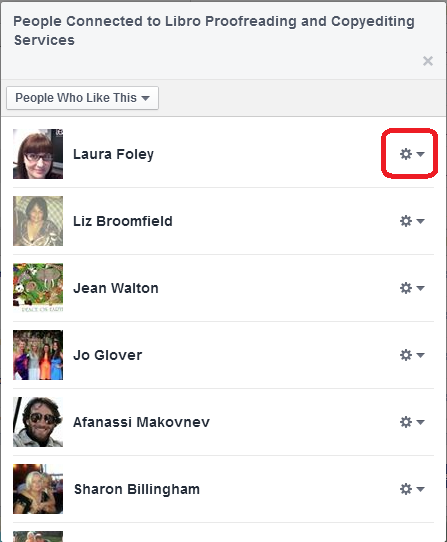
You will see a list of people who have “Liked” your page, each with a little icon to the right.

2 list of likes

Find the person you want to add, click on the icon and choose Make Admin:

3 make admin

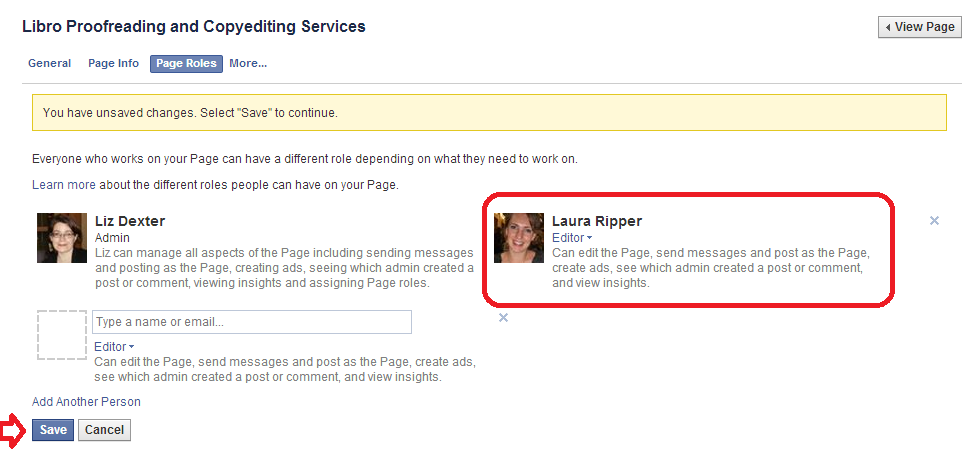
Once you’ve done that, you will get another screen which shows all of the people who are admins of that page:

4 make admin

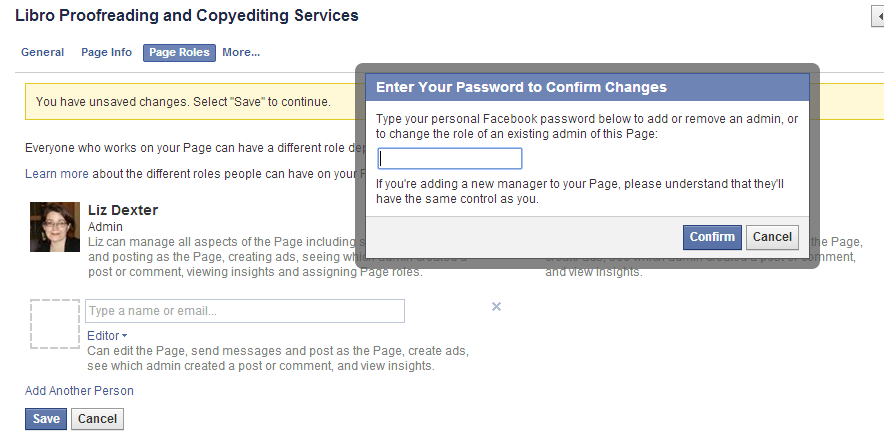
This shows that you’ve added someone to have admin rights. Note the x top right – this can be used to remove them. Press Save … and you’ll be asked for your password (just as a safety measure):

5 make admin

Add your password and there they are, an admin.

How do I access the Page Roles area to change what my moderators can do?

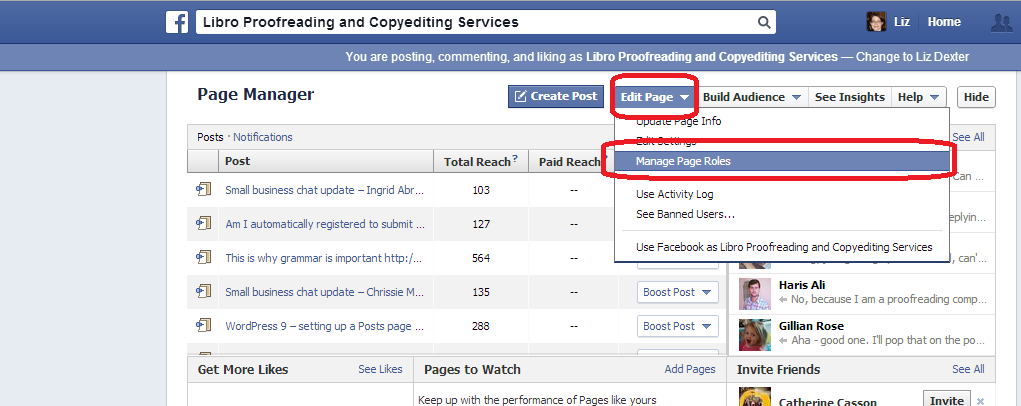
If you want to change the roles that people have in moderating your page, go into the Page roles area by choosing Edit Page in the Admin Panel, then Manage Page Roles:

Facebook page moderator page roles

What are the different Facebook page moderator levels?

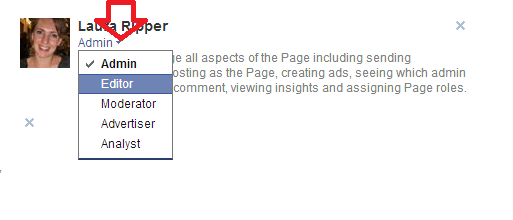
You can choose different levels of moderation to give to your admin people. If you want to change these at any time, go into the Page Roles area by choosing Edit Page then Manage Page Roles (see screenshot in the previous section.

Now, click on the arrow by the role name assigned to your moderator, and you will see a list of choices. The role that the administrator currently has will have a tick next to it. Click on a role to change the privileges that the administrator has.

Facebook page role optionsAn Admin can send messages, post as the page, create ads, see which person has created a post or comment, view insights (stats etc.) and assign page roles

An Editor can do everything that an Admin can do, plus they can edit the page itself.

A Moderator can do everything that an Admin can do, plus they can delete comments on the page

An Advertiser can see who created posts and comments, view insights (stats) and create adverts

An Analyst can see who created posts and comments and view insights

What does it look like when I’m added as an Admin of a Facebook page or group?

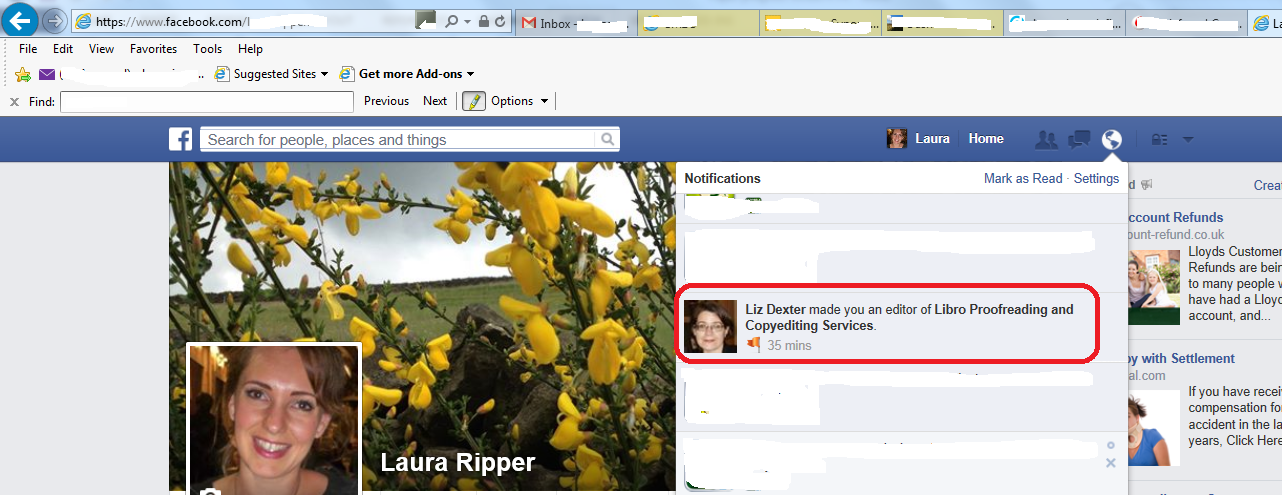
When the moderator of the page adds you as an admin, you will receive a notification. Depending on how you have notifications set up, you may receive an email – there will be a notification in your Facebook Notifications list. Here’s Laura’s which arrived after I’d added her, above:

facebook notification - added as moderator

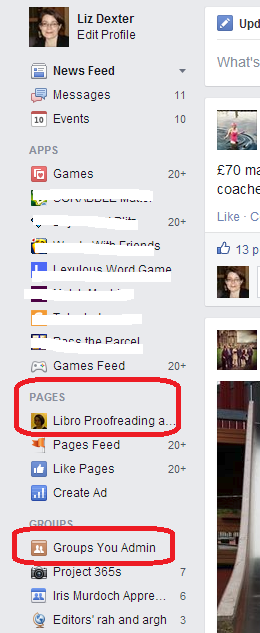
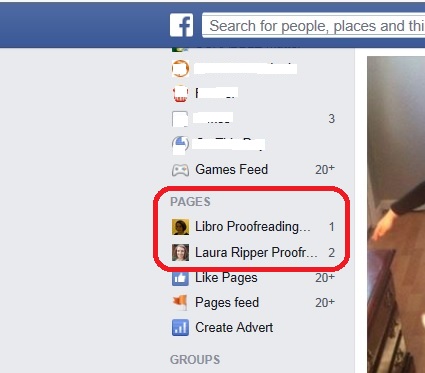
On your own Facebook feed, you will see all of the Pages you administrate under the Pages heading. For groups, there is also a section called Groups You Admin under the Groups heading.

6 groups you admin

And here’s Laura’s Facebook menu, showing that she’s now administrator of her own page and mine:

List ofFacebook pages for which you are admin

To view the page or group for which you have admin rights, click on the page or group and your view will be that of the administrator, with the Admin panel at the top:

7 admin panel

What does having moderator status for a Facebook page actually mean?

Once you’re a moderator / admin, you can do any or all of the following (see list above for the different roles): see all of the statistics for the page, who likes that page and how the posts on the page are doing; comment under the name of the page (so in my case, Laura can post on the page as if she’s called Libro Proofreading and Copyediting Services) and delete other people’s comments as appropriate; create adverts.

So, if you are the owner of a page and add admins, be careful if you’ve associated a bank account or PayPal account with the page, or make sure you choose the appropriate role level for your moderators and make sure you trust any people to whom you’ve given full roles to not to go booking millions of adverts without your say-so!

To summarise – if someone asks you to be a page administrator / moderator for their or their business’s Facebook page:

  • Make sure you ‘Like’ their page first
  • Ask them to find you in the list of people who ‘Like the page’
  • Ask them to click and make you a moderator
  • You will receive a notification and the page will appear at the top of your page list in the left-hand margin
  • Click on the page name in the left-hand margin and you will have full administrator rights

In this post, we’ve learned how to add someone as a page administrator, and what happens to that person’s view of Facebook once this has been done. Thanks to Laura Ripper for providing screen shots and being a guinea pig page admin! Her Facebook page is here and the Libro one is here.

If you’ve enjoyed this post and found it useful, please share it using the buttons below! Thank you!

You can find more resources on social media in my blog resource guide (link takes you to the social media section) and read about using social media for your business in my book on growing your business.

Related posts on this blog:

Facebook for business

How to delete posts and block users from your Facebook page

 
27 Comments

Posted by on June 4, 2014 in Business, Social media


Tags: , ,

Introducing my new business titles: Running a Successful Business After the Start-up Phase and Your Guide to Starting and Building your Business

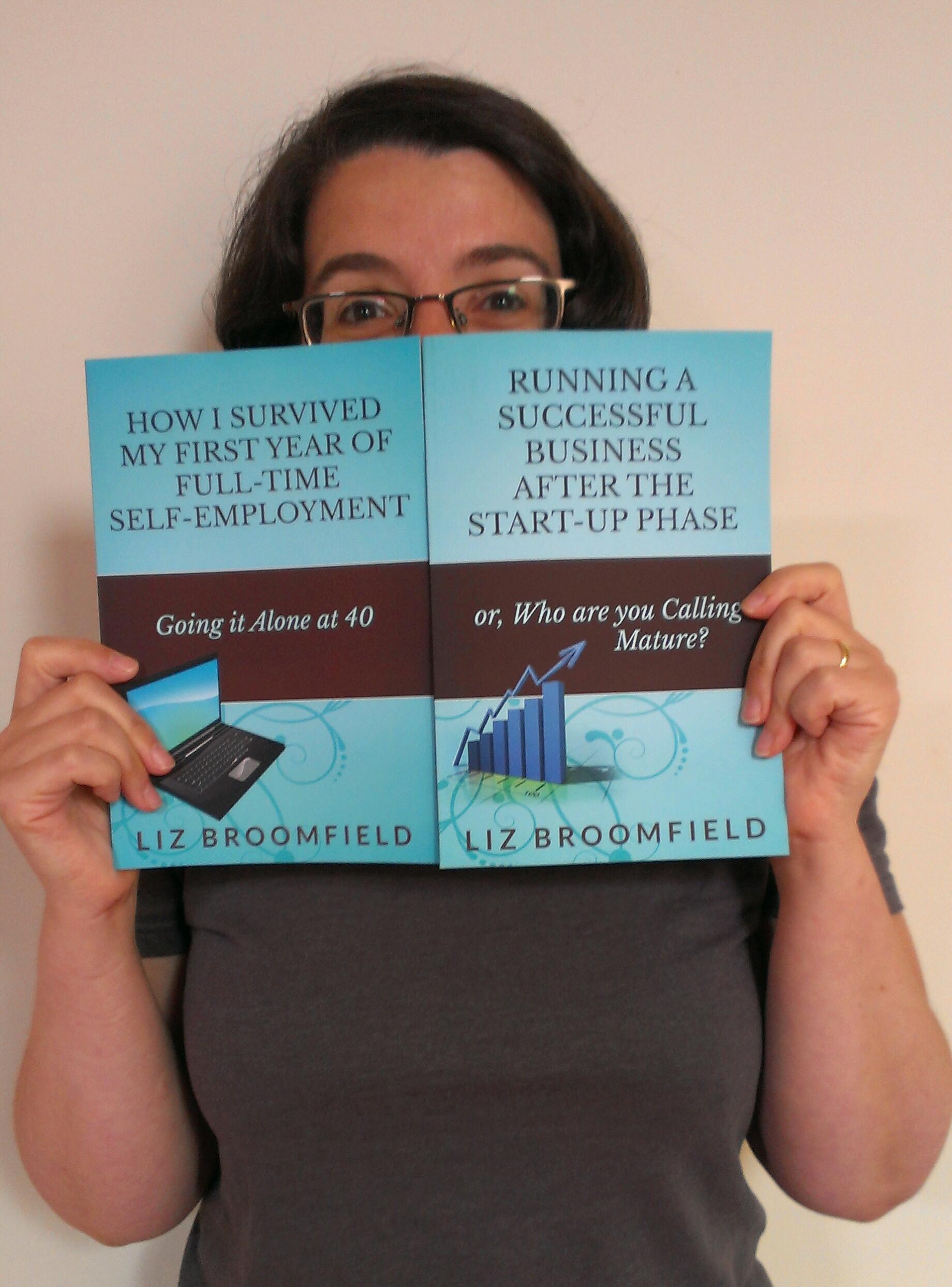
Liz with her new books

Liz with her new books

It’s time to tell the world: I have two new books out, and I’m pleased to share the news with my readers and subscribers.

Running a Successful Business After the Start-up Phase: Who are you Calling Mature?” is a look at what happens next. Following on from “How I Survived my First Year of Full-Time Self-Employment: Going it Alone at 40“, it shares what I’ve learned about optimising your customer base (including saying no to prospective new business), optimising your income, keeping that vital work-life balance, and blogging and the use of social media to build awareness and grow your business. It’s had some good feedback both personally and on its Amazon review page and I’m really pleased to be able to help people further along their journey through the wonderful world of self-employment and running a small business.

You can buy the print or e-book version from Amazon – you can go straight to Amazon UK, or see the book’s web page for links to the other international Amazons, and buy in different formats including pdf and for Kobo at Smashwords.

I decided to put “Your Guide to Starting and Building your Business” together to offer a low-cost option for people who want to read both books. It’s on e-book only at the moment, and is an omnibus made up for “How I Survived my First Year of Full-Time Self-Employment” and “Running a Successful Business after the Start-up Phase” which takes you right through from how to decide whether to go self-employed, taking the first steps, perhaps while working in a day job, setting up your business, getting your first customers, working out which customers to continue working with, using blogging and social media platforms and getting your life back while running a successful business. I really do write this blog and these books to help people, so I’m really pleased to be able to put this package together at a decent price, and it’s so great when I hear how I have helped people!

You can buy the e-book only omnibus from Amazon UK and other versions of Amazon (see list of links), and for all e-book formats, from Smashwords.

Thank you to everyone who’s supported me in my writing efforts – I’m so glad when I hear how I’ve helped people, and hope that I can continue to do so for many years to come. Watch this space for my new venture – an editors’ version of the two books and a workbook to go with both sets of books, based on the mentoring I’ve been doing with some industry colleagues this year.

If you’re interested in how I got to this point, do pop over to my Adventures in Reading, Writing and Working From Home blog, where I talk more personally about writing the books and choosing (and tweaking) their titles.

And you can find info on all of my books on the Liz Broomfield Books website!

 
5 Comments

Posted by on May 31, 2014 in Business, Ebooks, Uncategorized, Writing


Tags: , ,

Developing your Business: Moving Into Office Space – How, When and Why?

Sneak preview of the image from my new bookAs part of my series on growing your business., we’re taking a look today at the expert’s view on moving into office space. You can read about other people’s personal experience of moving out of the home office here, and today I’m delighted to welcome Sam Barnes from Easy Offices, who is going to run through things to think about when upgrading from your home office from an expert’s perspective.

Many people choose to start their businesses from home. It’s cheap, convenient and comfortable. For some businesses, that’s all that’s required and they never feel the need to break out of the home office. For the majority of businesses though, office space becomes an essential as revenues grow. We’ve helped all manner of businesses find office space, from single person start-ups to massive corporations. However, there’s no doubt that with the advice you’re about to read, the process of selecting and moving into your brand new office, will be made substantially easier.

Why does my business need office space?

Your office space is the centre of your business.

Without offices, you’re running the risk of not being taken seriously by other businesses or consumers. Imagine if the next time you wanted to go the bank you ended up at a home, not an office. Commercial premises are a necessity of business.

The practical side of getting your own office space is extremely important too. You’ll have your own phone systems, postal address and meeting space. All of these things will be vital as you grow your business, providing the infrastructure that will drive you forward.

When should my small business move into offices?

This is a slightly more difficult question to answer. There are lots of reasons that you might need to look into choosing office space:

•    You’re outgrowing your existing office space.
•    You’re taking on more staff.
•    You need a meeting room for clients.
•    There are too many distractions at home.
•    You’re unsatisfied with your current office space.
•    You need better facilities, i.e. better internet, private rooms, reception area etc.

There could be hundreds more reasons on this list, but the vast majority of office moves are instigated by a lack of physical space, specifically when taking on more staff.

If you find yourself thinking, on more than one occasion a day, that a bigger office would make your work more effective or allow your business to grow more easily, then I would say it’s time to take the plunge!

As your revenue grows, you’ll find that justifying the cost of an office becomes easier and easier. Having the cash to be able to fund an office move is an absolute necessity.

How do I go about choosing office space?

There are three main kinds of office space available to small businesses in the current market:

1.    Co-Working Office Space

Co-working spaces can be a great fit for some businesses. They’re the cheapest of the three main options available. Essentially you’ll rent a couple of desks in a room or part of a larger office. This gives you the ability to separate your work and home lives while keeping costs low while your businesses is in the early stage of development.

You’ll never know who you might be sharing with and you can make some amazing new businesses contacts while sharing office space. We’ve heard lots of fantastic success stories about relationships formed in shared environments. Equally you’ll want to know before you choose a certain office, what kinds of businesses you’ll be working alongside. If you need a really quiet environment, make sure those around you feel the same.

You’ll also have access to shared mail, printing and catering facilities.

If you’ve only got a couple of staff and you work as one well-oiled machine, a co-working space would be ideal.

2.    Serviced Office Space

Serviced office space is more expensive than co-working office space, but not quite as expensive as a full-blown office lease.

It’s the perfect choice for companies with a few staff who need room to grow. You’ll have a dedicated space for your business (no co-working here). You’ll have all the kitchen, printing and mail facilities that I mentioned before, plus some added features. These normally include security, some kind of reception area, cleaning services and usually the ability to rent extra infrastructure such as improved internet connections.

You’ll get to put your own stamp on things too! The simple branding of your office through posters, mugs and pens can turn the feeling in your office from start-up to established business.

A fantastic choice for businesses growing quickly who know they’re going to need space to meet clients and further expand their operations.

3.    Office Lease

The only option for larger businesses, an office lease lets you rent an entire office. This is necessary when your business has outgrown your existing solutions or needs to centralise.
As this post relates to small businesses, I won’t go into too much detail here. What I will say is that you’ll need to be making substantial revenues before choosing a fully leased office. The costs involved are substantially higher than serviced or shared offices.

Some Top Tips for Choosing Office Space

Here are a few questions that you’ll need to ask yourself before making your choice to move offices:

•    Price – Can you afford it?
•    Space – Does the office you’re looking at give you enough room for meeting clients and working as a team?
•    Infrastructure – Do you need a dedicated phone line and Internet? Does the office you’re interested in office this as a service or do you have to organise it yourself?
•    Facilities – Can you and your staff park here if they drive? Are the kitchens clean?

They might sound like simple, fairly obvious questions, but if you fail to take one of these things into account you’ll be paying for it for months to come.

The best advice I can give you when attempting to choose an office space, is do your research.

Start out with a list of criteria that you need from your office. If any one of the office spaces you go to look at doesn’t meet even one of them, keep looking. There’s a space out there for everyone!

sam barnesSam Barnes is from Easy Offices.

The company works tirelessly to help businesses of all shapes and sizes find the perfect office space for their needs. He is interested in everything small business related with a particular interest in marketing. He works in the digital marketing sphere.

Outside work, he’s an avid football fan, with Arsenal being his lifelong obsession. He also has a passion for music and film. He’s currently rattling through the IMDB top 100 as a personal challenge.

You can also find Easy Offices on Twitter.

This post is part of my series on growing your business. Read more here and read about my own business journey in my books.

 
1 Comment

Posted by on May 28, 2014 in Business, Guest posts, Organisation


Tags: , , ,

Am I automatically registered to submit my tax self-assessment online?

coins and watchIf you’ve registered as self-employed in the last year and a bit, you will have received a letter from HMRC telling you that you need to submit a self-assessment tax form. You can do this on paper by the end of next October, or online by the end of next January.

So it makes sense to do it online, right? YES.

Every year, I meet people who’ve just set up their new business and think that because they’ve registered as self-employed, or because they registered as self-employed online, they are automatically registered to submit their self assessment (tax return) online. They can just wait until the end of January and submit it online then, right?

NO.

If you want to file your taxes / submit your tax return / do your self-assessment online, and this is the first time you’re planning to do it online, you HAVE TO go through a separate registration process.

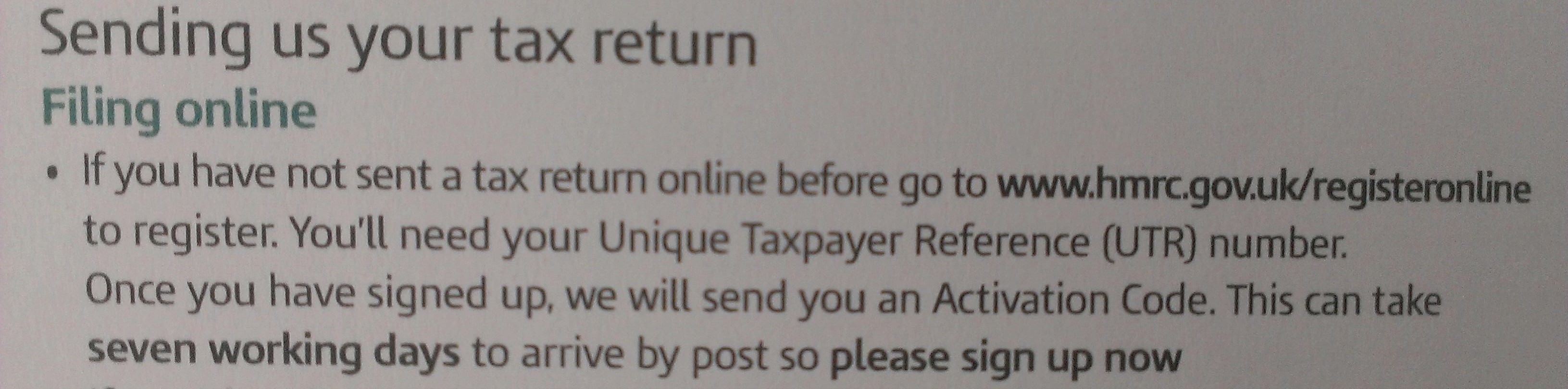
Don’t just take my word for it: here’s a bit of my latest letter from HMRC telling me I need to submit a tax return for the 2013-2014 tax year:

tax online

Got that? You need to go to the HMRC website – WELL BEFORE THE END OF JANUARY and register to submit your tax return online. Once you’ve registered, you will be sent a letter with an activation code. This can take over a week to arrive.

You do not want to leave it to the last minute, or make any assumptions.

If you want to submit your tax return online, you must register to do so as a separate process, and you need to do it in good time in order to get your letter and then activate the account and THEN complete the online tax return (that last bit doesn’t take very long).

If, as a good and normally sensible friend of mine did one year, you leave it until the end of January to even register to submit this information online, you will receive your letter after the end of January, go to fill in your tax return and find yourself confronted with a hefty fine.

The HMRC website with all information on submitting your tax return online, and registering to do so, is here.

If you’re considering setting up a new business or have recently done so, you will find plenty of careers resources on this website (click on that link or surf around the category cloud in the sidebar). Or why not take a look at my books, which have loads of information about starting and maintaining a freelance career.

Other useful posts on this blog:

Setting up as a freelancer 1

10 things you can do before going self-employed

Why I do my tax return in April

Tax payment on account

 
2 Comments

Posted by on May 14, 2014 in Business, Organisation


Tags: