RSS

Category Archives: Copyediting

Editing resource review – QuickStyle Customizable Editorial Style Sheet

Editing resource review – QuickStyle Customizable Editorial Style Sheet

As an editor and proof-reader of many years standing, I use style sheets as a matter of course (if you’re not an editor or you’re new to the business, you can refresh your memory on using a style sheet for proofreaders and editors and for writers). I have a very simple template which I use as a basic style sheet for, say, self-publishers who haven’t created one of their own, or I use a journal, publisher or university’s one. What I didn’t realise I needed until Hazel Bird of Wordstitch Editorial (coincidentally the same age as my own business) got in touch was a customisable style sheet that I can tweak to any requirements I wish!

What did I receive?

I received a copy of the style sheet in read-only format (to keep, and save-as to create my own customised versions) and a very useful PDF guide. I work on a PC but the download included the Mac versions, too. It comes in a .zip file so it’s not too big to send and receive.

What does it look like and what does it do?

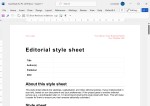
When you open the Word template document, you can immediately see that you can add your own business name and logo, making it entirely yours:

Screenshot of the top of the style sheet showing where you can add your logo and details

Obviously, you can add your branding then save a copy that’s “yours”. The bit of text at the top is spot-on already, but you can amend that, too.

Then we get to the nuts and bolts: first of all, you can state the style guide you’re being led by:
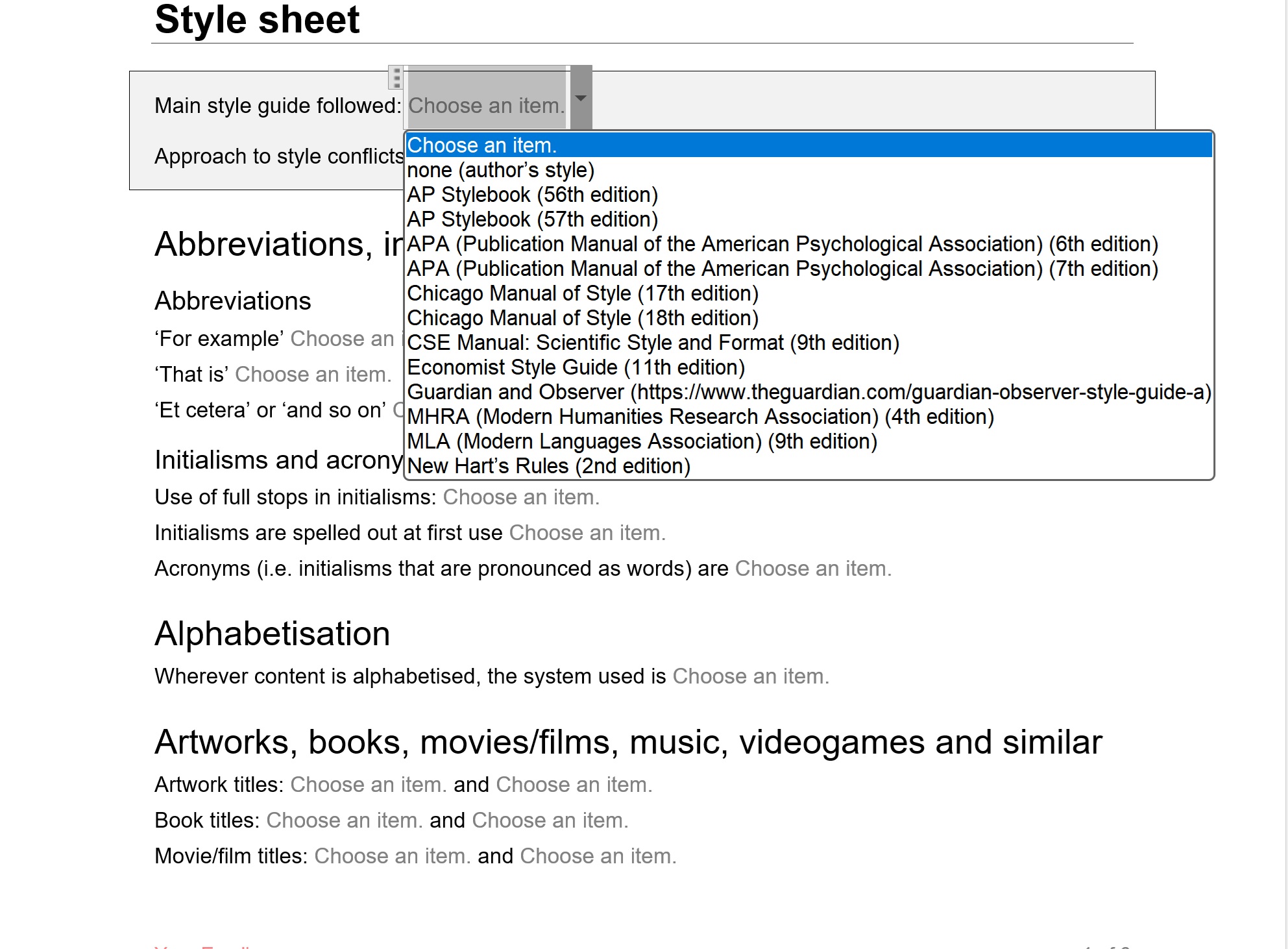
Screenshot showing how you can choose a style guide to follow

It’s worth noting here that there is even an “Approach to style conflicts” box so you can record whether the chosen style guide is the law set in stone or whether the client’s different uses trump the style guide.

The template then goes on, in alphabetical order, to let you choose the options for everything from abbreviations onwards.
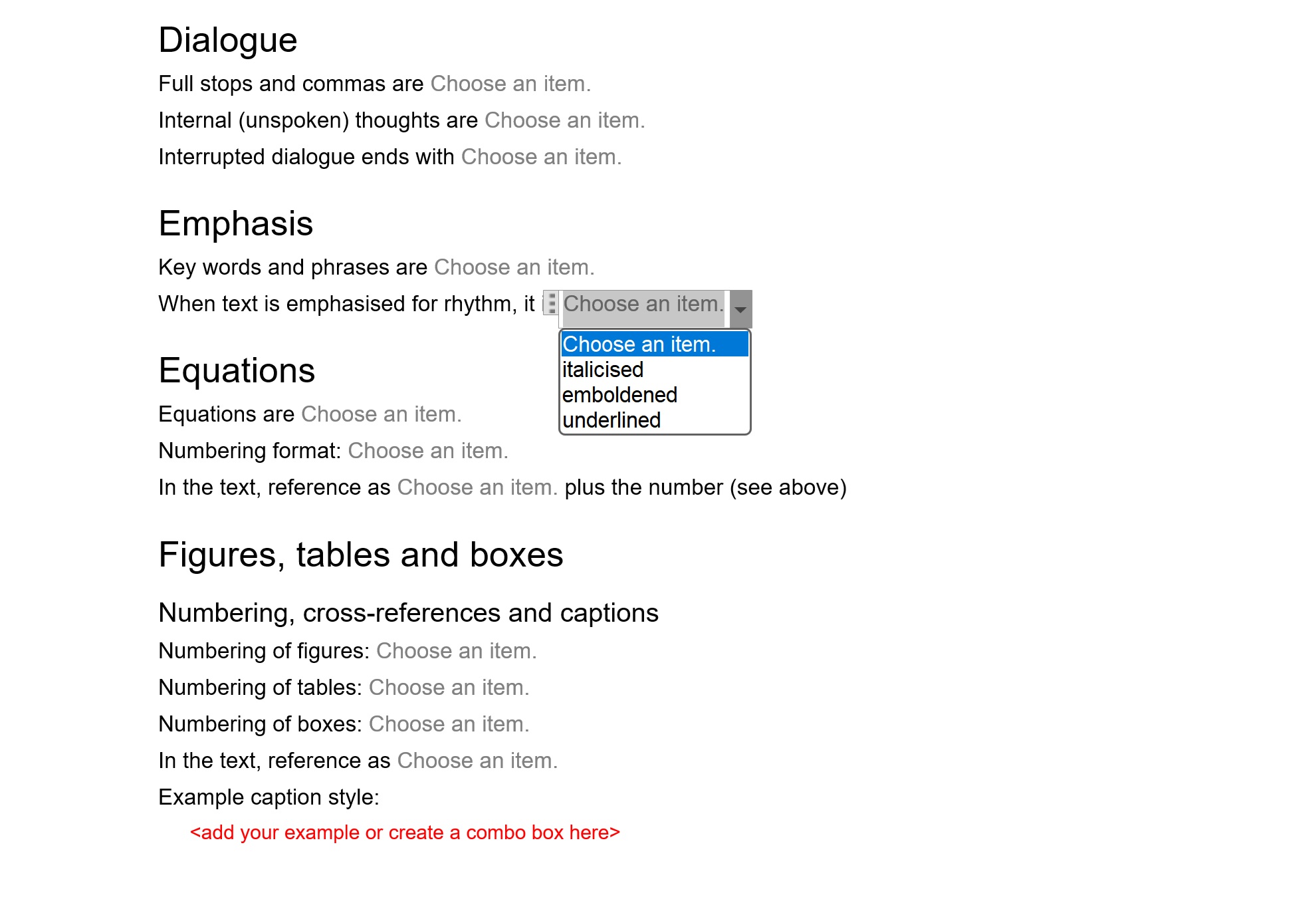
Examples of areas you might define rules for with one drop-down open

There are so many choices, which is great: I couldn’t find anything missing and you can always add any special ones to the list.

What about help?

The style sheet comes with a very useful manual in PDF which covers everything you need to know, written clearly and helpfully:
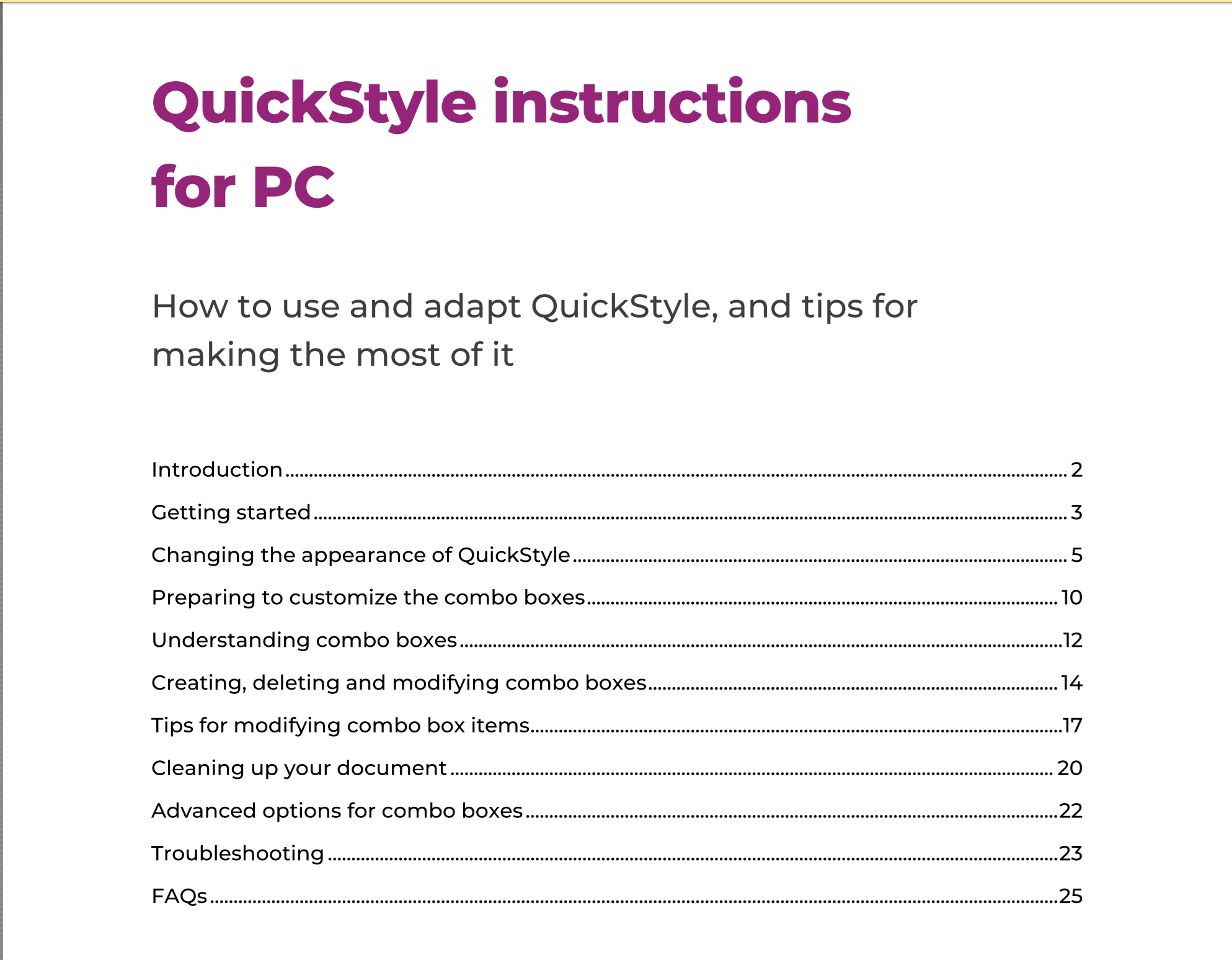
Menu for the PC manual

And I can lock the style sheet down so my client can’t alter it, right?

This was my main question: can I remove the choices so my client just sees what I’ve chosen for them (or my writers and editors if I’m a journal or book publisher). And the answer, of course is yes: you can create a standard-looking style guide your client can’t amend by mistake or on purpose!

Who is QuickStyle Editorial Style Sheet useful for?

  • Editors and proof-readers will find it invaluable
    • There is a LOT of information on the full template, however it’s easy to delete sections, so if you want to keep it simple, you can just keep to various basics, but if you need all the detail, it’s all there for you.
  • Writers who are producing more than one book and want to keep their style consistent could use it and pass it on to their editor and/or proof-reader
  • Journal editors and publishers can use it to provide guidance to their writers, editors and proof-readers

How do I buy QuickStyle Customizable Editorial Style Sheet?

You can download the style sheet from Hazel’s website here. She has provided the following information about contents and prices:

  • It’s available for PC and Mac (both versions will be included in all purchases, so users have access to whichever is relevant to them).
  • The price will be £45 inclusive of any applicable taxes.
  • There will be a 15% early-bird discount on all purchases at launch (13 August) until Friday 12 September.

Thank you to Hazel Bird for providing a review copy of QuickStyle Customizable Editorial Style Sheet in return for an honest review. It’s launch day today, 13 August 2025, and I do recommend it.
 

Tags: , ,

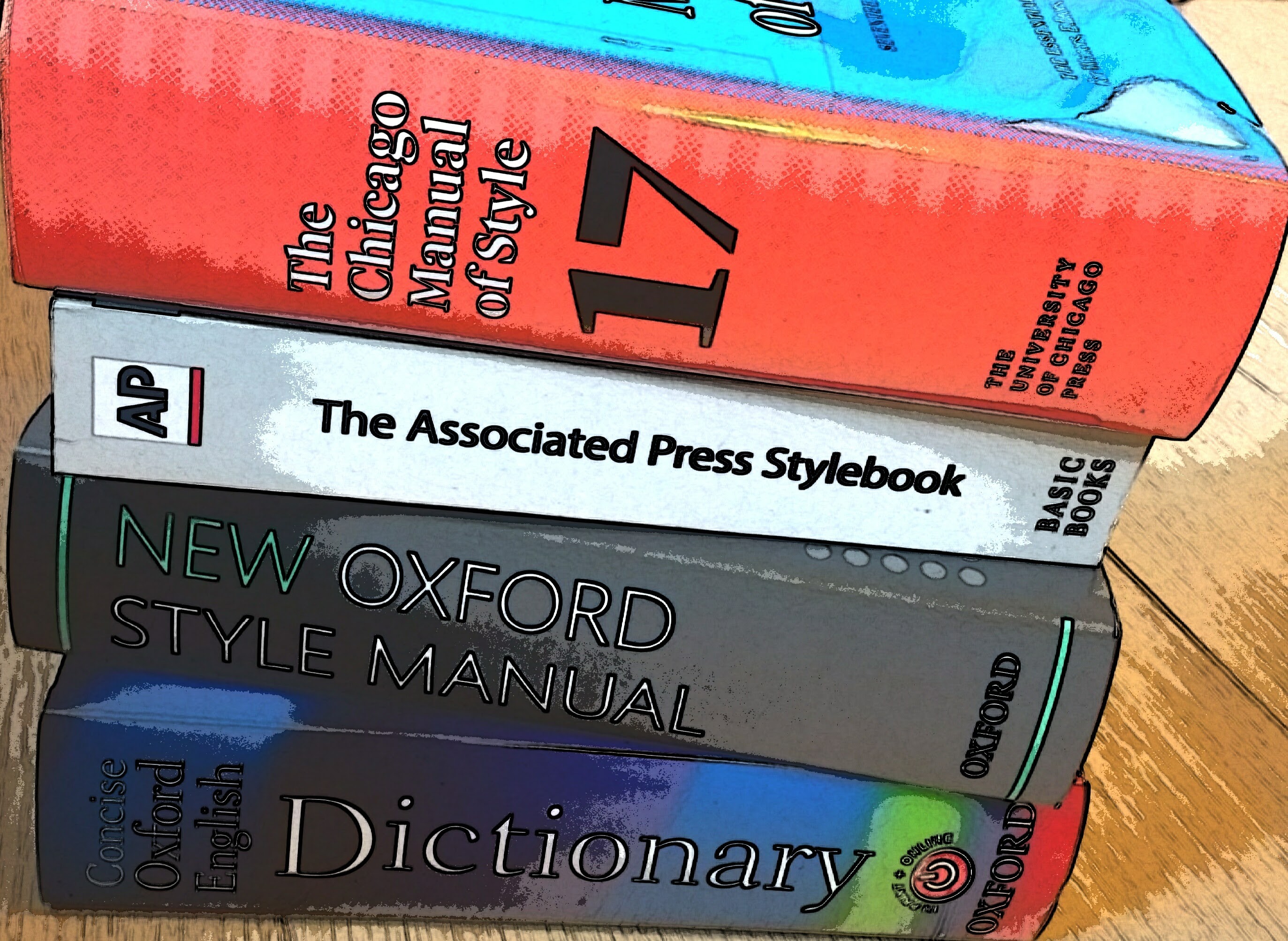
Can I still access Chicago Manual of Style 17th edition online?

Can I still access Chicago Manual of Style 17th edition online?

Writing in June 2025, I’m in the slightly odd position of having two editing jobs to hand that require Chicago Manual of Style 17th edition (CMOS 17), even though CMOS 18 has been out for almost a year (published in September 2024). I have an online subscription to CMOS 17 and, fortunately, I thought, print copies of both books.

I was busy leafing through my CMOS 17 while editing, reminding myself of the two major changes between the two that affect me here (CMOS 18 drops the requirement for a place of publication in the bibliography, and three or more authors (not four or more) are represented by first-author, et al.)

But look:

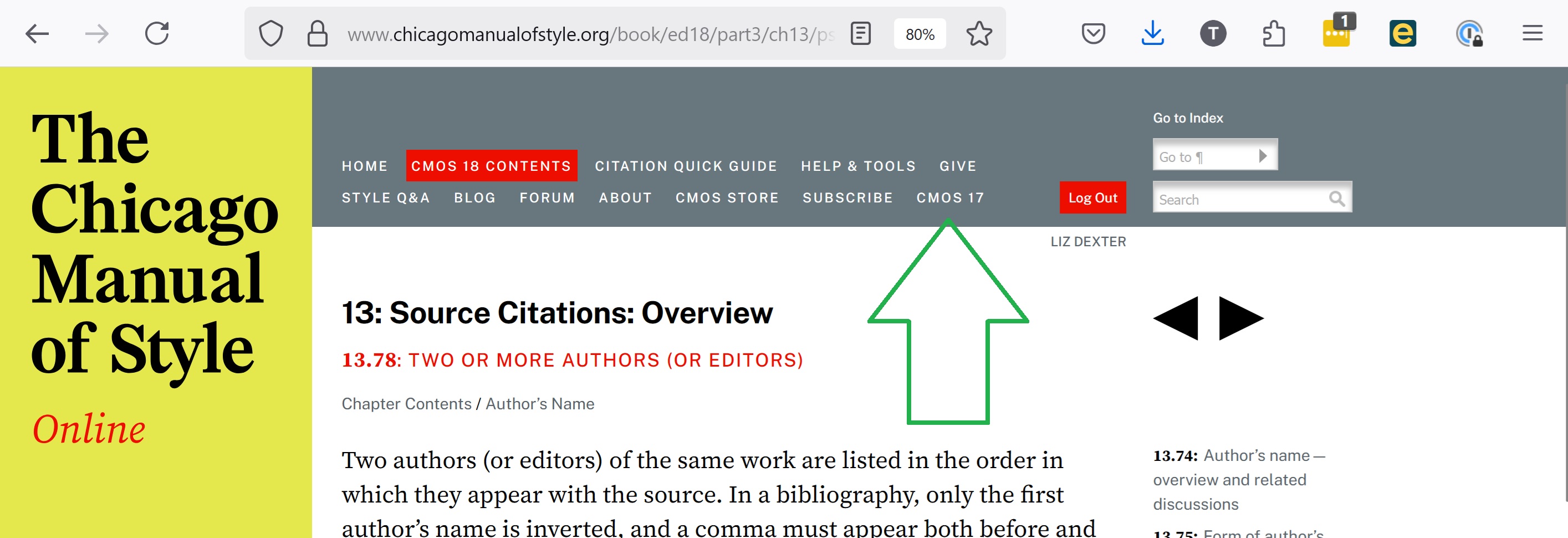
When you are in CMOS 18 online, there is a menu option for CMOS 17, and you can flip into that (or open it in a new tab), and it’s fully searchable, just like CMOS 18 online.

And I’ve written this both to remind myself and to let anyone else know who hadn’t realise. Thank you, Chicago Manual of Style people!

This post has shared that you can still access Chicago Manual of Style 17th edition online, even though the 18th edition is now the current one.

 
1 Comment

Posted by on June 28, 2025 in Copyediting, Reference materials


Tags:

Help – my Word Navigation Panel font has gone tiny

Help – my Word Navigation Panel font has gone tiny

You’re using Microsoft Word and suddenly the font size in your Navigation Pane has gone tiny. Here’s what to do.

Funnily enough, a similar situation inspired my very first post on this blog – What to do if your comment boxes go tiny in Word. Now we have the same situation with the Navigation Pane and its text becoming very small.

What is the navigation pane?

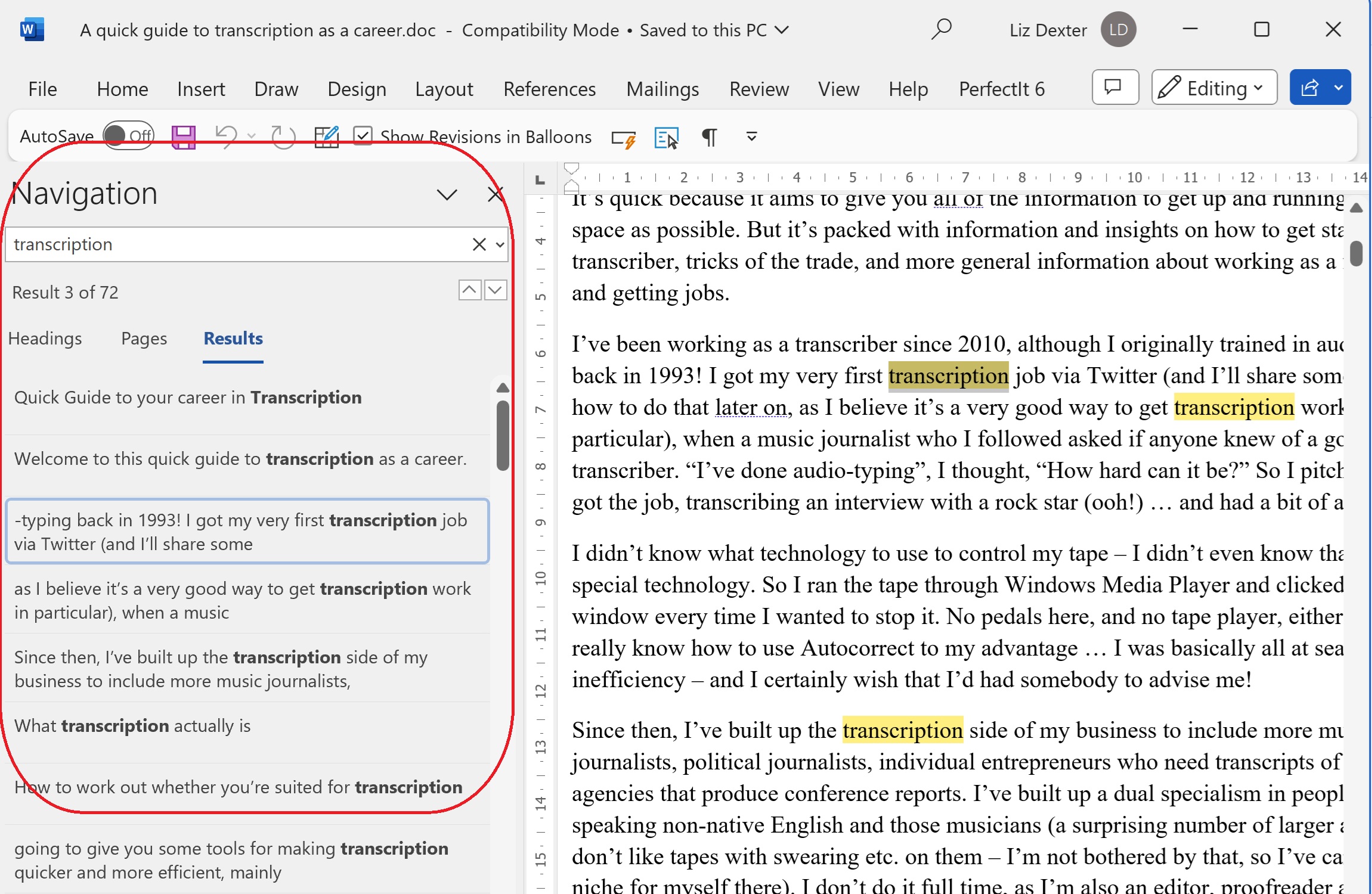
The navigation pane (or document map) is that area to the left (usually) of your Word document which gives you the option to view the headings and layout of your document, the pages, or search results for a term you’ve looked up. It normally looks like this:

but the problem arises when, often for no reason, sometimes when you’ve got a new monitor with a higher resolution, suddenly all the text in that Navigation Pane area is in a tiny font size. How do you change that font size? The answer lies in the Styles.

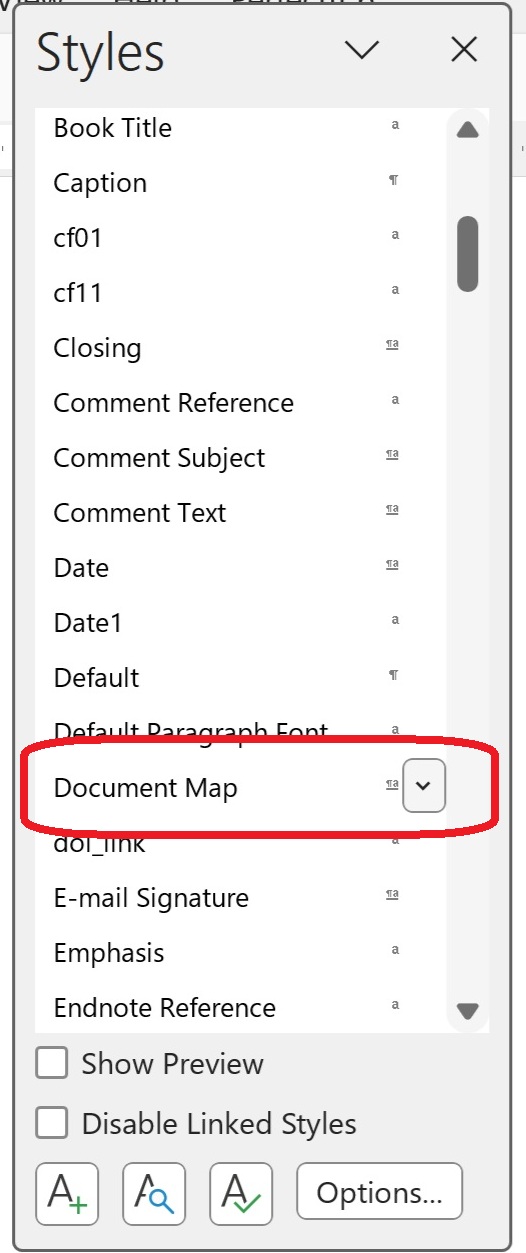
How to find the Styles menu

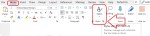
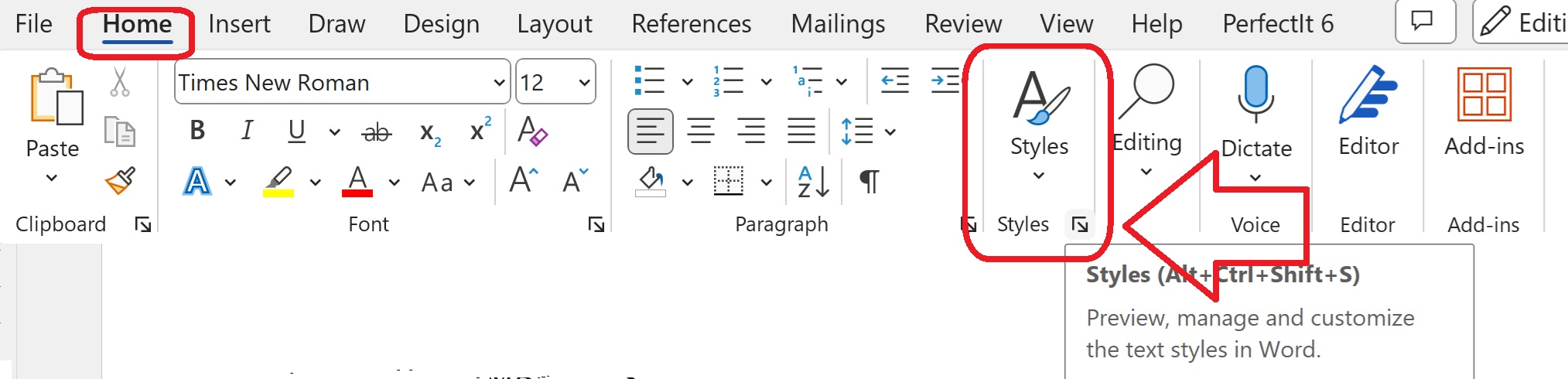
The Styles menu is in the Home tab. You might need to widen out your Word window to find it.

Once you’ve found Styles, click on the little arrow at the bottom right.

How to see all the styles, not just some

By default, Word will show you the styles it thinks you might need. Of course the one you want is never in the list. To see All the styles and edit the one you want …

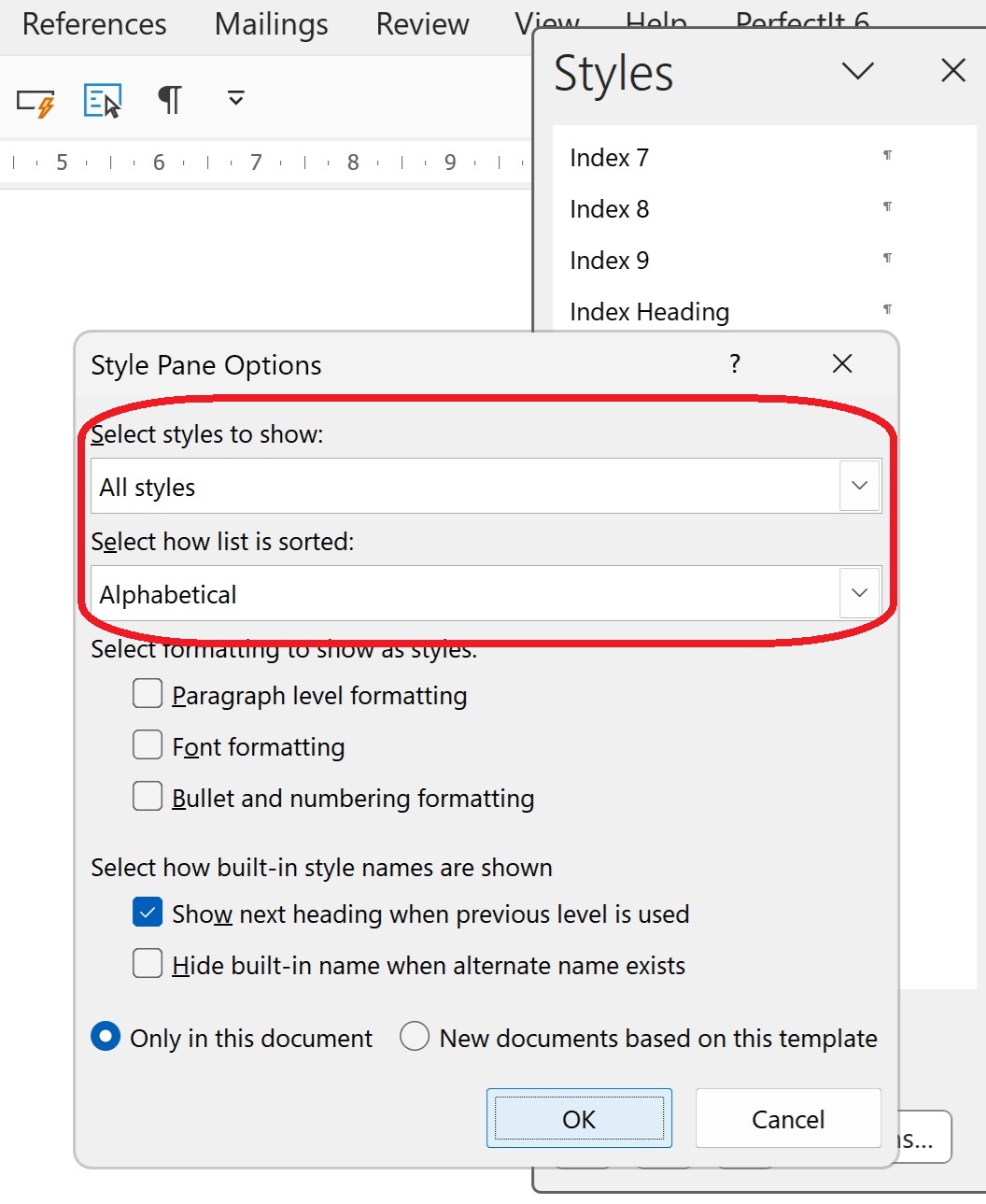
Click on “Options” at the bottom of the window.

Then change the drop downs to “Select styles to show”: All styles and “Select how list is sorted”: Alphabetical.

Then click OK.

How to change the Navigation Pane style using Document Map

The style that controls the Navigation Pane is called “Document Map”. I can only assume that it was once ONLY the document map, as that is still included in the Navigation Pane. Scroll down to find it …

… and click on the little arrow to the right-hand side.

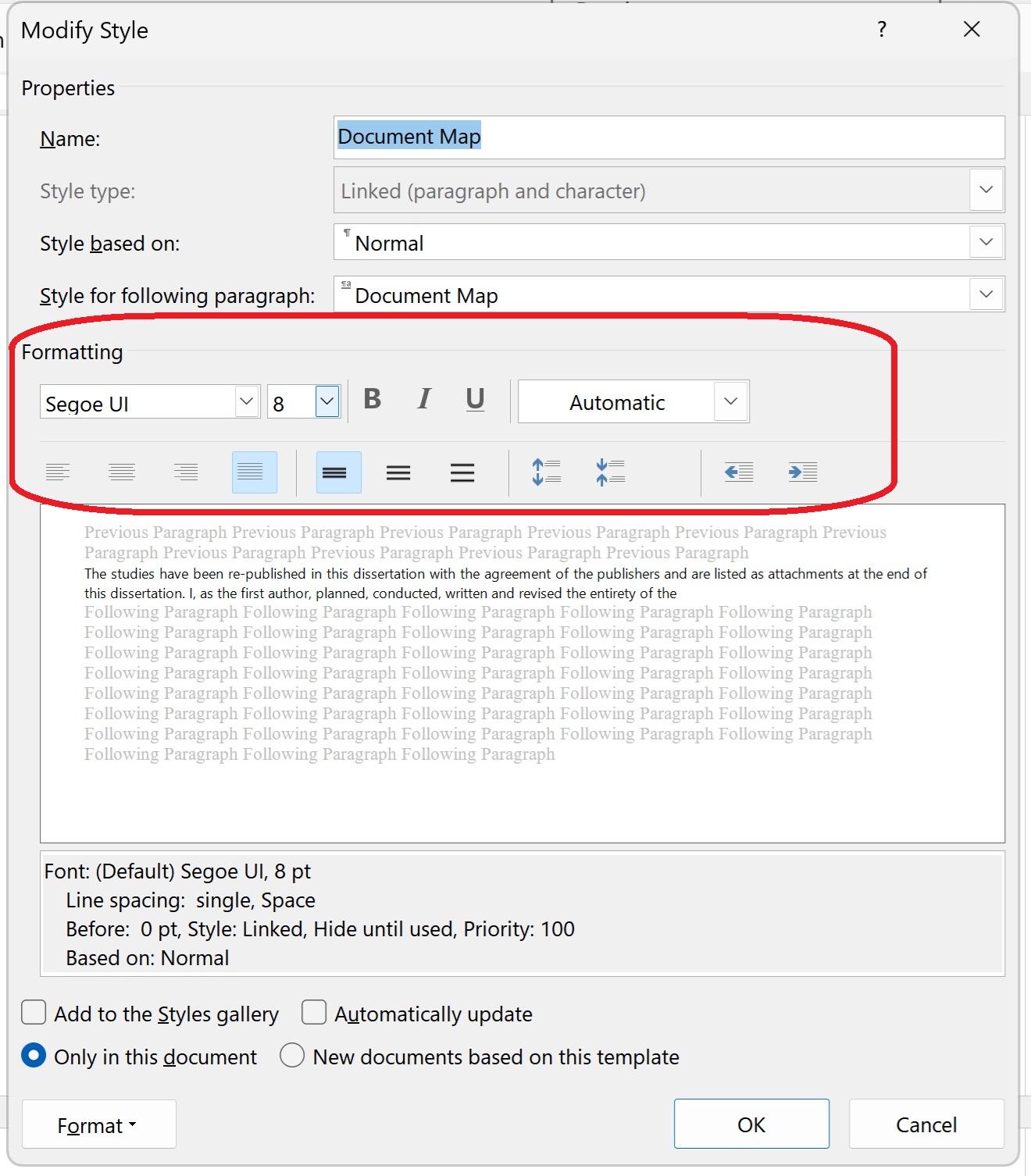
How to modify the Document Map / Navigation Pane style

Click on “Modify” so you can change the font size of the Navigation Pane.

Now the Modify Style window will appear. Here you can see the style is set to be an odd-named font with a very small font size. Here you can just change the font and size to whatever you want:

Once you’ve changed the font, and decided whether you want to add this style to the gallery (hopefully not, as you’ll never need to change it again!) and whether you only want this change for this document or all new documents based on the same template (not so useful if you only work on documents originating with other people), press “OK”.

Does this fix always work?

You may need to close and re-open your document to see the font size in the Navigation Pane change to one you can read. And it might not work, especially if you’re working with a corrupted document that has been through a lot of versions. But it should do.

Summary

In this post we have learned what to do if your Navigation Pane font size in Word suddenly becomes tiny (or, indeed, enormous)

Please note that these tips are primarily for Word 2010 and onwards, including Microsoft Office Subscription for PC. Most of them will work for Word for Mac, although you may find some menus in different places and I can’t guarantee it. This is part of my series on how to avoid time-consuming “short cuts” and use Word in the right way to maximise your time and improve the look of your documents. Find all the short cuts here

Do let me know if this has helped you, saved your document, etc. – and do share with the buttons at the bottom of this article.

Related articles

How do I view my Navigation Pane?

How do I move text and headings using the Navigation Pane?

 
8 Comments

Posted by on May 16, 2025 in Copyediting, Errors, Short cuts, Word


Tags: ,

Book review – Vivek Kumar (ed.) – “Discover the Editor in You”

My editing colleague Vivek Kumar shared last year that on behalf of the Indian Copyeditors Forum, he had curated a volume designed for the new editor or person considering a career in editing, so of course I rushed to buy it, and then of course it’s been over a year until I’ve got it read (but this is also fortuitous: see below).

In that time, I have to say, the development of Artificial Intelligence has leapt forward and I do worry that many of the processes of our profession are going to disappear as human processes, but for the time being you can get a good grounding in the career from this book.

Incidentally, talking about careers, I am publishing this review on the 15th anniversary of my issuing my first invoice, the basic start of my copyediting, proofreading and (slightly later) transcribing career!

Vivek Kumar (ed.) – “Discover the Editor in You: Copyediting as a Career”

(27 July 2023)

This is a great resource for new-career editors or those considering a career in the profession – or, indeed, in related professions.

In shortish articles written by a great collection of editing colleagues from India, the US and the UK, professional editors (etc.) share their lessons and recommendations, covering the skills and mind-set needed, gaining training and credentials and the nuts and bolts of editing in different niches (academic, school textbooks, fiction, newspapers and magazines and technical documents).

The Techniques and Craft section digs deep into clear writing, style guides, querying authors and fact-checking, and a fourth section on Allied Services gives a good flavour of the associated careers of proofreading, alt-text writing and indexing. Appendices offer a list of courses and a useful glossary.

There is some India-centricity, as befits a book written by the Indian Copyeditors Forum, but also has an international reach, covering associations, practices and training across the world.

A really good resource that I’m sure will help many develop the skills and confidence to work in this field professionally.


Tags: , ,

Why should editors be thinking about and using conscious language? [shared post]

Why should editors be thinking about and using conscious language? [shared post]

Today I’m sharing what is the best explanation I’ve seen of the need for editors to be aware of conscious language. I’m a non-fiction editor and Louise Harnby edits fiction but the principles remain the same.

In her article, Louise Harnby covers:

  • What is ‘conscious language’?
  • ‘But I’m not part of the “woke” brigade’
  • The foundations of editing
  • Are you part of the professional editing brigade?
  • Why conscious language is also about successful authoring
  • Why conscious language is about consideration rather than prescription
  • A case study
  • Helping our clients
  • Tools that help with conscious language

Read the rest of the article here.

This is such an important topic. I’ve been using “singular they” for a long time, and other aspects I’ve covered in my editing include not gendering people when they’re mentioned as examples in texts, working to eliminate terms in networking which are now outdated and pejorative and suggesting different terms for ones which are now considered pejorative in an ablist context.

As Louise mentions, as professional editors, we’re aiming to help our authors reach as wide an audience as possible, and if they risk alienating portions of that audience through the use of language that can be avoided, it’s our job to help them not do so.


Tags: , ,

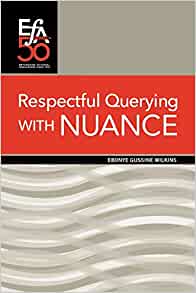
Book review – Ebonye Gussine Wilkins – “Respectful Querying with NUANCE”

Book review – Ebonye Gussine Wilkins – “Respectful Querying with NUANCE”

This book is published by the Editorial Freelancers Association, who are based in America, and I ordered it direct from them. My attention had been drawn to it by a couple of fellow-editors and I thought it would be useful to read and then share about here.

What it says on the back of the book

The blurb on the back summarises the book perfectly:

Editors working with writers of color or marginalized writers have dictated editorial changes that have misrepresented the writers’ voices for far too long. Writers receiving assistance from editors who don’t share their cultural backgrounds or experiences often don’t get the appropriate editorial support because of misunderstandings. Respectful Querying with NUANCE offers a framework that allows editors to continue to provide the necessary guidance while still respecting the author’s voice and encouraging the author to make the manuscript’s final editorial decisions.

Ebonye Gussine Wilkins herself is “a social justice writer, editor, and media activist shaping media through the lens of inclusion” (p. 29) and as such is ideally placed to guide other editors through this process.

What you get in the book

The introduction sets out the author’s stall as someone who is not a gatekeeper or rule-imposer but just wants to “help the writer put forth the best version of their manuscript” (p. v). She moves on to talk about how writers of colour or writers from marginalised communities outnumber editors of colour and from marginalised communities, so there are likely to be occasions when there’s a mismatch between the cultures of the writer and the editor. The editor in this case needs to be extra careful to let the author’s voice shine through and to not seek to suppress evidence of the author’s culture or background in their editing work – especially through their queries.

A query is where the editor puts a comment in the text because they’re not sure what the author intended to put across or needs to make a suggestion. For example, I have used queries recently to check what word someone intended to use when I suspected their voice-to-text software had inserted something a bit odd and, in a sort of backwards version of what this book is talking about, to suggest an author used singular they instead of he/she to avoid gender binary issues in the text. What Wilkins wants editors to do, entirely appropriately, is to take special care when doing this to pay attention to the author’s culture, and not to, for example, smooth out specific cultural terms into more ‘mainstream’ ones they might know and accept more readily themselves, certainly not without thinking about it. The main thing is to empower the author to make decisions on what’s in their own text, and to make sure that the editor’s culture, especially if it’s the dominant culture in the society in which they’re working, doesn’t dominate the author’s own voice.

Wilkins offers a handy framework to do this, based around NUANCE (Notice – Underscore – Accept – Narrow – Consult – Empower). I won’t go into all the details because then I’ll just be parroting the book. If you’re an established editor used to working supportively with writers of different groups to your own, you will probably do this intuitively. If you’re a new editor, or someone who’s feeling a bit challenged by working with someone’s manuscript that is different from your own more commonly held experiences, you’ll find this framework very useful.

My thoughts

I think this is a really good resource, especially for new editors or those needing to come to terms with working with texts that approach issues from or are written from other than their own cultural or personal characteristics. I’ve worked with all sorts of authors for years, and it encouraged and reassured me that I’m on the right tracks with the way I work with clients who are different to me in their backgrounds and lived experiences. The worked examples were useful, and the emphasis on looking things up and checking them with other external sources before assuming they’re incorrect was written in a way that was useful and supportive to the editor. In addition, with more lists and directories available of editors with different cultures and characteristics, I would – and have – directed authors who come to me with very specifically culturally rooted texts to approach an ‘own voices’ editor to work with them, something which may well be more comfortable for both, if they choose to. If they choose to work with me, I’m more confident after reading this short book that I will be able to support and empower them, working with them to make their text represent them and their thoughts as well as it can.


Tags:

Gendered language and language change

Today I’m sharing an excellent paper, “The State of Gendered Language“, written by experienced and highly respected editor Sarah Grey.

Gendered language is language that takes account of gender and gender-related terms in a marked way, for example using “female doctor” or “male nurse” to point out ‘deviations’ from some shared ‘norm’, using the pronoun he for unnamed examples of bosses, and she for unnamed examples of secretaries, or promoting the gender binary by using he/she or his/hers when there are plenty of folk who exist along a continuum that’s not just binary.

As writers, it’s important to be inclusive – mainly for social and ethical reasons but also, why limit our audience? This article is likely to help writers understand the background of the changes they might be asked to make by editors, agents or readers.

As editors, many of us try to introduce these concepts to authors who might not have encountered them. This article gives us a great resource to back up what we’re saying with some solid and professional facts and references.

Sarah Grey’s article “The State of Gendered Language” appears on the Chartered Institute of Editors and Proofreaders’ website. Thank you to my colleague Katherine O’Moore-Klopf for drawing my attention to it.

Other related articles on this website

Medalling, podiuming and singular they

 
Leave a comment

Posted by on December 6, 2021 in Copyediting, Ethics, Language use, Writing


Tags: , ,

Do editors make mistakes? What should you do if you find your editor has made a mistake?

I have written a little bit about errors in editing before, but this article by my colleague Erin Brenner of Right Touch Editing says everything that I would say about the issue.

Another reason editing can’t be perfect is the simple fact that editors are as human as writers and designers and every other person on our planet. Even though we’re trained and practiced at finding errors, we do miss them. And we’ll miss more of them when there are a lot of errors in the manuscript. Catching more errors might mean taking another pass through the document, which could mean more time and more expense. A good editor keeps your timeline and budget in mind when trying to make the manuscript the best it can be.

Read the full article here.

 
1 Comment

Posted by on October 25, 2021 in Copyediting, Errors, Ethics, proofreading, Writing


Tags: , , ,

Essay mills are to become illegal in the UK

The BBC has reported that “essay mills”, where companies sell pre-written complete essays to students, are to be outlawed as part of the Skills and Post-16 Education Bill. I welcome this, and hope it will drive this practice away from higher education. However, this does need to be accompanied by better essay-writing and pastoral care support for students, who are often tempted to cheat, not out of laziness, but because of high social and academic pressures.

What is an essay mill?

An essay mill is a company that exists to make money from providing pre-written essays and even dissertations on topics which students purchase and try to pass of as their own.

In my (of course entirely legitimate and very careful) dealings with student clients, I come across so many examples of organisations who prey on them and abuse them while extracting money from them. More times than I can count, a student has come to me having already had their essay “edited”, which has, at best, involved running a simple spell check over it. Particularly for students whose English is an additional language to the one or more languages they are already fluent in, this can be woefully insufficient for them. They pay money, often a lot of it, and are left with something not fit for purpose that needs re-editing. When I worked on a university campus, I would see stickers on lamp-posts offering editing or proofreading services for students, or, indeed, advertising essay mills.

Why are students tempted to use essay mills?

I firmly believe this is not all out of laziness and trying to buy your way through university. Of course, some examples may be that, but in my decade and more of dealing with students, especially overseas students who are not fluent writers in English, I have seen the huge pressure to perform that can sometimes overwhelm. Overseas students in particular pay huge fees to attend British universities, even higher than national students, and this money has been paid by families or sponsors. I am not sure that English language support is even across institutes of higher education and I have come across many students who clearly understand their topic but lack the skills to present it in English that is deemed acceptable by their authorities.

I need to emphasise here that I have huge respect for anyone pursuing higher education in their second, third, fourth, whatever language. My French is decent and my Spanish is getting there, my Icelandic can raise a wan smile and I can speak Italian only when in Italy: I would not wish to write a university-level essay in any of these languages. Also, it’s not only overseas students who use essay mills.

So you’re pressured to make good use of the money that’s been spent on you, you know your English skills are not brilliant, and you see an ad where you can buy an essay. What are you going to do?

What happens if a student submits an essay they’ve bought from an essay mill?

Universities and colleges are of course wise to the use of essay mills and the purchase of pre-written essays. Of course these essays aren’t individually written for each student, so they will crop up regularly. Plagiarism software will pick them up easily, and the tutor may also realise that the language used is very different from the student’s usual level of English.

I would hope that the university would offer support in English language skills and essay writing rather than simply censuring the student. I hope there’s more understanding for the people they have brought over and charged highly for this British education.

Dealing with plagiarism carefully

Of course this is all about plagiarism: passing someone else’s work off as your own. Legitimate and careful editors/proofreaders who work with students, like me, are very careful about plagiarism. I have a line I won’t cross in terms of how many corrections and suggestions I’ll make to a student’s work, and I have turned down work several times where it’s clear that too much help is needed from me, and advised the student to approach their tutor for support. I have some resources about plagiarism below.

If you’re a student looking for help and support with essays, I suggest you do the following:

  • Ask your tutor or the library support staff if there are any courses or classes available
  • If you need a proofreader for your essays, ask your tutor or classmates if they can recommend someone
  • If you need to find a proofreader for your essays or dissertation yourself, look for a service provider who has a statement about plagiarism and terms and conditions on their website. Ask them how they do the work, and check that they leave Tracked Changes turned on so you can see and assess their changes and decide yourself if you want to accept them.

This article was triggered by the announcement that essay farms are going to be made illegal in the UK. I have explained what they are and why students might used them, pleaded for understanding and discussed how else students can find support, with a mention of how they might choose that support. There are some resources below on plagiarism which you might also find useful.

Other resources on this website

For students

Choosing a proofreader – student edition

My terms and conditions

Why has my proofreader not edited my bibliography?

Referencing – how to keep track and how to refer to your reference materials

How to quote sources without plagiarising – rewording and quoting appropriately

Essay tips for new students – handy for undergraduates

Top tips for dissertations and theses – from people who’ve been there

Top tips for writing up your PhD

Appropriate language in academic writing

For editors

On (not) crossing the line

Plagiarism – what it is and how a proofreader should work with student material (and my terms and conditions)

Student at risk of plagiarism 1: What do you do when a text isn’t referenced properly?

Student at risk of plagiarism 3: Sending feedback to your student client and their supervisor

 
6 Comments

Posted by on October 11, 2021 in Copyediting, Ethics, proofreading, Students, Writing


Tags: , ,

What are the stages involved in writing my book?

a hand writing in a bookWhat are the stages involved in writing a book? Where do editing, proofreading and beta reading fit in?

Authors often get confused about the different stages and people involved in getting a book published. It’s not as simple as “Write a book – get it published!” but nor should it be so complicated that only the professionals understand it.

I work with a lot of people who are indie-publishing or self-publishing their book, however these stages will be roughly the same whether you’re publishing in the traditional route with a publisher, or going it alone. When the publisher gets involved can also vary.

What are the processes my book needs to go through?

Here are the basic stages for your book.

  1. Plan
  2. First draft
  3. Second draft
  4. Beta readers
  5. Third draft
  6. Edit (usually in Word)
  7. Fourth draft and preparation for publishing (layout artist, cover art, blurb)
  8. Proofread (usually in PDF or another file format from which the book will actually be produced)
  9. Publish

Note: You might have a substantive edit before or just after the beta readers; if you have one after that stage, it’s an idea to add another beta read in afterwards, which would give you this:

  1. Plan
  2. First draft
  3. Second draft
  4. Beta readers
  5. Third draft
  6. Substantive edit (usually in Word)
  7. Fourth draft
  8. More beta readers or the same ones again
  9. Fifth draft
  10. Edit (usually in Word)
  11. Sixth draft and preparation for publishing (layout artist, cover art, blurb)
  12. Proofread (usually in PDF or another file format from which the book will actually be produced)
  13. Publish

One last point: it’s better to have your edit and proofread done by different people: just as it’s hard to edit your own work, it’s hard not to miss things if you’re proofreading something you edited. See the link below for how to handle the style sheet you will need.

Other useful articles

The different kinds of editing and proofreading (it’s biased towards fiction but also works for non-fiction):

All about beta readers and what to ask them

Style sheets to pass from editor to proofreader

How to request a quotation from an editor

Negotiating and booking in your project

I hope you’ve found this very quick guide to the process of editing and proofreading useful. If you have, please share this article using the buttons below, or leave me a comment. Thank you!


Tags: , ,