RSS

Category Archives: Errors

Pedal or peddle?

I try to be understanding about all the different issues I see in my daily life as a proofreader and editor with eyes that can’t help catching things. Many of them, as I’ve described in this blog over the months, are explicable and understandable. But I have to admit that I have a bit of a block about this one, and I just can’t see how people manage to mix them up!

But I do see this one all over the place, and the Oxford Concise English Dictionary sees it necessary to have one of its special boxed comments distinguishing the two, so I’d better get on and differentiate them for you. I’ll be interested to see how many hits I get on this post from search engines – some of them are proving ever so popular! But maybe people don’t even realise there’s a distinction …

To peddle is to sell goods or promote ideas – so you can peddle the idea of a new innovation or practice – or of course you can sell goods door to door like a pedlar, which is where the word comes from originally.

A pedal, on the other hand, is an apparatus for making a bicycle move (or a similar human-powered machine like a pedalo or pedal-car), or an apparatus for making something happen, operated by the feet; thus car clutch and brake pedals or organ pedals. To pedal is to make a bike (or similar) move by applying pressure to its pedals.

Peddling – selling or promoting. Pedalling – moving oneself forward under one’s own steam on a bicycle or suchlike.

“Boris Johnson is peddling the idea of his hired bikes all over London – and you can literally get on a physical bike and pedal it all over London!”

You can find more troublesome pairs here and the index to them all so far is here.

 
3 Comments

Posted by on February 6, 2012 in Errors, Language use, Troublesome pairs, Writing


Tags: , , ,

Of or off?

I think that the confusion people make between of and off is a simple typing or sound one, as most people understand the difference between these two prepositions.

Of expresses a relationship between a part and a whole, “half of the pie”; a scale/measure and a value, “2 metres of fabric”; an association between two things, usually of belonging, “the sister of the man involved”; a direction and a point of reference, “East of the clock tower”; any other relationship, e.g. “half of you come from Outer Mongolia”, “you, the people of Outer Mongolia”, “Of all the countries in that area, Outer Mongolia is the largest”, “the dress is made of Outer Mongolian fabric”.

Off is used as an adverb or preposition and implies the opposite of a relationship – a separation: away from the place in question “off-site data storage”; so as to be removed or separated from, “the top of the bottle comes off for easy storage”; starting a journey or race, “they’re off!”; moving away and often down from, “she got off the horse”; removed or separated from, “he is now off the Mongolia project”; having a temporary dislike of, “I’ve gone off yoghurt again”; bad or spoiled, “this meat is off”.

So they’re quite different, and it’s just important to watch your typing when you’re using one or the other.

Interesting points 1 – it is incorrect to use of instead of have in constructions such as “I should have asked him the way to Ulan Bator” – see my post on would have or would of for why this happens.

Interesting points 2 – it is also incorrect to use off of instead of of – “I picked him up off of the floor and dumped him in a taxi” – but this was used in Shakespearean English and is found in American English usages (usually not formal written English, though).

You can find more troublesome pairs here and the index to them all so far is here.

 
2 Comments

Posted by on January 30, 2012 in Errors, Language use, Troublesome pairs, Writing


Tags: , , ,

Blog or blog post?

This is a quick and easy one, but it’s been bothering me slightly recently that the two are getting mixed up when they are distinct things.

A blog is a whole entity, like Libroediting or Libro Full Time (why not plug my own two!) or, now I come to think of it, my book review blog (I’m just shameless, aren’t I!). It’s a collection of blog posts, or articles, like a book is a collection of chapters or a magazine or newspaper is a collection of articles. The container, if you like.

A blog post is one of those individual articles or chapters. It’s a piece of content that’s contained in the container of the blog. This is a blog post, and part of a blog.

I’m not sure where the confusion has crept in, but it has … so people say “I’ve written a new blog today” or “I’m writing one blog a week this week”, when of course they don’t mean that they’re starting up a whole new set of articles, a new container; they mean they’re writing a blog post. I thought for a while that it was all about getting things written in as short a space as possible – Twitter syndrome – but “I  have written a post about discrete vs. discreet” takes up the same room as “I have written a blog about discrete vs. discreet”, so it can’t  be that.

The act of writing and publishing blog posts is, of course, blogging. But you’re still writing blog posts in particular, or a blog in general.

Thank you for your attention to this matter! You’ll have to excuse me the odd, small rant: just trying to keep things accurate and descriptive and doing my bit to preserve the finer grain of our language.

You can find more troublesome pairs here and the index to them all so far is here.

 
3 Comments

Posted by on January 27, 2012 in Errors, Language use, Troublesome pairs, Writing


Tags: , , ,

Either or neither?

Either or neither: a pair that many people seem to be confused about. So let’s sort this one out.

The main rule for this is quite simple, and there are some stylistic points, too.

The basic idea is that either is followed by or, and neither is followed by nor.

So, “Either we’ll go to the cafe or we’ll go to the pub”, “They went to neither the cafe nor the pub, but had a walk in the park, instead.”

It is incorrect to write: “They didn’t go to either the cafe nor the pub”, or “They went to neither the cafe or the pub”.  Quite simple: either … or and neither … nor.

Stylistically, both kinds of sentence need to be balanced: so you wouldn’t say “either we’ll go to the cafe or the pub” or “He neither saw himself as farmer or politician”.

Confusion also sometimes arises with the use of or/nor with no and any. “No people or pets were harmed during the filming”; “we did not harm any people or pets”, not “No people nor pets”; “any people nor pets”.

You can find more troublesome pairs here and the index to them all so far is here.


Tags: , , ,

Definite or definitive?

Definite and definitive obviously come from the same root, but they do have separate, differentiated meanings and I don’t think they should be allowed to blur into one another or swap meanings. We have these different words for a reason, and that reason is clarity. There’s getting to be a theme here, as I said a similar thing about refute and rebut, didn’t I!

Definite means clearly stated, decided – not doubtful or vague. It means clearly true or real, and as well as these more intangible meanings, it also means having exact and discernible physical limits. The definite article is “The”. “There is definite evidence that this pipe was not sealed properly”.

When something is definitive, it is done or reached with authority and decisively – and in extension, it refers to the most authoritative of its kind: usually a document or book. “We have found the definitive answer to the meaning of life”, “This is the definitive edition of Ms Broomfield’s great work”.

Oddly, a definitive stamp is one for general use, not commemorative or special. I did not know that.

You can find more troublesome pairs here and the index to them all so far is here.


Tags: , , ,

My short cuts – using Tabs effectively (2)

As you will have read in my original post, I’m writing up quick guides to short cuts for formatting your Word documents, to replace workarounds you might use.

I want to show you how to do things in a more formal way which will  make things easier for you in the long run, particularly when you’re dealing with long and complex documents.

Today we’re going to follow up on my previous post on Tabs. Now we know how to use the tab button, we’re going to go a step further and set tabs using the ruler at the top of the screen. Exciting, eh? It’s called “setting tab stops” – the “stops” idea coming from when you added physical barriers to your typewriter. I actually learned to type on an elecronic typewriter, back in the olden days, by the way …

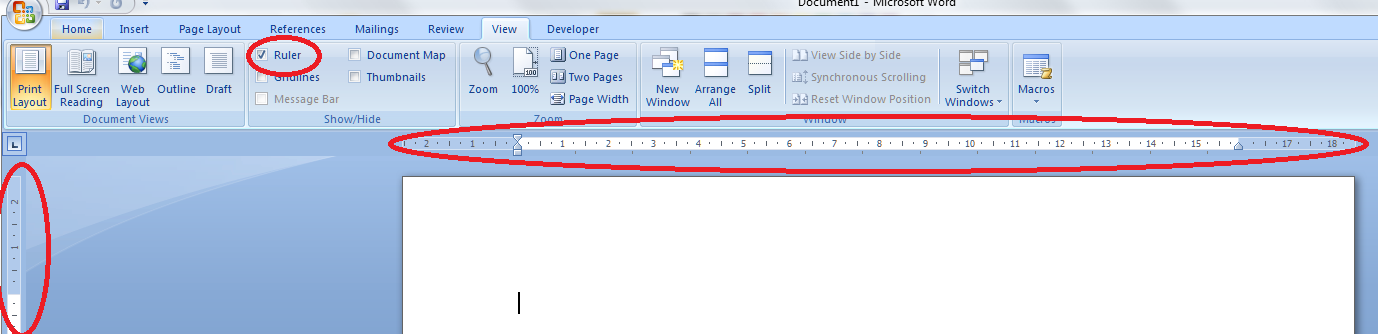
First of all, we need to check we can actually see the rulers at the top and side of the page.  Can you see a ruler at the top? If not, click on the view tab at the top of the page. See where it says ruler? Click on the box next to that so a tick appears:
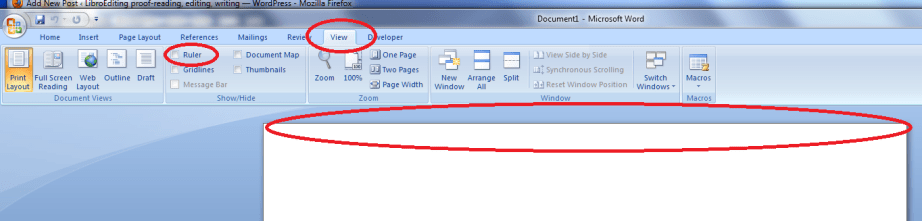
Once you’ve ticked the box, the two rulers should appear, like this:
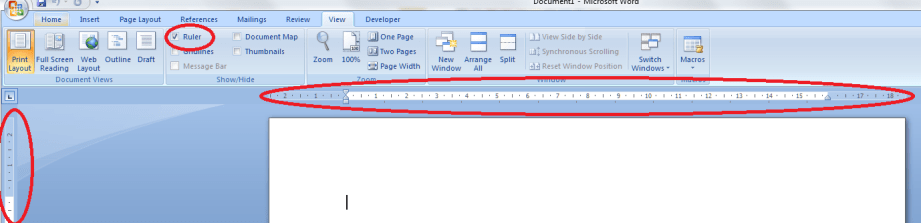
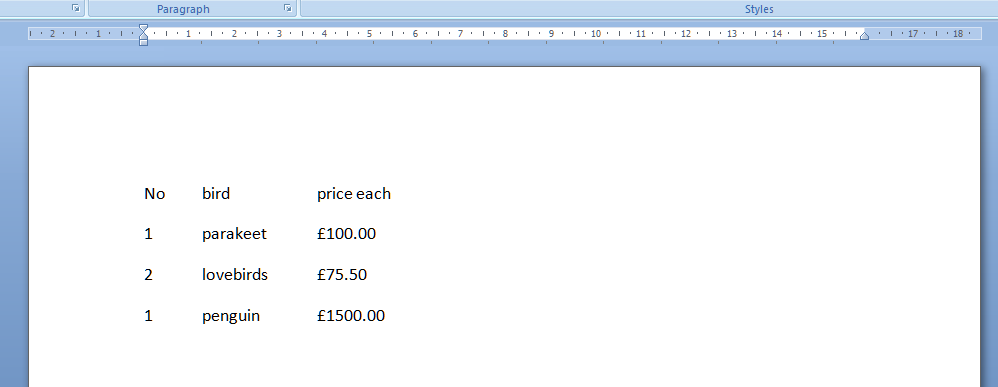
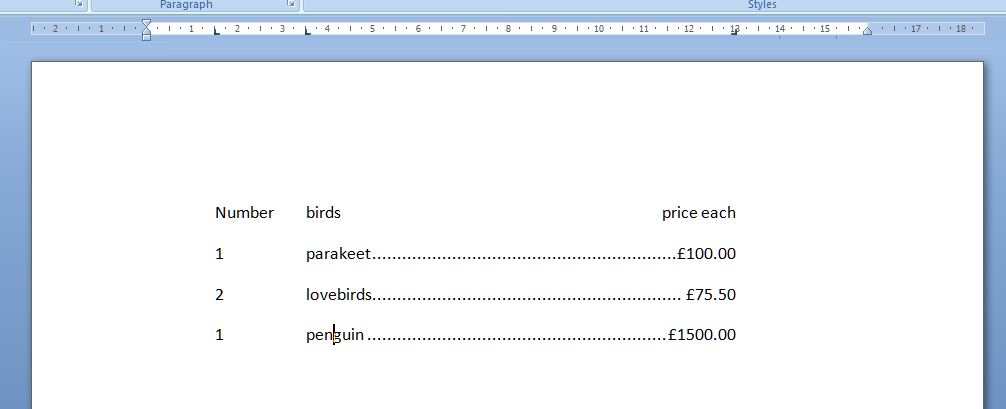
And we’re all ready to go. So, say we’ve got a little table of bird prices we want to lay out:
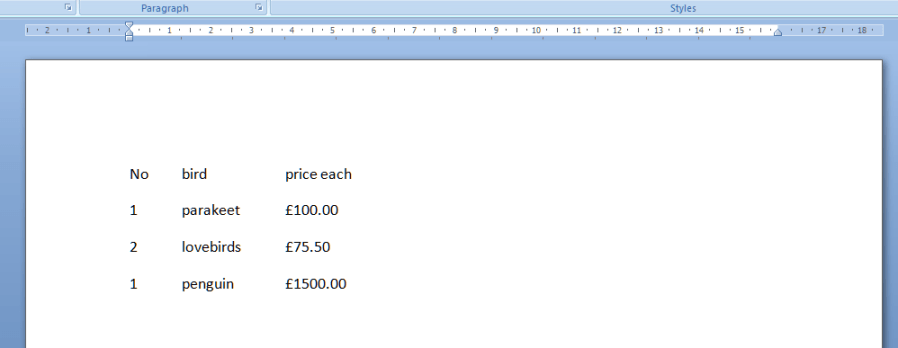
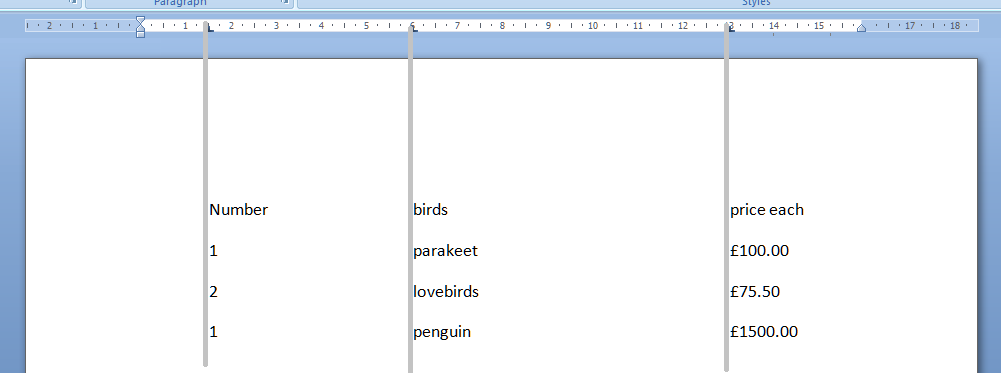
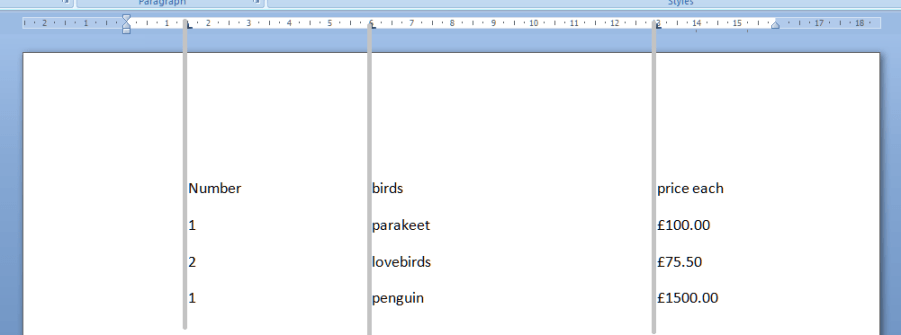
We can use the tab key to space across, but another way is to use the tab stops in the margin. Note that we need to highlight the text we want to apply tab stops to, or set up the tab stops before we type anything. Now, move the mouse pointer up to the top margin and click, just once, with the left mouse button, on the 1.5, 6 and 13 on the ruler. Just where the arrows are on the picture below. You’ll see a little L appear where you click. That’s L for left tab. Well, actually it shows which way the tab is facing, but we’ll come on to that later.

Now, when we type our text, using the tab key (remember, the one with 2 arrows on) will take us across to each of these tab positions that we have set up ourselves, rather than just going across by a set amount. The grey lines show how the text lines up with the tab stops we marked in the top ruler area.
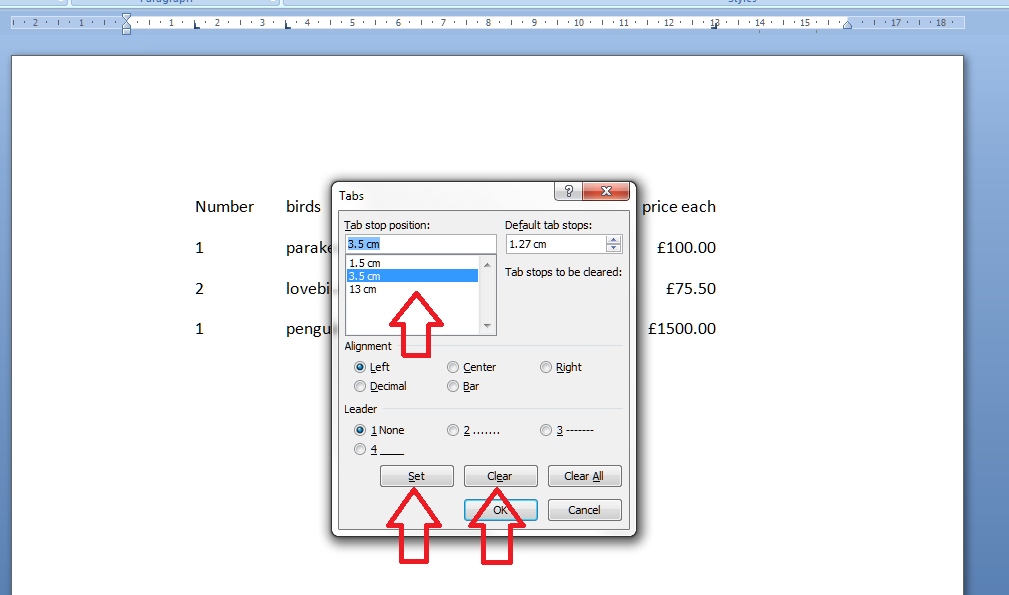
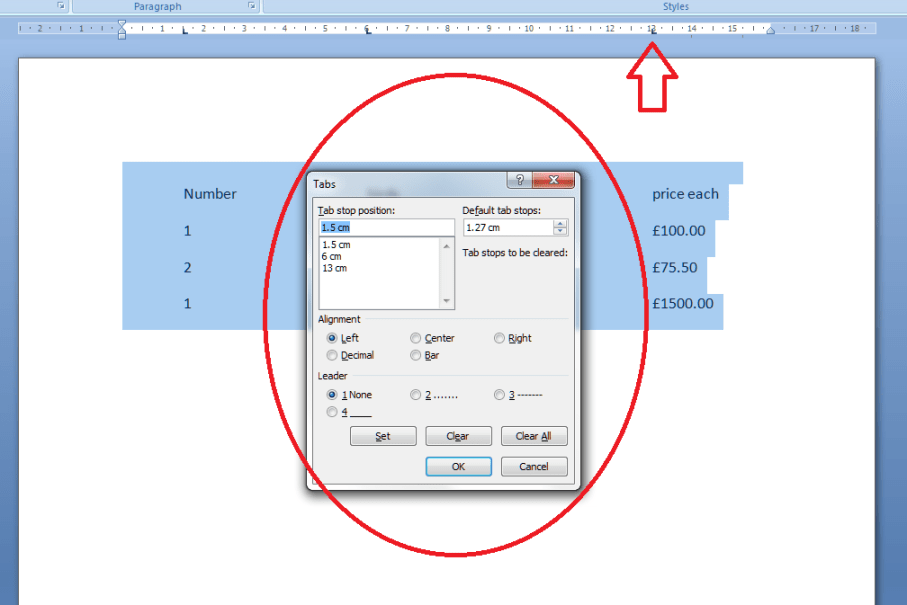
All well and good, but the prices don’t line up very neatly, do they. We can get around this, and mess around with the tab positions by highlighting the text we want to affect (remember to do this! And for this stage we want to highlight all the text so we move the column heading and the prices) and double clicking on any of the Ls we placed in the ruler. This brings up the tab dialogue box. Note: although you can click on any tab marker to bring this up, it automatically moves to working on the leftmost tab setting first, not the one you clicked on. So you can see one tab stop highlighted, and the other ones listed underneath. You can see that there are options to Clear or Set tabs. Set will set a new one at whatever position you want: if you add a third one between 6 and 13, all your text in the third column will jump across to match that. Clear will delete the tab position you have highlighted in the top box.
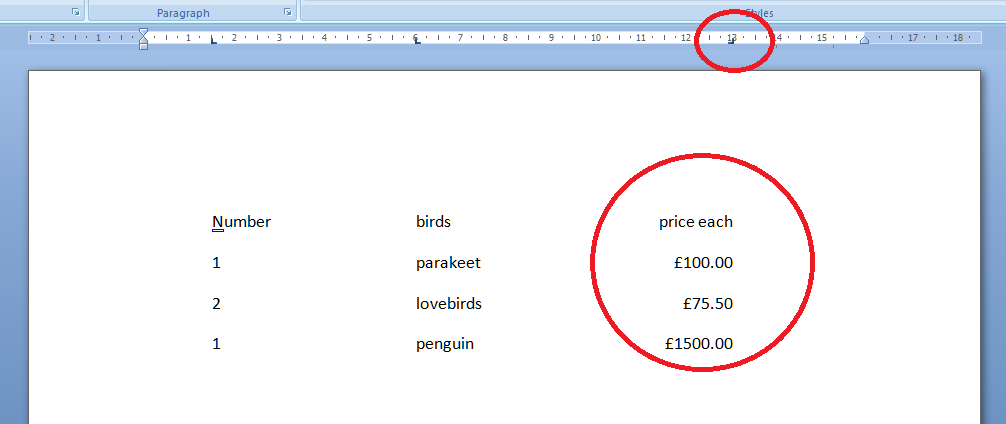
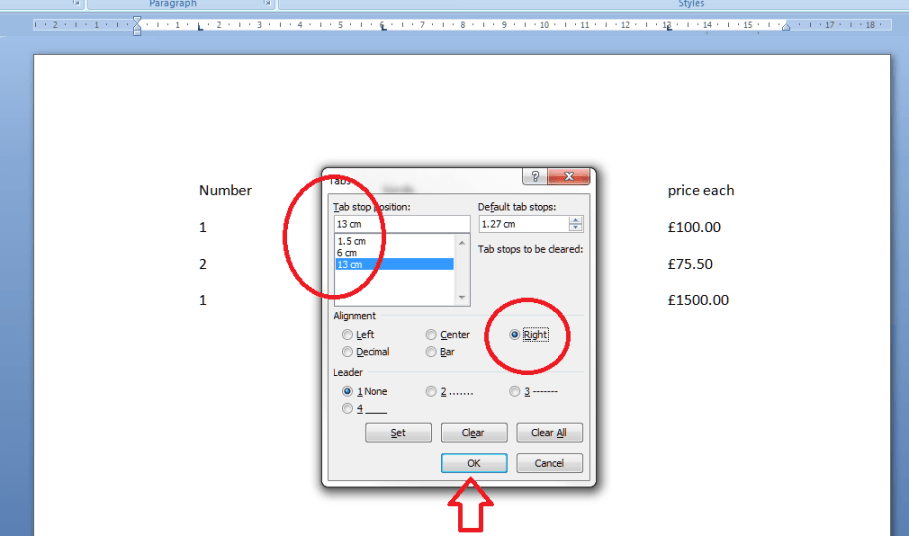
In order to line up those prices, we need to make the third tab a Right-handed one. This means the tab marker is at the right margin or, effectively, the end of the text you want to affect. So, click on the 13 in the box to bring that up as the active tab, click on the Right alignment radio button (circle).
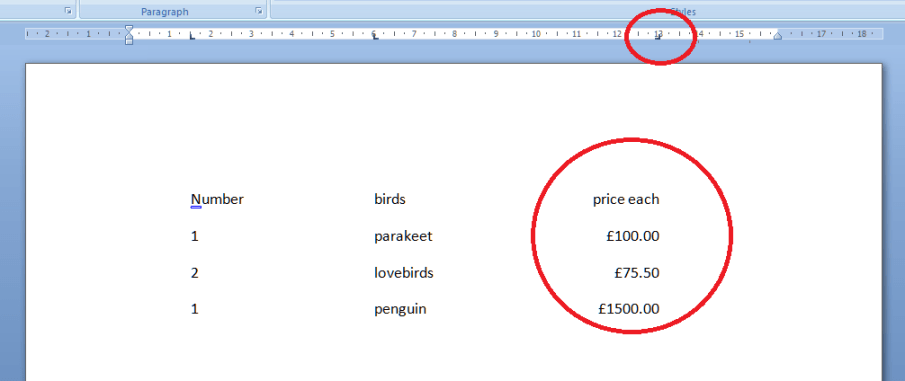
This will make the right hand side of the column line up: lovely tidy figures and heading! Look at the tab stop at 13. It’s now a backwards L, showing that it’s keeping everything tidy to the right, not the left.
But I think the bird names want to move over a bit. Simply highlight the text, bring up the dialogue box, highlight 6 and Clear, and click Set and add a tab stop at 3.5.
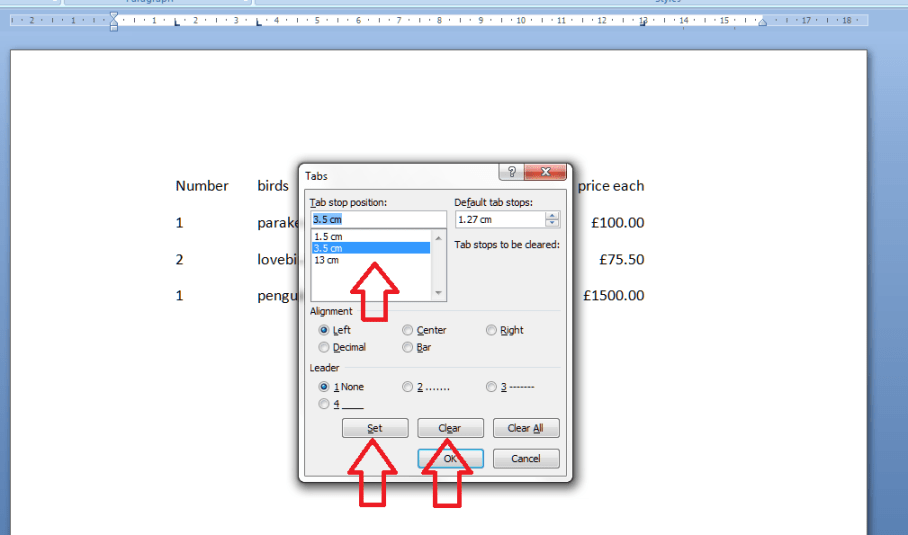
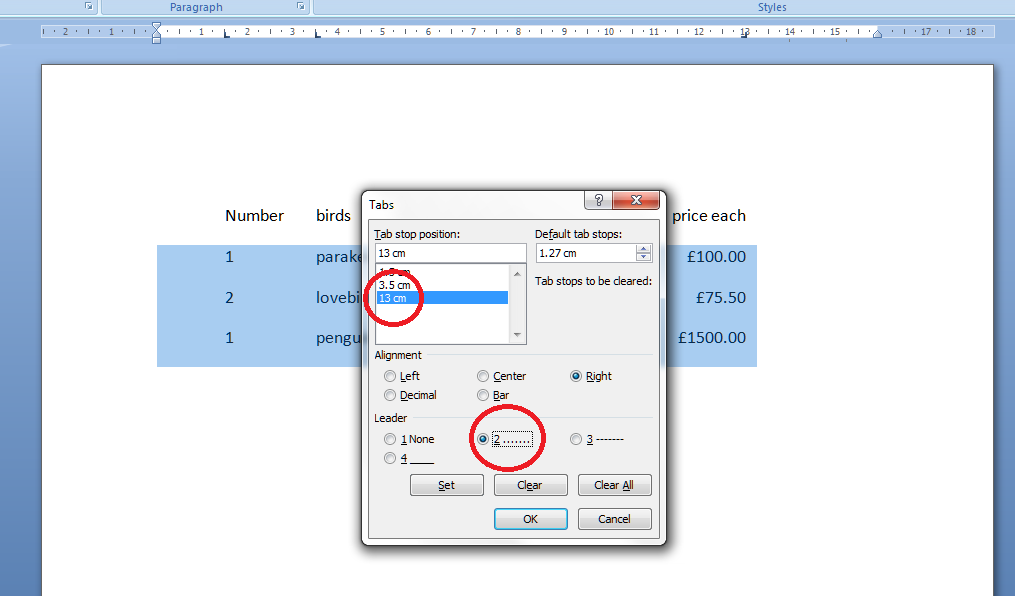
Now I fancy having a line of dots going from the name to the price. A bit odd in a list of bird prices, guaranteed, but if you want to do a quick table or a contents page (although I’ll be teaching you the proper way to do that automatically in a few weeks’ time) it works nicely and looks great. Highlight just the part that you want the dots to appear in and then double click on any of the tab stops. This time, select the 13 and choose the leader you require:
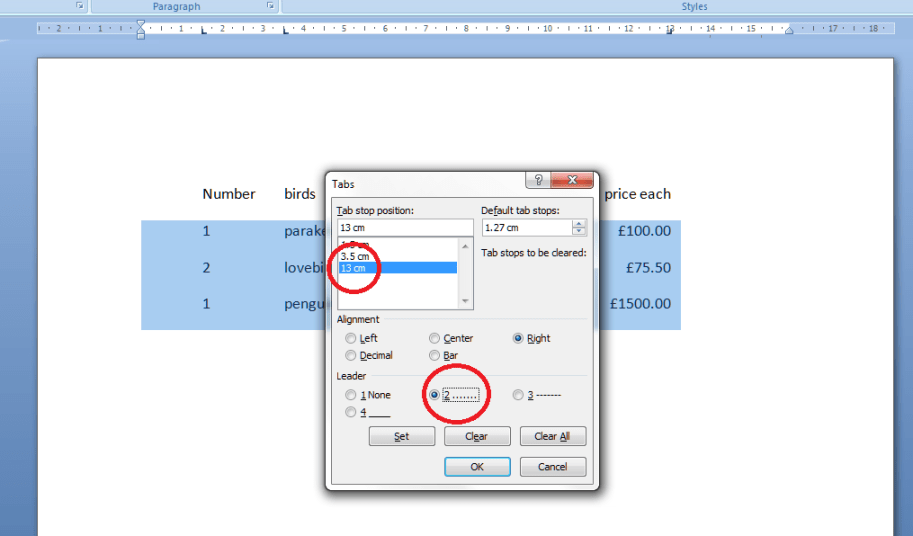
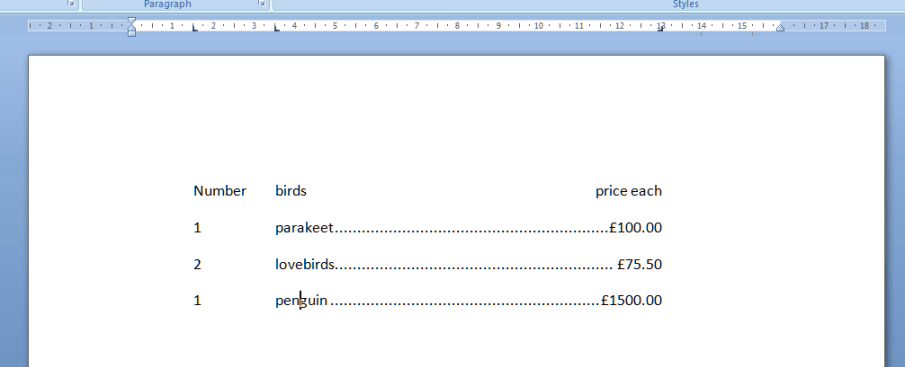
And there you go: lovely leaders between each bird name and its price. That looks tidier than scrappy columns made up of spaces and dots, now, doesn’t it!
Find my first introduction to tabs and using them to make your text nice and tidy and easy to navigate here.

Please note, these hints work with versions of Microsoft Word currently in use – Word 2003, Word 2007 and Word 2010, all for PC. Mac compatible versions of Word should have similar options. Always save a copy of your document before manipulating it. I bear no responsibility for any pickles you might get yourself into!

Find all the short cuts here

 
3 Comments

Posted by on January 19, 2012 in Copyediting, Errors, New skills, Short cuts, Word, Writing


Tags: , , , ,

Burglary or robbery?

This one is a bit delayed, as I remember all sorts of discussion about it around the time of the UK Riots in August 2011.  But it’s an interesting one, as things don’t always mean exactly what you think they do. So, burglary, robbery – and a little extra: theft.

Burglary is not, as people tend to think, stealing from a house. It actually refers very specifically to illegal entry into a building with the intent to commit a crime such as theft. This is why some of the rioters were convicted of burglary and people thought it was odd because it was a shop rather than a house that they were going in to. It’s similar to breaking and entering, which isn’t actually now a British legal term (according to the Concise Oxford – sue them, not me!) which is the crime of entering a building by force in order to commit burglary (remember, burglary just involves illegal entry, which doesn’t have to be forceful if, for example, you’ve stolen or copied a key).

Robbery is the action of stealing from a person or place, so you’d do a burglary in order to do a robbery, I suppose.

And our little bonus entry: theft is the action or crime of stealing.

Nice. Well, I was asked!

You can find more troublesome pairs here and the index to them all so far is here.

 
1 Comment

Posted by on January 16, 2012 in Errors, Language use, Troublesome pairs, Writing


Tags: , , ,

Refute or rebut?

Rebut and refute are a bit like confound and confuse – closely related but still subtly different meanings. I was at a translators’ meetup at the weekend (linked to a website/community I use to get proofreading and localisation jobs) and we were talking about how there are often 2 words in English for one concept (often one Anglo-Saxon and one Romance) and there are also subtle shades of meaning expressed by slightly different words, which would need longer phrases in other languages. Anyway: rebut or refute?

Rebut something is to claim or prove to be false. It comes from an archaic sense of driving back or repelling, which gives it a subtle difference from refute.  When you rebut something, it’s a rebuttal. I prefer that word to refutation, for some reason.  Rebut comes from Anglo-Norman …

… whereas refute comes direct from the Latin. To refute is to prove a statement or the person advancing it to be wrong.  So it’s more a discussion than a direct refusal and shoving back, which is what rebut feels like to me. Refute is often used nowadays in the sense of denying a statement or accusation. However, this use is not accepted by traditionalists – it’s marked as being “disp.” (disputed) in my New Hart’s Rules, so we won’t go there!

So, two similar words, two similar concepts, two slightly different emphases or shades of meaning. This is what keeps English rich and creative and keep these pairs alive!

You can find more troublesome pairs here and the index to them all so far is here.


Tags: , , ,

Themself or themselves?

They used to just be a plural word, referring to a number of people and having the standard reflexive form of themselves“There were many people in the queue. They were all told to help themselves from the buffet”.

But we are seeing more and more usage of they and them as a singular, to avoid clumsy uses of  he/she or him/her followed by himself/herself. Then, by extension from the him – himself or he – himself formation of the reflexive, people are starting to use themself as the reflexive. “If a child is confident, they may be able to help themself to water”.

This does seem to be sensible, and it’s something I think I’ve used myself (there’s another one!) in the past. However: no more! Because, having been asked about this via Twitter, I looked it up and found that actually themself is not regarded as “good English”. And we like good English on this blog, don’t we?

So the reflexive of singular they and them is themselves, and my above example should read: “If a child is confident, they may be able to help themselves to water”.

An easier one, I suppose, in that one is correct and one is incorrect – you don’t have to remember different usages, just not to use themself. Make that we don’t have to remember …

You can find more troublesome pairs here and the index to them all so far is here.

 
3 Comments

Posted by on January 13, 2012 in Errors, Language use, Troublesome pairs, Writing


Tags: , , ,

My short cuts – using Tabs effectively

As promised in my original post, I’m going to write some quick guides to things you do when you’re writing documents which you think are a short cut but actually cause more trouble than they’re worth.

The idea of this series isn’t to criticise people, just to show you how to do things in a more formal way which will actually make things easier for you in the long run, particularly when you’re dealing with longer or more complicated documents.

Today we’re going to talk about using Tabs. Tabs seem to be something of a mystery, but there are easy ways to use both the tab button and tabs set in the top margin which will tidy up your document, make it easier to enter neat text in lovely columns, and reduce tension when you’re trying to line everything up.

Please note: these examples can look rather wide. I want them to be as near full-size as possible, so you can see exactly what I’m doing. If you’re looking at this post on a monitor, you should be able to scroll across to see the full image. If you’re viewing on a tablet, some of the screenshot may be cut off: hopefully you can see enough to get an idea of it, or you should be able to select the image to view it separately.

Let’s start off with using the Tab button. This is a button on your keyboard which should have two arrows on it, one facing one way and one the other. Got that? Good.

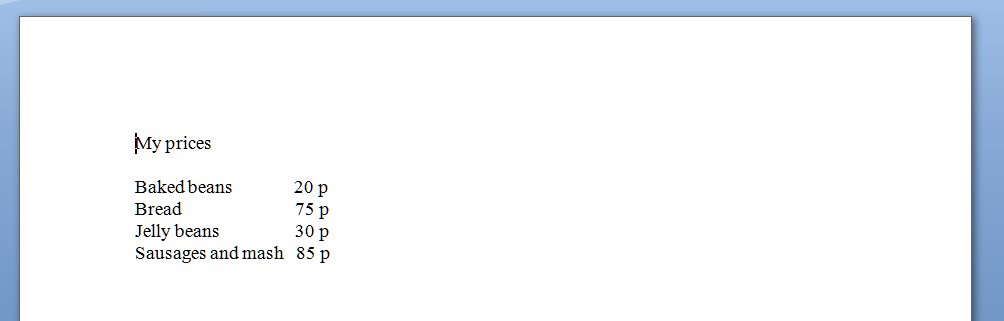
Here’s your common short cut, to start off with. You’ve got a menu you want to put on a document, with items in one column and prices in another. So you type it out, using the space bar to move along to the next column. And it looks like this:

But now you want to add another item and oh dear – it’s longer than all your other ones and puts it all out of alignment (because you’ve used the space bar to make the space between one column and the next):

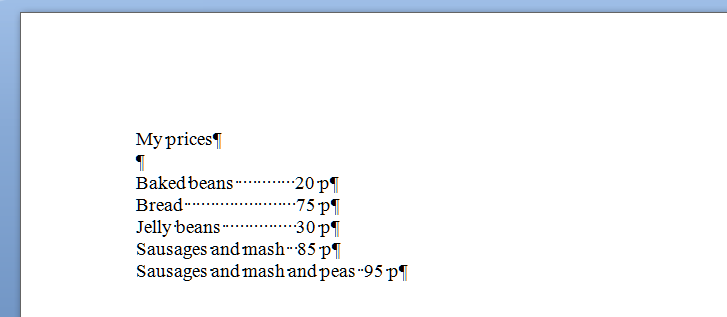
How do I know you’ve used the space bar? Because I’ve used that little paragraph button on Word again which shows us all the formatting, tabs, line returns, etc.

So the way you’ve achieved this spacing is by doing this (where dots are spaces and the things like a backward P are returns):

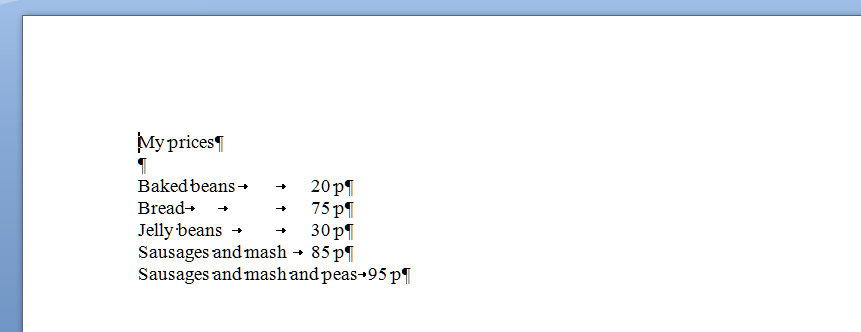
What you should have done (my short cut) instead of using space (your short cut) was to use the tab key (remember, the one with the two arrows) to space across to a set point along the horizontal ruler at the top of the screen. These tabs are represented by arrows when you’re viewing the markup:

Now, when you want to move the prices over for all the shorter items, you just need to insert one press of the tab key at the end of each item, to get them to line up perfectly.

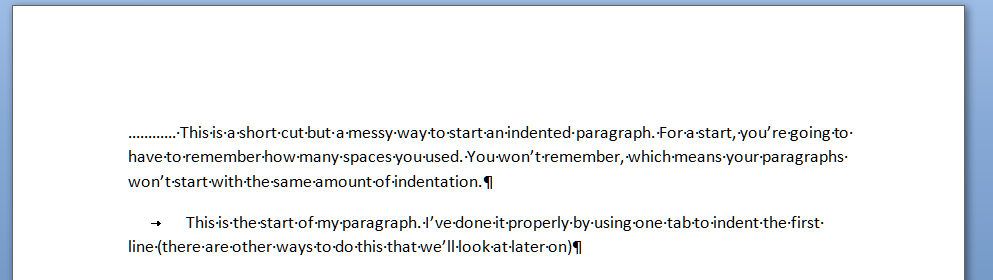
And here’s a last example. It’s very common to find people wanting to indent the first line of a paragraph, but using spaces to do so. This has its own issues – for example, you have to remember how many spaces you’ve put in and it’s likely that you’ll insert a different number each time, which will lead to indentations that don’t match. Instead, a simple press of the tab key at the beginning of your paragraph will leave everything nice and tidy

That’s enough for this session, I think. Of course, there are other ways you can format paragraphs and other indents, and you can set tab stops to wherever you want them to be across the page (and do all sorts of fancy kinds, too). But I’ll leave them for another post … (and I’ll link to them in this one when I publish them).

Please note, these hints work with versions of Microsoft Word currently in use – Word 2003, Word 2007 and Word 2010, all for PC. Mac compatible versions of Word should have similar options. Always save a copy of your document before manipulating it. I bear no responsibility for any pickles you might get yourself into!

Find all the short cuts here

 
8 Comments

Posted by on January 11, 2012 in Copyediting, Errors, New skills, Short cuts, Word, Writing


Tags: , , , ,