RSS

Tag Archives: business

Growing your business – employing staff and outsourcing (case studies)

Sneak preview of the image from my new bookOnce it’s time to grow your business, you will need to make a decision on whether to employ staff. Duncan Brown has given us the expert’s view on this topic, and now we’re going to hear from two people who have approached this in two very different – but equally successful – ways.

Nathalie Rush runs Six Star Group, which is an insulation business. She has been employing people right from the start, and has used a variety of different methods to find them, and gained a lot from employing people directly, although she does still use sub-contractors when needed.

Nathalie reports that in her line of business, job websites are cheaper to use than local newspapers, but she doesn’t think that tradespeople use the websites so much. Word of mouth has been quite successful. It’s important when advertising for staff to use the channels that the kind of people you’re looking for are likely to use, otherwise you’ll waste money on costly adverts when a word in the ear of the local university’s careers centre or just putting the word out that you’re looking for people might be just as effective.

Nathalie has found that one hands-on approach works really well for her:

Paying someone to work with you for a week’s experience can often be a good way of finding out their qualities. You’ll quickly know if you’ve got a rising star or not.

She has also developed a working relationship with a training centre in her industry, which she says is “proving to be a great way of finding hard-working, professional people”.

What is the advantage of having full-time employed staff for her business? “It means we can serve customers when we want and we don’t need to rely on sub-contractors”, although, as I mentioned, sub-contractors are brought in for the larger jobs. And she’s enthusiastic about the process, too. ”

It’s a joy to give someone a job. I get the biggest kick out of it and spend a lot of time training and motivating my team. After all, we are a business that sells a service and what good is that if the people can’t deliver what the company promises!

On the topic of sub-contractors, you do have to be careful when sub-contracting, especially if you’re in the construction industry. Nathalie explains: “Because of the line of business we’re in, I have to register every sub-contractor through the Construction Industry Scheme. This ensures everyone is taxed and it’s reported monthly to HMRC”.

And while she outsources the work on occasion, she is also careful not to take on too many admin tasks in-house that can be done by an external supplier: “Employing people comes in all shapes and sizes and it’s certainly handy to be able to outsource any paperwork you can that comes with running a business”.

What’s Nathalie learned from the process? As Duncan explained in his expert’s view, it is vitally important to outline all rights, roles and responsibilities up front. Nathalie says:

I’ve employed people in the past and it took me a while to work out exactly what the responsibilities of different roles should be. It’s clearer if you can explain the role, working times, use of mobile phones, holidays, etc. from the offset and not change things like this as it can be de-motivating.

John Ellery of John Ellery Consulting, a firm specialising in grant fundraising and grant making, has taken a different approach.

Six months on from setting up his business, he found that he was struggling to keep up with the work coming in from his clients and his growing to-do list, and it was clear that he needed some support. However, he was concerned about the sustainability of employing someone when his business was so new and he wasn’t yet able to predict the peaks and troughs:

Whilst the obvious option was to investigate employing someone my cash-flow situation would be very tight and whilst I had too much work at the moment who knew if this would still be the case in say three months time – last thing I would want as a new business is have an employee sitting around with no work to do.

His solution was to start using people who were happy to work on a freelance basis. To date, the work he has outsourced in this way has included admin support, consultants, marketing/sales and web design. Each time that he has started working with a freelancer, he has initially outsourced a single piece of work with no promises of on-going or future jobs. As he reports, “This has been extremely effective with the vast majority of freelancers I have used already very much used to this arrangement and were able to pick up my business, ethos and approach extremely quickly”, and he has continued to use this method of supporting his business and thus allowing it to expand.

How has he found freelancers? Mainly online, through Google searches and websites such as People Per Hour or Elance and even FiveSquid and Fiverr [the last two offer usually limited projects for £5 or $5; while this can lead to price undercutting, many reputable freelancers use them and ramp up the price to an acceptable and sustainable level for freelancer and client once a more complex project is in the offing].

The advantages are clear: being able to pick and choose, using people who are accustomed to this way of working and can mesh with the company’s objectives and style, and not having the overheads, legal issues and paperwork associated with employing staff. Are there any disadvantages? John says, “At times I have found that freelancers are not keen to show their work in progress and prefer to contact you when a job is completed. Whilst usually this hasn’t been an issue the occasional freelancer has produced a piece of work that was unsatisfactory and could have been easily addressed if the work was being done by an employee at the desk next to me”.

And does he recommend this method of using other people to expand your business?

Absolutely, however the secret is to find those tasks that can be outsourced. These may be tasks that you usually complete yourself, but by outsourcing these they will free up your hands.

So, two different ways of going about expanding your business through using the support of other people, whether using directly employed staff and officially registered sub-contractors or outsourcing to a series of freelancers. Both companies have profited from these methods, and it just goes to show that there is often more than one way to achieve your business aims.

Thank you to Nathalie and John for their input into this article.

Nathalie Rush Six Star Group – Twitter

John Ellery John Ellery ConsultingTwitterFacebook

———-

This post is part of my series on growing your business. Read more here and read about my own business journey in my book, Going It Alone At 40.

 
3 Comments

Posted by on January 30, 2014 in Business, Guest posts, Organisation


Tags: ,

How to set up a WordPress blog 2: adding pages to make it into a website

Following on from my posts about how important it is to have a website for your business and on setting up your WordPress blog (which you need to read before reading this if you’re a novice), in this article, I’m going to show you how to add pages to your WordPress blog to make it into a website.

This is what I did when I created this website that you’re reading this blog post on right now. I’m going to use my special test WordPress blog to show you what to do, and also the inside workings of this blog for the more complex aspects. Read on to find out how to set up web pages on your blog, and first of all, why you would do that.

What’s a WordPress page and why do I need them?

A page is a static, unchanging screenful of information, for example what you see when you go to my About page on this blog, or my page about my Business e-book on my writing blog. Where a blog post is written, published, moves down the blog page and is superseded by new blog posts, like a diary, a web page is fixed, stays the same and is visible whenever you visit its home. Where a blog is like a diary, a web page is like a passport photo or a lawn sign.

Why do you need one? Well, when someone reads your blog, they’re going to be bound to want to know something about you – that’s why pretty well all blogs have an About or Home page. And if you run a company, it’s advisable to put together a page, or a set of pages organised into some kind of structure, that tell readers about what you do, how you do it, what it costs, etc.

Website readers have a low attention span. They want to read a bit of stuff then move on. Many of them don’t even like scrolling down to see what’s lower down on the page. So a) they’re not going to want to search or scroll through your blog to look for information, and b) they don’t want everything on one web page. My website is quite wordy; imagine what it would be like if all that information you can access along the top menu bar was all on one page.

So, you’re convinced that you need at least an About page. You understand the difference between pages and posts (pages = static; posts = constantly updated diary type affair). Let’s find out how to set up a page on WordPress.

How do I set up a Page on WordPress?

You access Pages from the Dashboard (click on your blog name or the little house icon next to your blog name on your Stats page to reach it). Once in the Dashboard, go down to Pages, click, and choose All Pages. This allows you to see what pages are already there – and once you have some, you can edit them from here.

1 pages

Why have I gone here first rather than hitting the New Page option? Because every new WordPress blog has an About page set up already, to get you started.

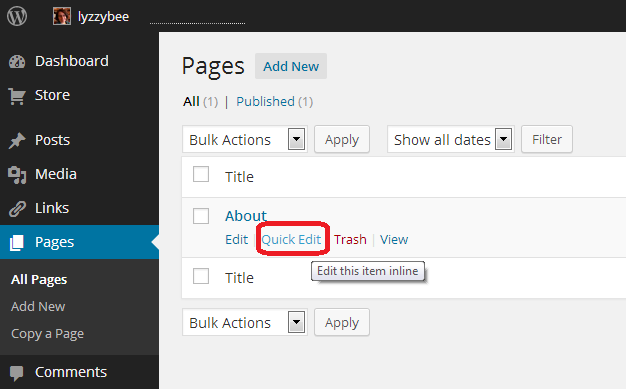
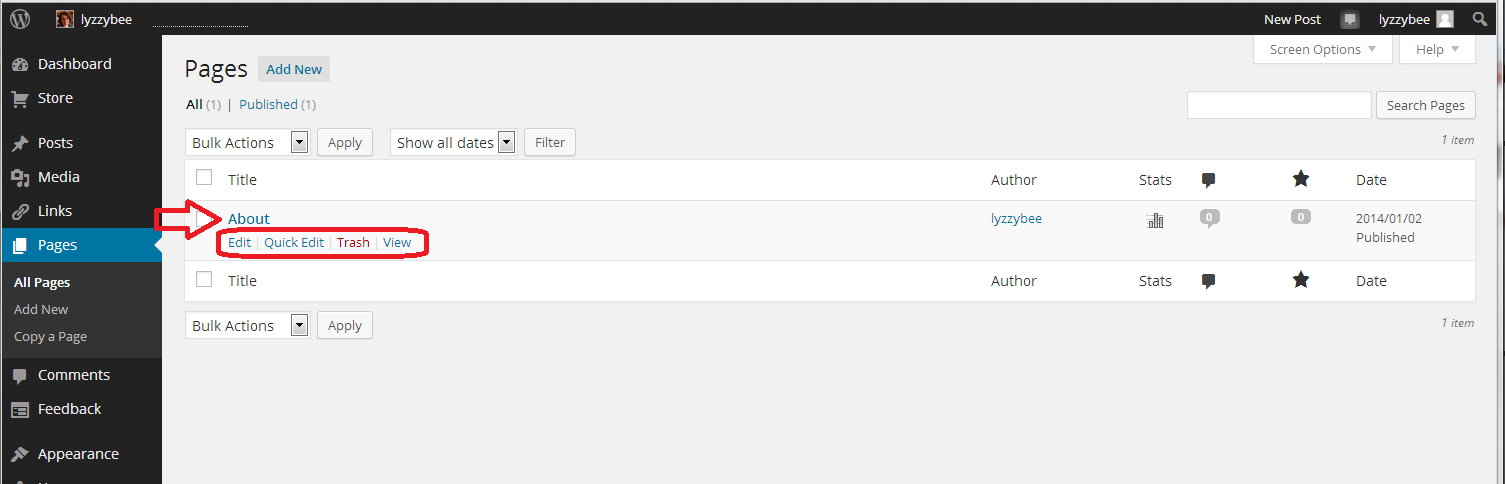
In the All Pages view, you can see all of the pages that you have set up, and hovering over the page title with your cursor allows you to Edit, Quick Edit, Trash or View them. Here, we’re going to Edit

2 about

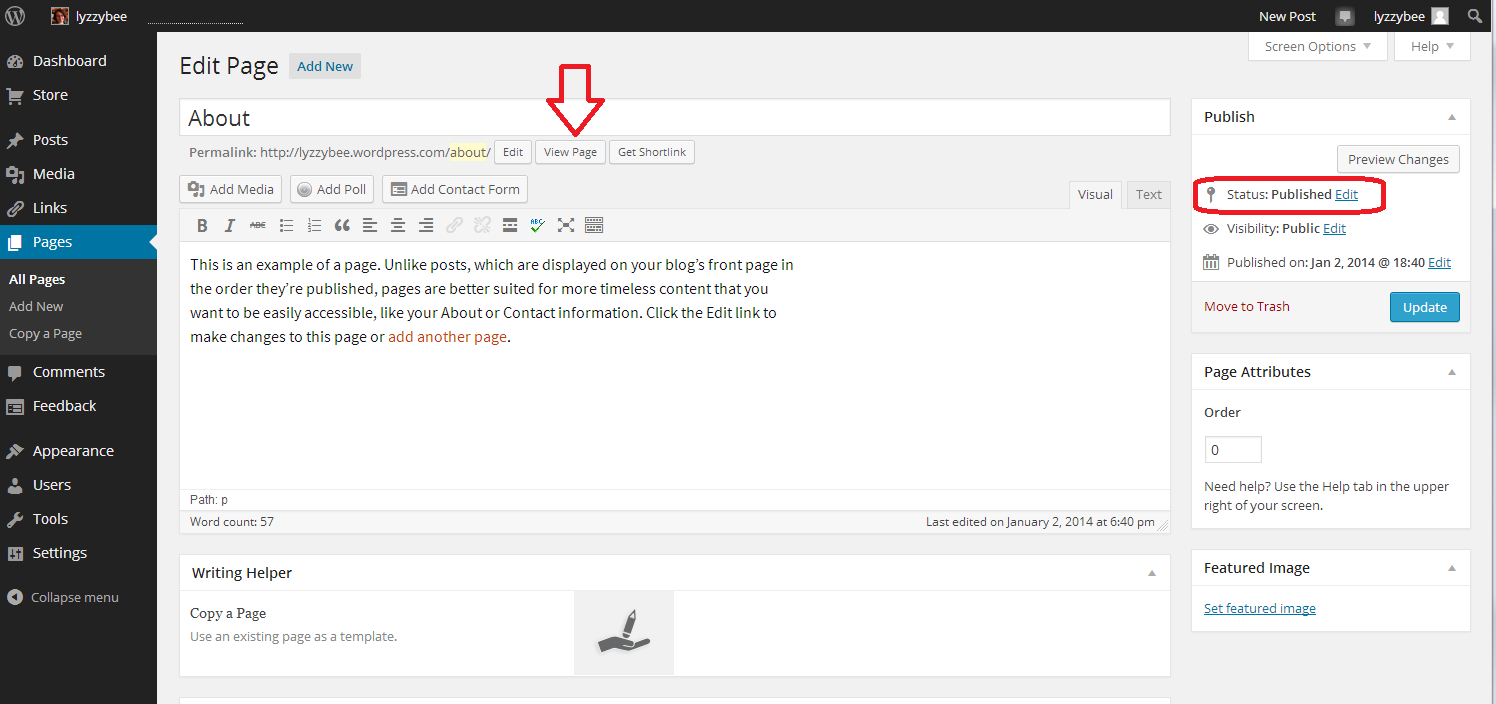
When you click Edit, you’ll arrive at a screen which looks very like the one that you use to create a new blog post. However, it has Edit Page at the top, and some Page Attributes to the side.

You can see that you have a title area (which includes the word “About” and a text area, which also contains some text at the moment.This can all be edited and customised just how you want it.

You can also see here that the Status is showing as Published. That  means it’s live on the Internet for all to see …

3 about

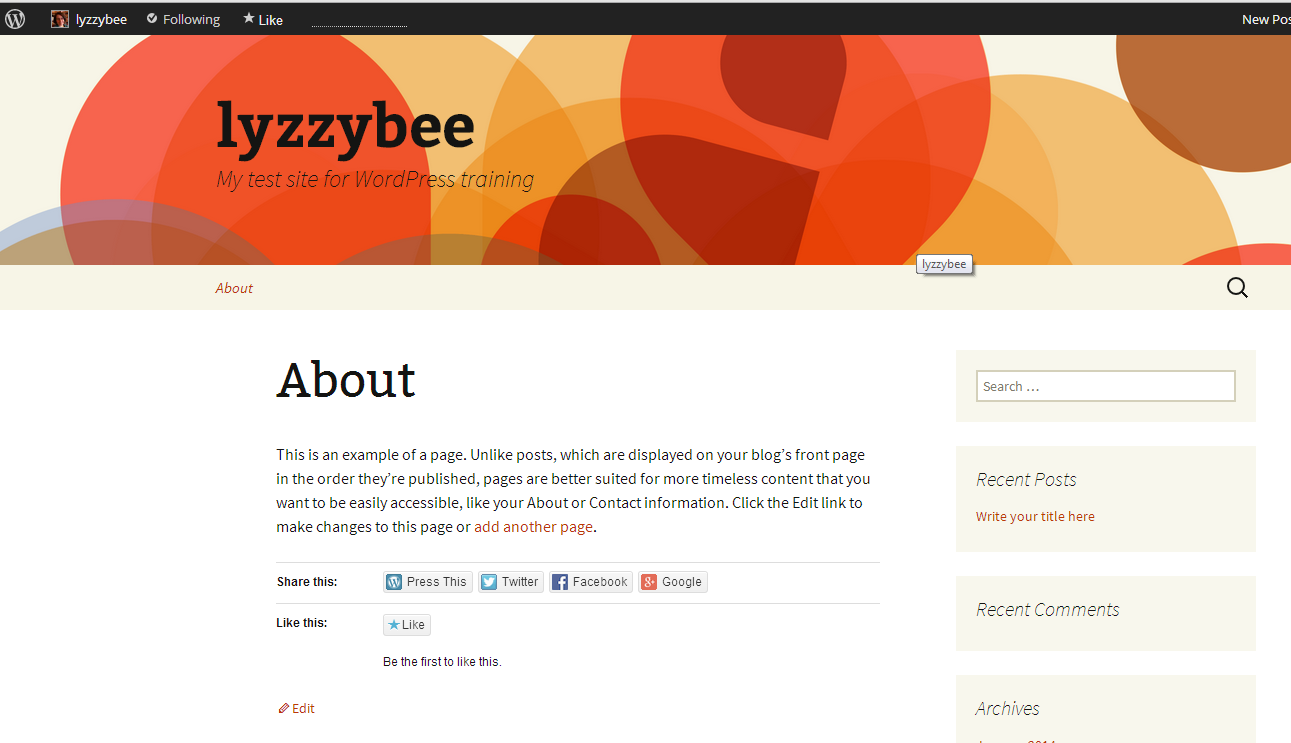
Want to see what this page looks like? Click on the View Page button just under the title …

4 about

This is likely to open in a new window – if it doesn’t, hit the back button on your browser to get back, or the Edit button at the bottom (or top, depending on your theme).

If you want to edit the text, which I do in this case, just delete the text that’s there and add some new. When you’ve edited it as you wish, hit the Update button to save. Then use the View Page button to have a look at the changes. Note: I’ve added hyperlinks here – here’s an article explaining how to do that

5 about

When you look at the page on the blog, there is all your new text, including the hyperlinks:

6 about

How do I set a web page to be my landing page / front page?

In some circumstances, you might want a static page to be the home page / landing page / front page that a visitor to your URL will always see. I do that with this website – whenever you go to www.libroediting.com, you will see my Home page. However, visit www.librofulltime.wordpress.com and you’ll see the latest blog post I’ve published, and you’ll need to click on the top menu to see a static page about you. It’s all about what you choose to do.

I’d recommend that if you are primarily blogging, with just one or two pages about you and your background, leave the landing page as the blog. If you’re promoting a company, product or service, and your blog is supporting that and driving visitors who you want to buy from you, choose to display a static web page when a visitor arrives.

Here’s how you tell WordPress to show visitors a page, not your latest blog post.

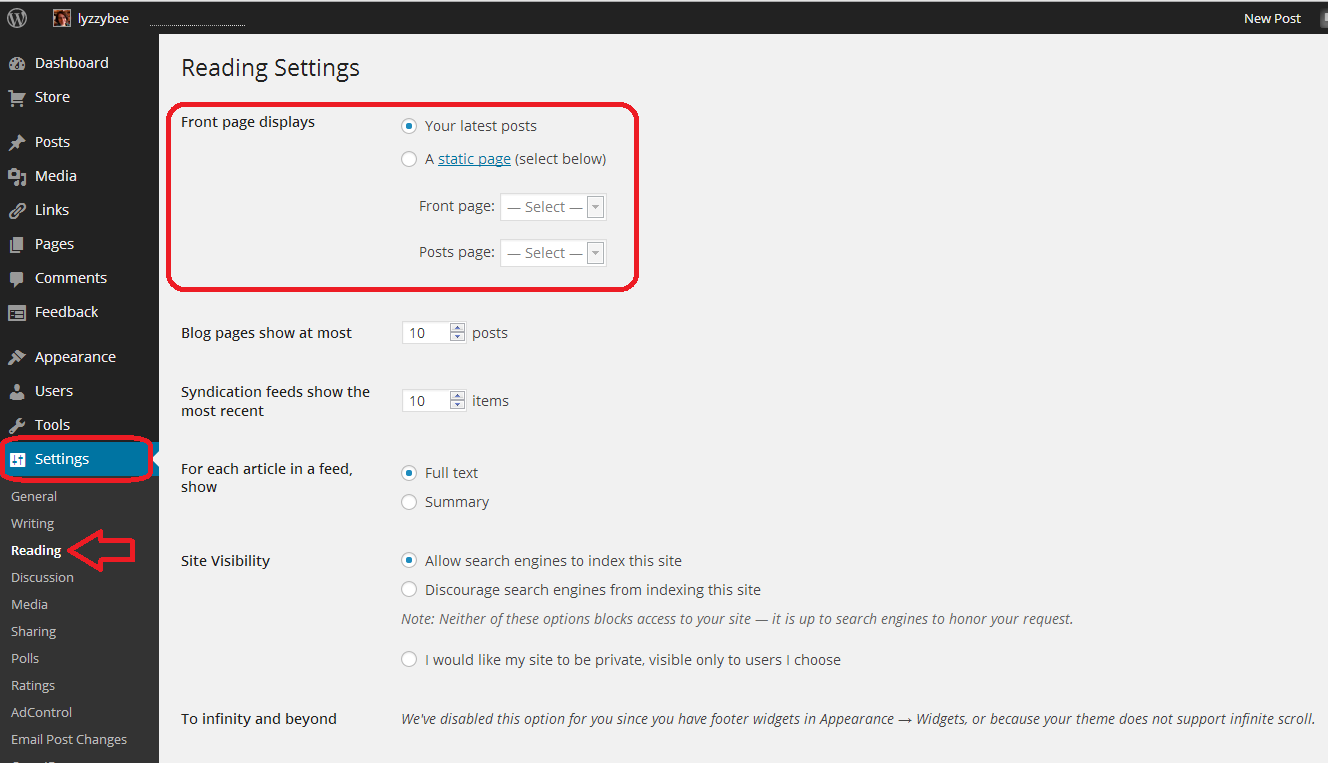
Go to the Dashboard, choose Settings, and then Reading. Right at the top of the page, you have a section entitled Front page displays. You have the choice of Your latest posts (i.e. your blog) or A static page. If you click on that radio button, you will be asked to choose a page to display.

7 set page as front page

I have chosen not to do that for this test website/blog, mainly so that I can change it if I’m training people face-to-face, but here’s how this Libroediting site is set up. I have chosen Libroediting as the front page, and Blog as the posts page. That means that any visitor will, as you’ve seen if you clicked the link above, see my Home page on their initial landing on the site.

8 set page as front page

How do I add a new Page to my WordPress website/blog?

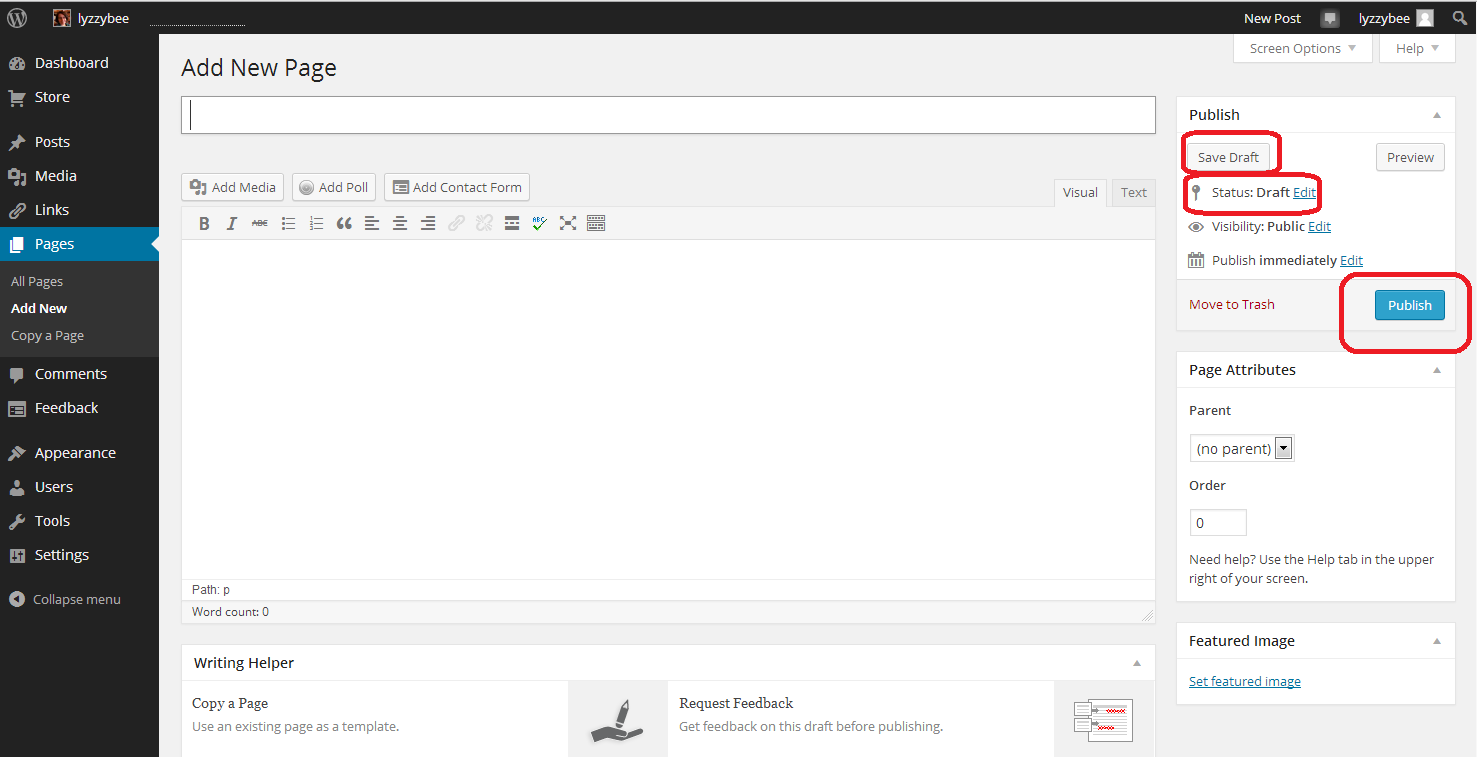
If you want to add a brand new page, revisit the Dashboard and choose Pages – Add New. Note, you can Copy a Page, too. This will give you an exact copy of a page you already have – more useful for posts, but if you have special formatting that you’ve set up, or you’re splitting the text on a page over several new pages, it’s worth doing that. Click on Add New

9 add new

… and you will find yourself in a completely blank editing page. Note that now the Status reads Draft, and you also have an option to Save Draft. Please press this very, very regularly, so you don’t lose your draft posts. When you’ve finished adding the text for your new page, hit the Publish button to make it live (or you can leave it in Draft form if you want to work on it further; just do remember to Save Draft).

10 add new

How do I view and edit my pages?

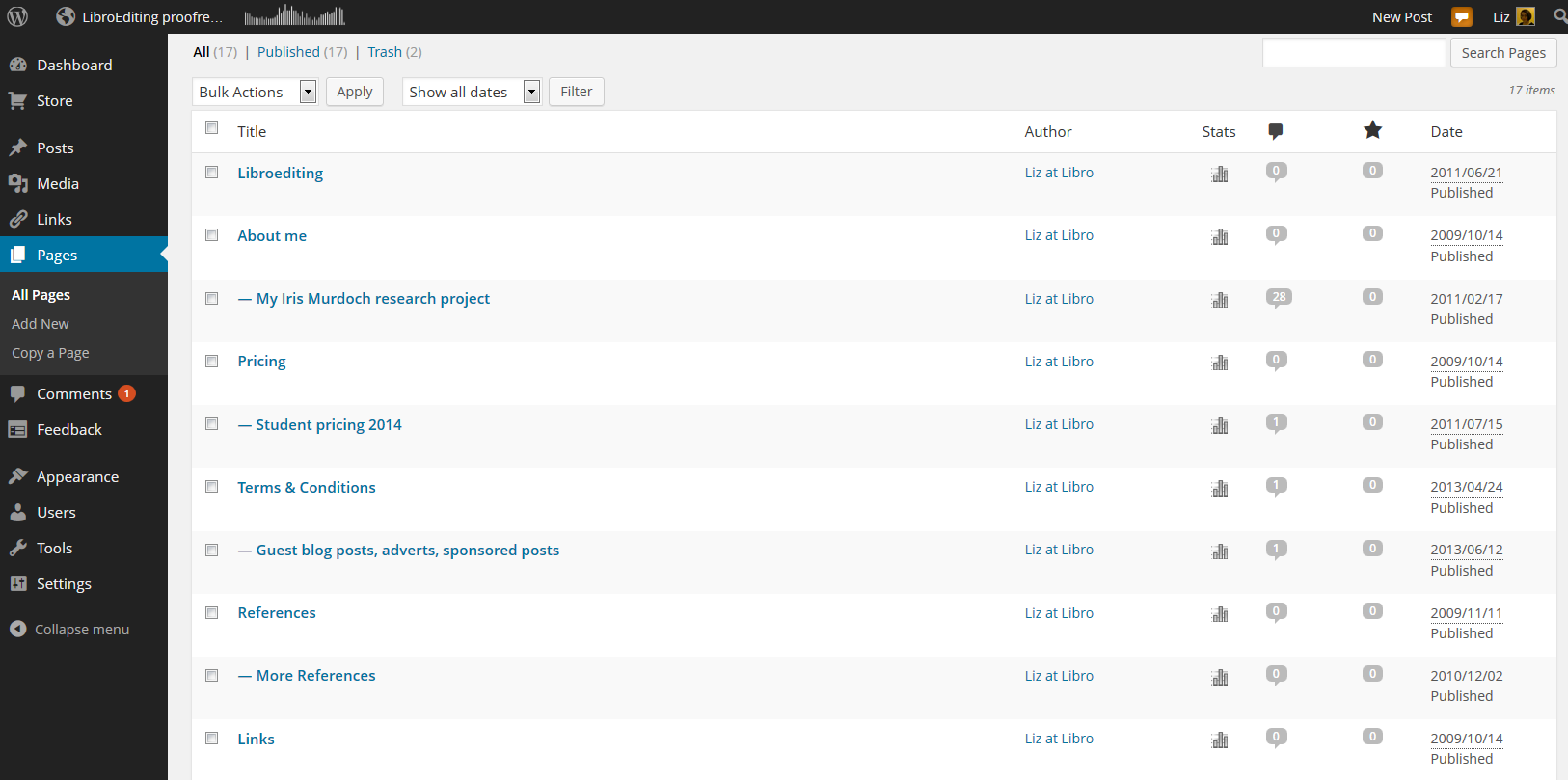
You can view all of your pages by going to the Dashboard and choosing Pages – All Pages. Here is part of my page list for this website. If you hover over any page title with the cursor, you’ll get the Edit / Quick Edit / Trash / View options to allow you to make any changes you want to. If you have any pages in Draft form, not yet published, you’ll see Draft next to All / Published / Trash and you can click to see all of your draft as opposed to published pages.

11 pages

Useful pages that I would recommend including on your business website are:

  • About me (with a photo)
  • Services
  • Prices
  • Testimonials / references
  • Contact me (with a contact form)
  • Blog
  • Links (links to colleagues and recommended websites – always kind to do)

How do I change the order in which my pages appear? How do I create sub-pages?

It’s good to be able to control what order that top menu and any side menus appear in. As you get more pages published, you might find there are too many for the menu to display, and it starts to look a bit messy. You might want to arrange pages in sub-categories, under other main pages.

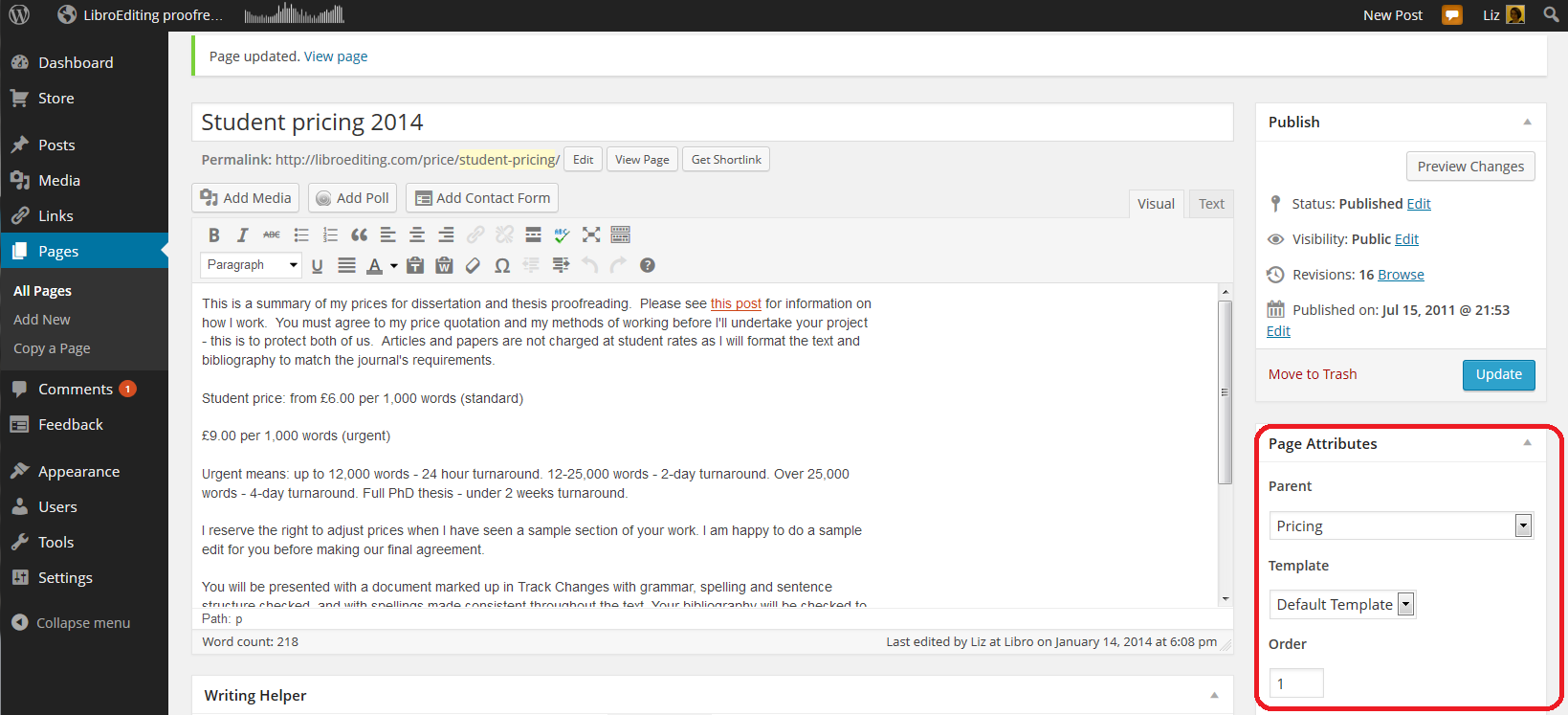
The place to do this is in the Edit screen for your page (click on Edit when viewing the page or select Dashboard – Pages – All Pages and click on Edit for the particular page). You will notice a section called Page Attributes. Here, we’re looking at my Student pricing 2014 page, which is a sub-page of my Pricing page. Note that I’ve chosen a Parent page from the drop-down menu of all of my pages. When you’ve completed all changes, press Update to save them. You can also choose the order … see below …

12 sub pages

It’s nice to have your landing page on the left and your About me quite prominent, with other pages such as Links down the order a little. That same Page Attributes area allows you to choose a number to define the order the pages appear in on your menus. Here, I’m giving my Links page number 6. I press Update and view the page …

13 page order

Looking at the page itself, you can see that the page name is number six in the list of pages along the top!

14 page order

Note: not all designs of WordPress blog have the menus automatically along the top. But they should appear at the top or down the side. Play with the choice of design if it’s not where you want it to be, or add a menu to the side bar, which we will learn about another day.

How do I do a quick edit?

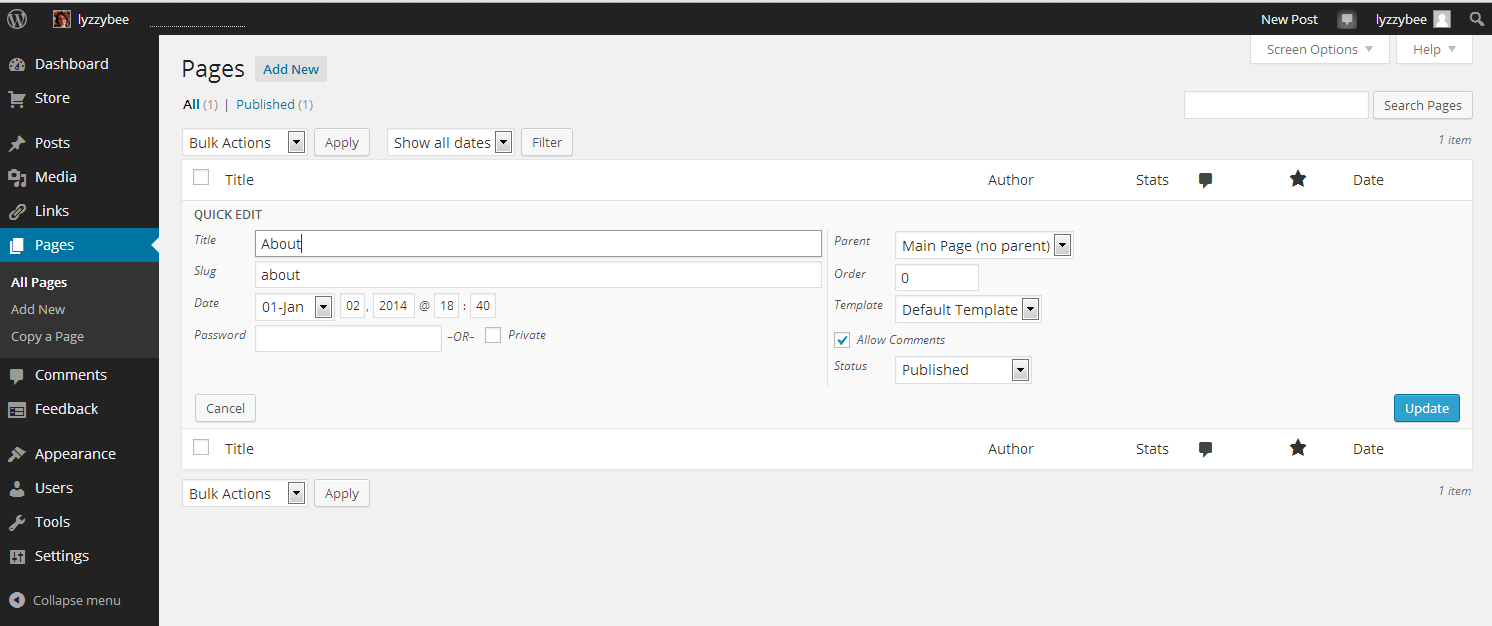
If you just want to change the title, page order or other attributes for a particular page, view All Pages, hover over the page title and choose Quick Edit.

15 quick edit

You will get a limited number of options, but this can be a quick way to do an update. Click Update to save.

16 quick edit

In this article, we’ve learned how to add web pages to a WordPress blog to make it into a website, using WordPress.com hosted by WordPress itself. These basic ideas should be the same on self-hosted WordPress sites.

I hope you have found this article useful. Please share using the share buttons below, or post a comment, and do please let me know if you use this article to help you to set up your own blog, and post a link below!

Related posts on this blog:

WordPress 1 – the basics – joining and setting up a blog

WordPress 3 – adding images to your post or page

WordPress 4 – adding slideshows and galleries of images

WordPress 5 – linking your blog to your social media

WordPress 6 – sharing buttons

WordPress 7 – adding an avatar picture

Is it worth having a website for my business? – the big question (and the answer’s Yes!)

Adding links to blog posts – how to do it on the major blogging platforms (and email)


Tags: , , ,

Is it worth having a website for my business?

websiteIn my networking adventures and other travels in the world of small business, I come across quite a few people who don’t have a website. To be honest, I’m a bit shocked when this happens. Unless you’ve got a constant set of clients, with new ones on the horizon to fill in any gaps if you lose one, then you’ll want to be findable.

When you think about getting the roof done, or finding a cleaner, or sourcing flowers for an event, or buying a product, where do you look?

Online.

Even if you look for a tradesperson on a Yellow Pages style website, I bet you like to have a URL to click through to, to look at their details. Right?

If you don’t have a website, even a single page with your name / company name and information about yourself, then what will people find when they search for you?

How do people search for companies, products or services?

People come to my website in one of four ways:

  • They search for my name
  • They search for my company name
  • They search for something that I do
  • They search for the answer to a question (“is it en route or on route?” “How do I repeat the header row of a Word document on every page?”)

This is what would happen if I didn’t have a website:

  • If they search for my name, they’ll find my Twitter or Facebook feed, or photos of me socially, or mention of me on forums. All fine, but they’d probably rather find either my Facebook or my company information in one place
  • If they search for my company name, they will find my Facebook or Twitter feed, however, those mention and feed back to my website, as they’re not enough in themselves to maintain interest and get me business
  • If they search for something that I do, they’ll find someone else’s website and if they’re looking for someone to do that work, they’ll hire that someone else
  • If they search for an answer to a question, someone else will answer it, and if they’re looking for someone to work for them, they’ll hire that someone else

This is what happens because I have a website:

  • If they search for my name, they’ll find my website and my other feeds, which all link together. They’ll find out what I do and if they want to talk about work, they can contact me
  • If they search for my company name, they’ll find my website, find out what I do, and possibly hire me, getting in touch via my contact form
  • If they search for something that I do, they’ll find my website, find out that I do that, find references from people who I’ve done that for before, and possibly hire me – getting in touch via my contact form
  • If they search for an answer to a question, if I can answer it, they’ll find out that I know what I’m talking about, and note me for later or sign up to receive emails when I post, and might hire me in time, or ask me a question or engage with my blog

The bare minimum

As a bare minimum, you should have a page somewhere that includes …

  • Your name
  • Your company name (if it’s different)
  • A list of your services or products – make sure that you mention all of the forms of the things you do on that page (so I would include transcriber, transcription services, editor, editing, etc.)
  • References from satisfied customers
  • A way to get in touch with you – a contact form, a phone number (most people like to see this), an email address
  • Professionally produced text – by which I really mean have someone check it for typos and spelling mistakes. Those will seriously undermine your reputation and send people running from your services – whatever they are

It’s a good idea to have your company name in the url for your website, but personally I don’t hold it against small companies if they have the word blogspot or wordpress in their URL – you don’t need to pay extra to have that if you don’t want to.

You can use a Facebook page as your company web page, however I would hesitate to ONLY use something that changes so often and is as unpredictable as Facebook. A company Facebook page is better than nothing, however!

Optional extras

You can add these extras if you want and if they add value. If you find that you’re getting a steady stream of enquiries via your simple website, and they turn into paying customers, then only add these items if you can see a clear value in doing so, rather than doing it out of vanity or because someone’s persuaded you to buy their service.

  • A URL that’s just your company name – you will have to pay for this, probably renewing annually
  • A professionally designed website – there are so many “themes” on offer that look as good as professional websites.
  • A blog – this is GREAT for driving people to your website and setting you up as an expert in your field. If you only do one of these things, write a simple blog
  • Someone to write web text and blog posts for you
  • Search Engine Optimisation – a professional can ensure that you’re showing up in the search engines etc. But shop around – this can be expensive and there are lots of things you can do to SEO your site on your own (just have a little search engine search and see what you can find)
  • A shopping cart and catalogue – very useful if you’re producing craft items or any tangibles – but you can sign up to services like Etsy and eBay which will do this for you

The big caveat

It’s really important to have a web presence so that people can find you.

It’s really important to be super-vigilant, because unscrupulous companies prey on small businesses’ lack of expertise in this area.

  • Always ask around fellow small business owners or someone whose website you admire and see who they use
  • If someone offers to make you top of the search engine results, ask what other sites they’ve worked on (always ask for references anyway) and do a search for yourself
  • If someone offers to revolutionise your website and make you a millionaire overnight, they’re probably over-selling. Ask for references
  • If someone offers to build your website make sure – no, MAKE SURE – that you will be able to edit and update the text and pictures on that website whenever you want to. Never hand over the full ownership of your site to another person such that you can’t update it yourself.

If you haven’t got a website, and you haven’t got a steady stream of new and regular customers giving you a good income stream, I really do suggest that you get a website!

Read more here about growing your business, have a look at my advice on blogging and social media, read about how to set up a WordPress blog and website (starting with this post) and read about my own business journey in my book, Going It Alone At 40.

Related posts

WordPress 2 – adding pages to create a website

 
11 Comments

Posted by on January 13, 2014 in Blogging, Business, New skills, Social media


Tags: , , , , , ,

Your transcription career: RSI, ergonomics and keyboards

mechanical keyboardWhen you’re a transcriber, you’re going to end up working at a desk for long periods of time, using a keyboard. This can lead to problems with your posture, and possibly to RSI.

There are loads of different arguments and positions with regard to the ideal workstation position. Here, I’m going to give a summary of what I’ve found to be good myself, and some of the ideas that are around, too. The best thing to do is:

BE AWARE – keep an eye on how you’re sitting, how you’re feeling, and any aches, pains or niggles.

Typing position

This is what suits me: the old-fashioned way I was taught at Pitman typing college back in the early 90s: back straight, knees at 90 degrees, feet flat on the floor or a footrest. Shoulders relaxed, elbows at 90 degrees, belly button a hand-span away from the front of the keyboard, hands hovering OVER the keyboard so your wrists are straight and your fingers drop down onto the keys. Eyes aligned with the top of the monitor.

However, recent research that I’ve seen has suggested that you should lean back in your chair rather than sitting upright. I’m an upright sitter anyway (years of pony riding as a child?) so I find this uncomfortable.

There is also a lot of talk about standing desks, and I have several colleagues who have adopted these to great effect. I did try this and it made my feet hurt and made me type less quickly, so I did abandon it, but it’s worth trying.

A note on laptops: laptop keyboards are really not suitable for large amounts of typing. They are very flat, even if propped up, and can really strain the hands and wrists. If you need to use a laptop as a computer, buy a plug-in keyboard to use in front of it.

Preventing RSI

The best ways to prevent RSI and other aches and pains are …

  • Be aware of any problems when they start
  • Be aware of your position at the desk (are you contorted or twisted? That’s never good)
  • Stretch and refocus every hour at least – move away from the desk, squat, stretch UP, stretch DOWN, walk up and down the stairs, do some squats
  • Exercise regularly outside the house – I find that a good rowing session at the gym helps ease those shoulders
  • If you get any suspicious pains, look at what you’re doing and see if you can change it
  • If you get a recurring pain, go to the doctor sooner rather than later

Your keyboard

Most people use the standard keyboard that came with their PC or Mac. That’s fine for everyday use, but you might find the standard shape uncomfortable to use at high speeds, and the standard keyboard mechanics might slow down your typing. Here are some ideas:

  • Try one of the “ergonomic” split keyboards. They’re split in half, with a hinge, so you can open or close them as you wish.
  • Try using an alternative key assignation. The most famous is “DVORAK” and you can read its Wikipedia entry here. This assigns different letters to different keys, and is supposed to help with RSI issues by balancing how you type (we all know that the standard QWERTY keyboard was designed thus to stop the mechanics of the typewriter getting caught up with each other by putting commonly used pairs of letters in particular positions).
  • Try using a mechanical keyboard. Standard keyboards have a membrane under the keys which transmits the keystrokes to the switches. Their technology means that you have to press each key right down to get the connection and produce the letter. But mechanical keyboards have one individual mechanism and switch per key. You don’t have to press them all the way down to produce the letter. They are much more responsive and you can type more quickly on them, and they apparently last a lot longer – but they are expensive I found a really good article about them here.

I’ve recently invested in a mechanical keyboard. Once I got used to it, it’s very comfortable, and I think that I’m typing more quickly and more accurately, although I’ll only be able to judge when I have some big, long files to transcribe.

A note on keyboard labels: If you type a lot, you will notice that the letter labels wear off your keys, especially the most heavily used ones. This seems fine if you’re a touch typist anyway (and has the added benefit of really annoying anyone else who tries to use your workstation) but is irritating if you have to look down to type in passwords, etc.

The problem arises because most keyboards have the letters and numbers applied via transfer, which can wear off. You can get keyboards where the letter is actually moulded through each key, like a stick of rock. Wear your key down all you like, and the letter will still be there. Something worth looking into if you do wear off the letters on keyboards. You can even get light-up keyboards for when you want to type in the dark …

What’s best for you is best for you

I’d suggest having a play with different types of keyboard at an office or computer supplies shop, especially when it comes to the more expensive mechanical type keyboards. Whatever you feel comfortable with and doesn’t produce any aches or pains after a week of eight-hour days typing is what you should stick with, whether you’re standing on your head or using some kind of odd keyboard that you invented. RSI can ruin your career and your health, so do take it seriously.

———————

You can read more about transcription in these related posts.

Why you need a human to do your transcription

How do you start a career in transcription?

Being a professional transcriber – software to use to help

Ten top tips for transcribers

Or, if you want all of my transcription careers advice in one place, consider investing just £1  or the equivalent in my book on the subject: A Quick Guide to Your Career in Transcription.

 
7 Comments

Posted by on January 9, 2014 in Business, Transcription


Tags: ,

Growing your business – becoming a Limited Company

Sneak preview of the image from my new bookWhen you decide to grow your business, one of the popular ways to do it is to become a Limited Company (also known as incorporating your business). I’ve asked an expert to comment on this, in this case my accountant, Andrew Minsky, from Nyman Linden. Andrew got in touch with me via Twitter when I was looking for an accountant recommendation, although of course I checked out the company properly before signing up with them!

Andrew talks here about the pros and cons of going Limited, and what it means for your business and income. I’ll be posting some stories from people who’ve done this with their businesses – do get in touch if you have experiences to share on this. But for now, over to Andrew …

Should I incorporate my business? (become a Limited Company)

If you are in business, you typically have two options available to you – Self-employment (being a Sole Trader) or setting up a Limited Company.

Setting up as a sole trader is simplest, and if you are new to running a business, this can be advisable in the start-up phase, whilst you get used to the accounts and tax requirements. Furthermore, if you incur trading losses, these can be claimed against your other income (a Company can only claim against its income).

However, if you are looking to grow your business and/or are expecting profits over £35k annually, consider using a Limited Company. A typical business earning £35k profits would save around £2,500 in tax & NI as a Limited Company.

Advantages of a Limited Company arrangement

  • You can control the timing, amount and nature (i.e. dividends, salary) of your income.
  • There are numerous tax advantages, including but not limited to:
    • Assuming that you are not caught by the IR35 rules, you will remunerate yourself by drawing a small salary and draw the remainder of the profit from the Company as a dividend. These dividends do not attract National Insurance contributions, saving NIC.
    • the ability to split the company shares between a husband and wife, thus taking advantage of both people’s own personal tax allowance and basic rate band.
    • If you are earning at the high rate of tax (40%), the ability to leave the money in the Company, to be drawn at a later date at a lower tax rate. Higher rate taxpayers can save significant tax this way.
  • A Limited Company pays tax 9 months (and 1 day!) after the year-end, e.g. 31 March 2014 year end pays tax on 1 January 2015. A sole trader typically will pay their tax bill ‘on account’, so for a 30 April 2014 year-end, the tax will need to be paid on 31 January 2014 and 31 July 2014. So, a Company is better from a cash flow perspective.
  • As a limited company with a trading name you can appear more credible (from a marketing point of view) when applying for new assignments.
  • The Company is a separate legal entity to you and liability for debts is Limited to the issued Share Capital: you personally are not liable.

Disadvantages of a Limited Company arrangement

  • Increased administration of a Company, including the need to;
    • File Company annual returns (£13 online)
    • Prepare and file statutory accounts with Companies House and HMRC
    • File Company tax returns
    • File RTI Compliant payroll

This extra administration, however, will generally be carried out by your accountant.

How to register your Company

andrew minskyAndrew Minsky is a Partner at Nyman Linden Chartered Accountants, based in Barnet but operating across the country.

Andrew qualified as a Chartered Accountant (ACA) in 2008, whilst working at a top 10 international practice. His career began in audit, advising large public sector clients, before moving into a more commercially focussed due diligence role at another international practice.

However, Andrew’s real passion lies in helping small businesses, helping their owners with the ever more complex tax regime, and advising them on how to save tax. He has his own portfolio of clients and actively works to recruit more. He recently achieved the highly sought after PCG accredited accountant status. He is responsible for the firms’ social media outputs and networking activities, and has a keen involvement in the firm’s PR and marketing initiatives.

Andrew married his wife Gemma in 2008 (a week after qualifying!) and is the proud father to his son Asher, born in 2012.

Andrew is also an Arsenal fan (long-suffering), and plays football twice a week for local teams to keep fit.

If you would like to talk to Andrew about becoming your accountant, you can email him or call Nyman Linden on 020 8449 9708.

———-

This post is part of my series on growing your business. Read more here and read about my own business journey in my book, Going It Alone At 40.
 
1 Comment

Posted by on January 6, 2014 in Business, Guest posts, Organisation


Tags: ,

Searching for jobs on Twitter

I had planned a post on exactly how I would go about searching for freelance (or otherwise) jobs on Twitter, then ended up discussing the topic with another editor, who’s keep on working on cookery books. So, here comes a worked example of how to search for jobs on Twitter.

Why search for jobs on Twitter?

People talk a LOT on Twitter, and they also use it for information seeking purposes. How many times have you seen a friend or just someone you follow ask a question, or look for a recommendation? Especially if you’re a freelancer, people will throw a question out: “Does anyone know a good transcriber?” and other people will answer them. It’s brilliant if one of your own clients does this and gives your name (this happens quite regularly to me, so I promise that happens), but if not, as long as you’re not over pushy about it, there is no harm in tweeting to that person to tell them about your services.

Does searching for jobs on Twitter really work?

Yes. Yes it does. I can say that with certainty, because I know it does from experience. Here are just a couple of examples:

1. I ran my regular search (see below for how to do this) on “looking for proofreader”. I found a Tweet by a woman working in PR. I contacted her, she became a client, she took me with her when she joined a big agency, and when she left that agency, I ended up with them and her as clients.

2. A journalist I followed on Twitter posted the tweet “Can anyone help me with some transcription?” At the time, I didn’t offer transcription as a service, but I was a trained audio-typist. I got in touch, again, it went to email for the negotiations, and I ended up with that journalist as a long-term client. Plus, she recommended me (via Twitter and email) to other people, who also recommended me, and I ended up with a regular client base of music journalists.

So yes, it does work. Here’s how to do it.

First, make sure your profile represents you accurately

When you tweet to someone, the first thing they’re going to do is look at your profile. So make sure it includes:

  • Your photo
  • Your full name
  • Your company name
  • Your url
  • What you do

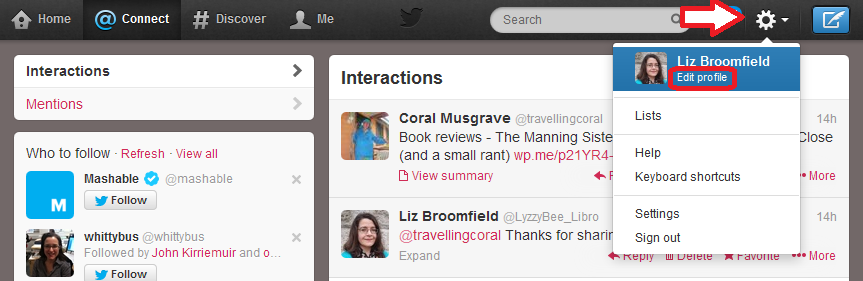
How do you change your Twitter profile? On the standard Twitter website, click on the Tools icon (the little cog) in the top right and drop it down to get Edit profile:

edit profile 1

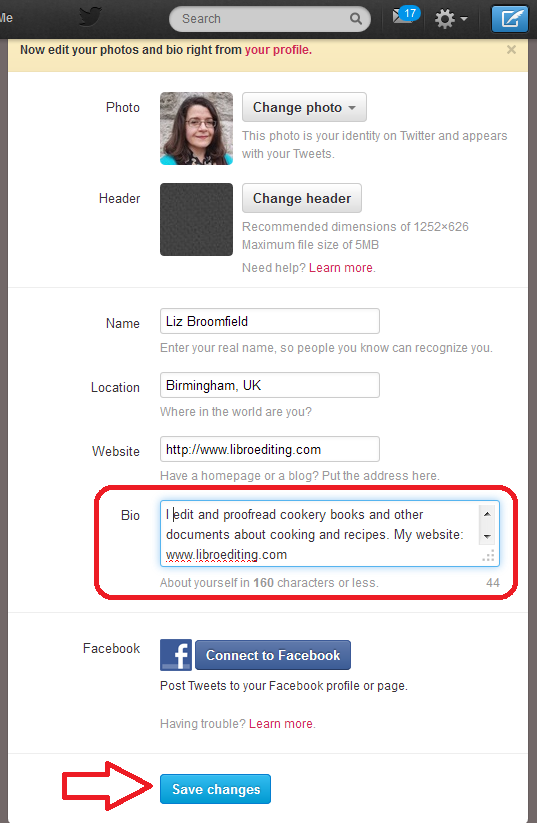
Now you have the option to change all of your details and your Bio(graphy). Make sure that you get all of your keywords in, press Save Changes at the bottom, and you’re reading to go and encourage people to look at it!

edit profile 2

How do I search in Twitter?

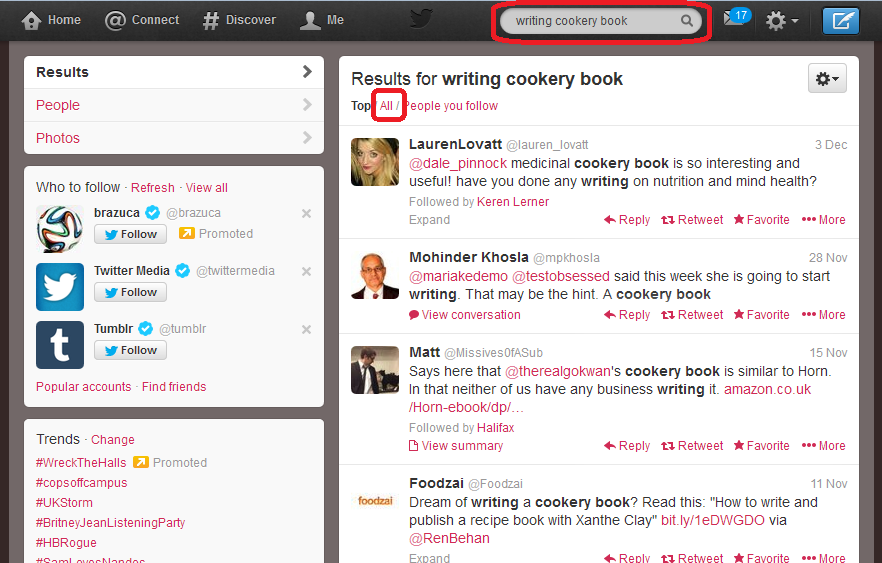
At the top of the screen, you will find a grey box with a magnifying glass icon in the right-hand end. You can type any words you want to search for in here and hit Return to run your search.

You do need to think about your search terms and what you think people who might be searching for a cookery book proofreader might need. Here, I’ve gone for “writing cookery book”, on the grounds that if someone is writing one, they are going to need editing help at some stage. So I input that, hit Return, and when the results come up, I choose All rather than Top or People you follow – to make the results list as wide as possible.

1 search

How do I interpret the Twitter search results?

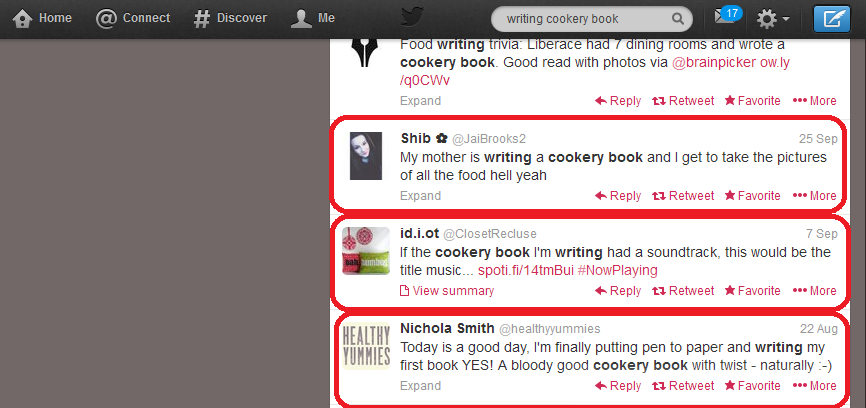
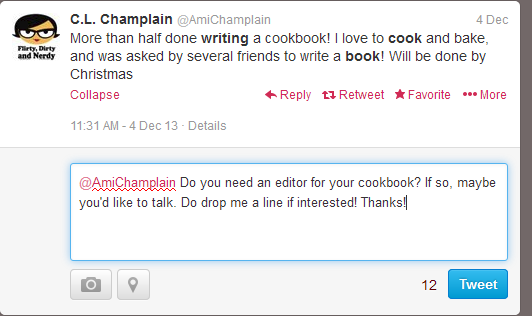
Bear in mind what you’re looking for: people who are writing cookery books and might need your help. Scan down the results list, and you’ll soon see some hopeful ones. I would send a quick note to all of the people I’ve circled, but not the one above, which just mentions a cookery book, not really associated with someone writing one right now:

2 results search

Advanced search in Twitter

Twitter searching doesn’t use wild cards, which means you can’t input cook* book and get it to search for cookery book, cook book, cooking book, etc. Once upon a time, you’d have to run searches for all the different words you wanted. But now you can run Advanced Search and search for lots of different things at the same time.

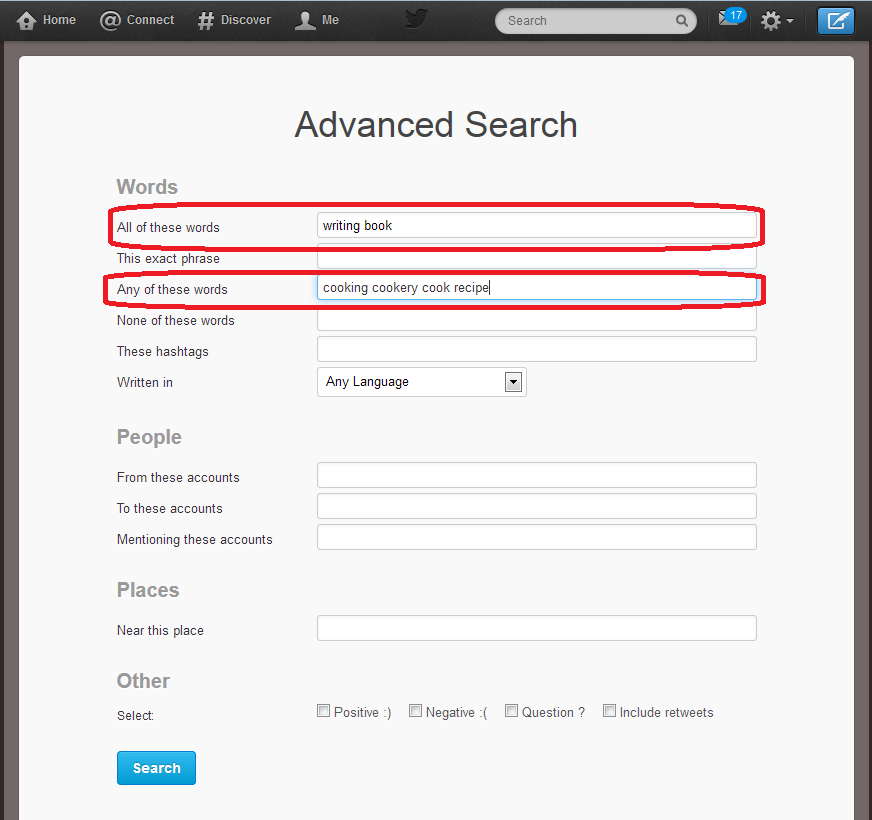
Click on the cog to the top right of your search results and drop it down. You’ll have an option to Save search (we’ll look at that later) and Advanced search will appear in the sidebar. Pick Advanced search and you’ll be taken to the Advanced Search input screen. Here you can handily choose words that must be included in the results, and words that could be included. So, here, I’m saying that all tweets that Twitter finds must include the words “writing book”, but they can also include any of “cooking”, “cookery”, “cook” and “recipe”. This means that it will look for “writing book” plus any one or more of the other words.

4 advanced search

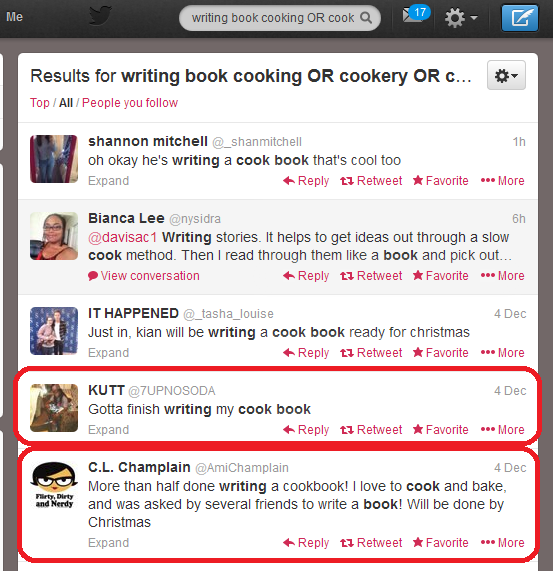
What effect does this have on the results? Well, we can see a few that aren’t really any use, but two from people writing cook books (circled). Result, and we’ll have more results doing this than for each of lots of different individual searches, all in one place.

5 advanced search results

(You can see that at the top of the search screen it’s written out your search as “Results for writing book cooking OR cookery OR cook…” and this means that it’s using the Boolean operators AND, OR (and NOT, if you want), so if you’re familiar with online searching, that’s what it’s doing.)

How do I save a Twitter search?

When you’ve found a good search that has a lot of useful results (no search will have ALL useful results, but this seems a good one), you can save the search. Click on the cog, drop it down and choose Save search:

6 save search results

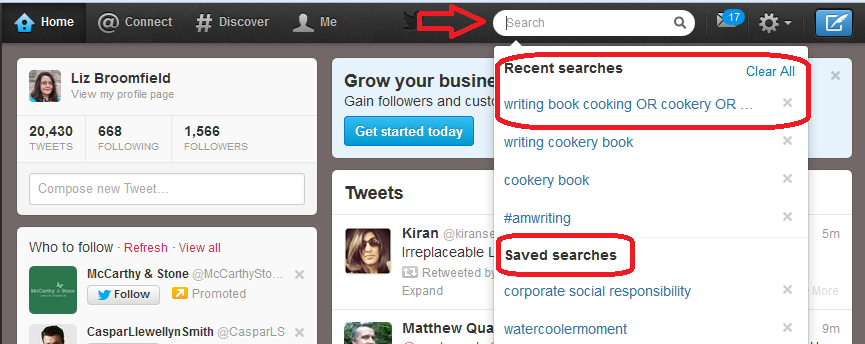
When you next click in the search field, you will get a list of Recent searches and Saved searches. Our search is in Recent searches at the moment, but will stay in Saved searches, now you’ve saved it.

7 saved search

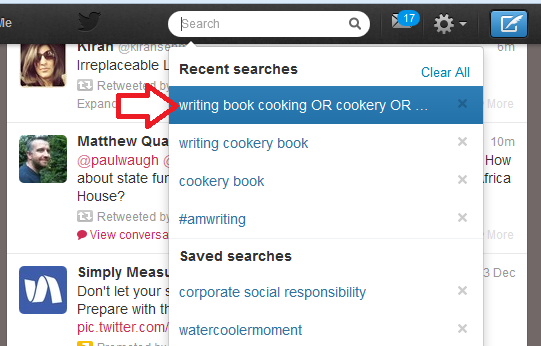
This means that you can just click on that search query rather than typing it all in again.

8 run saved search

How often should I re-run my Twitter job searches?

I recommend running each of your searches every 24 hours. This gives you only a few extra results each time, it’s easy to note where the ones that you’ve already seen start, and if you want to reply to a tweet, it’s not too long since the person tweeted it.

It might be worth running them more frequently at first, but keep an eye on how many new results come up during 24 hours and you’ll get an idea of the schedule to use. I wouldn’t leave it longer than 24 hours, for fear of missing out, as Twitter is a very immediate medium.

How do I pitch for a job on Twitter?

You might feel a bit uneasy about this. But I can promise you that no one minds one short, friendly and non-pushy contact in reply to a tweet they’ve sent out. I’ve sent loads, I’ve had a certain amount of success; some people have ignored me, but no one has ever complained.

Here’s a worked example of how I’d approach this situation as a proofreader looking for work on cookery books:

9 reply

So, a very non-pushy, friendly and polite tweet inviting them to respond. If they did respond positively, I’d very quickly move to giving them my website URL (even though it’s on my profile, I’d put it in a tweet) and initiate email contact so we could discuss the project in more detail.

———

So there we go: that’s how I searched for jobs on Twitter – and won them. My use of this network was a while ago now, but you know what? I still have both of those original clients who I talked about above!

If you enjoyed this post or found it useful, please do use the sharing buttons below and leave me a comment!

Related posts:

How do I get freelance work?

Reciprocity and social media

Karen Strunks on using Twitter in your business

 
16 Comments

Posted by on December 23, 2013 in Business, Jobs, New skills, proofreading, Social media


Tags: ,

How do I get freelance work?

This article shares some ways that I’ve found successful in getting proofreading, editing, localising and transcribing work. It’s applicable to all forms of freelance work but doesn’t look at getting a full-time employed job in publishing or for another large organisation.

It’s also worth noting here, in response to some of the early comments on here, that this is a suite of options and you wouldn’t expect to do them all at the same time. Once you’ve built up 1 and 2, you can pick and choose depending on what your career path is – and it’s important to indulge in some planning from the start. Thank you to my commenters for helping this to be a better and more useful post!

1. Make sure that you say what you do on your website

Many of your clients will come to you after doing a Google search. Remember: people will take the easy option. Why bother to search on lists and in directories if you can just stick a search in Google.

So it’s worth making sure that your website …

  • Includes a clear list of all of the services you offer
  • Includes a blog which is updated regularly – this really helps your position on the search results
  • Is Search Engine Optimised in general (there is an art to this, but make sure you include your keywords regularly, write lots of natural reading text and include keywords in page / post titles and headings)
  • Includes a picture of you and ways to contact you – a contact form is always good for this

Oh yes – do make sure that you HAVE a website. Even if it’s just one page, I really do think that in all industries, from carpentry to computer programming, people expect you to have some kind of web presence, and may well give up the search there and then if you don’t, even if you’ve been recommended by name by someone. I know that I do that when I’m looking for services …

2. Make sure that people know what you do

An awful lot of my early clients came through friends of friends and social networks. Obviously, don’t bombard your friends by begging them to refer you, but make sure the following are covered:

  • If you have a company Facebook page, include a list of your services
  • Include your services on your Twitter profile
  • Mention what you do on social networks every now and again (a good way to do this is to mention what you’ve BEEN doing “This month I’ve edited this, transcribed that and localised the other”.
  • Make sure peers in one area know you cover other areas, too (if you do), e.g. I make sure that my editing chums know that I transcribe as well
  • Consider setting up a newsletter and making sure you mention all of your services
  • Update your clients with any new services you’re offering

3. Join industry groups and publicise yourself through their directories

I gained early clients through being in a member directory associated with a copyeditors’ email list. Friends do well by being listed on the Society for Editors and Proofreaders’ website. My roofers are listed on a government-accredited tradespeople’s website. All of these are places where people will look for accredited and proved suppliers.

4. Advertise on general directories and websites

A hint: don’t bother with paid ones when there are so many free directories and websites!

Ask around your peers as to what they find useful. I am on Freeindex and get a few enquiries a month. Join as many as you want, but do make sure to update your profile if you change your services, fees, etc.

If you’re in a trade like roofing or plumbing, it’s worth looking at council and government approved listings and the paid directories, as people do search these first, but beware putting too much money in at first.

Again, for trades, local print directories and especially business association directories can be good. I have a free listing in our local business association one, which has never brought me any work, but I always try to find local tradespeople who are members, and other people will do this, too.

5. Use industry-specific freelancer sites

I’ve had a look at general websites like freelancer.com, elance.com and oDesk and personally, I don’t think they’re worth it. A lot of people on those will undercut and take any job at the lowest price possible. Many of the sites have “tests” which are actually a test of your understanding of the site itself, not your ability as a writer, editor or whatever.

*Edited to add: while I don’t find these useful, a couple of people have mentioned Elance to me as a good one to try that has got them decent jobs, so it’s worth looking at that.

However, there are industry-specific freelancer sites which are worth it. Again, ask your peers for recommendations. The one that’s got me the most work is proz.com, which is a site for translators where you can put up a profile and, if you pay for membership, that profile will be sent to people looking for freelancers, and they will contact you direct. This has paid back the membership fee for me tens of times over, because I work with translators into English, and offer localisation, which is related to translation.

You can also look for people looking for particular skills and freelancers and then pitch to them.

Take note, though: with anything you pay for, do assess each year whether you’ve got that fee back, and more. Only continue paying if you’re getting a good return on your investment!

6. Advertise (selectively)

I’m not a big fan of paying out for adverts. Most of the other methods I talk about here are free. But there might be specific advertising channels that will work for you.

When I was starting out, working as a proofreader on theses and dissertations, I put up some posters around the university where I worked, recruiting colleagues who were also students to put them up in common rooms, etc. (free, except for printing costs and a few coffees!) and I advertised in the university staff newsletter, which went to tutors and supervisors. The costs were low, even to non-staff, and I did get the money back.

As with using websites that you pay for, do check your return on investment and keep an eye on the outgoings.

7. Use social media proactively

This one particularly applies to Twitter, although LinkedIn can be used in this way, too. Search for people looking for your services on Twitter. Reach out to potential clients directly. I have got paid work using this method and, even better (see below), I’ve got clients who have gone on to be big recommenders this way, too.

No one minds one, polite Tweet if they’ve asked for recommendations for a good plasterer or translator and you fit the bill. Don’t hassle people and don’t blanket-tweet; do tailor your response to the person you’re contacting.

I’ve written a separate article on searching for freelance jobs on Twitter, with a worked example.

8. Seek recommendations and referrals from clients

The best way to get new clients is through word of mouth. The two main advantages?

  • It’s free!
  • If person A recommends you to person B, and person B gets in touch with you, they are far more likely to convert into a paying customer than someone who’s randomly got in touch with you through an ad or Google search.

You do need to be a bit proactive about this, though …

  • Make sure that your clients know you’re looking for more clients just like them
  • Say thank you whenever you find out someone’s recommended you
  • Ask clients for references to put on a reference page on your website (this makes enquirers more likely to use you as you come recommended by lots of people)

I have several clients who act as “nodes” for me, recommending me either individually or via blog posts and pages on their websites.

9. Seek recommendations from your peers

Your peers fall into two groups:

  • People who freelance or run small businesses like you, who you might meet in online groups or at networking events
  • People in the same industry as you, who you might meet in the same ways

It’s important not to see people in the same industry as you as competitors – you’re much better off considering one another as colleagues. When I was starting out, I was passed what turned out to be a major client by a proofreader friend who wanted to stop working at weekends and in the evenings. So I did evening and weekend cover for them. Now I’m established, I much prefer to be able to recommend potential clients who I can’t take on to another qualified person who I know will do a good job.

When you’re starting out, it’s worth forging (genuine) relationships with people in your industry who are more established. They may well have the odd customer they want to pass on, or have too much business and be looking for people to recommend on to. Nowadays, I pass quite a few people who I can’t accommodate on to a core set of five or so recommended proofreaders, writers and transcribers. I also keep a note of people in allied industries such as book design, graphic design in general and indexing, so I can pass people to them with a relevant recommendation, rather than just leaving them hanging.

You can also profit from either teaming up with peers in different industries – for example, I’ve worked with web designers on projects where they’ve written the website and I’ve provided the content, and I’ve done proofreading work for virtual assistants who don’t offer that service themselves.

I haven’t got many clients directly through networking, but I met an author at an event who went on to recommend my transcription services to a fellow author, who now uses me for transcription and editing, AND recommends me on her website!

10. Go cold calling and door-knocking

Some people do cold calling and door-knocking, where they literally call people on the phone or walk up their front paths and ask them for work. For a start, I don’t think that works in the service industry. I know some editors cold call publishing companies, and I’d love to know how that works out for them.

Personally, I feel this takes a LOT of investment. Cold calling requires a list, which takes time and research or money to get, and taking time out to walk up a lot of paths is a fairly hefty investment, too. It might be more worth looking at trade directories or local directories before you take this path – but do share your stories if you’ve had other experiences!

Edited to add: as people have kindly shared their experiences, I’m adding a note here to say that cold calling can be useful if you’re targeting a specific and maybe narrow group of clients. Fellow editors, for example, have gained work for publishing houses or journal publishers by taking this route. As my client base is more individuals and other small businesses and freelancers, this approach wouldn’t work for me. But if there’s a group of companies that you can identify as a good fit, by all means approach them with a call or letter, cold, as it were.

———————

How do you get freelance clients? Can you recommend any other ways, or do you use any of these? Do let me know whether you try any of these successfully as a result of reading this article!

Related posts of interest on this blog:

Thinking of going freelance (1) – some initial points to think about

Thinking of going freelance (2) – how to organise yourself once you’ve got going

How do I decide to who work with? – choosing companies to associate yourself with

How to turn a new customer into a regular customer

What’s the best mix of customers to have?

How to make more money in your freelance business

Searching for jobs on Twitter

When should I say no?

 
17 Comments

Posted by on December 16, 2013 in Business, Jobs, Organisation, Social media


Tags: , , ,

Growing your business – going full time (case study)

Sneak preview of the image from my new bookWhen you decide to grow your business, one of the first things you can do, if you’re not doing this already, is go full time. Sometimes this can feel a bit scary, but I can vouch for the fact that working on one job is always easier than trying to commit to two, and it can be a very liberating experience.

My fellow-proofreader/editor/transcriber, Laura Ripper, has kindly put together this guest post about her recent experience of going full time. Although we’re both in the same line of work, Laura’s experiences can be extended into other freelance careers very easily. Here she shares the process and her experiences as she went through it – a very useful piece indeed!

Why did I do it?

My main reason for going full time with my part-time business was that I knew that working for myself, and the work itself, would make me happy.

Working for myself part time was always a step towards doing the same thing full time, but that seemed a long way off when I first set up my editing and proofreading business in 2012. I’d worked as an editor at Plain English Campaign in the past, so I was confident in my ability to do the work. But I’d never worked for myself, and barely knew anyone who did, so going full time straight away was too frightening.

Once I got started, I enjoyed my two days a week on the business so much that I knew this was what I wanted to do. It was just a matter of when.

When did I do it (i.e. what stage was your business at?)

I had been working on the business part time for a year when I made the decision to go full time with it. Although I had the skills for the job when I went part time, I had no idea about what was involved in running a business. I spent that first year developing a strategy, building up a good network of colleagues, learning from others, setting up business processes and building up clients. I built a website, marketed myself, and joined professional groups and organisations like the Society for Editors and Proofreaders and ProZ. I read business books specific to my profession, like Louise Harnby’s Business Planning for Editorial Freelancers and Liz’s Going it Alone at 40. The advantage was that I could do this while still having a regular (lower) income.

By the time I went full time, the business was at the stage when I had started getting referrals through word of mouth and I had a few regular clients. I was beginning to have to turn down work because I couldn’t fit it around my other job, and I seemed to be working most weekends, too! I had quite a nice mix of clients, and also had built up good relationships with other freelancers who would pass me work when they were too busy. I had saved up enough money to bolster my income during the first few months of going full time, when I thought that I might need it most. I had the confidence that the work was out there and that my clients were happy with the service they were getting, and I had seen how work volumes changed over the course of a year.

How did you do it?

Making the decision to go full time was probably the most difficult part of the process – once I had done that, I just got on with it and did it!

I made a list of pros and cons, talked about it with people who had been there before me, spoke to my family and friends, and carefully worked out my finances to make sure that I was being realistic about whether I was ready to go full time. There is so much help out there to set up a full-time business successfully, from books and courses to forums and informal networks. I learned the most from other editors and proofreaders who were further along in their freelance careers – not only about client management and business processes, but how to deal with things when they do go wrong. This really built my confidence, and continues to do so.

I was worried about losing my regular monthly income, albeit a part-time one. I overcame this by saving everything that I earned from the business in my first year and living off my part-time income only. This gave me a ‘buffer’ that I could tap into if necessary, and made me and my partner feel more sure about the whole thing. My business planning wasn’t perfect, and gut feeling played a part in my decision to go full time, too, but I did make sure I would be able to support myself if things didn’t go the way I hoped.

Once I had decided, I told all my clients that I would soon be available to take on more work, and during my last month of employment I worked almost every day to give myself as much of a head-start as I could. I had all the processes and equipment ready, so I focused on doing more work for more clients, and made sure that I planned and organised the work well and closely monitored how much I was earning each week.
When I look back at the ‘pros and cons’ list I made just before making the leap, I can already see there are some things I got wrong (I thought I’d have more time for training – not likely!) and some that turned out not to be issues at all (I worried my first month or two would be very quiet).

Benefits gained Pitfalls / disadvantages you experienced or saw coming and managed to avoid

Benefits

The main benefit for me is that I am happier and feel more fulfilled in my life. I love my work and most of my clients, and I enjoy a lot of the business aspects I was worried about, too. I find it really satisfying to work for myself and to feel that my life and work are not such separate parts of my identity. I know this doesn’t suit everyone, but it works well for me.

I expected going full time to be more stressful, at least at first, but in some ways it’s actually less stressful than being part time in two jobs. I’m now better able to juggle several pieces of work within a particular timeframe, so I can take on more work in total and can fit in urgent bits and pieces for regular clients. I’ve also been able to take on jobs that I couldn’t have said yes to when I was part time – for example, PhD theses that need proofreading in a couple of weeks. Taking on longer jobs also means less admin time per day.

I can be more flexible about fitting in networking now, and am able to attend events that I wouldn’t have been able to when working part-time.

Pitfalls

One pitfall I saw coming was the start-up costs – time as well as money. I managed to buy most of the equipment for the business during my part-time year, and I got time-consuming things like setting up my website and templates out of the way before going full time, too.

Working for yourself full time means less financial security – at the moment, I earn less than I did when I was employed, and I work longer hours to earn it. My target for my first year is fairly low (although on the up side I am meeting it every week!), and I do want to increase my earnings in the years to come. It’s probably best not to go full time just as the mortgage is coming up for renewal, or when you know you’ll be particularly hard pushed!

Time management can sometimes be difficult, particularly fitting in work that doesn’t result in a direct payment, like admin, training and marketing. I do make time for these things, but it is easy to prioritise paid work over everything else and that isn’t always best for the future of the business. I also do end up working some evenings and weekends to fit in with clients, which means I miss out on spending as much time with my family and friends. I hope that as I develop the business further, this will happen less and less often, and I have seen others move away from this as their businesses develop.

Would you recommend it to other businesses? Why / why not?

Yes. Going full-time assumes that you are part time already, and if you’re enjoying the part-time work, it follows that at some point you’ll want to go full time.

Moving from part time to full time is a big step if you are a fairly cautious person, as suddenly what was a part-time business has to provide all your income and pay the bills, but if you can manage to save some money to cover the first few months this is a huge help. There are pitfalls to avoid, but the wealth of advice out there can help you avoid them. For me, those that I can’t avoid are worth it in exchange for the satisfaction of building up my business and doing what I love.

Thank you for this honest and detailed set of answers, Laura! It’s always a hard decision to make when you enjoy your day job and don’t have to give it up because of redundancy, moving or being needed for family duties, as many of my Saturday Business Chat contributors have done. But there comes a point when you can’t split your commitment any more and something has to give.

The questions are based on those I asked in my call for contributors to this series. Don’t worry, you don’t have to answer in such detail: if you’ve got experiences to share with your fellow small business owners about going VAT registered, getting premises, taking on staff, etc., you can give me a few notes up to a whole article, and I’ll work with your answers from there.

Laura RipperLaura Ripper is a proofreader, editor, transcriber and Plain English writer/editor based in the North of England. She went full time with her freelance career during 2013 and is loving it. Find Laura online at www.lauraripperproofreading.com or on Facebook.

———-

This post is part of my series on growing your business. Read more here and read about my own business journey in my book, How I Survived My First Year of Full-Time Self-Employment.

 
2 Comments

Posted by on December 9, 2013 in Business, Guest posts, Organisation


Tags: ,

Growing your business – employing staff

Sneak preview of the image from my new bookWhen you decide to grow your business, one popular way to do this is to employ staff. You can either take on people to do your admin, reception duties, sales, etc., or to do the actual work that you do. In this article, I’m going to talk a little about the advantages and disadvantages of taking on staff, and then we’ll hear from Duncan Brown, an expert on employment, who will talk us through the things we need to think about from a legal perspective when employing staff.

Advantages of employing people

  • Someone else can cover the admin while you concentrate on doing the job that makes the money
  • You can bring people in who have different skills to yours – in sales, for example
  • You’re not on your own; you will have an office full of people to bounce your ideas off
  • If you’re an extrovert, you can recharge by having people around you
  • Skills and positions can be covered and you might even get to take a holiday yourself!

Disadvantages of employing people

  • Someone has to manage them – will that be you?
  • You need to be aware of the rules and regulations – even if you employ an HR firm to deal with that side of things
  • You’re responsible for looking after these people physically, psychologically and financially
  • Related to the above, if things get tight, you can always not pay yourself – but if you’ve got staff, you need to make sure that you can pay them. I have seen firms founder and have to lay people off on this issue.

Key tips on employing staff

by Duncan Brown

When a person accepts a job offer from a potential employer, a contract of employment is created between the parties. An offer of employment does not have to be in writing to be valid.  However, it is best practice for offers of employment to be in writing and swiftly followed up with full written terms of the contract.

Irrespective of what form of legal entity an employer takes, i.e. Sole Trader, Partnership or Company, an employer must provide each employee with a “written statement of employment particulars” if the employee’s employment contract lasts at least a month or more. The “written statement” is not the employment contract, but is must include the main conditions of employment.  An employer must provide a “written statement” within 2 months of employment commencing.

Businesses must be aware that an employment contract places a set of obligations upon each party.  If an individual trades as a “sole trader”, that individual is the employer.  If the business is a partnership each partner is legally the “employer” of each employee, and each partner owes a duty under the contract to each employee. If the business is a Limited Company, the owners of that Company, i.e. the shareholders ultimately owe obligations to the employee.

Even if an employment contract is created verbally between the parties, the employer must still provide the employee with the “written statement”, which must include as a minimum:

  1. The name of the employer.
  2. The employee’s name, job title or a description of work, and start date.
  3. If a previous job counts towards a period of continuous employment, the date that period started.
  4. How much and how often the employee will be paid.
  5. Hours of work (and if the employee will have to work Sundays, nights or overtime).
  6. Holiday entitlement (and if that includes Public Holidays).
  7. Where the employee will be working and whether they might have to relocate.
  8. If the employee works in different places, where these will be and what the employer’s address is.

Items 1 to 8 are known as the “principal statement”.  The “written statement” must also contain information about:

  • How long a temporary job is expected to last.
  • The end date of a fixed term contract.
  • Notice periods.
  • Collective agreements.
  • Pensions.
  • Who to go to with a grievance.
  • How to complain about how a grievance is handled.
  • How to complain about a disciplinary or dismissal decision.

The “written statement” doesn’t need to contain the following information, but it must state where that information can be found, e.g. in a staff handbook:

  1. Sick pay procedures.
  2. Disciplinary/dismissal procedures.
  3. Grievance procedures.

If an employer doesn’t provide a “written statement” to an employee within 2 months of their employment commencing, that employee can commence a claim against the employer in an Employment Tribunal.  Employment Tribunals are usually expensive, time-consuming and stressful for employers (and also a potential PR ‘disaster’ because most local newspapers cover hearings at their local Tribunal!).

The Law implies certain terms into employment contracts, e.g. employees must not steal from their employer, each employee has a legal requirement to be paid at least the national minimum wage, etc.

An employment contract will be illegal if it is for an immoral or illegal act, e.g. prostitution, or if the employer pays part or all of the wages cash in hand and tax/NI contributions are not paid on the wages when they should have been, and the employee knew they were being paid cash in hand to avoid paying tax/NI contributions.

Solicitors can provide employment contracts and staff handbooks, often for fixed fees.  They can also provide employment law documentation, e.g. annual appraisal forms.

Competently drafted staff handbooks contain sufficient details on the terms and conditions of employment, to cover most eventualities.  They can also explain individual employer policies, e.g. email, fax & internet policies. Competent handbooks should contain the employer’s drugs and alcohol policy, and an equality policy.
The more detail in the written terms of the employment contract the more certainty there is for both employee and employer, hopefully resulting in fewer disputes (and thereby reducing costs, complications and possible employment tribunal claims for all parties concerned).

Businesses must bear in mind that employing staff is an onerous duty, especially for sole traders and partnerships, because sole traders and partners are personally liable for claims brought by their employee, e.g. for breaches of contract, for discrimination (e.g. sex discrimination), etc.

Duncan BrownDuncan Brown prides himself on being an approachable solicitor, who believes in providing clients with succinct, practical and commercially focused advice. His ethos is to take over the management of a dispute from clients, enabling them to concentrate on running their organisations.  He specialises in commercial disputes including employment law, landlord & tenant and building defect claims. He possesses niche experience of the Technology & Construction Court, Employment Tribunal, Property Chamber & Alternative Dispute Resolution.

Duncan works for Oliver Legal. Oliver Legal have a LinkedIn page, too, and Duncan can also be found on LinkedIn.

Thank you, Duncan, for those handy pointers on UK employment practices.

Have you taken on staff to expand your business? I’d love to hear your stories and your advice to add to a linked post on this important subject. Drop me a line via the comments below, or click on my Contact page: I look forward to hearing from you!

———-

This post is part of my series on growing your business. Read more here and read about my own business journey in my book, Going It Alone At 40.
 
4 Comments

Posted by on December 2, 2013 in Business, Guest posts, Organisation


Tags: ,

Developing your business: what next?

Sneak preview of the image from my new bookSo, you’ve got through the start-up phase, you’ve got a decent business going, and you’re still getting enquiries from prospective new customers. You might be earning enough to be thinking about optimising your tax situation or even going VAT-registered. What do you do now?

You have various options: in this post I’m going to run through the main ones, then in the weeks to come, I’m going to be featuring some expert advice from solicitors and accountants, business consultants and the like, who will talk us through the options, AND real-life examples from people who’ve been there and done it and can share their experiences.

In summary, here’s what you can do:

  • Go full time if you’re not already
  • Outsource tasks to other companies
  • Turn yourself into a Limited Company
  • Get VAT-registered
  • Employ people
  • Contract out to other freelancers
  • Go into partnership with someone
  • Expand into premises – an office or workshop
  • Do nothing

Going full time with your business

If you’re not already full time, and you’re feeling pressured by having a day job and your own business, it can be very worthwhile going it alone. I’ve written a whole book on the subject, but I know lots of people who’ve done this: it can be hard to decide when to jump ship, but very rewarding when you do! Read Laura Ripper’s experiences of going full time here.

Outsourcing

Outsourcing means getting someone else to do tasks such as

  • Admin
  • Finance
  • HR
  • Sales
  • Telemarketing

Outsourcing the admin and sales effort allows you to devote your time to working at the actual tasks that form the core of your work. More billable hours should mean more money coming in, and you can accommodate more clients. You can find articles on the Libro blog about tasks that you can outsource and how to work out whether it’s worth it. And here’s an article that includes real-life experiences of the values of ousourcing.

Becoming a Limited Company or going VAT registered

Both of these options have reputation and tax implications. Some clients in some industries find that dealing with a Limited Company or someone with a VAT number represents solidity and safety (of course, sometimes, it can be a disadvantage, for example, to be VAT registered yourself if most of your clients aren’t and won’t be able to claim the VAT back that they pay to you). Becoming a Limited Company can protect you legally and save you some tax (legally and ethically).

Read the expert’s view on becoming a Limited Company.

Employing people, contracting out work or going into partnership

These all involve getting other people into your business to share the workload. Some companies will contract out to people who do the same thing – for example, I work for a company that deals in proofreading for students, They send the work to me and pay me when I invoice them, and they invoice the customer for a bit more. If you go down this route, it involves a lot of admin on both sides, but means that you can have multiple people working for you without going down the employment route and bringing in profit on their work without doing that work yourselves (there are laws about when someone’s an employee, though, so it can get tricky). You can read more about employing people here and a case study here.

Going into a partnership involves a legal setup but can be useful if you have complementary skills.You have to think carefully about who you do this with, though, and issues like where you’ll work and who is responsible for what.

Employing people involves a lot of legal stuff and means that you’re responsible for other people’s income and taxes, but there are freelance HR companies out there that can help.

Added examples of this kind of area including offering franchises in your business to people and taking on an apprentice. Franchising has a lot of rules and regulations but allows you to replicate your brand and success with managers in place to run the businesses, and apprentices are given external training as well as working with you.

Moving into business premises

If it feels like you’ve outgrown your home office and you want more room for making the goods you sell, or you want to separate home and work life a bit better, then moving into premises can be the next step. This does involve costs, although there are offers out there that give you secretarial and reception support which can be very useful. It can look more professional if people visit you, too. Beware the treadmill that leads to getting  more office space / employing more people / getting more space / employing more people, with your overheads going up and up, unless you have a steady head and a good accountant! But it does work very well for some people.

Here are some people’s stories of how and why they did this and how it all went. We also have an expert view on how, when and why to move into office space and one on expanding into regional offices.

Doing nothing

I have to admit that this is my approach. Why? Mainly because what I do is so linked to me, my style of editing, my relationship with my clients, and because I like being my own boss, beholden to no one and responsible for no one. I’ve also looked at what some peers in other businesses have done, and realised I’d rather keep my simple model (plus most editors work like this). But I have done this:

  • Contracted out my accounting to allow me to devote my time to work, not admin
  • Developed robust business routines for the same reason
  • Optimised my customer base to give me a good mix of work and a good income stream (read more)
  • Worked on developing passive income streams (read more)
  • Developed a network of people to whom I can refer new business or the occasional bit of overflow work from regular customers

———————

I’ve talked here about some ways to grow your business. I’ll be featuring tips from experts and case studies from people who’ve been down these paths over the coming weeks. I still have some slots free, and I’d love to have a range of opinions and experiences for each topic: if you’re an expert on these areas or a business person who’s gone down any of these routes, please have a look at this post on precisely what I’m looking for, and get in touch!

Have you enjoyed reading this post? I love to read your comments, and you might be interested in some more of the posts in the Careers and Business areas of this website …

Related posts:

Case study: going full time

Expert view: outsourcing

Case studies: outsourcing

Expert view: becoming a Limited Company

Expert view: employing people

Case studies: employing people

Expert view: moving into office space

Expert view: expanding into regional offices

 
13 Comments

Posted by on November 25, 2013 in Business, Organisation


Tags: , ,