RSS

Tag Archives: thesis

On plagiarism

So … plagiarism.

We tend to think of plagiarism as “copying” – picking up chunks of text out of a book (then) or good old Wikipedia (now) and putting it in our essays and claiming it’s all written by us.

But plagiarism is really “passing other people’s work off as our own”, and this includes a lot of other things as well as copying out of books.

I’m going to talk about some examples and also about how I work with students to make sure I retain their authorship while helping them with any problems they might have with their writing.

Plagiarism includes:

  • Not citing your sources.  In example 1, below, the author has claimed something but not said where they got it from.  All sources need to be cited and you can have a look at my article on referencing to see how to do that.
  • Copying.  You need to either put other people’s words into your own words, or quote them directly (within the text for short quotations, as an inset block of text for longer ones) and then reference them.
  • Having another person write your work for you.  Very occasionally I get asked to rewrite an essay.  A lot of companies prey on students’ academic worries and fears and try to sell them essays.  If you buy and use someone else’s work like this, you are plagiarising and lying.  Any qualification you gain from this has not been gained legitimately or legally.

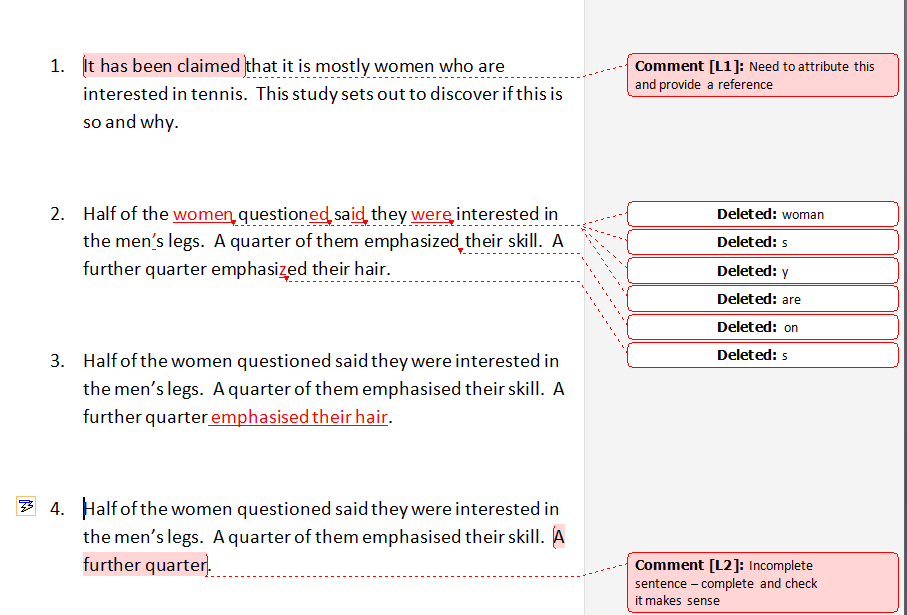
So, when I work with an essay, dissertation or thesis, I am very careful not to rewrite anything but only to tweak grammar, punctuation and spelling and suggest where things should be sorted out.  The following image shows a few examples of how I work, and one of how I DON’T work.

In Example 1, the author has not quoted their source and I’ve inserted a comment to remind them to do so.

In Example 2, there’s quite a lot wrong with spelling and grammar, but you can see that the author knows what they’re talking about.  I’ve amended their mistakes, but again that’s all tracked, so they a) can see what they’ve done wrong and b) have to choose whether to accept the change themselves.  By the way, the ‘s’ is changed in emphasized to make it consistent.  I’ll do a post about s and z another time.

In Example 3, a Very Bad ProofReader has seen something missing and decided to add it in.  In this case, rather than a few missing words, it’s a concept or part of the explanation of the actual results that’s missing.  This is a small example – but the author has not written that and the proofreader shouldn’t have.  I’ll suggest adding a word or two, but I wouldn’t complete something missing from the actual substance of the research or discussion.

Example 4 shows how I’d handle that same sentence.  No re-writing, no suggesting – I’ve just highlighted and told them something’s missing.  I’ll do the same if a sentence is mangled, incoherent and just doesn’t make sense.  But I don’t write my clients’ words for them, and students shouldn’t expect their proofreaders to do so (most don’t!).

 
16 Comments

Posted by on June 29, 2011 in proofreading, Students, Writing


Tags: , , , , ,

Referencing for academic writing

It’s dissertation season, in the UK at least, and so I thought I’d talk a little bit about some topics that are important to students, whether you’re doing your undergraduate dissertation or a postgraduate Master’s dissertation or PhD.  I’ll cover referencing this time, and then something on planning, structuring and handy hints. If you’ve been through the process and have any hints and tips to share, do get in touch so I can weave them together into a useful document.

So: referencing.  We reference (or cite) what we’ve read when writing an essay or thesis in order to avoid plagiarism and demonstrate that we’ve read around the subject and know what we’re talking about.  There are two aspects to referencing:

  • recording what you’ve read and referred to
  • referring to it appropriately in the text and bibliography of your dissertation

Recording what you’ve read

Putting together your references and bibliography is so much simpler if you keep a note of what you’ve read and consulted as you go along.  In the days of my Library and Information Studies post-grad, it was all done on card index cards.  Now there are lots of different options, including software like EndNote and Reference Manager.  For my research project, I’m just keeping a list on a spreadsheet in Excel.

The information you need to note:

  • Author’s full name.  Editor(s) if appropriate
  • For books: full title of the book.  Full publisher information for the book (you can find this on the bottom of the title page, or the back of the title page), including publisher name, location and date published
  • For chapters in books: Full title of the chapter and a full citation for the book, too (see above)
  • For articles in journals: Full title of the article.  Full title of the journal.  Page numbers for the article
  • For everything: page numbers for any direct quotations or sections you are going to refer to heavily
  • For websites: full URL and date you accessed the web page

Obviously, this is easy to do at the time; just note down the details and off you go.  Much, much harder to reconstruct after the event.

Referring to what you’ve read / citing

Now we’re talking about how you refer to what you’ve read and quoted in the text of the document you’re writing. The most important thing to do here is …

  • CHECK WHICH REFERENCING SYSTEM YOUR ORGANISATION PREFERS YOU TO USE!

This is hugely important.  Get it right first time, and you’ll pop all the references in easily.  Get it wrong, or don’t bother to check, and you’ll be going through and through the thing, fiddling around with the references, when you should be spending your time refining your arguments and putting your thoughts across.  Or you’ll be paying someone like me £x an hour to sort it out for you!

Referencing systems include Harvard Referencing, APA (American Psychological Association), MLA (Modern Language Association).  They all differ in how they ask you to present the information you collected above within your text.

For example, you could be expected to add a footnote number to each quotation in the text, with either a full bibliographical citation in the footnote section or a shortened reference there and a full bibliographical citation in the bibliography.  Or you could be expected to put Smith (2001) in the text and supply a full reference in the bibliography.  Or you might be putting a number in the text, referring to a numbered list in the bibliography.

A full bibliographical citation looks something like this:

Smith, J.L. (2001) The correct way to do referencing.  Birmingham: Libro Publications.

Jones, A.B. (2001) “Me and my essay”, in Smith, J.L. The correct way to do referencing.  Birmingham: Libro Publications.

Robinson, X. (2009) The different forms of citation.  American Journal of Footnotes 33 (1): 202-204.

But it doesn’t always, and the citation method does affect how this looks.

Always, though: ALWAYS, the bibliography is in alphabetical order by author’s surname.  It can take ages to sort this out if it isn’t!

How to conform to each referencing system?  That’s a long, long post that no one would want to read! Your academic institution should provide you with links to reference materials about their preferred system, and, if not, the dreaded Wikipedia does do a good summary of most of the common ones.

Good luck – and happy referencing!


Tags: , , , ,

So what does a proof-reader / copy-editor / transcriber / copy-writer actually do?

Today I thought I’d share a list of the projects I’ve worked on in the last month or so, to give an idea of what I actually do. Remember that I still work part-time in a library, if this doesn’t seem much; on the other hand, remember that I am always available to chat about booking in your work, and have a flexible schedule, if it seems like a lot!

So, since the beginning of 2011, I have…

Copy-edited a report on someone’s website for a US company.
Proof-read/copy-edited PDF and Word documents for 1 monthly and 1 quarterly issue of a Club magazine, various advertising materials for the Club, and half of their website, for the American PR agency which handles their publications (including a re-write on a particularly troublesome article).
Copy-edited 5 blog posts for one blog.
Copy-edited a PhD thesis on linguistics.
Copy-edited 2 essays for an ongoing client.
Copy-edited a PhD thesis on sports science.
Copy-edited part of a PhD thesis on Nigeria.
Proof-read/copy-edited a short newsletter for a physiotherapist I work for on an ongoing basis, including some re-writing.
Proof-read/copy-edited a tender for a company which writes tenders for other companies (another repeat customer).
Copy-edited a short non-fiction book on Bosnia.
Done some background research for 2 websites for which I’ll be writing the content for the web designer to place in the web pages he’s creating.
Set up working agreements with a printing company (to write content for them) and a virtual secretary (to provide copy-editing services) so that we can get going with projects once they come through.

And coming up, I have these booked in…

Another PhD thesis, psychology this time.
Going over yet another PhD thesis (on the EU) which I’ve already worked on once; the author has passed his viva but had to cut word-count so wants it checked over one last time.
Copy-editing a client’s submission for Chartership to their profession.
A novel.
Monthly newsletters for my physiotherapist client.
Monthly and quarterly newsletters plus the rest of the website for my Club client in the US.
Hopefully some more transcriptions of interviews for my journalist client – while I haven’t done any transcribing for her for a while, I did get to read the results of a few of my transcriptions in the magazine she writes for that I happen to read anyway!

And I think I have a topic for my next blog post… what is the difference between copy-editing and proof-reading?

 
6 Comments

Posted by on February 9, 2011 in Jobs, Organisation, What Do I Do?, Writing


Tags: , , , , ,

Keeping organised

I’ve been having a great week off the day job, doing just Libro work. I’d like to be able to do this all the time, but really late August / early September are my peak time during the year, with loads of Masters dissertations to proofread, all with similar due dates.

Although I’ve had a couple of longer jobs, and one big project from a repeat customer, it’s mainly been 2-4 hour jobs, and lots of them. Two problems – when to do the work, and how to know whether I can take on another piece of work from someone who just emailed me.

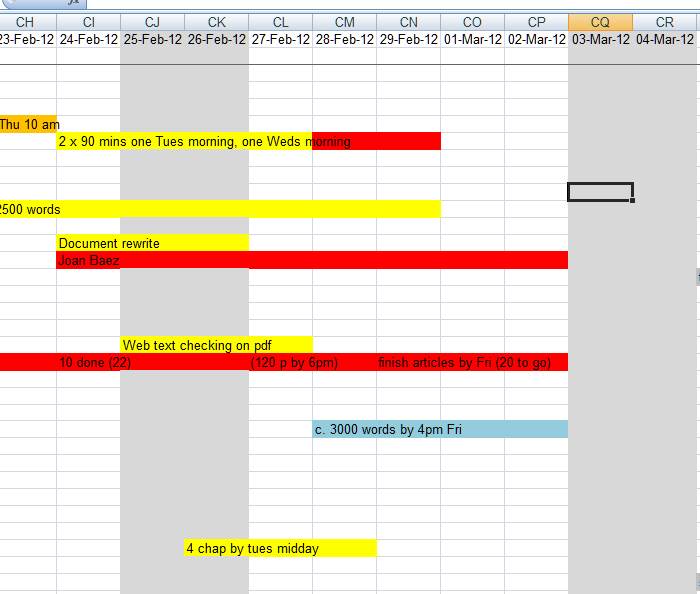
Ladies and gentlemen: I give you the Gant Chart.

I haven’t used anything fancy, just Excel. No project management software, although I’m sure you could use that if you want, and that’s where I got the idea from. But one of my rules is to keep it simple. A phone that phones, texts, and yes, now accesses my email. A computer and an email account. A spreadsheet with my accounts. And an easy gant chart.

So – dates across the top, one per column. Customers down the side. And you get to COLOUR IN SQUARES! Yes, it’s like O-level revision all over again – most of the time spent colouring in and underlining, some of it spent working.

When a customer books in, I colour in the squares for the days from when they intend to give me the document to when they need it back. In grey. It’s pending. It’s not here yet. But I can see what I’ve got hovering. The document comes in – and it gets coloured in red. Maybe the submission date gets moved, maybe the end date. Now I know what I have in hand – what I have to do. At this point, I shuffle all the rows round so the clients are in order by due date. This way, when I’ve got a lot of work in, I know what I need to do first.

Work done, I write DONE in the cells for the days on which I actually did the work, and colour it in yellow. Invoice submitted – orange. Invoice paid – green! And I leave it on there, to show me what I’ve been up to.

A hint: freeze the panes on your spreadsheet so you can see all the client names but move across the dates without losing them.

Along with email folders for all my current and completed customers, this has kept me organised over the past few weeks. I hope it’s helped some readers with some ideas. Maybe you’d like to tell me your favourite organisation tip?

 
5 Comments

Posted by on August 26, 2010 in New skills, Organisation


Tags: , ,

Learning something new every day…

So I’m a professional proofreader and I enjoy my work and take a pride in it… but sometimes it’s good to expand your horizons.

I’ve taken on a job sorting out the formatting of someone’s thesis this week. Page numbering, chapter headings forming a contents page, figures and tables; all of that stuff. At first I wasn’t convinced I could do it. But I persevered, took out the stuff at the front that had been copied and pasted, reminded myself of the theory (Word 2007 can be quite different from previous versions) and off I went.

Next time, I’ll know how to create separate figures and tables contents lists (ask me if you need to know how), I’ll know that Microsoft online help is a bit better than the help embedded in Word, and I’ll be confident I can do that little bit more to help my clients present the best possible version of their work.

 
2 Comments

Posted by on June 11, 2010 in New skills


Tags: , , ,