RSS

Category Archives: Errors

Devise or device?

There are lots of other word pairs with an -s- and -c- (practise/practice, advise/advice) that are differentiated by the fact that one is a verb (the -s- one) and one a noun (the -c- one). These two have become slightly more separated and slightly less confused, I feel (but maybe you’ve found differently).

To devise is a verb meaning to plan or invent something (usually something such as a process, procedure or mechanism that is quite complicated). “He devised a route to get from Manchester to Birmingham, not using any motorways”, “The clockmaker devised a mechanism for making a watch show the time in 15 different time zones”.

A device is a noun meaning a piece of mechanical or electronic equipment made for a particular purpose (“He constructed a device for making American recipes using English measuring instruments”), or a plan, trick or scheme (and, by extension, a form of words that’s intended to produce a particular effect: “She used a metaphorical device to explain quantum mechanics in her astounding poem”).

So, you could, indeed, devise a device, but I don’t think you’d want to, simply because of the cumbersome repetition (just like you don’t practise practices!).

You can find more troublesome pairs here and the index to them all so far is here.


Tags: , , ,

My short cuts – how to change your text from upper case to lower case

This is part of my series on how to avoid time-consuming “short cuts” and use Word in the right way to maximise your time and improve the look of your documents.

Sometimes you really want to change a sentence from, maybe, all lower case to All Title Case, or ALL CAPITALS to all lower case, or some other variant.

And you know how to do it, right: delete the sentence and retype it, or delete the first letter of each word and retype it, or turn on overtype then forget to turn it back to insert when you’ve finished … well, there is a way to just do it with a couple of keystrokes!

How do I change all small letters to all capitals or all capitals to all lower case letters?

This is such a simple one. Highlight your sentence (1). With the sentence still highlighted, press shift and F3 at the same time. Magic! With each press of shift-F3 it will cycle through Title Case (2), UPPER CASE (3) and then back to lower case (4).

This is so useful if you’re grappling with a bibliography you’ve written or you’re editing (especially when the capitalisation in article or book titles is not consistent), or if you accidentally type something all in capitals.

Please note, these hints work with versions of Microsoft Word currently in use – Word 2003, Word 2007 and Word 2010, all for PC. Mac compatible versions of Word should have similar options. Always save a copy of your document before manipulating it. I bear no responsibility for any pickles you might get yourself into!

Find all the short cuts here


Tags: , , , ,

Adviser or advisor?

This one has come up a few times and so I am sure there are a few people out there who are confused when trying to choose between using advisor or adviser.

So, which is it to be? I think people may think that advisor is more formal (even posher) in some ways, and it’s definitely used more in official documents and marketing-ese.

But in reality, this is another pair that means exactly the same. Adviser or advisor: just pick one!

What I would say (and what I always say), is be consistent. If you introduce a mortgage advisor on page 1, make sure they haven’t changed into a mortgage adviser by page 4!

Oh: but it’s always advisory (not advisery, which isn’t a word) when you’re talking about having the power to make recommendations (but not to enforce them, interestingly). “The panel is operating in an advisory capacity and cannot force the employees to wear baseball caps”.

I personally prefer advisor. What do you think?

You can find more troublesome pairs here and the index to them all so far is here.


Tags: , , ,

Advise or advice?

There are lots of other word pairs with an -s- and -c- (for example, practise/practice) that are differentiated by the fact that one is a verb (the -s- one) and one a noun (the -c- one). This one gets mixed up just as much, so it’s time to talk about it!

Advise is the verb. It means to offer advice to or to recommend. “‘I would not advise you to climb the steep face of the mountain: walk up the slope, instead,’ said John.”

Advice is the noun. It’s what’s advised: a recommendation or guidance offered with respect to future actions by the person being advised. “We took John’s advice, and took the easy way up the mountain.”

It should become easier to remember these once you have established that (in UK usage):

The word with the s is the verb, and involves doing something

The word with the c is the noun, and involves the thing itself.

You can find more troublesome pairs here and the index to them all so far is here.


Tags: , , ,

New ways to navigate the resources on the Libro blog

I’ve built up loads of information on all sorts of topics on this blog over the past few years, so I thought it was time to put together a resource to help you find what’s most useful for you. I ran a poll, people said yes, so I did it!

I put this new guide together about a week ago, and it’s proved popular so I thought I’d let you know about it quickly.

I’ve put together one simple resource guide with three main sections:

  • Resources for business – these include posts on how to set up a small business, things to do to grow your business, hints on networking, motivation, etc.; then some information about tax and finally an additional link to my small business interviews (note that business formation and tax posts are relevant to the UK although the rest of it will translate anywhere)
  • Resources for students – how to write an essay or dissertation, plagiarism and quoting sources, and lots more to come
  • Resources for Word users – all sorts of tips and hints to make your documents more consistent and easy to write, change and navigate, including tabs, margins, headings, contents pages and more obscure matters like how to put text in alphabetical order. Also includes a few notes on PowerPoint and other applications,

The whole resource guide offers a good way to find out what you need to know – do have a look and a play around, and let me know if you’ve found anything particularly useful!  I’ll be adding both resources and entries to the resource guide as I go along, of course. Watch this space …

And of course, we still have the index to the Troublesome Pairs and index to all the Saturday Small Business Chat posts.

I hope you enjoy the resource guide and indexes, and the resources they guide you to!


Tags: , , , , , , , , ,

How to count the words in a PowerPoint 2007 presentation

I recently needed to know the word count in a PowerPoint presentation. In my case, this was because I charge my clients by the word, in the main, and needed to know how much to charge someone for editing her PowerPoint text. But I’m sure it will be useful in other cases, too, for example if you’re a student with a word count target.

And it’s NOT obvious. Plus it’s different in Word 2007 and Word 2010, of course.

So, this is what you do …

How do I count the words in a PowerPoint 2007 presentation?

Open your document and click on the big Office button in the top left (1)

Click on Prepare (2) (like that’s obvious!) then Properties (3). This will give you some of the document properties in a bar along the top (these vary according to how you set up your document in the first place):

And because nothing ever shows you what you want immediately, you then need to click on Document Properties then choose Advanced Properties from the drop down. Then, finally, you get …

A lovely dialogue box with all the properties you could ever want, including the word count.

Please note, these hints work with versions of Microsoft Powerpoint 2007, for PC. Mac compatible versions should have similar options. Always save a copy of your document before manipulating it. I bear no responsibility for any pickles you might get yourself into!

Related posts:

How do I count the number of words in a PowerPoint 2010 presentation?

How do I count the number of words in a PowerPoint 2013 presentation?

Find all the short cuts here


Tags: , , , ,

Diffuse or defuse?

Two more words that look similar and sound similar but mean different things. Will there ever be an end to these?

To defuse means to reduce the tension or danger in something. This could be a physical something, like a bomb, or a less concrete thing, like an argument or a situation. “To defuse the fight situation that was building up, Tom jumped forward and kissed Dave on the nose.”

To diffuse means to spread out over a wide area. It’s what one of those room scenter things does, in the concrete form. Again, there’s an abstract – you can diffuse an idea and help it spread around the world. Diffuse, the noun, means spread out over, well, a wide area. The group of people from Kent was diffuse now, a few in each neighbourhood. The adjective can also mean lacking in clarity: “That was a bit of a diffuse argument you presented there” – the sense is carried over in the idea of it being all over the place, spread out, rather than precise and targeted.

If you defuse an idea, you render it harmless, eliminate it. Fewer people will hear about it. If you diffuse it, you spread it to more people.

You can find more troublesome pairs here and the index to them all so far is here.


Tags: , , ,

Wander or wonder?

This Troublesome Pair was suggested by a reader of one of my previous posts. Do keep your suggestions coming if there’s one you are confused about yourself or notice other people mixing up!

Wonder and wander is probably another pair that gets mixed up because the two words sound (fairly) similar, or exactly the same in some accents.

To wander is to move around aimlessly, to walk or move in a leisurely manner through or over an area. You might “wander lonely as a cloud” across the Lake District, for example (thanks to Wordsworth). A wander (the noun) is an aimless walk.

To wonder is to feel curious or desire to know, or to feel wonder, as in surprise and admiration caused by something unfamiliar, unexpected or beautiful (wonder (noun) being that feeling). “The sunset caused a sense of wonder in the onlookers”; “Mary wondered where her lamb had got to”.

To distinguish the two: “Mary wandered all over the farm, wondering where she had left her lamb”.

You can find more troublesome pairs here and the index to them all so far is here.


Tags: , , ,

How to put text in alphabetical order in Word

I was inspired to write this post after having to put yet another student’s bibliography into alphabetical order. I know the quick and easy way to do this – but I don’t think a lot of people know that you can do this!

So, you’ve got your bibliography, and you’ve been very good and followed the rules for setting it out (I’ve used Harvard method here) but it’s not in alphabetical order by author surname, and, except in certain cases,* it really should be.

*A very few referencing systems ask for the bibliography to be in the order in which the references appear in the text. I’ve hardly ever had to deal with them. But I like completeness!
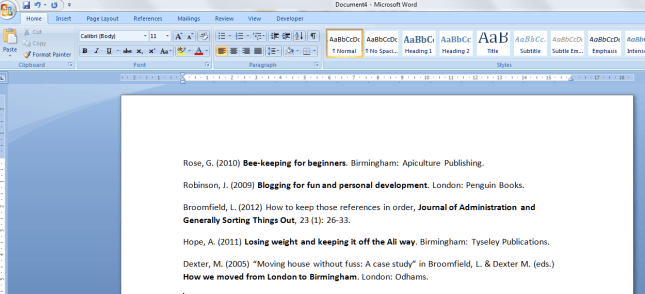
So, a lovely list of books but not in order by the authors’ surnames. How can we resolve this without swapping all the lines around?

First, highlight all the text you want to alphabetise. Then, make sure you’ve got the Home tab at the front. See that little button you’ve never even seen before, next to the paragraph mark?

Press the A-Z button and up pops a dialogue box.

There are all sorts of ways in which you can order the text, which are very similar to the ways you can order text and numbers in Excel. You can even specify whether what you’re sorting has a header row (I’m not sure why you’d want to do that, as you can just exclude the header row when you’re doing the highlighting, but I suppose it would be useful if you realise you’ve accidentally highlighted the headers too). I’ve sorted by Paragraph, Text, and in Ascending Order here, and to be honest, that’s what I always do. Click on OK, and look what you get:

Here’s our bibliography in order by author surname with just a highlight of the text and a few clicks – much quicker and with far less risk of human error than doing it manually.

Note: if your results come out a bit odd and have split your entries up into two halves, reverse your alphabetising by either hitting Control-Z or the Undo button, and check there aren’t any pesky hard returns hiding out in the middle of paragraphs (the best way to do this is to click the Paragraph button, to the right of the A-Z button and look out for bent arrows signifying carriage returns). Get rid of those and alphabetise again to your heart’s content!

This is part of my series on how to avoid time-consuming “short cuts” and use Word in the right way to maximise your time and improve the look of your documents.

If you have enjoyed this post and found it useful, please click on the “share” buttons below or tell your friends and colleagues about it! Thank you!

Please note, these hints work with versions of Microsoft Word currently in use – Word 2003, Word 2007 and Word 2010, all for PC. Mac compatible versions of Word should have similar options. Always save a copy of your document before manipulating it. I bear no responsibility for any pickles you might get yourself into!

Find all the short cuts here


Tags: , , , ,

ise or ize?

Having a Bank Holiday is no excuse for avoiding the big questions: so here we go with -ise and -ize. We’re talking here about whether you use organisation or organization; analyse or analyze.

Now, people assume that -ise is British and -ize is American, but that isn’t exactly the case. And – of course – it isn’t that simple, either. The one thing that is vitally important, however, is being consistent within a document or documentation.

In British English, either -ise or -ize is acceptable (most people don’t seem to know that. Oxford University Press, for example, use -ize in their house style. If you’re writing articles for journals, it’s important to check for house style on this). In American English, however, it’s -ize all the way. Well, nearly all the way.

Ise is obligatory in some words, and I have to thank New Hart’s Rules for putting this all in one place as an easy reference. So, -ise rather than -ize is obligatory when:

  • it forms part of a larger word element, such as -cise (cutting: excise), -vise (seeing: supervise), -mise (sending), or -prise (taking) [if you can think of any examples of the last two with that meaning, please let me know – I presume they are words coming from the French roots mener and prener but apart from that I’m stumped for examples that include the meaning sending or taking]
  • it corresponds to a noun that has an s in the stem: advertisement – advertise; television – televise

Common words that must use -ise in American and British English:

advertise, advise, apprise, arise, chastise, circumcise, comprise, compromise, demise, despise, devise, (dis)enfranchise, disguise, enterprise, excise, exercise, improvise, incise, merchandise, premise, prise (open), revise, supervise, surmise, surprise, televise

When we move on to the -yse / -yze debate, it’s much more simple: -yse in British English, -yze in American, so analyse vs. analyze, etc.

This issue comes up a lot for me, because I work with many students who, although studying in the UK, have American English as their standard language in Word and use American spellings throughout. Except when they don’t. If they mix them up, as they invariably do, well, I used to ask which they preferred but now I just pick the most common version they use and tell them that I’ve done that.

But the most important things are to

  1. Obey house style, if there is one (particularly important if you’re writing journal articles)
  2. Be consistent.
  3. If you are quoting from a source which uses a different spelling from your required one (e.g. you are working with -ise and it uses -ize), leave the word in the original form in which it was printed in a direct quotation. See more in my posts on quoting sources [coming soon].

You can find more troublesome pairs here and the index to them all so far is here.


Tags: , , ,