RSS

Category Archives: Skillset

How do I cope with the ups and downs of the freelance life? 2 – when there’s too much work

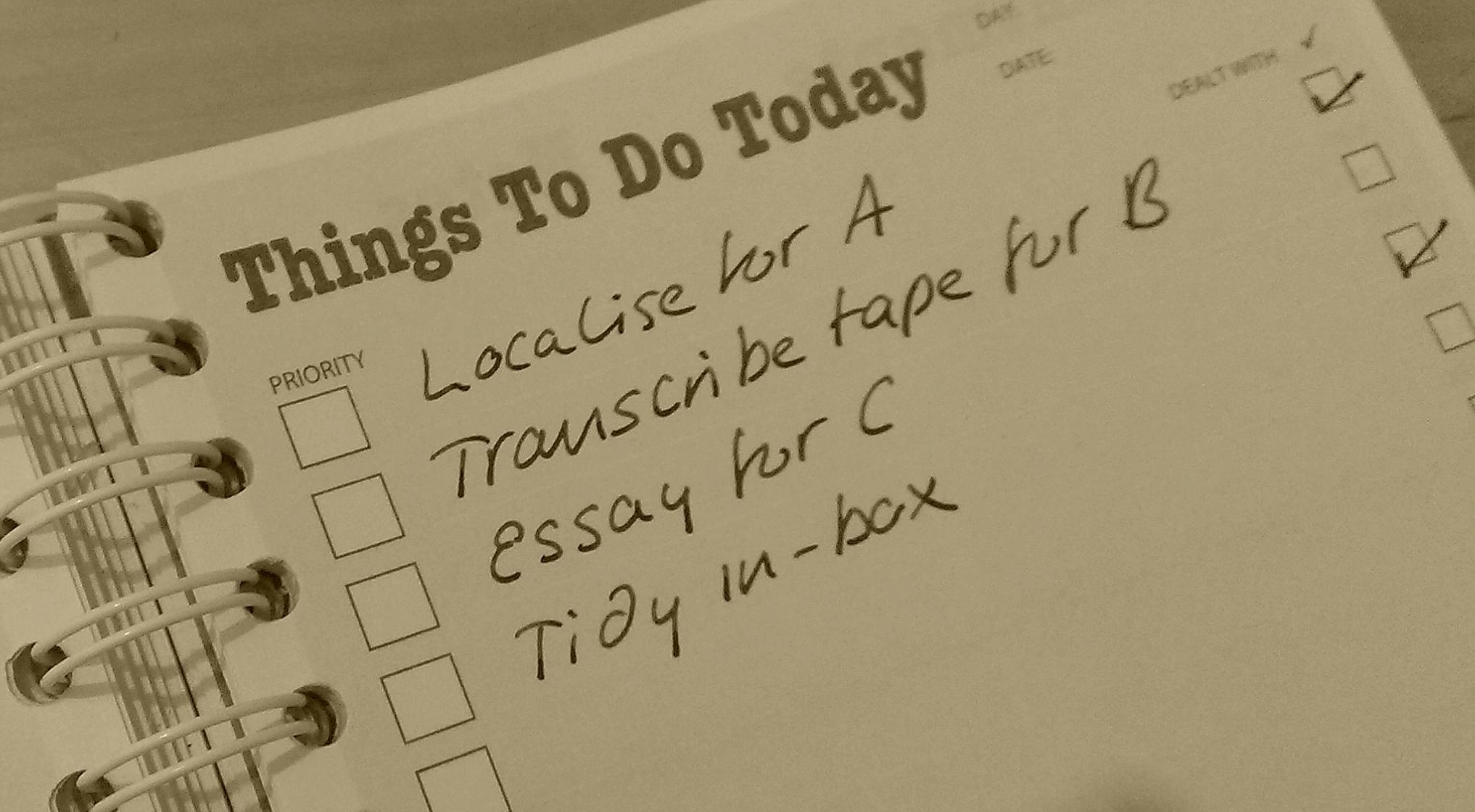
To do listsIt can be a bit scary being a freelancer / self-employed. One minute you’ve got no work at all, the next you’ve got all the work in the world, deadlines coming out of your ears, and you’re drowning in a sea of … stuff. To accompany my article on what to do if the work seems to have dried up, here are my top tips on coping with overwhelm – those times when all the work has come in and you don’t know what to do first. Maybe we can even work out a way to avoid that happening in the first place!

How do I cope when I’ve got too much work?

Yes, it’s the other side of the coin, which it doesn’t do to complain about as such, but can be a scary prospect. If you’ve got a lot of work but it’s not physically or mentally too much for you to complete in the deadline, that’s OK for short periods of time. We all get that. I’ve just booked in a large job  which will involve doing just one job for just one client, 9 hours a day for 4-5 days. However, you can bet I’ll be taking plenty of rest and cancelling everything else while that’s happening.

But what happens when you just have Too Much Work, too much to do in the time, too much to do without exhausting yourself mentally or physically?

It’s harder to organise yourself into not having too much work. Work does just tend to all come in at the same time: it’s a fact of life.

Here are some ideas for preventing overwhelm building up:

  • If you have a client who regularly overwhelms you, for example sending in orders for too many products in too short a timeframe or sending you work with no notice, reguarly, it’s worth talking to them and seeing how you can make the situation more predictable. If it’s really becoming a problem, consider offering to share their work with a colleague or tell them that you can’t fulful their requirements and they will need to find someone else to work with (yes, I know it’s really hard to do this, and you will probably want to have another prospective client lined up before you do this).
  • If you have a kind of work which regularly overwhelms you, consider how you can work to make that situation easier. I used to spend a lot of time with a particular kind of customer who tended to involve lots of emails and discussion and handholding. I now work mainly with an agency which specialises in this kind of customer – they do all the emailing, I do the work. It’s a lower rate of pay, but I am pretty sure I make that back in the time saved.
  • If you create trouble for yourself by scheduling too many jobs at the same time, keep some kind of record / calendar of what you’ve booked in. I do it on a Gantt chart with a line for each client, with the days I’ve got to do a piece of work or the dates they have booked me for coloured in. In this way, you can avoid scheduling All The Work for the same week.
  • If you have trouble with moving deadlines, put terms and conditions in place. This is a notorious problem for editors, as writers’ deadlines often slip back. Make sure you’re covered in your Ts and Cs for saying “No” if a job comes in later than planned and you’re already busy.

There are also three ways to cope with work overwhelm that involve other people …

  1. Contract out work. This involves having someone who you can book to delegate the work to. In this case, you will end up charging the cliient and paying the contractor. You may need to disclose that you’re using a contractor, i.e. someone other than you is doing the work, and I personally don’t use this method as my service revolves around me, to a great extent. Typically, the primary worker (you) will charge the client a little more than you pay the contractor, to give yourself a small profit on the job.
  2. Have at least one cover person who can take on work for your clients but act as an individual with their own relationship to the client. This is usually arranged in advance, but can be very helpful in this sort of situation (as well as when you want to take a holiday). If I am booked out and one of my clients with whom I have arranged this contacts me, I say, “I’m really busy at the moment, can you send this over to Laura, please?” They send the work to my colleague, then she will do the work and invoice them accordingly. Yes, I can’t make a little money on the fee, as you can with contracting, but my clients stay happy and the admin is minimal.
  3. Outsource work to someone else – for example, my journalist clients might usually transcribe their interviews themselves, but if they’re in a rush, they will send me the tape to transcribe while they get on with something else. You could either outsource the work itself or aspects of running your business that take up time – your social media updating, your filing, your invoicing … You may or may not have to disclose that you’ve done this (a journalist wouldn’t disclose that I’d typed out their interview) but you will generally pay the person you’ve outsourced the work to.

As with dealing with having too little work, there are two principles involved here:

  • Try to run your business such that it’s less easy for you to get overwhelmed
  • Have plans for what to do when overwhelm hits, and put them into action appropriately

With these tips and the ones on how to cope when the work dries up, I hope that I’ve given you some useful tools for smoothing out the ups and downs of the freelancer’s life. Good luck – let me know which ones work for you, or if you have other suggestions!

If you’ve enjoyed this post, please use the sharing buttons below to share it on your social media platforms. Thank you!

Related posts on this blog

How do I cope with the ups and downs of the freelance life 1: when the work goes away

Top ten tips for freelancers

How to decide who to work with

How to turn a new customer into a regular customer

What’s the best mix of customers to have?

How to make more money in your freelance business

When should I say no?

 
4 Comments

Posted by on June 17, 2015 in Business, Organisation, Skillset


Tags: ,

How do I cope with the ups and downs of the freelance life? 1 – when the work goes away

To do listsOne of the things that puts people off freelancing or self-employment is the ups and downs, feasts and famines, highs and lows of the workflow. While the freelance workflow can be tricky to manage, it is possible to get a handle on it and maintain your work-life balance (most of the time). I’m sharing with you my tips for making that work.

In this post, we’re going to talk about what happens when it feels like the work has all dried up. In the next post, we cover the other side of things: overwhelm!

The important thing to note here is that this all comes with time. No one starts out super-organised and busy at just the right level all of the time. Cut yourself some slack – things get over-busy or yawningly low for all of us, but these tips will help that to become less of a problem.

How do I cope when the work dries up?

The scariest thing about being a freelance is when the work appears to dry up. It’s easy to catastrophise here: what if NO WORK EVER COMES AGAIN? Well, in my experience, unless you’ve done something really wrong (like produced very sub-standard work or reneged on all your deadlines), the work will come back again. Part of learning to deal with the fallow periods is making yourself believe that they will come to an end.

There are two things to think about here …

  • What to do during fallow periods
  • How to prevent fallow periods happening in the first place

Let’s look at them in turn.

What should I do in times when I have no work?

There are so many things you can do to fill in the times when you have no work. They basically break down into three areas, though …

1. Rest

When it’s busy busy busy, I bet you don’t get all the rest you need. I try to get some downtime for myself when I’m slow at work – extra sleep, quiet reading, a cafe visit with a friend. Recharge those batteries ready for the next busy time!

2. Admin

There’s always admin to do, and you know it. Whether it’s clearing out your inbox, following up on leads that never came to anything, tidying your desk or sorting out your receipts, now’s the time to do it. (Extra hint: set a stopwatch. Do it for half an hour. You’ll be amazed at what you can achieve.)

3. Marketing

You can do a lot of your own marketing for no monetary cost – but there’s usually a time cost. If you have a free day, make it your mission to, for example …

  • Register on a few more free-to-advertise online boards
  • Write some amazing website content to promote your products or services, or overhaul what you’ve already got
  • Write and schedule some blog posts to keep your website regularly updated and cover you in the busy times
  • Go to that networking event you don’t usually have time for – or a new one
  • Overhaul your profiles on social media and make sure your message is getting across
  • Write some products for awareness-raising, passive income generation – free downloads, pdfs, an ebook …

The message here? Put your down time to good use, and use those troughs in incoming work to tidy things up and work to generate new business to diminish the next low point.

How can I guarantee to have a steady stream of work all the time?

You can’t. But you can work towards that situation, and this is something I have a lot of experience with, and it’s how come I write my blog posts in little scraps of time while waiting for something to come in, rather than in great blocks during days and days when I have nothing to do.

The answer is, I think, simple: diversify.

While it’s great to be an expert in a niche or to have one big customer who “always sends you so much work”, it also lays you open to sudden downturns when the industry in which you specialise or the company for which you work takes a downturn itself.

If you work supplying widgets to Company A which are different from the ones Company B uses, and you only make widgets of that kind, if the market for those widgets goes down or Company A goes bust or changes what they use, you’re in trouble. If you make widgets of all kinds and supply company A and B, it would take the whole widget market and both companies to go downhill fast before you were in trouble.

I’m not saying be Jack of all trades and master of none, but a bit of judicious diversifying can really, really help to iron out those peaks and troughs which come in any line of industry.

Here are some general ideas, with examples from my specific work:

  • Work on different products or services – I do editing, transcription and localisation, so if the market for one goes down, I have the others to look after me. I usually work on a range of tasks every week, but I can end up having a week of transcription and that’s fine.
  • Work with different types of client – even in the area of editing and proofreading, if I just worked for students, I’d get massive peaks and troughs as dissertation season comes round at Easter and the end of the summer, but disappears in October/November. But I can fill in those troughs by doing editing of self-published books or working with translators
  • Work with clients in different places if that’s possible – I have customers all over the world. I used to have a lot of Chinese customers; at the moment I don’t. If I’d concentrated only on that region, I’d be in trouble now. Similarly, with the drop in the value of the Euro, if I just had European clients who paid in euros, I’d be looking at a serious drop in my income right now.

I’m not suggesting that you take on areas of work or industry sectors you’re totally inexperienced in and unused to – but have a think about how you can diversify a little. If you work editing legal texts, maybe you can offer your services to a local university with a large law department. If you sell your handicrafts in shops, why not consider an Etsy shop or going to a few fairs?

In summary

If you want to avoid the down times and keep a good flow of work throughout  your working year, you can approach the issue on two fronts:

  • Have a plan for what to do when you have no work – rest, marketing, admin – and put that plan into action when you end up with some free time.
  • Work actively to have a good mix of work coming in from various sources, so you aren’t relying on just one income stream and don’t keep all your eggs in one basket.

When we add to these tips with some on what to do when you’ve got too much work, I hope you’ll find here a useful resource for helping you to smooth out the ups and downs of the freelancer’s life. Do let me know which ones work for you, or if you have other practical ideas that work!

If you’ve enjoyed this post, please use the sharing buttons below to share it on your social media platforms. Thank you!

Related posts on this blog

How do I cope with the ups and downs of the freelance life 2: when there’s too much work

Top ten tips for freelancers

How to decide who to work with

How to turn a new customer into a regular customer

What’s the best mix of customers to have?

How to make more money in your freelance business

When should I say no?

 
4 Comments

Posted by on June 10, 2015 in Business, Organisation, Skillset


Tags: ,

How Video Can Help Your Blog or Website

Today we have a guest blog post from Markus Wilson of Phink Video Productions, who talks about the added value that video can bring to your blog or website. A lot of people do have video content on their blogs now, and it’s something I’ve been considering doing myself for a while – maybe this will be the impetus that I need to look at it in a bit more detail …

This article is about how you can use video content to help your website or blog as part of a digital marketing strategy. No matter how big or small your websites audience maybe, video is a powerful tool to up your profile and reach a wider fanbase.

It’s a fact that our brains respond more effectively to communication that combines visual and audio stimuli. Therefore improving the retention of information we are trying to divulge. While it’s interesting to know that YouTube is the world’s second largest search engine online. It has been found that 60% of online users prefer video than text, and having video content on your website or blog increases the likelihood of first page Google ranking by 53%. Not only that, but people that reach your site are likely to spend at least two minutes longer browsing a site with video on it.

As we know today more and more people are using online video to learn about products, services, and tutorials. What’s great about online videos is that so many people are creating and watching them nowadays. Whether they are evaluating products, showing us how Coca-Cola can clean the rust off your car or just checking out the best supplier for a job. Video really is a great way to engage your audience. Another great feature about online video is that it can help you stand out in the search results! As long as your video listed is marked up with the appropriate title, tags and descriptions Google will always value video content over written.

One of the best ways to utilise online video for your website or blog is to create an explainer video. Explainer videos are great if you have something very complicated to get across, as you always have to fight for every second of your web users attention.

Another great use of video for businesses or service providers is to incorporate Testimonials from your former or current clients. Testimonials direct from the horse’s mouth and not just a quotation at the bottom of a webpage are a great way to gain that much needed social proof about you and your service.

A third good use of video for your website or blog is to create a ‘Frequently Asked Questions’ piece. This can be yourself presenting to camera or just something simple involving text and music. If you always come up against the same questions from your potential customers, by you anticipating the question, its an efficient and easy way for them to be reassured that your are the right person for the job!

Online video use continues to grow with 81% of marketers using video in their digital marketing activity and 76% planning to increase online video spend. At the current rate 69% of all internet traffic will be purely video by 2017.

So what will your story be?

Markus Wilson is Co-Founder of London-based video production company Phink TV. Markus has been in marketing for the past 8 years, first with data processing company Pumasource and starting up Phink TV in 2009. Since then he has produced video content for the likes of Coca-Cola, Unilever and Sony Music.

 
1 Comment

Posted by on October 1, 2014 in Business, Guest posts, Skillset


Tags: , ,

Using Twitter for your business

Using Twitter for your business

Twitter is an absolutely brilliant tool for business owners – if you use it in the right way. If you use in the wrong way, it can be a nightmare, as bad (or embarrassing) news travels very fast in the Twitter universe!

I personally got a lot out of Twitter in the early days, actually securing clients through using it – and long-term clients who recommended me on to more clients, too. I’d go as far as to say that it’s my number four source of work, after repeat business, personal recommendations and the Proz website. My clients still recommend me to other clients via Twitter, even several years on (the other month, a music journalist tweeted that she was looking for a transcriber. FIVE of my current clients tweeted her with my name!).

Benefits of Twitter: it’s quick and easy to use. Disadvantage: it can be a time-sink. Most important thing to remember: People only tend to see a snapshot of their tweets every day. I only know one person who reads ALL of the tweets in his timeline. This means that your tweeting strategy should be a bit different from your other social media posting strategies.

Setting up your Twitter profile

When you join Twitter, it’s very quick and easy to set up your profile. Your profile is a quick guide to who you are. Anyone clicking on it or searching for it needs to know that they’ve found the right Liz Broomfield / Libro (or whatever) and to see easily what you do.
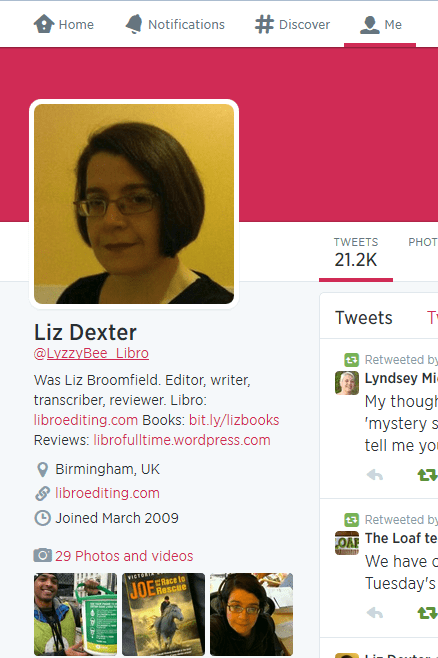
Twitter profile

I would recommend including the following on your profile, and I’ve seen plenty of other people recommend this, too:

  • Your real name when you log in, as well as your company name for your Twitter ID
  • Your photograph on your profile, rather than your company logo (you can add that to your background)
  • Your company URL in the field where you can provide that
  • Use your 140 letters of profile to the max, including what you do and any extra URLs

As with any profile, you can change it at any point; just click on your image and choose Settings,  Edit profile of in the Home Screen, click on your Twitter ID and the Edit Profile button.

Following and followers

Once you’ve set up your Twitter account, you can start following a few people. Twitter will suggest ones that you don’t really want, based on who’s popular, but you can find interesting people to follow in a variety of ways:

Ask someone for their Twitter ID when you meet them or glean it from their business card or website. Then enter that ID in the search field on Twitter. Or you can search for the person’s name or company name in the search field on Twitter.
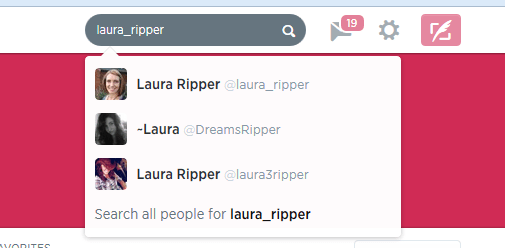
Twitter search

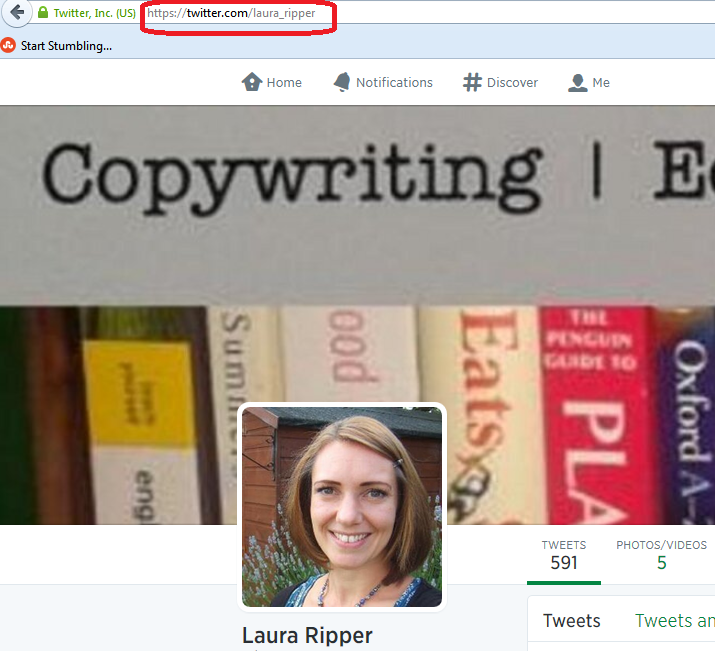
Or you can go to http://www.twitter.com/%5BID without an @ sign]:
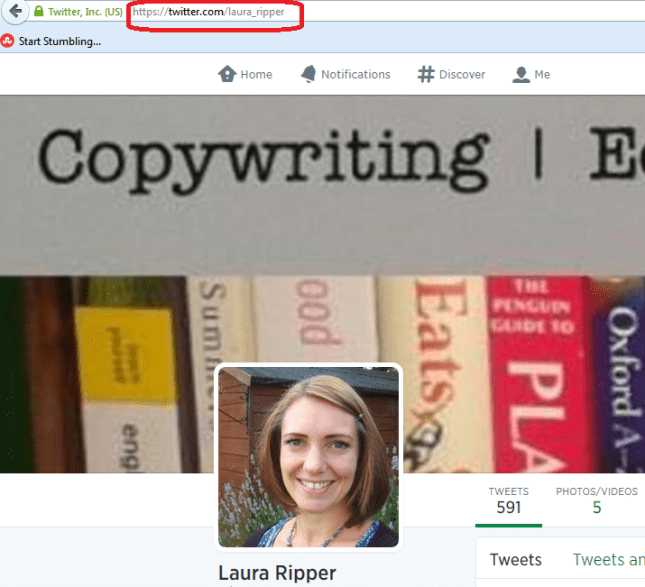
search using Twitter url

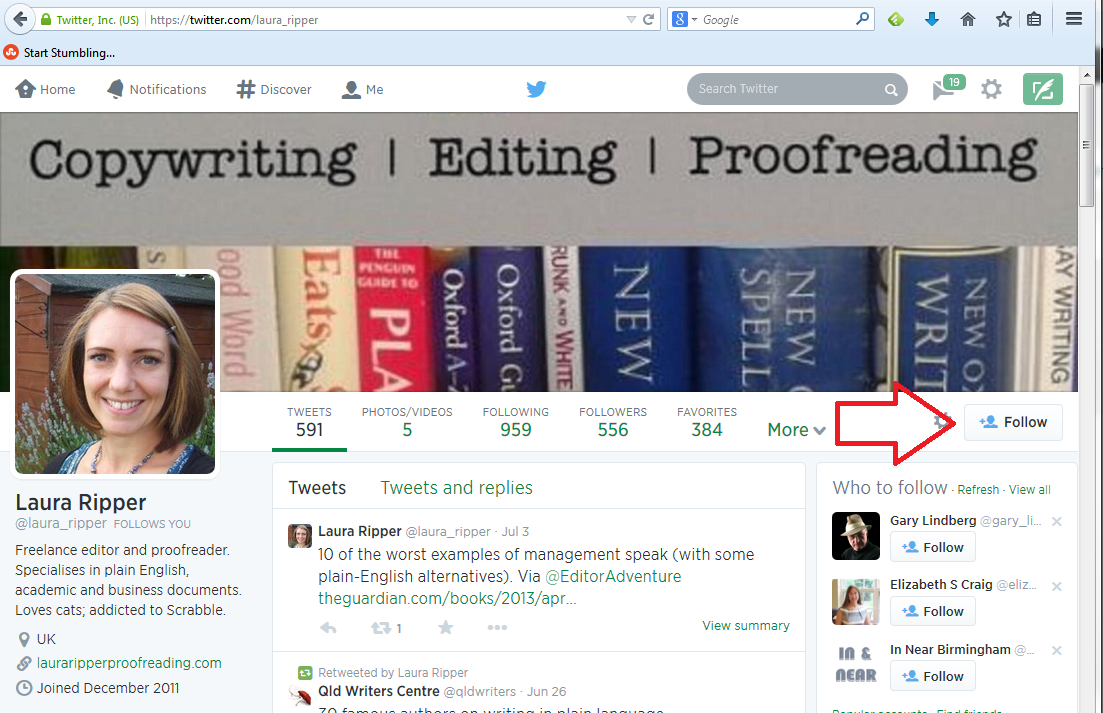
Have a look at their profile to check it’s the correct person, then press the Follow button if it is:
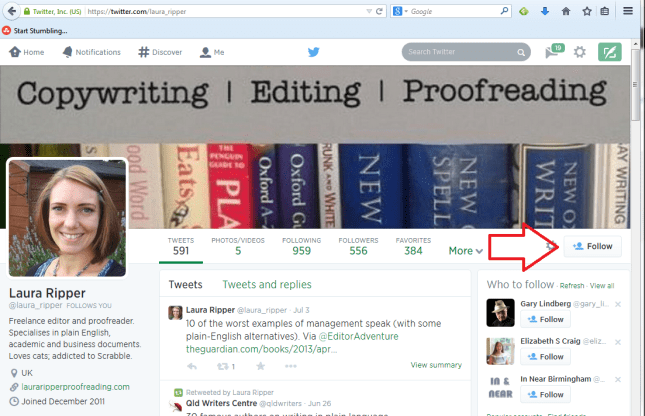
follow on Twitter

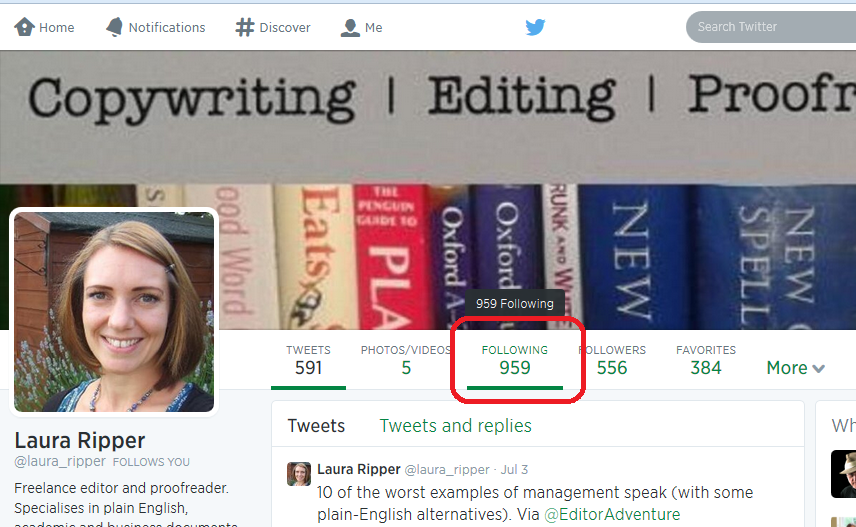
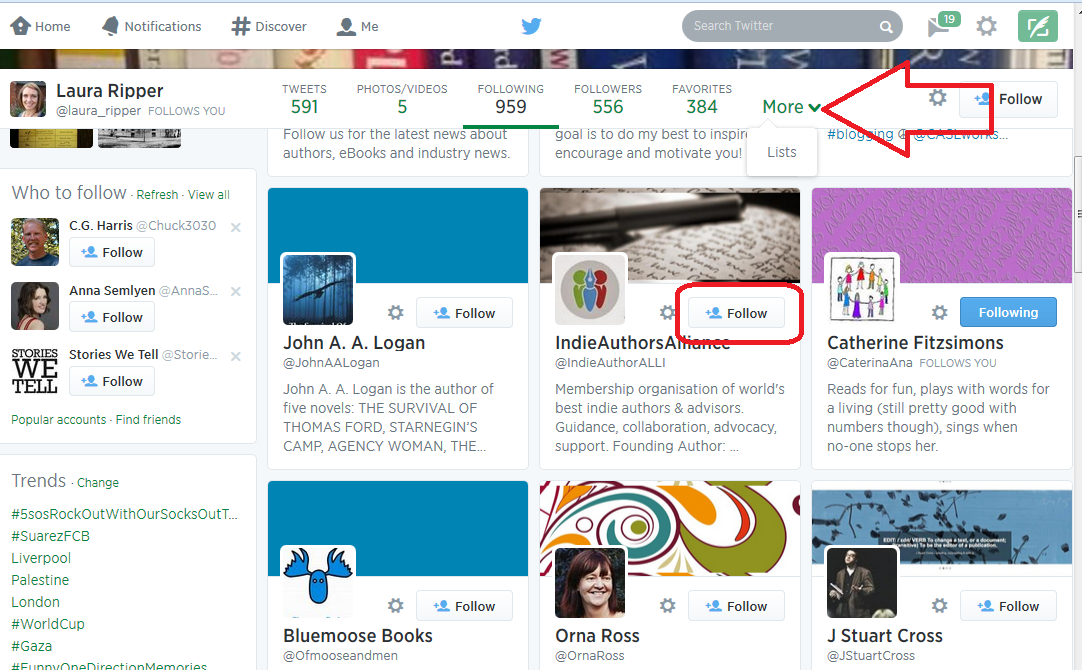
If you’re following someone in an interesting field, have a look at who they’re following. If you click on their profile, you will see links to Tweets, Following and Followers. Click on Following
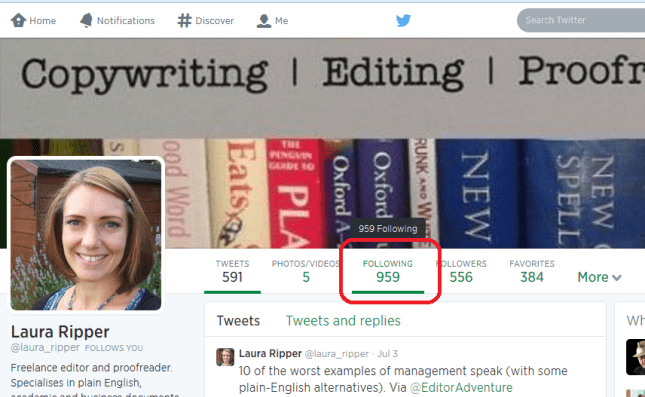
Following button

and have a look – there will be a handy Follow button by each name so you can simply follow from there (if you’re already following someone, it will be marked as such). Once you’re viewing who someone is following, you will see a dropdown button marked More which will take you to their Lists.
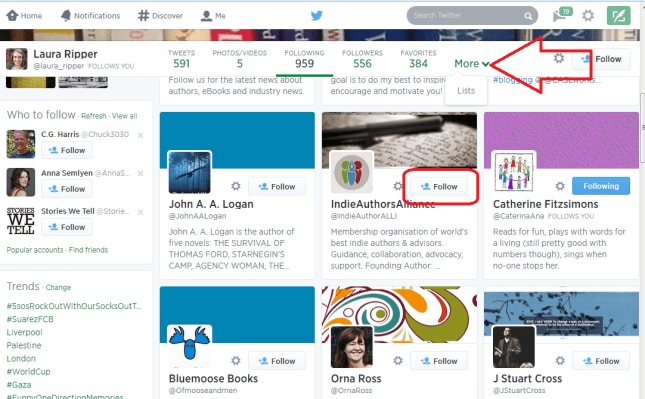
Who someone is following on Twitter

See more about Lists later on, but you can follow either  an entire list or members of one by clicking on the list, and this is another good way to glean people to follow in a particular area of interest.

How do I choose who to follow?

It’s entirely up to you how many people you follow and whether you organise them in any way. When I’m deciding whether to follow people who I’ve found, or who have followed me (you don’t HAVE to follow everyone who’s followed you, but it’s polite to have a look at least), this is what I do:

  • Check their profile to see whether they’re interesting to me
  • Check their list of tweets to see if they tweet interesting information
  • Check their tweets for the same tweet repeated over and over again – this means a lack of imagination, something akin to spamming or an automated response
  • Check their tweets for regularity and date of tweeting – if someone tweets once a week or hasn’t tweeted for a number of months, unless they’re hugely important to me, I won’t bother to follow them because their tweets will get lost in the general melee

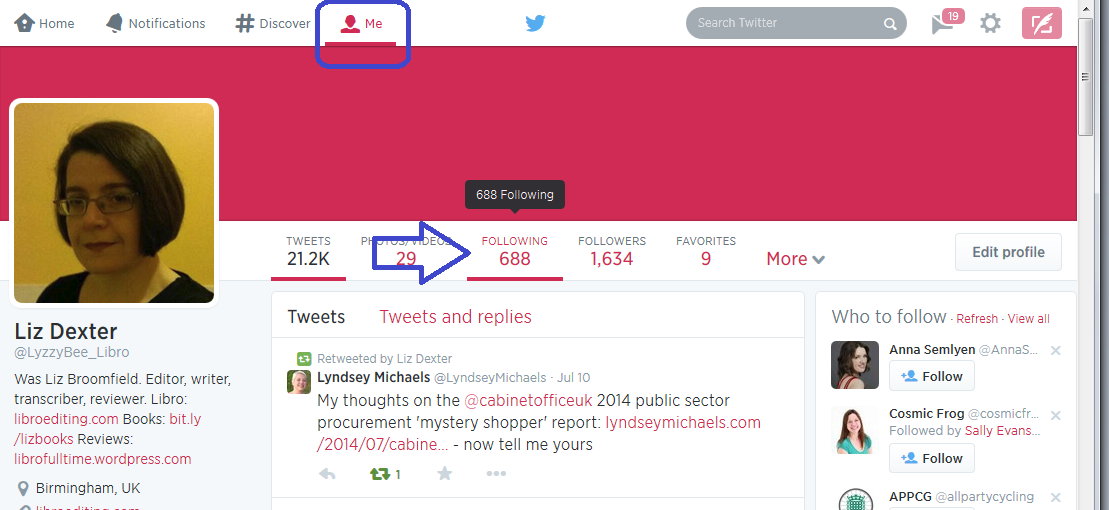
I do also regularly run a check over the people I’m following (click on Home, your own Twitter ID and Following) to make sure they’re still active. If not, I tend to cull. Sorry!
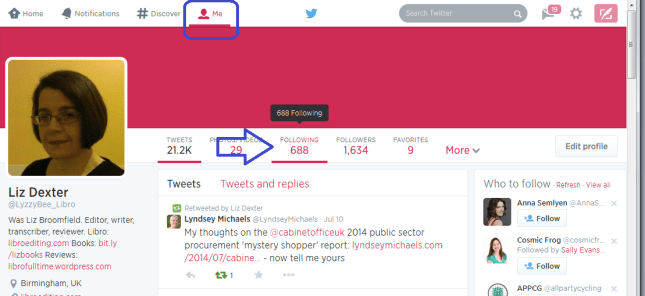
Who am I following?

Lists

Lists are a great way to put the people who you follow into categories or filters that you can look at independently. For example, I have a “Must know” list which includes all of the real-life friends plus some news feeds that I follow, so that if I only have time for a quick dip into Twitter, I can see what’s really important. I also have a “Journos” one so that I can see what my music journalist clients and a few others are up to, for some entertainment.

To add someone to a list …

Click on their name in your timeline to view their profile …
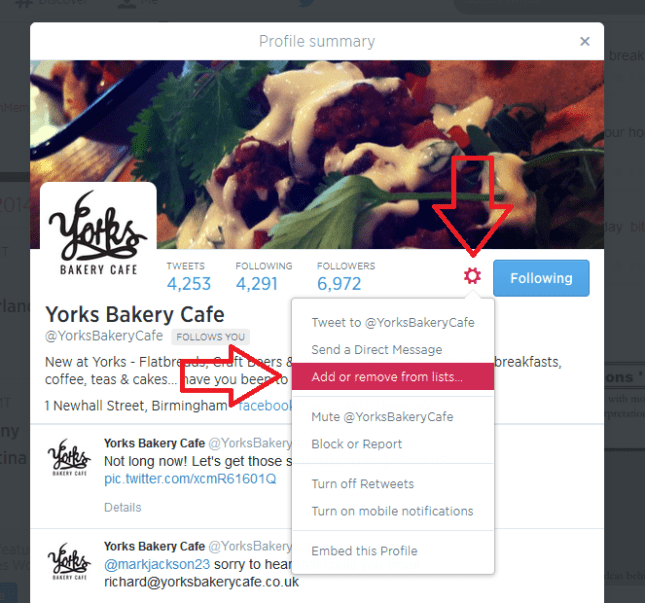
Add to list from profile

… or go to your list of accounts followed (Me – Following)
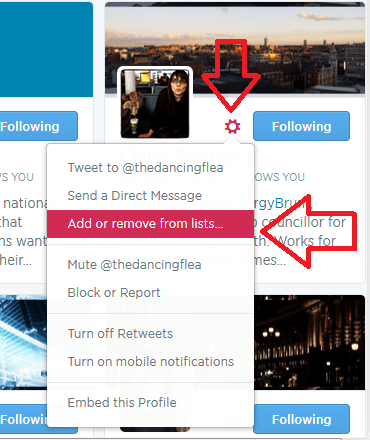
add to list from me - following

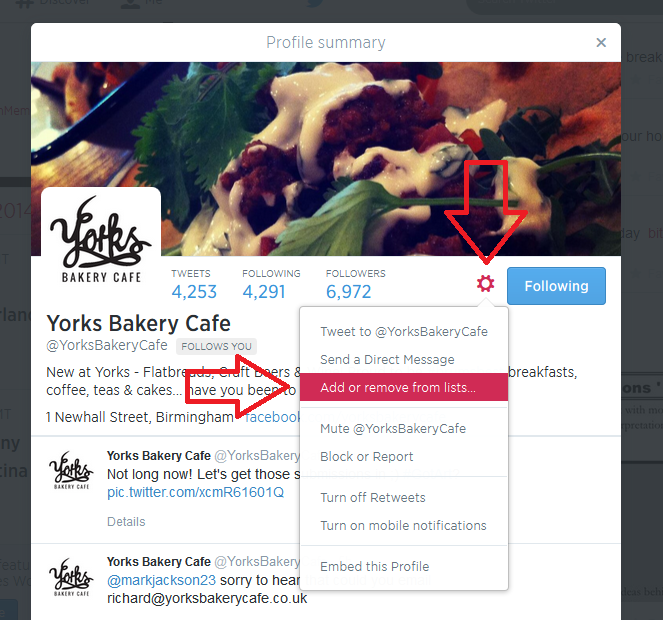
Click the User Options button (next to Following, it looks like a cog)

Click on Add or Remove From Lists

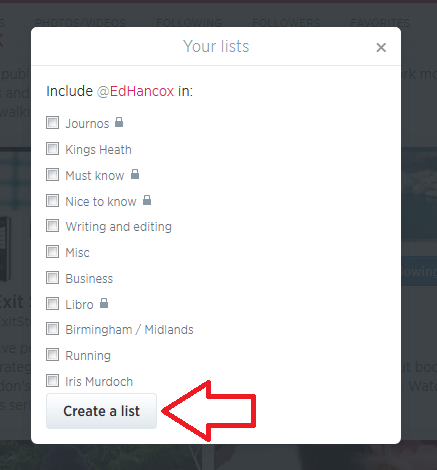
You’ll see a list of all of the lists you’ve already set up (if you have set any up) plus a button, Create a List

Either click on a list name to add that person then press the X in the top right corner to close the dialogue box:
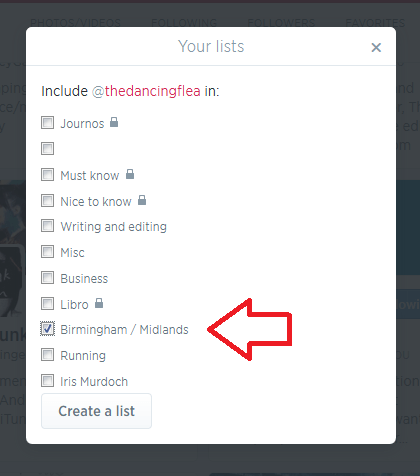
Add to twitter list

or click on Create a List

create a twitter list

and make up a new list name to add this person to:
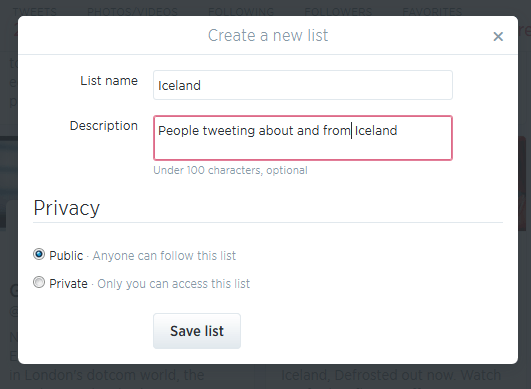
create new list

(if you make a list private, only you can see it – you’ll know when a list is private because it will have a padlock symbol next to the list name). Once you hit Save list, you will need to tick the particular list you want to add this person to:
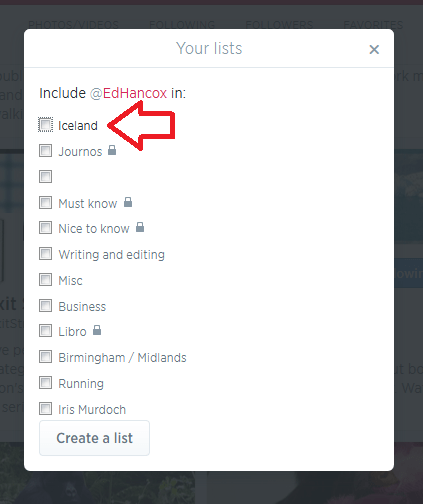
add person to new list

Once you have some lists, you’ll see a Lists entry under More when you click on Me. Ideas for lists include friends, particular interests, your business sector, news feeds, sport – anything you want.

You can follow other people’s lists or mine them for good accounts to follow – just click on a particular person’s Twitter ID and you’ll get their following, followers and lists.

Note – this doesn’t work exactly the same on mobile devices or third-party Twitter management dashboards as it does on the basic web-based Twitter interface. These instructions are for the latter.

How Twitter works – @ and #

One thing that you’ll see a lot of on Twitter is the symbols @ and #

@ is used in front of a Twitter ID to notify the person that you’re talking to them or to point someone else to their account. For example, someone might recommend an account for me to follow:

Megmac: @lyzzybee_libro have a look at @thecreativepenn for a good feed for writers

This makes the message appear in my Connect list (see below) and TheCreativePenn’s Connect list, so I will see the recommendation and she will see that she’s been recommended to me. If she wants, she can then reach out to me, and say thank you to the recommender.

# is used to create clickable links that will pull information on a particular topic together in one view. It’s often used at events and conferences – so, for example, #cbsms is used by people tweeting about the Central Birmingham Social Media Surgery. When you see a hashtag (as this is called) in a tweet, it will be a clickable link. Click on the hashtag and you will see all of the recent tweets with that hashtag, giving you a view of what’s going on and who’s talking about it.

Lyzzbee_libro: Off to the social media surgery to help a few people today #cbsms

It is also used to link tweets on a wider topic, e.g. #amwriting, which writers use to talk about the writing process. You can pop a hashtag on a tweet when you want it to come up in such searches, for example I might tweet about my book on transcription and add #transcription at the end, so that anyone looking at that hashtag will see my tweet.

Your Twitterstream and mentions

Whether you’re viewing Twitter online on a computer or via a phone or a third party dashboard, you will have a twitterstream and then various other views.

Your Home will show you your twitterstream: all the most recent tweets by people / companies / whatever that you’re following.

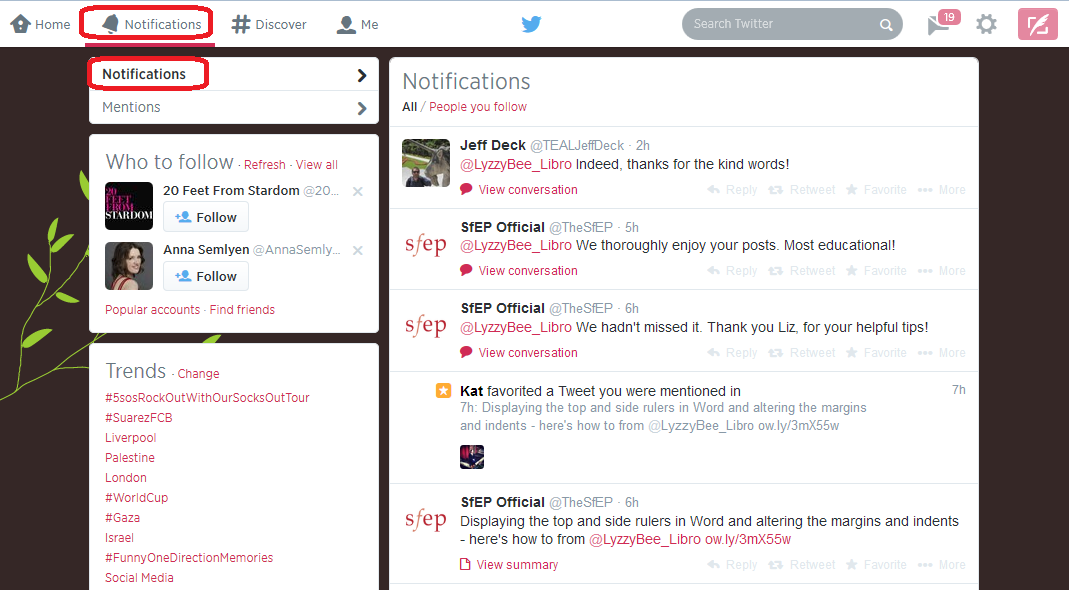
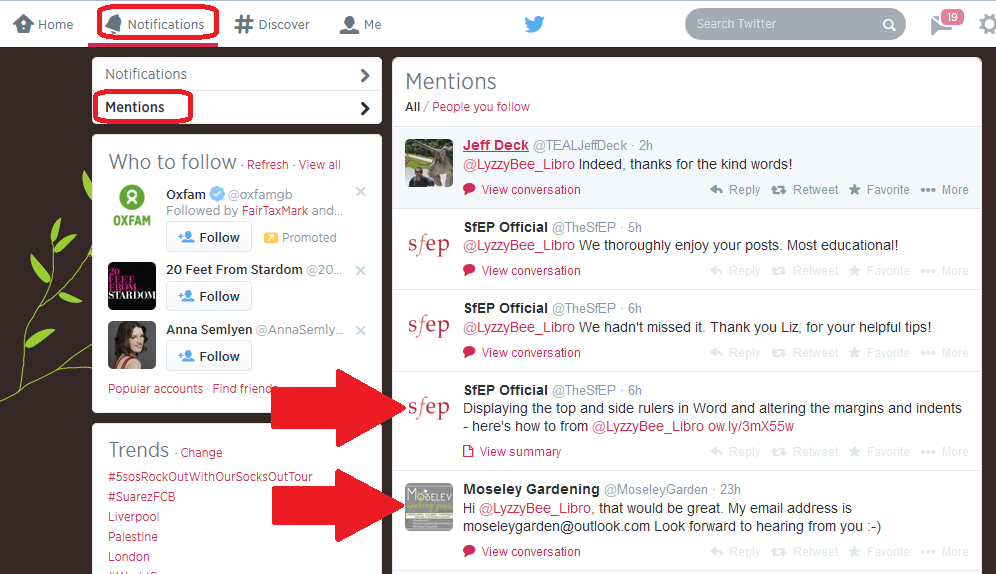
Your Notifications list will show you anything directly concerning your own Twitter account – so messages that have been sent to you with an @[your Twitter ID] as well as people who have followed you. It’s good practice to keep an eye on this so that you can reply to any messages sent to you and say thank you for recommendations and follows. Note here that Notifications gives you information on who’s followed you and favourited your messages, and any messages that start with your name:
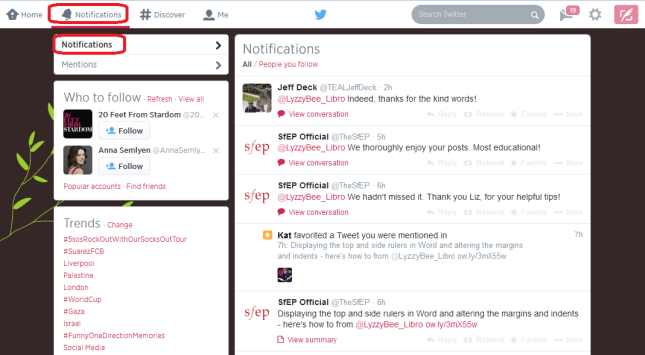
Twitter notifications

while Mentions will also show you when you’ve been @ mentioned by someone else:
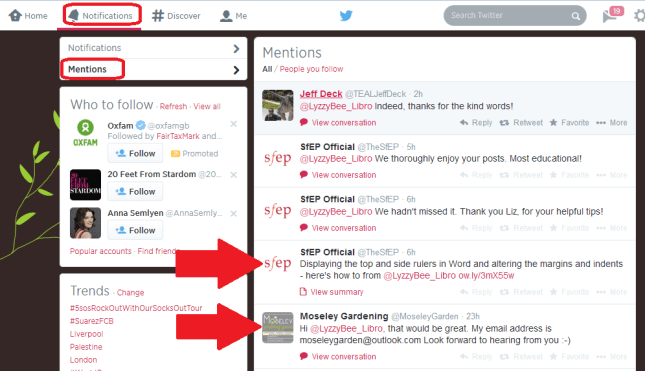
Twitter mentions

Getting rid of spammers

Everyone gets spammed by Twitter accounts, dodgy or otherwise, that are usually either looking for random followers to boost their numbers or clicks to their undesirable links. The ones with links often only have a link in the text – this is a real red flag and you should never click on a link in a tweet, even from a friend, if there’s only a link and no text (your friend could have had their account hacked).

If you receive an odd tweet or one with just a link, click on the photo or name of the sender. You will typically see that they’ve sent the same short message or no message and link to multiple people. Click on the User Actions button on their profile and you have options to Block or Report: [Note: I’m just using this chap as an example, he’s a good guy really!]
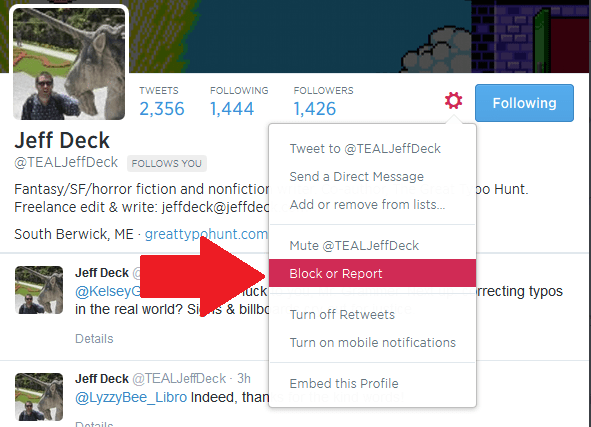
Block on twitter

Once you’ve clicked on Block or Report you will see this screen, which allows you to tell Twitter why exactly you are blocking or reporting the person:

Block and report on Twitter

This alerts Twitter that the person is spamming, and will help to save someone not as savvy as you from clicking on a dodgy link and going who knows where in cyberspace!

If you’re just getting annoyed or bored by a Twitter account that you follow, you can click on their photo or name and press the button marked Following – this will change to Unfollow as you hover over it; click it and you’ll unfollow them and no longer see them in your Twitterstream.

Rules for using Twitter effectively

Using Twitter effectively is a matter of knowing how it works and how people view it, and being sensible and polite.

Posting multiple times

The main point about tweeting is that very few people read every single tweet on their timeline. People typically check Twitter on the way to work, at lunchtime, on the way home, and some time in the evening. Once you’re following more than about fifty people, there’s no way that you’re going to see all of their tweets – so think of people as viewing a snapshot of their Twitterstream rather than everything.

This means that it’s fine to tweet a message multiple times, where it would be seen as rude and intrustive to post a Facebook status multiple times in one day.

You also need to be aware of your markets and their time zones – if you have a lot of Australian clients, and you’re in the UK, you will need to tailor your tweets to their time zone, maybe investing in a Twitter dashboard that will allow you to pre-schedule your tweets.

Using a dashboard

It can be very useful to use a dashboard such as Tweetdeck to manage your Twitter accounts. You can view multiple accounts at a time and post as them (handy if you have, say, a personal and a work account) and view your lists in their own feeds. Some of them will also allow you to schedule your tweets to be published at a certain time or on a certain date, which can be very useful (although watch out that you still keep an eye on when these go out, as there have been numerous examples of an auto-tweet posting when it’s really not appropriate, such as after a disaster).

Sharing other people’s material

The other main rule is to be polite and reciprocate and say thank you.

If you retweet other people’s tweets, they are more likely to share your tweets with their network. To retweet, click on the word retweet underneath the tweet, or look for that ‘arrows-in-a-square’ icon which has the same effect. Some people reckon that you should share five other tweets to every one of your own that you post. I’m not that scientific, but I do try to share as much as I post.

Saying thank you and being proactive

If other people retweet or otherwise share your tweets, which you will find out about by reviewing your Connect feed, do drop them a message to say thank you.

If someone recommends your Twitter account or your services to someone else, contact the person to whom you’re being recommended with a polite “how can I help you” and a way to contact you, and say thank you to the recommender.

Not automating too much and not spamming

I’m not a big fan of the automated message when I follow someone’s Twitter account, and many other people find this annoying, too. I like to know that there’s a person behind the account. Similarly, all sales and no sharing, or all automated tweeting and no replying to @ messages will probably get people irritated.

Other useful posts

On this blog: Using Twitter to find jobs

Using LinkedIn for your business

Social media resource guide for this blog

My friend Sandy’s post on Twitter for professional development
 
9 Comments

Posted by on July 16, 2014 in Business, Skillset, Social media


Tags: , ,

Localisation as a career

localisationI was recently asked for some hints about developing a career in localisation, and so here I share a bit of information about this rather specialised area of work.

What is localisation?

I covered the definition of localisation in an earlier post, but basically it’s all about changing content (whether that’s content in a novel, a website, marketing materials, dialogue in a computer game, instructions for operating equipment, etc.) so that it works in a different geographical location.

Typically, being a British English native speaker, I am asked to localise from American English into British English, for the British (or British English influenced English speaking) market.

“Oh,” you might cry, “that just means you change color to colour and organize to organise, right?” Well, there is a bit more to it than that, and I really don’t think it’s something that just anyone – even any editor – can do.

What background and skills do you need to do localisation?

As well as the classic attention to detail and background in perhaps editing, or indeed translation (it is actually often seen as a branch of translation, which brings its own issues, as we’ll find below), I think that it is vital to have experience in the language out of which you are localising: the way it works, its vocabulary, its punctuation, its spelling.

I used to work for an American company in its UK office. I spent a lot of time working on documents aimed for the two marketplaces. I travelled to America and had a lot of dealings with American colleagues, as well as travelling to America at other times, and got a good grasp of the difference between the two cultures. Still, like translators are meant to do, I will only localise out of US English into UK English. I do edit American English, so I see it and am made aware of its differences and special rules on at least one job per week.

Because of the links with translation, you also need a very special set of skills to do with operating specific, specialised translation software – which is very often not easy to use. I’ll talk about that in a minute.

I’ve also got a number of reference books – the New Oxford Style Manual is good on the variants in spelling, and I have other books in addition to the resources I use to edit in US English.

What is involved in US – UK English localisation?

As I mentioned above, it’s not just a question of changing the or spellings to our and taking out some zs (actually, British English of the Oxford variety does allow zs; however, I’ve found that all of my localisation clients or those who ask for work in specifically British English prefer to have the s spellings which they associate with British English – I do as I’m asked!). American and British English differ in terms of their spelling, punctuation and other grammar, and terminology. Here’s an invented example (US English on the left):

localisation

Now, of course, English is nothing if not subjective, and you might not agree with my choices here, but this serves as an example of the level of work involved in localisation. I might not change so much in every sentence, but there are an awful lot of issues to be aware of.

Another important issue is the range of texts involved in localisation projects. Most of mine have been under Non Disclosure Agreements, but I can tell you that I’ve worked on instructions for medical devices; dialogue for computer games; error messages for software; marketing materials for various large multinationals; and quizzes for people who sell a particular brand of product. So you need to be aware of the different registers involved in English writing, perhaps more even than when you’re editing.

How do localisation jobs work?

Herein lies the rub. As I mentioned earlier, localisation is often seen as akin to translation. And very often, a British English localisation is just one of a whole slew of translations into other languages that is being done, or it’s being handled by a company that handles translations and is used to dealing with translation software.

So, while pretty well all of my editing and proofreading jobs come in Word or PDF files, just one document to be annotated or changed, my localisation jobs come in the form of:

  • A Word document that has been output from translation software and has two columns, one for US English (the Source) and one for UK English (the Target), usually with the US English pasted into the UK column to be changed and marked up, broken up into sentences or sentence fragments, often with some highlighted in different colours
  • An Excel document in two or more columns, again broken up into sentences or sentence fragments. Sometimes the UK English is pre-populated into the Target column, sometimes not.
  • A file to be manipulated using standard translation software like Trados or Across. To use the full versions of these, you might need to buy and download somewhat expensive software.
  • A file to manipulated using the client’s own proprietary translation software – this is often web-based and free, but can take some learning, and they are ALL DIFFERENT

I’m not going to go into the details here, but basically any work done in a translation management system can be a bit frustrating for the localiser, as typically you’re not changing words in every segment, yet you will have to mark each segment as translated, often by hand and using a repetitive set of actions. All very well if you’re a translator, poring over every word, not so great when you are only changing one segment in five!

How do I get localisation work?

I tend to get my localisation work in two ways:

  • Through my membership of Proz.com, which is a jobs (and more) website specifically for translators, but which does have editing (usually non-native English texts) and transcription jobs
  • Through people searching the web and finding that I discuss and offer localisation

I have several regular localisation clients. However, I don’t think I would want to do only localisation, as it’s quite a specific field and the projects involved can be quite long and complex.

In conclusion, localisation is something I would only suggest you go into if you have …

  • Good, solid experience with US and UK English
  • A high tolerance and capacity for learning new software interfaces fast and dealing with often recalcitrant and tricky systems

————

Related posts on this blog:

Read all of my careers advice posts here!

 
14 Comments

Posted by on October 28, 2013 in Business, Localisation, New skills, Skillset


Tags: ,

Living with the Dreaditor

I came across Tammy Salyer via Twitter and was so intrigued by the fact that she’s both an editor and a creative writer that I asked her to write a guest post for me about how this works for her. Read on to find out how she uses her “editor’s brain” (the ‘dreaditor’) to help her fiction writing …

We all know that voice. The one in our head that says, “My Godiva, woman, did you really just string five adjectives in a row to describe your character’s appearance?” Or, “What-what-what!? You do know that dangling modifier makes you sound like a complete goon, right?” We’ll call that voice “The Dreaditor”—the evil, amorphous being that skulks within the crevasses of our brains and tries at every turn to squash our creative voice into so much jumble-y pulp.

For a lot of writers, the inner editor is worse than having Spock after he’s downed ten cups of coffee quoting bad lines from Star Trek directly into our ears in a bid to create order out of our creative chaos. “Are you sure it isn’t time for a colourful metaphor?” ~ Spock,”The Voyage Home” Or, “Nowhere am I so desperately needed as among a shipload of illogical humans.” ~ Spock, “I, Mudd”).

When starting out, many of us have to work very hard to ignore that voice, which can be exhausting and stifling to our creative brains. However, in contrast to the common notion that writers must completely turn off the Dreaditor, especially in their first draft, and just let fly with whatever mental ejecta our brainmeats conjure, I’ve found incalculable benefits in my eight years of serious writing to merging the personalities of Dreaditor and writer. By bringing these two personas together, I’ve learned how to stop the Dreaditor from yucking my yum and keep the writer within from being lost down the rabbit hole of endless possibility. Let me share these benefits with you.

First, the Dreaditor does a wonderful job of helping me figure out what I’m really trying to say. It is a master at clarifying ideas and making sentences get right to the point before they get out of hand.

We’ve all done it; a brilliant idea flashes through our creative brain and we start rapping at the keyboard as if the poor tool were Hungry, Hungry, Hippo. Finally, 300 words later, we type in a period. Then reality hits. We’ve just summarized our protagonist’s inner struggle with his addiction to chocolate milk in the most babbling run-on sentence known to humankind. Already we’re loath to think about what we’re going to have to go through in the second draft to figure out what we were trying to say in the first place, then to tighten up that sentence so our readers can figure out what the heck we’re talking about. But having a well-developed Dreaditor act as a kind of babelfish by automatically taking those potentially long and quirky sentences and distilling them into writing that is both concise and comprehensible the first go round barely slows your stream-of-consciousness writing a whit.

Secondly, no one is more innately compelled to pursue the elegance of structure as an editor, and thinking with your editor brain as you create helps you write toward a stronger overall story structure sooner. It’s one thing to be writing a fabulous scene that’s going to blow your villain into a new dimension—literally—but if your story is a romance set in the Old West, this may not be the most productive use of your time (no matter how fun it is). Having part of your brain always focused on how your writing links to your story arc and anchor scenes, how best to develop your characters in all situations, and what elements of the world you’ve built can be tied into your plot and conflict keeps your forward momentum more consistent in the long run. It also mitigates the pain later of having to cut wonderfully fabulous scenes, which you’ve sweat blood over, because they just don’t fit.

The third and most obvious benefit to having the Dreaditor always on duty is the vast amounts of time and mental energy you will save on your rewrites and subsequent drafts. An editor generally values efficiency in both language and movement toward an end goal. Being diligent about keeping your writing as streamlined and error-free as possible from the outset comes in immensely handy when deadlines loom. Additionally, it saves having to make endless passes at a particular page or scene if you’ve approached it with the precision-targeting focus of an editor from the beginning.

What works for me is certainly not a universally better process for all writers. However, I can honestly say that my writing began to improve in leaps after I’d taken a few self-editing classes. Becoming a successful creative writer is a subjective path with a variety of different objectives, depending on each person’s desires. Yet, becoming a writer with polished self-editing skills can only serve to propel every author closer to whatever their personal writing goals are. Plus, how many of us haven’t secretly wanted to be that person at parties that snootily points out to others that they’ve erroneously used “which” when “whose” is the correct word?

What do you think? Does every fiction writer have a dreaditor? Can you edit as you go along? Can a good fiction writer be a good editor and vice versa? (I know I’m not good at true creative writing, although I can write marketing copy with the best of them, and I know plenty of writers who say they couldn’t edit someone else’s work).

Author bio:
Tammy Salyer is a professional writer and editor who believes the imagination is humankind’s sixth sense. Contract of Defiance is the first book in her military science fiction Spectras Arise trilogy and was released to acclaim in Spring 2012. The followup, Contract of Betrayal, came out in February. Stop by Inspired Ink Editing, her blog, or follow her on Twitter and say hi.

I did a return guest post on Tammy’s blog with ten top tips for fiction writers. Read it here!

 
16 Comments

Posted by on June 5, 2013 in Copyediting, Reading, Skillset, Writing


Tags: , , ,

What can Libro do for you?

What can Libro do for you?

Here’s a handy list of everything that Libro can do for you, to make your life that bit easier and make your words work better …

Libro is all about making your words work, whether the words themselves need tweaking (editing what you’ve written, proofreading and polishing before publication), or writing (from your notes or a chat with you), or changing in terms of location (localisation from US to UK English or vice versa), or changing in terms of medium (turning handwritten notes or a taped interview into a typed document).

Follow the links for more information, but here’s a summary:

Editing  – making sure your words, grammar, punctuation, sentence structure and even your plots and non-fiction books don’t contain gaping holes.  Checking marketing content (leaflets, websites … ), blog posts, letters, reports …

Proofreading – checking that what you’re about to publish in print or online looks right and works as the document you expect it to be – checking page numbering, headers and footers, website links, etc.

(and for the difference between editing and proofreading, see here)

Copy writing – writing text for your book, downloadable e-book or leaflet, brochure, website, letter, press release, advertorial, advertisement, etc. from your notes or a conversation with you.  I can add in SEO keywords to build your presence in the search engines with text that potential clients will want to read, too.  I work with web designers, too – writing content for the websites they design.

Localisation – adjusting your copy to match UK or US English standards – not just the spellings but sentence structures, word usage, etc.

Transcription – saving you hours of time typing up dictations, interviews, meetings; why not produce a transcript of your webinar or training session to offer to your clients as an added extra?

Copy typing – bundles of notes and no inclination to type them up? Scan them in, send them to me and I’ll produce a nice, tidy, grammatically correct and properly spelled document.

I also offer all of these services as an add-on for virtual assistants, meaning they can offer a wider service without having to have all the skills themselves.

Contact me via email or via my contact form.


Tags: , , , , , ,

What does a copy-typist do? What is copy-typing?

Do you have sheaves of handwritten notes from a training course or presentation you’ve attended? Maybe you like writing longhand and have completed a novel. You will find a copy-typist useful if you have a lot of typing to do from handwritten documents, especially if you don’t type very fast, or you just don’t have the time to sit down and type it up.

These days, I usually work from scanned handwritten documents, rather than the documents themselves, although I will happily accept the documents on paper too. Quite often, my copy-typing projects come via Virtual Assistants, who can easily outsource a single project like this to someone like me, if they don’t have time to do it themselves or would rather be doing something only they can do for their client.

I’ll then type it up – I usually correct spellings and put in the punctuation as I go, but I don’t have to, it depends what the client wants me to do!

I started off my freelance career years ago, typing up people’s PhD theses from their handwritten versions. It surprises me that, x years later, I still type for people; but there’s obviously still a need for it, and it’s a good thing to outsource.

Other useful articles on this blog

Copy-typing hints and tips 1: What it is, what it looks like and how to charge

Copy-typing hints and tips 2: How do I do copy-typing work?

 
24 Comments

Posted by on October 4, 2011 in Business, Jobs, Skillset, What Do I Do?


Tags: ,

What is localisation (or localization)? How do I localise documents?

I’ve been doing some localisation for some new customers recently and, mentioning this on my Facebook page, etc., I realised that this isn’t a well-known process.  So, for those of you who are interested, and people who might have documents they would like to work in different regions of the world (there’s a clue!), here’s a quick guide to localisation.

One of the dictionary definitions of ‘localise’ is “to make local in character”, and that’s basically what it’s all about. Say a website, or a brochure, or an advert, or even a novel, has been produced in America. Obviously, the language is going to be American, rather than British English. Eggplant, freeway and optimize, as opposed to aubergine, motorway and optimise. Now, sometimes, the company or publisher putting out that document will want to adapt it for different markets, so that the reader feels comfortable with the text and can understand it without any strain. If the markets are in countries that don’t speak English, then a translator will be called in to translate it for their country.  And if the markets are in countries that speak English, but slightly differently, then someone like me is called in to “translate” the text into British, Australian, Canadian (etc.) English.

It’s not just a matter of turning all the “ize”s into “ise”s. There are grammatical differences (“different from” vs “different than”), spellings (“colour” / “color”, “anaesthetic” / “anesthetic”), and terms (“pavement” vs “sidewalk” and so on).  Then there are trickier things – would a British reader understand immediately what “resumé boosting” or other very American terms mean? The aim, as with editing in general, is to make the reading experience smooth, so that the reader absorbs the words and their message, rather than being jerked into consciousness that they’re reading a created text, and coming out of the immersion.

Not every editor, or every translator, can do this work. It’s more like translating than editing, and I can do it because I’ve got particular and useful experience working for the UK office of an American company, where I dealt with the two Englishes almost every day for a good few years.  Add to that my editorial experience and general language skills, plus attention to detail which means making a list of the words I’m looking out for and making sure I change them all – and that’s why I’ve been praised and will be used again by the two companies I’ve completed localisation projects for so far.

It’s fun, too!

Read more about localisation as a career


Tags: , , , ,

What is transcription? What does a transcriber do?

One of the jobs I really enjoy – and which can really free up your time if you outsource it – is transcription.

Basically, transcription involves listening to a recording of something and typing the contents up into a document, which is then returned to the client, giving them a written record of what’s on the recording. Typically, this will be an interview – which might be something a journalist has undertaken with someone they’re writing about, or part of a study, where a researcher has interviewed subjects and needs to record their responses.  It can take absolutely ages to type out a recording like this – much longer than you think it will, particularly if you don’t type very fast!

When I learnt to audio-type, it was all done with tapes and a special pedal you pressed to play and rewind the recording.  These days, although you can still get the pedals, it can all be done with MP3s, some special software (I use some provided free by NCH) and the function keys on the keyboard take the place of the pedals.  You can even speed up or slow down the playback.

The time it takes to transcribe a recording depends on several factors:
– the speed at which the people are talking
– the number of people talking
– the clarity of the recording (background noise, phone interview … )
– the clarity of the speaking voices (accents, speaking English as a second language, mumbling … )

If you’ve got lots of interviews to transcribe or need to have a dictation, a lecture, a radio programme or a presentation turned into text, it’s worth contacting a professional transcriber like me to do it for you.

Pricing for transcription is here.

Related posts on the Libro blog: Learn why humans are better at transcription than machines, find out how to develop a career in transcription, and learn about the tools of the trade.

Want to learn more? Read my book: A Quick Guide to Transcription as a Career – buy from Amazon UK or visit the book’s web page for worldwide links and news.

 
42 Comments

Posted by on June 22, 2011 in Skillset, Transcription, What Do I Do?


Tags: ,