RSS

Tag Archives: blogging

Is it worth having a website for my business?

websiteIn my networking adventures and other travels in the world of small business, I come across quite a few people who don’t have a website. To be honest, I’m a bit shocked when this happens. Unless you’ve got a constant set of clients, with new ones on the horizon to fill in any gaps if you lose one, then you’ll want to be findable.

When you think about getting the roof done, or finding a cleaner, or sourcing flowers for an event, or buying a product, where do you look?

Online.

Even if you look for a tradesperson on a Yellow Pages style website, I bet you like to have a URL to click through to, to look at their details. Right?

If you don’t have a website, even a single page with your name / company name and information about yourself, then what will people find when they search for you?

How do people search for companies, products or services?

People come to my website in one of four ways:

  • They search for my name
  • They search for my company name
  • They search for something that I do
  • They search for the answer to a question (“is it en route or on route?” “How do I repeat the header row of a Word document on every page?”)

This is what would happen if I didn’t have a website:

  • If they search for my name, they’ll find my Twitter or Facebook feed, or photos of me socially, or mention of me on forums. All fine, but they’d probably rather find either my Facebook or my company information in one place
  • If they search for my company name, they will find my Facebook or Twitter feed, however, those mention and feed back to my website, as they’re not enough in themselves to maintain interest and get me business
  • If they search for something that I do, they’ll find someone else’s website and if they’re looking for someone to do that work, they’ll hire that someone else
  • If they search for an answer to a question, someone else will answer it, and if they’re looking for someone to work for them, they’ll hire that someone else

This is what happens because I have a website:

  • If they search for my name, they’ll find my website and my other feeds, which all link together. They’ll find out what I do and if they want to talk about work, they can contact me
  • If they search for my company name, they’ll find my website, find out what I do, and possibly hire me, getting in touch via my contact form
  • If they search for something that I do, they’ll find my website, find out that I do that, find references from people who I’ve done that for before, and possibly hire me – getting in touch via my contact form
  • If they search for an answer to a question, if I can answer it, they’ll find out that I know what I’m talking about, and note me for later or sign up to receive emails when I post, and might hire me in time, or ask me a question or engage with my blog

The bare minimum

As a bare minimum, you should have a page somewhere that includes …

  • Your name
  • Your company name (if it’s different)
  • A list of your services or products – make sure that you mention all of the forms of the things you do on that page (so I would include transcriber, transcription services, editor, editing, etc.)
  • References from satisfied customers
  • A way to get in touch with you – a contact form, a phone number (most people like to see this), an email address
  • Professionally produced text – by which I really mean have someone check it for typos and spelling mistakes. Those will seriously undermine your reputation and send people running from your services – whatever they are

It’s a good idea to have your company name in the url for your website, but personally I don’t hold it against small companies if they have the word blogspot or wordpress in their URL – you don’t need to pay extra to have that if you don’t want to.

You can use a Facebook page as your company web page, however I would hesitate to ONLY use something that changes so often and is as unpredictable as Facebook. A company Facebook page is better than nothing, however!

Optional extras

You can add these extras if you want and if they add value. If you find that you’re getting a steady stream of enquiries via your simple website, and they turn into paying customers, then only add these items if you can see a clear value in doing so, rather than doing it out of vanity or because someone’s persuaded you to buy their service.

  • A URL that’s just your company name – you will have to pay for this, probably renewing annually
  • A professionally designed website – there are so many “themes” on offer that look as good as professional websites.
  • A blog – this is GREAT for driving people to your website and setting you up as an expert in your field. If you only do one of these things, write a simple blog
  • Someone to write web text and blog posts for you
  • Search Engine Optimisation – a professional can ensure that you’re showing up in the search engines etc. But shop around – this can be expensive and there are lots of things you can do to SEO your site on your own (just have a little search engine search and see what you can find)
  • A shopping cart and catalogue – very useful if you’re producing craft items or any tangibles – but you can sign up to services like Etsy and eBay which will do this for you

The big caveat

It’s really important to have a web presence so that people can find you.

It’s really important to be super-vigilant, because unscrupulous companies prey on small businesses’ lack of expertise in this area.

  • Always ask around fellow small business owners or someone whose website you admire and see who they use
  • If someone offers to make you top of the search engine results, ask what other sites they’ve worked on (always ask for references anyway) and do a search for yourself
  • If someone offers to revolutionise your website and make you a millionaire overnight, they’re probably over-selling. Ask for references
  • If someone offers to build your website make sure – no, MAKE SURE – that you will be able to edit and update the text and pictures on that website whenever you want to. Never hand over the full ownership of your site to another person such that you can’t update it yourself.

If you haven’t got a website, and you haven’t got a steady stream of new and regular customers giving you a good income stream, I really do suggest that you get a website!

Read more here about growing your business, have a look at my advice on blogging and social media, read about how to set up a WordPress blog and website (starting with this post) and read about my own business journey in my book, Going It Alone At 40.

Related posts

WordPress 2 – adding pages to create a website

 
11 Comments

Posted by on January 13, 2014 in Blogging, Business, New skills, Social media


Tags: , , , , , ,

How to set up a WordPress blog 1: the basics

This article will help you to set up a standard, free, WordPress.com blog for the first time. It talks you through step by step, including setting up your account, choosing your blog name and setting up the features that I find essential when setting up a new blog.

Further posts cover more advanced topics like sharing your posts, inserting pictures and galleries, setting up web pages associated with the blog, etc. By the end of this session, you will know how to …

  • Set up a WordPress.com blog
  • Choose and apply a theme (background / colours / layout)
  • Set up comment moderation to keep you safe from spammers
  • Remove ads which will put off your readers
  • Write and publish a blog post

Why would I want to start a blog?

I’ve covered this in detail elsewhere, so do have a look at this index or pop to the bottom of this article to see a list of related posts on this blog.

Getting started with a WordPress.com blog

Please note that this all applies to a standard WordPress blog hosted on WordPress’ own servers. Some of this will look different if you’re setting up a self-hosted WordPress site. Don’t worry about that bit if you just want to set up a blog!

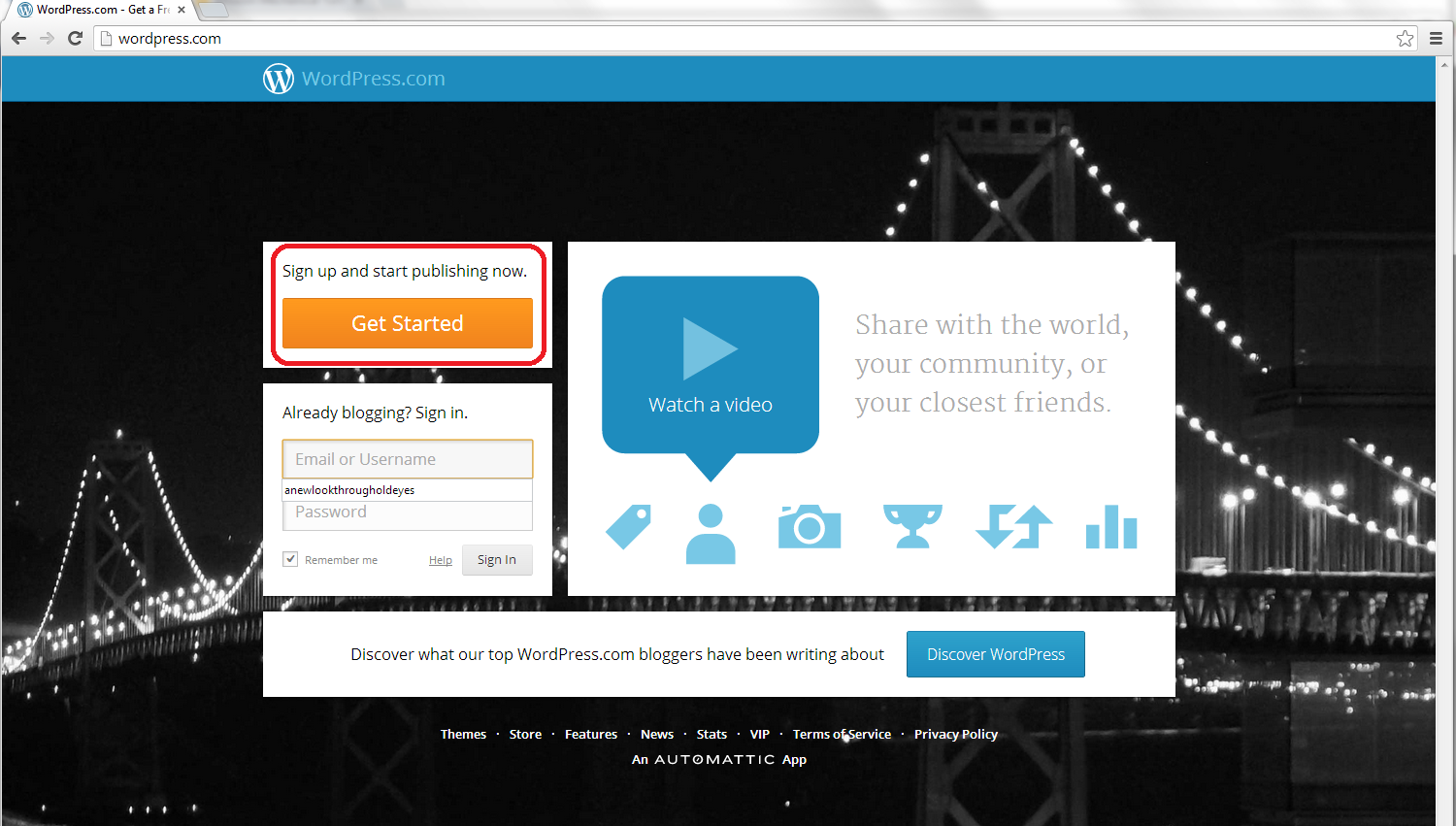
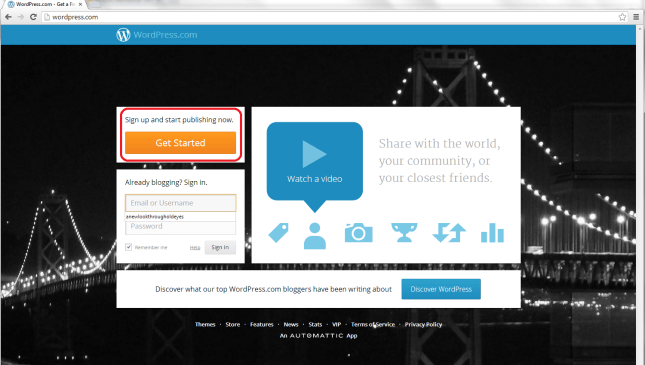
So, to set up your blog, first go to http://www.wordpress.com, where you will meet a sign-up page:
1 front page

Click on the Get Started button to set up your account:

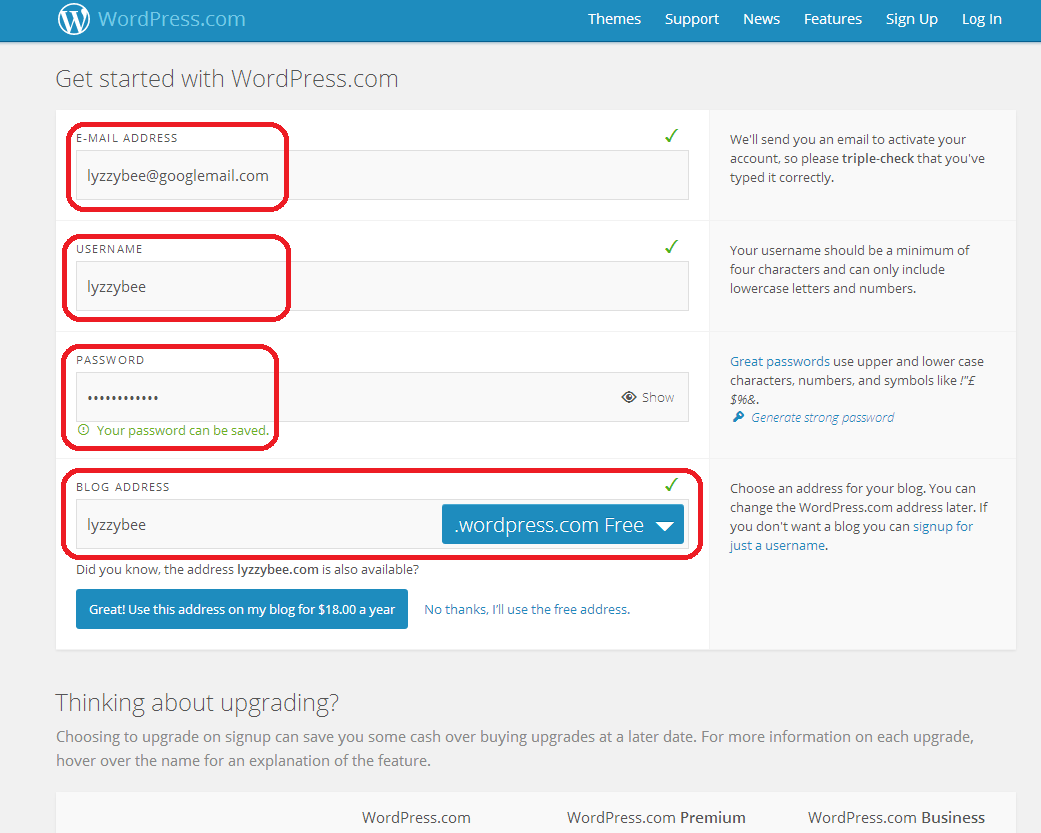
2 sign up

Fill in your email address, a username, and choose a password, then choose the web address for your blog.

Note: although you can change the name that your blog displays, this web address should always stay the same. If people link to it, or you link to your own posts on it, or people add it to their blog reader, they use the web address. If this changes, then the links will be lost. I suggest choosing something as bland and general as you can, so that if you change the name of your blog or the way you write it over the years, the web address and the name won’t be too different.

I’m choosing Lyzzybee here – WordPress has suggested that but you can change it. Watch out for the little green tick, which means the address is available. That means that you can choose it for your blog.

Underneath the web address box, WordPress lets you know that you could buy the domain name (in this case lyzzybee.com) for $18 per year. There’s a lot of discussion about this, with people claiming that seeing WordPress (or blogspot or any other blogging software name) will put people off if you’re writing a business blog or setting up business pages. I’m not sure that it does these days, but there is an option to buy the name if you want to, if it’s available:

3 sign up

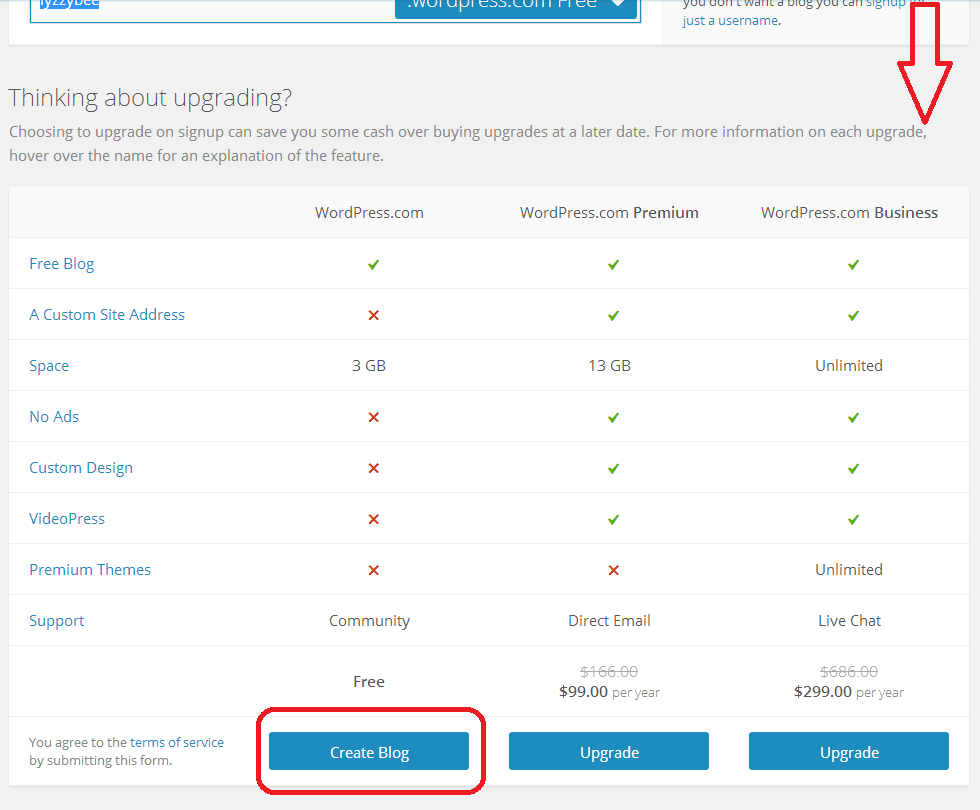
If you scroll down, you’ll see some options for upgrading, too. These look very enticing and seem to offer you a lot, but upgrades cost money and you will only really need a free blog for most purposes apart from the most content-heavy and customisable blog. For our purposes, a free one will do, so click on Create Blog at the bottom of the free column.

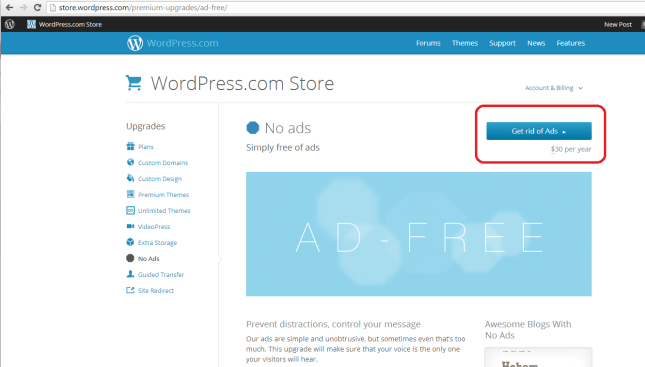
(Note: ad free is something we will be looking at later as I feel it’s important to remove intrusive ads from your blog, so it’s not EXACTLY free. Ad removal is currently $30 per year (about £20), it is an option but I think it’s important).

4 sign up free

Confirming your email address

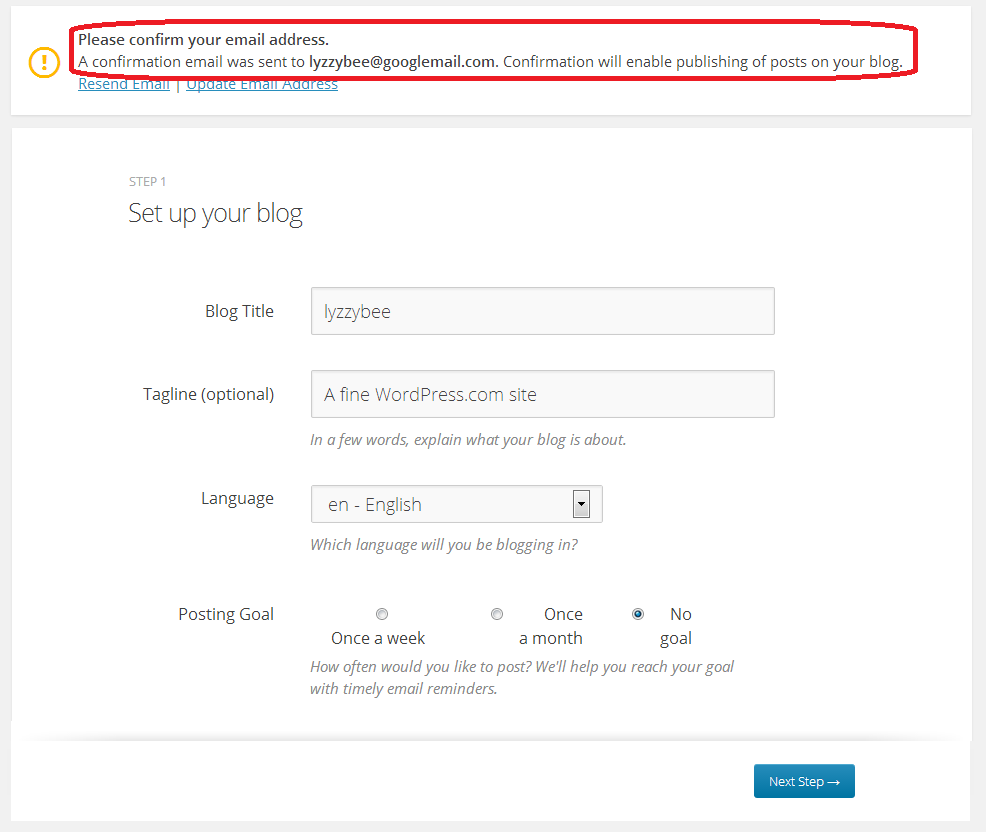
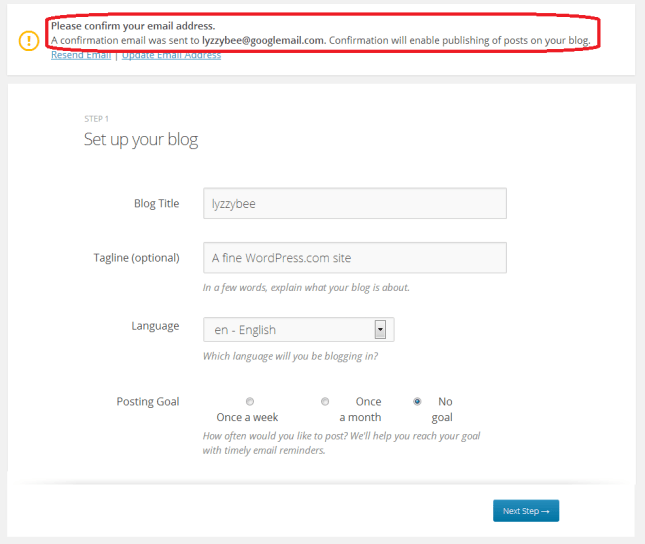
Before you go any further, you will need to confirm your email address in order to allow you to write posts and use your blog. This is a security measure, to make sure that no one’s setting up a blog under your email address illegitimately.

You will see a message about confirming your email address once you’ve hit that Create Blog button. You have options to change the email address or re-send the email if it doesn’t appear:
5 confirm

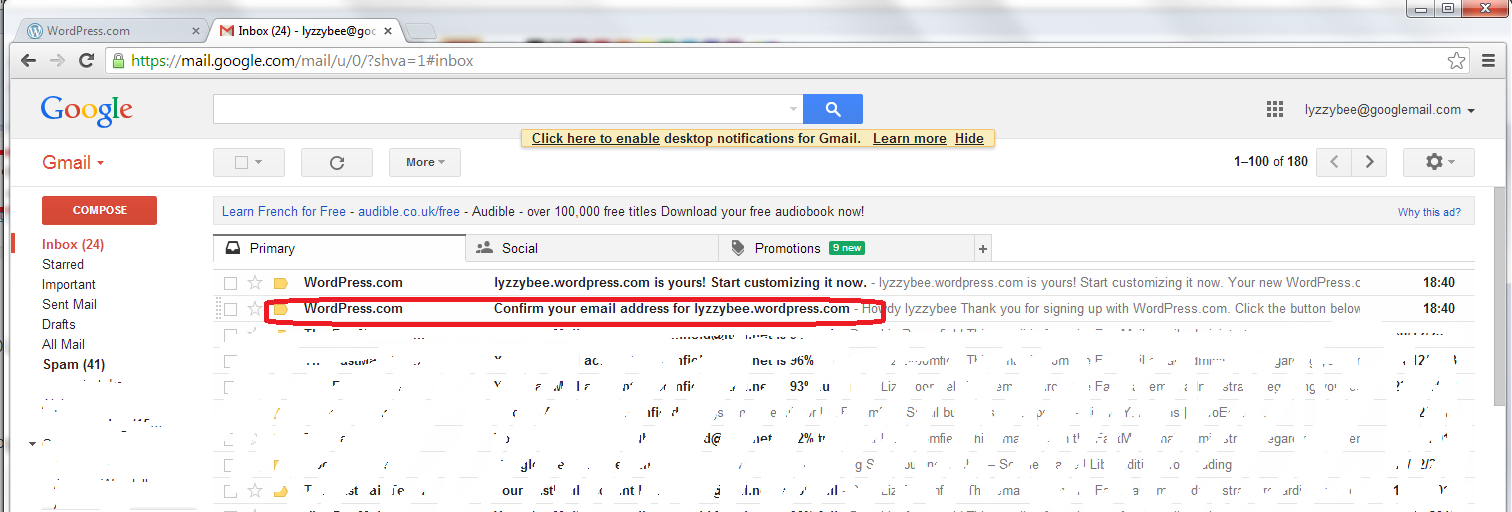
But, all being well, you should find an email from WordPress in your email inbox, with the subject “Confirm your email address for [your blog address]” – it might be the second one from WordPress, as here:
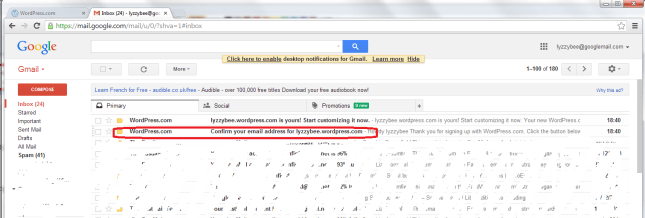
6 confirm

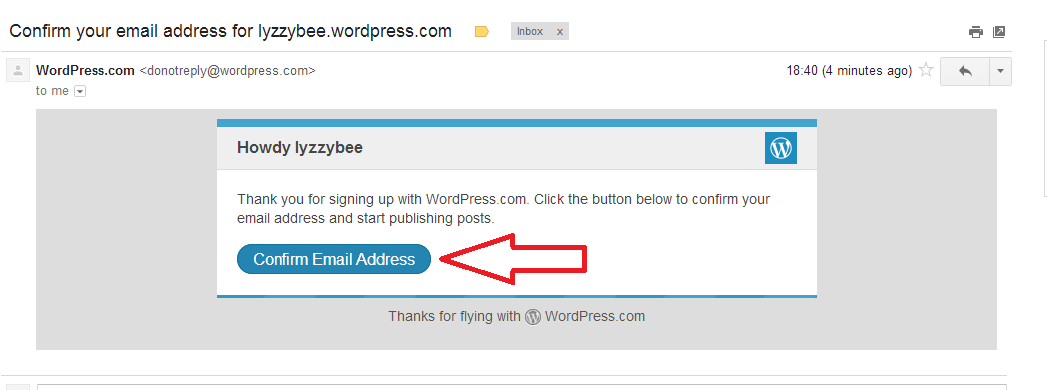
Open the email and you’ll find a Confirm Email Address button to press. Press that button …

7 confirm

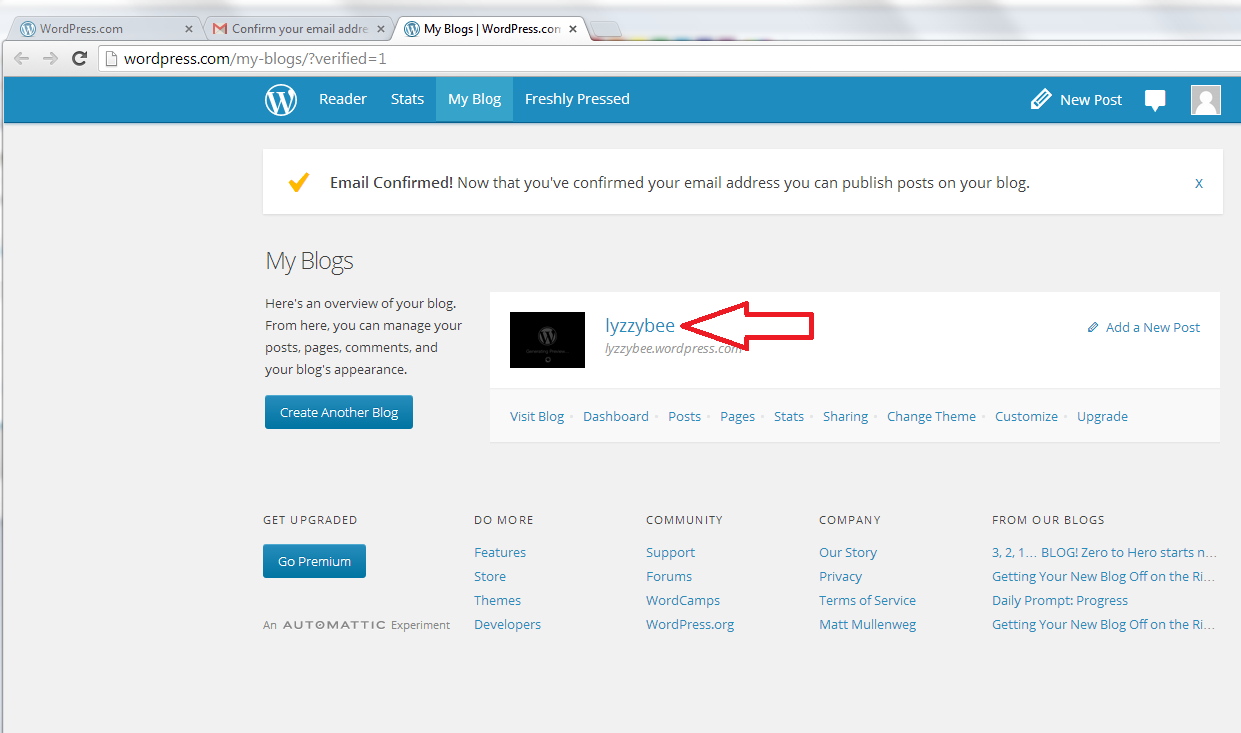
… and you’ll be back in WordPress (in a new window) with the email address confirmed and able to do what you want with your blog!

Click on the blog name to go and look at your blog …
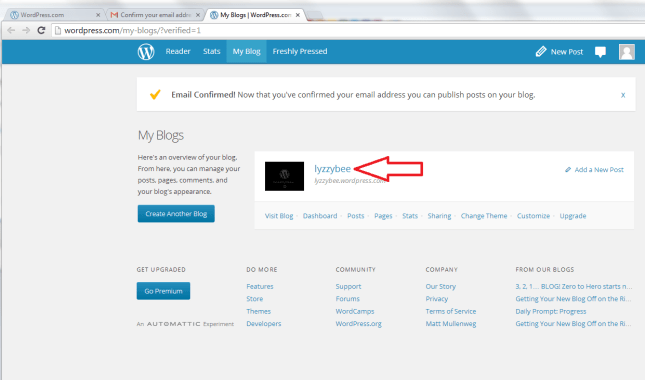
8 confirm

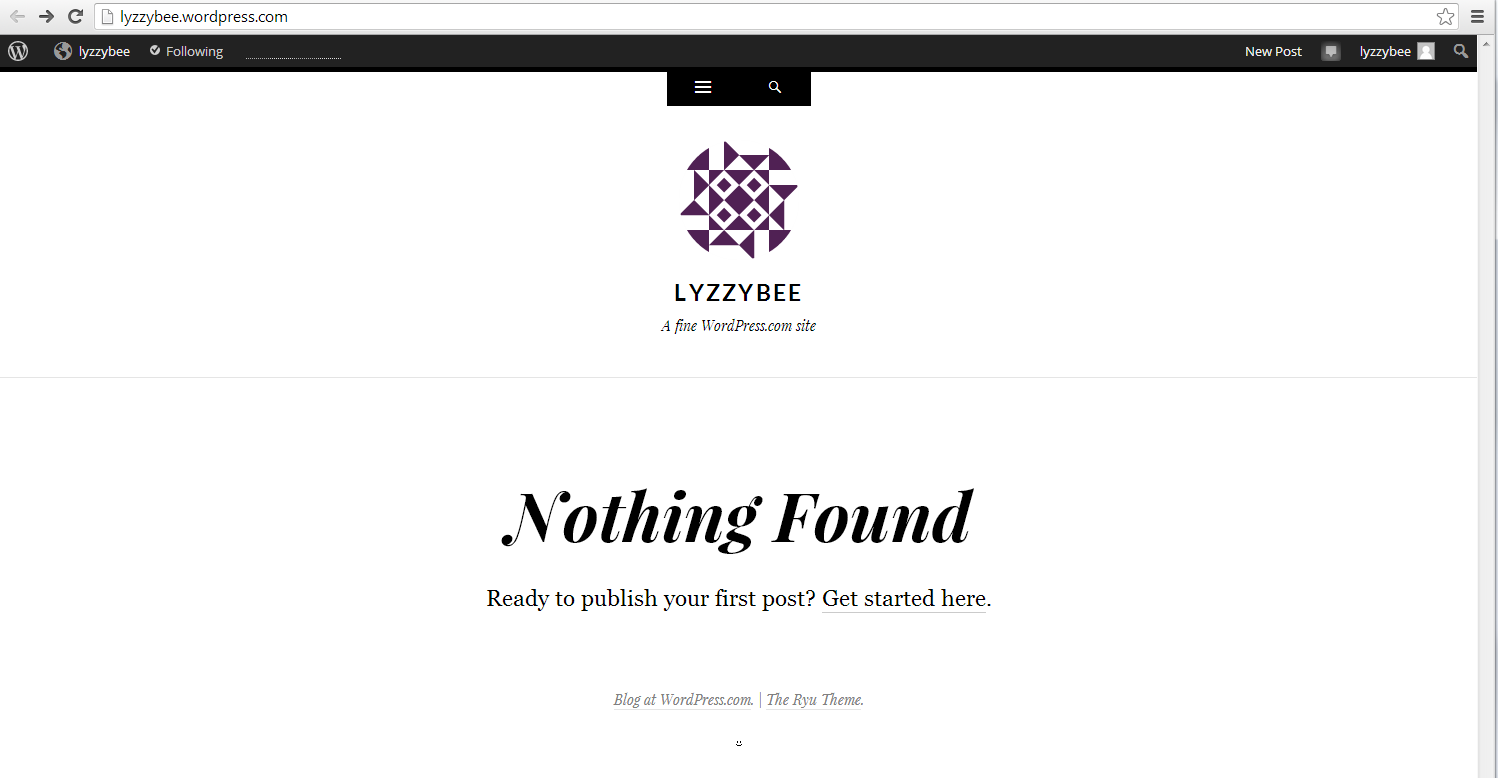
… and you will find the very bare bones of a completely blank and empty blog! But it’s your completely blank and empty blog!
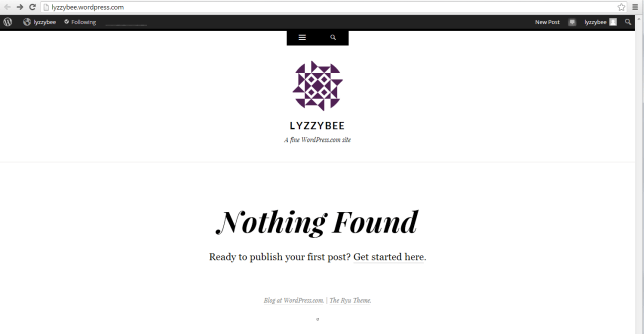
9 setup

How do I access the dashboard on WordPress, aka how do I actually do stuff?

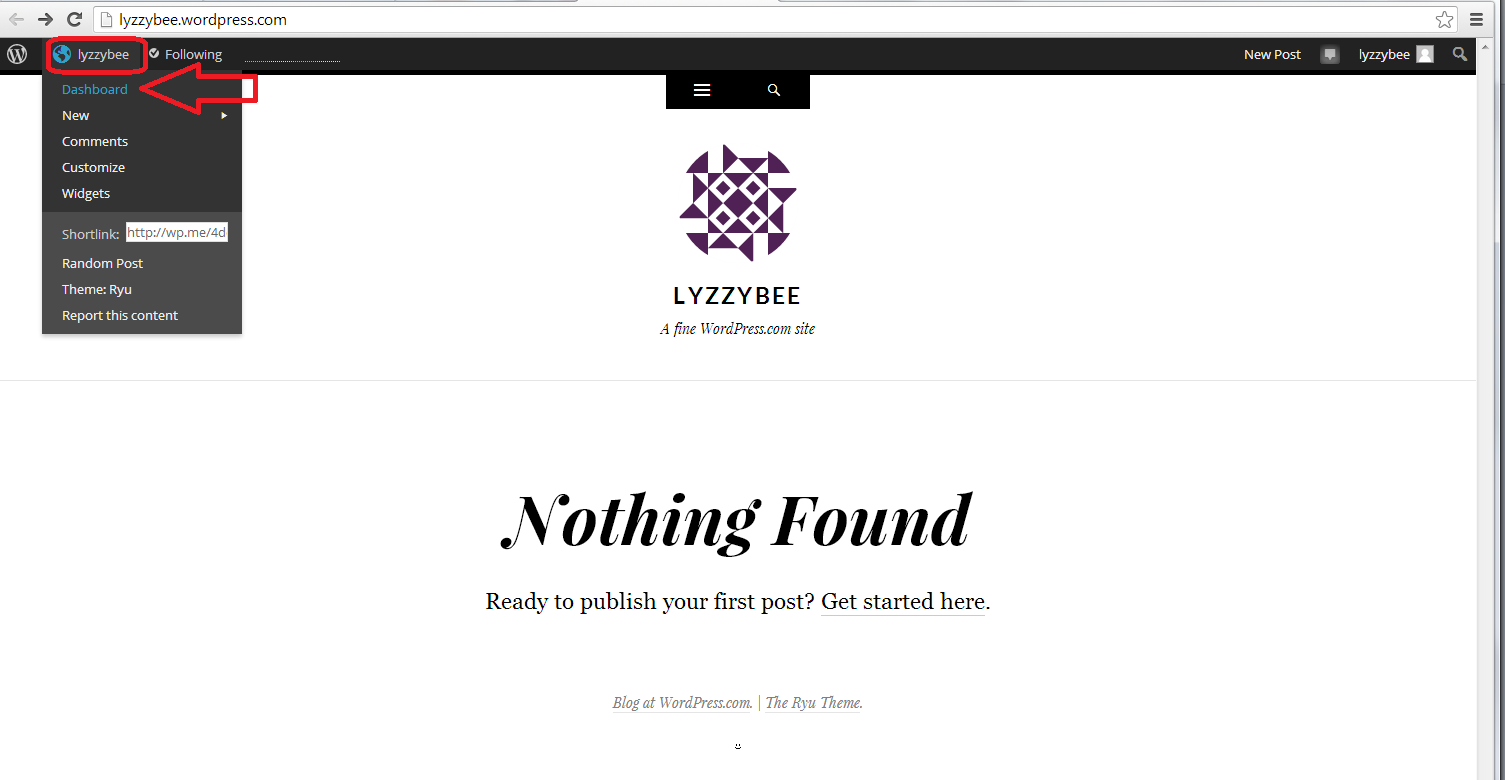
Whenever you’re logged in to WordPress and want to do something with your blog, whether you want to alter the settings, write a post, check your comments … you can access the Dashboard (which allows you to do all of this) by clicking on your username at the top and then clicking Dashboard:
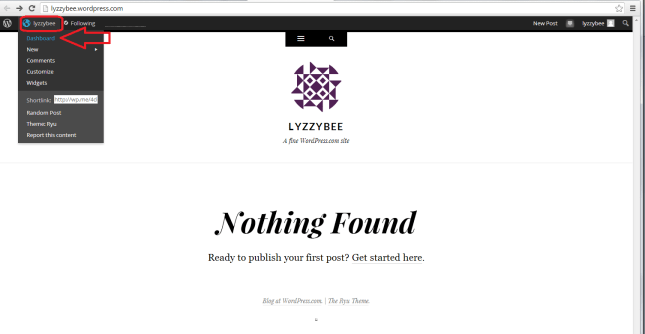
10 setup

Now, the Dashboard looks like a pretty scary place at first glance: there’s lots of text, lots of options … lots of STUFF!

But I can tell you that you will usually only need to use a handful of areas on this Dashboard, and a few options in each one.

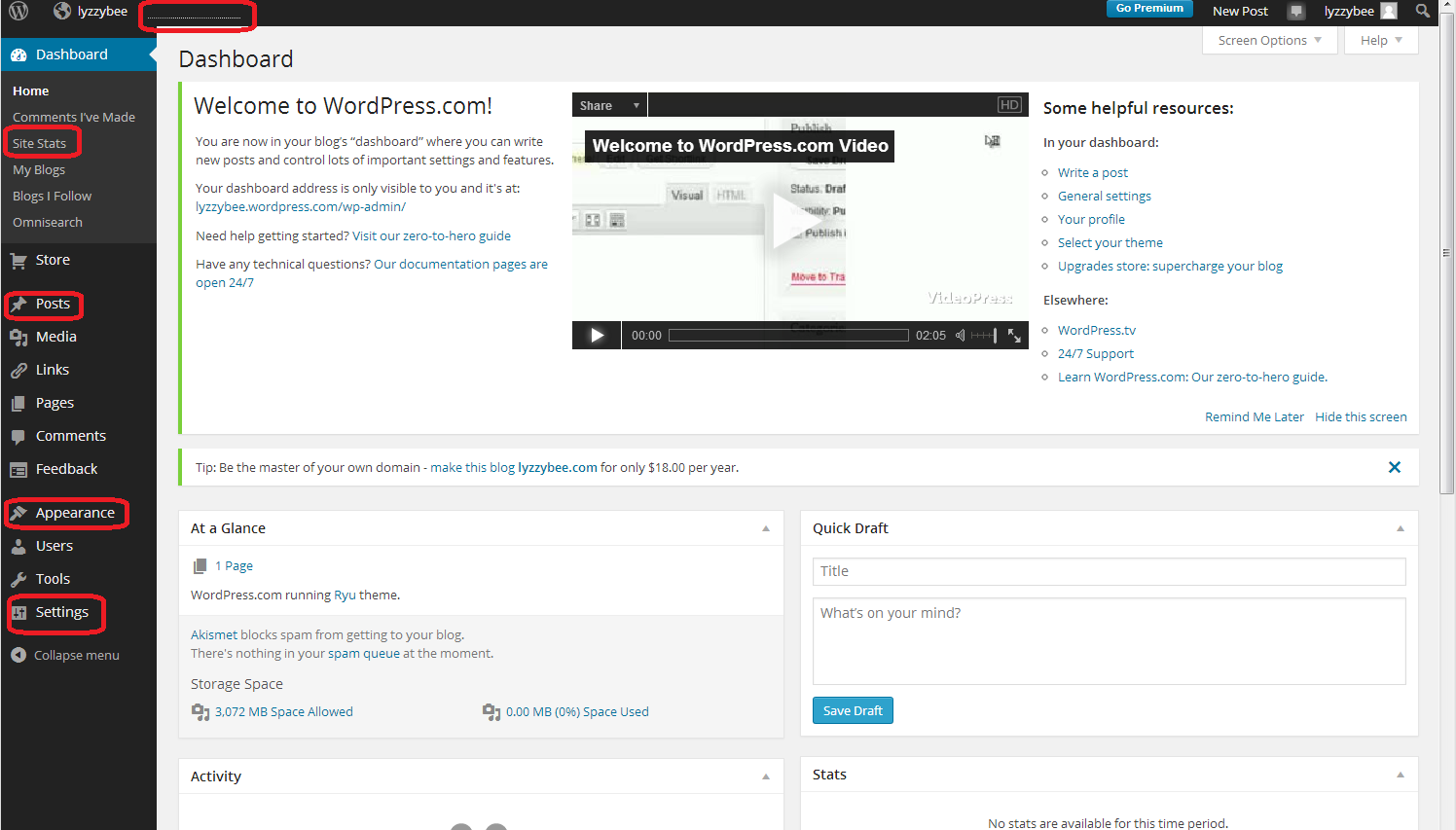
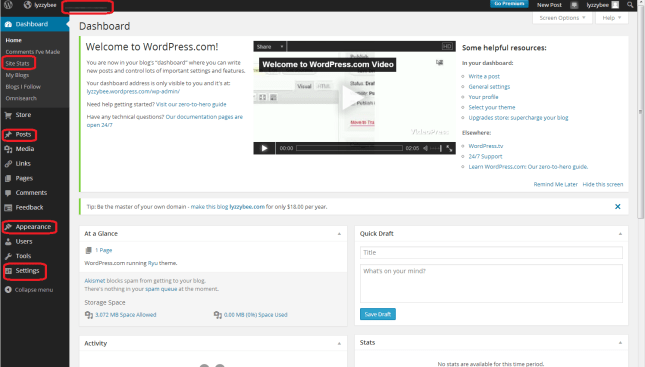
The ones that I find most useful and use most of the time are:

  • Site stats – accessible from the top part of the Dashboard or the dotted line on the very top line (which starts to look like a bar graph as soon as you get some people looking at your blog)
  • Posts – where you write posts, copy posts, edit them and review your drafts
  • Appearance – where you change the theme of your blog
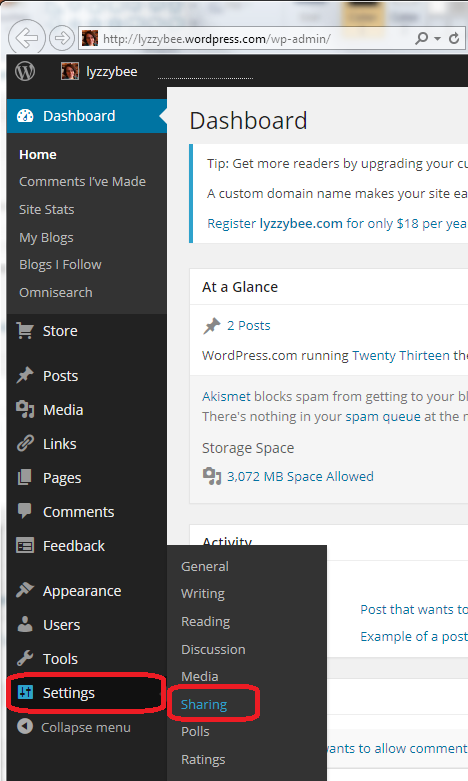
  • Settings – where you change your blog’s name, subtitle and spam filtering options

I’ve highlighted them all here: not so scary after all?
11 setup

How to change your blog’s name and subtitle

Remember what I said above about not being able to change your blog’s web address, but being able to change its name and subtitle? I’m going to show you how to do that first, mainly because WordPress adds its own subtitle to your blog, and we want to customise it for ourselves.

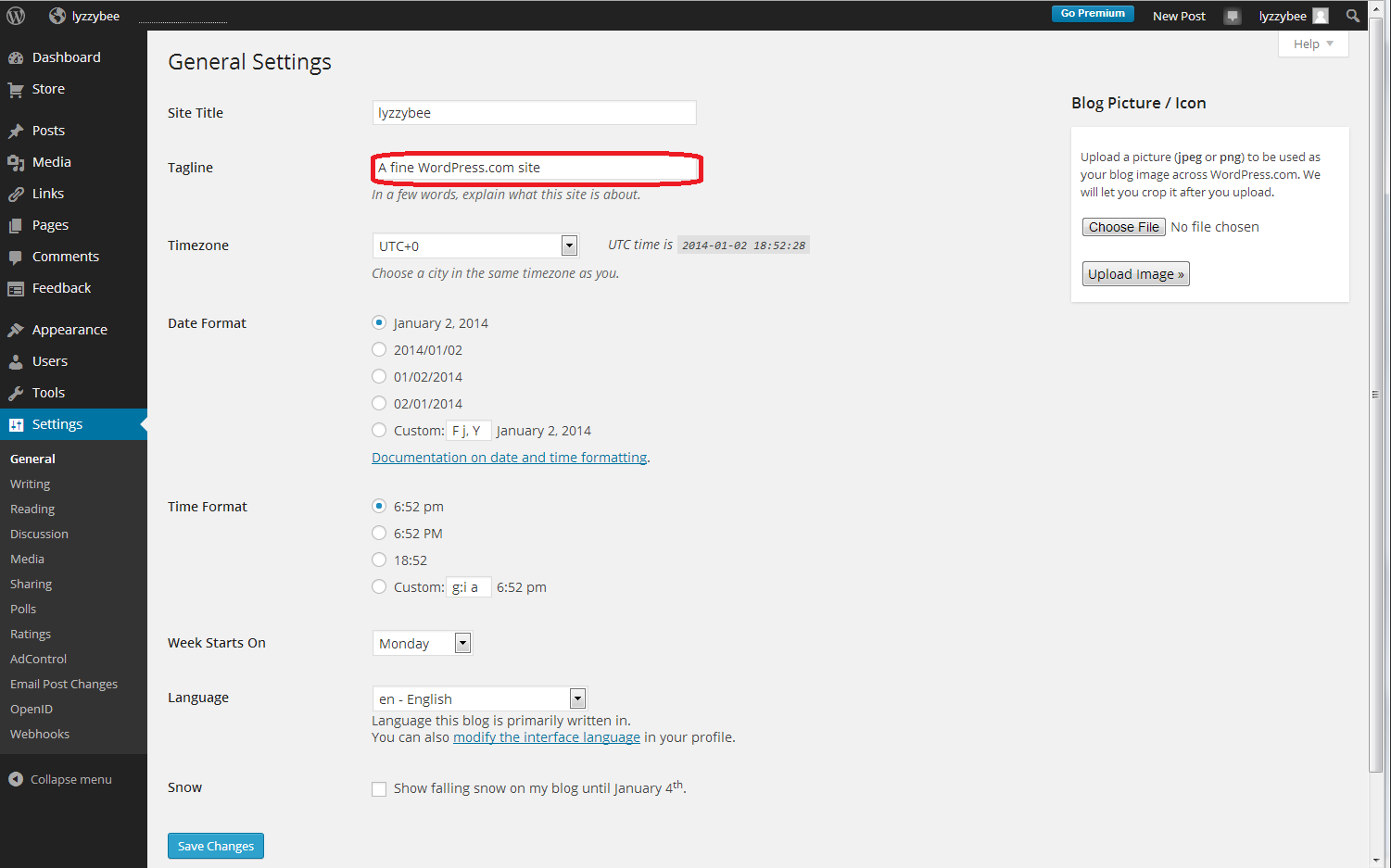
Whizz up a couple of pictures to that blank white screen that says “Nothing Found” in the middle of the screen. Notice how underneath the blog name “Lyzzybee”, it says “A fine WordPress site”. Well, that’s all well and good, but this is where you can describe what the blog’s all about. This blog that you’re reading now has the subtitle “Proofreading, editing, writing, transcription and localisation”, and this field is searchable by search engines, so it makes sense to get your keywords in there and tell people what it’s all about (another of mine can be found here).

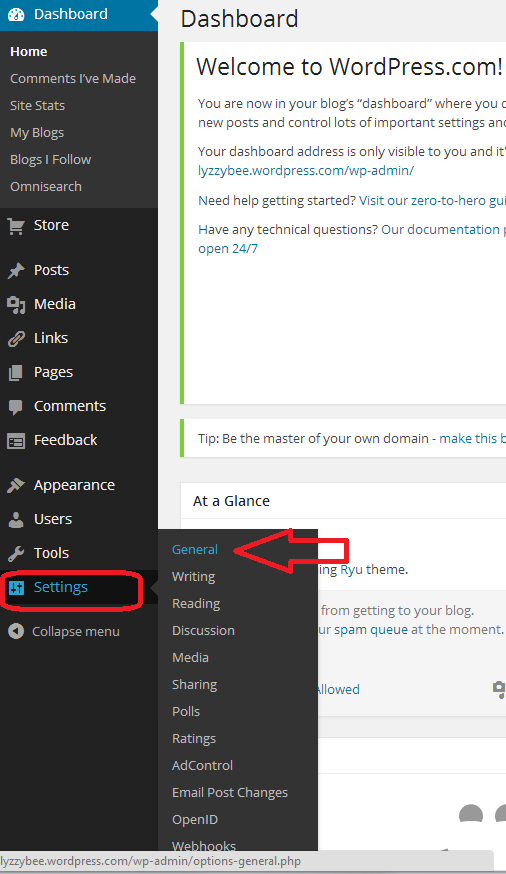
To change this, go down to the bottom of the Dashboard and click on Settings. You’ll get a sub-menu, and you now choose General:

12 setup

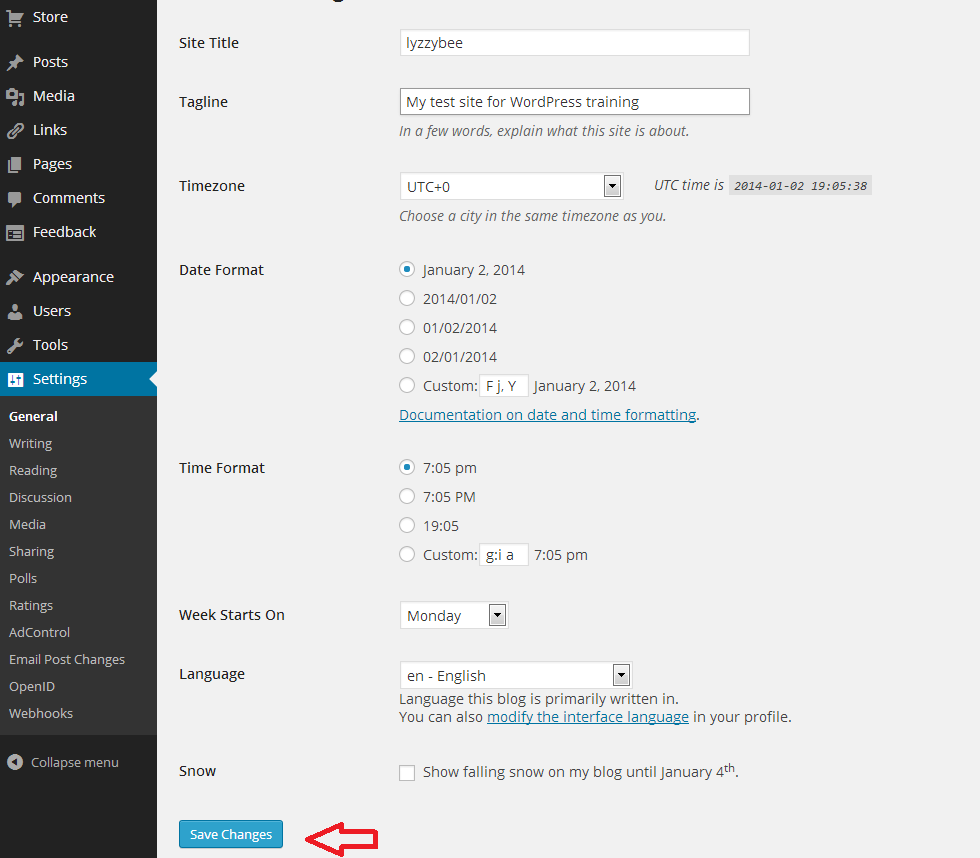
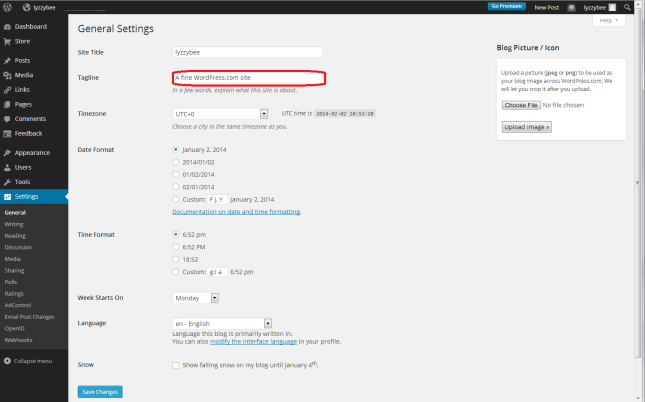
After clicking General, you’ll get a page where you can change the very general details of your blog. I’m not going to go into much detail about this page now, but you can see at the top the SIte Title (which you can change if you want to; I’m not going to for now), and Tagline (the subtitle). There’s the text that WordPress has automatically inserted for you, and here’s your chance to start customising your blog and telling people what you’re all about:
13 setup

So I type in “My test site for WordPress training”, because that’s what it is, and then press the Save Changes button at the bottom of the screen to save that. There are lots of other things you can change on this page; do have a play with them if you’re feeling confident, but it’s not strictly necessary at this stage. Everything can be accessed and changed later on.

14.5 setup

Changing the comment settings to prevent spam

Yes, yes, I know you want to change what your blog looks like and get writing, but this bit’s really important.

Once you get up and running, lots of people who are your friends, old and new, real and virtual, will hopefully want to post comments on your blog posts. Lovely! But other people will try to post fake comments, in an attempt to either place their web address on as many other web pages as possible (this gets them up the search engine results pages, not wanting to go into too much detail) and/or want your readers to click on dodgy links in order to sell them fake ugg boots or even install viruses on their computers. People will also tend to trust your blog less if you let spam get through with its dodgy links enticing your readers to click through. You need to stop this, and although WordPress does have really good spam filters, the odd one still gets through.

By making sure that you moderate the first comment that anybody makes on your blog, you will cut out almost all of the spam. The only way that someone can spam comment is if they post a normal comment first, then a spam one. Most people won’t bother. So, make sure you catch them out and prevent them from commenting by setting up your Discussion setups in your favour, not theirs.

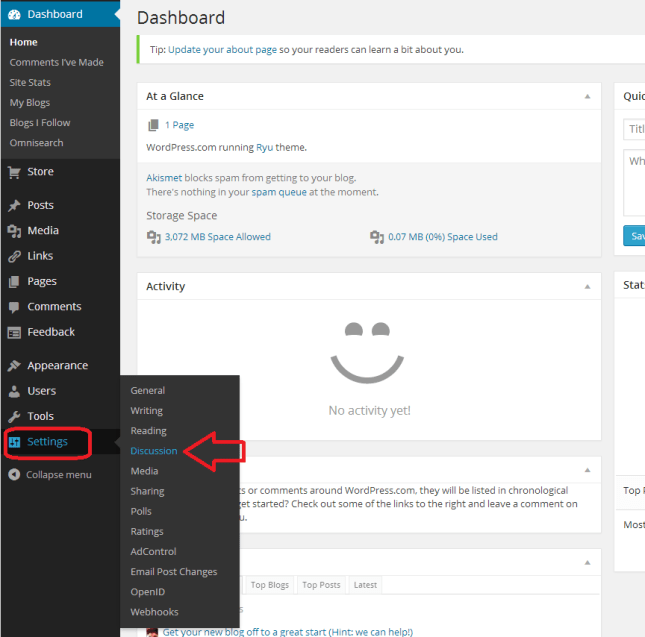
You access this area by choosing Settings from the Dashboard again, then Discussion:
18 setup

Now you have a range of options. Handily, the ones that are already ticked are the ones that you want. But the most important to be ticked are circled in red below:

  • Other comment settings – Comment author must fill out name and email (this means they can’t just post anonymously)
  • Before a comment appears – Comment author must have a previously approved comment (don’t tick manually approve every comment unless you get bombarded with spam and need to check every single comment and pass it manually – just approving the first comment will do)

It’s also worth keeping as many email alerts as you can, so you can add to these vital ones:

  • Email me whenever – Someone posts a comment (you will always be told whenever you get a comment. If you spot a spammy comment, you can follow the link and delete it)

19 setup

Setting up your Discussion section like this means that:

  • Every time someone comments on one of your blog posts, they will have to enter their email address and name
  • Every time someone comments on one of your blog posts, you will receive an email.
  • When it’s their first comment on your blog ever, you will receive an email asking you to approve their comment. Once you’ve done that, they will be allowed to comment whenever they like, as long as you’ve approved the first one.
  • Because you receive an email every time someone comments, you can reply back to their comment, making them feel like it’s a two-way process and you care about your readers (see more on this in my article on reciprocity and social media)

Choosing your blog theme

At last she’s letting us make our blog look nice! I know – but it’s important to set up the security aspects first, right?

At the moment, your blog is quite plain. You can choose from loads and loads of attractive themes to brighten it up. And you can change your theme any time you want (although be aware that some of them have the menus in different places and might not offer certain functions).

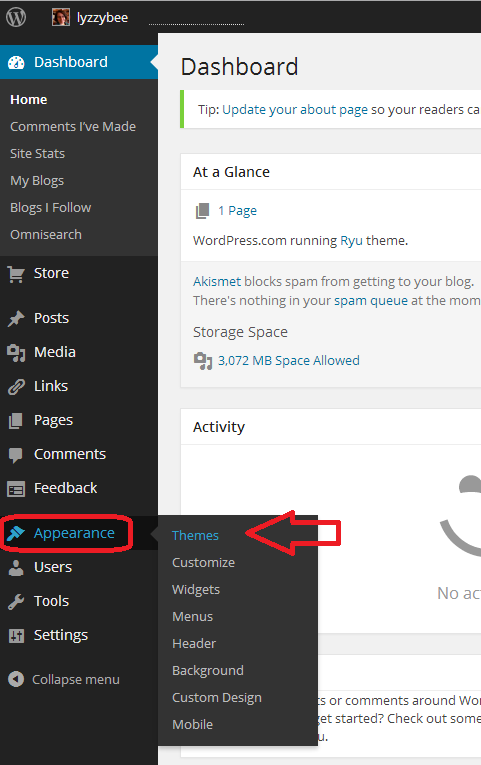
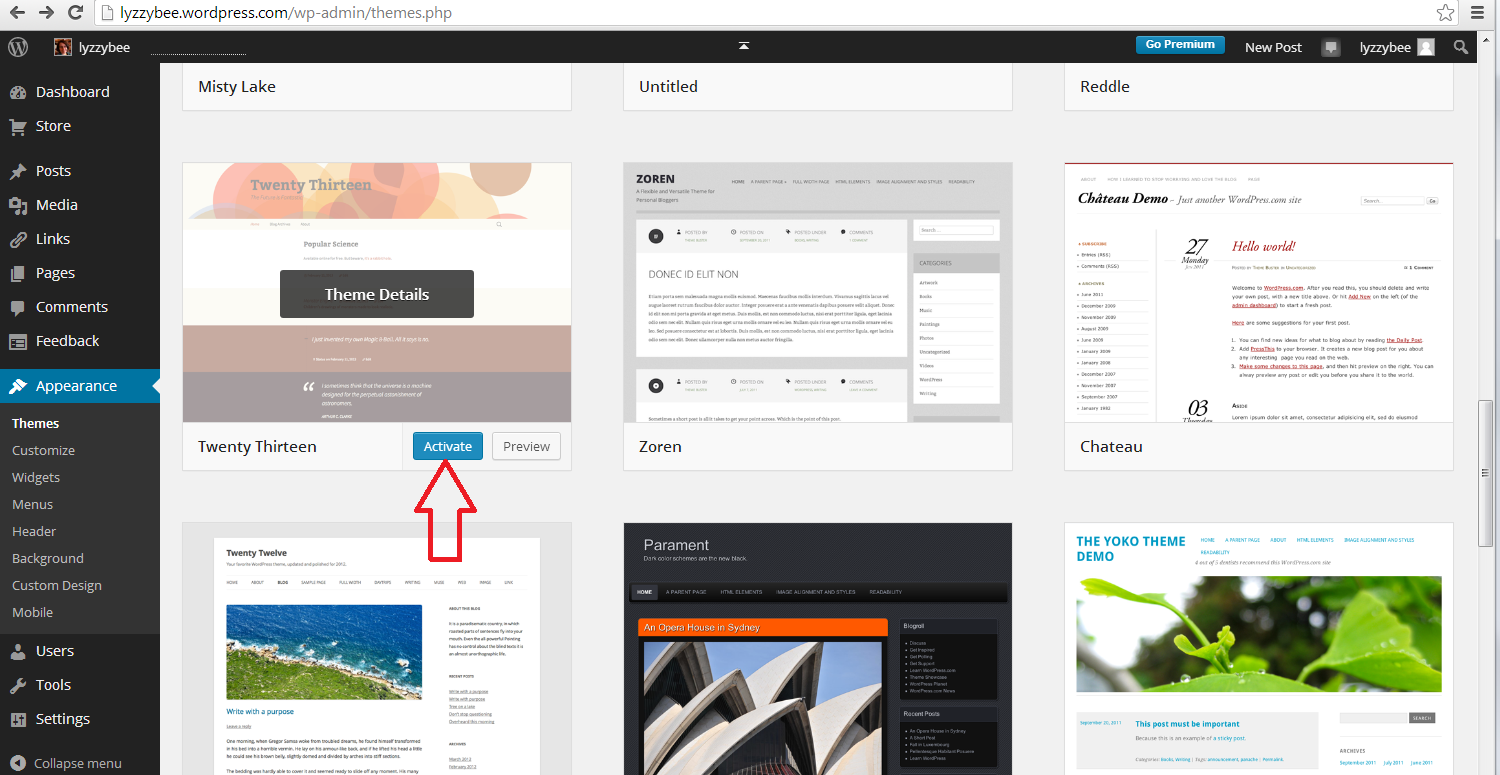
To set up your new theme (or change your theme once you’re up and running), click Appearance on the Dashboard, and then Themes:

20 setup

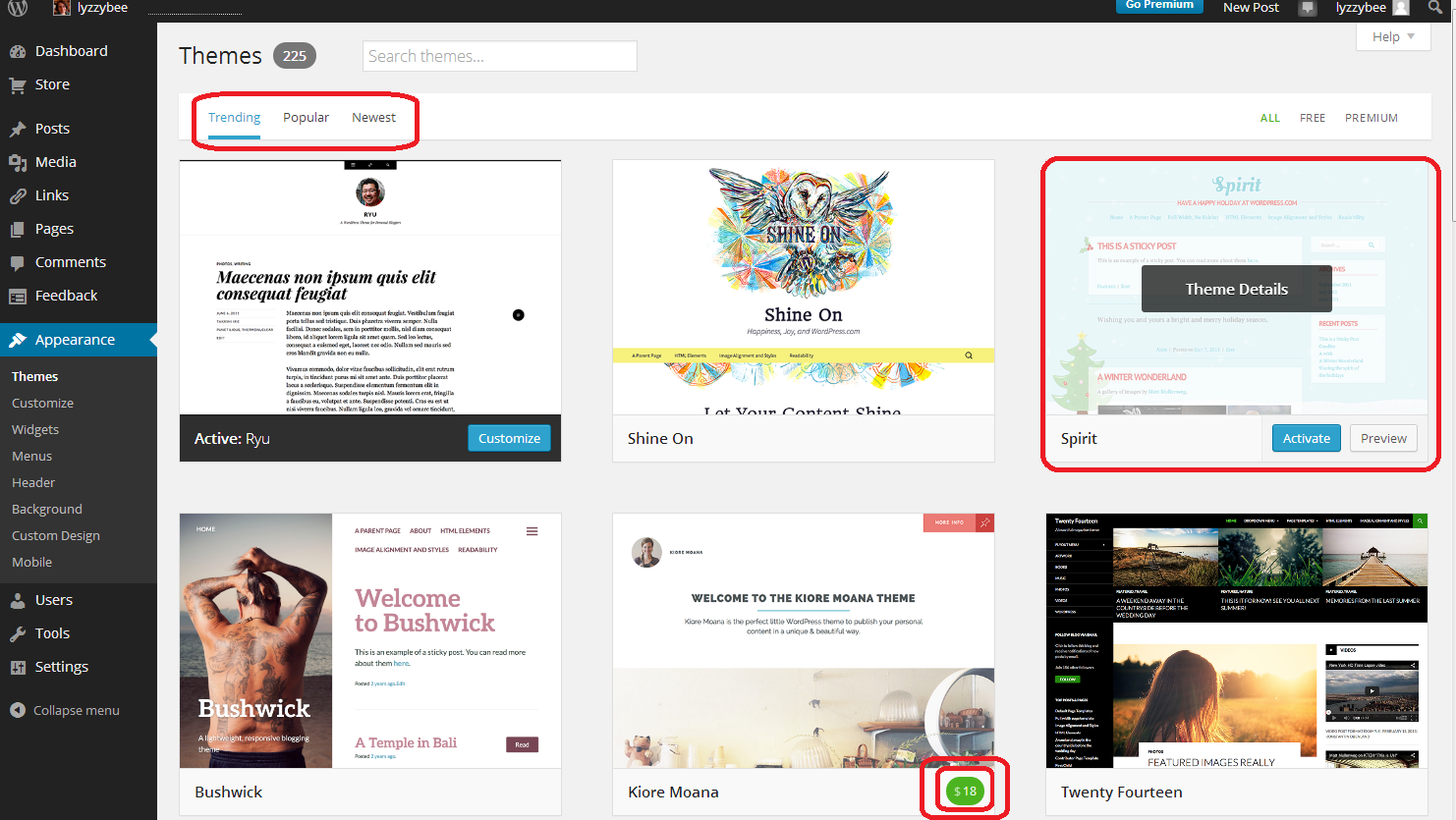
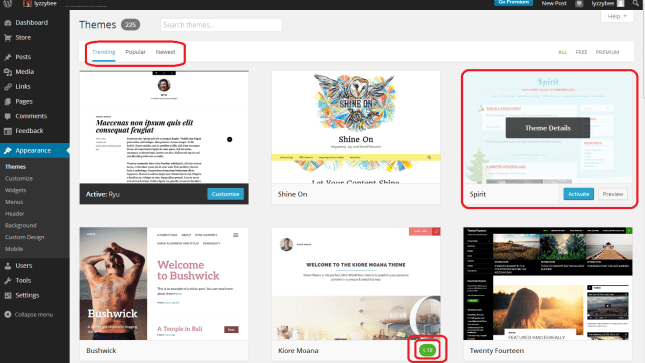
You will now see a page of lots of different designs for your blog.

Note three things here:

  • At the top, you can search for themes (flowers, etc.), choose from Trending, Popular and New themes (and on the right, choose to see only free ones)
  • When you hover over a theme, you will get the opportunity to Preview or Activate (see below)
  • You have to pay for some themes (see the double circle at the bottom). There are LOADS of free ones so certainly don’t bother to do that at the start.
21 setup

If you click on that Preview button, you’ll be shown what your blog looks like in that theme. Note that the blog name and Tagline / subtitle are there, as are any posts you’ve made.

Return to your list of themes using the back button at top left

22 setup

Once you’ve chosen your theme, press the Activate button

23 setup

You will get a confirmation that you’ve activated that theme (but you can always change it later!)
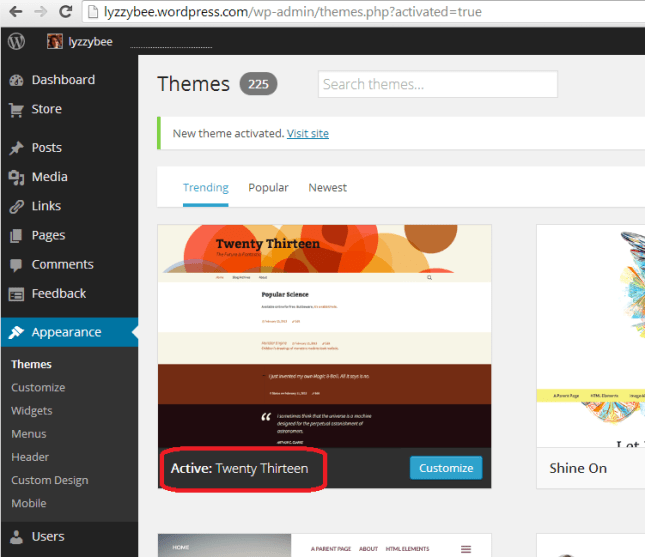
24 setup

How do I write a blog post in my WordPress blog?

Hooray – it’s time to actually write something!

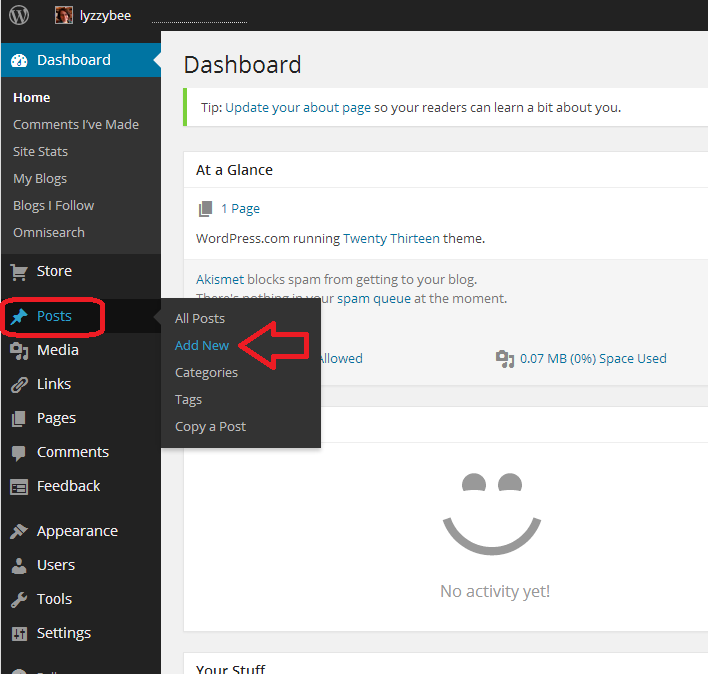
To write a blog post, go to Posts on the Dashboard and then click Add New. There are some other options there but this is getting LONG and we’ll just do the basics.

25 post

Once you’ve clicked New Post, you’ll be in your post editor. I’ve added a title and some text here (click to view larger and you can see my instructions).

Once you’ve got a title in place, WordPress will create a Permalink (URL) for it. You can alter the words in this after the date, so if you don’t want to be sharing a huge URL, you can cut it down (e.g. this very post has a URL ending wordpress-blog-basics, which is not the full title of the post).

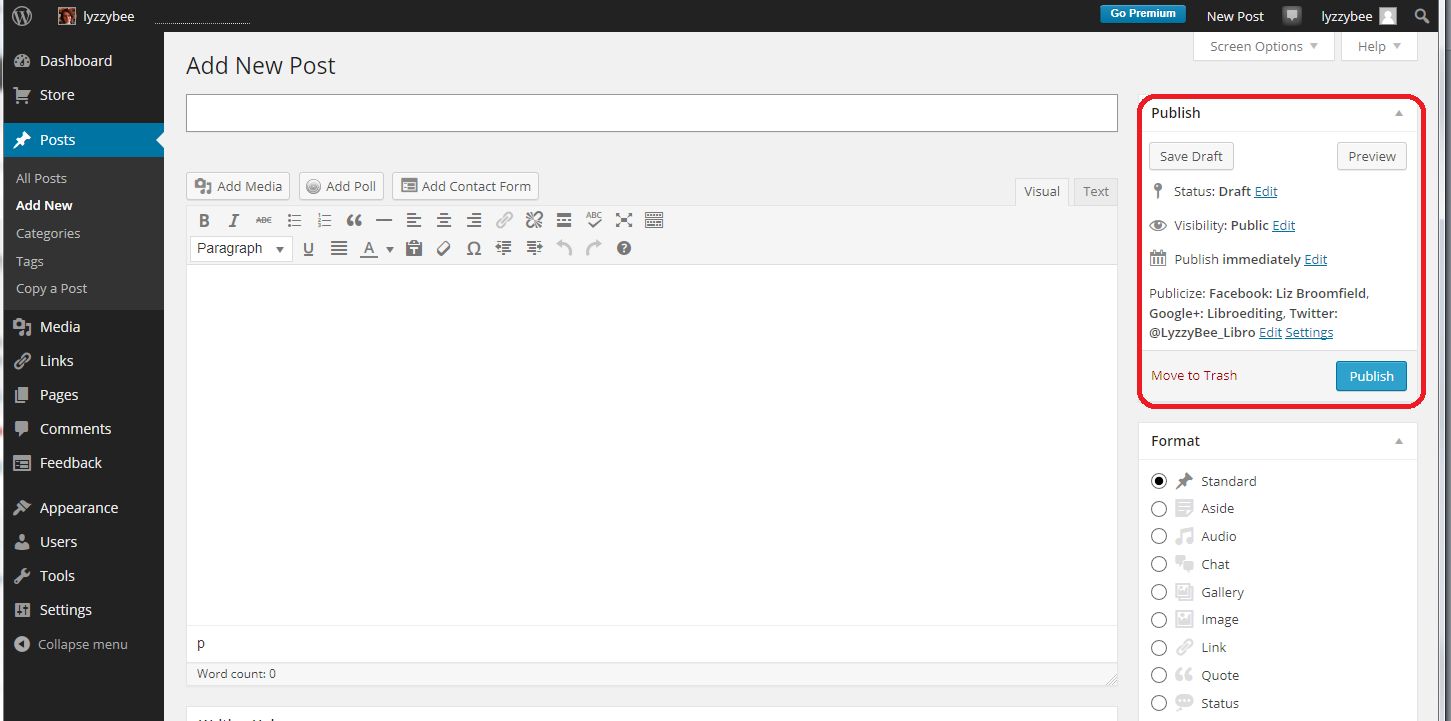
Once you’ve started writing your post, hit Save Draft and continue to press that regularly so you don’t lose your work. Once you’re ready to publish your post, press Publish!

26 post

When you publish any post, you will get a side panel that tells you how many posts you’ve done – you need to click on the little arrow before you’ll get your URL at the top and your post in full screen. Note here that there’s a little square telling you that there might be an advert appearing there – see below for how to get rid of that.
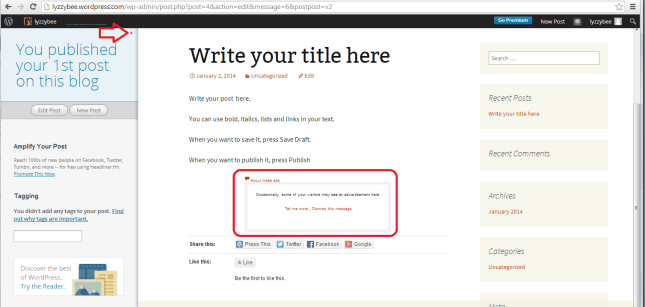
27 post

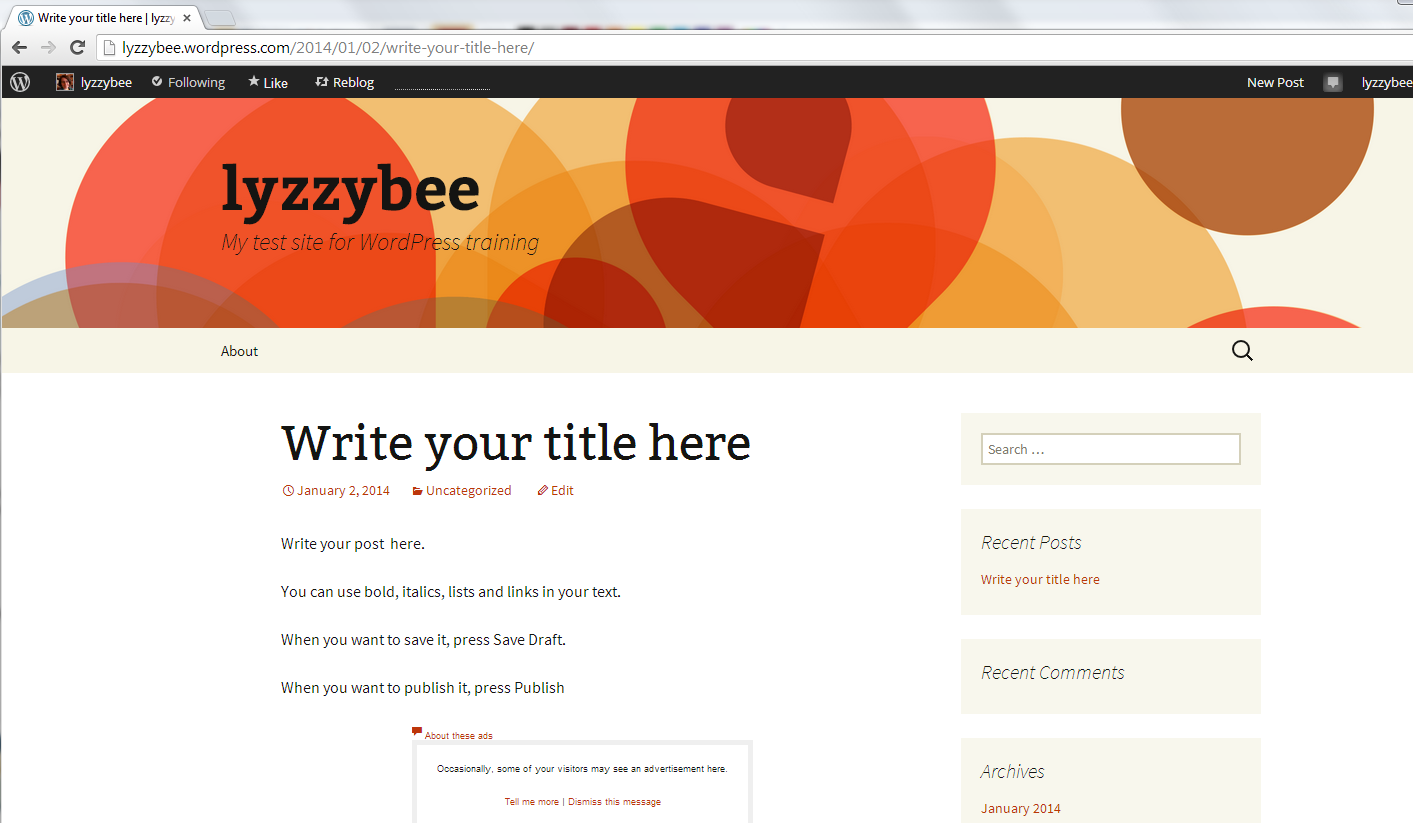
But for now, here’s our blog post, in all its glory, on the blog theme that we chose a little while ago:
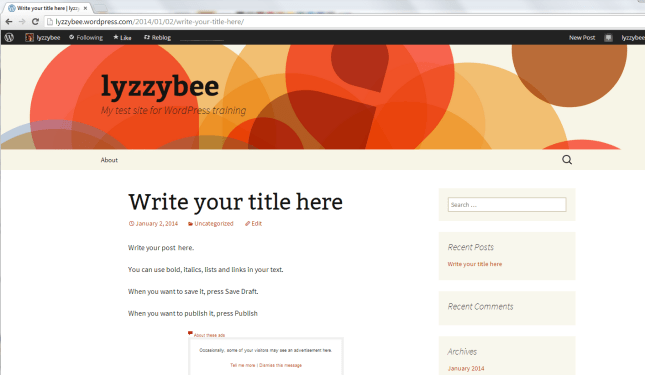
28 post

How do I get back to the dashboard from my blog post?

At the top of the screen, you’ll see your username. Click on that and you’ll get a drop-down menu including Dashboard.
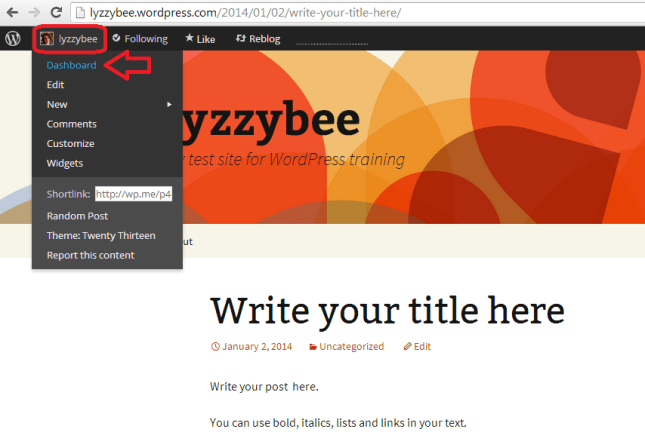
29 setup

How to remove ads from your blog

WordPress will automatically place adverts on your blog. Nice, eh? But they have to make some money, and people pay them to do this. Note that this is NOT the same as having a service where you choose to have ads on your blog and can choose what they’re about. This is any ads they choose to promote, flashing all over your blog, in front of the content. The worst bit: you can’t see them if you’re logged in, even if you look at your own blog. And yes, people do have ad blockers, but I know from experience that readers do get put off and won’t return to look at your blog, or subscribe to it, if you have ads all over it.

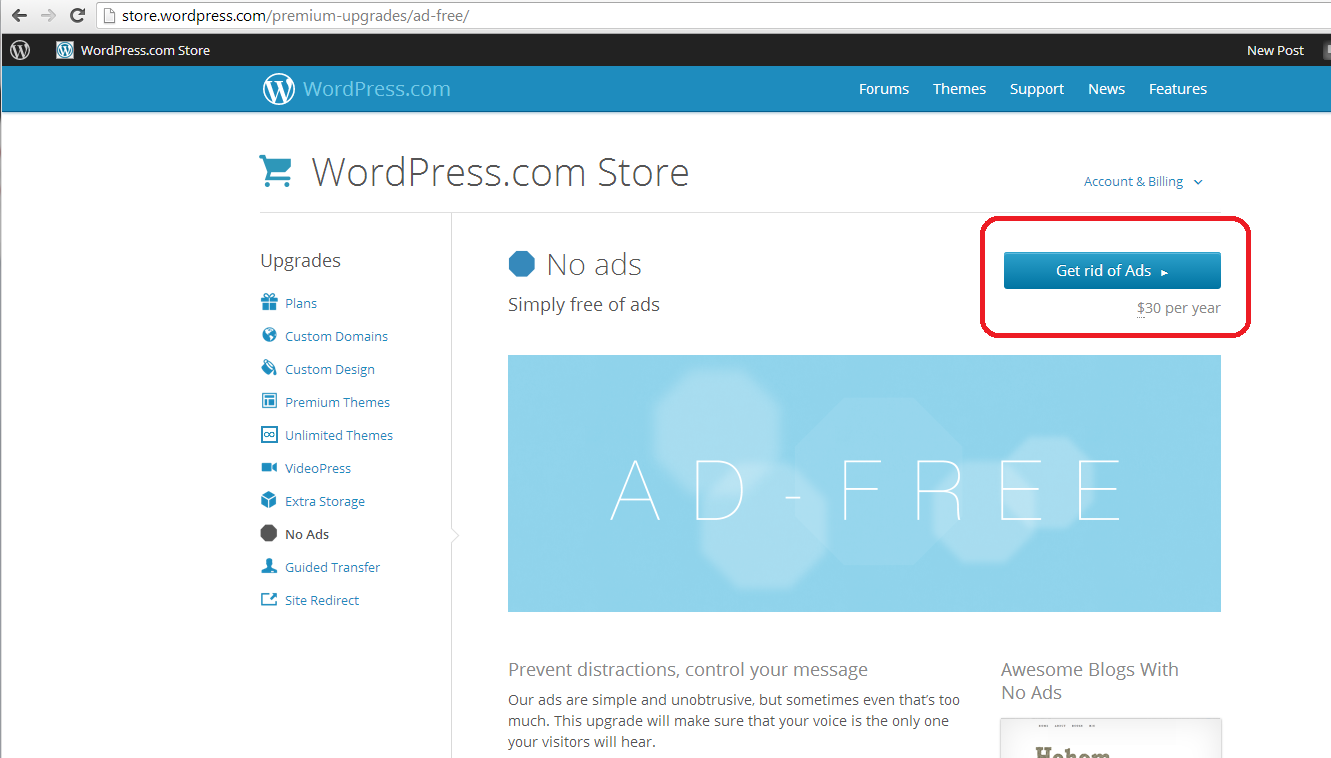
You can remove the ads for $30 (about £20) a year. It’s up to you, but I think it’s worth it as the final stage of setting up a good, solid, useful WordPress blog.

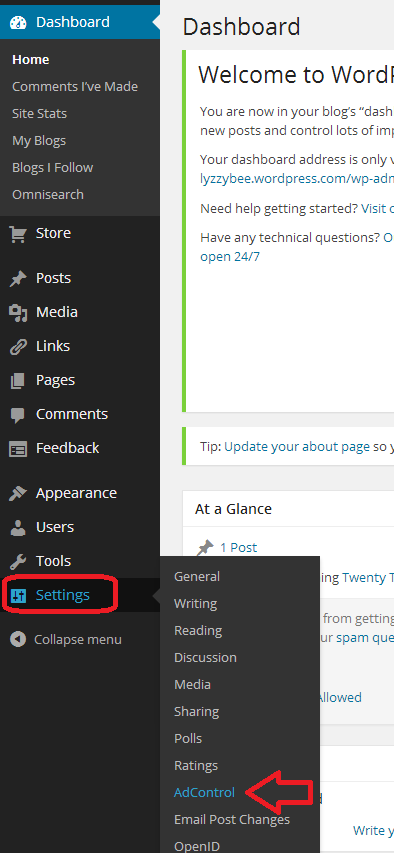
Here’s how you remove them. Go to Settings on the Dashboard and then Ad Control:

30 setup

Choose No Ads upgrade. You probably don’t need a Bundle, which is more expensive and includes high levels of customisation which you just don’t need when you’re starting out. You renew this every year, and can always add customisation when you’re more confident with what you want to do with your blog.

31 setup

You will be taken to the WordPress Store, where you can choose Get rid of Ads. This will take you to a payment screen where you can pay by PayPal or debit or credit card. As I said, well worth doing to avoid annoying people who read your blog.
32 setup

By now, you should be able to set up a blog, post a blog post, set your comment moderation and remove ads, and choose and change your theme. Future posts will cover more details such as automatically sharing your posts on social media, adding photos, and other technical details. You can find more general articles about blogging in the list of related posts below.

I hope you have found this article useful. Please share using the share buttons below, or post a comment, and do please let me know if you use this article to help you to set up your own blog, and post a link below!

Related posts on this blog:

WordPress 2 – adding pages to create a website

WordPress 3 – adding images to your post or page

WordPress 4 – adding slideshows and galleries of images

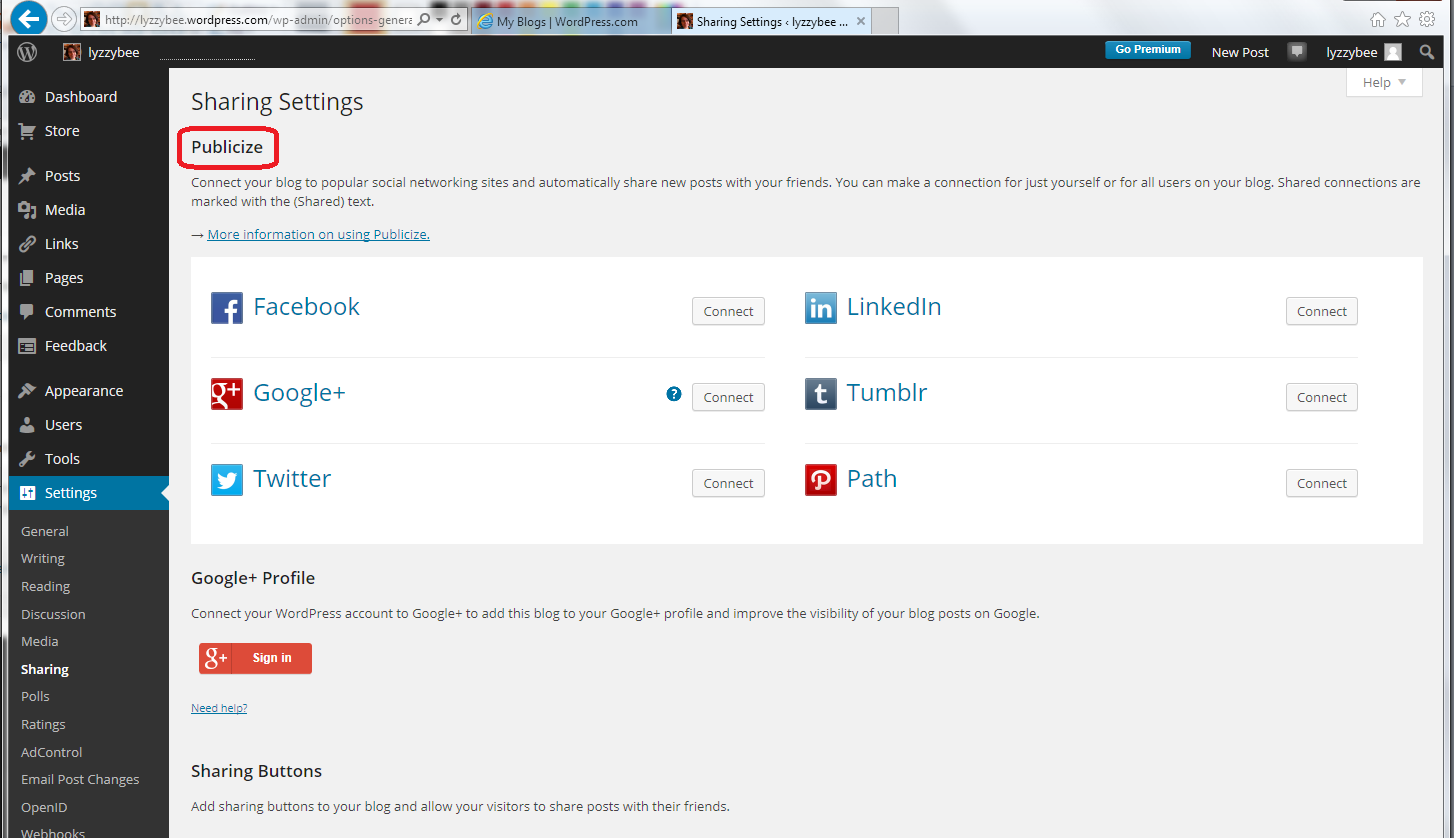
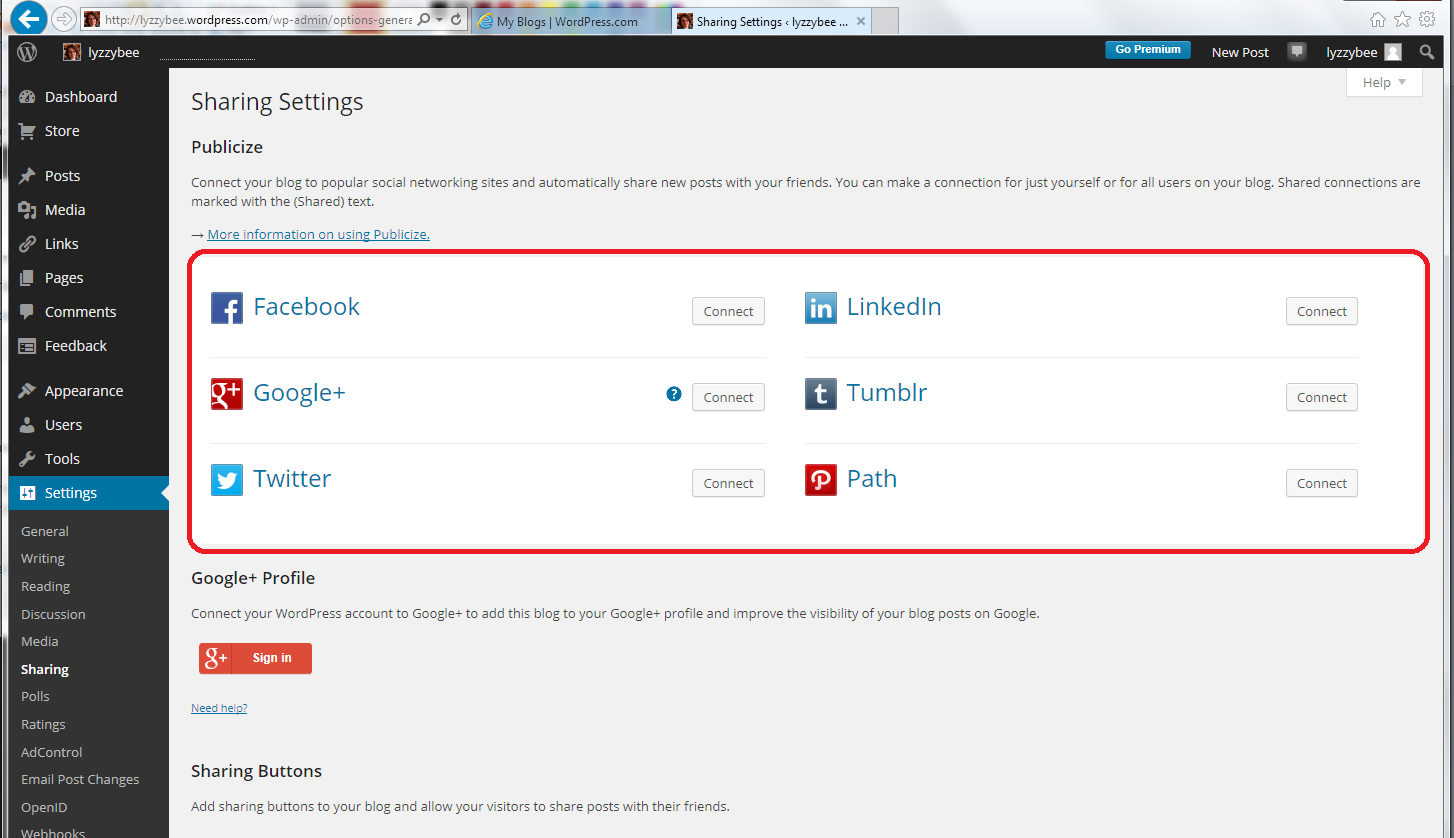
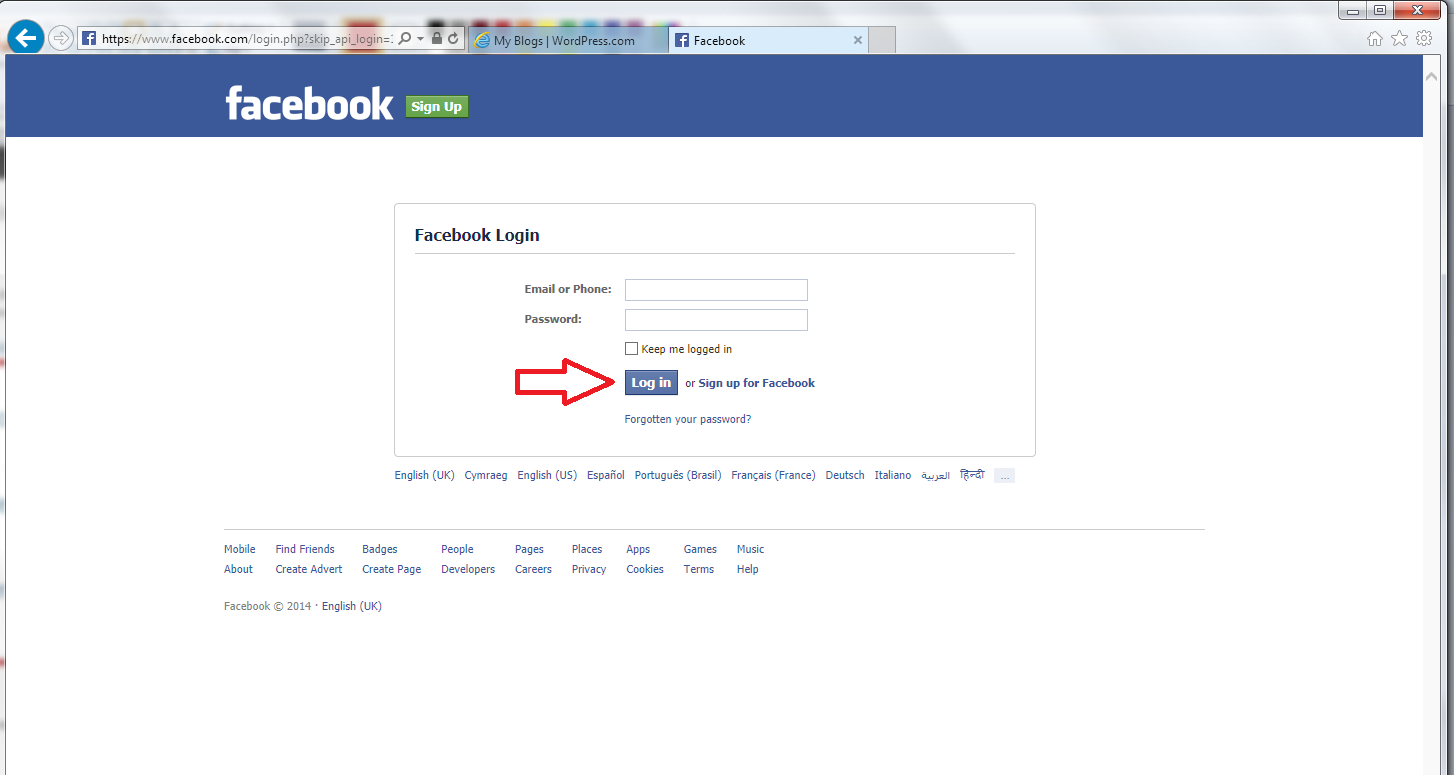
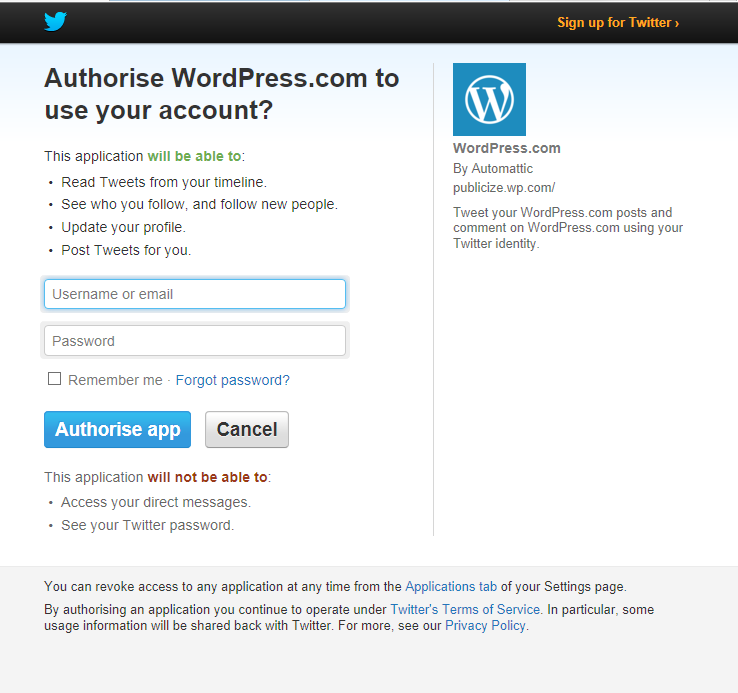
WordPress 5 – linking your blog to your social media

WordPress 6 – sharing buttons

WordPress 7 – adding an avatar picture

10 reasons to start a blog – why you should do it now!

10 reasons NOT to write a blog – and why you should stop and think, at least!

Reciprocity and Social Media – how to negotiate social media kindly and politely

Top 10 blogging sins – avoid these if you can!

Scheduling blog posts and keeping going – scheduling the posts and the writing of them

Guest posts (1) hosting – how to be the host(ess) with the most(est)

Guest posts (2) guesting – how to be the perfect guest

Adding links to blog posts – how to do it on the major blogging platforms (and email)
 
23 Comments

Posted by on January 3, 2014 in Blogging, Business, WordPress, Writing


Tags: , ,

What is Storify and how do I use it?

Storify logoIn response to a request for information*, today I’m going to be talking about Storify: what is it, why would you use it, and how do you use it? I wasn’t already a user, so this post takes you through the stages of logging in and creating your first story through screenshots created as I did it for the first time myself!

What is Storify?

Storify is a social media tool that lets you create stories or timelines from a variety of social media resources like Facebook and Twitter, as well as other web resources. You can use it to pull together information on whatever you want, and can customise it how you want, then share your story on the site with your friends on those social media sites.

Why use Storify?

I’ve mainly come into contact with Storify in relation to events. For example, Karen Strunks pulls together a Storify after every Social Media Cafe in Birmingham. She gathers any Tweets and Facebook posts which have used the hashtag #bsms and creates a storyline showing the event through its before, during and after stages, and what people were saying about it. Here’s an example of one of her Storify stories.

So you can see that it’s a great way to pull together information and images and make a story that you can share with others. It’s useful for events, news on particular topics, or fundraising and awareness raising campaigns. You don’t have to base it around hashtags (a hashtag is a short code with a # in front of it that creates a searchable link in Twitter and Facebook, etc., which allows you to find all of the tweets on a particular topic. For example, even if you’re not a member of Twitter, searching for the hashtag #amwriting, used by authors, will give you these results, all containing the hashtag (example)).

How do I join Storify?

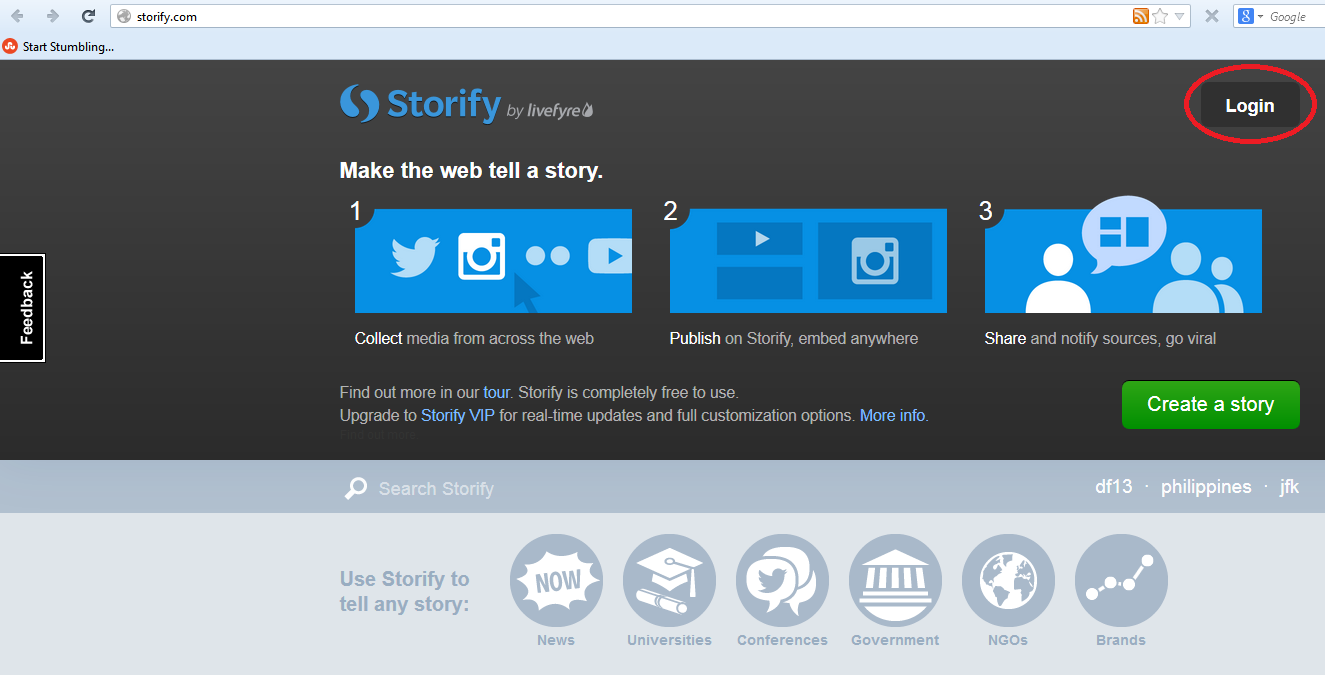
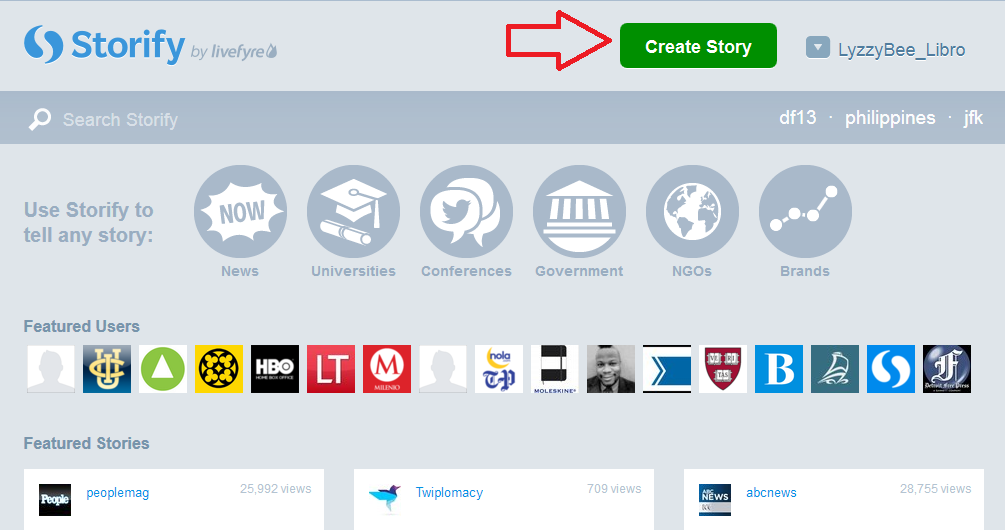
If you’re not already a member, you need to go to www.storify.com and sign up. If you don’t already have an account, you need to click the Login button at the top right:

Storify home page

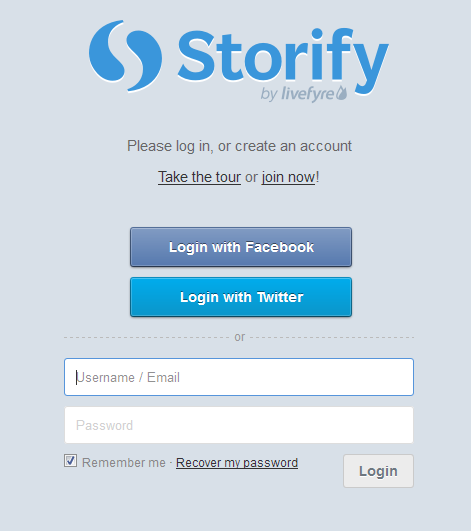
You will be given the option to log in using Twitter or Facebook. Actually, you will still need to create a password and account with Storify: what this does is associate your Storify account with your social media account. You can also just create a username and password.

2 login

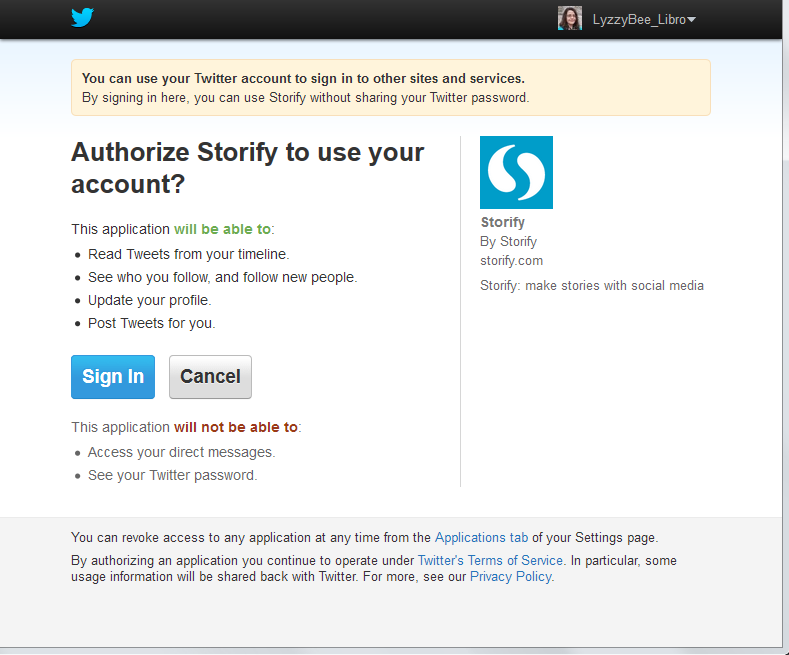
I chose to sign up using my Twitter account, as that’s what I use most for business and sharing. As it says, it only connects to your Twitter account and uses its authentication, it doesn’t see your password etc. And when it says it will Tweet for you, that’s only when you create a story, not randomly!

3 Twitter login

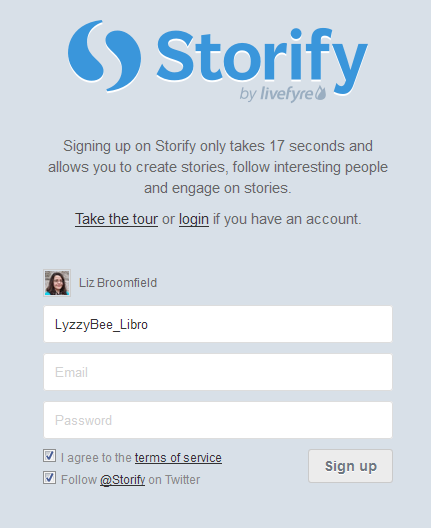
So I told it my Twitter username then added my email address and a password:

4 sign up

And that was it, I was ready to create my first story!

How do you create a Storify story?

Once you’ve created your account, you’re ready to create a story. There’s a big green button on the top row of the website, Create Story. Click that …

5 create

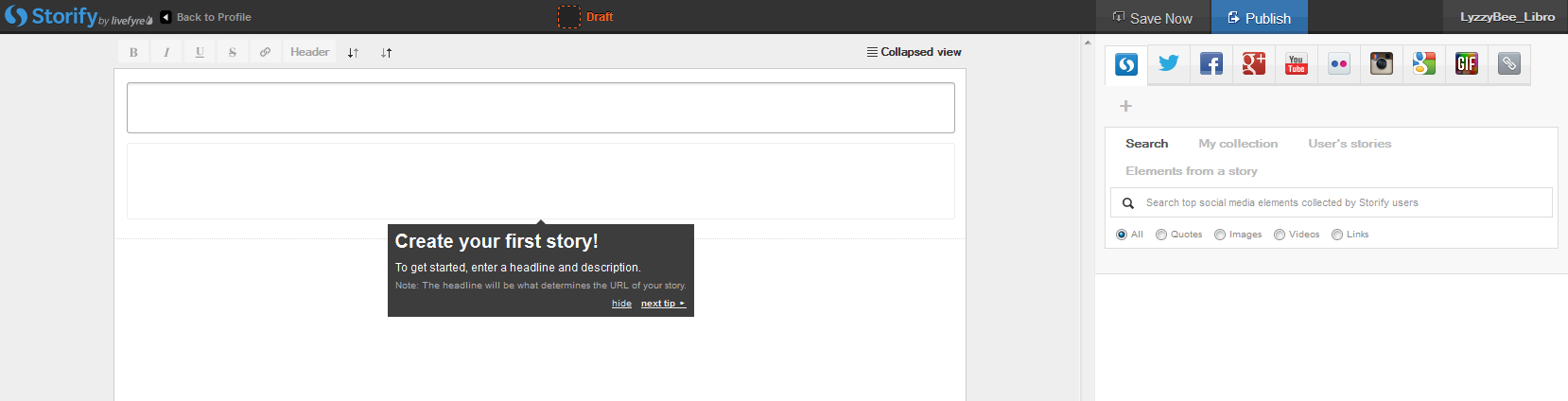
… and you’re taken to a slightly alarming page – alarming because it manages to look both blank and complicated! But look: little tips come up the first time you use it which guide you through what to do!

Basically you’ve got an area where you create your story on the left and a place to search for content on the right.

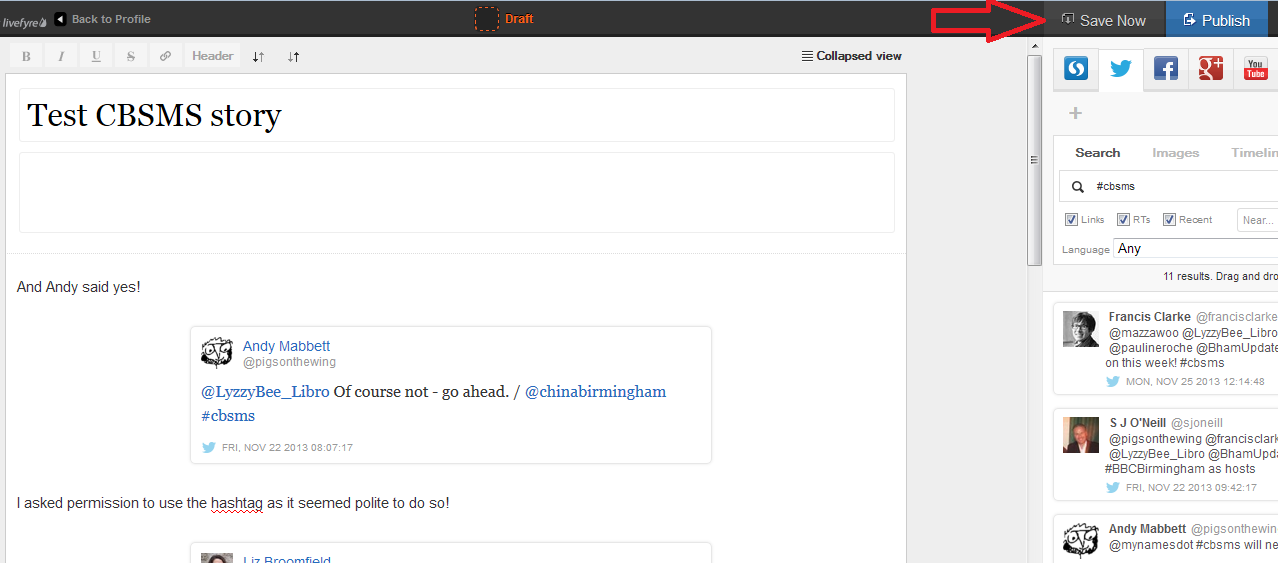
The first thing to do is create a name for your story. You can also press the Save Now button at this stage, which will prompt it to autosave as you go along.

6 create

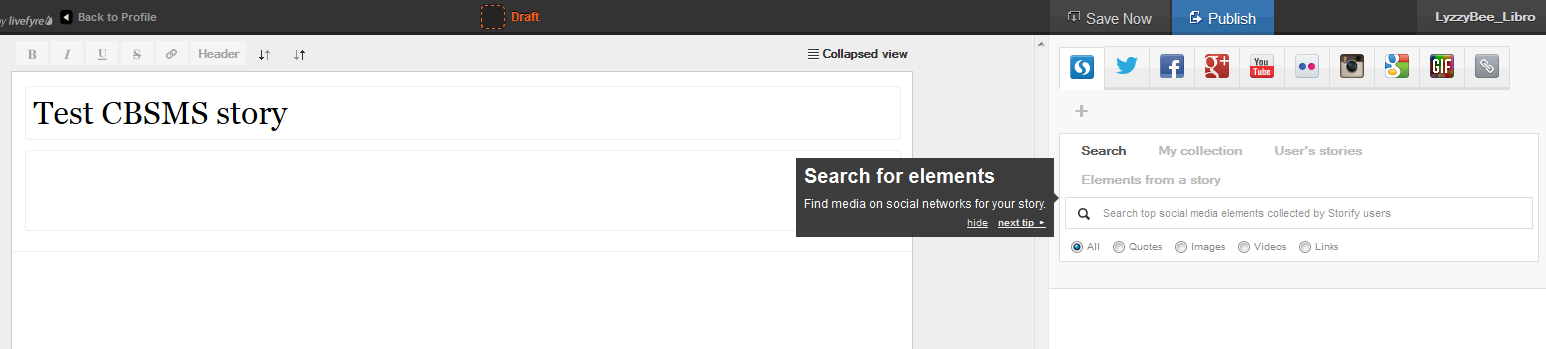
I’ve given my story the edifying title “Test CBSMS story” and now I’m ready to add content, or Search for elements, as Storify calls it:

7 create

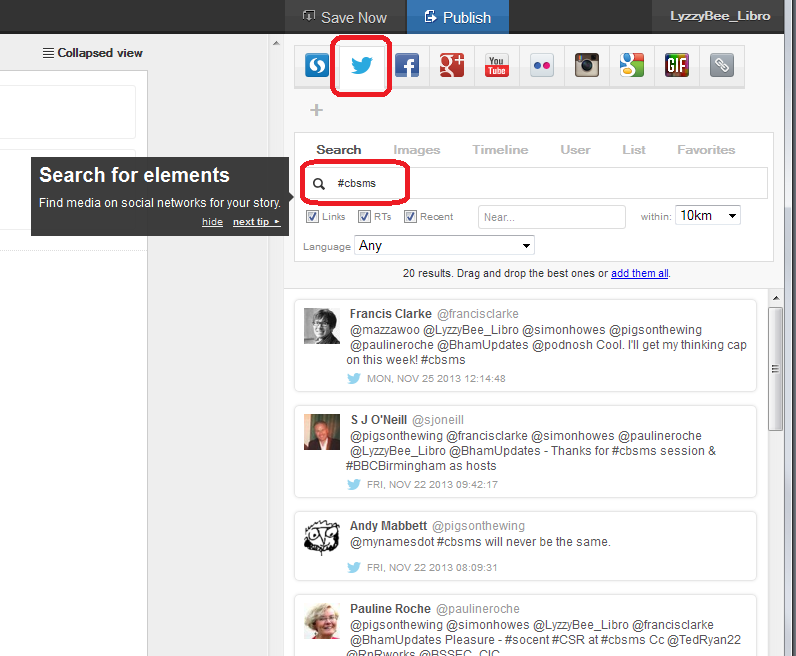
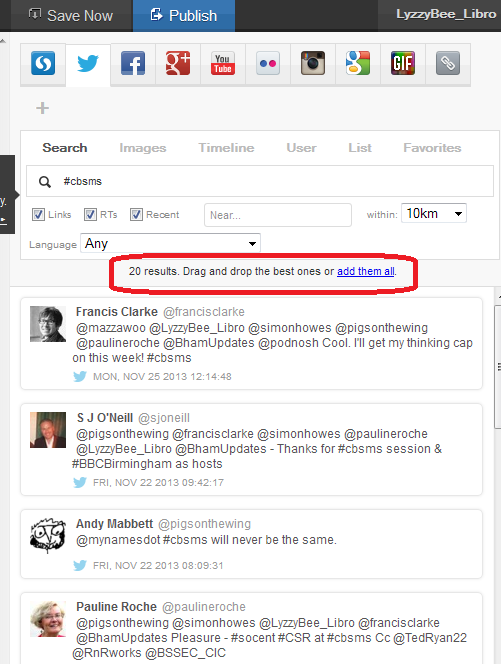
There’s a row of tabs along the top – I clicked on Twitter and then searched for #cbsms [Central Birmingham Social Media Surgery], because I knew that that was the hashtag used around the event. But you can search for anything here:

8 search

You can see that a set of Twitter results has come up, and all of them contain the hashtag. Storify now handily told me what to do: drag and drop the tweets I wanted into the story area:

9 choose

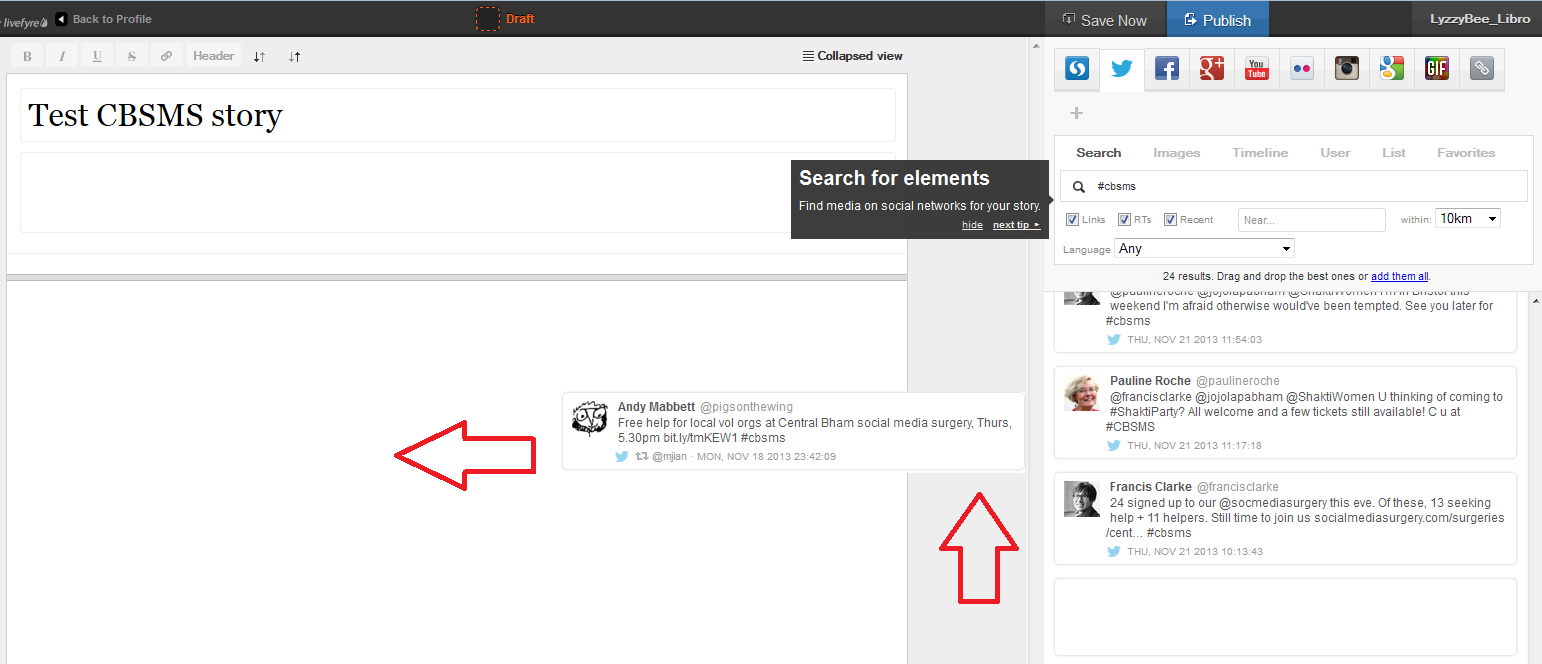
This means that you can pick up particular results but not all of them – useful if some of them are repeated or just ‘chatter’ that you don’t want to include. It also means that you can put them into whatever order you want, rather than the order imposed by the standard Twitter view (I made this one like Twitter, with the newest tweets at the top, but if you look again at Karen’s example, she switched it round to read from top to bottom).

Click on the tweet you want to include and drag it across into your story area:

10 choose

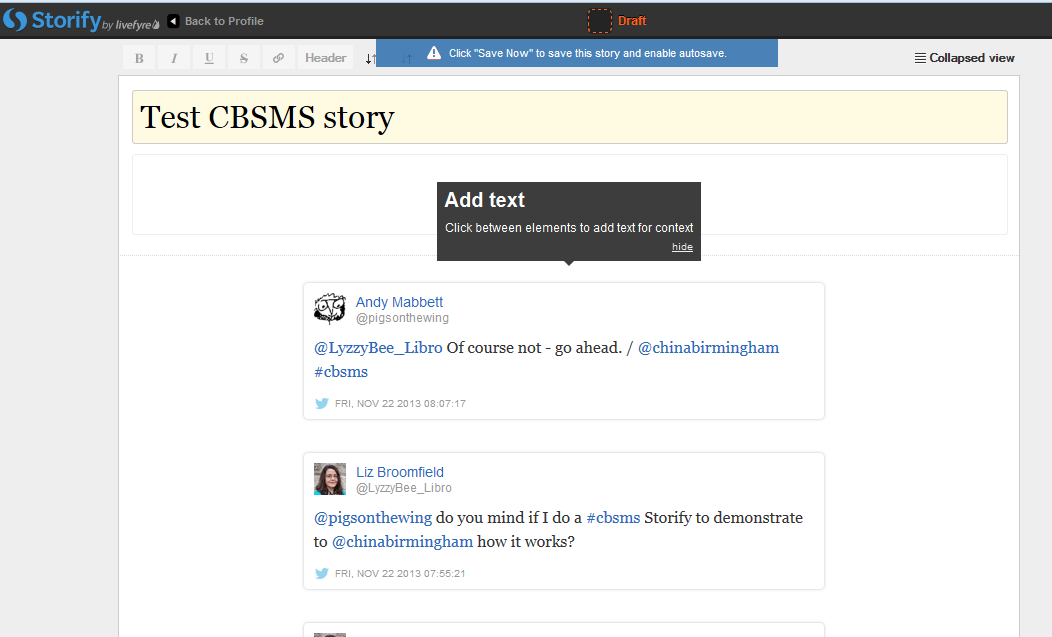
Once I’d popped a couple of items in, I was told that I could add text:

11 comment

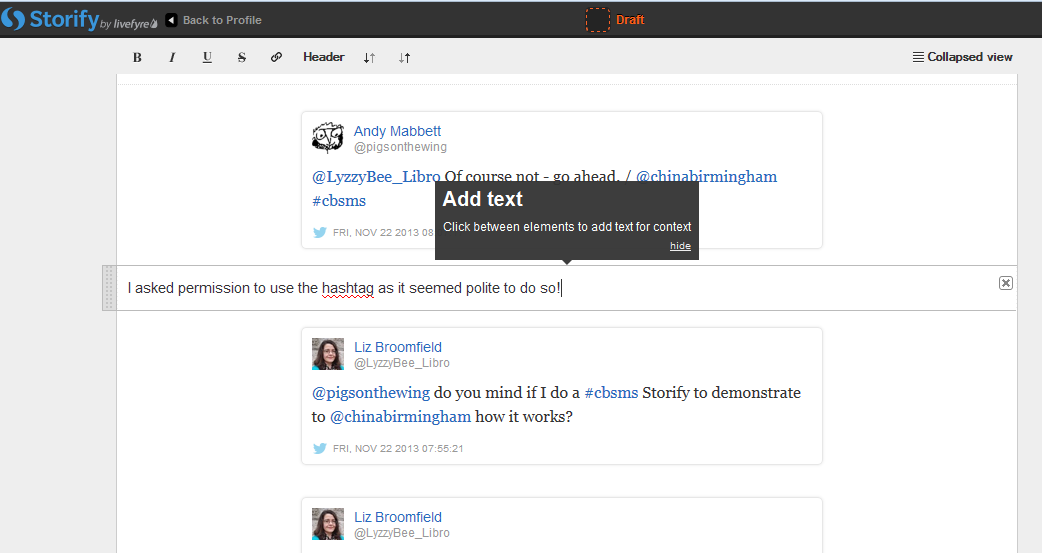
You click on the space between your items and type whatever text you want to add:

12 comment

So I added a note explaining the last two entries in the story, where I checked it was OK to use the hashtag to create this worked example.

I then hit the Save Now button – which I mentioned earlier and should have done at the point at which I mentioned it! Just in case!

13 save

Adding more sources to your Storify

You’re not limited to creating a Storify from only one source. Along the top of the search area you can see loads of different options, including Facebook, Google+, YouTube, Google, and your own photos and links.

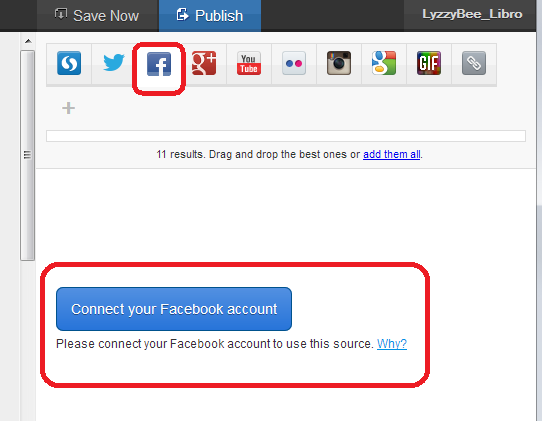
Note that if you choose Facebook, you will need to log in and link it to your own Facebook account (again, this won’t do anything nasty, it just appears to need to use your own Facebook timeline. Of course, you can search for anything on Facebook once you’re logged in). You don’t seem to need to do that with Google+, though.

14 connect other accounts

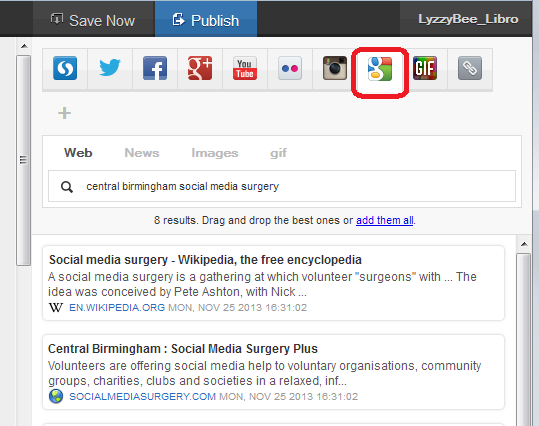
This time, I didn’t bother with any Facebook items, but I did pop into Google search and picked up some explanatory information about the Social Media Surgery to add to my story:

15 connect other accounts

How do I publish my Storify story?

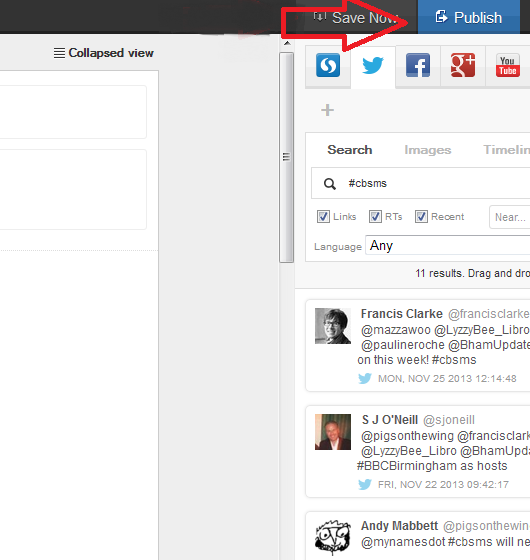
The first step is to hit the Publish button at the top right:

15.5 publish

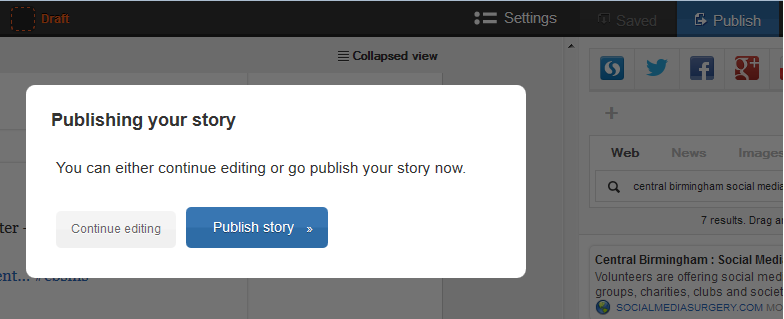
Just in case I had pressed it too soon, I was shown a confirmation box:

16 publish

I was ready to publish, so I clicked on Publish story.

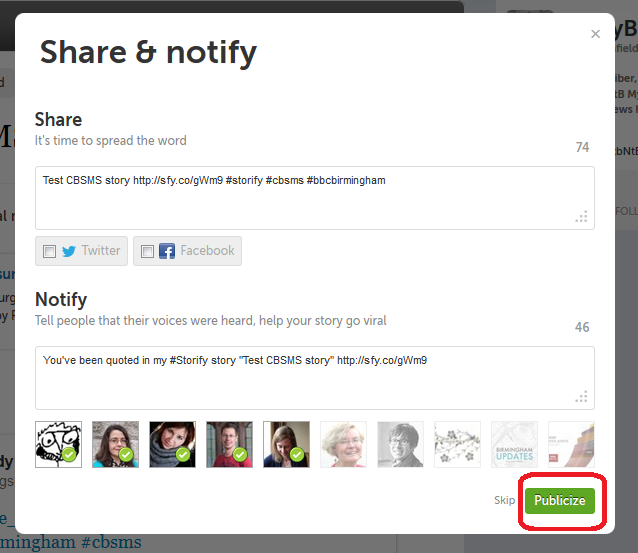
The next step was Share & notify. Sharing creates an automated Tweet with a link to your story. I imagine that if you’ve signed in to Facebook, etc., you will also be given the option to post an automated status update.

Notify lets you autotweet anyone who’s a friend on Twitter and is mentioned in your story to tell them that their tweet has been included in your story. I really like receiving these notifications, so I left these ticked, but you can untick them if you don’t want to do this.

17 share and notify

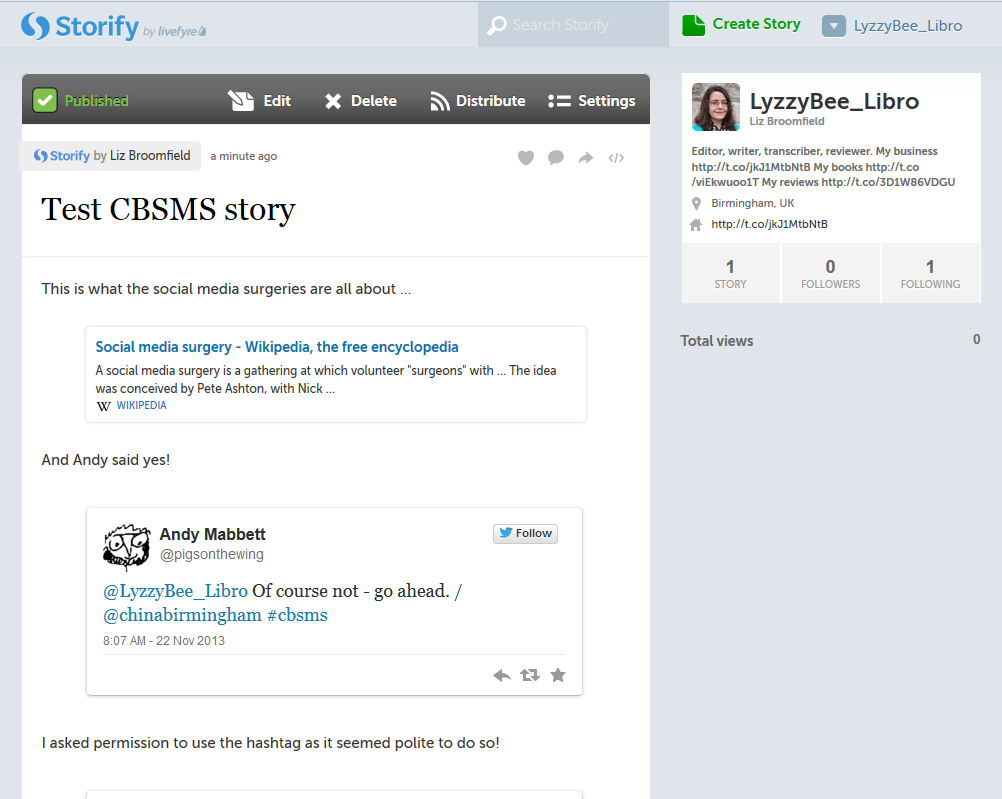
This process creates my story in Storify. At this point, the story gets assigned a URL that I can quote in emails or add to my blog. In the case of this story, it’s http://storify.com/LyzzyBee_Libro/test-cbsms-story, and this stays with the story on my profile for ever more.

18 live

What does my Storify look like on my Twitter account?

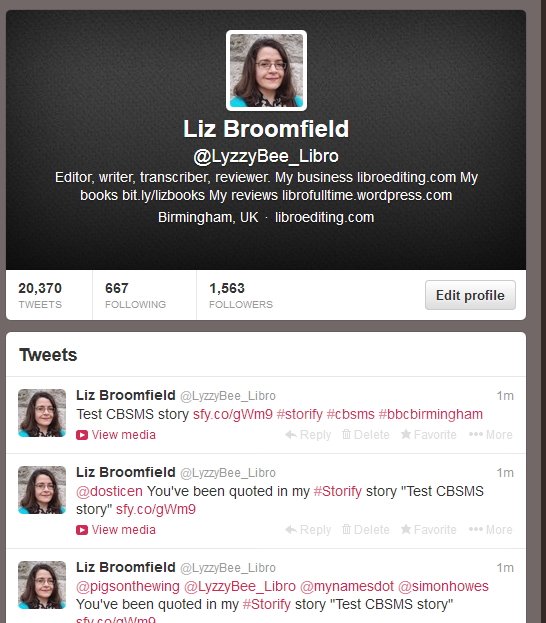
Finally, I popped over to my Twitter account to see what my story looked like on there. The top tweet is the automatic tweet with the link to my story, and the ones underneath are those ones that automatically tell people that they’ve been included. Exactly what it said it would do.

19 live on Twitter

What else can I do with Storify?

When you’re searching, you can refine your search to exclude retweets, etc.

You can get a paid account which is useful for large businesses or organisations. This seems to allow a lot more customisation and also real-time updates – however, I like the editable nature of the free version and I’m not sure if that would get lost if real-time updates were running. Maybe someone who has a paid account will come along to share the uses of that. But I think most people will be OK with the free version.

* I was helping the Chinese Community Centre in Birmingham at the November 2013 Social Media Surgery and they wanted to use Storify to pull together stories from their Oral History Project. We ended up talking about their blog rather than Storify, but I promised to put together some instructions for them. This one’s for you! Note: This is not a sponsored post, but an exploration of a potentially useful tool.

———————

This post has taught you – through my own learning process – about using Storify. You can find more posts about using social media in the relevant part of my resource guide.

If you would like more detail about how to use Storify for your content marketing, have a look at this article by Fiona Cullinan.

If you’ve found this article useful and/or interesting, please do post a comment and share using the buttons below! Thank you!

 
26 Comments

Posted by on November 27, 2013 in Blogging, New skills, Social media


Tags: , , , ,

New series on expanding your business – looking for contributors

handshakeI’m planning a series of blog posts on how to expand and grow your business, and I’d like to feature guest posts from professionals and case studies from people who have taken the various paths, as they’re not something of which I have direct and personal experience.

Ideally, I’d like to have at least one professional (HR consultant, accountant, estate agent, etc.) and at least one case study for each topic.
I want to write about:

  • Changing from being a Sole Trader into a Limited Company
  • Going into a partnership with another person or company
  • Going VAT registered
  • Moving into premises
  • Employing your first staff members
  • Doing nothing – staying as a Sole Trader

and I want each article to cover:

From the professionals:

  • Why you should do it
  • When you should do it
  • How to do it
  • Potential benefits
  • Potential pitfalls

From the business owners:

  • Why you did it
  • When you did it (i.e. what stage was your business at?)
  • How you did it
  • Benefits gained
  • Pitfalls / disadvantages you experienced or saw coming and managed to avoid
  • Would you recommend it to other businesses? Why / why not?

Note: I am primarily aiming this at the UK market, however if you have useful information about how this stuff works in the US or elsewhere, do feel free to join in, just let me know the region to which your experience/advice applies.

What do you get out of it? Well, in the article where I mention you, I’ll put whatever links you’d like to your website, twitter feed etc at the bottom. I might be looking to put it into my new book, too, again with a full credit and links in the e-book version – let me know when you get in touch whether you’re OK with that. I can also keep you anonymous if you’d like to contribute but not have your name on the piece.

I get around 20,000 hits per month on this website / blog and that’s still building every month, and I have great Search Engine Optimisation so this website / blog shows up well on search engine searches.

If you’d like to take part, please contact me via email or my Contact Form.

These articles will appear on this blog and will be indexed in the Careers section of the blog.


Tags: , , ,

Guest posts 2: How to be the perfect guest

handshake

Getting guest posts published on other people’s blogs is generally considered to be A Good Thing. It can bring you new clicks, followers and even customers. But even if you’re being commissioned to write a blog post for someone else, there are some fairly unwritten rules that will help you to make it a success on both sides.

In this article, I share what makes a good guest blogger, from initial contact to thank yous and shares in ten top tips for being the perfect guest blog poster. I talk about being a good host here, by the way).

1. Do your homework

You’ve got a post you want to share and you think it’s a good guest post. Before you even contact the host to ask them to post it, do your homework. Check whether they have a guest post policy (I have one, and you can find a link to it on my main blog and in more detail on the Libro Full Time blog). Many busy bloggers will not even reply to you if you haven’t looked and noted any guidelines. I will give people a second chance if I have time – but not always!

Presumably you know the blog because you’ve been reading it already. Have a think about who the audience is. What sort of posts does this person publish? How does your prospective guest post fit in with them?

2. Pick your hosts wisely

Have a think about whether this person welcomes guest posts. Are they on your topic or are they specific interviews or on other subjects? Is this someone you’ve engaged with on a long-term basis? Have you liked, shared, commented on their posts for a few months already? If they know your name and where your expertise lies, they are more likely to welcome your guest post.

Note that common advice is to only guest post on blogs that are more popular than your own. You can look at their Alexa score and yours, for example, to see which is more popular. BUT, because part of my mission is to help other small businesses and colleagues, I’m happy to guest on smaller, newer blogs, like I did here and here, to help to promote them as well as myself.

3. Show that you’ve done your homework

When pitching to place a blog post cold, or when replying to a commission, make sure that the host knows that you’ve had a look at their blog, that you’re familiar with their style and content, that you have an idea who their readers are. Nothing annoys a blogger more than having a random person contact them saying “I have read your blog [on football] and I think this post [on nuclear physics] would fit really well, please post it and all my links as soon as possible”. Even super-polite old me doesn’t always reply to those ones!

4. Follow the guidelines

If a blog has guidelines for guest posts, like The Creative Penn does, for example, then do follow them! (These ones are very detailed because it’s a very popular blog with lots of guest posts, but as I said above, most people have them). In fact, if you can’t find any published guidelines, ask the blogger if they have any specifications as to the ideal length, angle, etc. Make your piece match these as closely as possible.

5. Don’t duplicate content

Google and other search engines do not like duplicated content. So make sure that any blog post you tout around is fresh, new content, not something that has appeared elsewhere or been pitched elsewhere. It’s fine to pitch the same post to several potential hosts as long as you do it in series not in parallel, i.e. you wait for the first rejection, then try the next blogger. Also see section 9 to avoid doing this on your own blog.

6. Help the host with the formatting

As we learnt in the last post on hosting guest posts, formatting text sent in by someone else can be a nightmare. If you really want to help your host, by all means write your post in Word so you can spell check it, etc., but then “save as” a plain text file with a .txt file (drop down the “save as” box when you’re saving and choose “plain text .txt”). Your host can then open the file in a text editor and paste it into their blog editor.

You can always send a Word version as well, so they can see any bold or italics or special formatting.

It goes without saying that you’ll spell check your post and – if necessary – have it checked by your proofreader first, doesn’t it?

7. Provide an author bio and links

To make it easy for your host, do provide a short author bio about yourself, and links to whatever it is you want to promote. I usually put together a few sentences on what I do and what I care about (this guest post by me has a good example which the host has altered slightly to fit her style and context) and then give the full URLs for the links, with an explanation of what they’re linking to. Some hosts will put the links under the text, some will put them next to the text, all should make them live.

8. Accept feedback and give feedback

Many bloggers who accept guest posts will want to tweak your article a little to make sure it fits their guidelines, style and readership. Please do accept this graciously – you’re playing round someone else’s house, so you do need to play by their rules.

I submitted one piece to a blog as a guest post, but it wasn’t what they were looking for. They came back to me with ideas for tweaks, but in the end I thought it was better to abandon that idea and do a whole new post for the other blogger. That was accepted immediately and proved popular with their readers. Not being one to waste some good text (and proving that it was fine as a blog post, just not as a guest post on that particular blog, I tweaked it to remove references to the original blogger and published it on my own blog!).

Once the piece has been published, have a look at it, and if there are any errors, do let the host know. Typical things to look for include spelling your name incorrectly and not putting live links on. If you spot anything like this, let them know right away and give them an opportunity to put it right. No one’s perfect, and I would certainly prefer my guests to let me know if there was a problem.

Related to this, though: don’t push. If you’ve submitted a request to guest and haven’t heard back, by all means drop one reminder or question a week or so later, but that’s it. For many bloggers, blogging isn’t their only job. Sometimes my blog has to come second to my paid work (I pre-write and auto-post, so even if it looks like I’m spending time on the blog every few days, I might not be!) and I’m sure other people are in that situation, too. Hassling will probably lead to a refusal!

9. Promote and share

Your guest post will build hits for and interest in both your host’s blog and products/services and yours. So get promoting and sharing on their behalf, since a hit on your guest post is likely to generate a click-through to your blog or other resource. I get a lot more hits on those posts that both my guests and I promote – AND because there are more hits, the click-throughs go up, too (this is particularly noticeable on my small business chats, when it can make a big difference). So you have a vested interest in promoting the blog on which you’re guesting.

One important point: don’t paste the whole of your guest post into your own blog. By all means write about it and link back to the original (this is a good example by one of my guests) but duplicating content over two different blog posts will make your content disappear down the search engine rankings very fast, as the search engines are suspicious of anything that looks like automated activity and will ignore two blocks of identical text.

10. Say thank you

It’s always nice to say thank you. So email the blogger who has hosted you and also put a public thank you out there on the social media. I’ve got a page on my blog where I list my own guest post requirements but also list all the guest posts I’ve placed – and that sends a few people over to my hosts every day.

———–

This post has talked about how to be a good guest blogger. If you enjoyed this post, please click some of the share buttons below or post a comment yourself – all are welcome! And if you have an idea for a guest post for this blog … do get in touch!

Related posts:

Guest posts 1: How to be the host(ess) with the most(est)

10 reasons to start a blog

10 reasons NOT to write a blog

Reciprocity and Social Media

Top 10 blogging sins

Scheduling blog posts and keeping going

 
9 Comments

Posted by on September 16, 2013 in Blogging, Business, Social media, Writing


Tags: , , , , ,

Guest posts 1: How to be the host(ess) with the most(est)

handshake

We know that placing your guest posts on other people’s blogs and hosting other people’s guest posts on your blog is A Good Thing. It increases traffic to both of your websites, gains you social capital, and gives you new, fresh and different content for your blog.

But how do you make sure that you do it right – for both you and your guest? Here are ten top tips to help you get the most out of hosting guest blog posts. If you only read and apply two of these, please make them numbers 7 and 8!

1. Know what you want

It’s all very well deciding to welcome guest posts onto your blog, but what do you want to achieve? Do you want to show different angles on your line of business? Allow so-called competitors space to talk? Give your clients some publicity? Help other people in your geographical area? Start to formulate a policy rather than having a scattershot and random approach. This will help your readers to understand why you’re hosting guest blog posts, and will help potential guests match their posts to your blog.

I accept guest posts on writing, especially on editors as writers and writers as editors. The more random ones I’ve posted up in the early days didn’t get many hits, because they didn’t really mesh with what I write about. The most popular – ones that chime with my experiences, and the odd Troublesome Pair or Be Careful post that someone has written from the heart.

2. Know what you don’t want

Once your blog has a certain reach, you’ll find that people get in touch regularly wanting to place guest posts. Many of these seem almost completely random, with almost no (or absolutely no) relevance to my blog. I might give these people a second chance, but not often. I realised early on that there wasn’t room on my blogs for random links to unconnected companies, or links to companies doing things that I didn’t quite approve of – I get a lot of requests for “guest posts” which are just ways for a company to place their client’s URLs in popular places and build their SEO, and a good number for links to student proofreading companies that I wasn’t entirely sure about.

3. Be clear on what you will and will not accept

Once you know what you want and don’t want, you can narrow this down to what you will and will not accept. Most of the guest blog posts you publish will probably be suggested to you rather than commissioned, and it’s up to you to say yes or no to these ideas. Personally, I will accept trial copies of relevant software or hardware but I’ll say if that means my review is effectively a sponsored post, but I won’t accept requests to place blatant ads. I might in future accept ads for products that I have reviewed, found good and am happy to recommend. I have got a few links that earn me an affiliate fee on my Links page, but I make it clear that I earn a fee from purchases coming from those clicks. Some people won’t take any ads, some will take anything that pays. I don’t mind what you do but it’s best to be clear about it.

So, once you know what will and won’t accept, get clear about it. I have a Guest Post Guidelines page on my other blog (linked to from this one) – I put it there because it linked in with my policy on reviewing books I’m sent. I refer enquirers there when they want to place a guest post with me.

4. Commission guest posts

I get a lot of requests for guest posts, but I’ve also commissioned them (and been commissioned to write them too – I was asked to write this one after chatting about exercise with a fellow attendee at a networking event). Commissioning doesn’t mean paying: it means asking someone if they’d like to contribute.

I have done this recently with a fellow editor who is less far along her business path than I am. She’s got a specialism in which I’m interested, and fits with what I do, but isn’t something I do, personally. So I’ve asked her to contribute a guest post on it, which will be interesting for my readers and get a link to her website on mine, too.

Another aspect of this is reciprocal posting. I did this recently with Tammy Salyer. I asked her to write a post on being an editor/writer, and she then commissioned me to write about 10 top tips for fiction writing. I’ve noticed a good flow of hits and referrals between the two posts – win-win for the two of us!

5. Don’t be afraid to give feedback

Once the post has been written and sent to you, rather than just publishing it as is or rejecting it wholesale, if there are aspects that I think could be changed, or I think the post needs major work, I will feed that information back to the poster. If there are minor spelling and grammar errors in Small Business Chats, I tend to change them silently (my initial instructions should make it clear that I’m likely to do that), but if there’s a more major content change, I will send a note to the poster before I publish (or reject)

6. Help people out

I try not to use guest posts just to give me me me more content, more hits, more interest. If I can give someone an opportunity to promote their book, service or specialism, AND it fits in with my blog and its readers, I’ll offer them a guest post or accept their proposal. I do care about hits, but I also care about helping people and promoting things that are of value. That’s why I’ve turned my own posts over to topics like Kiva and the Soberistas, and am happy to work in guest posts on topics that I feel are valuable.

7. Format the post

Most people will send their guest post to you in one of two ways: text in an email, or a Word document attached to that email.

Probably, like me, you usually write your own blog posts straight into the blogging interface you use – you hit “new post” and start typing. Fine, that’s all new text and it should format OK. If you copy text straight from an email or Word document and dump it into your blog interface in a “new post”, you are likely to end up with a mess.

This is because most emailing programs and definitely Word documents contain all sorts of invisible formatting commands that will carry over into your blog post and run paragraphs together, put it all in unfeasibly tiny print, and all sorts of other sins.

It’s easy to avoid this. Copy the text that will form your blog post and paste it into a text-only editor – most PCs will have Notepad installed as standard, for example. Paste it in there and then copy it and paste into your blog editor. Job done. You may have to reformat any links that the guest blogger has given you, but see the next point for how to work that one out.

8. Include links and an author biography

In my opinion, this is the most important one of the lot – and something that sadly I see going wrong quite a lot of the time.

If someone is decent enough to provide you with a guest blog post for your blog, be decent enough to tell your readers about them, and put links to their product / service / book / cat pictures / whatever they want to promote – and that’s LIVE LINKS, not just URLs that you can’t click through with – on the post.

This is a good example (I won’t share a bad one to save people’s blushes, but I’ve come up against this with my own blog posts). It includes an author bio with proper links that make sense and are in a different colour, so readers can find me and the book I wanted to promote easily.

It’s great to reciprocate, but the effort someone has put in to writing a guest post for you will be simply thrown away if you don’t provide links so that people can click through to them and their websites.

So make sure you ask your guest blogger for a quick biography and links to the things they want to promote (don’t assume!), and then place the links in the article.

If you don’t know how to create live links in your blog posts, read this article. Now.

9. Share and promote

Once you’ve published your guest post, make sure that you share and promote it just like you do your own ones. It’s nice to include the author’s name and link in any posting you do on Facebook, Twitter, LinkedIn and Google+ etc.

This extends to telling the author that you’ve published the article and where they can find it – send them a link to the URL. And ask them to promote it, too. That way, you can leverage the social capital of both of you – or in simple terms, get more people to look and click. And that’s really what guest posts are about!

10. Say thank you and feed back again

Once someone has been kind enough to provide you with a guest post, do say thank you publicly and privately. It’s also nice to let them know how many hits the post has had – say in the first week. You look at your stats for your posts, right? You can also let them know how many click-throughs they got to their website or other resource. Also let them know if there are comments on the post that you think they should see or even reply to – not every guest will bookmark it and check obsessively for comments. But don’t leave them to do all the responding – take part yourself, too. Again, this one is a good example – look at the comments, where both I and the guest poster respond to them in turn.

———–

This post has talked about how to be a good host to guest bloggers. Next week I’ll look at how to be a good guest. In the meantime, if you enjoyed this post, please click some of the share buttons below or post a comment yourself – all are welcome!

Related posts:

Guest posts 2 – how to be the perfect guest

10 reasons to start a blog

10 reasons NOT to write a blog

Reciprocity and Social Media

Top 10 blogging sins

Scheduling blog posts and keeping going

 
8 Comments

Posted by on September 9, 2013 in Blogging, Business, Social media, Writing


Tags: , , , , ,

How to maintain a good online reputation

a man's hands typingYou are your brand. I know that that sounds a bit marketing-speaky, but it’s true. If you run a business, people are going to look for you online as well as your business name. I can vouch for that, because I get loads of searches coming through to this blog for the people I feature in my Small Business Chat. Far more of them are looking for the person’s name than for their business name (if it’s different). Today I’m going to talk about my personal methods for maintaining a good and positive online image, with some tips which should be useful for you, too.

These tips mostly relate to social media, but you can extend them to anywhere where people see you, and your business, in operation, such as networking events, trade fairs, etc.

What do you mean by “You are your brand”?

This is particularly important if you run a small business or are a sole trader. However, even if you look at a  multinational, the person at the head of the company and the reputation they personally have has an effect on the perception of the company.

Think about Richard Branson. What about Theo Paphitis and Duncan Bannatyne? Remember Gerald Ratner and how he ruined his business with one sentence?

In the same way, when you go out networking, or you do stuff online, and you run a business (or even if you don’t), people are getting an impression of you which extends to the perception they have of your business.

My personal dos and don’ts

This is of course a personal list. Maybe you disagree? I know that I’m ultra-careful about my brand and company reputation, but I’d rather be ultra-careful than too relaxed. Reputations can be destroyed in an instant!

This is not about manipulating your image to sell more of your product or service; it’s about making sure that you’re representing your company in a positive light and making sure you match in your behaviour the message that you want your business to get across.

DO be yourself

It’s no good trying to hide who you are. Yes, if you’re shy, you can project more of an image of self-assurance, but also kindness, respect and care often come with shyness, and they’re good things for your clients to see. Personally, I’m very open and honest, and I try to give something back through charity donations and helping people. Therefore I have made small business loans to celebrate Libro’s anniversary and help out other small businesses with my weekly features, etc. I also keep my blog posts linked to what I do and my own practices – someone mentioned to me just the other day that my posts are very personal and friendly – which is how I hope my business comes across, too.

DO stay true to your morals and ideals

As an addition to this, I try to make sure that what I do with Libro mirrors my own personal morals and ideas. This is why I won’t put ads on my blogs unless it’s a testimonial for someone’s work that I know is good, and why I am very careful about the guest blog posts I publish (I recently turned down a fair amount of money offered to me to mention a blog hosting company on a blog post, because I was asked not to disclose that it was a sponsored post. Not my thing). I have also turned down work through my personal ideals.

DO be human

If you have a personal presence on social media, and even if you only have a business presence, make sure that the person behind the business shows through. This applies especially if you’re sharing your business posts on your personal account. I have a Libro Facebook page (where I make sure you can see photos of me and ask for feedback as well as sharing my blog posts) and a personal page, and I try to make sure I post more personal than business stuff on the personal page. People want to know the person behind the business, and they particularly don’t want the friend they’ve followed to turn into a corporate mouthpiece all of a sudden.

DON’T bombard friends with your business message

It’s very tempting to repost all of your business blog postings, etc. on to your personal Facebook and Twitter streams. It’s even more tempting to shoehorn a mention of your business into every comment you make to your friends. We all know at least one person who does this (I’ve been accused of it myself by one person, but I do try hard to keep the balance), and what does it do? It puts you off buying their goods or service. Sorry, but it does. Do share your business stuff with your friends, but not at the expense of the normal friend stuff!

DON’T moan about your customers

This one is oh-so-tempting, too. Especially if you work alone, sometimes you have to MOAN. Here’s the thing: moan, but don’t do it in public. Really, don’t. If you only follow one of these tips, follow this one. If you moan about a customer, even “just” on your personal Facebook timeline, how many of your friends might have been going to recommend your services to a friend, and might now not be inclined to. It’s unprofessional.

Of course, we do all need to moan, but this is what you do: do it in private. I set up a local homeworkers’ support group and an “Editors’ Rah and Argh” group on Facebook – as private, invitation-only groups. If we want to roar, sob or moan, we do it there, or in an email to a friend, or in a cafe, not in public!

DON’T talk about your customers at all, actually

Not only the moaning, but be careful what you say about your clients in public. I have Non-Disclosure Agreements with some of mine, which means no talking, ever, but even with the others, I do not identify them by name, when talking in public or writing about them in my book. I don’t Tweet to my music journalist clients, outing myself as their transcriber, unless they specifically mention it in public first. I don’t put their comments on my references page and CV before asking first. It’s just good practice.

DON’T let people see the frantic paddling, just the serene swan

Cash flow problems or upset by something? I might mention in the most general terms that I’m feeling a bit stressed, but I usually won’t. Although it’s good to talk things out, if you run a business, you don’t know who is watching. If you would be worried if a customer or prospect saw what you were writing, do it privately – create a filter or a private group on Facebook. If in doubt, don’t talk about it in public.

DO be appropriate

If you manage rock bands and hang out at heavy metal festivals, by all means swear a bit on your public tweets. If you earn your living editing, try not to have spelling mistakes and typos all over your blog (this is really hard to do – I know. Collect a group of friendly people who will let you know privately if such a thing occurs). I lead a pretty quiet life, but I do try not to swear or have inappropriate pictures of me all over social media. Obviously that’s easier the older you are and the less of your adult life has been lived in the full glare of social media, but you can always politely ask people to untag you from that hen party pic or horrendous shot from your younger days. If you explain politely that your business is linked to your name, and you’re worried about affecting it, most people will surely comply with that! You can also untag yourself from Facebook posts and pictures and set up your profile so that you have to approve all tags, if you’re at all worried (thanks to Linda for that tip!)

My golden rule for maintaining a good online reputation

This is my golden rule. I’ve stuck by it ever since I started having an online presence:

Never say anything in public online that you wouldn’t be happy shouting out loud in the middle of Birmingham.

What if your reputation is already less than stellar? I think that’s a post for another day, don’t you?

Related posts:

10 reasons to start a blog

10 reasons NOT to write a blog

Reciprocity and Social Media

Top 10 blogging sins

Scheduling blog posts and keeping going

 
22 Comments

Posted by on September 2, 2013 in Blogging, Business, Social media, Writing


Tags: , , , , ,

Scheduling blog posts, scheduling writing, and keeping going

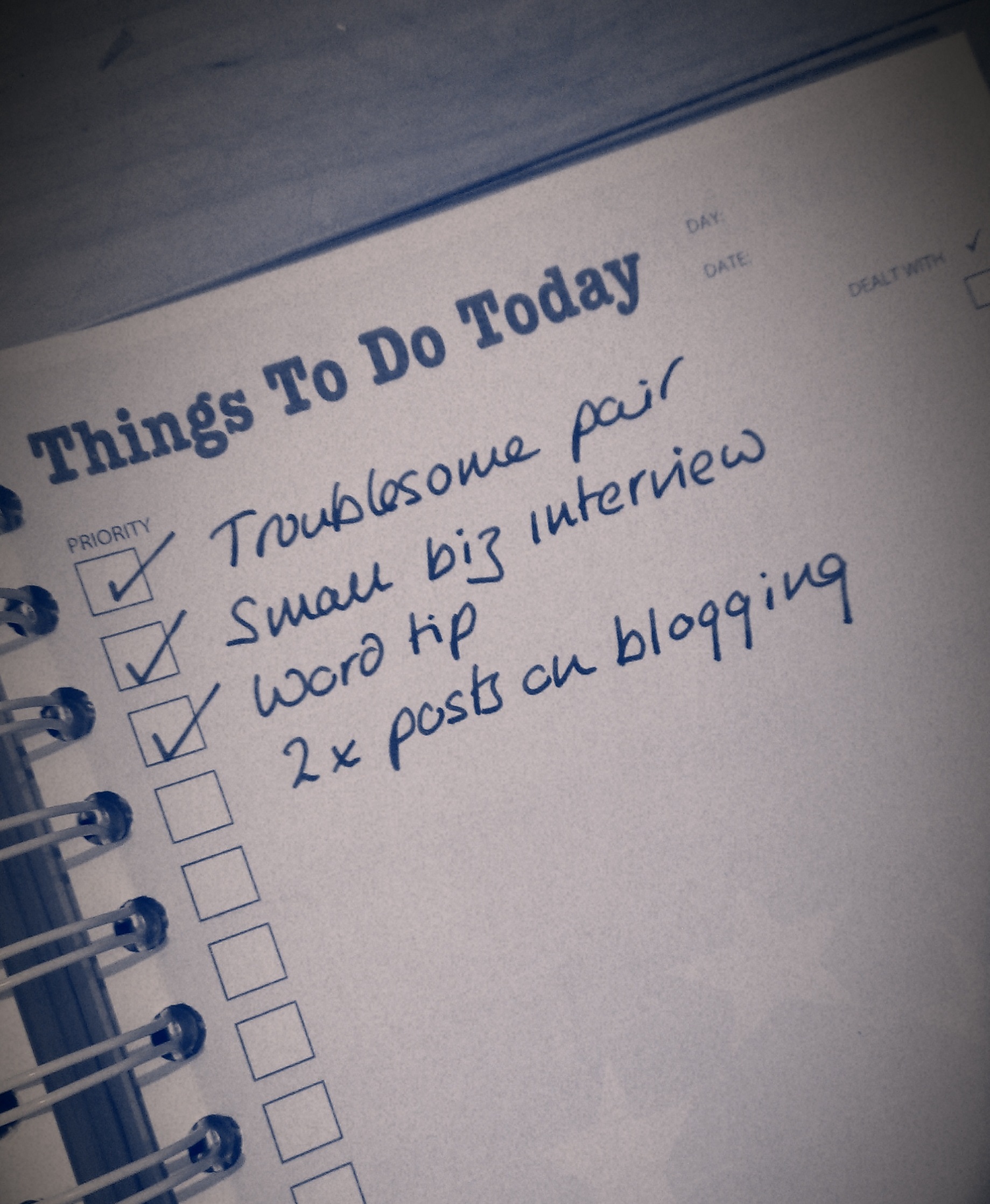
Things to doAs part of my series on blogging, in this article I’m going to talk about how frequently to blog, keeping going, and how to get down to writing those posts. This is primarily aimed at people who are blogging for their business, but this advice applies to anyone who wants to build the audience for their blog and needs help getting down to writing posts and sticking to blogging.

So that’s everyone, right?

How often should I blog?

How often should you publish a blog post? Well, that’s up to you to a certain extent. But if you’re looking to appear high up in the search engine results and keep your readers happy, you should keep it regular.

Most advice that I’ve read suggests posting at least twice a week. This will keep your readers engaged, keep your content updated enough for the search engines to promote it up their lists, and get enough keywords and content out there to keep your statistics nice and busy.

Varying your blog posts

Even a book review blog could do with a bit of livening up every now and again. A good example is my friend Ali – she mainly posts long-format book reviews, but she also takes up general topics or talks about book-buying trips – which varies things for her readers and gives them something new every now and again.

I choose to vary things and give myself a structure by running series in different topics every week. I tend to publish a short Troublesome Pairs post about a pair of easily confused words or at present an article on blogging on a Monday, a Word tip or business post on a Wednesday, and I always run a Saturday Business Chat or Chat Update each Saturday. I don’t stick to this slavishly – this post is coming out on a Tuesday to avoid the bank holiday, but it helps me to structure things and means that there’s something for everyone every week (I hope).

You don’t have to just publish text pieces, either. I’m sticking to text for the moment, but you can include video and audio pieces as well.

This article by Joanna Penn of The Creative Penn has really good advice about when she schedules her text, audio and video content. Her blog is really popular, with loads of comments and great search engine optimisation, and if you’re planning on using different media, this would be a good plan to follow.

Including guest posts on your blog

I’ve talked about this a bit already in my article on Reciprocity in Social Media, but hosting guest posts (and having them on other people’s blogs, too) is a great way to spark up interest in your readers and get reciprocal links and readers. I’m going to write more about the etiquette of guest blogging soon. But again, it varies things a bit. I wouldn’t personally have a guest post more than once every couple of weeks.

How do I remember my ideas for blog posts?

If you’re anything like me, you’ll have ideas and inspirations for blog posts at the oddest moments. If I’m anywhere near my desk and PC, I pop into my WordPress platform and create a Draft blog post, sometimes with just a title, sometimes with a few jotted notes. If I’m learning something new (like turning footnotes into endnotes, just today), I’ll take screenshots as I go along, and save them ready to insert into a post on the subject. If I spot a picture I want to take or have a document with a feature I want to use, I take a photo and email it to myself or save the document in the relative folder.

If I’m out and about, I use the note app on my phone to make a quite note of what I want to write about, or, if I’m feeling brave, I go into the WordPress app and create a draft from there!

How do I organise my images for my blog posts?

Because many of my blog posts are very screen shot based, and I always include some kind of image in my posts (looks good when sharing, attracts readers, etc.), I have a folder in my Windows Explorer called Blog posts. This has sub-folders for all of the blog posts I write, or plan on writing, so I can pop screen prints and pics into the appropriate folder and know they’ll be there for later. I have a set of generic pictures in the Blog posts folder, too, that I can use as images at the top of posts. I prefer to use my own images to avoid copyright issues.

How do I get down to writing my blog?

Here’s my secret: blogging SESSIONS.

You do not have to write your blog posts on the day you publish them! You can write them in advance, save them up, and publish in advance!

I’ve always got some draft posts on the go – either because I’ve had ideas (see above) and not yet written them up, or I’m part way through a series and I’ve planned the whole thing out. So when I can see at least a 90 minute slot in my schedule, I’ll schedule in time to write blog posts.

I’ll then bash through as many as I can, using my draft posts for inspiration and possibly already having pictures ready to go, either saved or inserted into the posts. Then I just need to write the text. In a good session I can get at least a week’s worth of posts ready in one go.

I’m used to having to write because that’s some of what I do in my job. If you have to wait for inspiration to strike before you write posts … just make sure that inspiration has plenty of room to keep going! Anyway, it’s surprising what you can produce when you sit down and tell yourself that you have 90 minutes to generate a load of blog posts!

Scheduling publication of blog posts

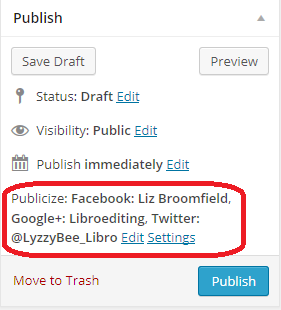
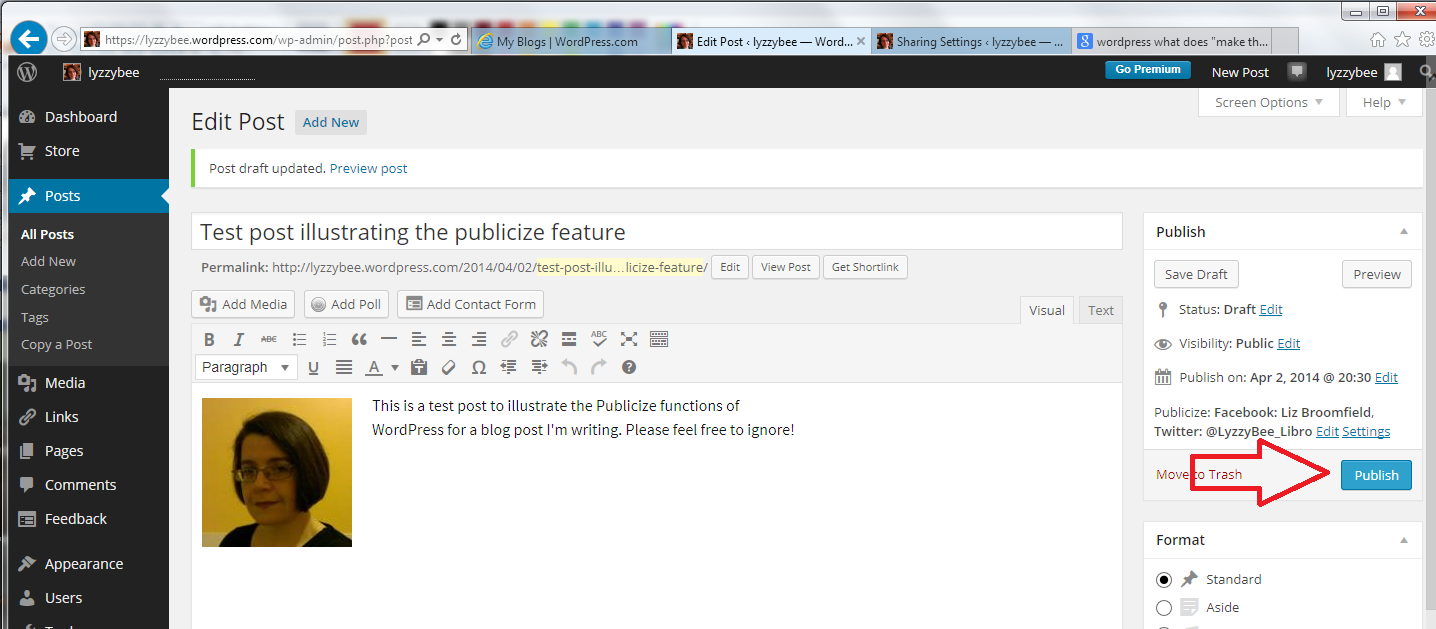
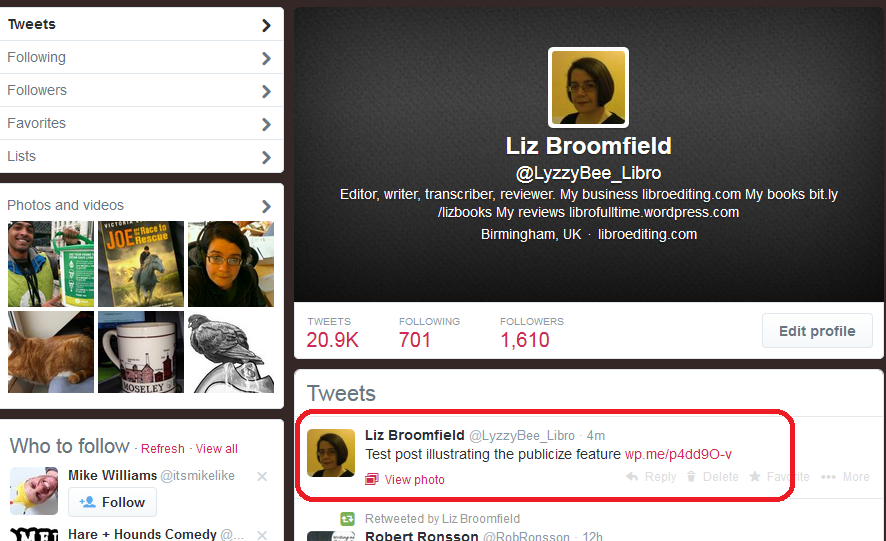
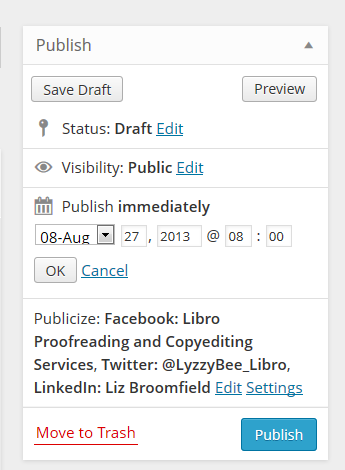
schedulingI would imagine that all blogging platforms have a scheduling feature. Here in WordPress, I can edit the Publish Immediately field to the right of my writing pane, and choose a date and time to publish the post (I also automatically post a link to Twitter, Facebook and LinkedIn. This means I can schedule a post to publish when I’m going to be away from my desk and the post will still be publicised).

If you don’t know how to schedule blog posts on the platform you’re using, Google your platform name plus something like “schedule blog posts” and you should be able to find instructions.

So, when I do a big writing session, I write the posts I want to write, then schedule them all in for the appropriate days. I can view just the posts I’ve scheduled to make sure there aren’t any clashes, then I can get on with work or even go on holiday, knowing that my blog will be publishing when I’m away.

How do I make myself keep on blogging?

If you get stuck and don’t post for a while, or don’t feel like posting, don’t panic! Here are some things you can consider doing:

  • Have a think about why you’re blogging and whether you do actually want to continue (try reading my article on 10 reasons not to blog or the one on 10 reasons to write a blog!)
  • Have a little brainstorm and think of some ideas for blog posts – just jot them down and write them up later
  • Get into a writing routine that suits you – whether that’s posting once a day or having a weekly blogging afternoon
  • Sign up for one of the various schemes that suggests something to post, or ask your friends or readers to make suggestions about what to write about
  • Consider creating some themes – it’s easier to come up with an idea for a Word tips post than an idea for “a post”
  • Don’t beat yourself up. Look at other people’s posts for inspiration. Ask for some guest bloggers. Review something you use in your work life. Write about something personal

————–

This article has talked about how often to blog, how to organise your blogging, how to schedule posts and what to do if you get stuck. I’d love to hear your thoughts on these topics – do post a comment, and if you’ve enjoyed this post, please share it using the buttons below.

Related posts:

10 reasons to start a blog – why you should do it now!

10 reasons NOT to write a blog – and why you should stop and think, at least!

Reciprocity and Social Media – how to negotiate social media kindly and politely

Top 10 blogging sins – avoid these if you can!

 
20 Comments

Posted by on August 27, 2013 in Blogging, Business, PowerPoint, Social media, Writing


Tags: , , , , ,

Top 10 blogging sins

pens and ink bottleI’ve been talking about why and why not to blog recently. Once you’ve committed to your blog, it can be a bit of a minefield. Here are the top ten blogging sins that I see over and over again, or hear other people complaining about. No one can be expected to know everything straight away, and we’ve probably all made at least one of these mistakes, so hopefully I’ll help you to avoid the big, bad ones with this list.

1. Not having an RSS feed

File:Feed-icon.svg RSS is a way to allow blog reader software to collect your content whenever it’s  updated and send it on to any of their readers who subscribe to your blog This Wikipedia article explains it all and examples of RSS readers include Feedly.

If you look at the top of this blog page, you will see that I have an RSS feed logo in the top right-hand corner, and a link in the right-hand menu bar, and I also offer a link to subscribe by email. All blogging software will have something in their settings that allows you to add this. If you don’t add this link, it makes it that bit harder for people who want to subscribe to your blog to do so (they can usually put the URL in their reader software, but are they going to do that extra process? Not always). Not having a button to use to do it quickly and easily can give the impression that you’re not interested in people reading your blog. That’s probably not true. But I’ve seen people get really cross about this and say that they’re not going to look at a person’s blog any more if they don’t have this. I know … but if one person’s saying it, how many are thinking it?

If you get stuck trying to add this button to your blog, the easiest way to find out how, is to Google your blogging software’s name and “RSS feed button”. You should find a YouTube video or set of instructions telling you how to do it.

2. Not updating your blog

If you set up a blog and you then don’t update it, it won’t help you to get more readers or to promote whatever it is you’re promoting. Google and the other search engines thrive on updated, fresh content. If you don’t update your blog regularly, it will fall further and further down the search rankings and no one will be able to find it. If you want to write a blog, commit to updating it regularly.

I’ll be publishing a post about scheduling and keeping active with your blog posts soon, so watch this space!

3. Stealing content from other people

It’s fine to “reblog” other people’s blog posts onto your own blog (where a snippet of the post appears on your page, with a link to the real thing). It’s fine to link to other people’s blog posts and tell other people about them. It’s even fine to be inspired by another person’s blog or content – one of my friends has started a questionnaire series a little like my Small Business Chat one but with an emphasis on marketing techniques: similar idea, different content, that’s fine.

It’s not fine to lift content wholesale from another person’s blog or website. If you quote large amounts of text written by someone else, it’s just the same as if you were using that in an article or essay – you need to reference where it came from and acknowledge the author. It’s fine to talk about newspaper articles or reports in your blog and react to them, not fine to quote them verbatim, or quote people they have quoted, and not give the original source.

Never be tempted to take someone else’s content for your blog post. At best, you won’t get picked up by the search engines anyway (see below). At worst, you’ll find yourself slapped with a lawsuit for plagiarism! And it’s just not right.

4. Reusing content in exactly the same form

Say you’ve had a guest post on someone else’s blog and you’re really pleased with how it’s turned out – so much so that you want to share it. So you post it in its entirety on your blog, too. Not a good idea.

All of the search engines, like Google, like to offer their users varied content. So if the same content appears in two places, both places won’t come up in search results. Effectively, one of them will be invisible to search engines, therefore invisible to people searching for keywords that might lead them to that content.

To look at it from a different viewpoint, if you’ve published information in a guest post, the owner of the blog you’re guesting on will want to be posting up original content, not things that can be found elsewhere. Some people actually specify that the content must be original in their guidelines for guest posters. See more about this in a week or so when I blog about guest posts.

How do you deal with this? Publish a snippet of the post on your blog, with a link to that post. Put some of your own text around it, then the search engines will find your post and your guest post, both of you will get found and viewed, and no one’s copied anything. There are clever ways to deal with all of this in the coding behind your blog, but I’m guessing that most of us aren’t the kind to deal with that level of complication – I’m certainly not!

5. Being rude or negative

I feel like a  bit of a hypocrite writing this, because obviously this post is a little bit negative. But I’m also genuinely trying to help people to avoid making common mistakes! In the same way, I tried to make sure that my 10 reasons not to write a blog article talked about reasons for reviewing your blogging and content and making a positive decision. Whining and moaning and relentless negativity won’t make your readers like you any more than they would like you in real life.

Being rude can get you views in the short term. But it’s like those restaurants that people go to only because the waiters are desperately unfriendly. Fine for a laugh: but will they go back regularly for birthdays and anniversaries? Probably not. Even ranty blogs about politics or issues have to be constructive as well as rude!

If you want to have a rant or talk about a mistake you’ve made, try to vary and space out these posts, and make them as constructive as you can. We can all get a good blog post out of a bad experience, but make sure that you and your readers come away having learned something. I’m going to post soon about managing your social media brand, and this comes very strongly into that, too.

6. Posting inappropriate content

I don’t just mean lurid or dirty pictures here. If you want to share information about your management courses, then blogging about your exercise classes won’t get you the audience you want to buy your courses, unless you’re doing some very clever keyword placement and making the articles valuable to both groups of readers.

I have to admit to having a laugh at funny spelling mistakes as much as the next person. However, I’m careful not to mock or talk about or post pictures on this blog, because a lot of the people I work with as an editor are unsure about their English and using it as a second, third, fourth language … and would be mortified if they thought people were laughing at them (I don’t laugh at their English: I know I couldn’t do half as well as my overseas clients if I was writing in my second language. Bong joor toot le world).

7. Not giving your guest posters what they need

If someone takes the time to write a guest blog post for you to to give you more, fresh content, bring their fans over to your website, give you a marketing opportunity, etc., etc., then you need to do certain things to make the experience a good one on all sides. Chief among these, and something I see people having issues with all the time, is making sure that you provide live links back to their website and whatever it is they’re promoting, be it another website, their book on Amazon, or whatever. A live link is one that your readers can click on and be taken to their page, like this one which takes you to a post I wrote telling you how to add links to your blog posts!

Formatting guest posts that have come through in an email or an attachment can be tricky, full stop. I recommend pasting the text into a Notepad file on your computer, then pasting it from there into your blog post. Lots more on this in an upcoming article. But please make your guest blogger’s links live so that your readers can visit them online!

8. Not letting people respond to your posts

I like responding to blog posts. We all like responding to blog posts. We like to feel it’s a two-way conversation when we read something online, don’t we. But I still come across blogs every day that either don’t allow any comments at all, or make the commenting process so complex that people give up.

I have to say that the blogging software can be a culprit here. I can never seem to reply to Blogger posts, and WordPress itself can give the impression that you have to sign up to a WordPress account in order to comment on one of its blogs (you really don’t, you just need to add your name and email address).

Enable comments, even if you moderate and check all of them for spam (most blogging platforms allow you to set the level of moderation, for example, I hand-moderate the first post by anyone, and am alerted to all new comments, so I can check they’re not spammy or inappropriate). And listen to your readers – if you’re getting complaints about how hard it is to reply to a post, have a look at your settings and see if you can make it easier. One of my blogging friends has a note whenever you go to comment with an email address to use if the process won’t work – very helpful!

9. Not responding to comments

Allied to the above, if people take the time to reply to your blog, it’s only polite to take a moment to respond to them. Some people who get a lot of comments will do a general reply mentioning all of the previous commenters with a sentence addressed to them, and that’s of course fine. But I get a bit frustrated if I comment thoughtfully on a blog post and the author never responds. You don’t have to do it immediately, but I try to do it within 24 hours, a couple of days at most.

Conversations on your blog can be one of the most interesting things about blogging – so get out there and engage with your readers!

10. Only advertising, never helping

Yes, I and other people have told you again and again that having a blog will help your business. That’s true. But just blaring out adverts to your readers won’t make them keep coming back. Imagine two blogs, both about plumbing:

  • One lists the different areas of plumbing the plumber can do, and has carefully inserted keywords to attract the search engines
  • One talks about the jobs the plumber has done this week, including how she solved a particularly tricky question. She sometimes posts a question and answer about a common type of issue, like changing the washer on a tap

Which blog will you go to once, to find a plumber? Which one will you bookmark and read, share and tell other people about? Which one will actually bring the plumber more business in the long term?

I give away quite a lot of free advice on my blog, but just because I tell people how to set up a table of contents doesn’t mean that none of my clients ever ask me to do that now. On the contrary, seeing my expert advice, they trust that I can sort it out for them!

———–

That’s my personal top 10 list of blogging sins. Would you add any to that? Are any of those NOT sins in your book? I’d love to know what you think, and whether you’re enjoying this new series of articles all about blogging!

Related posts:

Top 10 reasons to write a blog

Top 10 reasons not to write a blog

Scheduling blog posts and keeping going

You can find a growing set of articles on blogging and social media in the resource guide. Do click on the share buttons below or comment if you found this article interesting or useful!

 
35 Comments

Posted by on August 19, 2013 in Blogging, Business, New skills, Writing


Tags: , , , , , , ,

10 reasons not to write a blog

pens and ink bottleWe’ve already looked at reasons to write a blog. But what are the reasons for not writing a blog, or for taking an informed decision to stop writing one, even if you started?

Note that this, like the last post, is mainly targeted at business bloggers. However, if you have a blog that you want to gain an audience and maybe earn some money from in whatever way, these points will interest you, too.

So, what are the reasons NOT to write a blog, or to give up?

1. You are only doing it because someone told you that you should

I go on about blogging to people ALL THE TIME. I even did it when I was buying vegan food from a stall in Greenwich at the weekend. But don’t just do it because someone tells you to. OK, it’s worth looking at the reasons why having a blog is good (see my previous post) and making an informed decision, but if someone just tells you, “start writing a blog” and you do, it’s not so likely that the habit will stick and it will be useful and fun.

2. You actually dislike doing it

So, you’ve started blogging and you’ve got into a routine, and then you realise that you’re just dreading writing that next post. I’m going to talk in another post about slumps and maintaining momentum (if I forget to link to it here, look in the index). But what I’m talking about here is hating it all the time, disliking putting fingers to keyboard and putting the thing together, resenting the time it takes up. If you don’t enjoy doing it

  • get someone else in your organisation to do it
  • pay someone else to do it
  • stop doing it entirely

3. You haven’t got time to post regularly

Although if you have a personal blog and you’re not worried about statistics and search engines, you can get away with blogging very irregularly, if you are doing it so as to appear in search results and get more exposure for your business, you really do need to post regularly. I find that, for me, three posts a week are the sweet spot. When I publish three posts a week, I get the most visits to the blog. It’s worth noting that not all of those are long posts (my Troublesome Pairs certainly are not), but it’s regularly updated content, full of relevant keywords and useful to different groups of readers.

Once a week is, I think, the minimum you can get away with and still gain value from the process. If you don’t have the time to do this, again, consider outsourcing, or consider not doing it at all.

4. You’re not organised to post regularly

Following on from the time issue, you do need to be organised enough to generate new content fairly regularly. Again, I’m going to talk about this in detail in another article, but you do need to be able to plan what you’re going to talk about, gather photographs and illustrations for the posts, and organise yourself to sit down and write them, and then publicise the posts and deal with any comments that might ensue. If you fly by the seat of your pants and do everything as and when, and find organisation in general to be a tricky thing, blogging for business might not be for you.

5. You’re only in it to make money

You do read loads of posts about making money from your blog. And you can make money from your blog, for example by …

  • Allowing adverts to appear on your blog (but be very careful with this and make sure you only allow adverts relevant to your readers or this will be a big turn-off. The best way to do this is through carefully selected product placement that matches with your content and readership)
  • Hosting affiliate links on your blog so that readers can click a button or picture on your blog to be taken through to buy a product, while you get a percentage of all sales (this is notoriously difficult to make money from)
  • Selling your blog to a publisher to make into a book (but not many people make money writing and selling books, and there’s more to a blog-to-book than just bunging all your blog posts in one place – I have direct experience of this)

It’s not common to make money directly from your blog. It’s hard to say how many page views you need per month to do well out of advertising, but recommendations start at 10,000 unique visitors per month. Not many publishers convert blogs into books outside the big ones we’ve all heard about. What my blog does is let people know about me who then become customers … but that’s using your blog to build your business, not to make money per se. If you’ve read an article or been to a seminar about easy ways to make money online, be VERY careful what you sign up for and get into.

6. You are not interested in engaging with your readers

People who read blogs like to comment on them. People who comment on blogs like to see the blogger reply to these comments. I know that personally I’ve stopped reading and commenting on blogs when I’m never responded to, especially if I can see that the blogger never responds to any comments. This is actually one of my Top 10 Blogging Sins, too.

If you’re not actually interested in having a conversation, in engaging with your readers, in replying to their comments, and you just find it a chore; if you just want to broadcast and don’t want to engage in two-way conversation, I don’t personally think that blogging is for you. You will lose readers as fast as you gain them, and it will never be personally or professionally fulfilling for you.

7. You are not interested in engaging with other bloggers

This is similar to point 6, but we’re talking here about other people in the same line of business as you (whether that business be small business support, engineering or book reviewing). If you see other people blogging on a similar topic to you as rivals, and you want to keep apart from the, set yourself apart and distance yourself, then you may not find blogging to be useful. You probably can’t “beat” the most successful blogger in your industry, and if you don’t want to engage with them, share guest blog spots, link to their material and comment on each other’s blogs, then it might be wise to disengage with the process.

8. You haven’t got anything interesting to say

If you’re boring yourself with your blog content, you will probably be boring your readers. If you’re constantly scratching around for topics to write about, or covering the same ground time and again, consider scrapping that series, if you have various topics you cover on your blog, or the whole thing. I used to post up an update about what I’d been doing in the previous month at the beginning of each month. Although some readers said they enjoyed it, it was becoming very repetitive and boring to write. So I stopped doing it and added something else in that slot on the blog.

Note: what you think isn’t interesting might be to other people – it’s always worth doing some market research. When I meet people like locksmiths, carpenters and electricians, I always tell them they should write a blog about their daily lives and the jobs they do (keeping their clients’ confidentiality, of course) as many of us would find that sort of thing really interesting. I’m talking about when you’re struggling for ideas and you’re maybe not getting any positive feedback or a growing readership, and your blog becomes bogged down and repetitive. Have a rethink or ditch the blog!

9. Your blog isn’t relevant to your target market

If you’re blogging for business, your blog posts need to be relevant to your target market(s). For example, I blog about …

  • Word tips and hints – because most of my clients and target market use Word
  • Language tips and hints – because my business lies in improving written language
  • Business tips and hints – because I’ve written a book about business and I am passionate about engaging with other businesses
  • Blogging tips and hints – because I get asked about this a lot and because of the business reason above and because I noticed that I get searches coming through to my blog on that topic already, so people want to know about it

If you sell garages but blog about hairstyles, the people who read your blog are not likely to have a huge overlap with the people who are going to buy your services. If you have a book review blog and want to engage with mystery authors but only review romance, that’s not going to engage your audience. There needs to be a big overlap between what you talk about on your blog and the people you want to attract to read it. Even “the general public” has niches – people who like to read about fashion, or the work of an ambulance driver, or about low cholesterol eating.

10. Nobody is reading your blog, even after 6, 12, 18 months

It takes time to build a blog and its audience. Both of mine have grown over the months, pretty gradually. My book review blog wasn’t growing its audience much for a while, and I did wonder whether to cancel it. I actually published a post asking if people found it interesting to see whether anyone was reading it! What I found out was that many people were reading it on blog aggregators, which don’t show up on my statistics. So it was worth doing, but I also took steps to add value, beefing up my reviews, adding some more web pages to the blog, and importing a whole wodge of old reviews from another blogging service I used to use. My traffic improved and the blog was saved. But if you do that, and you change things and no one’s looking, maybe it’s time to consider other ways to market and raise awareness.

———–

These are not necessarily ten reasons to stop blogging altogether. They certainly are reasons to stop, look at what you’re doing, reconsider things and maybe tweak your posts, style, content or other aspects.

Have you stopped writing a blog? Why?

Relevant posts:

10 Reasons to Write a Blog

Reciprocity and social media

Top 10 blogging sins

Scheduling blog posts and keeping going

Coming soon …

WordPress blogging 101


19 Comments

Posted by on August 12, 2013 in Blogging, Business, Writing


Tags: , , , , , ,