RSS

Tag Archives: blogging

10 reasons to write a blog

pens and ink bottleWhy should you write a blog? Why should you start writing a blog, and why should you continue writing a blog? Here are my top reasons why. I’m really looking at business blogging here, but the first one applies to everyone!

1. Because you want to

This reason covers both personal bloggers and business bloggers. You should start writing, and continue writing, a blog, because you want to. Forcing yourself to do something you don’t want to do is no fun, and you should enjoy the time you spend designing and honing your blog and writing those entries. Whether you want to share holiday pictures or reviews of restaurants or share your professional expertise, do it because you want to.

2. You’ve got something interesting to talk about

There are so many interesting things to talk about. I often meet people running businesses where I have no idea of the nitty gritty of their everyday lives. How does a carpenter learn his trade? What does a freelance solicitor do, day to day? How many projects does a crafter have on the go at any one time, and how does a mobile hairdresser help their clients to choose a new hairstyle?

I have found that my posts on building my business struck a chord and interested many people. A series of posts that I started really for myself about Word hints and tips has turned into a popular series. If you run a business, think about some of the behind the scenes things, some of the aspects of your knowledge that people might be interested to know about (don’t worry about giving away your secrets – I might publish articles on Word headings and tables of contents, but I still get asked to do them by my clients!).

Of course, it goes without saying that you shouldn’t share personal details about your clients. But I think it’s fine to talk about them if they’re heavily disguised – or ask if they’d like to have a case study published with links back to their website!

3. It will set you up as an expert in your field

This is invaluable when you’re building your reputation and your business. Don’t see it as giving away information for free, think of it as sharing your expertise with the world. Once you start appearing in people’s Google searches when they’re trying to resolve a problem, they’ll be more likely to come to you for help when they need your services. If you can offer a back catalogue of useful, targeted advice on your blog when you’re negotiating with a new prospect, they will see that you can walk the walk as well as talk the talk.

This may not lead to direct sales – but I’ve often seen my blog posts shared among other people and organisations in my field. Keep your name in front of them as well as prospects, and you never know where the next recommendation and job might come from!

4. It will attract people to your site

This links in to the above point. The more content you have on your website which is packed full of keywords and language to do with your business, the more findable it is in the search engines. The more people find information that is useful to them and engages with them, the more time they will spend on your website. The more time people spend on your website, or the more repeat visits they make, or the fact that they’ve signed up for your RSS feed and get regular updates into the RSS* reader or email inbox, the more likely they are to remember your name and your products or services when they or a contact need them.

More website visitors does not directly lead to more sales in a quantifiable relationship. But as long as you do show genuine expertise and a willingness to engage with your audience, you will build your exposure, get more visitors to your site, and this will help you to become better known and gain more sales.

5. It will build your platform

Your platform is the group of people who are engaged with you in whatever way – through personal connections, social media such as Twitter, Facebook and LinkedIn, through your email newsletter, through your blog – and who can then be “leveraged” (horrible word) when you want to get the word out about something new that you’re offering.

For example, if you’re self-publishing a book, it’s vital to have built a circle of connections before it comes out, so you have a guaranteed audience of at least a few people. If you start offering a new service, for example when I added transcription services to my proofreading and editing offering, it’s useful to have people who you can tell, and who will then hopefully spread the word.

Having a blog builds your platform because it engages people’s interest. It brings them to your website, it gets them reading your content regularly, and it encourages them to sign up for your RSS feed or to receive your posts by email as they’re published. Once you have subscribers, you can get information out to that guaranteed audience when you need to. That’s much harder if you only have a static website for them to visit.

6. Regularly updated content will boost your position in search engine search results

It’s fairly common knowledge that the search engines (Google, Yahoo, etc.) like content that is regularly updated. This means that their complex and little-known (and ever-changing) algorithms will promote websites that are frequently updated above those that are static. Updating your blog once a week or more gives all of the content on your website a better change of being found by potential contacts and clients, because it gives it a better chance of appearing in a higher position in the search results.

7. So will information crammed full of the keywords that are important in your industry

Keywords are vital for search engines, too. If you just write a set of keywords over and over again, the chances are the the search engines will pick up that it’s not real content, and will not show it to searchers. But if you are writing well-crafted copy which includes a good sprinkling of keywords among the text, you will find yourself doing better in the search engine results.

I write natural text in my blog posts that is (hopefully) interesting and gives something to the reader – but I am also careful to include relevant keywords at a regular rate in the blog posts I write, which does improve my search engine optimisation no end (it’s also good to get them into sub-headings and the blog title itself). SEO is a fairly dark art, but the more keywords you can sensibly insert into your content, the more the search engines will be happy to find and display your content to their users.

8. You want to engage with your readers / prospects / clients

Blogs are not a one-way conversation. Once your audience has built a bit, you will get comments, shares, etc. on your blog posts, and on the places where you promote them (I will get almost as many comments on my Facebook post advertising a new blog post as I will on the post itself).

One of the golden rules of blogging is that you need to respond to your comments. Some bloggers are very good at this, some are not. I’m sure everyone’s commented excitedly on a blog post, only to find their comment is effectively “ignored”, with no reply from the writer. I think that’s quite rude, and I am likely to engage a lot less – or stop engaging – with bloggers who have a habit of not replying. Obviously, we all get times when we’re away or too busy to reply that moment, but most blogging platforms alert users to replies, and you want to keep that feature switched on and engage with your audience, otherwise they will stop coming back.

And those commenters might just be your friend Ali or your ex-colleague Steph, but every person who engages with your blog is a potential client or recommender.

9. You want to engage with other bloggers

There’s nothing like blogging for building communities of like-minded people. Once you’re blogging in a niche area, whether it be fiction writing, editing, ironing services or Sage, people who are interested in the same sorts of areas will start to follow your blog, comment on your posts and share what you’re saying.

This is useful for a couple of reasons: firstly, it’s always good to have colleagues. I’ve written elsewhere about how I treat other people in the same line of business as me as colleagues rather than competitors. It’s always good to have people to recommend prospects on too if you’re fully booked and can’t take them on, and to have people to send you referrals. Sometimes you need to have a moan or a chat or ask advice, and you might want to do this privately rather than publicly, which is where your network of colleagues can come in very handy. You can also read what they’re saying, get new ideas, keep up to date, and slot into networks that offer mutually useful posts, services and applications.

Secondly, this may give you the opportunity to guest post on other people’s blogs, and vice versa. We’ll talk about sharing your content in other places next. But just to give you some examples, if I hadn’t started blogging, I wouldn’t have got to know many of the editors I now know who link to my blog articles, share them on social media, and act as a sounding-board when I need to talk things through. That’s worth every hour of effort I put into my blog, to be honest!

10. You want to share your content in other places on the web

The good thing about your URLs and name appearing in places on the web that are not connected directly with you, your website and social media is, you guessed it: it boosts your position in search engine results. The more times your URL appears on a website that’s on a solid standing itself and has followers and people talking about it, the more the search engines will consider your website to be appropriate to present in their search results listings.

These links to your content on other people’s pages are called backlinks. You can secure these in a number of ways:

  • Comment on someone else’s blog post, including your URL
  • Contribute when someone asks for examples, experiences or feedback, again making sure that your URL is included
  • Write a guest blog post for someone – ensuring that the biography at the end includes all of your links

Now, you’ll know if you’ve ever allowed comments on a website or blog that a lot of companies do this seemingly randomly, just to get their URL into other people’s comments, and now you know why they do it. So do make sure that the content and comments you share are appropriate to the topic of the post on which you’re commenting! But this is a great way to increase traffic to your website and blog.

So, there are 10 top reasons for writing a blog. Do you have any others? Why did you start yours? Do also read … 10 top reasons NOT to write a blog!

File:Feed-icon.svg *What’s this RSS stuff I keep talking about? RSS feeds are file formats that allow your regularly updated content to be collected and sent on to readers, usually involving them reading all of the blogs etc that interest them using an RSS reader that accumulates them all in one place. This Wikipedia article explains it all and examples of RSS readers include Feedly. RSS feeds can be found on blogs around the symbol at the beginning of this explanation.

Related topics:

10 top reasons NOT to write a blog

Reciprocity and social media

Top 10 blogging sins

Scheduling blog posts and keeping going

 
39 Comments

Posted by on August 9, 2013 in Blogging, Business, New skills, Writing


Tags: , , , , , , ,

Reciprocity and social media

handshakeHere’s a guide to how to be polite and maintain reciprocity on social media, including Twitter, Facebook, LinkedIn and your blog, so as to “leverage your social capital”, which actually just means make social media work for you and use sharing and friendliness to help yourself and others.

It’s all about reciprocity. What does that mean?

What is reciprocity?

The dictionary definition of reciprocity – is gaining mutual benefit from exchanging things with other people.

In the case of social media, in which I include blogging, as done well it should be a two-way and mutual activity, this means building strands of connection which can, over time, turn into powerful networks that can help you start, grow or develop your business or other endeavour.

By responding to comments and forging links, sharing and re-tweeting, you make yourself more prominent in other people’s eyes, for the right reasons.

If you are unfailingly polite, share people’s content, always say thank you, share people’s details with other people and act as an ambassador and connector for other people’s personal brands as well as your own, that will come back to you in bucketfuls.

Whether you’re just starting out, embracing a new form of social media, or need a gentle reminder (I know that writing this reminded me to return to sharing more on Twitter), I hope you find these tips useful.

Reciprocity on Twitter

  • Always respond to @ comments that require a reply (i.e. they ask you a question or tell you about something).
  • Always respond to RTs, Follow Friday mentions, etc., with a thank you Tweet.
  • If someone recommends you to someone else, always a) thank the original person, b) make contact with the prospect – don’t wait for them to come to you.
  • Take part in peer-group events like #watercoolermoment etc. to encourage the people who run them and engage with your peers – you are likely to find new, interesting people to follow and talk to.
  • Retweet other people’s content if interesting to you / your followers. People often talk about the 80/20 rule – 8 retweets or shares of other people’s content via the social media sharing buttons on their blog posts to 2 promoting your own words or interests.

Note: Twitter works fast. Many people don’t see their whole stream, just snapshots through the day. If someone has seen your content and contacted you / shared, etc., try to thank them within 12 hours or less.

Use Twitter to forge links, have short conversations, support and encourage others and share content with your followers. People who you retweet will be more likely to retweet your posts. People who you recommend to others will remember the favour.

* not sure what I’m on about with all this talk of @ and RTs and followers and # signs? I’ll be putting together at Twitter 101 post to clear all that up soon!

Reciprocity on Facebook

This applies mainly to people using Facebook for their business, however it helps keep the wheels of general social interaction running smoothly, too!

  • If someone asks a question on your business page or a business-related question on your own timeline, always respond. My business page doesn’t always alert me when I have a new comment – so keep checking yours to make sure you’re not ignoring someone!
  • if someone sends you a Facebook message, always respond if it’s appropriate and meant for you, not spam.
  • Check your “other” messages for messages from people who are not “friends” with you but are making genuine contact, and respond appropriately.
  • If people comment on your status updates, “like” their comments and engage with them.
  • If people share your status updates, “like” the share and say thank you publicly or privately.
  • If people recommend you via Facebook, thank the recommender and contact the prospect as soon as you can
  • Share other people’s content.
  • Like business pages as yourself and as your business (click on cog next to message).
  • If you join groups of peers, people in the same business, people who are also self-employed, etc., join in with the group once you’re there, help other people and don’t either relentlessly self-promote or stay silent.

Facebook works on friendship and commonality. Share your peers’ posts and you’ll build up a network of people who will recommend, help and support you.

Reciprocity on blogs

I’m including blogs in social media because the best blogs that work well for businesses and people who want a “successful” blog are those that engage in two-way conversation, share content and link people together. Sounds like social media to me!

  • On your own blog, mention and link to people who have helped, advised or inspired you.
  • ALWAYS reply to comments. If you don’t have time to reply to each individually, at least put up a thank you and a mention to the most important ones.
  • Keep an eye on your search statistics and respond to what your readers are looking for (e.g. I noticed people were searching for “comment boxes too large” so added new blog post about that).
  • If people like and comment on your blog, pop over to their blog and scatter a few comments and likes if you find their content interesting.
  • Use those social media buttons on other people’s blogs to share their content – and make sure you enable the ones on your blog to allow and encourage people to share.
  • Engage with other bloggers especially in your industry sector or area of interest – comment, share, etc.
  • Offer guest post spots on your blog for other people to contribute content.
  • If you give someone a guest blog spot, make sure that you include all their links as well as a little biography about them. Make it easy for people to find them.
  • If you place a guest post on someone else’s blog, make sure that you give them all of your links to include, and talk about it as much as possible on your other social media channels.

Blogs can be a powerful way to meet people, link with people, learn from people and get your content shared around the world.

Reciprocity on LinkedIn

  • When you link to someone, change the standard message to a personal one, maybe reminding them where you met or making another tailored comment. Some people get quite annoyed with the standard messages and might even ignore then on principle, so it’s worth making that extra effort.
  • Introduce people who you think would be useful to each other.
  • Press that endorse button and give your contact some more stats.
  • Use the recommend feature if you’ve worked with someone to place some feedback on their profile, LinkedIn displays how many recommendations you’ve made, and everyone wants to work with someone who’s generous with feedback and honest praise.
  • If someone endorses or recommends you, or introduces you to a third party, send them a message to say thank you.
  • Join groups and share content kindly and generously.
  • When you join a group, get to know people and comment on other posts and questions before you start self-promoting.
  • if a group seems to be full of spam and self-promotion and no discussion and mutual encouragement, leave it alone – you won’t be able to change it and it’ll just annoy you. But learn what not to do from that!

LinkedIn can be a very powerful tool for IT and other business people, with most recruiters looking for a LinkedIn profile these days. Make sure that your full CV is on there, and a good photo.

Reciprocity on Google+

Google+ works much like Facebook, in that you can +1 posts, make comments etc. The major point about Google+ is that if you share your content and others’ on there, Google will pick up on it that little bit quicker to add it to its search engine. So it’s worth engaging on there even if it isn’t as busy or active as the other networks (or maybe it is in your field?)

Reciprocity on Pinterest, Tumblr, etc.

I’ve talked here about points regarding social media networks that I use. I don’t know much about Pinterest, Tumblr, etc. If you have points like the above to share on these, please pop them in the comments or send them to me via my Contact Form, and I’ll include them in this post (with an attribution of course!).

This article should help you to grasp the conventions of reciprocity in social media. If you’ve enjoyed it or found it useful, and think that other people will, too, please take a moment to share it using the buttons below or by sharing any alert you might see on Twitter, Facebook, LinkedIn or Google+. Thank you!

Related topics

10 top reasons to write a blog

10 top reasons NOT to write a blog

Top 10 blogging sins

Scheduling blog posts and keeping going


Tags: , , ,

Important information for Google Reader subscribers

Hello there! This is aimed at people who subscribe to this blog and my other one via Google Reader.

*update: link to Feedly is now correct, sorry about that!*

Google Reader will be shutting down at the end of June 2013, so you will need to export your feeds to another reader, or you’ll lose them.

I have moved over to Feedly which allows you to import your Google Reader subscriptions and offers functionality for tagging and saving posts until later. I’ve found it’s good and reliable and easy to use, and it works on desktop computers and tablets, phones, etc. This is not an affiliate link or paid advertisement – I took some advice and looked at some alternatives and this looked best for me.

Of course, there are other RSS feed aggregators out there, and Library Guru Phil Bradley has kindly gone through and assessed them all for us in this blog post.

If you don’t want to use RSS feeds anymore, you can subscribe to this blog via email – just look at the top right hand side of the screen and you’ll see a link in the sidebar.

I hope you are able to continue to subscribe via Feedly or email or some other form and that I continue to see you over here. Any questions, please ask!

 
1 Comment

Posted by on June 25, 2013 in Blogging, Organisation


Tags: ,

An Editor Writes: 10 Lessons I Learned When Writing My Own Book

going_itWhen I set out to write a full-length non-fiction book, I had two ideas in my head:

1. I can just stitch this together from my blog posts – easy!

2. I’m a professional editor and writer, I’m used to writing to deadlines, so I’ll get this done quickly and efficiently.

Wrong!

This article is about what happens when you go over to the other side – when editor and content writer becomes (self-)published author.

Sitting down to write

The first thing I found when writing my own book was that it’s so hard to make yourself do it! I knew towards the end of 2012 that I had amassed the blog posts that I needed to write a book about a year of self-employment. So I picked up all the posts out of my blogs, popped them in a Word document, and thought, “Oh, look: a book”.

First lesson learned: I should probably have organised the book using a software package like Scrivener. This would have made it easier to organise … and reorganise … and reorganise it.

Second lesson learned: I should have set aside time for this process in my diary, like I do for my clients. You’d think I’d have learned this from trying to slot some academic research into my schedule – apparently not!

Emotional blocks to writing

I don’t know whether it’s because when I write for my clients, it’s “white label” work, which means that my name doesn’t appear on the finished piece, and having this appearing under my own name made it feel like I was under the spotlight, but I kept getting blocked. When it’s paid work for a client, I’m as busy as can be, but somehow there were a zillion other things I could do to avoid working on the book (sound familiar)?

I was committed to it; I knew it could actually help people; people had TOLD me to write the thing, but I’d get blocked and veer away from it in my mind and physically when I tried to sit at my desk. This happened particularly at the editing stage.

Third lesson learned: Treat writing like a job. Set deadlines and stick to them. Try to sweep aside the emotions and get on with it, as you would with a job.

How to organise your book in a million easy stages

It all looked a bit messy and unbalanced, so I made some of the posts diary entries and some of them articles. Nope, still looked wrong. This is where I realised that you can’t just turn a blog into a book without some serious editorial decisions. I moved stuff around, added an introduction to each month, and stuck bigger, more general pieces in appendices at the end.

Fourth lesson learned: If you think it’s going to be easy, you’re probably doing it wrong. Nothing good comes without a struggle, right?

How to edit an editor

Like a good writer who’s learnt from others, I was all ready and eager for some beta readers. I recruited two friends initially. Each did a useful read-through for me and gave me some good comments. One of them, and I say this with the greatest appreciation and respect, edited my book like I was editing my book. She’s not a professional editor, but she’s good. She picked out typos (ouch) and weird sentences (ouch) and missing links (ouch) and repetitions (eek) and huge structural issues (argh!).

Ouch, ouch, ouch.

I’ve written in detail elsewhere about my reaction to this edit: suffice it to say that I felt wounded, winded and disconsolate. What a marvellous lesson about how my own clients feel when I edit them! It did put me off for a good while, thinking this book was rubbish, how dare I think I could publish something, let alone publish something good that people would want to read. In fact, I left it for FOUR MONTHS!

Fifth lesson learned: Editing is vital, but it does sting. I must continue to be as kind to my editing clients as I possibly can be. However kind the editor is, it still feels brutal to have your work criticised and pulled apart. I will not make it more brutal for them.

Sixth lesson learned: You can get a blog post out of anything. Mine on being edited was one of my most popular so far!

Getting round to rewriting

I mentioned emotional blocks: this was the big one. I read through the editing comments. No: I skim-read through them, muttering and sobbing. Then I closed the file and ran away from it. It sat there, taunting me. “So, you were going to publish in the first week of January, were you? It’s February already …” I just couldn’t make myself do it.

In the end, I had to force myself. I had to treat it like any other job, open up the file, and start on it. Of course, once I started, I could see a) how good the editing was, b) how to make it better. I was tough with my precious words. One of the major problems with the text was that it was repetitive – every time you write a blog post, you’re expecting new people to read it as well as subscribers, so you tend to reinvent the wheel. Put that in one document and you’re, frankly, boring people. So out came the delete key, and I honed and polished, added some bits too, but chopped thousands of words off the total, to make a much slimmer and better read.

Seventh lesson learned: Be ruthless. If it is at all expendable, out it comes. Chop out the dead wood. If you can’t see the dead wood, get someone to chop it out for you. It will come out better for it.

When it comes to your book, looks are everything

Well, not everything, but …

I was so keen to publish that I started out with a terrible home-made cover. Then a friend tweaked my original book’s cover to make a new matching one, but it still looked a bit too home-made. I then  found a book designer online and got a lovely cover done. I looked into getting the interior of my book designed professionally so I can put out a print-on-demand paper copy, but the book needs to sell some more copies first to be able to pay for that!

Eighth lesson learned: Your book really does look more professional with a professional cover; it will stand out for the right reasons. If you have more than one book, it’s worth getting an overall consistent look. My first book started to sell more when I got its cover updated to match the new one. Get this done first – it takes ages to update the cover on Amazon when you’re embarrassed about your old one!

Soft launch aka the obsession starts …

A read-through from another friend and it was ready to go! I’d already tried the process once (with a book that was much shorter and easier to write!) so I knew the mechanics of publishing for Kindle on Amazon. I’d read up about the process and I knew about the choices, and decided to go for Amazon exclusive, as I could then enrol the book in KDP Select. I get quite a few loans on my other book, and somehow I make more royalty on loans than sales on that one, per copy. I priced the book carefully – as low as I could make it while still getting the higher royalty from Amazon. I also knew to soft launch, build some sales and reviews, and then do a bigger launch.

So I published the book, and I did the social media thing, and I told people about it, and I sent out one or two review copies. And then I was reminded of the obsessive nature of authors – I’m still constantly checking for reviews, sales, likes, comments … It’s like it’s your baby and you have to watch over its every breath.

Ninth lesson learned: Reviews will come, whether you hassle people or not. I knew a few of my first readers. I put up pleas for reviews. It takes longer to read and review a full-length book, and the reviews will come in time! And if you read a book by an indie author – do review it, it means the world to them!

What next?

Once I had a few five-star reviews (finally!) I’m making more of a noise about the book. I picked up this tip from The Creative Penn and it worked with the last one – give people something to look at when they’re making their buying decision. And here it is, out there, selling and helping people (the main thing) and I’m proud of it and all the hard work.

Tenth lesson learned: Do it. At very least you will find out something about yourself and other authors. At best, you’ll have an income stream and you’ll see some lovely reviews and know you’ve helped and/or entertained people! Go for it!

Resources

The book that I’m talking about here: Going it Alone at 40 – and the book’s own web page with links to worldwide Amazon sites to buy it.

That blog post about being edited: On Being Edited

Book designer: I actually used someone on www.fiverr.com  for this, on the recommendation of a writer friend: I don’t normally like low-cost sites like this, but my designer offers lots of extras that pay them better, so I felt it was OK.

 
14 Comments

Posted by on June 12, 2013 in Blogging, Copyediting, Ebooks, New skills, Writing


Tags: , , ,

A week-long series over on the Other Blog …

It’s three-tops cold!

As the weather is getting colder and I settle in to my 11th month of full-time self-employment, I’m running a series of blog posts over on the Libro Full Time blog about what homeworkers wear. I’m musing about standards, keeping up appearances, changing from corporate wear to home wear, and whether appearances matter when you’re hiring me for my brain, over the next week, as well as sharing what I’m wearing and encouraging other homeworkers to do so, too.

Do pop over and say hello; you can sign up to subscribe or add the blog to your reader if you haven’t done already, or just dip in and out.

Watch this space for more Word tips on this blog later in the week … Otherwise, I’ll see you over there!

 
Leave a comment

Posted by on November 5, 2012 in Blogging


Tags:

More resources to read and share

Just a quick not for new readers of this blog: if you’ve enjoyed my post on Customising Track Changes, there are many more articles and series to read.

On this blog, which is my professional language and small business area, you can find all sorts of posts about using Word, as well as posts to help other small businesses and some resources for students.

Do take a look at the category cloud in the right-hand column for more.

Over on the Libro full time blog, you’ll find more personal  reflections on my journey towards full time self-employment and my experiences in my first year of working completely for myself; the most recent post on there is about being self-employed and getting ill, and you’ll also find book reviews, Iris Murdoch stuff and information about my e-book. This page explains the connection between all these disparate elements.

I post at most once a day on one or other of the blogs, and most of my articles are fairly short, so you can subscribe with confidence if you’re not signed up already!

Do enjoy – and don’t forget to use the share buttons if you particularly enjoy a post, so others can read it too. Thank you for your interest in my pages and posts!

Contact me via email or via my contact form.

Libro on Facebook

Libro on Twitter

 
Leave a comment

Posted by on October 5, 2012 in Blogging, What Do I Do?


Tags: ,

Keep an eye on your stats

Do you ever look at your blog or website statistics? If you don’t, I’m going to show you why you should. If you do, do you get all you can out of them? Do you look at them actively or passively?

Note: this post uses examples from the WordPress.com statistics pages, because that’s the blogging/website platform I use. But all of the standard blogging sites, plus Google Analytics, Statcounter and other analysis tools will offer you similar information, with similar headings.

Why should I look at my statistics?

Looking at your statistics can help you tailor your blog to match what your readers want, and will also alert you to who is talking about you and where they are doing so. You can also measure the success of your attempts to build your audience through posting on social media and other blogs and sites. Here are some of the things you can find out …

  • Which posts or pages are people looking at a lot … and which ones are they ignoring?
  • Is there a kind of post that people are particularly interested in?
  • When do people read your posts?
  • How do people find you (social media, web searches … )
  • What search terms do they use?
  • Where do your readers go next – what links do they click?
  • Are people finding your site via other sites and blogs?

How do I find and view my blog / website statistics?

Usually you’ll have some kind of button or menu option called Statistics or Analytics. On WordPress, you will find a Stats option when you go into your blog, or you can click on the bar chart at the top of the screen. Once you’ve found them, you’ll find a screen something like this:

Now we’ve located our stats, let’s look in more detail about what they can tell us.

How do I tell how many times my blog posts have been viewed?

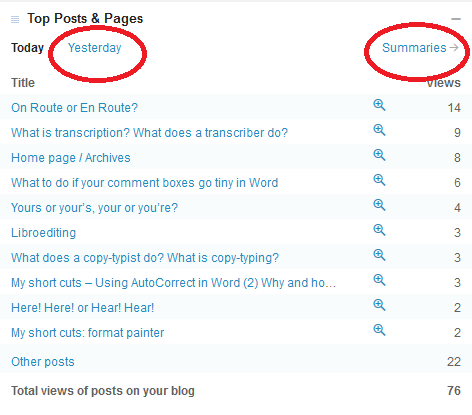
One of the important ones to look at is your most popular pages. We’re looking at one day here, and I can see that my blog post on on route or en route is, yet again, the most popular.

But I can also see what other posts and pages have been popular (and if I click on yesterday or summaries I can see previous days’ stats, while if I click on the magnifying glass next to the number, I can see all the views for that post). This is useful, as I can tell how I’m doing in the search engines, if it’s an older post, or whether my alerts are doing well, if it’s today’s post going up the ratings.

How do I tell how people have found my blog or website?

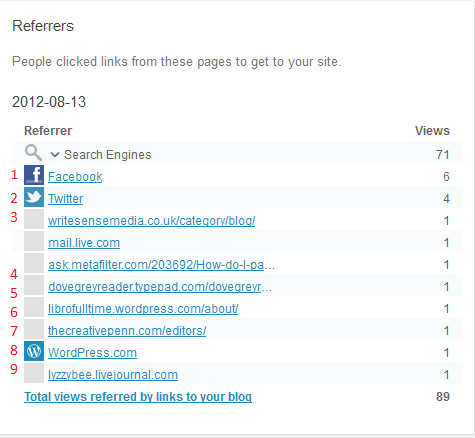
It’s very useful to know how people are finding your blog. You should have a section of statistics called something like referrers or referrals. Here are mine for a particular day.

You can glean all sorts of information from this. At the top you can see I get most of my hits from search engines (over 70 of that day’s hits so far), then Facebook (1) and Twitter (2), then a variety of websites and blogs that I’ll go through in a minute. This has changed – when you’re new to blogging, you’ll get most of your hits from Facebook and Twitter and other social media, as your friends will be looking at your posts and you will be promoting them on social media. As your blog gets indexed on the search engines, results will start showing up from them.

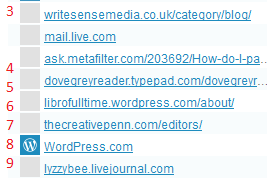
Looking at the pages from which your readers have come can be SO useful. Here’s what I can learn from this one:

3 comes from one of the people I’ve featured on my blog blogging about my feature herself – a great link-back that Google will like indexing. 4 is from an answer I gave (with a link) on an expert site. 5 is from a comment I made on someone’s blog. 6 is from my other blog. 7 is from a list of editors a client added to her website (very valuable). 8 is from WordPress itself, probably someone surfing through tags, and 9 is from my old LiveJournal blog, where I post links to this blog/website.

All good stuff, and I can say thank you to people who have sent readers my way, or even find out when they’ve done so (all these links can be clicked, so I can see exactly what people have said). Now, what about those search engines?

How can I find out what search terms people have used to find my site?

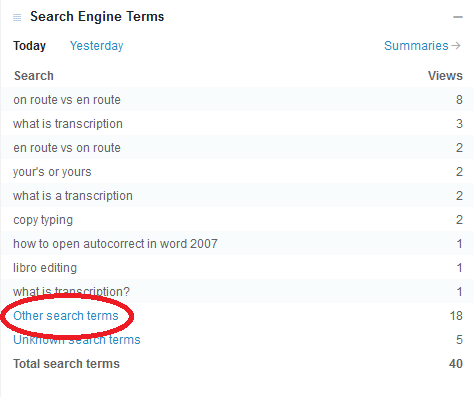
You should have a heading like Search Terms somewhere on your stats page. This offers a world of exciting information.

Clicking on Other search terms will give you the rest of the terms people have searched on – that they will only have tried once (or only one person has tried).

For a start, you can see exactly what people are searching for. It might be useful to change the wording on your blog posts to get further up the search results for a popular term. It’s also worth searching for these terms yourself and seeing where on the Google results page they appear. Another useful point is it can give you ideas for future blog posts. I noticed that someone had found me while searching for Autocorrect, which I had mentioned in a blog post. So then I wrote a post on Autocorrect itself, which has been quite popular.

It can also be quite amusing to see what people search for. Someone once came through to my blog having searched for “persuasive piece on children believing in the tooth fairy” – I think they may have been disappointed (they found me because I mention the tooth fairy in an example sentence explaining a word definition).

How can I see where my blog readers are?

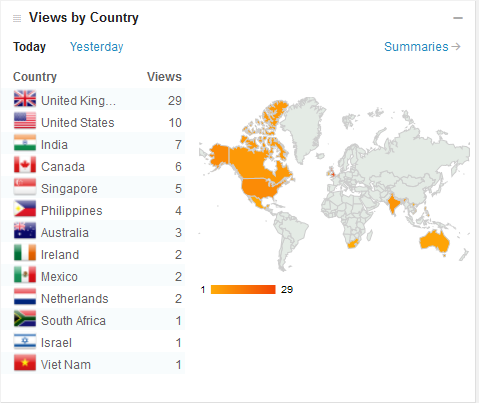
On WordPress you can see a rather nifty world map with the countries from which your visitors have come from highlighted.

This is more of a fun distraction than a useful tool, to be honest, but if you discover an anomaly, for example if you’re in the UK and you get a lot of visitors from Brazil, you could consider tailoring some of your blog posts for this market. I get a lot of international visitors, so I’m going to make sure I talk about my work with non-native speakers of English soon.

Is my website traffic increasing? What did I do to make that happen?

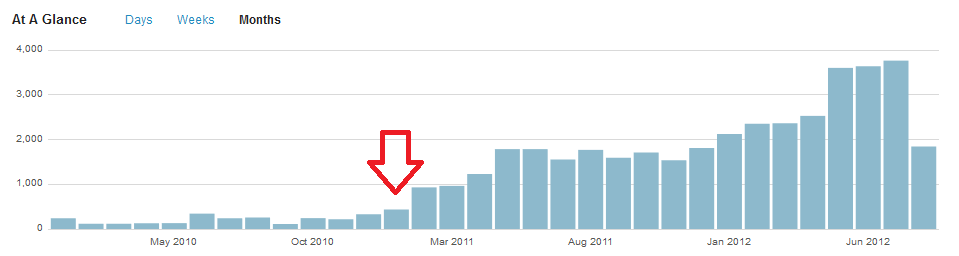
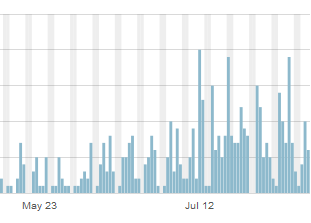
As well as today’s data, you can usually see a month or year’s worth, too. If I look at the traffic on my website and blog over time, I can see that it started increasing at the beginning of 2011.

What did I do at the time of that red arrow? Started writing this blog!

Do people read my blog more at the weekends?

Looking at your daily traffic will show peaks and troughs. If your blog is more popular at the weekends, it might be good to post new content then. If I drill down into one of my blog posts, the ever-popular “What do I do if my comment boxes go tiny in Word?”, I can see that it’s not read very often at the weekends.

This says to me that office workers are looking for and using this post, so I can make sure I post more for that kind of audience and save other new posts for the weekends.

Where do my website visitors go when they leave my site?

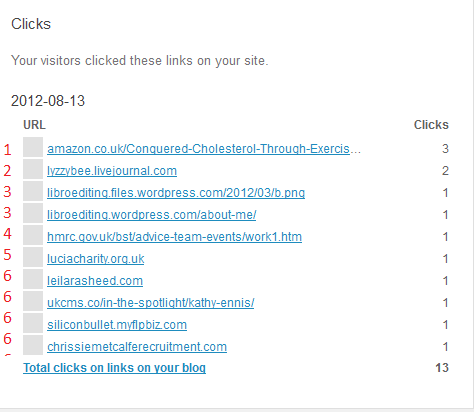
This is usually found under the heading Referrals, or maybe Click-throughs. Here’s a good representative one of mine from a few days ago:

Looking at clickthroughs from my website

You can see that the click-throughs fall into a few groups. 1 is my ebook, which I have linked to in a blog post and on the site itself. Hooray – my PR campaign is starting to work! 2 is a click to my Livejournal blog, linked to on my website. 3 is a pair of pages on this website, filed under my old url but I can see people are navigating around the site and sticking around. 4 and 5 are both links I have on blog posts; 5 is also on my references page. And all those marked 6 are websites of people I’ve featured on my blog, showing that I’m helping them get some traffic, too.

So there we go. Look at those statistics, whether you’re using WordPress or another host for your blog. And look at them actively: think about what they mean and how they can help you to find out how to tailor your blog to your audience and drive more traffic to your blog or website.

If you’ve enjoyed this post, please click on one of the share buttons below, or leave me a comment. Especially if you’ve had any amusing search terms recently!

 
5 Comments

Posted by on August 17, 2012 in Blogging, Business, New skills, Organisation, Writing


Tags: , , , ,

Olympic hiatus

Photo: Dot did not share in the general excitement last night ...

My cat ignoring Usain Bolt

Dear readers,

In case you’re wondering why there haven’t been as many blog updates as usual, Libro is enjoying working part time and watching the Olympics on the TV (although I will be venturing to London on Sunday to catch the Men’s Marathon, always a favourite event anyway).

Normal service will be resumed soon. In the meantime, here is a picture of my cat enjoying the achievements of Usain Bolt …

 
Leave a comment

Posted by on August 8, 2012 in Blogging


Tags:

Kreativ Blogger awards

I have been nominated for a Kreativ Blogger award by Vikki, an old friend with growing interest in creativity who has her own blog now, too.  Thank you, Vikki!

The Kreativ Blogger award rules are:

1. Share 10 things about yourself that readers may find interesting
2. Pass the award on to 6 other Bloggers. Be sure to leave a comment on their blogs to let them know.

So here goes …

10 things about me

1. I play the Clarinet to grade 6 standard. Well, played, really. The clarinet is a loud instrument.

2. I studied Old Icelandic at University (along with English Language and Literature – don’t want my clients to get too worried there).

3. I’m still friends with 3 women I met on my first day at University.

4. I have run 4 half-marathons.

5. My hair was blue for a while.

6. I have been a (legal) busker.

7. My favourite author is Iris Murdoch (hm, did anyone not know that one?)

8. I am a (slightly lapsed) BookCrosser.

9. I used to live in Peckham.

10. I’ve given up my job to run Libro full-time. Until the end of December 2011 I’d had some form of paid employment since 1988!

And six bloggers to nominate …

Paul Magrs, wonderful author and great writer about books and reading.

Ali, book reviewer and friend

Maxine Johnston of Life’s A Celebration – a new businesswoman and blogger and doing very well!

Carrie at Eraser Carver – wonderful printmaking and she explains how she does it, too!

Laura, Woman With An Opinion – doing her own creative writing and encouraging other people too

Verity, a librarian reading all of Virago’s books – how can I not?

There are so many more I can mention, but I expect they’re going to be mentioned by other people too, so I’m sticking with this creative but maybe not so well known bunch!

 
3 Comments

Posted by on January 6, 2012 in Blogging


Tags: ,

A new survey

I’ve set up a new survey to see how I can best make this blog useful through 2012. Please take a moment to answer as many of the questions as you can – I really want to know the answers!

You can find the survey here on SurveyMonkey.

Thanks for reading … and filling in your answers!

 
Leave a comment

Posted by on December 27, 2011 in Blogging, Writing


Tags: , , ,