RSS

Tag Archives: business

How do I cope with the ups and downs of the freelance life? 1 – when the work goes away

To do listsOne of the things that puts people off freelancing or self-employment is the ups and downs, feasts and famines, highs and lows of the workflow. While the freelance workflow can be tricky to manage, it is possible to get a handle on it and maintain your work-life balance (most of the time). I’m sharing with you my tips for making that work.

In this post, we’re going to talk about what happens when it feels like the work has all dried up. In the next post, we cover the other side of things: overwhelm!

The important thing to note here is that this all comes with time. No one starts out super-organised and busy at just the right level all of the time. Cut yourself some slack – things get over-busy or yawningly low for all of us, but these tips will help that to become less of a problem.

How do I cope when the work dries up?

The scariest thing about being a freelance is when the work appears to dry up. It’s easy to catastrophise here: what if NO WORK EVER COMES AGAIN? Well, in my experience, unless you’ve done something really wrong (like produced very sub-standard work or reneged on all your deadlines), the work will come back again. Part of learning to deal with the fallow periods is making yourself believe that they will come to an end.

There are two things to think about here …

  • What to do during fallow periods
  • How to prevent fallow periods happening in the first place

Let’s look at them in turn.

What should I do in times when I have no work?

There are so many things you can do to fill in the times when you have no work. They basically break down into three areas, though …

1. Rest

When it’s busy busy busy, I bet you don’t get all the rest you need. I try to get some downtime for myself when I’m slow at work – extra sleep, quiet reading, a cafe visit with a friend. Recharge those batteries ready for the next busy time!

2. Admin

There’s always admin to do, and you know it. Whether it’s clearing out your inbox, following up on leads that never came to anything, tidying your desk or sorting out your receipts, now’s the time to do it. (Extra hint: set a stopwatch. Do it for half an hour. You’ll be amazed at what you can achieve.)

3. Marketing

You can do a lot of your own marketing for no monetary cost – but there’s usually a time cost. If you have a free day, make it your mission to, for example …

  • Register on a few more free-to-advertise online boards
  • Write some amazing website content to promote your products or services, or overhaul what you’ve already got
  • Write and schedule some blog posts to keep your website regularly updated and cover you in the busy times
  • Go to that networking event you don’t usually have time for – or a new one
  • Overhaul your profiles on social media and make sure your message is getting across
  • Write some products for awareness-raising, passive income generation – free downloads, pdfs, an ebook …

The message here? Put your down time to good use, and use those troughs in incoming work to tidy things up and work to generate new business to diminish the next low point.

How can I guarantee to have a steady stream of work all the time?

You can’t. But you can work towards that situation, and this is something I have a lot of experience with, and it’s how come I write my blog posts in little scraps of time while waiting for something to come in, rather than in great blocks during days and days when I have nothing to do.

The answer is, I think, simple: diversify.

While it’s great to be an expert in a niche or to have one big customer who “always sends you so much work”, it also lays you open to sudden downturns when the industry in which you specialise or the company for which you work takes a downturn itself.

If you work supplying widgets to Company A which are different from the ones Company B uses, and you only make widgets of that kind, if the market for those widgets goes down or Company A goes bust or changes what they use, you’re in trouble. If you make widgets of all kinds and supply company A and B, it would take the whole widget market and both companies to go downhill fast before you were in trouble.

I’m not saying be Jack of all trades and master of none, but a bit of judicious diversifying can really, really help to iron out those peaks and troughs which come in any line of industry.

Here are some general ideas, with examples from my specific work:

  • Work on different products or services – I do editing, transcription and localisation, so if the market for one goes down, I have the others to look after me. I usually work on a range of tasks every week, but I can end up having a week of transcription and that’s fine.
  • Work with different types of client – even in the area of editing and proofreading, if I just worked for students, I’d get massive peaks and troughs as dissertation season comes round at Easter and the end of the summer, but disappears in October/November. But I can fill in those troughs by doing editing of self-published books or working with translators
  • Work with clients in different places if that’s possible – I have customers all over the world. I used to have a lot of Chinese customers; at the moment I don’t. If I’d concentrated only on that region, I’d be in trouble now. Similarly, with the drop in the value of the Euro, if I just had European clients who paid in euros, I’d be looking at a serious drop in my income right now.

I’m not suggesting that you take on areas of work or industry sectors you’re totally inexperienced in and unused to – but have a think about how you can diversify a little. If you work editing legal texts, maybe you can offer your services to a local university with a large law department. If you sell your handicrafts in shops, why not consider an Etsy shop or going to a few fairs?

In summary

If you want to avoid the down times and keep a good flow of work throughout  your working year, you can approach the issue on two fronts:

  • Have a plan for what to do when you have no work – rest, marketing, admin – and put that plan into action when you end up with some free time.
  • Work actively to have a good mix of work coming in from various sources, so you aren’t relying on just one income stream and don’t keep all your eggs in one basket.

When we add to these tips with some on what to do when you’ve got too much work, I hope you’ll find here a useful resource for helping you to smooth out the ups and downs of the freelancer’s life. Do let me know which ones work for you, or if you have other practical ideas that work!

If you’ve enjoyed this post, please use the sharing buttons below to share it on your social media platforms. Thank you!

Related posts on this blog

How do I cope with the ups and downs of the freelance life 2: when there’s too much work

Top ten tips for freelancers

How to decide who to work with

How to turn a new customer into a regular customer

What’s the best mix of customers to have?

How to make more money in your freelance business

When should I say no?

 
4 Comments

Posted by on June 10, 2015 in Business, Organisation, Skillset


Tags: ,

Why do transcribers charge by the audio minute, not by the word?

keyboard earphonesWhat is the industry standard and fair way to charge for transcription work? Why do transcribers charge by the audio minute rather than by the typed word? This article explains why and offers a fair and standard pricing structure, too. It’s part of a series, and you can find the other articles in the series and a link to my popular book on the subject at the bottom of this article.

I was working with an agency on presenting an offer for a transcription job to a company. As usual, we provided a per-audio-minute rate. This works well and is the industry standard, as it’s predictable in advance and doesn’t change according to how long it takes the transcriber to do the job (of course, it’s up to the transcriber to check the tape and make sure they’re charging a per-minute rate that’s fair to them and the client. Mine is based on two speakers, a clear tape and non-urgent turnaround time, with fair and transparent add-ons per minute for more speakers / tape issues / urgent turnaround).

In this case, the client wanted a quotation by the number of words typed and/or the time it was going to take me to transcribe the tape. So they wanted to know my words-per-minute typing speed for a standard transcription.

Is there such a thing as a standard transcription speed?

In a word: No. There is no such thing as a standard transcription typing speed.

For a start, the speeds you can calculate from your own documents are not worked out in the same way the typing test people work out your official typing speed. That’s done on the basis of a standard five-letter word plus one space (I worked this out, because I’m like that, and a document that showed as 11,582 words would be 10,459 “standard words” which gave me a typing speed of 50 or 45.5 words per minute).

For another thing, the typing speeds you are measured on as a copy-typer are different from those you can achieve doing audio typing / transcription. I can type at about 70 wpm, but my transcription speeds vary WILDLY, as you can see below. If a client is used to hearing about a good typist typing 70 wpm, are they going to be impressed if we offer them a price based on 35 wpm? Probably not.

Of course, when transcribing, it’s rare to be able to keep up with the speakers without pausing the tape. It’s also rare to be able to hear everything perfectly first time – everyone has to rewind and check. In addition, a good transcriber will fact-check as they go along – company names, people’s names, the names of albums … and this slows things down, too, of course.

In addition, it’s completely impossible to calculate a standard transcription speed as it will vary according to

  • Number of speakers
  • Accents of speakers
  • Speed that the speakers speak
  • Turn-taking versus overlapping speech
  • Background noise
  • Quality of the tape
  • Degree of accuracy / in-transcription editing the client wants (e.g. turning non-standard English into standard English, transcribing every um, er and repetition vs. tidying the tape up slightly to not include ums, ers and repetitions)

I actually went back and checked a few transcriptions that I’d done recently (I note how long jobs take me and could take the word count from the Word document. My words-per-minute varied between 35 wpm and 60 wpm over a range of transcriptions, and that variation was not predictable by the type of client or the type of content (I do mainly journalists’ interviews and corporate work transcribing presentations, videos and conferences).

What is a fair way to charge for transcription?

The fair way to charge for transcription is by the audio minute. This is fair on the transcriber, if they have a range of pricing to suit different situations, and is fair for the client because they will in most cases know the charge up front (an exception to this would only come if they booked in 30 minutes and sent 90 minutes of tape with more speakers than expected and suddenly super urgent: if the client specifies exactly what they have, the transcriber will be able to quote clearly in advance for them).

I charge …

  • A minimum rate per audio minute for up to 2 speakers, speaking clearly on a good quality tape and not urgent (with 24 hours for up to a 60-minute tape)
  • A certain amount extra per audio minute for each additional speaker
  • A certain amount extra per audio minute for a particularly challenging tape quality (checked beforehand and only used if it’s a truly terrible tape or with huge amounts of background noise)
  • A certain amount extra per audio minute for urgent turnaround (under 24 hours for up to 60 minutes; negotiable over that tape length)

This charging structure has worked well for me over my transcription career so far.

If you are asked to provide other kinds of pricing, do bear in mind my points above, and feel free to refer your client to this article to explain further!

If you’ve found this article useful, please click to share!

If you want to learn more about Transcription as a career, buy my book: A Quick Guide to Transcription as a Career – buy from Amazon UK or visit the book’s web page for worldwide links and news.

Related posts in the series:

How do you start a career in transcription?

Why you need a human to do your transcription

Being a professional transcriber – software to use to help

Ten top tips for transcribers

 
21 Comments

Posted by on May 20, 2015 in Business, Jobs, New skills, Transcription, Word


Tags: ,

What can the politicians do for small businesses?

What can the politicians do for small businesses?

I was kind of challenged by one of our local councillors to write a blog post on this topic. I want to be clear that I’m not being political here – although the discussion was on what one party could learn from the election about engaging the “aspirational”, I am making these general points to politicians of all parties.

You see, I don’t see much mention of the self-employed person, the sole trader, in all of the political talk. When offers are made “for small businesses”, they’re often along the lines of helping them take on apprentices, or cutting the National Insurance for people who take on their first employee. However, there are around 3.6 million sole traders in the UK – a significant proportion of the 5.2 million SMEs in the country (source: British Chambers of Commerce, The Guardian). So what are the parties doing for us? Were we mentioned in their manifestos? If they’re so keen to get the country on its feet and moving upwards, shouldn’t they take us into consideration?

Here’s a personal list of things I’d like to see the politicians (both those in government and those formulating their policies outside government) to consider. I also asked in a small business Facebook group and got some extra ideas in areas I know nothing about, like VAT and childcare issues – all contributions are referenced below.

Acknowledge our existence

It’s time for people to actually acknowledge we exist in great numbers, it’s not just about small businesses who employ people. I’d like to bet that everyone knows someone who’s a sole trader. We sort out your gardens, do your accounts, paint your houses … Talk to us about what we need, include us in your plans. 3.6 million voters isn’t a small number …

Sort out the help HMRC gives us

Top of my list here is restoring the personal training sessions that the HMRC used to run. When I was setting up my business, I went to a training session in our city library. It was great – one trainer, about 20 people, and she tailored her advice to our individual needs (me, working and self-employed at the same time; a partnership; people using cars; people who needed food hygiene certificates) as well as covering general issues. Now, that doesn’t seem to happen, and you can just look at a range of videos online. You can’t ask those videos questions or network with the other people attending the course, can you!

My colleagues mentioned the HMRC, too. Alison Mead from Silicon Bullet made the point that it was now much harder to navigate to the pages about VAT including submitting your VAT return. Katie Walker from I Say Digital was fed up with having to phone them and be put on hold for up to 45 minutes, commenting that we’re not allowed to email them – “why can’t they sort out the security to do that?”

Sort out VAT

While we’re on the subject of VAT, several of my fellow sole traders had something to say about this issue. Alison Mead, as a bookkeeper and Sage consultant finds that people need more support and advice on VAT in general. Heather Barber from Minty Moose raised the issue of the VAT on digital products. This applies VAT to all digital products, leading people who don’t have to be VAT registered otherwise to have to register, and those of us who only sell through resellers (with eBooks etc.) having to lose profit or put our prices up. There was a huge outcry at the time, which was pretty well ignored- surely now is the time to review things, see what effect they are having, and work on making things more fair.

There’s also a thought that the VAT threshold should be raised: as Tony Antoss Puplett from Flintshire FItness Supplies mentioned, it can make a big hole in your income if you’re just above the current threshold, and “20% is still a killer if you are a bricks and mortar business competing with online businesses”.

Don’t pile the tax on

I have no problem with paying tax. No problem at all. The bit of my income that pokes up into the higher-level tax bracket – fine, take some more off me and redistribute it. Cool. However, the payment of tax on account system (whereby once you get to a (quite low) profit level and associated level of taxation, you have to start paying estimated tax in advance) can be crippling. Basically, you end up paying two lots of all of your tax in one year. The year I tipped over the limit, I ended up paying 49% of my total income for that year in tax, rather than my usual around 24%. If I hadn’t known it was coming (which many people don’t know), that could easily have caused a big problem, and I k now people who it has really knocked back.

Limited companies and other forms of small business don’t have this issue. I can’t think that it raises more revenue for the tax office, since they just get it all a year early and don’t get anything out of your last year trading. Taking this away would have a BIG impact at surely not much cost. More info on how payment on account works here.

Give us the odd tax break

There’s a scheme for giving small businesses relief on their NI for their first employee. This hasn’t apparently had much takeup. Maybe there could be a rise in the threshold at which we start paying NI, or a let-off for those earning a low amount from their business, but more than the current £5,500-odd covered by a Certificate of Low Income – I don’t mind paying the amount I do, but when people are starting out, it would be nice to give them a little boost. If money was set aside to cover this scheme for employing, maybe it could be released to promote such a scheme.

Make it easier to access benefits

Self-employed people can claim statutory sick and maternity pay. But it’s really complicated trying to work out how to do this, and I don’t know many people who’ve managed.

And while of course it’s important to make sure people don’t over-claim or claim when they shouldn’t be, it seems to be too difficult at the moment. Christine Whyte Hahn from Iesha’s Attic reported that it was impossible for her to claim any benefits when she was starting her business because the authorities demanded to see her audited accounts, which she had not yet had to provide to do her self-assessment, etc. (In fact, sole traders don’t have to provide full audited accounts to do their self-assessment. They cost several hundred pounds to get from an accountant, potentially wiping out the value of any benefits).

Sarah Banks from Banks’ Business Solutions also shared that it’s not possible to get childcare vouchers as a self-employed person, limiting her opportunities to grow her business.

If you read my Small Business Chats, so many of my interviewees starting their own businesses have childcare responsibilities. Surely they could be encouraged to grow their businesses by giving them the same childcare vouchers that workers can access?

Make it easier to access training and support

As well as the HMRC problem, it’s difficult to access training and support. I’ve done a few courses sponsored by service providers, which give some training but then include a pitch for the sponsor. Christine Whyte Hahn has had difficulty accessing government grants that are already there and waiting for her, being “passed from pillar to post”. Maybe some of the money the big corporations aren’t paying in tax could be reclaimed to pay for educating micro businesses so that they can make more money and give more tax back into the system!

Help us by lobbying the banks

I have a simple business model which doesn’t require loans, special banking facilities, a business bank manager, etc. But I’m still expected to have a business bank account – basically paying a fee to have an account whereby I don’t take advantage of any of the facilities. That doesn’t seem fair to me, and I would like some kind of regulator to talk to the banks – who are supposed to be helping small businesses with business loans, etc. – and get them to remove this stipulation and give free basic business accounts to those of us who don’t need the whistles and bells.

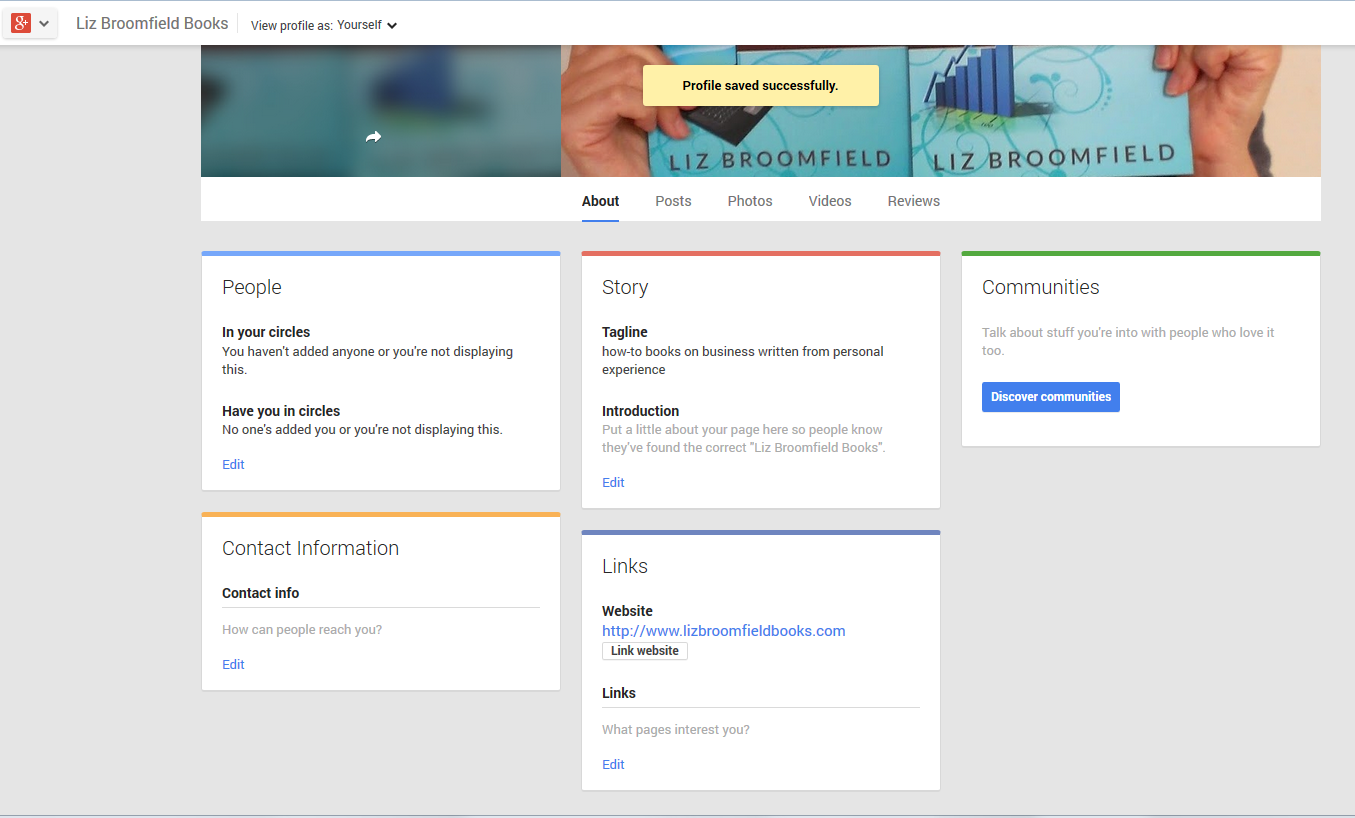
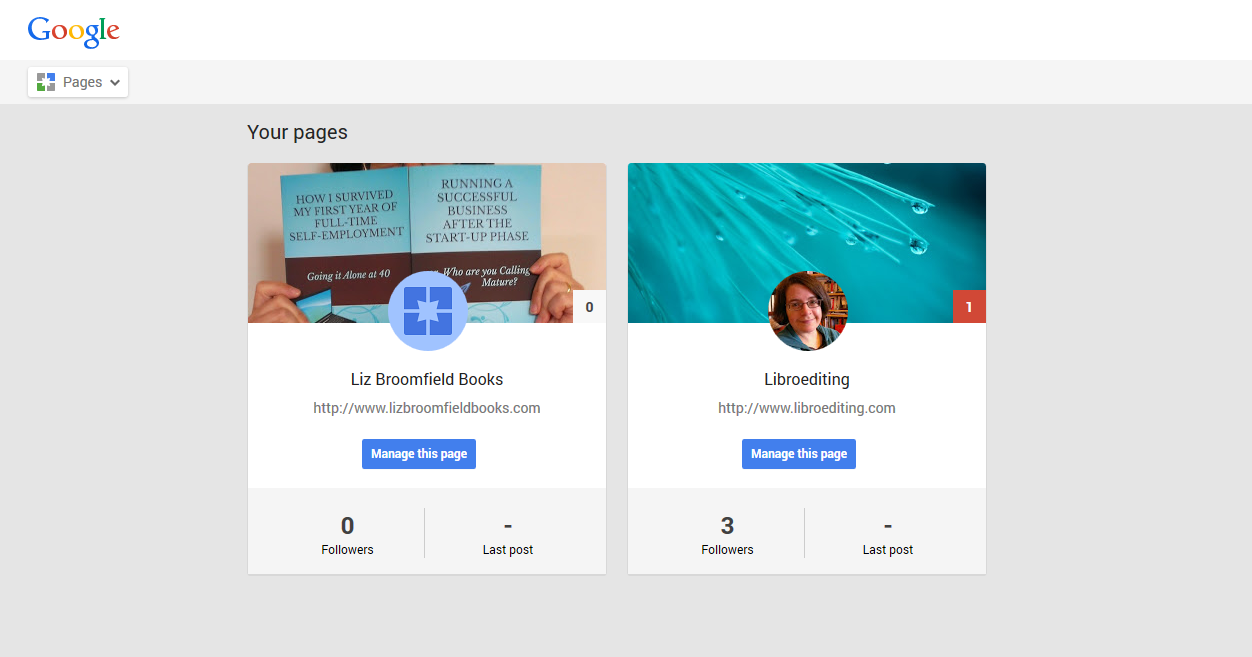
This has been a personal list, with the help of a few friends. Of course, I’m not the only person to be thinking about this, although my emphasis is firmly on those of us who are micro-businesses – sole traders. The lovely folks at Enterprise Nation came up with a list, too, which covers things like employment regulation as well, so supporting the small and mediums as well as the micros. If you have any other suggestions for things that the politicians could do to help sole traders / micro businesses, do please pop a comment below. And if you have a friendly politician in your circle, maybe you’d like to show them this, and Enterprise Nation’s list …

Thanks for reading! I’ll be back to the Word tips soon, but this felt important to write about.

 
Leave a comment

Posted by on May 13, 2015 in Business
 

Tags:

What do I do if I have to cancel a booking?

What do I do if I have to cancel a booking?

As a freelancer, how do you handle it when something unexpected and important comes up – and I’m talking about those rare events like illness or a household emergency – and you have to postpone and cancel jobs that you’ve already booked in?
Last week, something happened to me which happens very rarely (thank goodness). I had the flu, and I was so ill that I could not work. At all. Couldn’t get out of bed. Had to have my husband send messages to clients on my behalf via my phone.

Look: it happens to everyone. No one is immune to all illnesses. However much we plan and back-up, life happens, things happen, and sometimes, as I did last week, we have to cancel jobs we’ve already firmly booked in. While I’ve been recovering, I’ve been thinking about how we can make the effects as minimal as possible (and how we can plan to a certain extent). Here’s what I’ve come up with – but I’d love to hear any points you’d like to add, too.

1. Accept that you can’t do it

I’d been ill for a while. I did reschedule some jobs the week before when I started to feel unwell, but I now wonder if I should have been stricter with myself at that point. Anyway, there’s no point railing against it and raising your temperature further. If you can’t do something, you can’t do it, and you need to work out what to do next, calmly and methodically.

2. Be honest

Like you, your customers are human. I contacted people with whom I had jobs booked and told them: I’ve got the flu. I can’t get out of bed; I’m too ill to work. I’m really sorry, I’m not sure when I’ll be fit, but for the time being, I can’t do your job.

3. Apologise but don’t make a big deal out of it

If you cancel a job, your client has to find someone else to do it. A brief but heartfelt apology with an explanation is fine; no one wants paragraphs of self-loathing and squirming. Keep it professional and honest, and brief.

4. Offer an alternative

For one client, I just could not offer an alternative – it’s a job I had to be trained to do and I don’t know anyone else who does it. I told them as early as I could, explained I couldn’t really take a delayed deadline as I didn’t know when I’d be better, and left it with them. For the others, I suggested they contact my wonderful colleague who covers me when I’m on holiday (having previously warned her).

This leads on to some planning stuff …

5. Have back-ups set up in advance

I’m very lucky in that I a) have a group of people I can refer work on to, b) have a good friend and colleague who covers my work when I’m on holiday or unavailable (I do the same for her, obviously!). This is something that it’s much better to have set up in advance, so you know that you can contact them in an emergency and ask for their support, and your clients are used to occasionally using an alternative person to you. In the end, my cover lady couldn’t take everything, as she was busy, too, but she was able to cover a new customer and some stuff for an on-going one. If you don’t have a back-up person set up already, I strongly recommend that you do so. Have a formal agreement on not stealing customers from each other if you wish, but set something up. You won’t regret it.

6. Maintain good relationships with your clients

I am lucky to have good relationships with my clients, which means I can occasionally ask them to bear with me.

Scrap that: I’ve worked hard to build good relationships with my clients, etc. They know I’m super-reliable, and they know I’m honest and will keep them informed. This goes a long way to smoothing over any issues that might suddenly arise. Obviously, I’m not going to do this often, but when it happens, having good relationships will make it a lot easier.

Right, back to the situation at hand. A couple more tips.

7. Keep people informed

First of all, I put an Out Of Office reply on my work email which stated that I was unwell, that regular customers should consider using their named back-up, and that I probably wouldn’t be able to help new customers (but they should look at my Links page for alternative service providers).

I also then let those clients who I had had to let down know when I was well again – this was particularly important for the ones who regularly send me work and needed to know when they could start sending it again.

8. Be realistic about your recovery, whatever form it takes

I’ve been very careful not to take too much on since I was so badly unwell. It’s important to get better, not to plough straight into a full work schedule again. Similarly, if you’ve had a personal or family crisis, a bereavement or an issue around the house, there will be stuff to sort out practically, and stuff that you need to take on board.

In my case, I made sure that I was available for my regular clients again, but have turned down work from anyone new that needs to be done straight away, and will continue doing so until I feel 100% fit again. There’s really no point running yourself into the ground.

——

So, that’s what I’ve learned from having a think about how I should – and did – handle a health emergency. Is this helpful to you? Any other hints and tips or examples from your freelancing life? Do share using the buttons below or write a comment if you’ve got something useful to share. Thanks!

 
3 Comments

Posted by on May 6, 2015 in Business, Organisation


Tags: ,

Are you on top of your Terms & Conditions?

Are you on top of your Terms & Conditions?

Once you’ve been running your business for a while, it’s easy to let your Terms and Conditions just sit there idly, waiting for the next person to come along and half-read them. But a Terms and Conditions document should be a dynamic document which responds to (or hopefully pre-empts) changes in your market or things that your clients might do. My Ts & Cs have developed fairly reactively, based on issues I’ve had with customers, and I’ll admit that freely in order to save people from making the same mistakes!
How to stop overload

Even when you’re an experienced freelancer with a good handle on your workload, things can sometimes get A Bit Much. This happened to me just before our recent holiday (doesn’t it always!). I had promised two standard time turnarounds for two similar and large jobs, months apart. Both had negotiated and checked in through those intervening months, but not recently. Then – oh joy – they came in at the same time. Both of them. Within an hour of each other. And this tipped me into a situation where, although I didn’t miss any deadlines (of course), I was right up against my deadlines a couple of times, working flat-out, slightly too many hours a day, because those two promises had to be fulfilled and then the other work fitted around them.
The reason I couldn’t turn one of those jobs down? Well, I could have if it’d really wanted to, but it wouldn’t have felt professional. The problem was that I didn’t have anything in my Terms and Conditions that expressly covered this situation. So I got the job done, but I wasn’t that happy and had lost the relaxed and flexible lifestyle that I did this all for in the first place, working right up until the night before my holiday (I’m glad I’ve got holiday cover, anyway!).

Now I have a section in my Ts & Cs covering booking me in advance. This states that if a job is delivered to me late, I reserve the right to recommend the client on to another trusted editor (or transcriber or whoever) if I now can’t fit it in. No one likes turning down work, especially if it was booked in, but we have to retain our sanity and a rushed editor is never a good editor.

Interestingly, I read a post by a colleague, Adrienne Montgomery, about what happens if there’s a delay in submitting work to you and you have a gap in your schedule. I probably have a less-than-standard schedule because I tend to do lots of smaller projects rather than a few big ones, so I can always fill in gaps (with blog writing if nothing else, but that’s actually rare) but hit trouble when I get something in in the middle of other projects. But maybe that makes me more typical of freelancers as a whole.

How to firm up payment terms

Another example of learning from experience came when a client neglected to pay me. I had to call in a debt recovery company, and from them I learned that it’s customary to add in a paragraph to your Terms and Conditions that states that non-payers will be liable for your debt recovery company fees. You can’t claim those fees back from them unless you’ve put that in your Ts &Cs first, of course. So that’s gone in there, too.

Can you make people read your Terms and Conditions?

In my original negotiations, I always ask my prospective client to read my Ts & Cs and confirm they accept them. I’ve now tweaked that to say that sending in their document to me constitutes acceptance of my terms – this protects me if they claim they didn’t know they had to pay, etc., and might just lead them to read them. If you have ways of getting people to engage with yours, I’d love to hear them!

Other additions to Terms and Conditions

Your business will vary from mine. Mine are specific to my market and my clients, and the way in which I work. For example, I have a big section on how I work with students, in order to combat the issue of plagiarism – and to be seen to be doing so. This originally arose when a very early client complained that I hadn’t done as much rewriting of their essay as they’d hoped! I also have a section on corrupt files that releases me from having to fight with recalcitrant documents that won’t behave, and bits on plagiarism for writers other than students.

Check your Terms and Conditions now

Do yourself a favour and review your Ts & Cs regularly. I had my colleagues Laura Ripper and Linda Bates look over my additions and changes before I published them. As well as adding the sections on pre-booking and debt recovery companies, I firmed up a few other areas, too. It’s worth keeping on top of things.

Here are my Terms and Conditions – a work in progress, as I said. You may know me as an editor, transcriber, proofreader and localiser, but I also write business books and you can find out all about them here!

 
3 Comments

Posted by on April 15, 2015 in Business, Organisation


Tags: , , ,

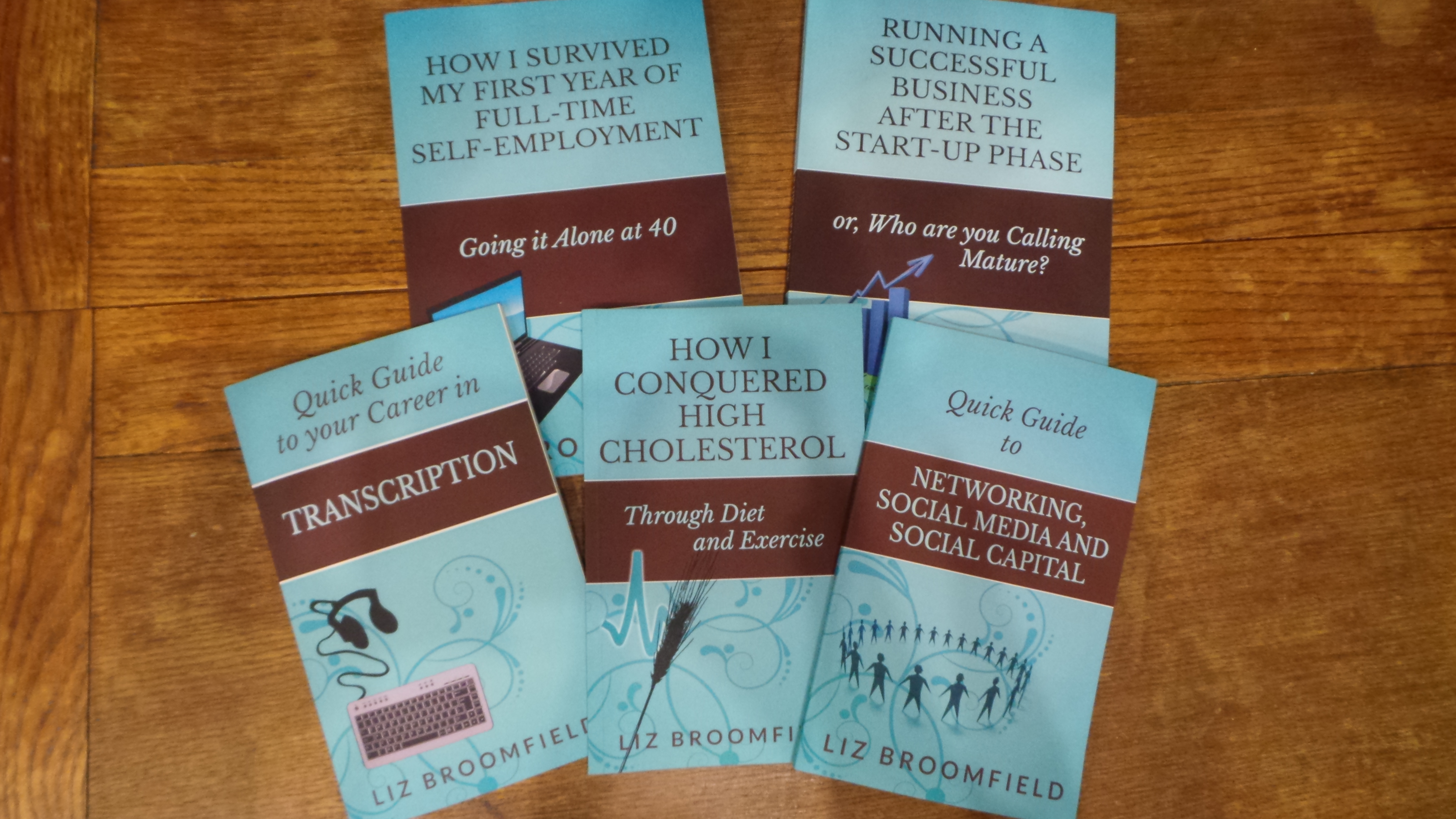
My business books are now available in print editions!

In case you’re not following my books blog but are interested in the books on starting and growing a business and specific aspects of business such as networking, social media and transcription as a career (and on lowering your cholesterol, that popular outlier to my oeuvre), I’m pleased to announce that all of my books are now available in print as well as e-book editions. Look – proof:

Business books by Liz Broomfield

You can read all about what I’ve been up to in this blog post.

I’ll be sharing a how-to on creating your print book in Amazon’s CreateSpace and I’ll let followers of this blog know when that happens.

 
6 Comments

Posted by on April 1, 2015 in Business, Social media, Transcription


Tags: , ,

MailChimp 1 – Signing up for MailChimp

Welcome to the first in a series of walk-throughs that will show you how to set up a MailChimp account, set up templates and lists, and send out a MailChimp newsletter. You can start to set up your subscriber list in MailChimp 2 and create a sign-up form in MailChimp 3

What is MailChimp?

MailChimp is a web-based service which allows you to send out newsletters to a list of people who have signed up to receive them. There are other services out there, but MailChimp is very popular, often recommended to newbies and is free as long as you have under 2,000 subscribers and send out fewer than 12,000 emails per month. You can upgrade in order to get extra features and also if your list goes over the 2,000 mark. Please note right here and now that I’m not being sponsored by MailChimp for doing these posts – I’ve been asked to do them by people I’ve been working with at social media training sessions, and I happen to use MailChimp myself so can give you all some training resources. Other similar services include iContact, Constant Contact and Aweber and you might want to check these out before committing to MailChimp.

Why use a special program? Why not just send out emails?

That’s a good point: if you have a load of emails to send out, why not, you know, just email them? Here are a few reasons:

  • It’s really, really easy to cc instead of bcc when you send out a mass email. CC is the one where everyone can see the email address of everyone the email’s been sent to. People get really annoyed when that happens.
  • Internet service providers can get really suspicious if you’re sending out regular emails to hundreds of people – or if one of their clients receives such emails. Your newsletter is likely to bounce into a spam folder and your own ISP might block you from sending them.
  • There are rules on spamming and using people’s email addresses to market to them without permission. The key is to allow people to opt in rather than assume they are to opt out. Services like MailChimp look after this, making sure people opt in to your mailings properly and that your details are on your emails. So you can be reassured that you’re not doing anything inappropriate.
  • It’s really easy to design nice newsletters, include photos and all sorts when using a service like MailChimp.

How do I sign up to MailChimp?

In this post, we’re going to walk through exactly how to sign up to MailChimp. In future posts, we’ll look at more detail of templates, getting people onto your list, etc. But here are the stages of signing up:

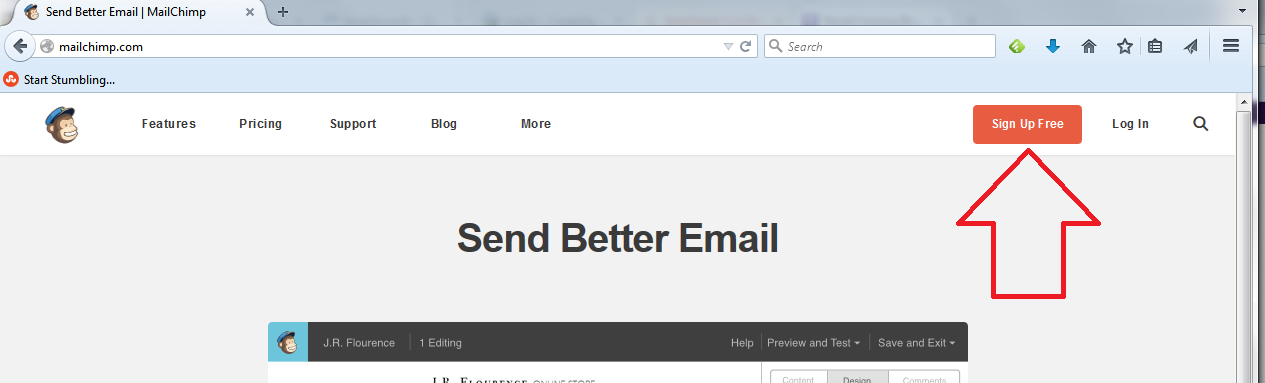
First of all, go to www.mailchimp.com, where you will find a button marked Sign Up. Hit that button:

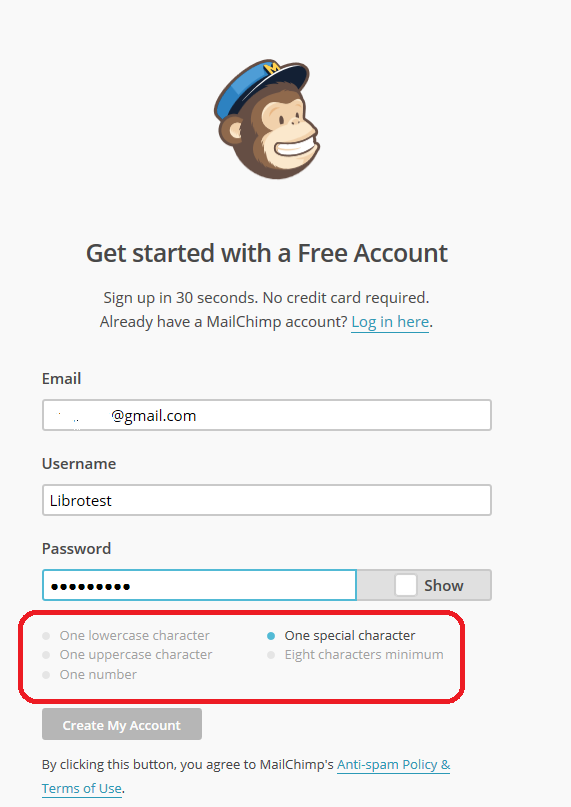
mailchimp signupThis will take you to a screen where you can sign up for your first, free account. At this point, you need to enter your email address and create a username and password:

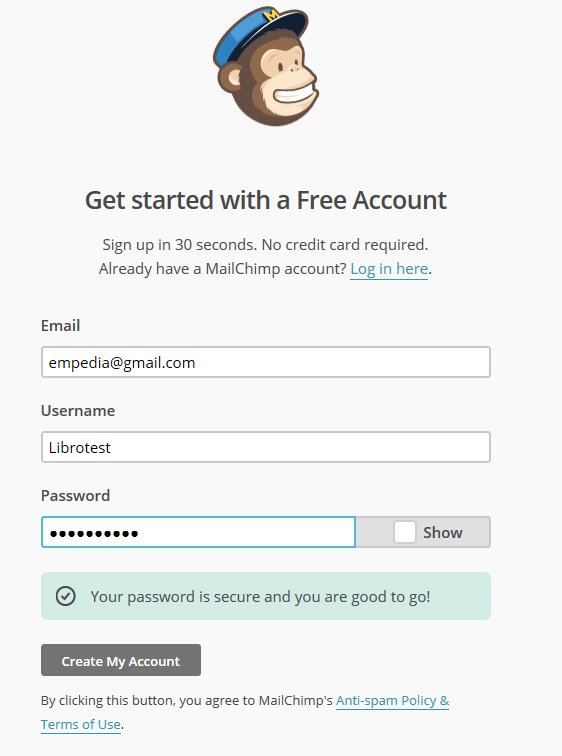
mailchimp sign up username and passwordNote, because it’s not that clear, that your password must tick all the boxes below the password entry area. Here I’ve missed out on “one special character”, so I had to add an exclamation mark to my password:

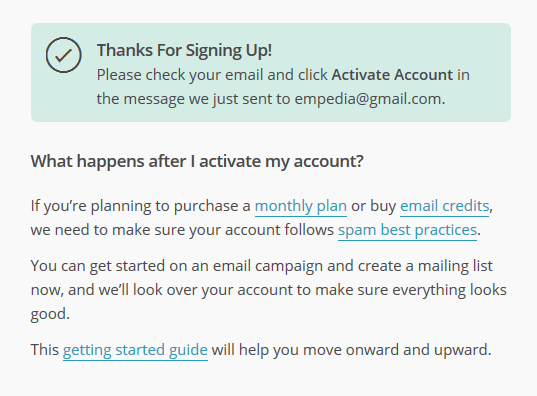
mailchimp passwordAt this point, the Create my Account button stops being greyed out and you can press the button. Now you’ll be asked to validate your account …

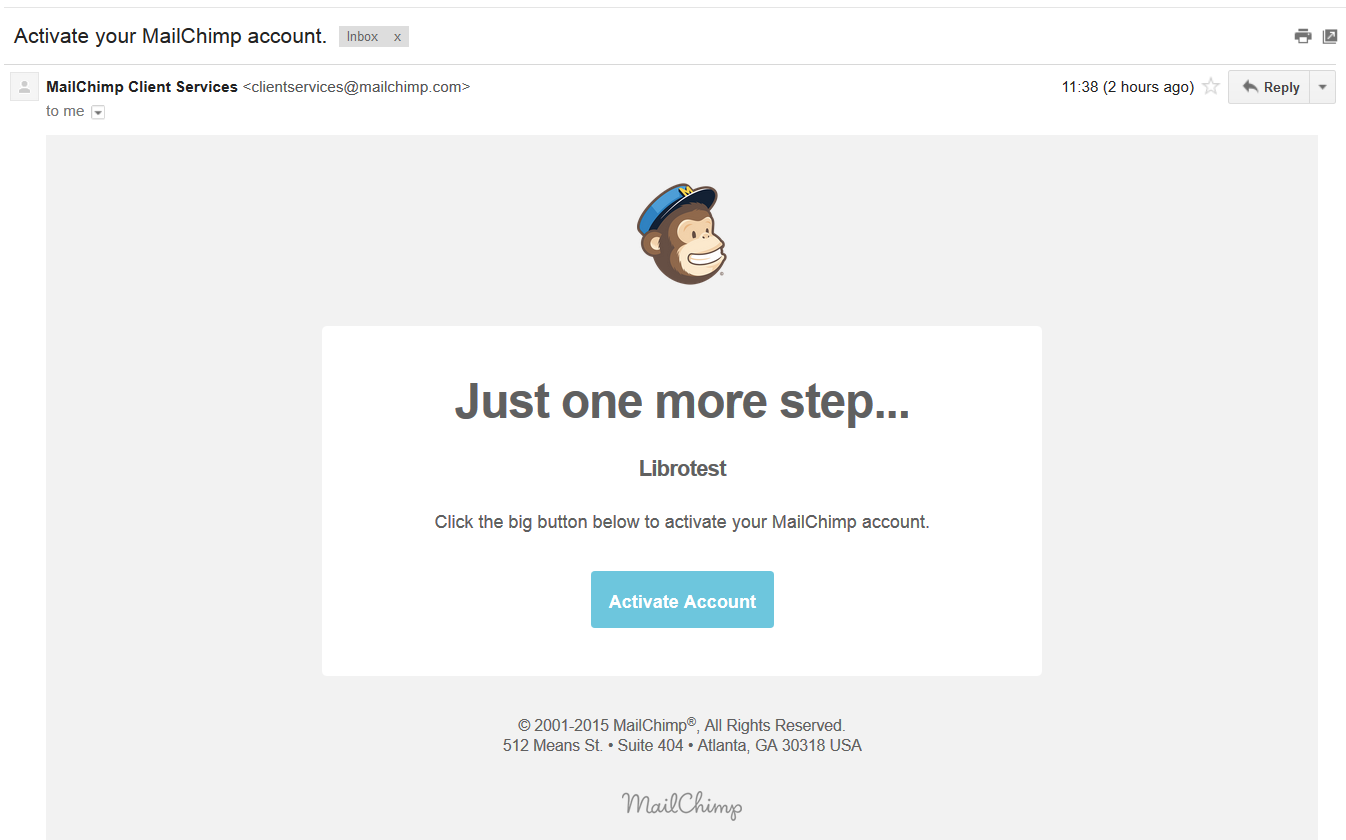
mailchimp validateAt this point, you need to pop over to the email account that you gave in the sign-up step. The email from MailChimp will obviously be from them and will have a subject line that talks about validating your account. When you open the email, it will look like this:

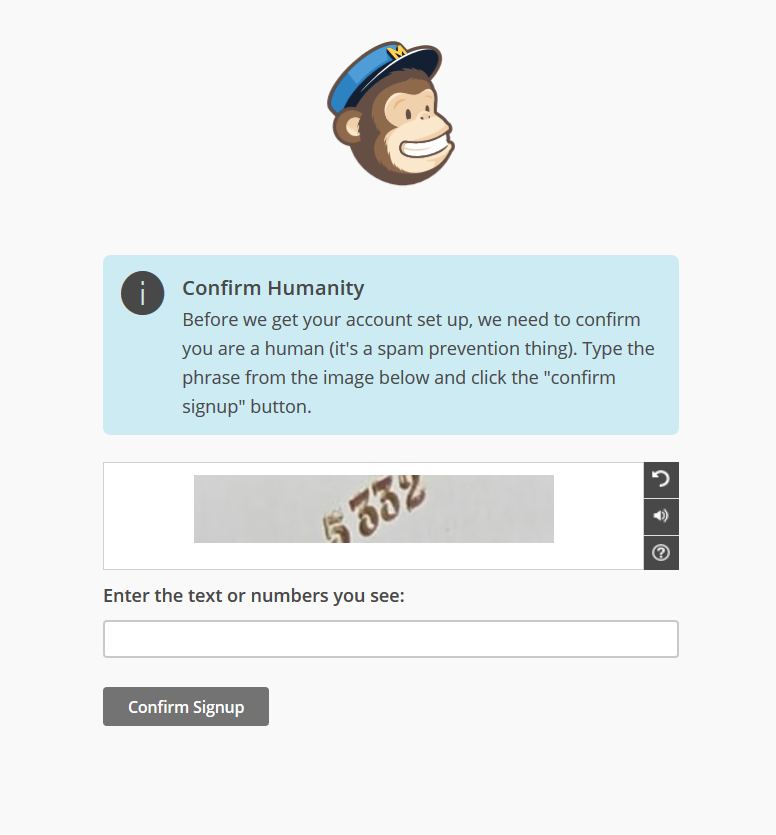
mailchimp validation emailClick on the button and you’ll go through an initial validation stage …

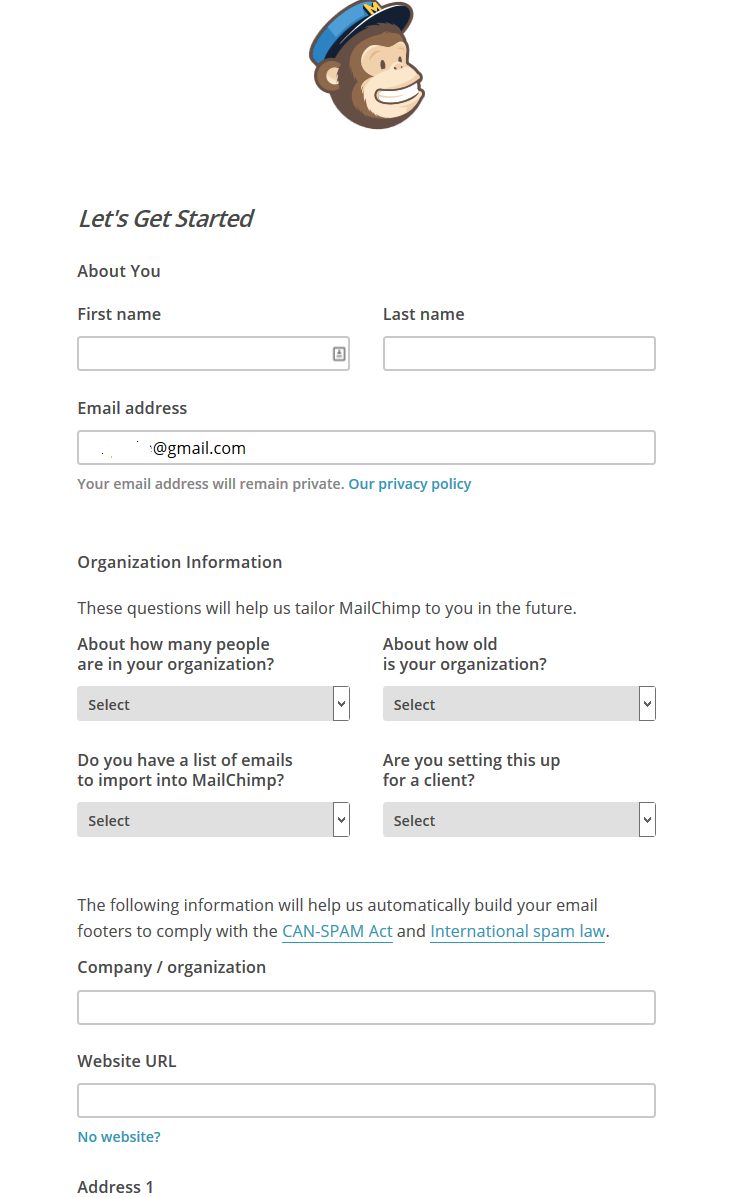
Mailchimp validationPop the number in, press the Confirm signup button, and you’ll then have a form to fill in.

7 enter details 1

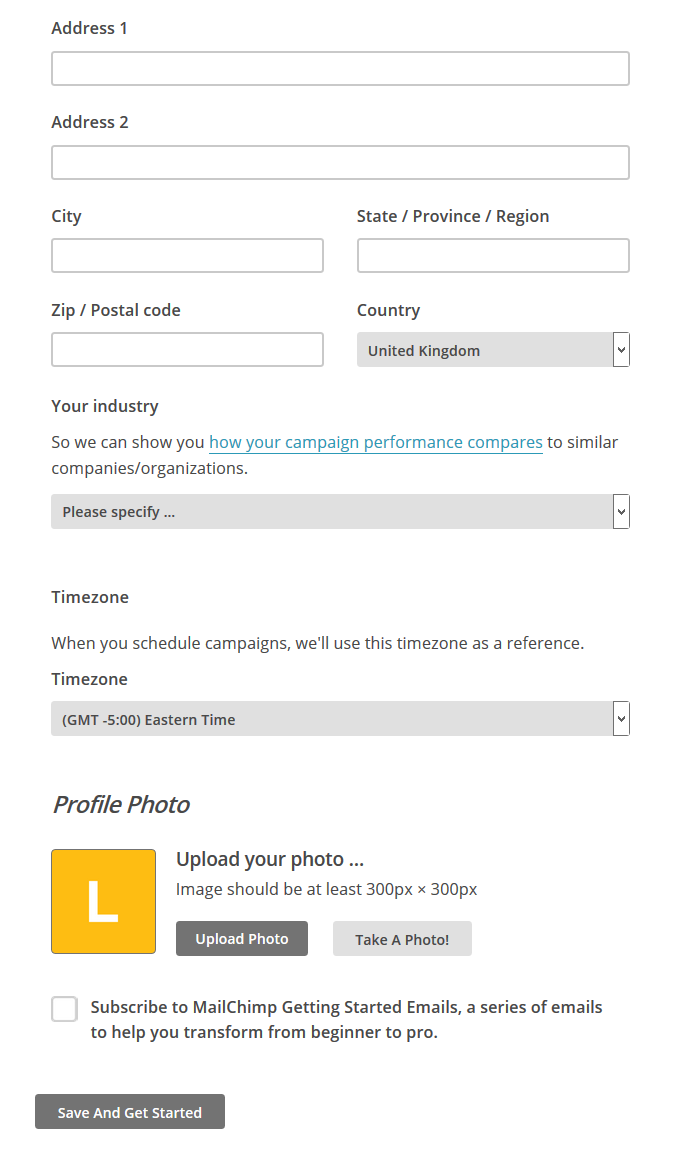
Mailchimp enter detailsFill in as much of this form as you can. The address details are so that MailChimp can include them at the bottom of your newsletters. This is good practice and it’s a legal requirement in many countries to include this information on emails. However, if you run your business from a private address, as I do, I think it’s fine to smooth over the details a little and, for example, not include your house number. I am not a lawyer, though, and you might wish to check the legal requirements in your country.

You can add a profile photo at this point, if you wish.

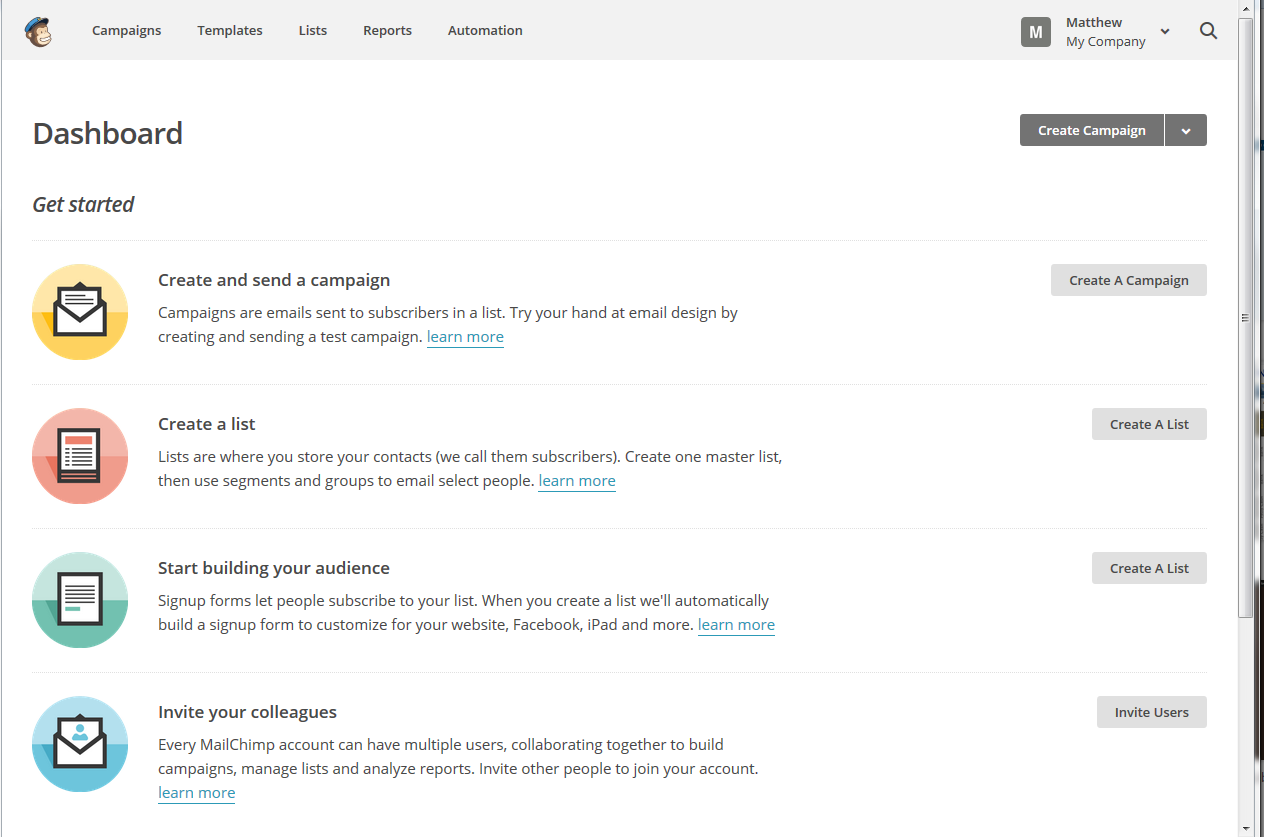
Once you press the Save and Get Started button, you will find yourself in the main MailChimp screen, from which you can create templates, an email list or a campaign (i.e. an actual newsletter). This is also the screen you will encounter when you go to the website and log in rather than signing up.

Mailchimp logged inSo here you are, all signed up and ready to go.

Coming soon – articles on creating a newsletter template, adding sign-up forms, and sending out your campaign …

You can find a growing set of articles on blogging, social media MailChimp etc. in my resource guide. Do click on the share buttons below or comment if you found this article interesting or useful!

Other relevant posts on this blog:

MailChimp 2 – setting up a subscriber list and importing contacts

MailChimp 3 – setting up a sign-up form

MailChimp 4 – setting up your newsletter template

How to avoid two common MailChimp errors

 
20 Comments

Posted by on February 11, 2015 in Business, Social media


Tags: , ,

New book on networking, social media and social capital

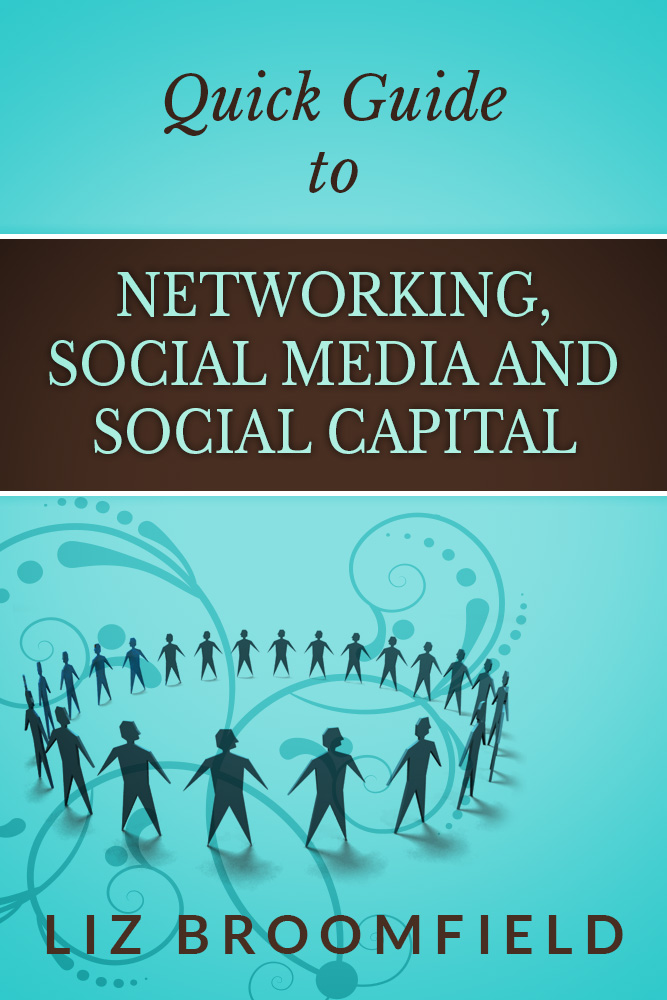
Quick guide to networking, social media and social capitalI’m delighted to be able to announce that my new book, “Quick Guide to Networking, social Media and Social Capital” is out now and available to buy on Amazon and Smashwords as an e-book in all formats (for Kindle, Kobo, as a pdf …). Like my popular “Quick Guide to your Career in Transcription“, this contains the specific information – no filler, where there’s jargon, it’s explained – that you need to venture into networking, whether that’s face to face or through online services such as Twitter and Facebook. It pulls together material I’ve written and thought about on social media etiquette and building social capital … to help others as well as ourselves, and where I go into detail on particular topics, I provide links back to this blog for all of those screen shots and details that regular readers will be used to.

You can visit the book’s web page which lists all of the places you can buy it, and I have shared the first great reviews today, too.

I hope you enjoy reading about my new book and if you find it helpful or think one of your colleagues or friends would benefit from reading it, please let them know by sharing this post or the web page for “Quick Guide to Networking, Social Media and Social Capital“.

 
Leave a comment

Posted by on November 4, 2014 in Business, Ebooks, Social media, Writing


Tags: , ,

Google+ for business

In this article I’m going to go through how to set up a business page on Google+

Because I don’t want to show my home address in public on Google, or give it to Google, most of the examples here are drawn from setting up a Brand. However, I understand that the principles are the same if you’re setting up a local business with an address. Do get in touch if you’d like to share screen prints from setting up an account with an address and I’ll be happy to include them (but not tell everyone where you live!)

Why should I set up a Google+ account and page?

This is a good question, as Google+ is known to be one of the rather less active social media platforms. However, the clue is in the word “Google”. Basically, stuff you post on Google+ and your Google+ page will be indexed more quickly by Google and will appear as more relevant in a Google search. There are active communities in Google+ and Hangouts and other social discussions and groupings – I have to admit that what I personally do is auto-post to Google from this blog and my others, so invest minimal effort, but it is worth doing for the indexing and SEO side alone.

How do I set up a Google+ account?

If you have a Google email address, you will automatically have a Google+ account. Look at the top of your email and you’ll see a +[your name] icon …

Google+ icon

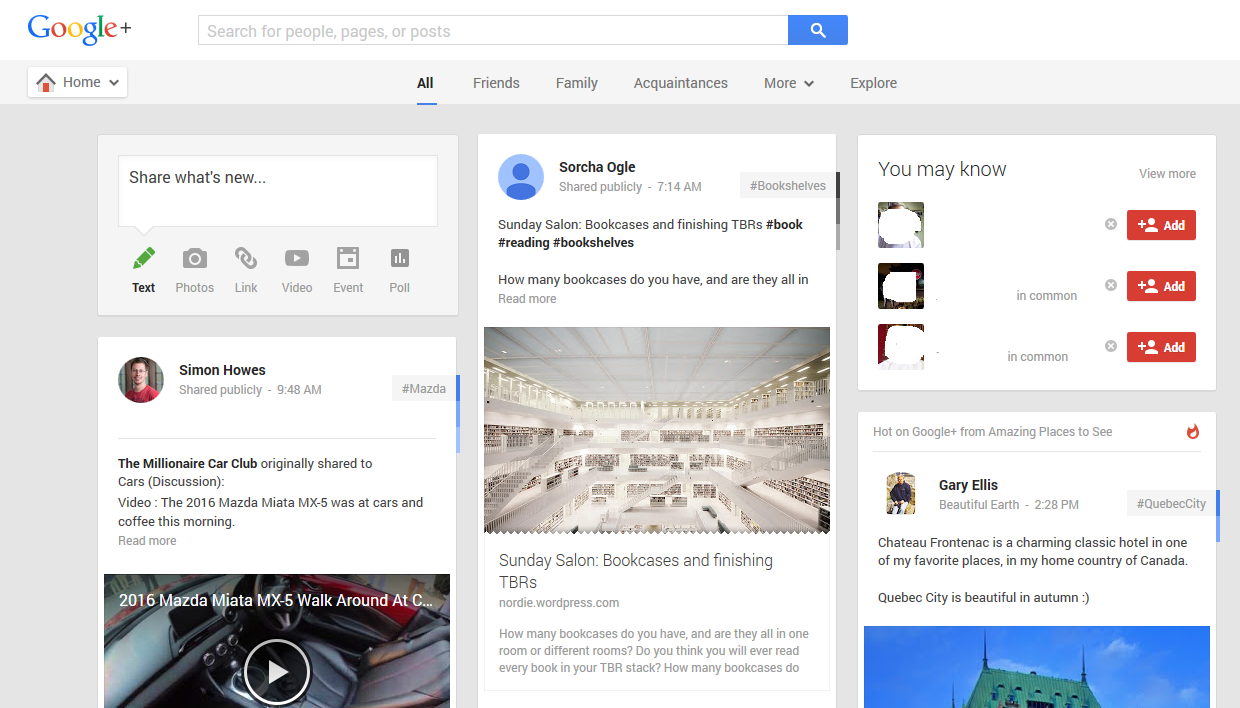
You do need to have a Google account to have a Google+ account, although of course you don’t need to use it for anything else. Notifications about Google+ interactions come to your Gmail, but you could set up an autoforward to send that to another email account. Anyway, enough about options for escaping being taken over by Google – click on the +[name] icon and you’ll be taken to your Google+ account:

Google+ account

You can see that this looks quite a lot like other social media platforms such as Facebook, with posts by friends, recommended contacts (names deleted for privacy purposes) and a place to post an update at the top.

We’re not going to explore personal G+ at the moment, but instead look at the business application.

How do I set up a Google+ page for my business?

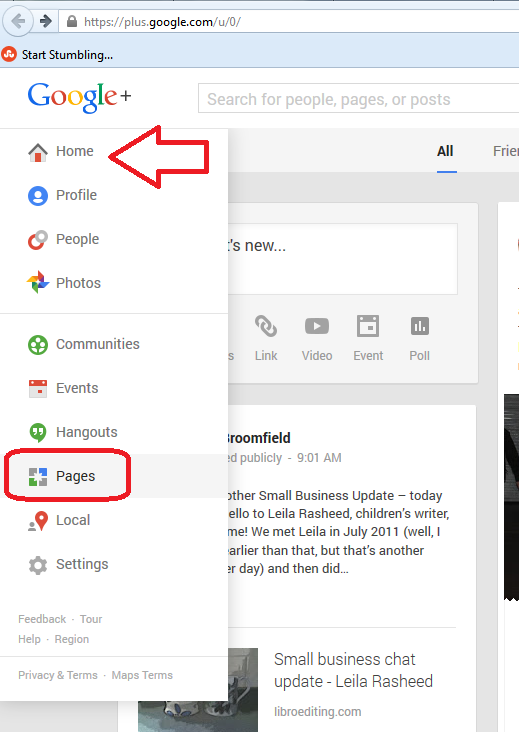
To access the Google+ pages creator and editor, click on the Home button at top left and choose Pages:

Pages on Google+

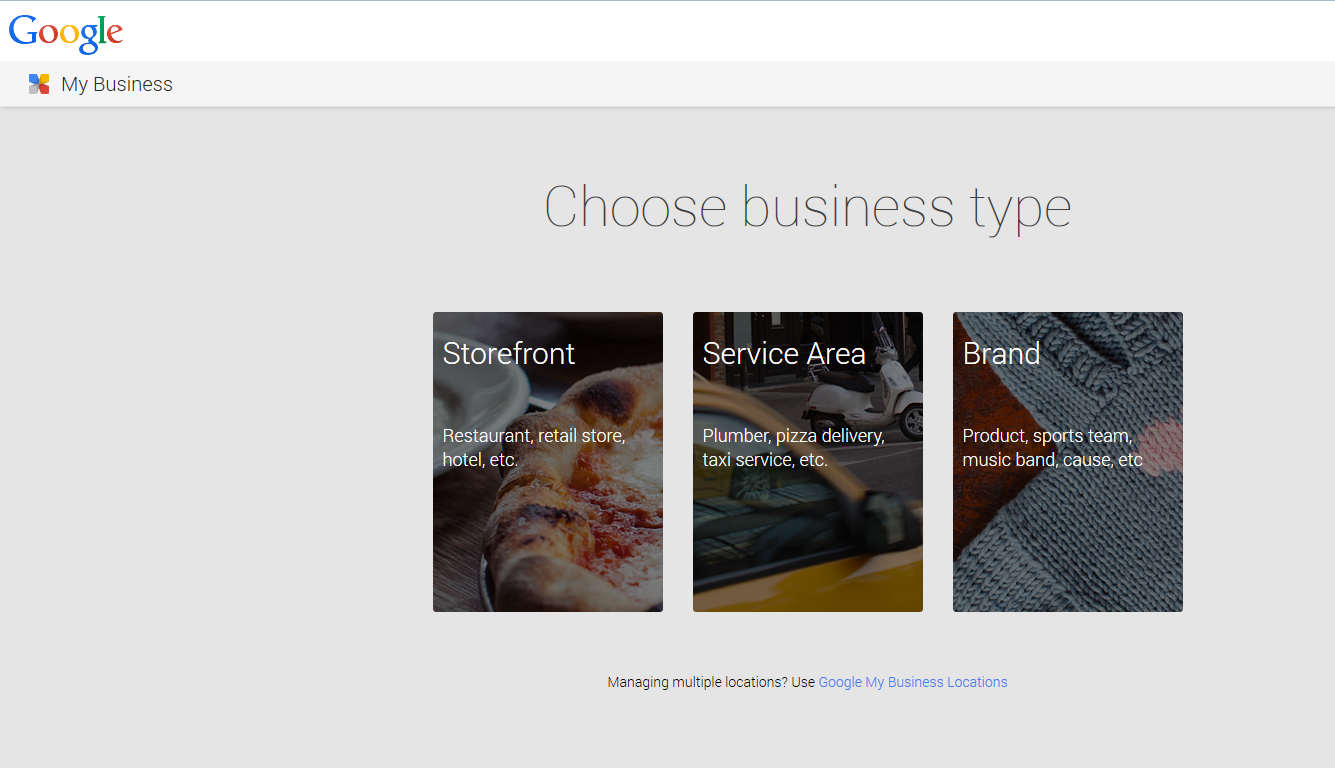
This will lead you to an option to choose a business type:

Google+ pages business type

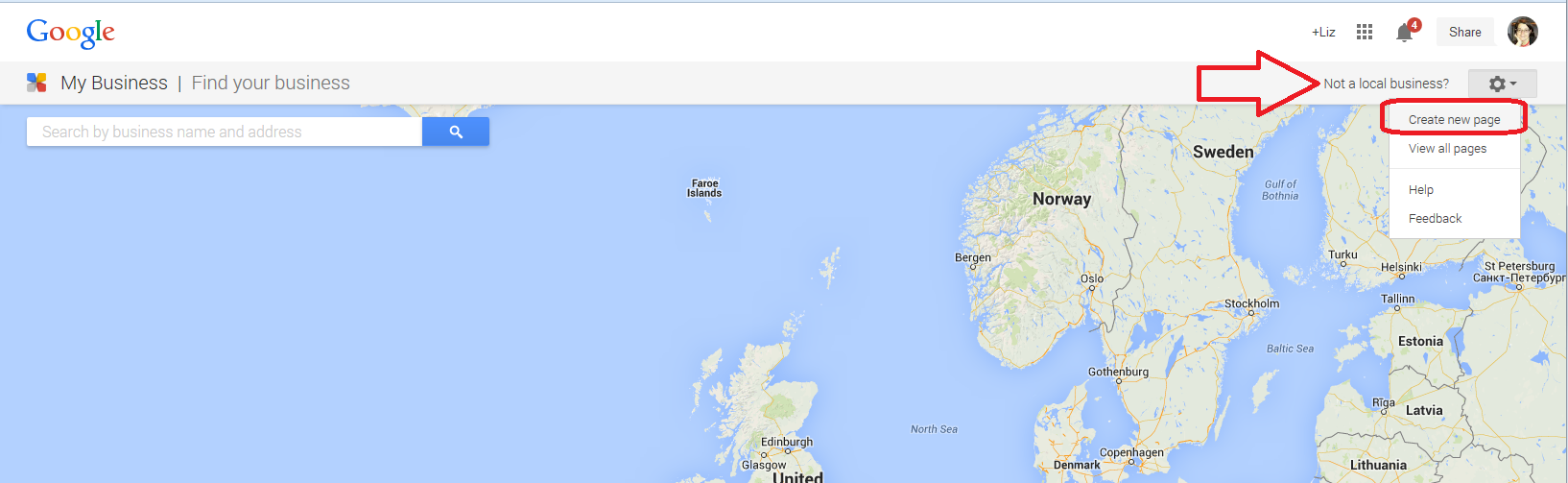
Clicking on Storefront or Service Area (which is what I chose when I first did this) will first give you an option to search for a business. This gets a bit confusing, but we’ll work our way through it. If you choose Create New Page, as you would expect to do, after clicking Not a Local Business …

Google+ pages create new page

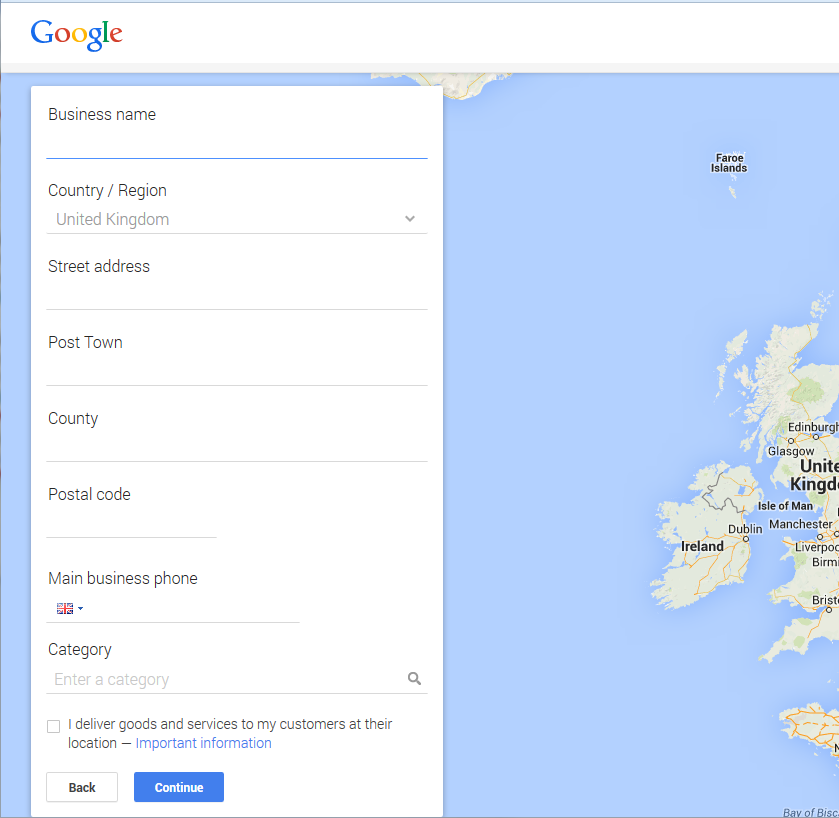
you will get the option to add a business with a street address. This is great if you have a shop or trading address, for example if you welcome people into a high street shop, have a gym in an out-of-town location or have customers visit your home to collect products, have therapeutic sessions, etc., and if this is the case, you can fill in all the details and have a listing for your business appear on Google maps for prospective customers to see.

Google+ pages add your business

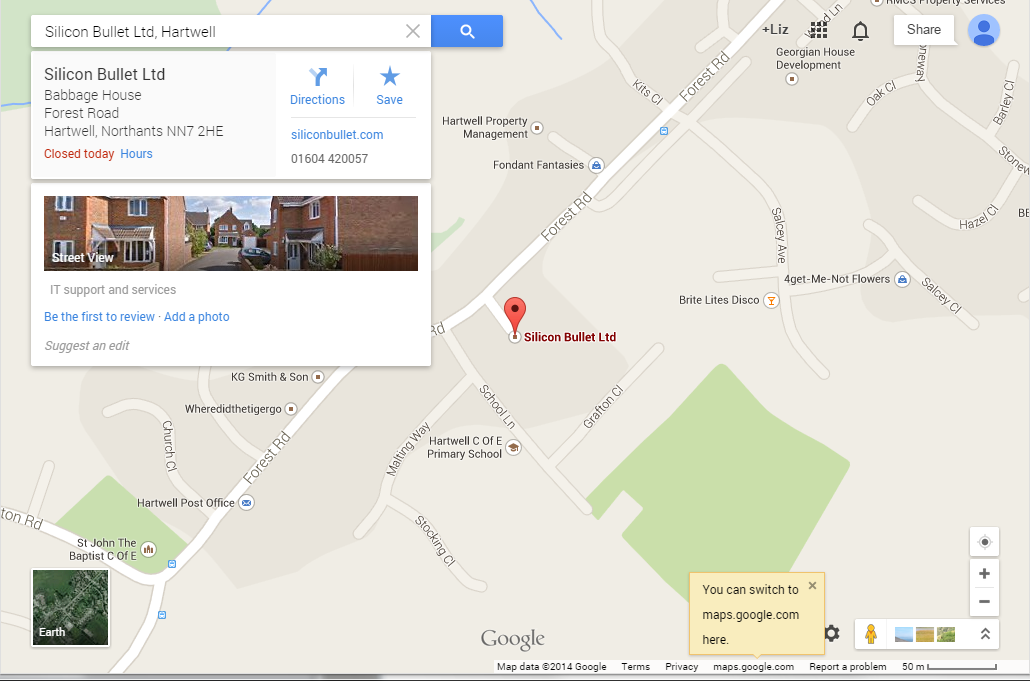
Here’s what a business with a local page looks like on Google Maps. Here, I’ve searched in Google Maps for the business name, but it will also appear if you are viewing the map of the area at a certain level of zoom:

Google+ pages on Google Maps(thanks to Alison from Silicon Bullet for letting me use her business as an example!)

But what if I don’t want to list my address and have a pin on Google Maps?

I don’t want to list my address on Google Maps because I work from home, but I don’t see any clients here and I don’t really want the world to know my address! So this is how to set up a Google+ page without your address. Note, you can’t cheat the section above and put in spaces or dots – it really does want to pinpoint your address with a little label.

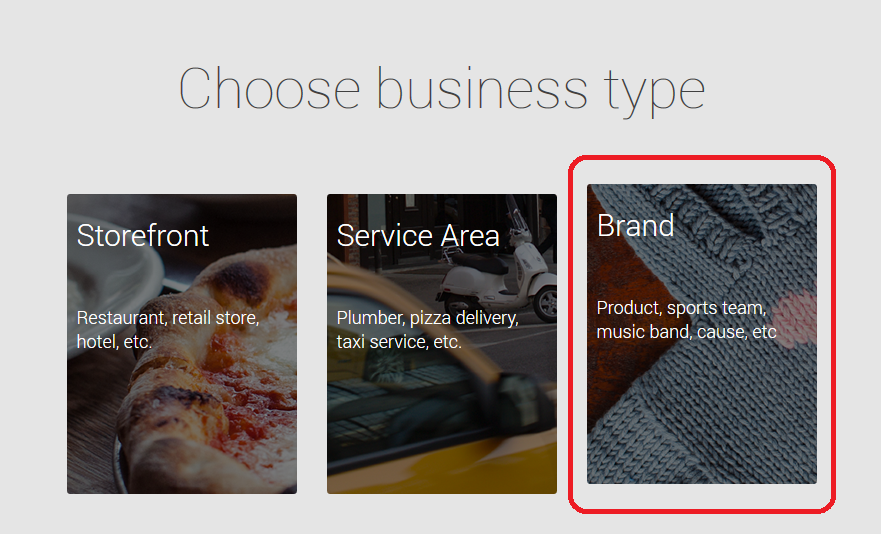
When you’re at the point of choosing your business type, choose Brand if you don’t want to have to add your address:

Google+ pages business type brand

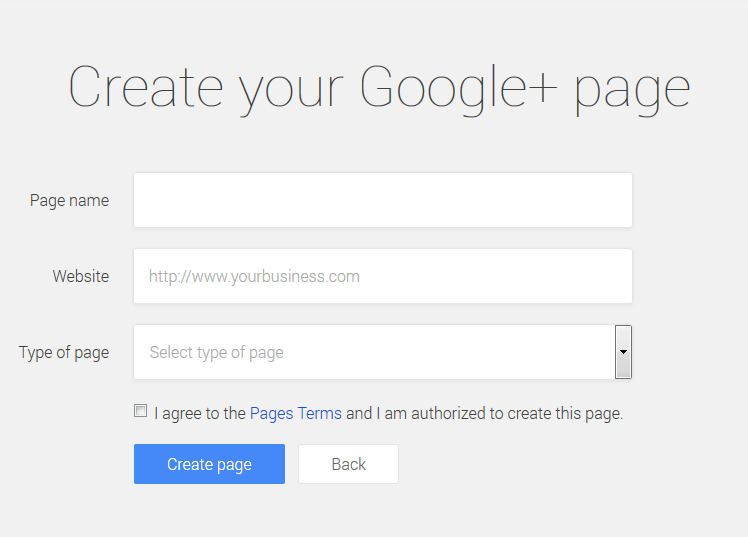
This will take you to a screen where you start to add your details:

Google+ pages add brand details

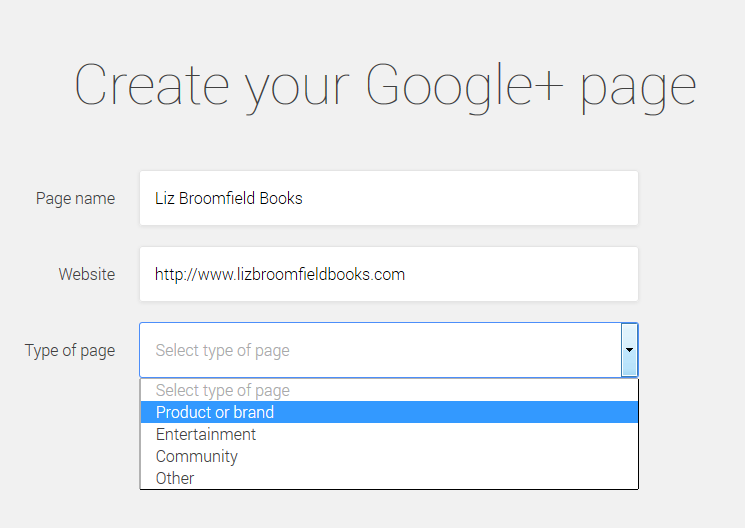
You can now start filling in your details:

Google+ page set up brand

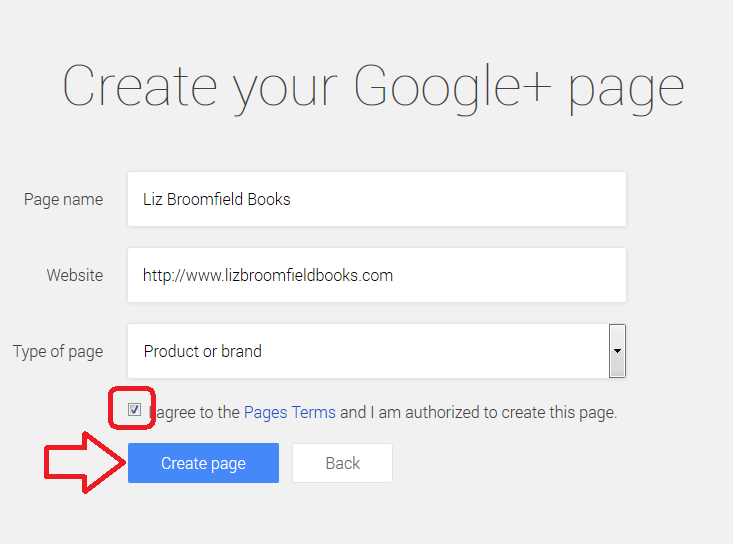
You can add in your URL and select the type of thing you’re talking about – so this is how you set up a community or other non-business entity, too.

Do note that you need to tick the box to agree to the Pages Terms (and do click through to have a look and check you DO agree) and to confirm that you’re authorised to create the page.Then click Create Page to create your page:

Google+ page setting up brand page

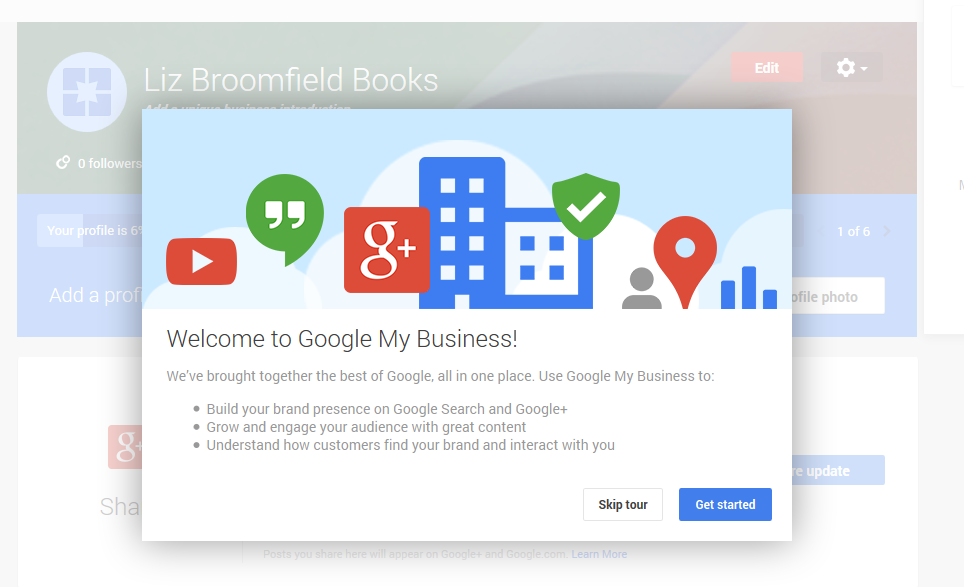
Once you’ve created your page, Google+ will give you a tour or you can just get started customising your page.

Google+ pages page created

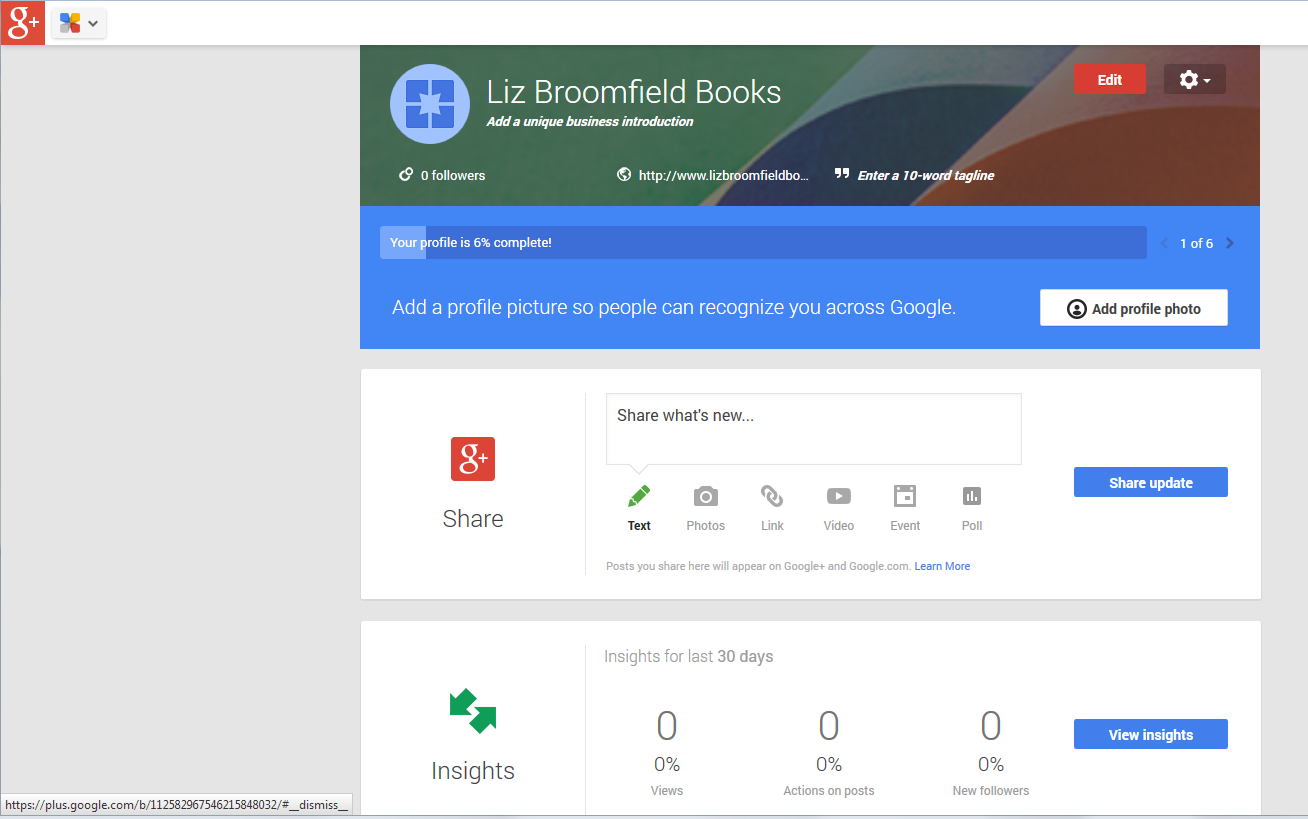
This is all pretty self-explanatory. For example, you will be asked to complete your profile and given options to share updates. There’s also a section where you can see Insights – how people are interacting with your new page.

Google+ page complete profile

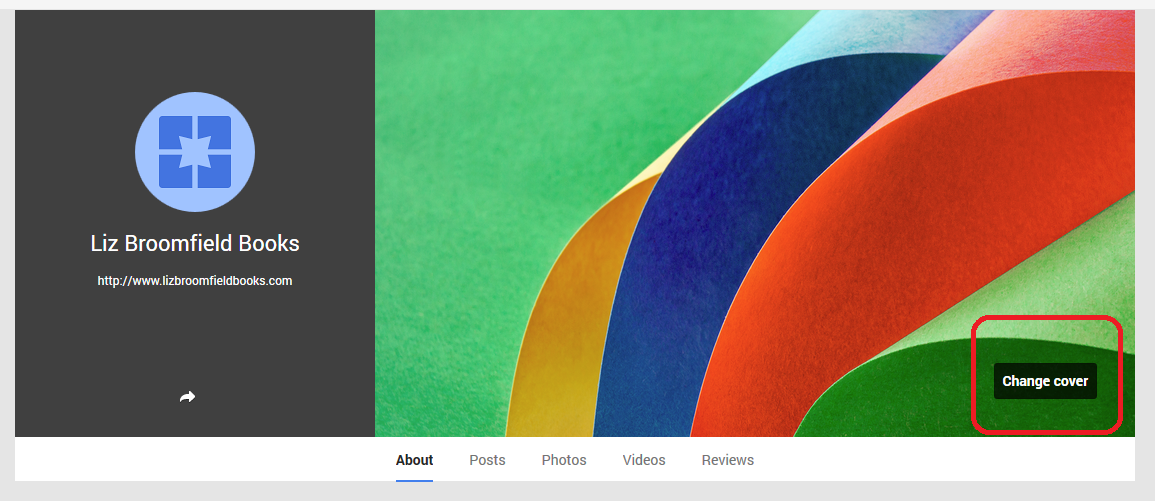
You can update your cover with your own image as well as adding your own picture to the place on the left:

Google+ page change background

Once you’ve clicked Change cover, you can choose one of the gallery or upload your own photo (if you have already put up several cover photos, you can click on that link to choose one you’ve used earlier).

Google+ page change cover

Upload takes you into your own folders so you can choose your own image. Here I’ve added my own image and I can now explore, add updates and add contact information and links.

Google+ page complete profile

How do I edit my Google+ business page(s)?

You can access your business pages at any time by clicking the Home button and choosing Pages. If you’ve created more than one Page, you will be shown all the ones you have active, with a link to edit them:

Google+ page edit pages

The Golden Rules of Google+

The rules here are the same as everywhere on social media …

  • Be professional
  • Reciprocate and share

In this post, we’ve learned about Google+ pages and how and why to create them. To learn about more aspects of social media for business, take a look at the resource guide.

if you’ve enjoyed reading this article and have found it useful, please take a moment to click on the buttons below to share it! Thank you!

Other relevant posts on this blog:

Facebook for business

How to delete posts and block users from your Facebook page

How to add a moderator or admin to your Facebook page

How to find a job using Twitter

Using Twitter for your business

Using LinkedIn for your business

Additional resource:

Garrett and Mike from Techfunction Magazine have got in touch to let me know about their resource guide to Google Business – read the first article here.

 
1 Comment

Posted by on October 22, 2014 in Business, Social media


Tags: , ,

How do I delete a post or ban a user on a Facebook page?

This post follows on from my one about the basics of Facebook for business and covers two really common concerns for people with a business Facebook page:

  • How do I delete a post or comment that someone has put on my Facebook page?
  • How do I ban or block someone from commenting on my Facebook page?

In fact, the way to do the second leads on from the first … so let’s look at how to delete a comment first.

Where can I see other people’s comments on my Facebook page?

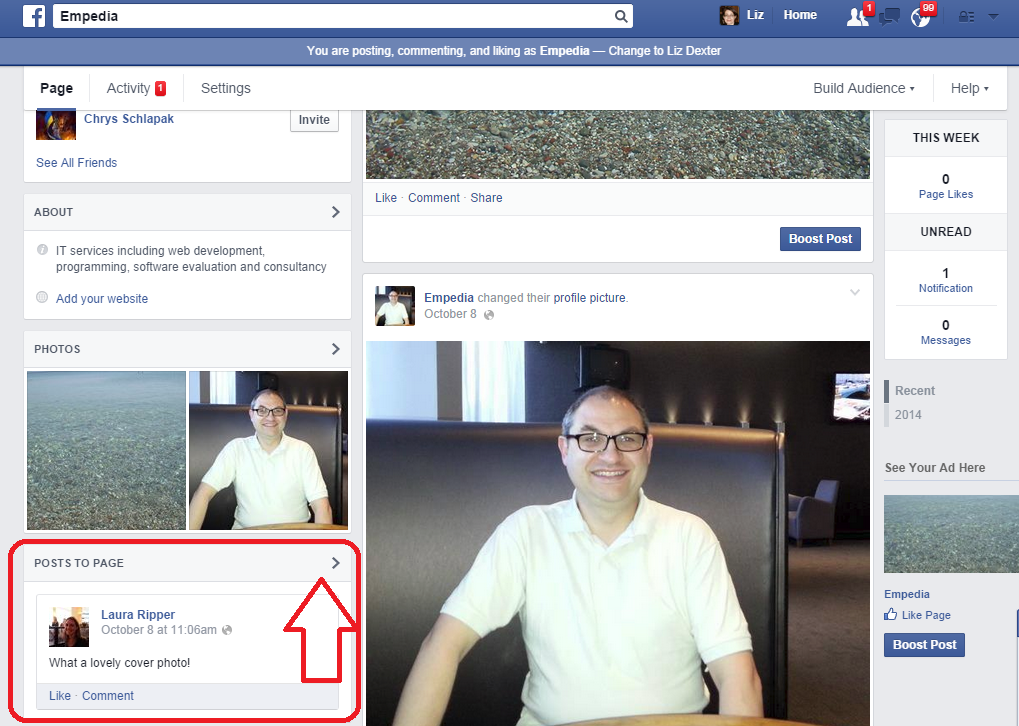
Comments move around a bit on Facebook, but if you’ve enabled people to be able to comment, you can see their comments under the heading Posts to Page:

Posts to page on Facebook page

To look at all of these posts in detail or delete some, click on the arrow at the top right. You will then see just your comments:

Posts to page view Facebook

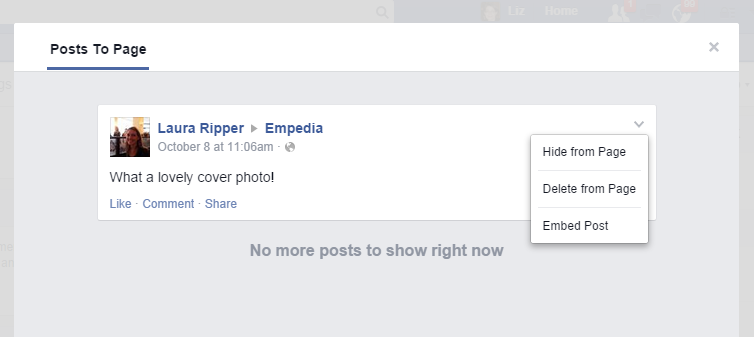
To delete this post OR to block or ban the user, click on the down arrow at the top right. You will now be presented with three options:

Delete post to Facebook page

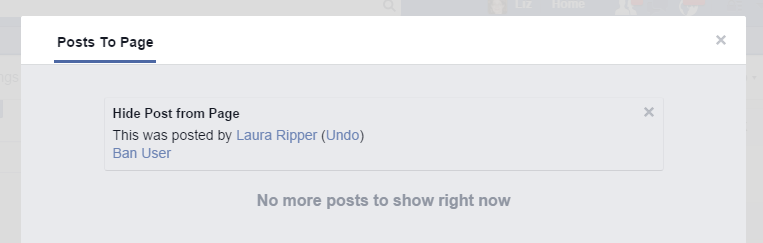
  • Hide from Page will hide the post but not delete it – no one will be able to see it. This would be useful if you suspected someone of posting inappropriately but wanted to get in touch with them to check what they meant or give them another chance / ask them to edit their post. You also have the option to ban the user at this point:

Facebook page hide post

(use Undo to backtrack from here, the x button to hide and close the dialogue box, or Ban User to ban the user from the page)

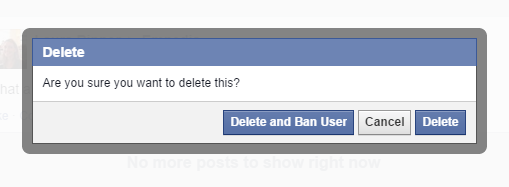
  • Delete from Page will delete the post and give you the option to ban the person who wrote the post

Delete post from Facebook pageYou can Delete the post and ban the user, Cancel if you clicked this option by mistake, or just Delete the post (you could use this option if the user had made a mistake or posted something you didn’t want on the page but you don’t actually want to ban that person from posting on your page in future.

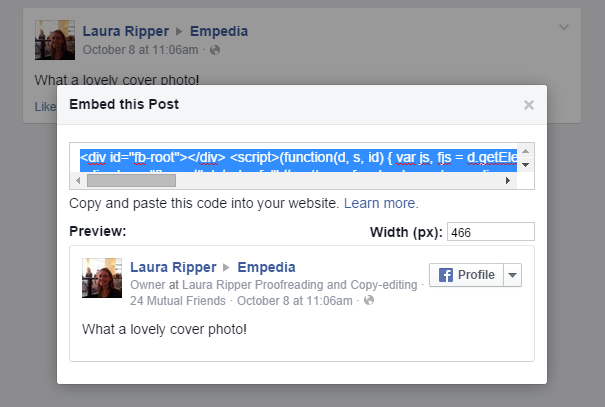
  • Embed Post will generate some HTML code that will allow you to include an image of the post on Facebook in other places such as your website or blog – useful if you have a great post from a fan or celebrity:

Facebook embed post

Copy the code that’s highlighted and use it anywhere that you can place HTML – in a blog post, on a website, in a discussion forum, etc.

How do I block someone from posting on my business’s Facebook page?

As we’ve seen above, you can use two methods: both need you to look at the post itself first. You can then …

  • Hide the post and ban the user
  • Delete the post and ban the user

How do I stop people posting on my Facebook page at all?

If you want to suppress all posts from people who are not the Facebook page’s administrators / moderators, go to Settings / General / Posting Ability. When you go to the General area, under Posting Ability you will see your current settings. If you want to change these, click Edit:

Facebook settings allowing posts

Clicking Edit will allow you to choose whether and what people can post on your business page:

Edit posting ability Facebook

Use the round buttons to choose whether you Allow other people to post to my Page timeline or Disable posts by other people on my Page timeline. The tick boxes allow you to choose whether to let people add videos or photos (useful to untick if people have been posting inappropriate photos but you still want to allow comments) and allow you to ask Facebook to send you posts by other people that you then have to approve (you’ll receive an email alerting you to the new post and allowing you to approve or reject it).

Click Save Changes to save your changes or Cancel if you want to keep your settings as they are.

Important information about allowing posting and deleting posts

I personally think it’s a good idea to allow other people to post on your business Facebook page. After all, you want to encourage interaction and conversations, not just pump out sales information, right? I get a bit frustrated if I go onto the Facebook page for a business and find I can’t place a comment about how much I loved their veggie sausages or enjoy wearing my new shoes. So, unless you are bombarded with spam and abuse, try not to use the Disable posts by other people on my timeline option if it all possible.

And a word on deleting posts. Be careful what you delete.

Posts it’s OK to delete or hide

  • Unfounded or personal abuse
  • Spam that has nothing to do with your own page (e.g. on this Empedia page for an IT consultant, a post about buying homes in West Texas)
  • Spam from rival companies in your business area who are not supporting and cooperating with you, but merely trying to get your followers to move over to them instead (for example, on my own editing page, posts from student proofreading companies just saying “For the best proofreading click here”)
  • Pornographic or other inappropriate images, text or video

Posts it’s best not to delete or hide

  • Genuine complaints and negative feedback – OK, so your first reaction will be to hide that post where someone complains the shoe they bought from your range has fallen apart. But if they’ve taken the time to find your Facebook page and complain, then they’re going to know they did that, and they’re going to notice if you delete it. What will they do then? At very least, post it again, but be assured that they will have told their friends and family, shared your page on their Facebook timeline with a note about what you’ve done, and been very unhappy altogether.

If someone posts a complaint or negative feedback on your Facebook page …

  • Think what you’d do if you encountered them in person. You wouldn’t stick a bit of tape over their mouth or turn your back on them, would you? Yet that’s what you’re doing when you hide or delete their post.
  • Address the issue at least partly in public – for example, you could post a reply along the lines of, “Sorry to read you’re experiencing problems. Please contact me at vvv@vvvvv.com or via my Contact Page [with link] so we can resolve your problem”.
  • You could go further and say something like, “I’m sorry you appear to be having a problem – you can of course return your shoes to use for a full refund” and give them information on how to do this.
  • Once the problem is resolved, pop another reply on – “I’m glad we were able to replace your shoes and hope you’re happy with the new pair – do let us  know how you’re getting on.
  • Be polite – if someone posts a little aggressively – “I’ve heard you supply slip-on shoes with fancy chains and blood diamonds on them to arms dealers: what do you say about that?” then take the polite route, and address their question in public as far as you can.
  • Don’t get into a fight in public – if it gets messy, take it offline with an offer to call them or whatever’s appropriate.
  • If the poster strays into the inappropriate, follow the steps above for deleting or hiding posts, but maybe consider putting a note on the page to explain (calmly) why you did this.

This article has hopefully helped you to deal with negative or inappropriate comments and commentators on your Facebook page. You now know how to hide or delete comments and block or ban users from your Facebook business page, and how to use the Settings to control who can post what.

Other useful posts on this blog

Facebook for business – the basics

How to add an admin or moderator to your Facebook page

Thank you to my husband, Matthew, for allowing me to set up a Facebook page on his behalf to harvest screenshots! And of course, Laura Ripper is a good friend and colleague and never posts inappropriate content on people’s Facebook pages!

If you’ve enjoyed this post or found it useful, please click one of the sharing buttons below! Thank you!

 
8 Comments

Posted by on October 13, 2014 in Business, Facebook, Social media


Tags: , , ,