RSS

Tag Archives: Wordpress

Is it worth having a website for my business?

websiteIn my networking adventures and other travels in the world of small business, I come across quite a few people who don’t have a website. To be honest, I’m a bit shocked when this happens. Unless you’ve got a constant set of clients, with new ones on the horizon to fill in any gaps if you lose one, then you’ll want to be findable.

When you think about getting the roof done, or finding a cleaner, or sourcing flowers for an event, or buying a product, where do you look?

Online.

Even if you look for a tradesperson on a Yellow Pages style website, I bet you like to have a URL to click through to, to look at their details. Right?

If you don’t have a website, even a single page with your name / company name and information about yourself, then what will people find when they search for you?

How do people search for companies, products or services?

People come to my website in one of four ways:

  • They search for my name
  • They search for my company name
  • They search for something that I do
  • They search for the answer to a question (“is it en route or on route?” “How do I repeat the header row of a Word document on every page?”)

This is what would happen if I didn’t have a website:

  • If they search for my name, they’ll find my Twitter or Facebook feed, or photos of me socially, or mention of me on forums. All fine, but they’d probably rather find either my Facebook or my company information in one place
  • If they search for my company name, they will find my Facebook or Twitter feed, however, those mention and feed back to my website, as they’re not enough in themselves to maintain interest and get me business
  • If they search for something that I do, they’ll find someone else’s website and if they’re looking for someone to do that work, they’ll hire that someone else
  • If they search for an answer to a question, someone else will answer it, and if they’re looking for someone to work for them, they’ll hire that someone else

This is what happens because I have a website:

  • If they search for my name, they’ll find my website and my other feeds, which all link together. They’ll find out what I do and if they want to talk about work, they can contact me
  • If they search for my company name, they’ll find my website, find out what I do, and possibly hire me, getting in touch via my contact form
  • If they search for something that I do, they’ll find my website, find out that I do that, find references from people who I’ve done that for before, and possibly hire me – getting in touch via my contact form
  • If they search for an answer to a question, if I can answer it, they’ll find out that I know what I’m talking about, and note me for later or sign up to receive emails when I post, and might hire me in time, or ask me a question or engage with my blog

The bare minimum

As a bare minimum, you should have a page somewhere that includes …

  • Your name
  • Your company name (if it’s different)
  • A list of your services or products – make sure that you mention all of the forms of the things you do on that page (so I would include transcriber, transcription services, editor, editing, etc.)
  • References from satisfied customers
  • A way to get in touch with you – a contact form, a phone number (most people like to see this), an email address
  • Professionally produced text – by which I really mean have someone check it for typos and spelling mistakes. Those will seriously undermine your reputation and send people running from your services – whatever they are

It’s a good idea to have your company name in the url for your website, but personally I don’t hold it against small companies if they have the word blogspot or wordpress in their URL – you don’t need to pay extra to have that if you don’t want to.

You can use a Facebook page as your company web page, however I would hesitate to ONLY use something that changes so often and is as unpredictable as Facebook. A company Facebook page is better than nothing, however!

Optional extras

You can add these extras if you want and if they add value. If you find that you’re getting a steady stream of enquiries via your simple website, and they turn into paying customers, then only add these items if you can see a clear value in doing so, rather than doing it out of vanity or because someone’s persuaded you to buy their service.

  • A URL that’s just your company name – you will have to pay for this, probably renewing annually
  • A professionally designed website – there are so many “themes” on offer that look as good as professional websites.
  • A blog – this is GREAT for driving people to your website and setting you up as an expert in your field. If you only do one of these things, write a simple blog
  • Someone to write web text and blog posts for you
  • Search Engine Optimisation – a professional can ensure that you’re showing up in the search engines etc. But shop around – this can be expensive and there are lots of things you can do to SEO your site on your own (just have a little search engine search and see what you can find)
  • A shopping cart and catalogue – very useful if you’re producing craft items or any tangibles – but you can sign up to services like Etsy and eBay which will do this for you

The big caveat

It’s really important to have a web presence so that people can find you.

It’s really important to be super-vigilant, because unscrupulous companies prey on small businesses’ lack of expertise in this area.

  • Always ask around fellow small business owners or someone whose website you admire and see who they use
  • If someone offers to make you top of the search engine results, ask what other sites they’ve worked on (always ask for references anyway) and do a search for yourself
  • If someone offers to revolutionise your website and make you a millionaire overnight, they’re probably over-selling. Ask for references
  • If someone offers to build your website make sure – no, MAKE SURE – that you will be able to edit and update the text and pictures on that website whenever you want to. Never hand over the full ownership of your site to another person such that you can’t update it yourself.

If you haven’t got a website, and you haven’t got a steady stream of new and regular customers giving you a good income stream, I really do suggest that you get a website!

Read more here about growing your business, have a look at my advice on blogging and social media, read about how to set up a WordPress blog and website (starting with this post) and read about my own business journey in my book, Going It Alone At 40.

Related posts

WordPress 2 – adding pages to create a website

 
11 Comments

Posted by on January 13, 2014 in Blogging, Business, New skills, Social media


Tags: , , , , , ,

How to set up a WordPress blog 1: the basics

This article will help you to set up a standard, free, WordPress.com blog for the first time. It talks you through step by step, including setting up your account, choosing your blog name and setting up the features that I find essential when setting up a new blog.

Further posts cover more advanced topics like sharing your posts, inserting pictures and galleries, setting up web pages associated with the blog, etc. By the end of this session, you will know how to …

  • Set up a WordPress.com blog
  • Choose and apply a theme (background / colours / layout)
  • Set up comment moderation to keep you safe from spammers
  • Remove ads which will put off your readers
  • Write and publish a blog post

Why would I want to start a blog?

I’ve covered this in detail elsewhere, so do have a look at this index or pop to the bottom of this article to see a list of related posts on this blog.

Getting started with a WordPress.com blog

Please note that this all applies to a standard WordPress blog hosted on WordPress’ own servers. Some of this will look different if you’re setting up a self-hosted WordPress site. Don’t worry about that bit if you just want to set up a blog!

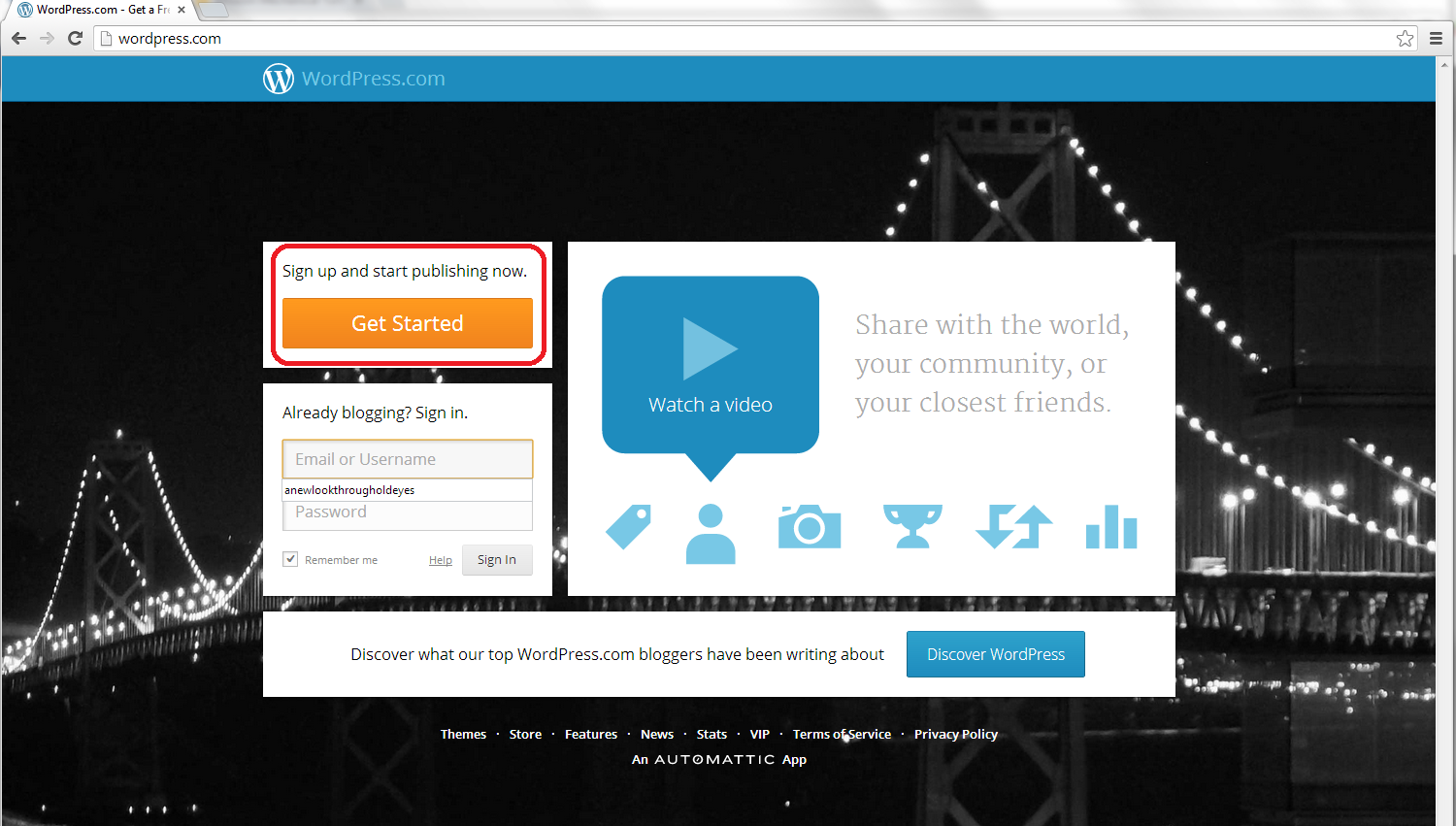
So, to set up your blog, first go to http://www.wordpress.com, where you will meet a sign-up page:
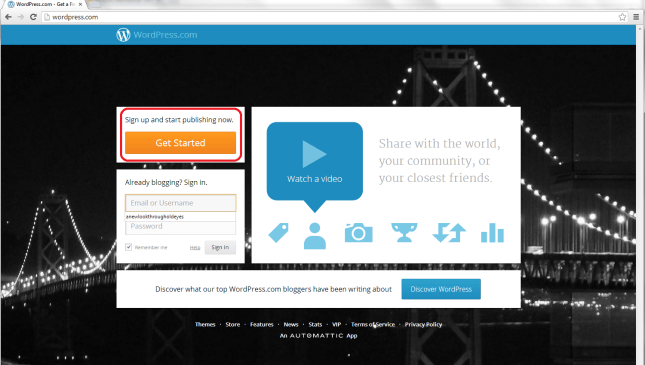
1 front page

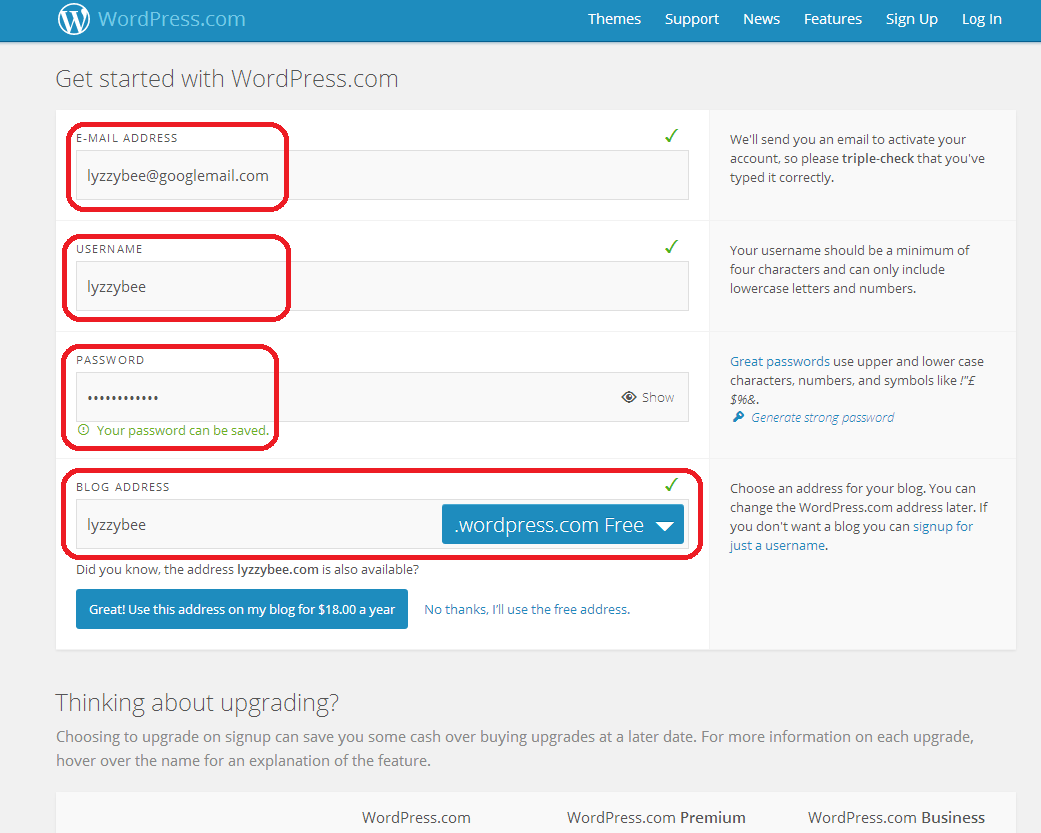
Click on the Get Started button to set up your account:

2 sign up

Fill in your email address, a username, and choose a password, then choose the web address for your blog.

Note: although you can change the name that your blog displays, this web address should always stay the same. If people link to it, or you link to your own posts on it, or people add it to their blog reader, they use the web address. If this changes, then the links will be lost. I suggest choosing something as bland and general as you can, so that if you change the name of your blog or the way you write it over the years, the web address and the name won’t be too different.

I’m choosing Lyzzybee here – WordPress has suggested that but you can change it. Watch out for the little green tick, which means the address is available. That means that you can choose it for your blog.

Underneath the web address box, WordPress lets you know that you could buy the domain name (in this case lyzzybee.com) for $18 per year. There’s a lot of discussion about this, with people claiming that seeing WordPress (or blogspot or any other blogging software name) will put people off if you’re writing a business blog or setting up business pages. I’m not sure that it does these days, but there is an option to buy the name if you want to, if it’s available:

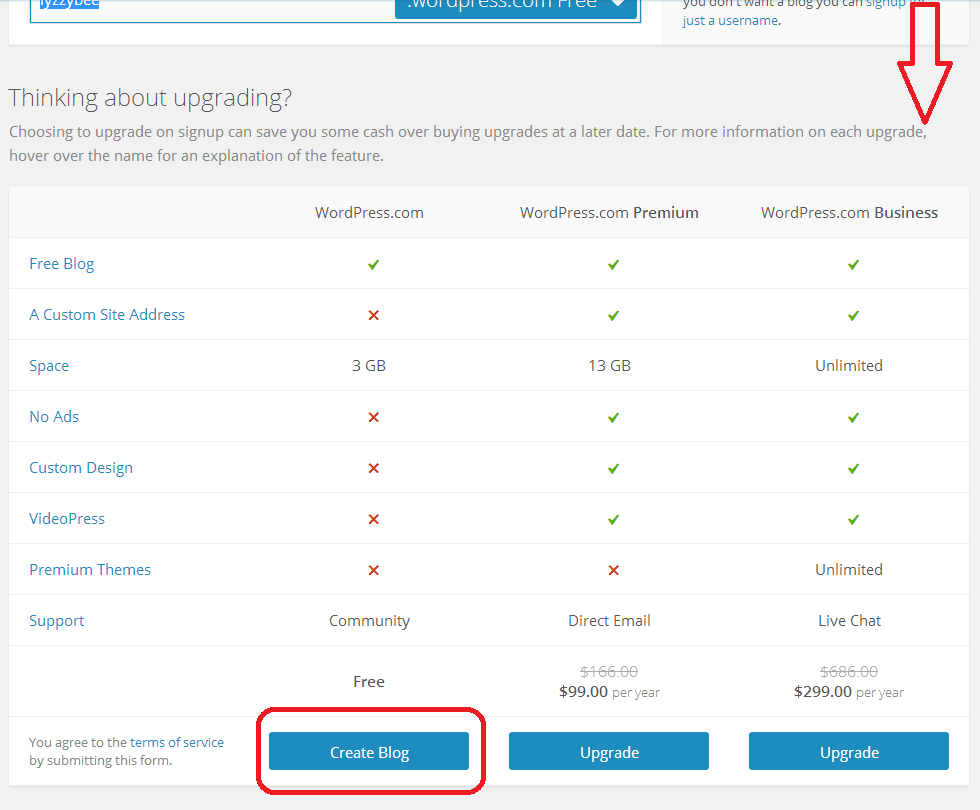
3 sign up

If you scroll down, you’ll see some options for upgrading, too. These look very enticing and seem to offer you a lot, but upgrades cost money and you will only really need a free blog for most purposes apart from the most content-heavy and customisable blog. For our purposes, a free one will do, so click on Create Blog at the bottom of the free column.

(Note: ad free is something we will be looking at later as I feel it’s important to remove intrusive ads from your blog, so it’s not EXACTLY free. Ad removal is currently $30 per year (about £20), it is an option but I think it’s important).

4 sign up free

Confirming your email address

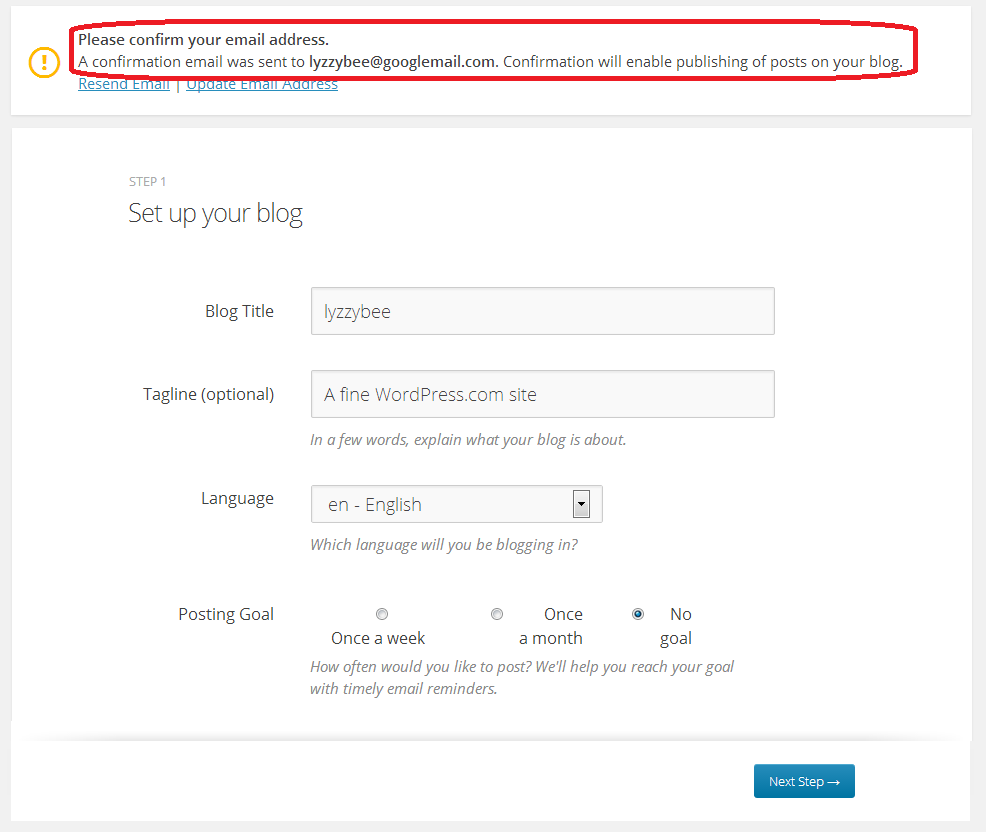
Before you go any further, you will need to confirm your email address in order to allow you to write posts and use your blog. This is a security measure, to make sure that no one’s setting up a blog under your email address illegitimately.

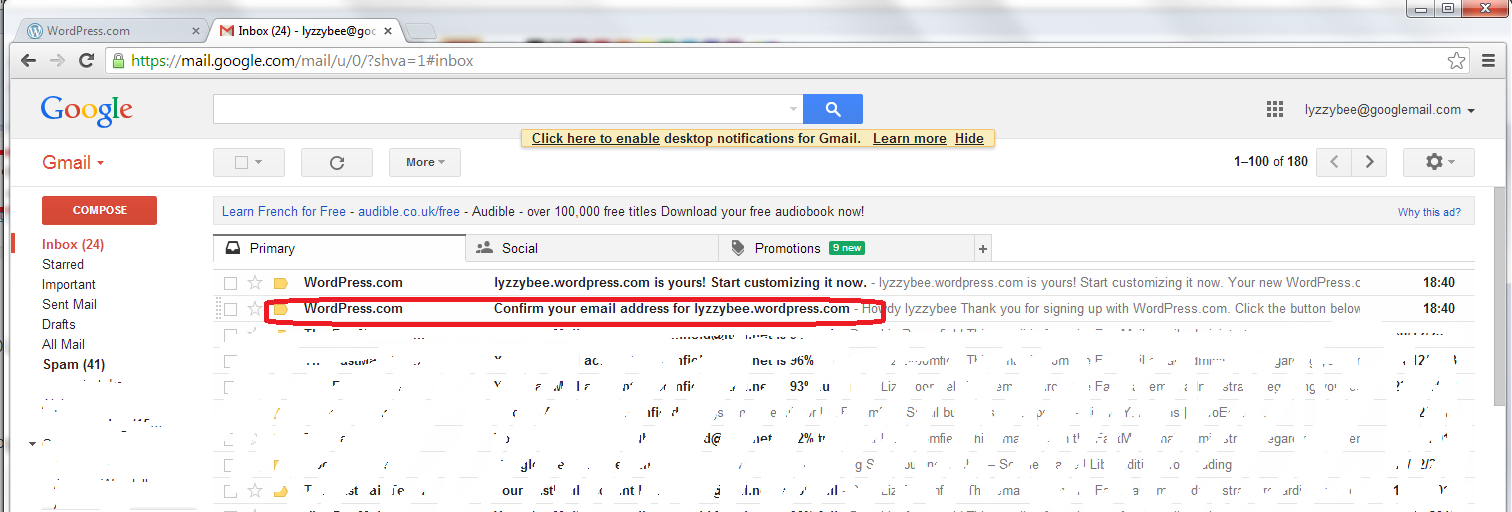
You will see a message about confirming your email address once you’ve hit that Create Blog button. You have options to change the email address or re-send the email if it doesn’t appear:
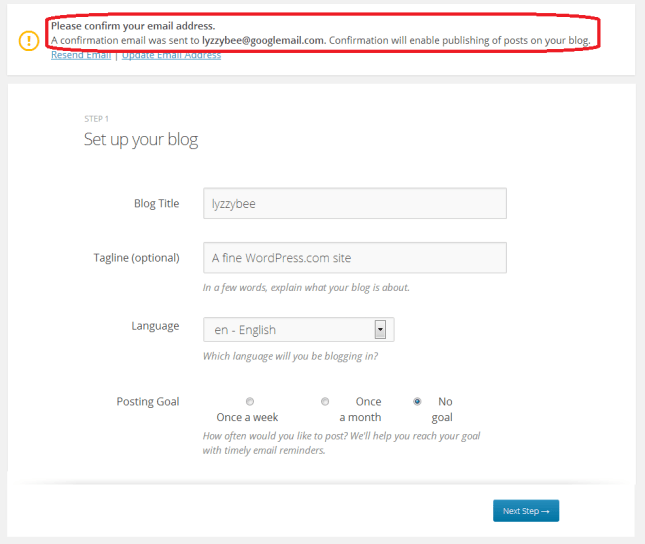
5 confirm

But, all being well, you should find an email from WordPress in your email inbox, with the subject “Confirm your email address for [your blog address]” – it might be the second one from WordPress, as here:
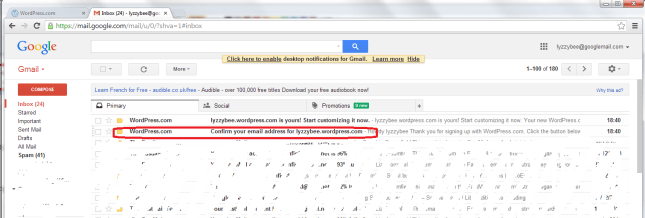
6 confirm

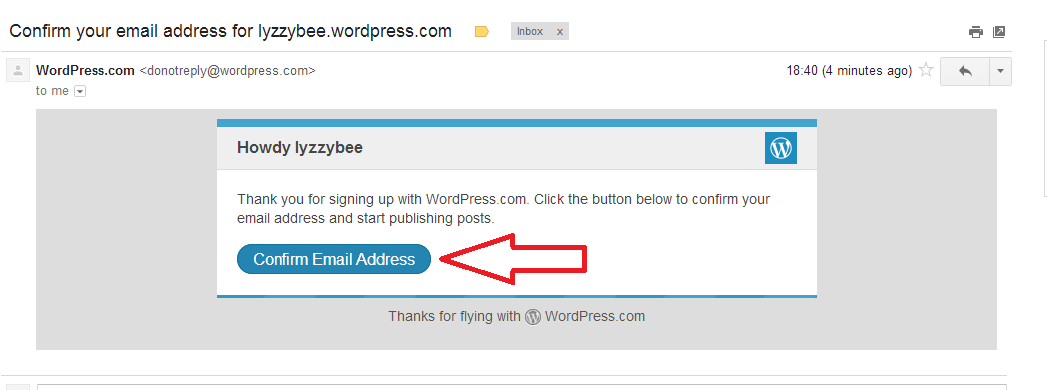
Open the email and you’ll find a Confirm Email Address button to press. Press that button …

7 confirm

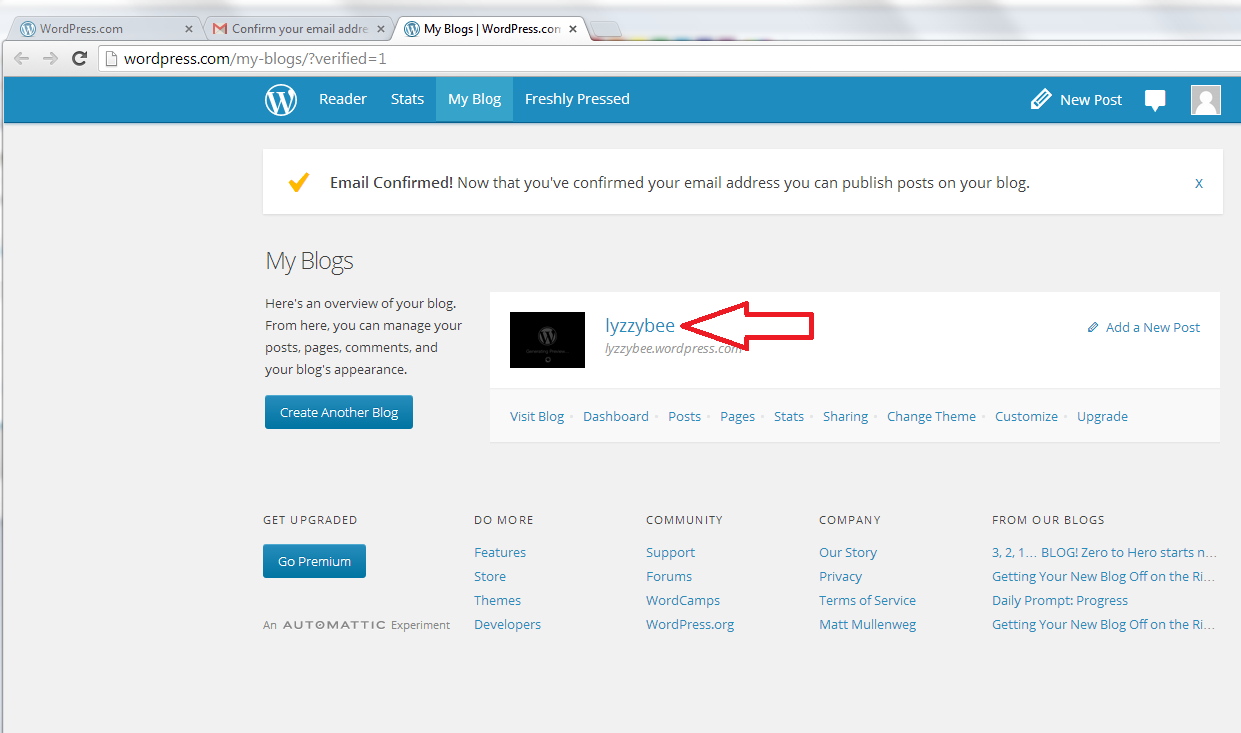
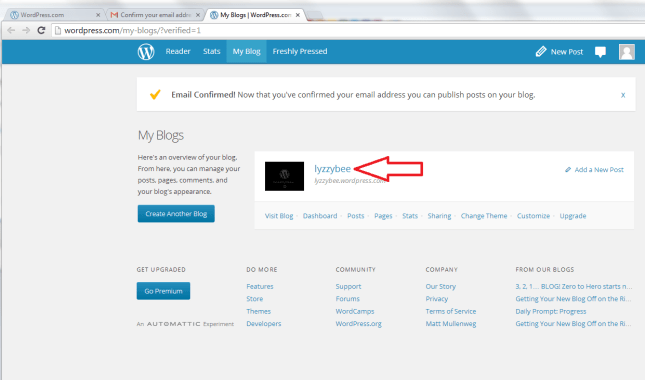
… and you’ll be back in WordPress (in a new window) with the email address confirmed and able to do what you want with your blog!

Click on the blog name to go and look at your blog …
8 confirm

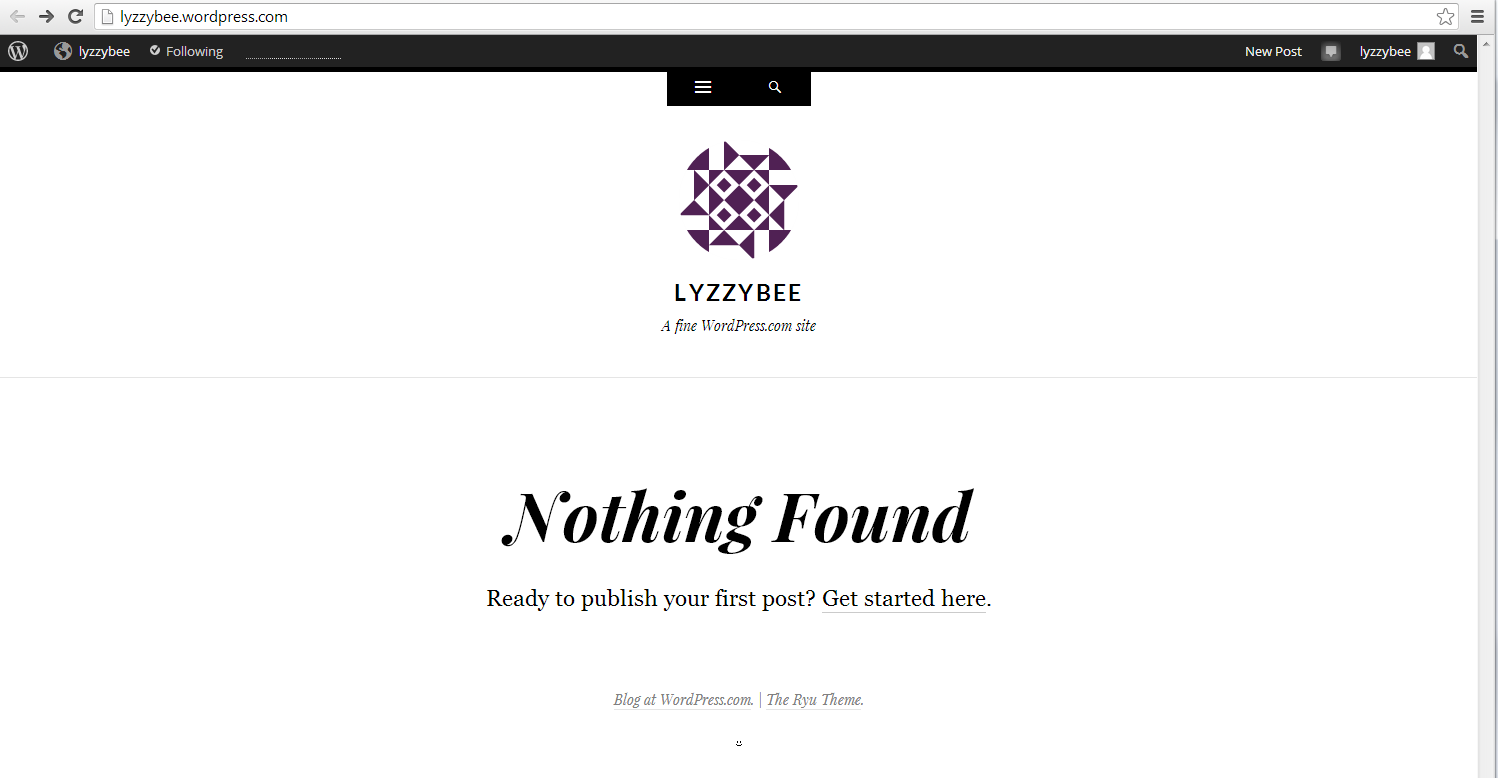
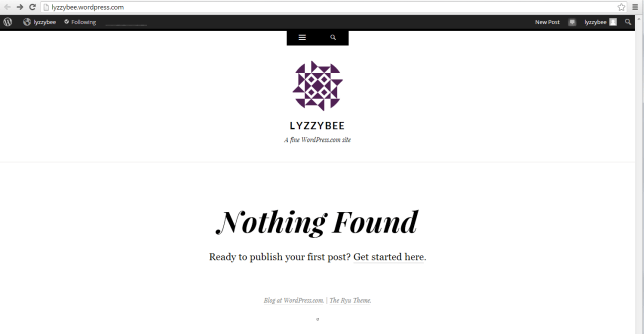
… and you will find the very bare bones of a completely blank and empty blog! But it’s your completely blank and empty blog!
9 setup

How do I access the dashboard on WordPress, aka how do I actually do stuff?

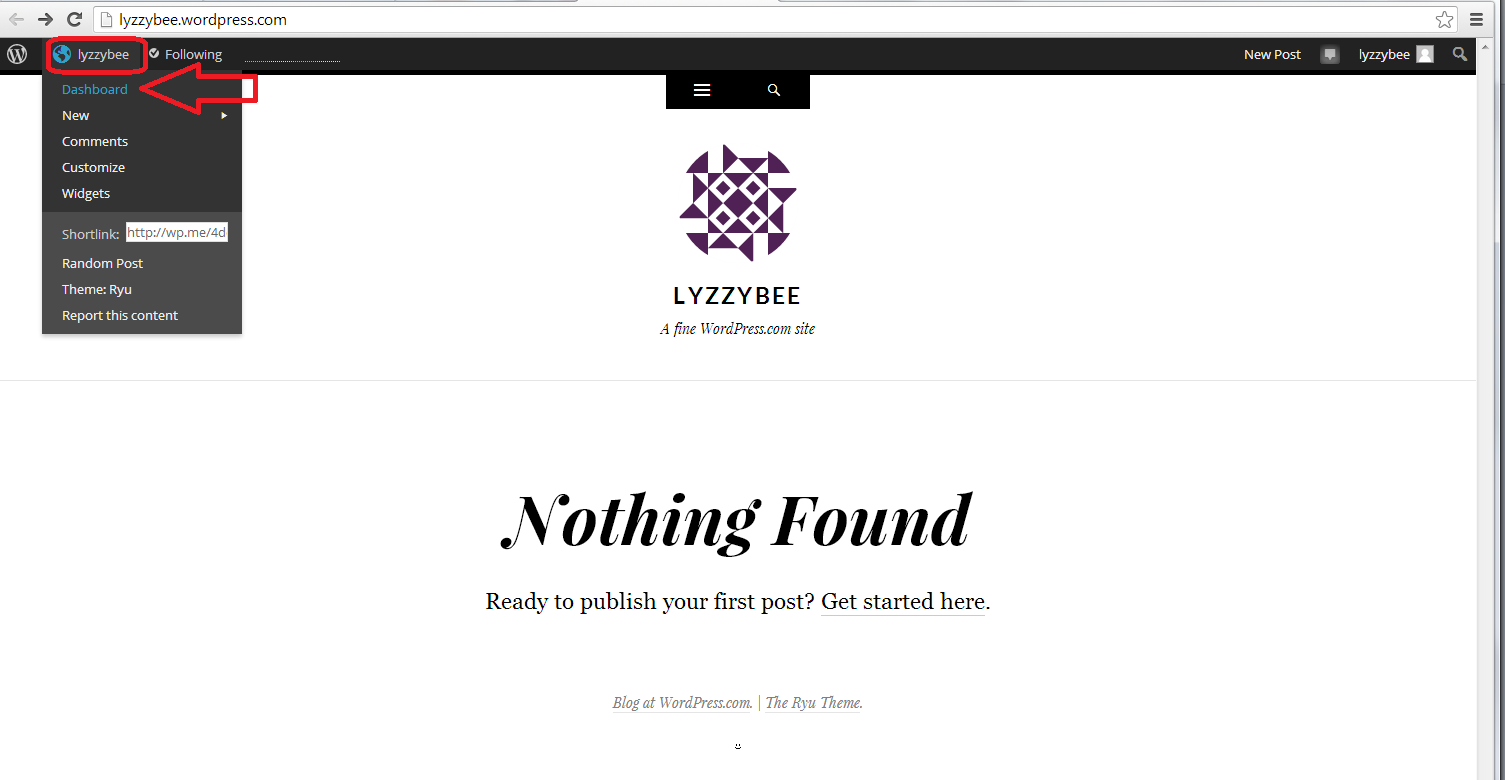
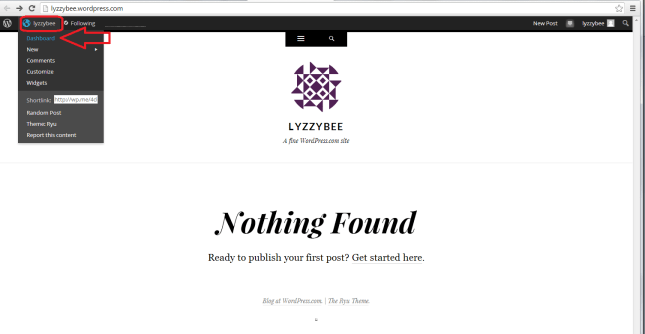
Whenever you’re logged in to WordPress and want to do something with your blog, whether you want to alter the settings, write a post, check your comments … you can access the Dashboard (which allows you to do all of this) by clicking on your username at the top and then clicking Dashboard:
10 setup

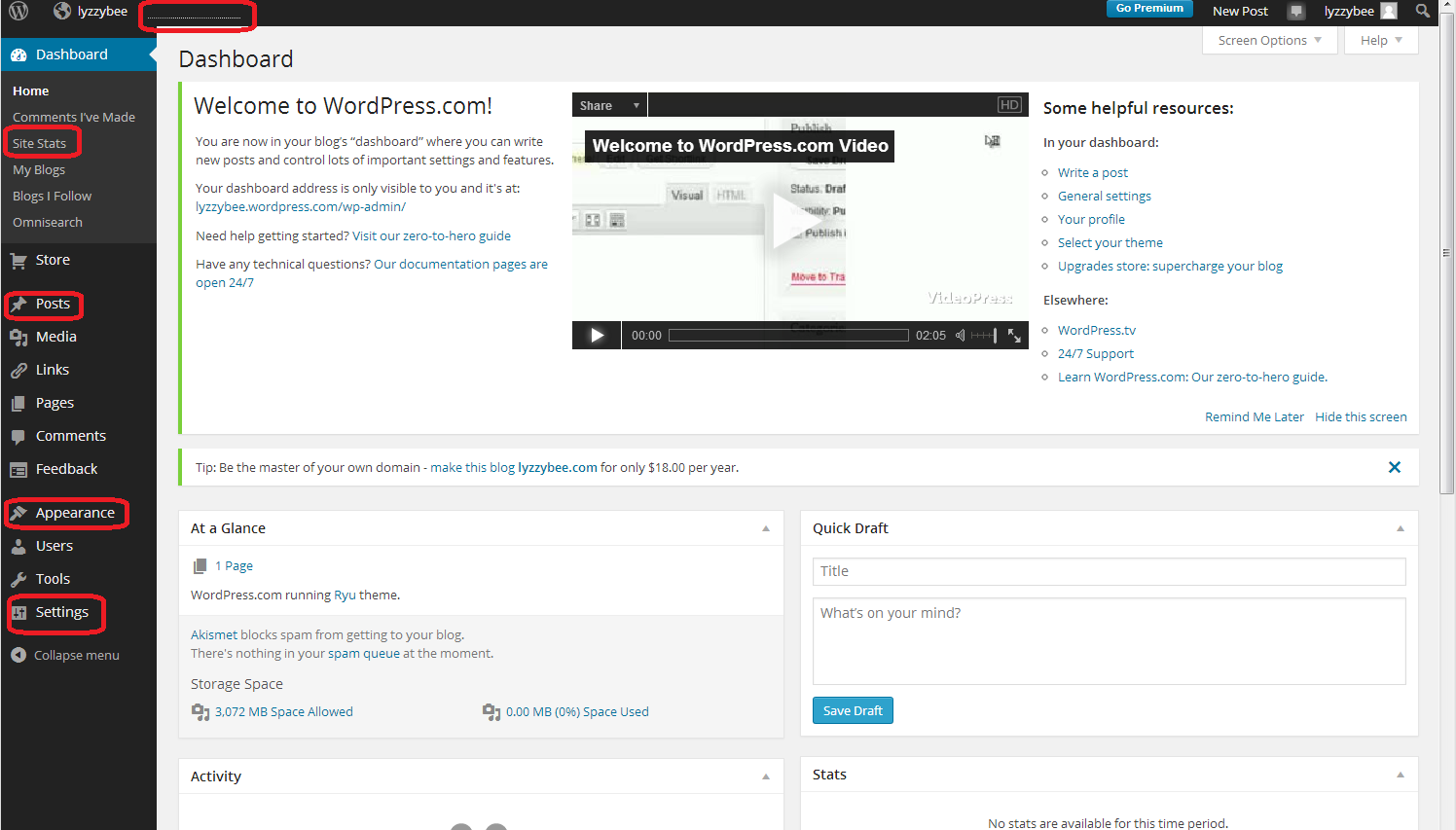
Now, the Dashboard looks like a pretty scary place at first glance: there’s lots of text, lots of options … lots of STUFF!

But I can tell you that you will usually only need to use a handful of areas on this Dashboard, and a few options in each one.

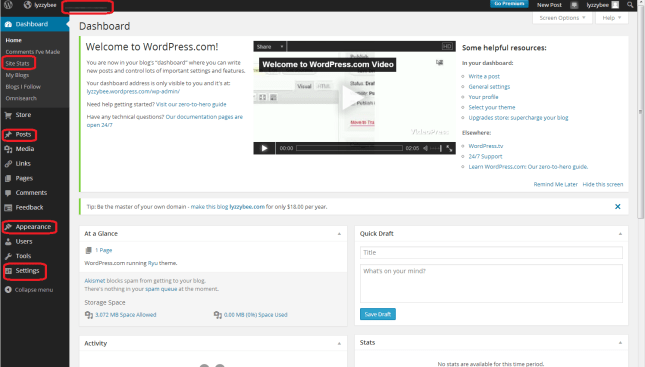
The ones that I find most useful and use most of the time are:

  • Site stats – accessible from the top part of the Dashboard or the dotted line on the very top line (which starts to look like a bar graph as soon as you get some people looking at your blog)
  • Posts – where you write posts, copy posts, edit them and review your drafts
  • Appearance – where you change the theme of your blog
  • Settings – where you change your blog’s name, subtitle and spam filtering options

I’ve highlighted them all here: not so scary after all?
11 setup

How to change your blog’s name and subtitle

Remember what I said above about not being able to change your blog’s web address, but being able to change its name and subtitle? I’m going to show you how to do that first, mainly because WordPress adds its own subtitle to your blog, and we want to customise it for ourselves.

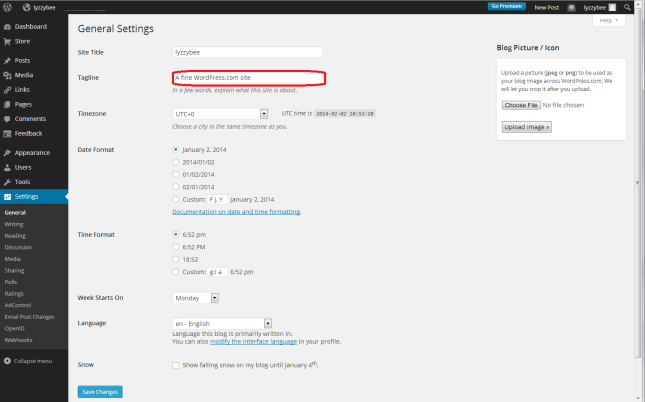
Whizz up a couple of pictures to that blank white screen that says “Nothing Found” in the middle of the screen. Notice how underneath the blog name “Lyzzybee”, it says “A fine WordPress site”. Well, that’s all well and good, but this is where you can describe what the blog’s all about. This blog that you’re reading now has the subtitle “Proofreading, editing, writing, transcription and localisation”, and this field is searchable by search engines, so it makes sense to get your keywords in there and tell people what it’s all about (another of mine can be found here).

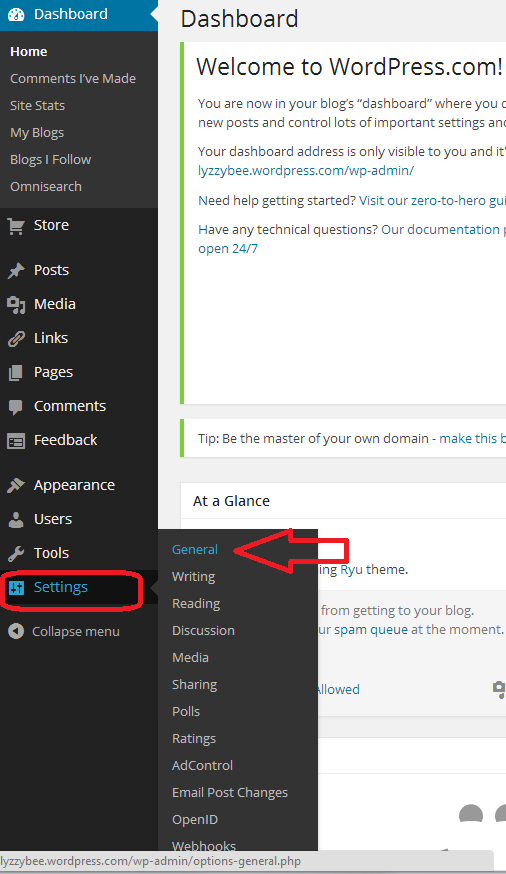
To change this, go down to the bottom of the Dashboard and click on Settings. You’ll get a sub-menu, and you now choose General:

12 setup

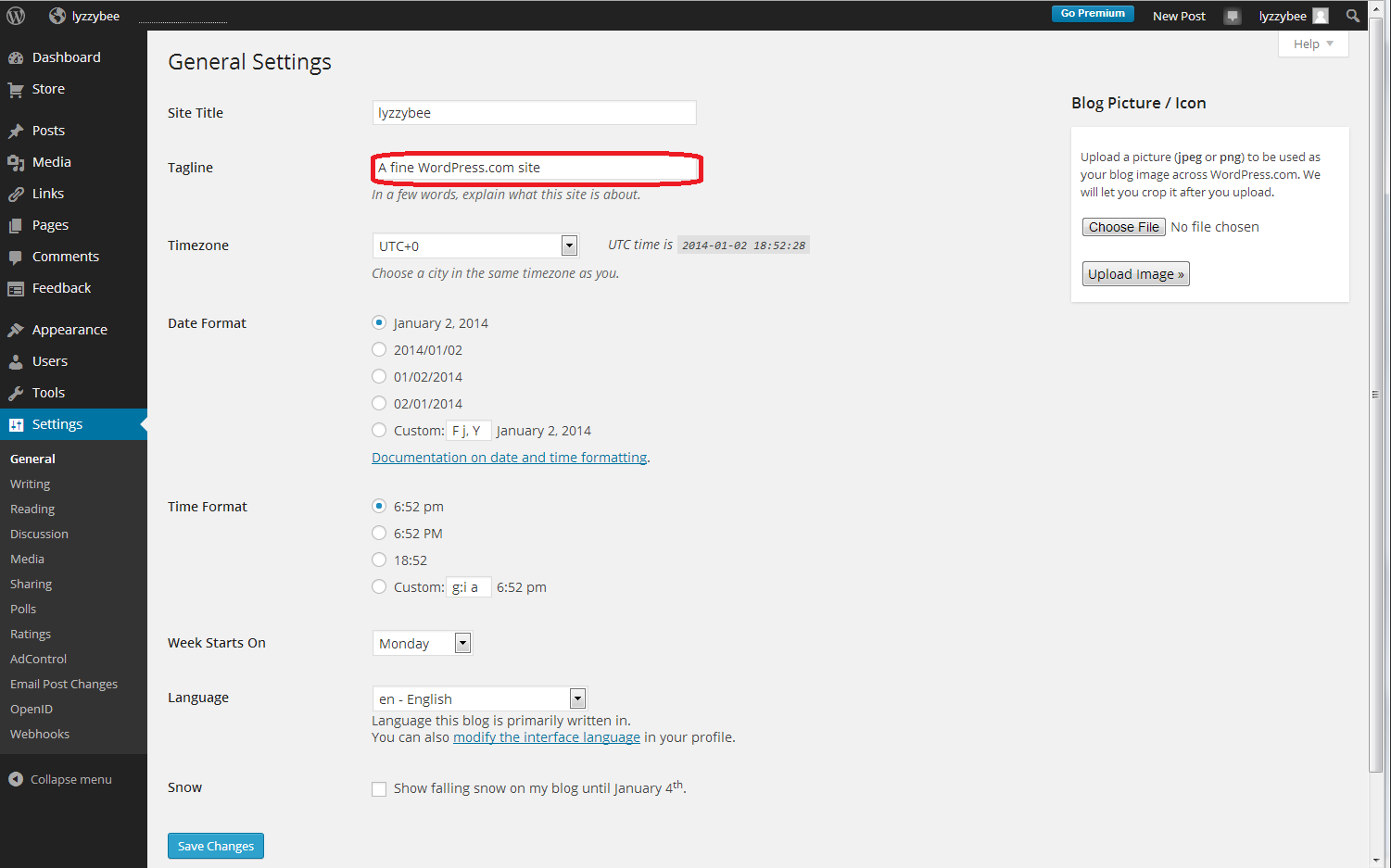
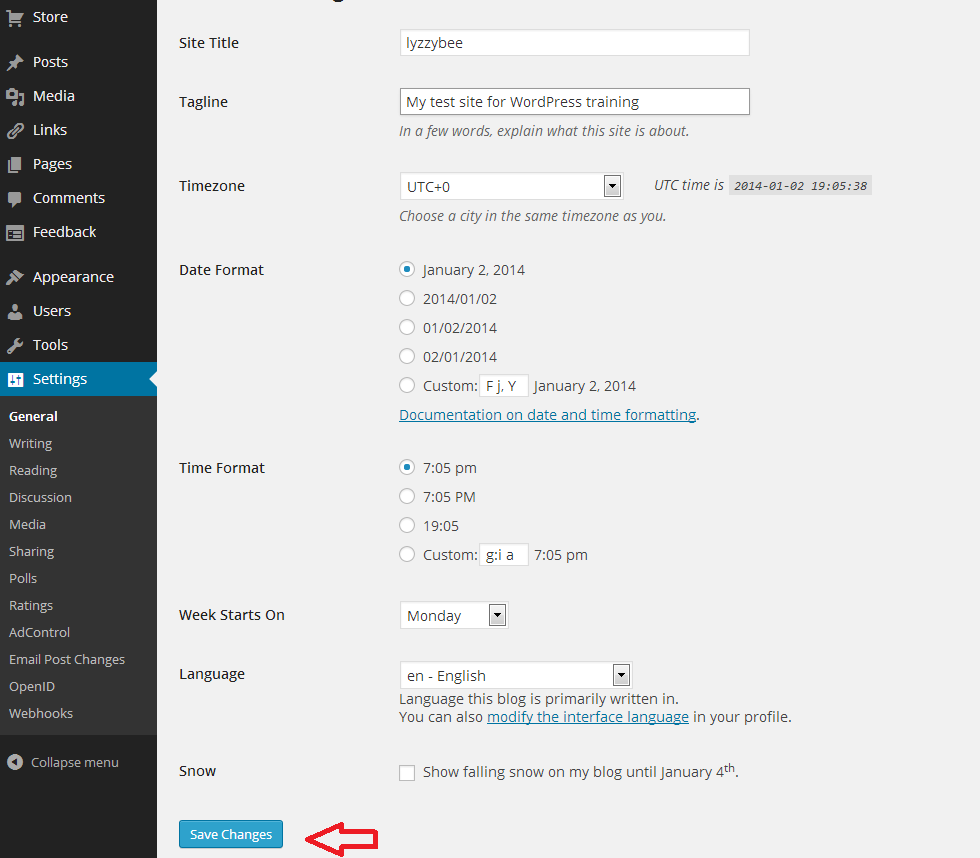
After clicking General, you’ll get a page where you can change the very general details of your blog. I’m not going to go into much detail about this page now, but you can see at the top the SIte Title (which you can change if you want to; I’m not going to for now), and Tagline (the subtitle). There’s the text that WordPress has automatically inserted for you, and here’s your chance to start customising your blog and telling people what you’re all about:
13 setup

So I type in “My test site for WordPress training”, because that’s what it is, and then press the Save Changes button at the bottom of the screen to save that. There are lots of other things you can change on this page; do have a play with them if you’re feeling confident, but it’s not strictly necessary at this stage. Everything can be accessed and changed later on.

14.5 setup

Changing the comment settings to prevent spam

Yes, yes, I know you want to change what your blog looks like and get writing, but this bit’s really important.

Once you get up and running, lots of people who are your friends, old and new, real and virtual, will hopefully want to post comments on your blog posts. Lovely! But other people will try to post fake comments, in an attempt to either place their web address on as many other web pages as possible (this gets them up the search engine results pages, not wanting to go into too much detail) and/or want your readers to click on dodgy links in order to sell them fake ugg boots or even install viruses on their computers. People will also tend to trust your blog less if you let spam get through with its dodgy links enticing your readers to click through. You need to stop this, and although WordPress does have really good spam filters, the odd one still gets through.

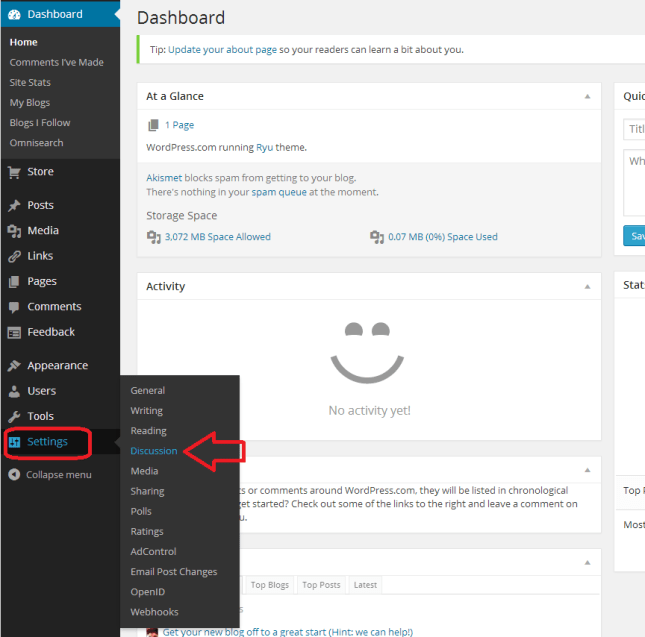
By making sure that you moderate the first comment that anybody makes on your blog, you will cut out almost all of the spam. The only way that someone can spam comment is if they post a normal comment first, then a spam one. Most people won’t bother. So, make sure you catch them out and prevent them from commenting by setting up your Discussion setups in your favour, not theirs.

You access this area by choosing Settings from the Dashboard again, then Discussion:
18 setup

Now you have a range of options. Handily, the ones that are already ticked are the ones that you want. But the most important to be ticked are circled in red below:

  • Other comment settings – Comment author must fill out name and email (this means they can’t just post anonymously)
  • Before a comment appears – Comment author must have a previously approved comment (don’t tick manually approve every comment unless you get bombarded with spam and need to check every single comment and pass it manually – just approving the first comment will do)

It’s also worth keeping as many email alerts as you can, so you can add to these vital ones:

  • Email me whenever – Someone posts a comment (you will always be told whenever you get a comment. If you spot a spammy comment, you can follow the link and delete it)

19 setup

Setting up your Discussion section like this means that:

  • Every time someone comments on one of your blog posts, they will have to enter their email address and name
  • Every time someone comments on one of your blog posts, you will receive an email.
  • When it’s their first comment on your blog ever, you will receive an email asking you to approve their comment. Once you’ve done that, they will be allowed to comment whenever they like, as long as you’ve approved the first one.
  • Because you receive an email every time someone comments, you can reply back to their comment, making them feel like it’s a two-way process and you care about your readers (see more on this in my article on reciprocity and social media)

Choosing your blog theme

At last she’s letting us make our blog look nice! I know – but it’s important to set up the security aspects first, right?

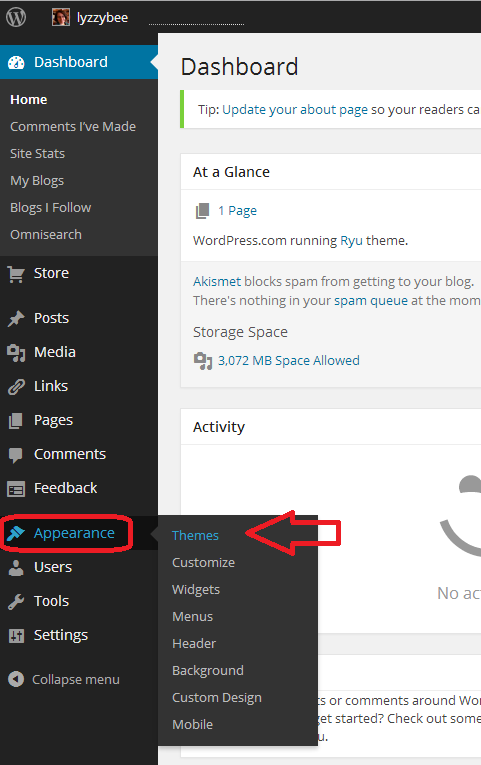
At the moment, your blog is quite plain. You can choose from loads and loads of attractive themes to brighten it up. And you can change your theme any time you want (although be aware that some of them have the menus in different places and might not offer certain functions).

To set up your new theme (or change your theme once you’re up and running), click Appearance on the Dashboard, and then Themes:

20 setup

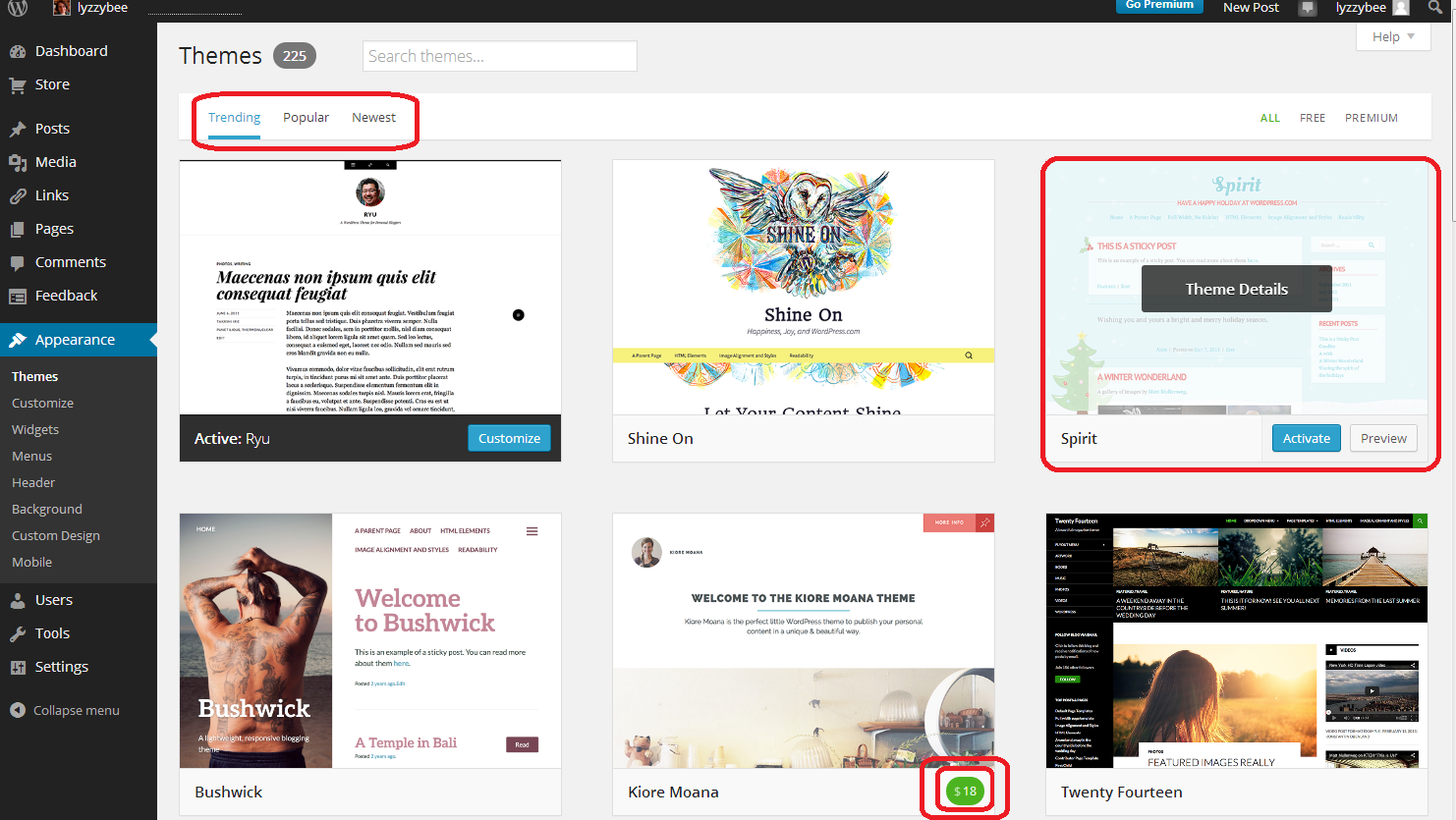
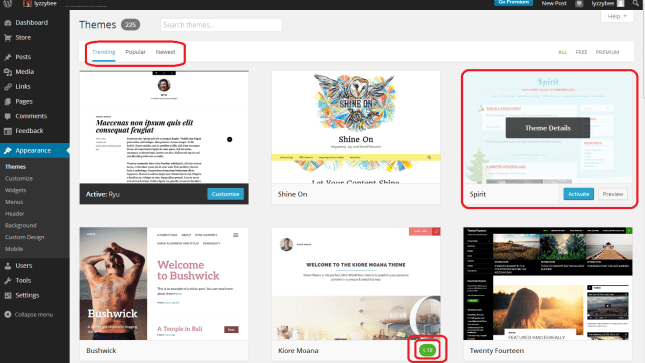
You will now see a page of lots of different designs for your blog.

Note three things here:

  • At the top, you can search for themes (flowers, etc.), choose from Trending, Popular and New themes (and on the right, choose to see only free ones)
  • When you hover over a theme, you will get the opportunity to Preview or Activate (see below)
  • You have to pay for some themes (see the double circle at the bottom). There are LOADS of free ones so certainly don’t bother to do that at the start.
21 setup

If you click on that Preview button, you’ll be shown what your blog looks like in that theme. Note that the blog name and Tagline / subtitle are there, as are any posts you’ve made.

Return to your list of themes using the back button at top left

22 setup

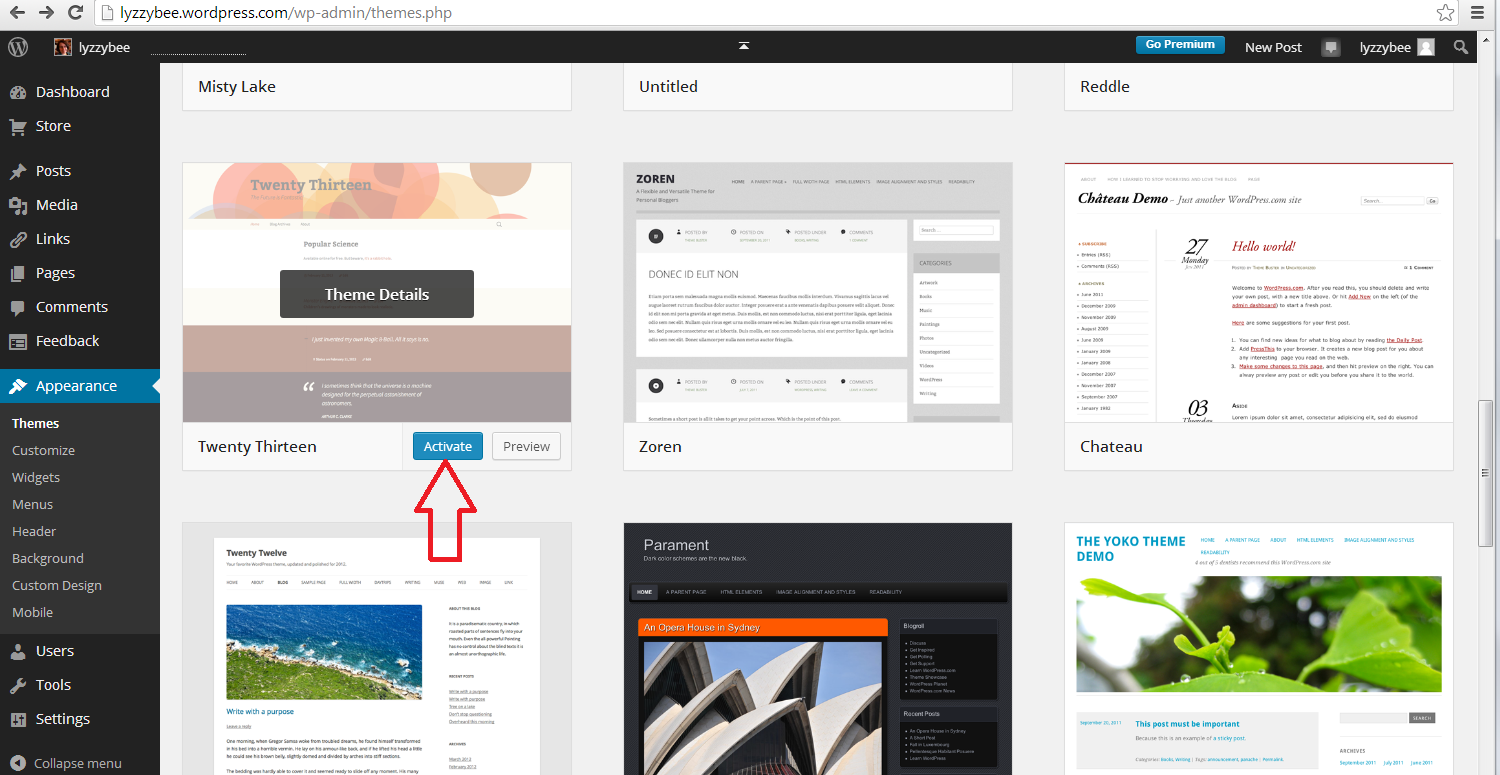
Once you’ve chosen your theme, press the Activate button

23 setup

You will get a confirmation that you’ve activated that theme (but you can always change it later!)
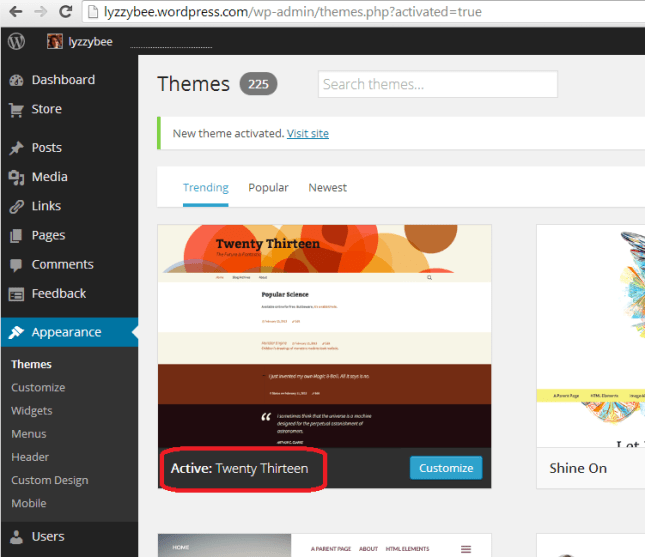
24 setup

How do I write a blog post in my WordPress blog?

Hooray – it’s time to actually write something!

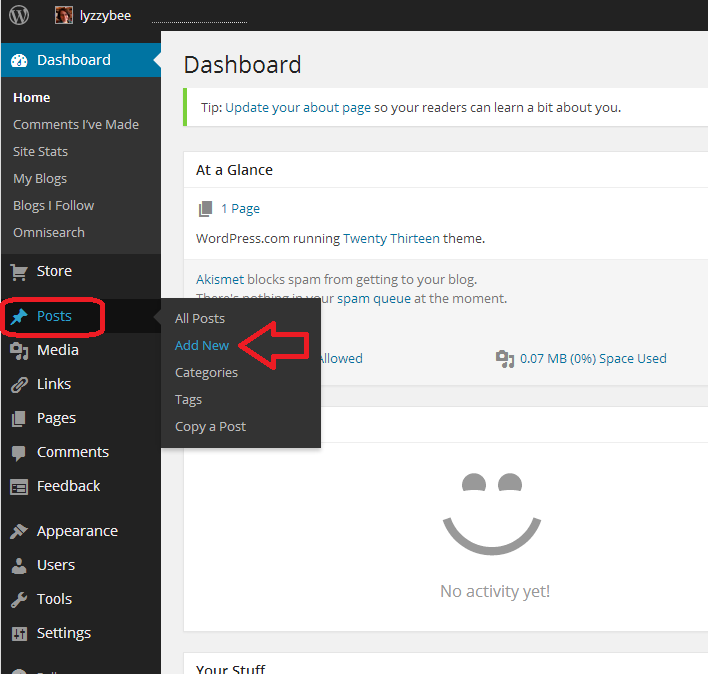
To write a blog post, go to Posts on the Dashboard and then click Add New. There are some other options there but this is getting LONG and we’ll just do the basics.

25 post

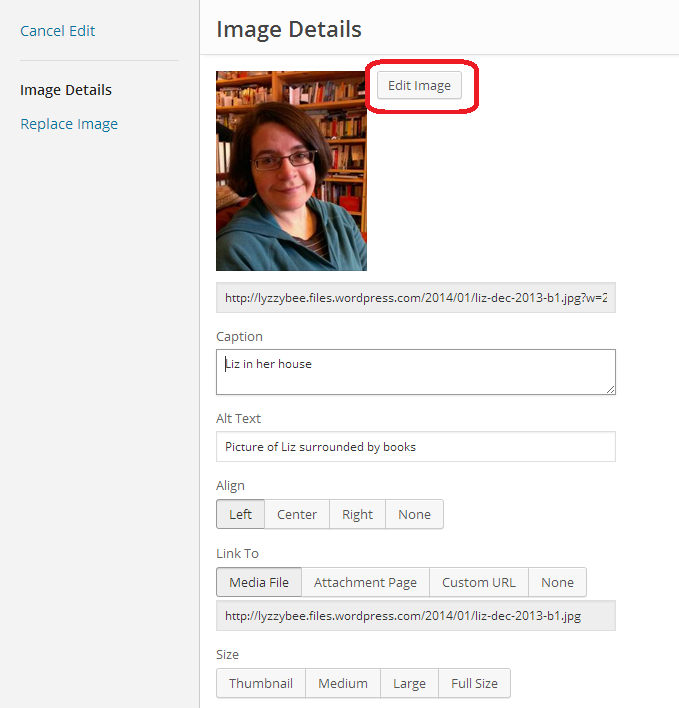
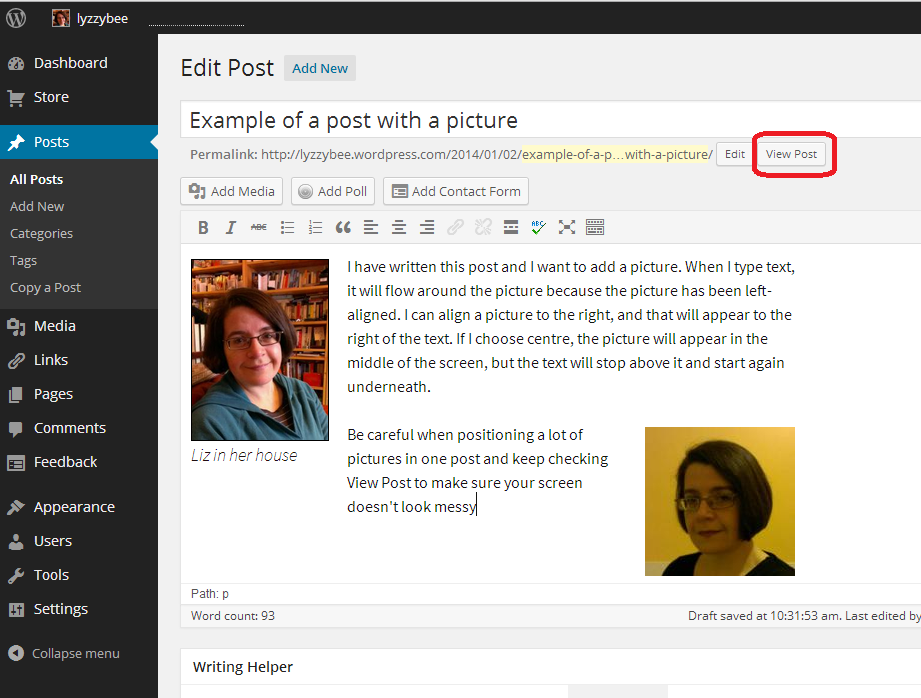
Once you’ve clicked New Post, you’ll be in your post editor. I’ve added a title and some text here (click to view larger and you can see my instructions).

Once you’ve got a title in place, WordPress will create a Permalink (URL) for it. You can alter the words in this after the date, so if you don’t want to be sharing a huge URL, you can cut it down (e.g. this very post has a URL ending wordpress-blog-basics, which is not the full title of the post).

Once you’ve started writing your post, hit Save Draft and continue to press that regularly so you don’t lose your work. Once you’re ready to publish your post, press Publish!

26 post

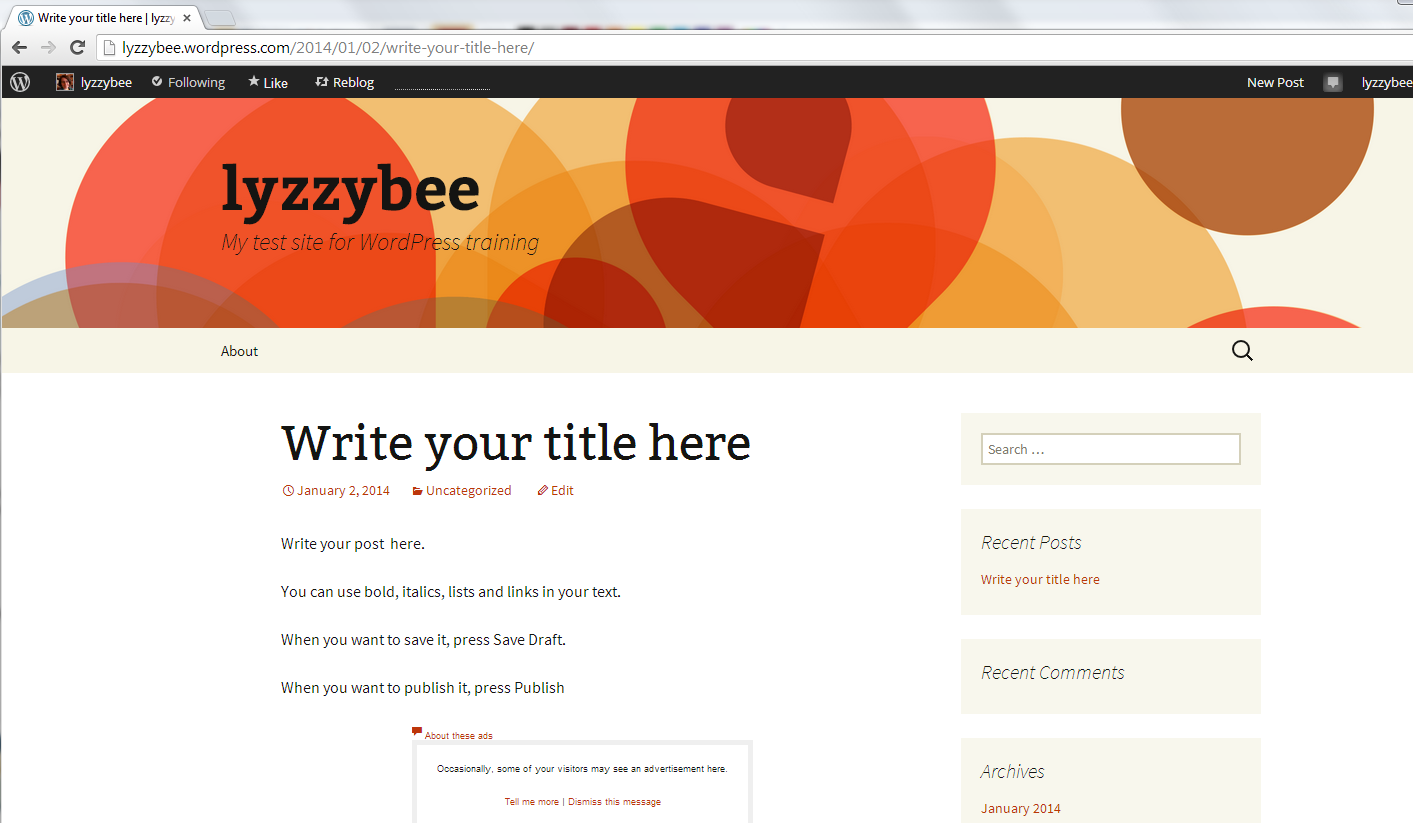
When you publish any post, you will get a side panel that tells you how many posts you’ve done – you need to click on the little arrow before you’ll get your URL at the top and your post in full screen. Note here that there’s a little square telling you that there might be an advert appearing there – see below for how to get rid of that.
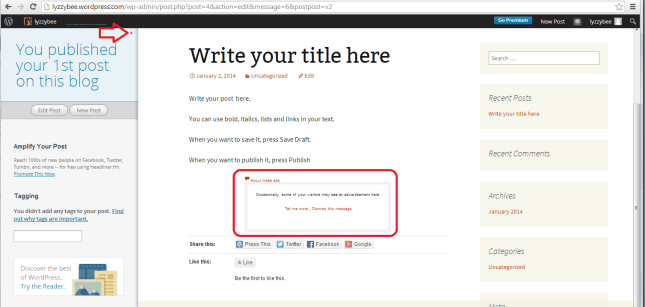
27 post

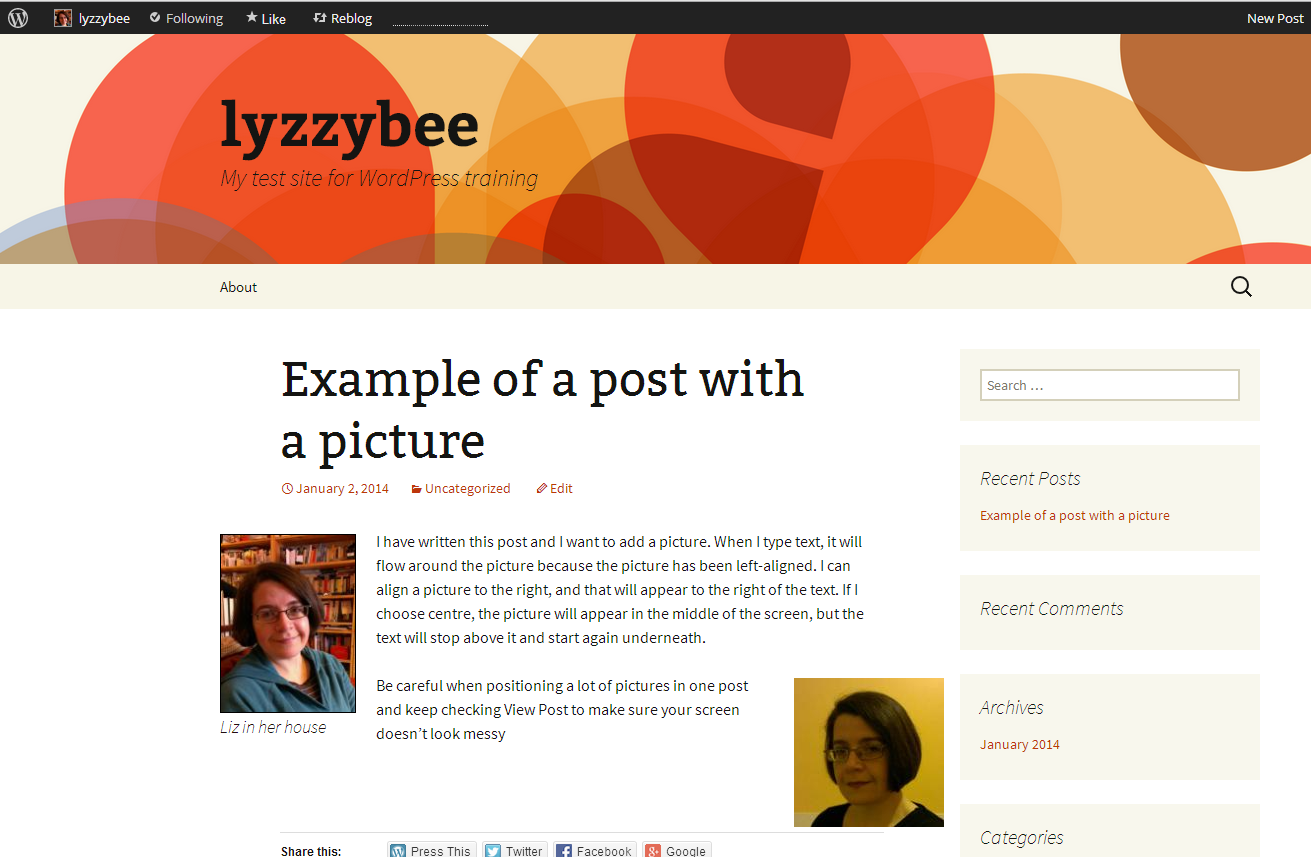
But for now, here’s our blog post, in all its glory, on the blog theme that we chose a little while ago:
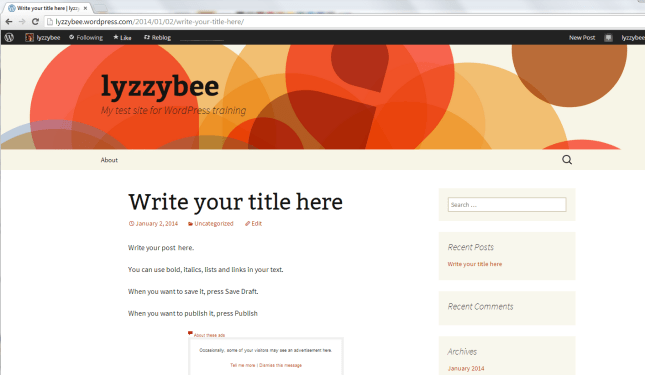
28 post

How do I get back to the dashboard from my blog post?

At the top of the screen, you’ll see your username. Click on that and you’ll get a drop-down menu including Dashboard.
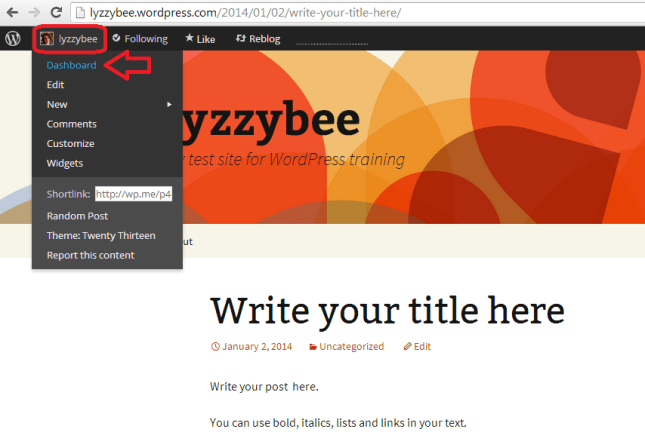
29 setup

How to remove ads from your blog

WordPress will automatically place adverts on your blog. Nice, eh? But they have to make some money, and people pay them to do this. Note that this is NOT the same as having a service where you choose to have ads on your blog and can choose what they’re about. This is any ads they choose to promote, flashing all over your blog, in front of the content. The worst bit: you can’t see them if you’re logged in, even if you look at your own blog. And yes, people do have ad blockers, but I know from experience that readers do get put off and won’t return to look at your blog, or subscribe to it, if you have ads all over it.

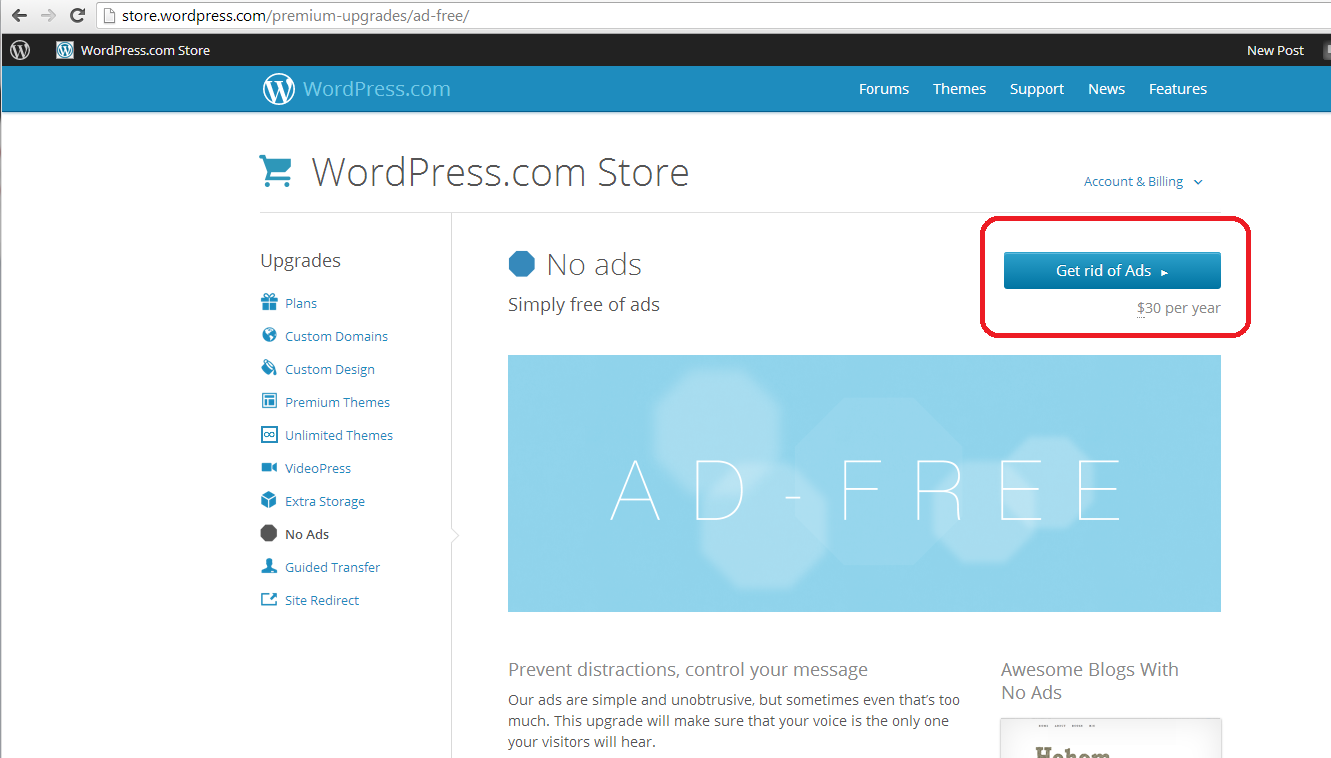
You can remove the ads for $30 (about £20) a year. It’s up to you, but I think it’s worth it as the final stage of setting up a good, solid, useful WordPress blog.

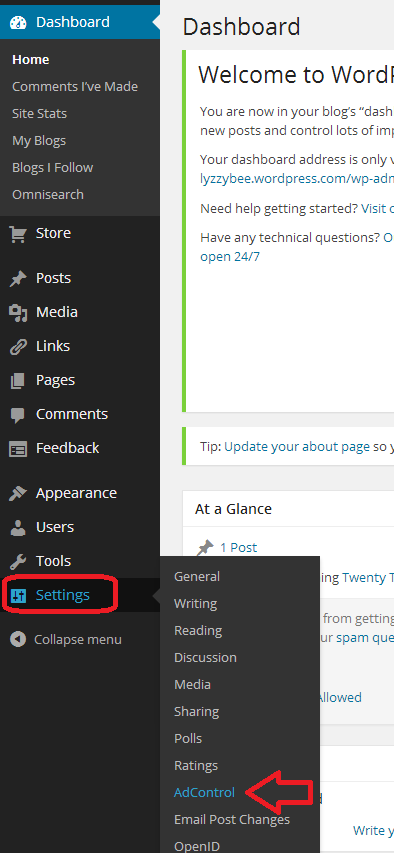
Here’s how you remove them. Go to Settings on the Dashboard and then Ad Control:

30 setup

Choose No Ads upgrade. You probably don’t need a Bundle, which is more expensive and includes high levels of customisation which you just don’t need when you’re starting out. You renew this every year, and can always add customisation when you’re more confident with what you want to do with your blog.

31 setup

You will be taken to the WordPress Store, where you can choose Get rid of Ads. This will take you to a payment screen where you can pay by PayPal or debit or credit card. As I said, well worth doing to avoid annoying people who read your blog.
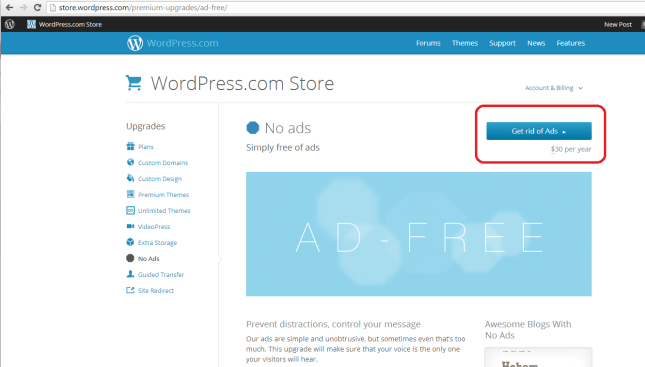
32 setup

By now, you should be able to set up a blog, post a blog post, set your comment moderation and remove ads, and choose and change your theme. Future posts will cover more details such as automatically sharing your posts on social media, adding photos, and other technical details. You can find more general articles about blogging in the list of related posts below.

I hope you have found this article useful. Please share using the share buttons below, or post a comment, and do please let me know if you use this article to help you to set up your own blog, and post a link below!

Related posts on this blog:

WordPress 2 – adding pages to create a website

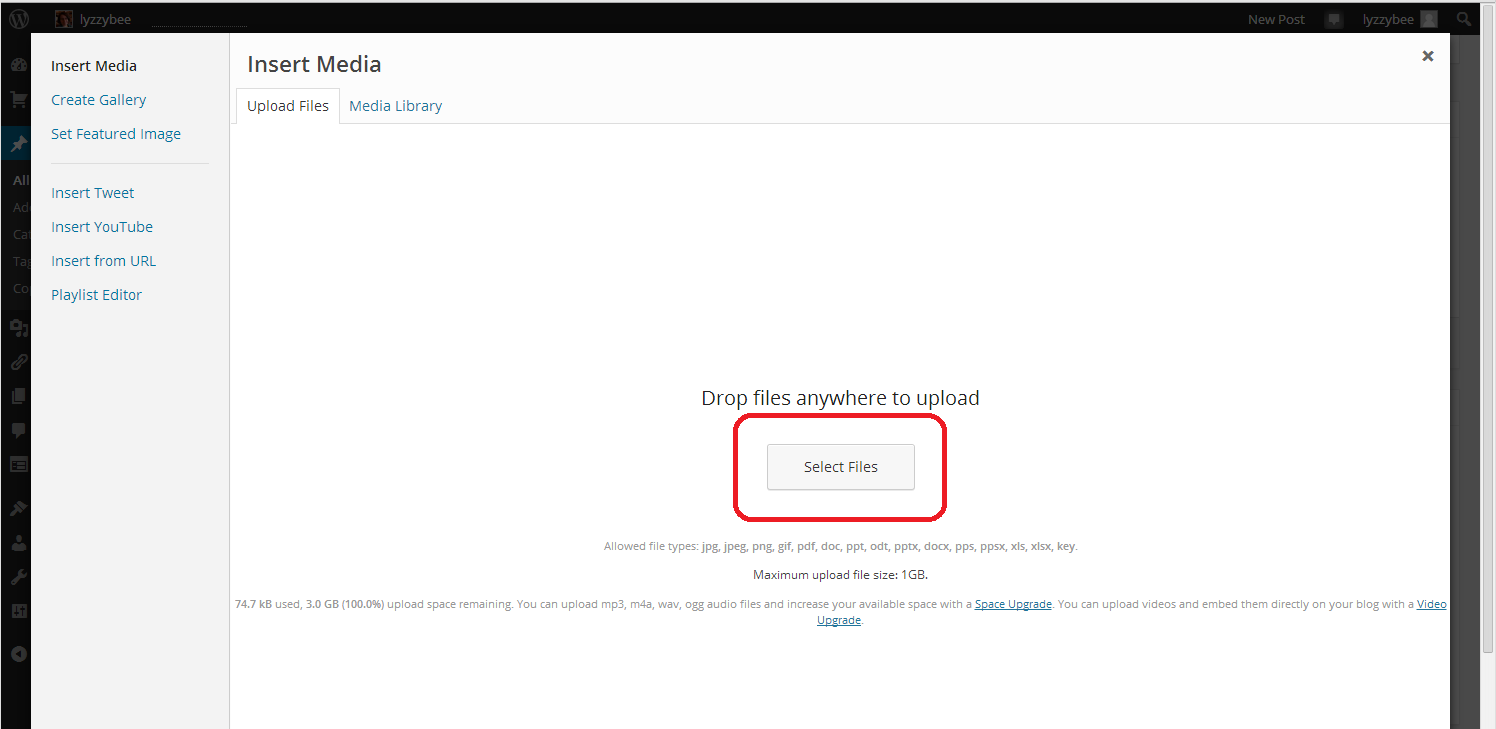
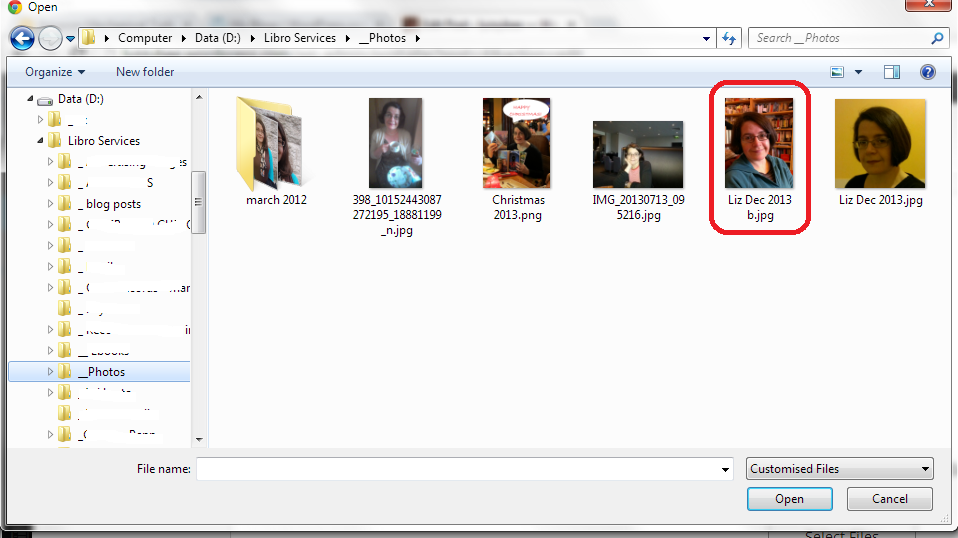
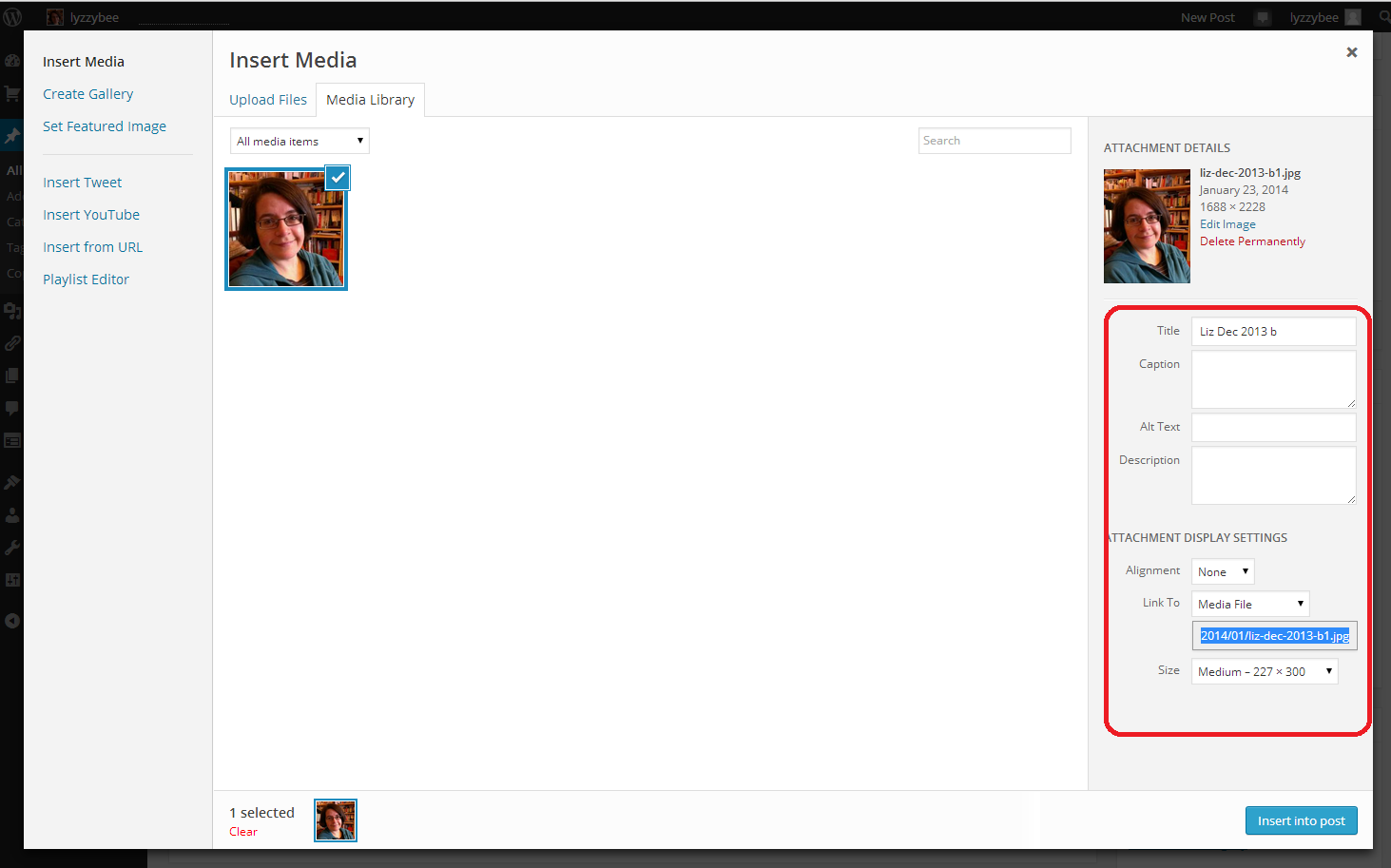
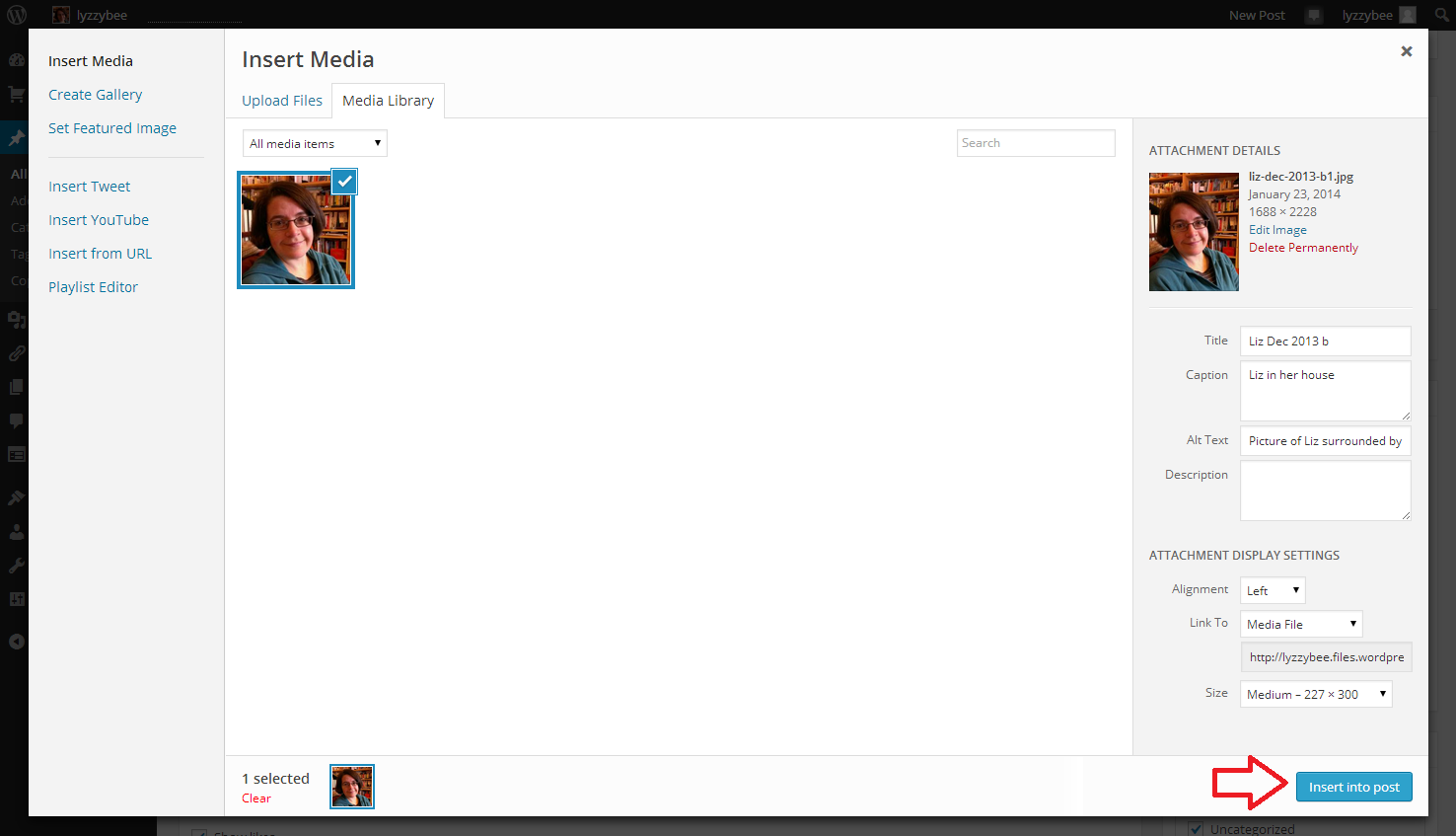
WordPress 3 – adding images to your post or page

WordPress 4 – adding slideshows and galleries of images

WordPress 5 – linking your blog to your social media

WordPress 6 – sharing buttons

WordPress 7 – adding an avatar picture

10 reasons to start a blog – why you should do it now!

10 reasons NOT to write a blog – and why you should stop and think, at least!

Reciprocity and Social Media – how to negotiate social media kindly and politely

Top 10 blogging sins – avoid these if you can!

Scheduling blog posts and keeping going – scheduling the posts and the writing of them

Guest posts (1) hosting – how to be the host(ess) with the most(est)

Guest posts (2) guesting – how to be the perfect guest

Adding links to blog posts – how to do it on the major blogging platforms (and email)

 
23 Comments

Posted by on January 3, 2014 in Blogging, Business, WordPress, Writing


Tags: , ,

Scheduling blog posts, scheduling writing, and keeping going

Things to doAs part of my series on blogging, in this article I’m going to talk about how frequently to blog, keeping going, and how to get down to writing those posts. This is primarily aimed at people who are blogging for their business, but this advice applies to anyone who wants to build the audience for their blog and needs help getting down to writing posts and sticking to blogging.

So that’s everyone, right?

How often should I blog?

How often should you publish a blog post? Well, that’s up to you to a certain extent. But if you’re looking to appear high up in the search engine results and keep your readers happy, you should keep it regular.

Most advice that I’ve read suggests posting at least twice a week. This will keep your readers engaged, keep your content updated enough for the search engines to promote it up their lists, and get enough keywords and content out there to keep your statistics nice and busy.

Varying your blog posts

Even a book review blog could do with a bit of livening up every now and again. A good example is my friend Ali – she mainly posts long-format book reviews, but she also takes up general topics or talks about book-buying trips – which varies things for her readers and gives them something new every now and again.

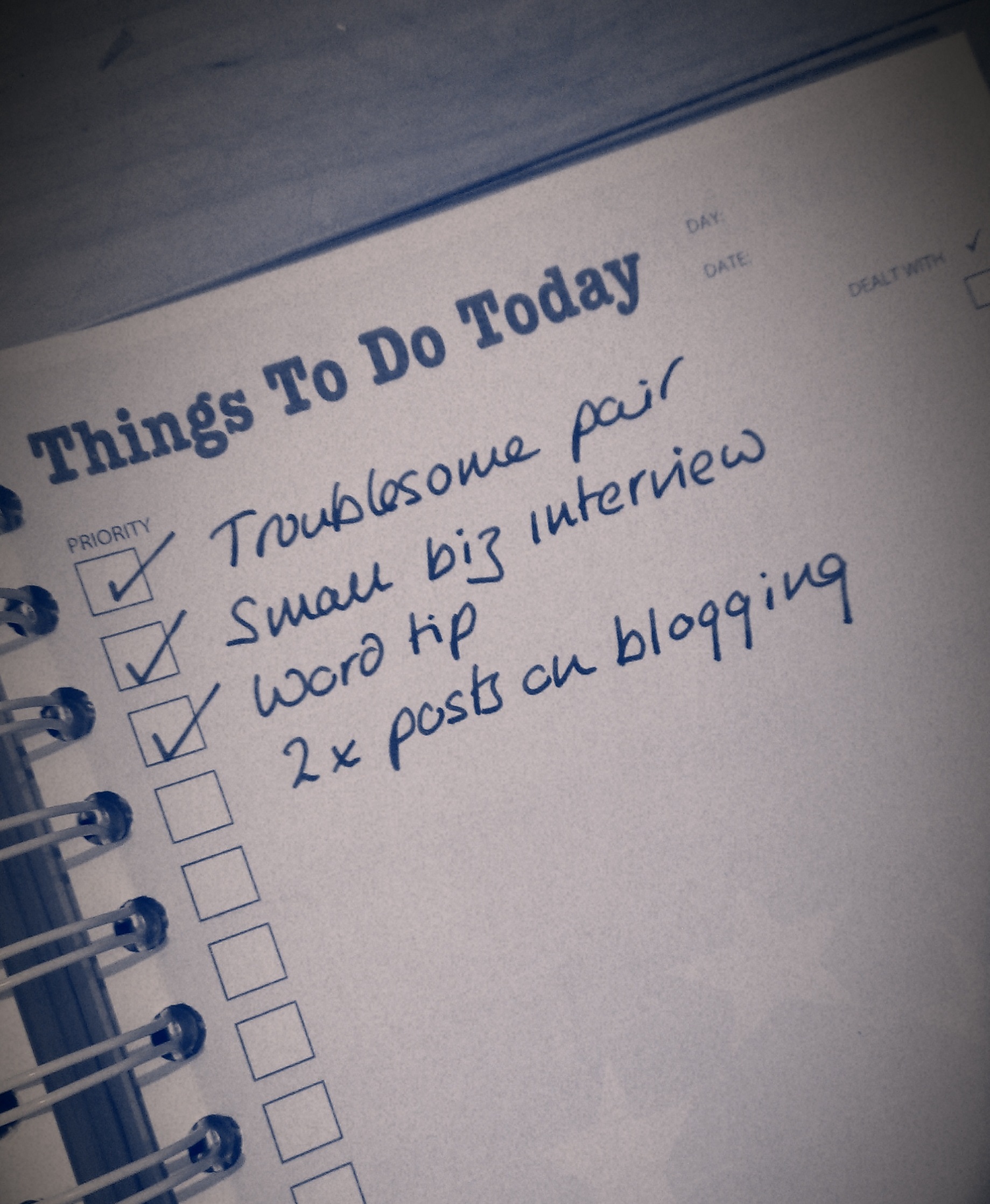
I choose to vary things and give myself a structure by running series in different topics every week. I tend to publish a short Troublesome Pairs post about a pair of easily confused words or at present an article on blogging on a Monday, a Word tip or business post on a Wednesday, and I always run a Saturday Business Chat or Chat Update each Saturday. I don’t stick to this slavishly – this post is coming out on a Tuesday to avoid the bank holiday, but it helps me to structure things and means that there’s something for everyone every week (I hope).

You don’t have to just publish text pieces, either. I’m sticking to text for the moment, but you can include video and audio pieces as well.

This article by Joanna Penn of The Creative Penn has really good advice about when she schedules her text, audio and video content. Her blog is really popular, with loads of comments and great search engine optimisation, and if you’re planning on using different media, this would be a good plan to follow.

Including guest posts on your blog

I’ve talked about this a bit already in my article on Reciprocity in Social Media, but hosting guest posts (and having them on other people’s blogs, too) is a great way to spark up interest in your readers and get reciprocal links and readers. I’m going to write more about the etiquette of guest blogging soon. But again, it varies things a bit. I wouldn’t personally have a guest post more than once every couple of weeks.

How do I remember my ideas for blog posts?

If you’re anything like me, you’ll have ideas and inspirations for blog posts at the oddest moments. If I’m anywhere near my desk and PC, I pop into my WordPress platform and create a Draft blog post, sometimes with just a title, sometimes with a few jotted notes. If I’m learning something new (like turning footnotes into endnotes, just today), I’ll take screenshots as I go along, and save them ready to insert into a post on the subject. If I spot a picture I want to take or have a document with a feature I want to use, I take a photo and email it to myself or save the document in the relative folder.

If I’m out and about, I use the note app on my phone to make a quite note of what I want to write about, or, if I’m feeling brave, I go into the WordPress app and create a draft from there!

How do I organise my images for my blog posts?

Because many of my blog posts are very screen shot based, and I always include some kind of image in my posts (looks good when sharing, attracts readers, etc.), I have a folder in my Windows Explorer called Blog posts. This has sub-folders for all of the blog posts I write, or plan on writing, so I can pop screen prints and pics into the appropriate folder and know they’ll be there for later. I have a set of generic pictures in the Blog posts folder, too, that I can use as images at the top of posts. I prefer to use my own images to avoid copyright issues.

How do I get down to writing my blog?

Here’s my secret: blogging SESSIONS.

You do not have to write your blog posts on the day you publish them! You can write them in advance, save them up, and publish in advance!

I’ve always got some draft posts on the go – either because I’ve had ideas (see above) and not yet written them up, or I’m part way through a series and I’ve planned the whole thing out. So when I can see at least a 90 minute slot in my schedule, I’ll schedule in time to write blog posts.

I’ll then bash through as many as I can, using my draft posts for inspiration and possibly already having pictures ready to go, either saved or inserted into the posts. Then I just need to write the text. In a good session I can get at least a week’s worth of posts ready in one go.

I’m used to having to write because that’s some of what I do in my job. If you have to wait for inspiration to strike before you write posts … just make sure that inspiration has plenty of room to keep going! Anyway, it’s surprising what you can produce when you sit down and tell yourself that you have 90 minutes to generate a load of blog posts!

Scheduling publication of blog posts

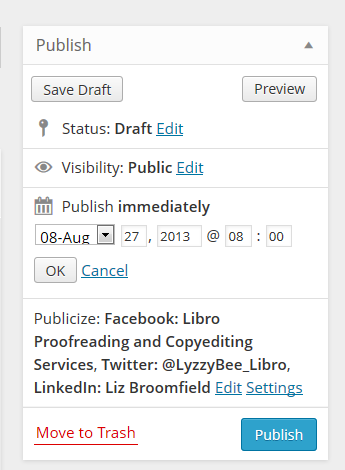
schedulingI would imagine that all blogging platforms have a scheduling feature. Here in WordPress, I can edit the Publish Immediately field to the right of my writing pane, and choose a date and time to publish the post (I also automatically post a link to Twitter, Facebook and LinkedIn. This means I can schedule a post to publish when I’m going to be away from my desk and the post will still be publicised).

If you don’t know how to schedule blog posts on the platform you’re using, Google your platform name plus something like “schedule blog posts” and you should be able to find instructions.

So, when I do a big writing session, I write the posts I want to write, then schedule them all in for the appropriate days. I can view just the posts I’ve scheduled to make sure there aren’t any clashes, then I can get on with work or even go on holiday, knowing that my blog will be publishing when I’m away.

How do I make myself keep on blogging?

If you get stuck and don’t post for a while, or don’t feel like posting, don’t panic! Here are some things you can consider doing:

  • Have a think about why you’re blogging and whether you do actually want to continue (try reading my article on 10 reasons not to blog or the one on 10 reasons to write a blog!)
  • Have a little brainstorm and think of some ideas for blog posts – just jot them down and write them up later
  • Get into a writing routine that suits you – whether that’s posting once a day or having a weekly blogging afternoon
  • Sign up for one of the various schemes that suggests something to post, or ask your friends or readers to make suggestions about what to write about
  • Consider creating some themes – it’s easier to come up with an idea for a Word tips post than an idea for “a post”
  • Don’t beat yourself up. Look at other people’s posts for inspiration. Ask for some guest bloggers. Review something you use in your work life. Write about something personal

————–

This article has talked about how often to blog, how to organise your blogging, how to schedule posts and what to do if you get stuck. I’d love to hear your thoughts on these topics – do post a comment, and if you’ve enjoyed this post, please share it using the buttons below.

Related posts:

10 reasons to start a blog – why you should do it now!

10 reasons NOT to write a blog – and why you should stop and think, at least!

Reciprocity and Social Media – how to negotiate social media kindly and politely

Top 10 blogging sins – avoid these if you can!

 
20 Comments

Posted by on August 27, 2013 in Blogging, Business, PowerPoint, Social media, Writing


Tags: , , , , ,

Top 10 blogging sins

pens and ink bottleI’ve been talking about why and why not to blog recently. Once you’ve committed to your blog, it can be a bit of a minefield. Here are the top ten blogging sins that I see over and over again, or hear other people complaining about. No one can be expected to know everything straight away, and we’ve probably all made at least one of these mistakes, so hopefully I’ll help you to avoid the big, bad ones with this list.

1. Not having an RSS feed

File:Feed-icon.svg RSS is a way to allow blog reader software to collect your content whenever it’s  updated and send it on to any of their readers who subscribe to your blog This Wikipedia article explains it all and examples of RSS readers include Feedly.

If you look at the top of this blog page, you will see that I have an RSS feed logo in the top right-hand corner, and a link in the right-hand menu bar, and I also offer a link to subscribe by email. All blogging software will have something in their settings that allows you to add this. If you don’t add this link, it makes it that bit harder for people who want to subscribe to your blog to do so (they can usually put the URL in their reader software, but are they going to do that extra process? Not always). Not having a button to use to do it quickly and easily can give the impression that you’re not interested in people reading your blog. That’s probably not true. But I’ve seen people get really cross about this and say that they’re not going to look at a person’s blog any more if they don’t have this. I know … but if one person’s saying it, how many are thinking it?

If you get stuck trying to add this button to your blog, the easiest way to find out how, is to Google your blogging software’s name and “RSS feed button”. You should find a YouTube video or set of instructions telling you how to do it.

2. Not updating your blog

If you set up a blog and you then don’t update it, it won’t help you to get more readers or to promote whatever it is you’re promoting. Google and the other search engines thrive on updated, fresh content. If you don’t update your blog regularly, it will fall further and further down the search rankings and no one will be able to find it. If you want to write a blog, commit to updating it regularly.

I’ll be publishing a post about scheduling and keeping active with your blog posts soon, so watch this space!

3. Stealing content from other people

It’s fine to “reblog” other people’s blog posts onto your own blog (where a snippet of the post appears on your page, with a link to the real thing). It’s fine to link to other people’s blog posts and tell other people about them. It’s even fine to be inspired by another person’s blog or content – one of my friends has started a questionnaire series a little like my Small Business Chat one but with an emphasis on marketing techniques: similar idea, different content, that’s fine.

It’s not fine to lift content wholesale from another person’s blog or website. If you quote large amounts of text written by someone else, it’s just the same as if you were using that in an article or essay – you need to reference where it came from and acknowledge the author. It’s fine to talk about newspaper articles or reports in your blog and react to them, not fine to quote them verbatim, or quote people they have quoted, and not give the original source.

Never be tempted to take someone else’s content for your blog post. At best, you won’t get picked up by the search engines anyway (see below). At worst, you’ll find yourself slapped with a lawsuit for plagiarism! And it’s just not right.

4. Reusing content in exactly the same form

Say you’ve had a guest post on someone else’s blog and you’re really pleased with how it’s turned out – so much so that you want to share it. So you post it in its entirety on your blog, too. Not a good idea.

All of the search engines, like Google, like to offer their users varied content. So if the same content appears in two places, both places won’t come up in search results. Effectively, one of them will be invisible to search engines, therefore invisible to people searching for keywords that might lead them to that content.

To look at it from a different viewpoint, if you’ve published information in a guest post, the owner of the blog you’re guesting on will want to be posting up original content, not things that can be found elsewhere. Some people actually specify that the content must be original in their guidelines for guest posters. See more about this in a week or so when I blog about guest posts.

How do you deal with this? Publish a snippet of the post on your blog, with a link to that post. Put some of your own text around it, then the search engines will find your post and your guest post, both of you will get found and viewed, and no one’s copied anything. There are clever ways to deal with all of this in the coding behind your blog, but I’m guessing that most of us aren’t the kind to deal with that level of complication – I’m certainly not!

5. Being rude or negative

I feel like a  bit of a hypocrite writing this, because obviously this post is a little bit negative. But I’m also genuinely trying to help people to avoid making common mistakes! In the same way, I tried to make sure that my 10 reasons not to write a blog article talked about reasons for reviewing your blogging and content and making a positive decision. Whining and moaning and relentless negativity won’t make your readers like you any more than they would like you in real life.

Being rude can get you views in the short term. But it’s like those restaurants that people go to only because the waiters are desperately unfriendly. Fine for a laugh: but will they go back regularly for birthdays and anniversaries? Probably not. Even ranty blogs about politics or issues have to be constructive as well as rude!

If you want to have a rant or talk about a mistake you’ve made, try to vary and space out these posts, and make them as constructive as you can. We can all get a good blog post out of a bad experience, but make sure that you and your readers come away having learned something. I’m going to post soon about managing your social media brand, and this comes very strongly into that, too.

6. Posting inappropriate content

I don’t just mean lurid or dirty pictures here. If you want to share information about your management courses, then blogging about your exercise classes won’t get you the audience you want to buy your courses, unless you’re doing some very clever keyword placement and making the articles valuable to both groups of readers.

I have to admit to having a laugh at funny spelling mistakes as much as the next person. However, I’m careful not to mock or talk about or post pictures on this blog, because a lot of the people I work with as an editor are unsure about their English and using it as a second, third, fourth language … and would be mortified if they thought people were laughing at them (I don’t laugh at their English: I know I couldn’t do half as well as my overseas clients if I was writing in my second language. Bong joor toot le world).

7. Not giving your guest posters what they need

If someone takes the time to write a guest blog post for you to to give you more, fresh content, bring their fans over to your website, give you a marketing opportunity, etc., etc., then you need to do certain things to make the experience a good one on all sides. Chief among these, and something I see people having issues with all the time, is making sure that you provide live links back to their website and whatever it is they’re promoting, be it another website, their book on Amazon, or whatever. A live link is one that your readers can click on and be taken to their page, like this one which takes you to a post I wrote telling you how to add links to your blog posts!

Formatting guest posts that have come through in an email or an attachment can be tricky, full stop. I recommend pasting the text into a Notepad file on your computer, then pasting it from there into your blog post. Lots more on this in an upcoming article. But please make your guest blogger’s links live so that your readers can visit them online!

8. Not letting people respond to your posts

I like responding to blog posts. We all like responding to blog posts. We like to feel it’s a two-way conversation when we read something online, don’t we. But I still come across blogs every day that either don’t allow any comments at all, or make the commenting process so complex that people give up.

I have to say that the blogging software can be a culprit here. I can never seem to reply to Blogger posts, and WordPress itself can give the impression that you have to sign up to a WordPress account in order to comment on one of its blogs (you really don’t, you just need to add your name and email address).

Enable comments, even if you moderate and check all of them for spam (most blogging platforms allow you to set the level of moderation, for example, I hand-moderate the first post by anyone, and am alerted to all new comments, so I can check they’re not spammy or inappropriate). And listen to your readers – if you’re getting complaints about how hard it is to reply to a post, have a look at your settings and see if you can make it easier. One of my blogging friends has a note whenever you go to comment with an email address to use if the process won’t work – very helpful!

9. Not responding to comments

Allied to the above, if people take the time to reply to your blog, it’s only polite to take a moment to respond to them. Some people who get a lot of comments will do a general reply mentioning all of the previous commenters with a sentence addressed to them, and that’s of course fine. But I get a bit frustrated if I comment thoughtfully on a blog post and the author never responds. You don’t have to do it immediately, but I try to do it within 24 hours, a couple of days at most.

Conversations on your blog can be one of the most interesting things about blogging – so get out there and engage with your readers!

10. Only advertising, never helping

Yes, I and other people have told you again and again that having a blog will help your business. That’s true. But just blaring out adverts to your readers won’t make them keep coming back. Imagine two blogs, both about plumbing:

  • One lists the different areas of plumbing the plumber can do, and has carefully inserted keywords to attract the search engines
  • One talks about the jobs the plumber has done this week, including how she solved a particularly tricky question. She sometimes posts a question and answer about a common type of issue, like changing the washer on a tap

Which blog will you go to once, to find a plumber? Which one will you bookmark and read, share and tell other people about? Which one will actually bring the plumber more business in the long term?

I give away quite a lot of free advice on my blog, but just because I tell people how to set up a table of contents doesn’t mean that none of my clients ever ask me to do that now. On the contrary, seeing my expert advice, they trust that I can sort it out for them!

———–

That’s my personal top 10 list of blogging sins. Would you add any to that? Are any of those NOT sins in your book? I’d love to know what you think, and whether you’re enjoying this new series of articles all about blogging!

Related posts:

Top 10 reasons to write a blog

Top 10 reasons not to write a blog

Scheduling blog posts and keeping going

You can find a growing set of articles on blogging and social media in the resource guide. Do click on the share buttons below or comment if you found this article interesting or useful!

 
35 Comments

Posted by on August 19, 2013 in Blogging, Business, New skills, Writing


Tags: , , , , , , ,

10 reasons not to write a blog

pens and ink bottleWe’ve already looked at reasons to write a blog. But what are the reasons for not writing a blog, or for taking an informed decision to stop writing one, even if you started?

Note that this, like the last post, is mainly targeted at business bloggers. However, if you have a blog that you want to gain an audience and maybe earn some money from in whatever way, these points will interest you, too.

So, what are the reasons NOT to write a blog, or to give up?

1. You are only doing it because someone told you that you should

I go on about blogging to people ALL THE TIME. I even did it when I was buying vegan food from a stall in Greenwich at the weekend. But don’t just do it because someone tells you to. OK, it’s worth looking at the reasons why having a blog is good (see my previous post) and making an informed decision, but if someone just tells you, “start writing a blog” and you do, it’s not so likely that the habit will stick and it will be useful and fun.

2. You actually dislike doing it

So, you’ve started blogging and you’ve got into a routine, and then you realise that you’re just dreading writing that next post. I’m going to talk in another post about slumps and maintaining momentum (if I forget to link to it here, look in the index). But what I’m talking about here is hating it all the time, disliking putting fingers to keyboard and putting the thing together, resenting the time it takes up. If you don’t enjoy doing it

  • get someone else in your organisation to do it
  • pay someone else to do it
  • stop doing it entirely

3. You haven’t got time to post regularly

Although if you have a personal blog and you’re not worried about statistics and search engines, you can get away with blogging very irregularly, if you are doing it so as to appear in search results and get more exposure for your business, you really do need to post regularly. I find that, for me, three posts a week are the sweet spot. When I publish three posts a week, I get the most visits to the blog. It’s worth noting that not all of those are long posts (my Troublesome Pairs certainly are not), but it’s regularly updated content, full of relevant keywords and useful to different groups of readers.

Once a week is, I think, the minimum you can get away with and still gain value from the process. If you don’t have the time to do this, again, consider outsourcing, or consider not doing it at all.

4. You’re not organised to post regularly

Following on from the time issue, you do need to be organised enough to generate new content fairly regularly. Again, I’m going to talk about this in detail in another article, but you do need to be able to plan what you’re going to talk about, gather photographs and illustrations for the posts, and organise yourself to sit down and write them, and then publicise the posts and deal with any comments that might ensue. If you fly by the seat of your pants and do everything as and when, and find organisation in general to be a tricky thing, blogging for business might not be for you.

5. You’re only in it to make money

You do read loads of posts about making money from your blog. And you can make money from your blog, for example by …

  • Allowing adverts to appear on your blog (but be very careful with this and make sure you only allow adverts relevant to your readers or this will be a big turn-off. The best way to do this is through carefully selected product placement that matches with your content and readership)
  • Hosting affiliate links on your blog so that readers can click a button or picture on your blog to be taken through to buy a product, while you get a percentage of all sales (this is notoriously difficult to make money from)
  • Selling your blog to a publisher to make into a book (but not many people make money writing and selling books, and there’s more to a blog-to-book than just bunging all your blog posts in one place – I have direct experience of this)

It’s not common to make money directly from your blog. It’s hard to say how many page views you need per month to do well out of advertising, but recommendations start at 10,000 unique visitors per month. Not many publishers convert blogs into books outside the big ones we’ve all heard about. What my blog does is let people know about me who then become customers … but that’s using your blog to build your business, not to make money per se. If you’ve read an article or been to a seminar about easy ways to make money online, be VERY careful what you sign up for and get into.

6. You are not interested in engaging with your readers

People who read blogs like to comment on them. People who comment on blogs like to see the blogger reply to these comments. I know that personally I’ve stopped reading and commenting on blogs when I’m never responded to, especially if I can see that the blogger never responds to any comments. This is actually one of my Top 10 Blogging Sins, too.

If you’re not actually interested in having a conversation, in engaging with your readers, in replying to their comments, and you just find it a chore; if you just want to broadcast and don’t want to engage in two-way conversation, I don’t personally think that blogging is for you. You will lose readers as fast as you gain them, and it will never be personally or professionally fulfilling for you.

7. You are not interested in engaging with other bloggers

This is similar to point 6, but we’re talking here about other people in the same line of business as you (whether that business be small business support, engineering or book reviewing). If you see other people blogging on a similar topic to you as rivals, and you want to keep apart from the, set yourself apart and distance yourself, then you may not find blogging to be useful. You probably can’t “beat” the most successful blogger in your industry, and if you don’t want to engage with them, share guest blog spots, link to their material and comment on each other’s blogs, then it might be wise to disengage with the process.

8. You haven’t got anything interesting to say

If you’re boring yourself with your blog content, you will probably be boring your readers. If you’re constantly scratching around for topics to write about, or covering the same ground time and again, consider scrapping that series, if you have various topics you cover on your blog, or the whole thing. I used to post up an update about what I’d been doing in the previous month at the beginning of each month. Although some readers said they enjoyed it, it was becoming very repetitive and boring to write. So I stopped doing it and added something else in that slot on the blog.

Note: what you think isn’t interesting might be to other people – it’s always worth doing some market research. When I meet people like locksmiths, carpenters and electricians, I always tell them they should write a blog about their daily lives and the jobs they do (keeping their clients’ confidentiality, of course) as many of us would find that sort of thing really interesting. I’m talking about when you’re struggling for ideas and you’re maybe not getting any positive feedback or a growing readership, and your blog becomes bogged down and repetitive. Have a rethink or ditch the blog!

9. Your blog isn’t relevant to your target market

If you’re blogging for business, your blog posts need to be relevant to your target market(s). For example, I blog about …

  • Word tips and hints – because most of my clients and target market use Word
  • Language tips and hints – because my business lies in improving written language
  • Business tips and hints – because I’ve written a book about business and I am passionate about engaging with other businesses
  • Blogging tips and hints – because I get asked about this a lot and because of the business reason above and because I noticed that I get searches coming through to my blog on that topic already, so people want to know about it

If you sell garages but blog about hairstyles, the people who read your blog are not likely to have a huge overlap with the people who are going to buy your services. If you have a book review blog and want to engage with mystery authors but only review romance, that’s not going to engage your audience. There needs to be a big overlap between what you talk about on your blog and the people you want to attract to read it. Even “the general public” has niches – people who like to read about fashion, or the work of an ambulance driver, or about low cholesterol eating.

10. Nobody is reading your blog, even after 6, 12, 18 months

It takes time to build a blog and its audience. Both of mine have grown over the months, pretty gradually. My book review blog wasn’t growing its audience much for a while, and I did wonder whether to cancel it. I actually published a post asking if people found it interesting to see whether anyone was reading it! What I found out was that many people were reading it on blog aggregators, which don’t show up on my statistics. So it was worth doing, but I also took steps to add value, beefing up my reviews, adding some more web pages to the blog, and importing a whole wodge of old reviews from another blogging service I used to use. My traffic improved and the blog was saved. But if you do that, and you change things and no one’s looking, maybe it’s time to consider other ways to market and raise awareness.

———–

These are not necessarily ten reasons to stop blogging altogether. They certainly are reasons to stop, look at what you’re doing, reconsider things and maybe tweak your posts, style, content or other aspects.

Have you stopped writing a blog? Why?

Relevant posts:

10 Reasons to Write a Blog

Reciprocity and social media

Top 10 blogging sins

Scheduling blog posts and keeping going

Coming soon …

WordPress blogging 101


19 Comments

Posted by on August 12, 2013 in Blogging, Business, Writing


Tags: , , , , , ,

10 reasons to write a blog

pens and ink bottleWhy should you write a blog? Why should you start writing a blog, and why should you continue writing a blog? Here are my top reasons why. I’m really looking at business blogging here, but the first one applies to everyone!

1. Because you want to

This reason covers both personal bloggers and business bloggers. You should start writing, and continue writing, a blog, because you want to. Forcing yourself to do something you don’t want to do is no fun, and you should enjoy the time you spend designing and honing your blog and writing those entries. Whether you want to share holiday pictures or reviews of restaurants or share your professional expertise, do it because you want to.

2. You’ve got something interesting to talk about

There are so many interesting things to talk about. I often meet people running businesses where I have no idea of the nitty gritty of their everyday lives. How does a carpenter learn his trade? What does a freelance solicitor do, day to day? How many projects does a crafter have on the go at any one time, and how does a mobile hairdresser help their clients to choose a new hairstyle?

I have found that my posts on building my business struck a chord and interested many people. A series of posts that I started really for myself about Word hints and tips has turned into a popular series. If you run a business, think about some of the behind the scenes things, some of the aspects of your knowledge that people might be interested to know about (don’t worry about giving away your secrets – I might publish articles on Word headings and tables of contents, but I still get asked to do them by my clients!).

Of course, it goes without saying that you shouldn’t share personal details about your clients. But I think it’s fine to talk about them if they’re heavily disguised – or ask if they’d like to have a case study published with links back to their website!

3. It will set you up as an expert in your field

This is invaluable when you’re building your reputation and your business. Don’t see it as giving away information for free, think of it as sharing your expertise with the world. Once you start appearing in people’s Google searches when they’re trying to resolve a problem, they’ll be more likely to come to you for help when they need your services. If you can offer a back catalogue of useful, targeted advice on your blog when you’re negotiating with a new prospect, they will see that you can walk the walk as well as talk the talk.

This may not lead to direct sales – but I’ve often seen my blog posts shared among other people and organisations in my field. Keep your name in front of them as well as prospects, and you never know where the next recommendation and job might come from!

4. It will attract people to your site

This links in to the above point. The more content you have on your website which is packed full of keywords and language to do with your business, the more findable it is in the search engines. The more people find information that is useful to them and engages with them, the more time they will spend on your website. The more time people spend on your website, or the more repeat visits they make, or the fact that they’ve signed up for your RSS feed and get regular updates into the RSS* reader or email inbox, the more likely they are to remember your name and your products or services when they or a contact need them.

More website visitors does not directly lead to more sales in a quantifiable relationship. But as long as you do show genuine expertise and a willingness to engage with your audience, you will build your exposure, get more visitors to your site, and this will help you to become better known and gain more sales.

5. It will build your platform

Your platform is the group of people who are engaged with you in whatever way – through personal connections, social media such as Twitter, Facebook and LinkedIn, through your email newsletter, through your blog – and who can then be “leveraged” (horrible word) when you want to get the word out about something new that you’re offering.

For example, if you’re self-publishing a book, it’s vital to have built a circle of connections before it comes out, so you have a guaranteed audience of at least a few people. If you start offering a new service, for example when I added transcription services to my proofreading and editing offering, it’s useful to have people who you can tell, and who will then hopefully spread the word.

Having a blog builds your platform because it engages people’s interest. It brings them to your website, it gets them reading your content regularly, and it encourages them to sign up for your RSS feed or to receive your posts by email as they’re published. Once you have subscribers, you can get information out to that guaranteed audience when you need to. That’s much harder if you only have a static website for them to visit.

6. Regularly updated content will boost your position in search engine search results

It’s fairly common knowledge that the search engines (Google, Yahoo, etc.) like content that is regularly updated. This means that their complex and little-known (and ever-changing) algorithms will promote websites that are frequently updated above those that are static. Updating your blog once a week or more gives all of the content on your website a better change of being found by potential contacts and clients, because it gives it a better chance of appearing in a higher position in the search results.

7. So will information crammed full of the keywords that are important in your industry

Keywords are vital for search engines, too. If you just write a set of keywords over and over again, the chances are the the search engines will pick up that it’s not real content, and will not show it to searchers. But if you are writing well-crafted copy which includes a good sprinkling of keywords among the text, you will find yourself doing better in the search engine results.

I write natural text in my blog posts that is (hopefully) interesting and gives something to the reader – but I am also careful to include relevant keywords at a regular rate in the blog posts I write, which does improve my search engine optimisation no end (it’s also good to get them into sub-headings and the blog title itself). SEO is a fairly dark art, but the more keywords you can sensibly insert into your content, the more the search engines will be happy to find and display your content to their users.

8. You want to engage with your readers / prospects / clients

Blogs are not a one-way conversation. Once your audience has built a bit, you will get comments, shares, etc. on your blog posts, and on the places where you promote them (I will get almost as many comments on my Facebook post advertising a new blog post as I will on the post itself).

One of the golden rules of blogging is that you need to respond to your comments. Some bloggers are very good at this, some are not. I’m sure everyone’s commented excitedly on a blog post, only to find their comment is effectively “ignored”, with no reply from the writer. I think that’s quite rude, and I am likely to engage a lot less – or stop engaging – with bloggers who have a habit of not replying. Obviously, we all get times when we’re away or too busy to reply that moment, but most blogging platforms alert users to replies, and you want to keep that feature switched on and engage with your audience, otherwise they will stop coming back.

And those commenters might just be your friend Ali or your ex-colleague Steph, but every person who engages with your blog is a potential client or recommender.

9. You want to engage with other bloggers

There’s nothing like blogging for building communities of like-minded people. Once you’re blogging in a niche area, whether it be fiction writing, editing, ironing services or Sage, people who are interested in the same sorts of areas will start to follow your blog, comment on your posts and share what you’re saying.

This is useful for a couple of reasons: firstly, it’s always good to have colleagues. I’ve written elsewhere about how I treat other people in the same line of business as me as colleagues rather than competitors. It’s always good to have people to recommend prospects on too if you’re fully booked and can’t take them on, and to have people to send you referrals. Sometimes you need to have a moan or a chat or ask advice, and you might want to do this privately rather than publicly, which is where your network of colleagues can come in very handy. You can also read what they’re saying, get new ideas, keep up to date, and slot into networks that offer mutually useful posts, services and applications.

Secondly, this may give you the opportunity to guest post on other people’s blogs, and vice versa. We’ll talk about sharing your content in other places next. But just to give you some examples, if I hadn’t started blogging, I wouldn’t have got to know many of the editors I now know who link to my blog articles, share them on social media, and act as a sounding-board when I need to talk things through. That’s worth every hour of effort I put into my blog, to be honest!

10. You want to share your content in other places on the web

The good thing about your URLs and name appearing in places on the web that are not connected directly with you, your website and social media is, you guessed it: it boosts your position in search engine results. The more times your URL appears on a website that’s on a solid standing itself and has followers and people talking about it, the more the search engines will consider your website to be appropriate to present in their search results listings.

These links to your content on other people’s pages are called backlinks. You can secure these in a number of ways:

  • Comment on someone else’s blog post, including your URL
  • Contribute when someone asks for examples, experiences or feedback, again making sure that your URL is included
  • Write a guest blog post for someone – ensuring that the biography at the end includes all of your links

Now, you’ll know if you’ve ever allowed comments on a website or blog that a lot of companies do this seemingly randomly, just to get their URL into other people’s comments, and now you know why they do it. So do make sure that the content and comments you share are appropriate to the topic of the post on which you’re commenting! But this is a great way to increase traffic to your website and blog.

So, there are 10 top reasons for writing a blog. Do you have any others? Why did you start yours? Do also read … 10 top reasons NOT to write a blog!

File:Feed-icon.svg *What’s this RSS stuff I keep talking about? RSS feeds are file formats that allow your regularly updated content to be collected and sent on to readers, usually involving them reading all of the blogs etc that interest them using an RSS reader that accumulates them all in one place. This Wikipedia article explains it all and examples of RSS readers include Feedly. RSS feeds can be found on blogs around the symbol at the beginning of this explanation.

Related topics:

10 top reasons NOT to write a blog

Reciprocity and social media

Top 10 blogging sins

Scheduling blog posts and keeping going

 
39 Comments

Posted by on August 9, 2013 in Blogging, Business, New skills, Writing


Tags: , , , , , , ,

Keep an eye on your stats

Do you ever look at your blog or website statistics? If you don’t, I’m going to show you why you should. If you do, do you get all you can out of them? Do you look at them actively or passively?

Note: this post uses examples from the WordPress.com statistics pages, because that’s the blogging/website platform I use. But all of the standard blogging sites, plus Google Analytics, Statcounter and other analysis tools will offer you similar information, with similar headings.

Why should I look at my statistics?

Looking at your statistics can help you tailor your blog to match what your readers want, and will also alert you to who is talking about you and where they are doing so. You can also measure the success of your attempts to build your audience through posting on social media and other blogs and sites. Here are some of the things you can find out …

  • Which posts or pages are people looking at a lot … and which ones are they ignoring?
  • Is there a kind of post that people are particularly interested in?
  • When do people read your posts?
  • How do people find you (social media, web searches … )
  • What search terms do they use?
  • Where do your readers go next – what links do they click?
  • Are people finding your site via other sites and blogs?

How do I find and view my blog / website statistics?

Usually you’ll have some kind of button or menu option called Statistics or Analytics. On WordPress, you will find a Stats option when you go into your blog, or you can click on the bar chart at the top of the screen. Once you’ve found them, you’ll find a screen something like this:

Now we’ve located our stats, let’s look in more detail about what they can tell us.

How do I tell how many times my blog posts have been viewed?

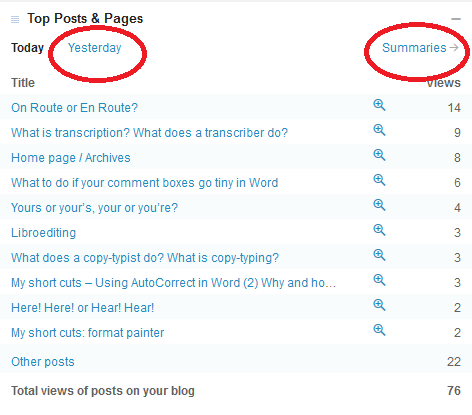
One of the important ones to look at is your most popular pages. We’re looking at one day here, and I can see that my blog post on on route or en route is, yet again, the most popular.

But I can also see what other posts and pages have been popular (and if I click on yesterday or summaries I can see previous days’ stats, while if I click on the magnifying glass next to the number, I can see all the views for that post). This is useful, as I can tell how I’m doing in the search engines, if it’s an older post, or whether my alerts are doing well, if it’s today’s post going up the ratings.

How do I tell how people have found my blog or website?

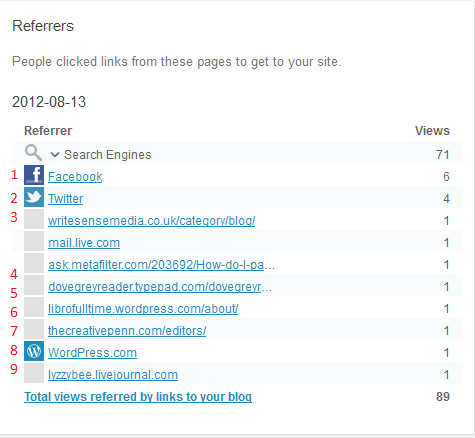
It’s very useful to know how people are finding your blog. You should have a section of statistics called something like referrers or referrals. Here are mine for a particular day.

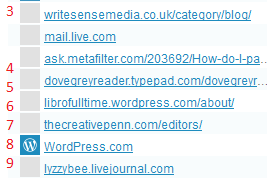
You can glean all sorts of information from this. At the top you can see I get most of my hits from search engines (over 70 of that day’s hits so far), then Facebook (1) and Twitter (2), then a variety of websites and blogs that I’ll go through in a minute. This has changed – when you’re new to blogging, you’ll get most of your hits from Facebook and Twitter and other social media, as your friends will be looking at your posts and you will be promoting them on social media. As your blog gets indexed on the search engines, results will start showing up from them.

Looking at the pages from which your readers have come can be SO useful. Here’s what I can learn from this one:

3 comes from one of the people I’ve featured on my blog blogging about my feature herself – a great link-back that Google will like indexing. 4 is from an answer I gave (with a link) on an expert site. 5 is from a comment I made on someone’s blog. 6 is from my other blog. 7 is from a list of editors a client added to her website (very valuable). 8 is from WordPress itself, probably someone surfing through tags, and 9 is from my old LiveJournal blog, where I post links to this blog/website.

All good stuff, and I can say thank you to people who have sent readers my way, or even find out when they’ve done so (all these links can be clicked, so I can see exactly what people have said). Now, what about those search engines?

How can I find out what search terms people have used to find my site?

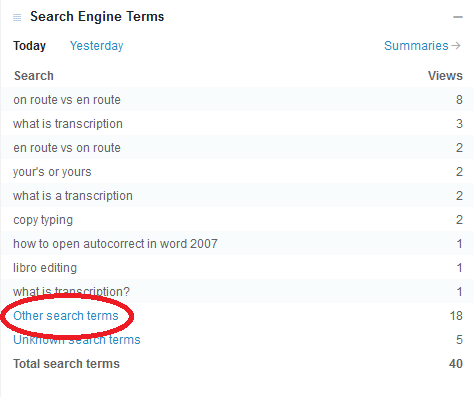
You should have a heading like Search Terms somewhere on your stats page. This offers a world of exciting information.

Clicking on Other search terms will give you the rest of the terms people have searched on – that they will only have tried once (or only one person has tried).

For a start, you can see exactly what people are searching for. It might be useful to change the wording on your blog posts to get further up the search results for a popular term. It’s also worth searching for these terms yourself and seeing where on the Google results page they appear. Another useful point is it can give you ideas for future blog posts. I noticed that someone had found me while searching for Autocorrect, which I had mentioned in a blog post. So then I wrote a post on Autocorrect itself, which has been quite popular.

It can also be quite amusing to see what people search for. Someone once came through to my blog having searched for “persuasive piece on children believing in the tooth fairy” – I think they may have been disappointed (they found me because I mention the tooth fairy in an example sentence explaining a word definition).

How can I see where my blog readers are?

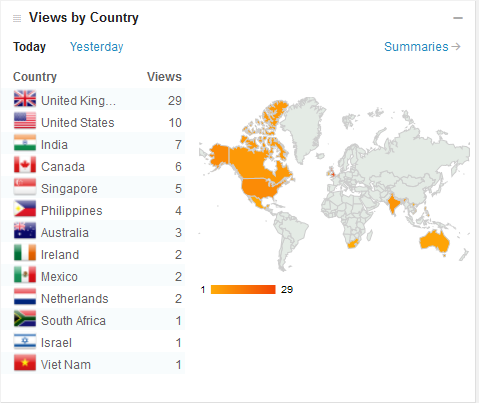
On WordPress you can see a rather nifty world map with the countries from which your visitors have come from highlighted.

This is more of a fun distraction than a useful tool, to be honest, but if you discover an anomaly, for example if you’re in the UK and you get a lot of visitors from Brazil, you could consider tailoring some of your blog posts for this market. I get a lot of international visitors, so I’m going to make sure I talk about my work with non-native speakers of English soon.

Is my website traffic increasing? What did I do to make that happen?

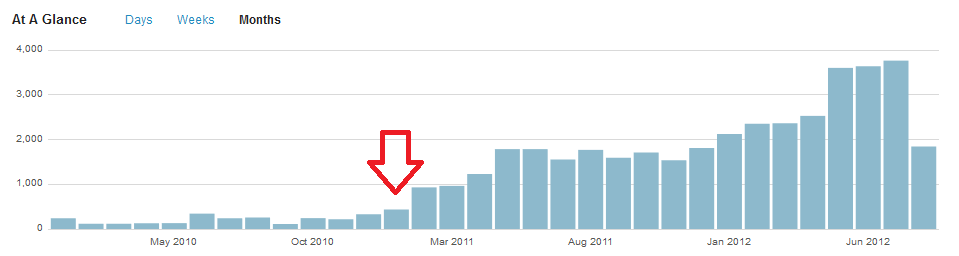
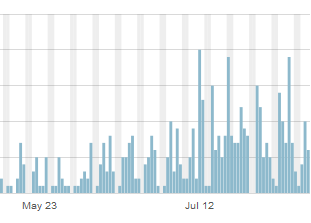
As well as today’s data, you can usually see a month or year’s worth, too. If I look at the traffic on my website and blog over time, I can see that it started increasing at the beginning of 2011.

What did I do at the time of that red arrow? Started writing this blog!

Do people read my blog more at the weekends?

Looking at your daily traffic will show peaks and troughs. If your blog is more popular at the weekends, it might be good to post new content then. If I drill down into one of my blog posts, the ever-popular “What do I do if my comment boxes go tiny in Word?”, I can see that it’s not read very often at the weekends.

This says to me that office workers are looking for and using this post, so I can make sure I post more for that kind of audience and save other new posts for the weekends.

Where do my website visitors go when they leave my site?

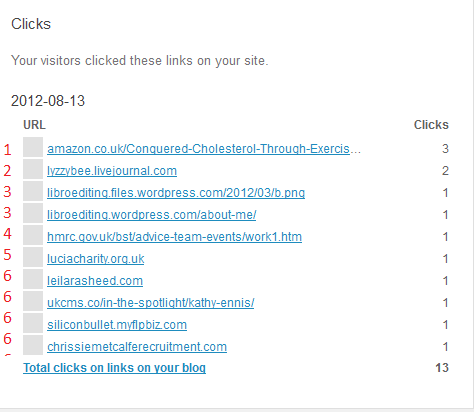
This is usually found under the heading Referrals, or maybe Click-throughs. Here’s a good representative one of mine from a few days ago:

Looking at clickthroughs from my website

You can see that the click-throughs fall into a few groups. 1 is my ebook, which I have linked to in a blog post and on the site itself. Hooray – my PR campaign is starting to work! 2 is a click to my Livejournal blog, linked to on my website. 3 is a pair of pages on this website, filed under my old url but I can see people are navigating around the site and sticking around. 4 and 5 are both links I have on blog posts; 5 is also on my references page. And all those marked 6 are websites of people I’ve featured on my blog, showing that I’m helping them get some traffic, too.

So there we go. Look at those statistics, whether you’re using WordPress or another host for your blog. And look at them actively: think about what they mean and how they can help you to find out how to tailor your blog to your audience and drive more traffic to your blog or website.

If you’ve enjoyed this post, please click on one of the share buttons below, or leave me a comment. Especially if you’ve had any amusing search terms recently!

 
5 Comments

Posted by on August 17, 2012 in Blogging, Business, New skills, Organisation, Writing


Tags: , , , ,