RSS

Sally Evans-Darby

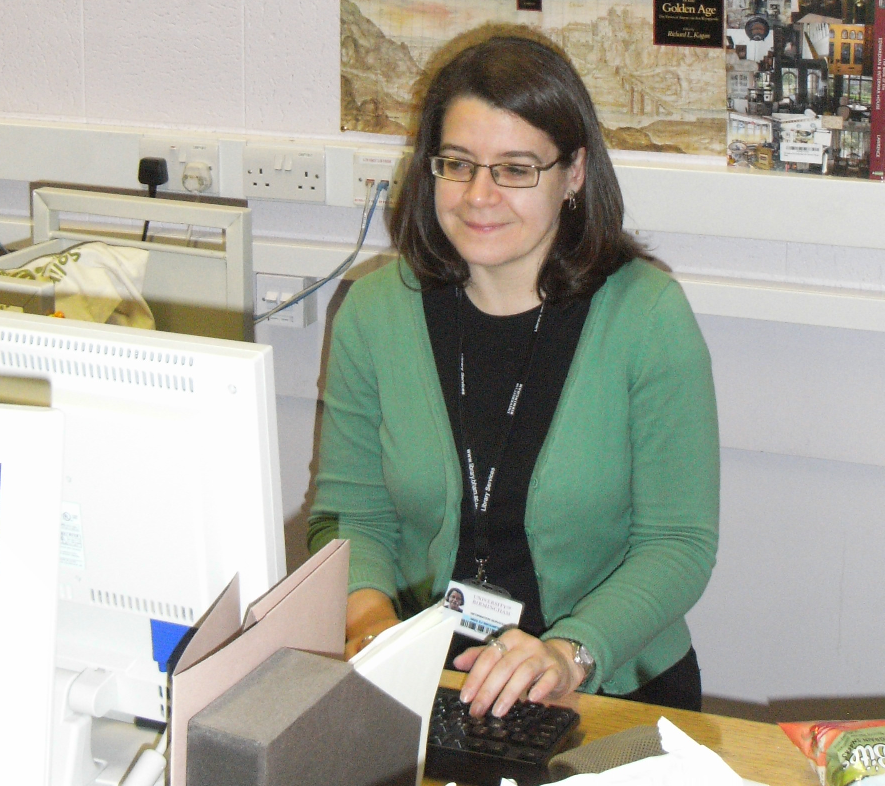
Welcome to Saturday Business chat. It’s time for another new chat today, and we’re meeting Sally Evans-Darby from Write Sense Media, a very new business, which has only been going for a few months. Sally’s had some very nice things to say about this interview series: when asked if it’s OK to contact her in a year for a catch up, she said, “Absolutely – and thanks so much for this one! Great way to encourage people to reflect on their own businesses, but more importantly, to build up an information database of lots of different people’s experiences. It’s always so useful to read about others’ experiences in something you are thinking of trying out” – which is great for me to hear.

I do meet people who read all of these interviews and find them useful – if you’re one of them, do post to let me know! In the meantime, let’s find out what Sally has learned so far …

What’s your business called? When did you set it up?

Write Sense Media – launched in February 2012. The name was a suggestion from my other half and it just stuck. Write Sense Media offers proofreading, editing and writing services.

What made you decide to set up your own business?

I’ve worked both in-house and freelance as a proofreader and writer, but mostly in-house (read: full-time, 9-5 day job with ‘living for the weekend’ mentality and everything else that lifestyle comes with!). I had thought about being purely freelance before but just didn’t think I would be able to sustain it as a living. Then came a brainwave in the early part of this year where I realised that working freelance was exactly what I needed to be doing. Looking at my life and my career as a whole, I just couldn’t see myself always working in an office for an employer. There would have to come a time where I did the work I love (i.e. editing, proofing, writing) but for myself and with my own values/strategy rather than the views of my employer. So I thought, why not now? Life is short; I decided to just go for it.

What made you decide to go into this particular business area?

I’ve always been into words, whether that’s word-play, crosswords, finding out new words, learning about language. Plus, I’ve always been a mean speller! In primary school I remember the class being asked to look at what the difference was between an old map listing a village as ‘Bishop’s Lydeard’ and a new one as ‘Bishops Lydeard’. I was the only one who noticed the missing apostrophe in the new version. I guess you could say I’ve always had a knack for looking at words, the way they’re presented, and picking them apart.

I love words. As a lot of logophiles will say, I’m terrible with numbers – figures don’t make sense to my brain, but letters do.

I should mention too that I hadn’t realised until this year that there was a genuine career path budding editors/proofreaders can take. The internet is a wonderful resource in this respect. Browsing other proofreaders’ websites, including yours, Liz, made me realise there was a whole world out there of people who read, edit and write for a living – and I wanted to be part of it.

Had you run your own business before?

No – the idea of ‘running my own business’ has always been something I’m slightly sceptical about. I don’t see myself as the particularly entrepreneurial type and I worried about practical things like sustaining this in the long-term. But making the leap and deciding to have my own business was completely the right thing for me. I just had to realise that.

How did you do it? Did you launch full-time, start off with a part-time or full-time job to keep you going … ?

I still had a full-time job when I started up Write Sense Media, because I knew it was going to take time to build things up: create and add content to a website, start a blog, start networking, start making contacts with clients. I see my business as a huge round object that started off stationary, and which took a lot of effort and work to get rolling. Once it was rolling, however, its own momentum keeps it rolling. It’s just that initial struggle into being that every business must go through that means you have to keep a job at first, unless you’ve had the foresight to build up a nest egg beforehand.

What do you wish someone had told you before you started?

That it would take some time but I just had to hang in there and things would work out.

What would you go back and tell your newly entrepreneurial self?

To devote every spare hour I could to Write Sense Media. That I was on the right track and I just had to keep going.

What do you wish you’d done differently?

I wish I’d been able to devote more time to it and of course it would have been a luxury to not have to work full time at the same time.

What are you glad you did?

I’m glad I made my website one of my top priorities, and that I went to my brother, Scott Darby (http://scottdarby.com/), for his invaluable help with this. I’m not the most technical person, so him helping me with this was essential! I’m proud of the result and feel it represents me and my business well, so I’m glad I took the time to make this happen.

What’s your top business tip?

Be yourself. Don’t try to be someone you’re not – whether you’re using your ‘voice’ on the internet, phone, in person, always just be yourself. People respond to people who are human. Also never act desperate, even if you are!

How has it gone since you started? Have you grown, diversified or stayed the same?

So far, in the short time since I started Write Sense Media, my overall ‘vision’ has pretty much stayed the same. I expect things to change though in the future and am open to change. I’m ready to roll with the punches, and keep my business current and alive.

Where do you see yourself and your business in a year’s time?

I truly hope to see my business flourishing and for me to feel much more in control of my life! I hope to have a diverse client base and to have built up lots of long-lasting relationships. I hope to have been to a few SfEP (Society for Editors and Proofreaders) events and to have met other people working in the same field.

I do like “never act desperate, even if you are!” and I’m glad to have been something of an inspiration. It can indeed be frustrating starting up part time and not having all the time you want to devote to your new business, but it’s also a safer way to do it for those of us who are maybe not the traditional type of entrepreneur. Good luck, Sally, and I’ll look forward to seeing how you’re getting on in a year’s time!

Read Sally’s 2013 interview.

Oh, and for anyone who is curious about why I feature people you could see as competitors in this series; I’d rather see them as colleagues! And it’s worth remembering that much of the interest I get in my own blogs and website is generated by so-called competitors, something I talked about a few weeks ago.

You can find Sally’s website at www.writesensemedia.co.uk and, of course, email her.

If you’ve enjoyed this interview, please see more freelancer chat, the index to all the interviewees, and information on how you can have your business featured.

 
7 Comments

Posted by on July 14, 2012 in Business, New skills, Small Business Chat


Tags: , ,

What to do if my comment boxes are running right to left

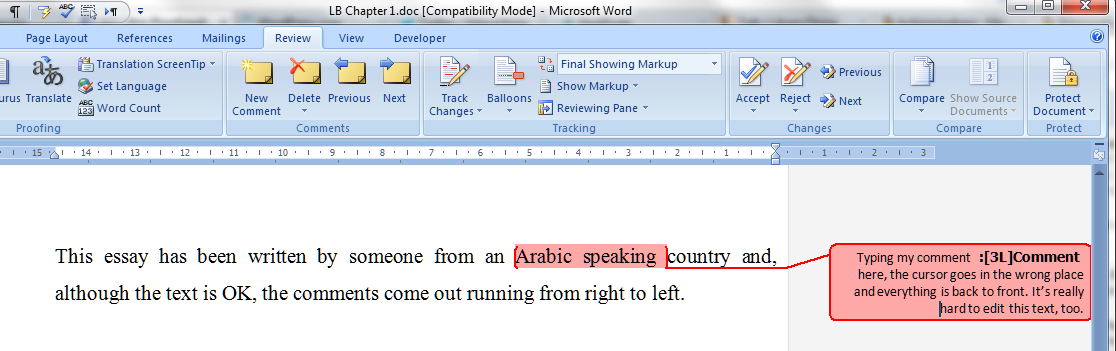
A friend of mine had this issue this week, and then I did, too. Both of us were working on documents that originated from Arabic-speaking countries, and this is where I usually see this problem. It’s hard to describe, but completely obvious if you’ve ever experienced it: you’re using Track Changes to mark changes in a document, you go to write a comment in a comment balloon / box, and the text runs from right to left instead of left to right. Sometimes even the word order is reversed. It looks something like this:

The cursor is at the wrong end of the line of text, it’s all justified to the right, it shows oddly as you type, and editing it is a nightmare. So how do we change the orientation of the comment text?

Changing the orientation of comment text in Word 2007

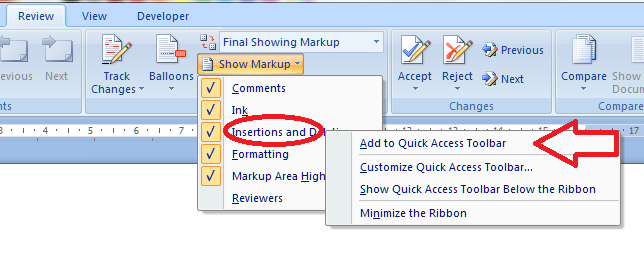
What we want to do is change the comment box text from wanting to run right to left to making it want to run left to right. And the easiest way I’ve found to do this is to add a secret little button to your Quick Access Toolbar, then use that to sort out your text. Go to my article on how to add buttons to the Quick Access Toolbar if you need a refresher (or note that you click the down arrow on the QAT at the top of your screen then choose More Commands).

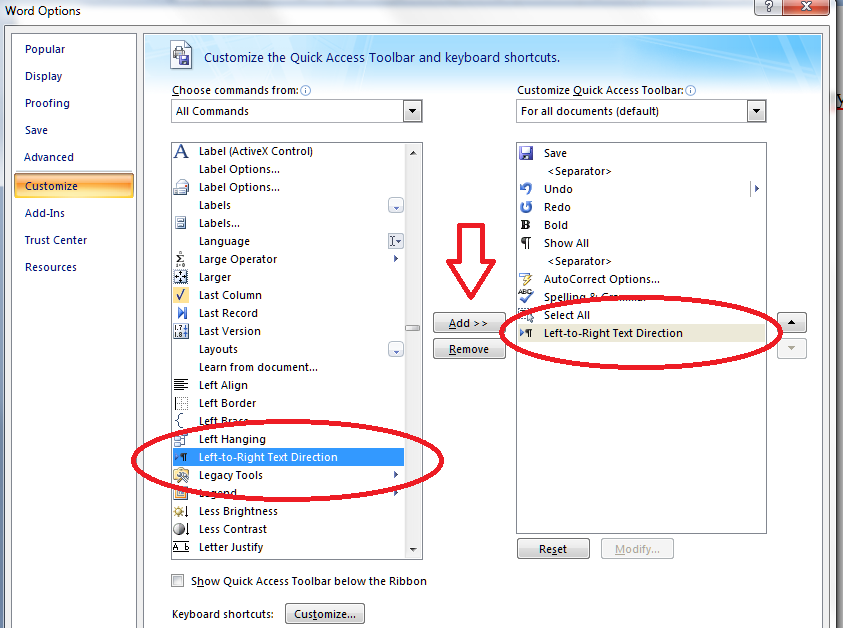
When you get to the part on the Customize Screen menu where you choose the button to add, type L to get near the right place and/or scroll down until you come to Left-to-Right Text Direction and add that to the Quick Access Toolbar.

Now you will have a button on your QAT which looks like a paragraph mark with an arrow next to it. If you hover the mouse cursor over it, it will announce to you that it’s the Left-To-Right Text Direction button. Make sure your typing cursor is in the comment balloon and press this button …

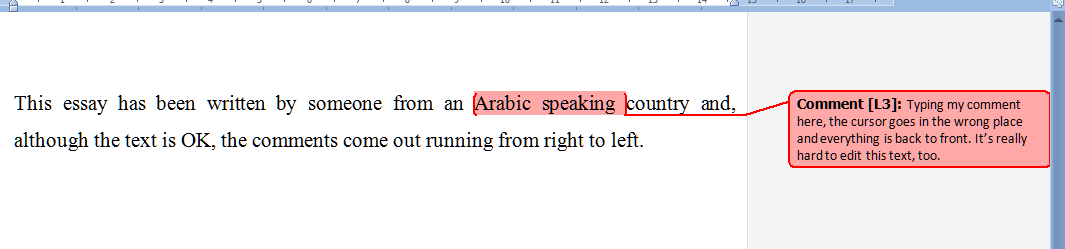
And now your text in your comment balloon should be the right way round (for you):

Please note: you will have to do this for each comment box you create. But it’s only a matter of pressing one additional button, and it WORKS reliably, where fiddling around with the Styles really won’t always work (I know: I’ve been there).

Changing the orientation of comment text in Word 2010

Now, this works just the same in Word 2010, apart from the fact that the button has a different name and a different appearance! Of course!

So when you have reminded yourself how to add buttons to the Quick Access Toolbar if you need a refresher (or note that you click the down arrow on the QAT at the top of your screen then choose More Commands), you will need to start by typing an L and/or scrolling down, but this time you’re looking for Ltr Run.

And when you want to change the orientation of your text in your comment balloon from right-to-left to left-to-right, you’ll need to click on the little green blob (although, again, it will admit that it is the Ltr Run button if hovered over):

Again, please note: you will have to do this for each comment balloon you create. But it’s only a matter of pressing one additional button, and does WORK reliably, where fiddling around with the Styles really won’t always work (I know: I’ve been there in Word 2010, too).

And if you’re using a Mac? Well, apparently you can’t do it, and will need to send it to a friend with a PC. But if you know better, do let me know!

… and if that doesn’t work …

It’s always worth trying copying and pasting your text into a new document. And if that doesn’t work, here are two more methods to try.

Changing the balloons one by one using Style Inspector

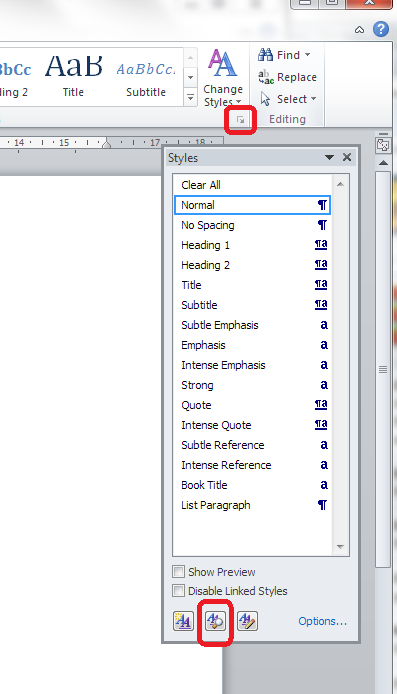
Put your cursor in the offending balloon. In the Home tab, go to Styles and click the down arrow in the bottom corner. Then, instead of Manage Styles, click the second button along, Style Inspector:

8 alternative

This will make a little dialogue box come up. Click on the top A button (marked with an arrow) and the Paragraph Formatting box should change to Normal.

9 alternative

Close the box and OK everything else until you’re back with your document, and your comment box should be the right way around! You will need to apply this per comment balloon, but it’s less drastic than this one …

Delete the styles

We also found this more drastic way. Thanks to Mr. Libro for finding this workaround.

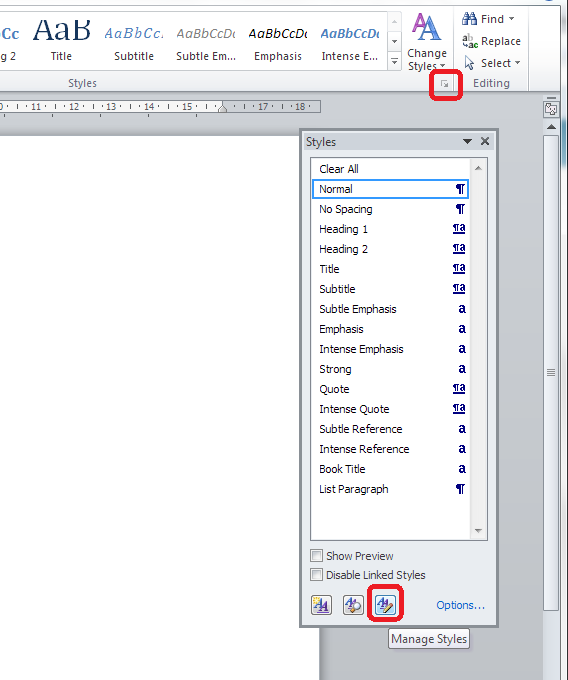
Go to the Home tab, click the Styles down arrow and select Manage Styles (the third button):

10 alt 2

Put the list of styles into alphabetical order by clicking the dropdown arrow and choosing Alphabetical:

11 alt 2

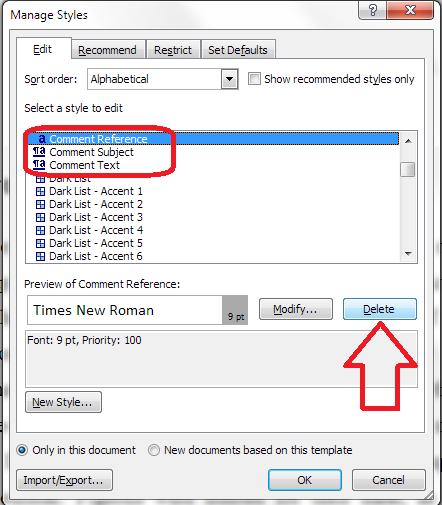
Find your three Comment styles and delete them IN THIS ORDER: Comment Reference, Comment Subject, Comment Text (otherwise Word is liable to crash):

12 alt 2

Press Delete then confirm that you’re sure:

13 alt 2

You can just go back to the list each time. Watch out – your place in the list may well jump around and you may have to scroll up or down to find your style.

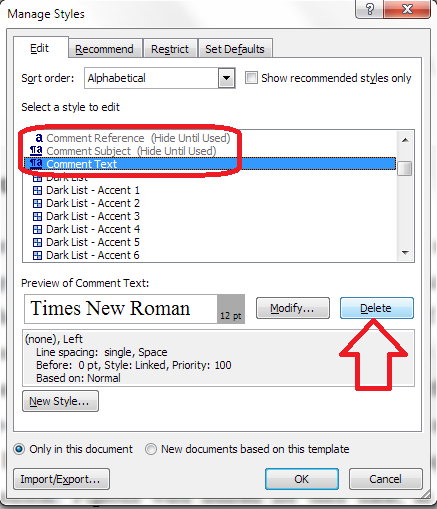
Delete Comment Text as the last one (you will see that the others grey out) …

14 alt 2

And then press OK until you’re back at your document. All of your comment boxes will now be the correct way around.

————

Want even more detail on how to customise your comment boxes? Read my article on customsing comment boxes!

Related posts: What to do if my comment boxes go tiny in Word.

Changing the language in your comment balloons

Please note, these hints work with versions of Microsoft Word currently in use – Word 2003, Word 2007 and Word 2010, all for PC. Mac compatible versions of Word should have similar options. Always save a copy of your document before manipulating it. I bear no responsibility for any pickles you might get yourself into!

This is part of my series on how to avoid time-consuming “short cuts” and use Word in the right way to maximise your time and improve the look of your documents. Find all the short cuts here

 
70 Comments

Posted by on July 11, 2012 in Copyediting, New skills, Short cuts, Word, Writing


Tags: , , , ,

Goodbye, Word Magazine

Suitably funereal transcription kit

My last copy of The Word (as it was originally) just dropped through the letterbox. This is genuinely a very sad moment. I have read every issue of this magazine since it started to be published. I have had a subscription for years, renewing it in chunks of two years, secure in the knowledge that I would continue to enjoy it. It wasn’t one of those mags where, as soon as you subscribe, it goes all odd on you.

It seemed to be pitched right at me and my demographic. I’m not quite old enough for Mojo, and I always felt Q was too male. Word gathered writers I’d been reading for years, and talked about bands I’d loved for years. They also had a decent books and films section. There were always interesting long pieces of biography, history, technical stuff as well as straight band stuff. You could trust the reviews.

But print based media has run into all sorts of problems. Print based everything, actually: look at the state of the book publishing industry. Word diversified with an iPad app and brilliant podcasts, but it wasn’t enough. What a shame.

Latterly, I’ve had the privilege of working for two excellent writers who regularly had pieces published in Word: Rob Fitzpatrick and Jude Rogers. I have transcribed many interviews for both of them, and so there was an added joy of coming across articles for which I’d transcribed the interviews, and seeing what the writer had done with the material. As a writer myself, and aware that much of the material I transcribe I will never see again, this added a marvellous dimension to my reading of the magazine; added to the joy. Thank you, Jude, for taking me on off the back of a Tweet, and Rob for taking the recommendation (and both for recommending me on to other people). They have been great clients and I know they have plenty of other irons in the fire, but I hope they and all the other employees and freelancers associated with the magazine find something to fill that Word-shaped hole in their lives.

I know it will be difficult for me to do so. The balance of two running mags and a music mag coming through the letterbox every month is now irreparably altered.

Word Magazine, I will miss you.

 
Leave a comment

Posted by on July 9, 2012 in Transcription, Word


Tags:

Desert or dessert?

This common error was suggested to me by a friend who was looking at some flyers she’d made and suddenly panicked: which one should it be? And I was actually quite surprised that I hadn’t tackled it yet.

So, the big question, which can end up with sand in your ice cream or endlessly trekking with your camel over empty wastes of Angel Delight … dessert or desert?

A dessert is a pudding; the sweet course. Think of it as an extra … with that extra s. So, the dessert trolley, what would you like for your dessert, etc.?

A desert is that sandy expanse (well, you can get rocky and stony deserts but let’s not get into all the stuff I learned in Geography O and A level). Think of it being deserted, if that helps.

And here’s a fun extra (when I described this bit as “fun” to the friend who asked me about this, she started to doubt my sanity, but, hey: this is my life now). You know when you say somebody has “got his just deserts“? That’s deserts, because he has got what he deserved. Not desserts, as it’s not the pudding on top of the menu of life.

“Jack ate all the desserts, but he got his just deserts, as he could never look at a bowl of ice cream in the same way again.”

You can find more troublesome pairs here and the index to them all so far is here.


Tags: , , ,

On Mutual Support

Recently, I was invited to present at a training morning on small business and social media. I’m always happy to help other small businesses and community organisations learn about the things I’ve picked up over the years, and, while presenting my case study as a business person who has used social media to get an audience and clients, I emphasised the idea of mutual support.

I talked mainly about retweeting on Twitter and also about the way I feature other small businesses in my “Small Business / Freelance Chat” posts on my blog. I also talked about how some editing colleagues (who I do NOT see as competitors) kindly shared some of my blog posts on various forums to which they belong, which helped a couple of my posts go “viral” (500 hits in a couple of days is a big deal to me).

So I just wanted to take a moment to mention some of the kind instances of support I’ve had from other people in the editing / small business community (and, of course, encourage you to look at their resources too).

Louise Harnby kindly featured my Word help posts as her Link of the Week recently. This and her weekly round-up which included it again have collected me over 40 hits on my own website/blog so far. Add to that a couple of entries on her weekly round-up post for others of my posts, and she’s sent over 50 visitors my way in the past month. Thanks, Louise!

The University of Kent Careers Service found my post on starting a career in proofreading and linked to it on their Careers in Publishing web page. I’ve had a few hits a day from that since that happened.

Editor colleague, Kathy O’Moore Klopf, who is a constant support and fount of information, often (make that usually) shares my links to posts made in Facebook and Twitter. She also shares them with other communities she’s in, via forums and other discussion areas. Of course, I do the same for her! She is one of the people who helped me to those 500 pageviews.

An editors’ forum called The Editor’s POV mentioned my Stress post in one of their weekly round-up articles, and quite a few people popped over to have a look.

And last week, Nicky Getgood from TalkAboutLocal featured me in an article about people who use Twitter, Facebook and other free tools for marketing, information sharing and awareness raising.

All of these different posts in different places give me …

  • A new audience who may not have come across me yet
  • The chance to help more people, as well as to market myself to them – both are truly equally important to me
  • Link-backs, i.e. my URL on their page – Google likes these as they confirm that the site being linked to is valid and useful – so it helps me in their search results

And all this is on top of the retweeting and Facebook sharing – I’ve explained elsewhere why that is important to small businesses.

So, thank you to everyone who’s talked about me on their websites, here is some mutual support back, and if you have a Twitter account, a Facebook account, a website or blog, do share other people’s resources – it’s really worthwhile and can make a friendly small business person very happy!

 
5 Comments

Posted by on July 4, 2012 in Business, Ethics


Tags:

Between or among?

I’ve encountered this one a few times recently, so it’s time to differentiate between between and among. Or among between, betwixt, among and amongst. Did you see what I did there?

It’s all a question of numbers: in general terms, between is used when you’re talking about two things, and among is used when you’re talking about three or more thing, whether that’s points, places, people or choices.

So, between means into or across the space separating two points or locations or objects – “He regularly caught the train between Glasgow and Edinburgh”, “He squeezed in between Sally and Jan so he could be in the photograph”, or two things that need to be differentiated or otherwise chosen: “I couldn’t choose between the doughnut and the cream cake, so I had both”.

And among means surrounded by, in the middle of – “I was trapped among the cows in the field” – or indicates a differentiation, choice or division involving three or more parties or objects – “You must choose your holiday destination among Bulgaria, Hawaii and Outer Mongolia”

Between can be used for more than two objects, people, etc. when you are indicating a connection between several entities/parties (“There are links between Spanish, Italian and French”) although this one is a matter of stylistic choice, and I prefer among for more than two, and when a group does something – “We came up with his fine between us: although he got caught, we all raced the shopping trolley down the main road”, although I might be inclined towards among here, too, if I was being particularly picky.

These choices, where it’s not clear which has to be used, is why we editors have style sheets, by the way, so that when we make a choice the first time, we make sure we make the same choice next time.

Bonus information:

I’ve been asked about betwixt and between a few times. Betwixt is just the archaic form of between. Betwixt and between means “neither one thing nor the other”

And amongst, like whilst and while, is a mainly British English alternative form of among, but can seem a little over-formal.

You can find more troublesome pairs here and the index to them all so far is here.


Tags: , , ,

My short cuts: adding shortcuts to the quick access toolbar

Do you use commands in Word that are usually buried inside a menu inside a menu inside a menu? I’m going to show you how to add these onto your Quick Access Toolbar, so you can get at them using a shortcut in just one click. And scroll to the bottom for a very quick way to do this …

The example I’m going to use is AutoCorrect Options. I have posted about how to find and work with AutoCorrect, but it is buried within some nested menus, which means you have to click and click and click whenever you want to add a new entry, wasting time to do something in order to save time. Now, I can access the menu I want with just one click!

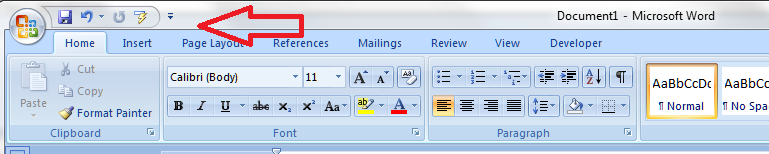
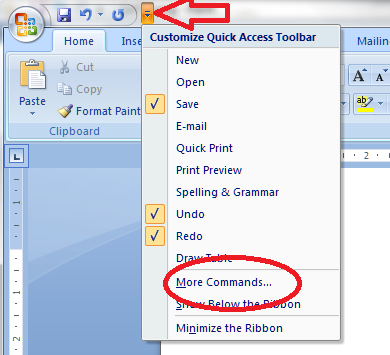
So, first of all we need to go up to the Quick Access Toolbar, right at the top of your screen in Word 2007 and Word 2010 (in Word 2003, right click on the main toolbar and customise it). Note the down arrow to the right of your standard buttons, and click it:

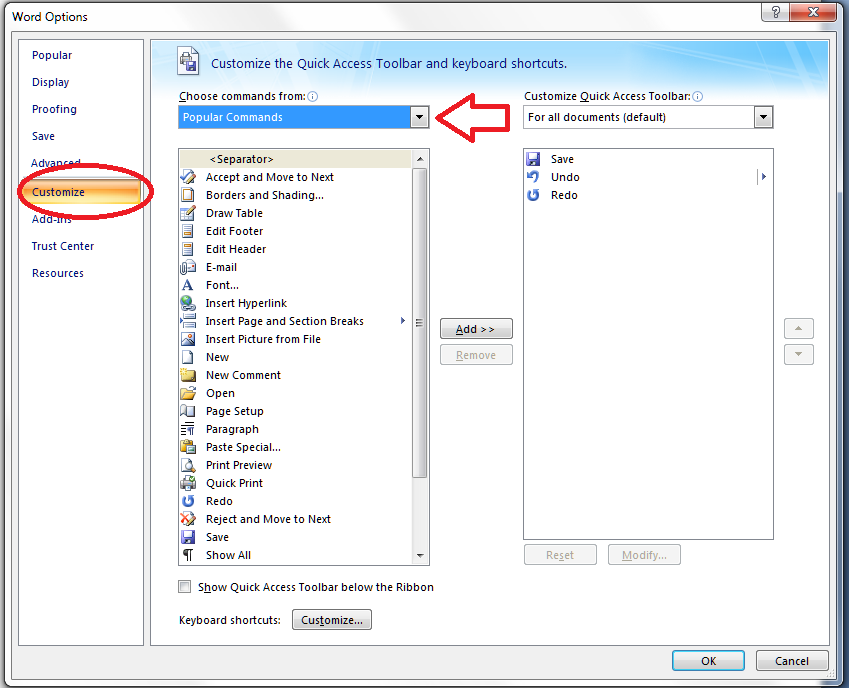
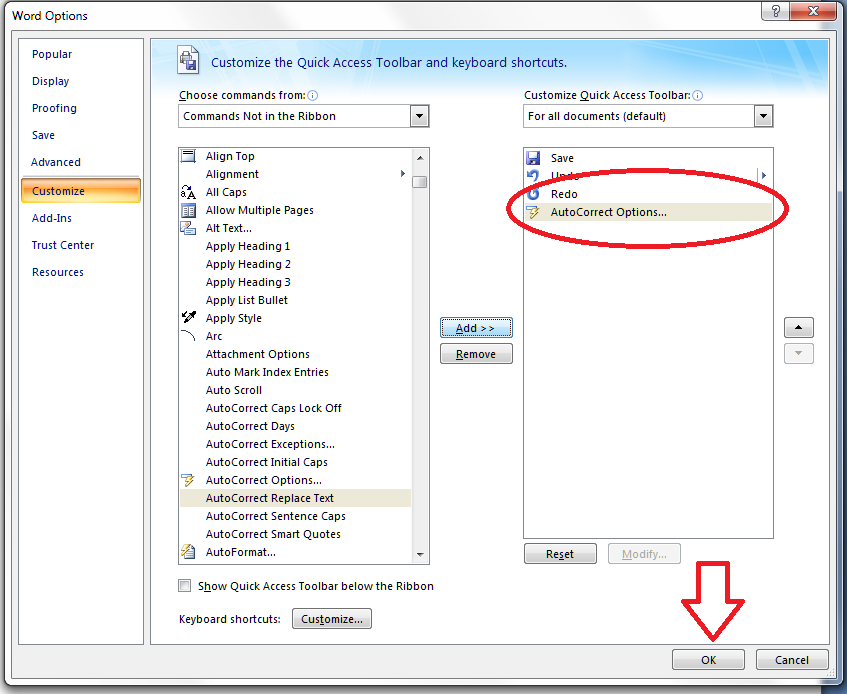
You will notice an option to choose More Commands – this is how you add more buttons to the Quick Access Toolbar. Click on that, and you’ll get a screen which allows you to customize the Quick Access Toolbar:

Note at this point that you can access this menu via Word Options – Customize, too, if you want to.

We can now see a whole load of Popular Buttons you can add on to the Quick Access Toolbar – so you can pop them on there to get at them whenever you want to. These are a few buttons that appear at the top level when you click on any of the tabs on your main ribbon.

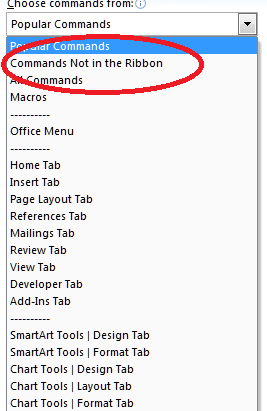
We’re going deeper, though, into buttons and commands which don’t appear on the top level of your tab menus. So click on the arrow next to Popular Commands and you’ll get a list of options:

You can choose All Commands, which will give you every command and button (with a hover-over tip to which menu they belong to so you can choose, for example, Spell Check from the Review tab rather than the Blog version, which won’t do much for you in a standard Word document. In this case, to add our deeply buried button, we want to choose Commands not on the Ribbon.

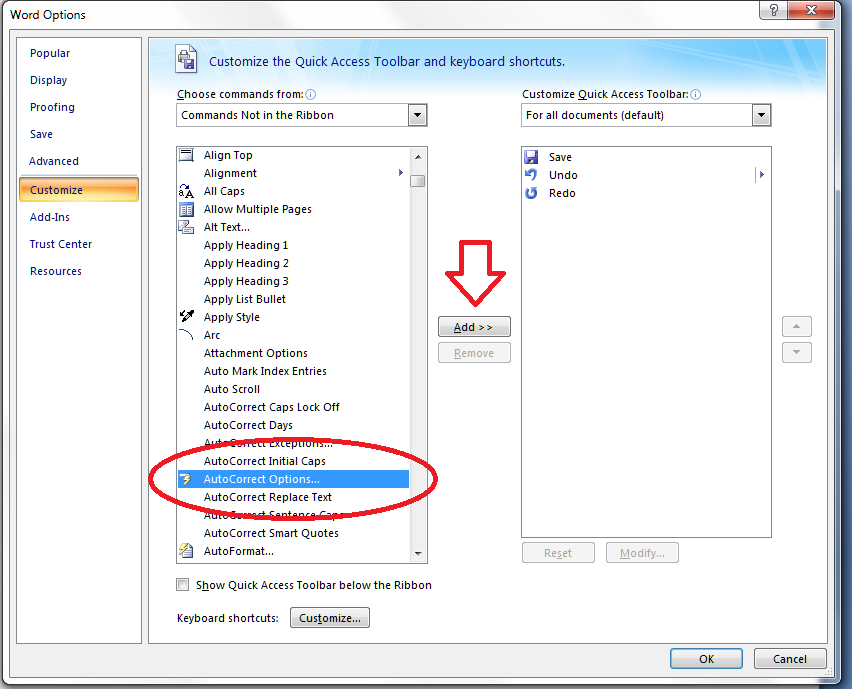
Now you have a list of every command and button that exists in Word. How handy that AutoCorrect begins with an A! Look for your button and highlight it, then click on Add >> to add it to the list on the right – which is the list of buttons that appear on your Quick Access Toolbar. At this point you can even choose when these buttons will appear, but I always leave it on All documents. When you’ve pressed Add, there it is, on the list:

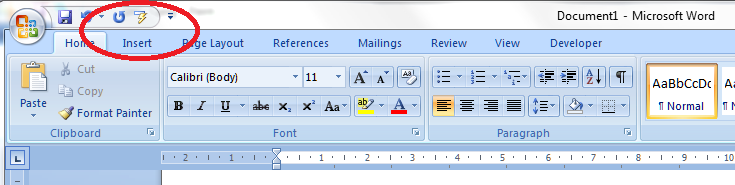
Click on OK and it will magically appear on your Quick Access Toolbar:

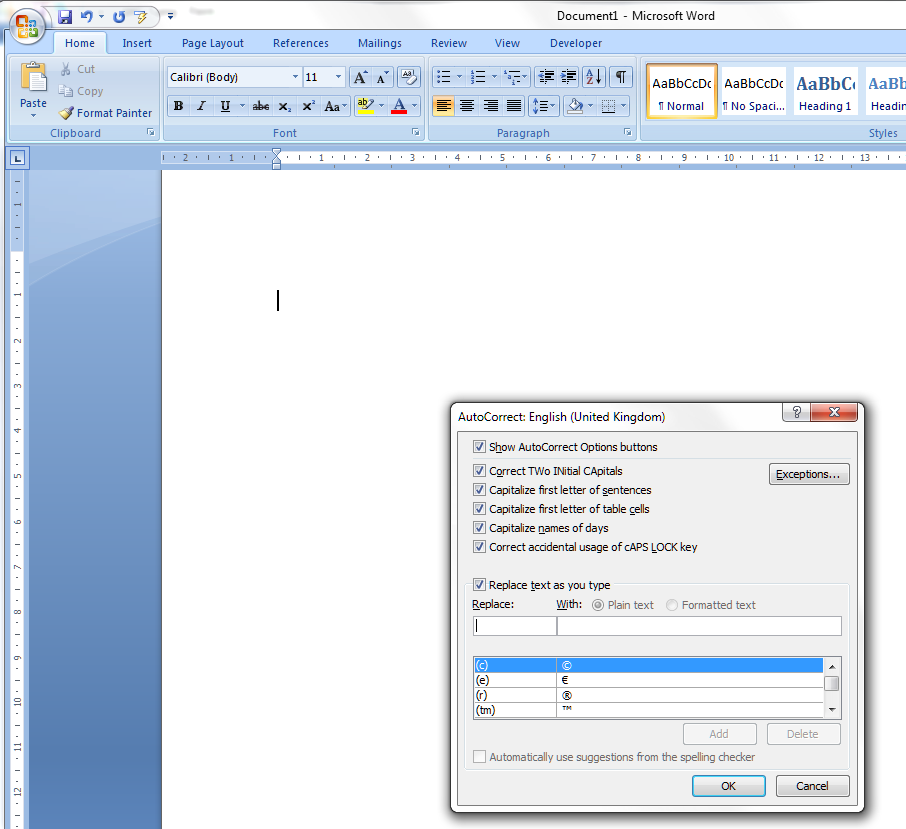
Want to check it’s true? Click on the little icon, and there’s our familiar AutoCorrect menu.

What a time saver! I’ve added all my very commonly used buttons from different menus onto my Quick Access Toolbar, from Bold to Spellcheck and all sorts of other things in between …

Adding items quickly to the QAT

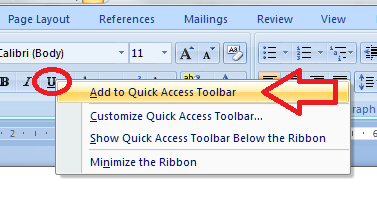
Edit to add: If you have the button you want to add to the QAT in front of you, simply right click on that button and you will get the option to add it to the quick access toolbar!

Magic! And it works however deeply buried the button is in your lists of commands – for example, you can choose something that appears in a menu within a menu:

Please note, these hints work with versions of Microsoft Word currently in use – Word 2003, Word 2007 and Word 2010, all for PC. Mac compatible versions of Word should have similar options. Always save a copy of your document before manipulating it. I bear no responsibility for any pickles you might get yourself into!

This is part of my series on how to avoid time-consuming “short cuts” and use Word in the right way to maximise your time and improve the look of your documents. Find all the short cuts here

 
24 Comments

Posted by on June 27, 2012 in Errors, New skills, Short cuts, Word


Tags: , , , , , ,

Palate, pallet or palette?

I see these three, especially pallet and palette, mixed up all the time – of course double letters, e at the end of a word and e or a are all classic ways to confuse spellings, so it’s hardly surprising that people get into a pickle with these.

Your palate is the roof of your mouth, and, by extension, can also be used to describe someone’s ability to appreciate different flavours and distinguish between them (wine tasters, for example, should have a good palate).

A palette is that board, usually round with a thumb hole in, that artists use to mix their paints, or the range of colours that an artist uses.

And a pallet is a portable flat platform used to store and stack other things – it’s often made of wood but you also find them in plastic. It’s also a kind of flat knife used to shape clay or plaster. And (whisper) it can be used to describe an artist’s palette, but let’s not confuse matters by doing that, OK?

“The artist cleared his throat, stepped up onto the pile of pallets that had stored his bread, grasped his palette and mixed some colours, and let the taste of the wine swill around his palate.”

You can find more troublesome pairs here and the index to them all so far is here.


Tags: , , ,

Are you guilty of presenteeism?

This is not my current desk

Having inadvertently given my friends and family the impression I work all day and every day, I started to think about whether the cult of “Presenteeism” is as strong in the self-employed community as it is among employees. Surely it shouldn’t be … and if it is, what can we do about it?

What is presenteeism?

We’ve all heard of absenteeism, or the practice of regularly removing oneself from the working environment for no good reason. Presenteeism is the opposite. It’s in the Oxford Concise Dictionary, and here’s how they define it:

The practice of being present at work for longer than required, especially as a manifestation of insecurity about one’s job,

This manifests itself in that classic competition over who can stay latest in the office (or, more importantly, who can be seen to be staying latest in the office. Or being in earliest. Or both. We’ve all sent an email to the boss when we’ve got in particularly early, haven’t we?

Now, that’s all well and good when you have a boss to impress. But what if you work on your own?  And I’m admitting doing this myself, here – although inadvertently. It’s easy to send that Tweet or Facebook status at the end of a long day …

Phew – done 10 hours at the desk today – big project!!!!

but is it so easy to say

Good day, did a couple of hours of work, all caught up so I lay around reading for a few hours

Well, is it?

Why do we have to engage in presenteeism?

I’d be interested to work out why we do this. Are we so busy trying to combat that insidious view of freelancers as people who sit around in their pyjamas watching daytime telly? Surely our friends and family know we don’t do that by now?

If you work in an office, you will tend to have set start and finish times, a proper lunch break, and weekends off (or a set working pattern) and holidays. How many freelancers take the full holiday entitlement they would be given as an employee? I know I probably don’t.

So when it’s quiet, we’re up to date and we skip off merrily to the cafe, or the gym, or just lounge in the garden for an hour or so, is that really a crime?

And isn’t it better for our friends and family to know we’re happy. whole, balanced and relaxed than working every hour there is on a hideous treadmill of work? Didn’t at least some of us go freelance  to avoid that hideous treadmill of work?

Celebrate balance, not overwork

I’m not suggesting we stop working when we need to be working. Everyone has to pull one of those 11 hour shifts sometimes. But let’s all be honest about how we live, celebrate the downtime as well as the busy times, and acknowledge that, yes, we do do this in order to have balance and flexibility in our lives, and we do have work patterns which are different, but balanced over the grand scheme of things.

I’m going to talk about this in public – I dare you to too!

Inspiration for this post came from one I published on my other blog about what I do all day. I have tried, since publishing that, to note when I have some time off …

 
14 Comments

Posted by on June 20, 2012 in Business, Ethics


Tags:

Horde or hoard?

Of course this one comes under the “these words sound the same! Which on earth do I use?” category, as so many Troublesome Pairs do. What do you do if you’ve only heard the words spoken but want to write one of them (well, you look here or in a dictionary, but you know what I mean …).

So, here’s the difference:

A horde is a noun meaning a large group of people. It’s often used in a pejorative or slightly threatening sense (ravening hordes) but also in a positive, if slightly anachronistic way: “Hordes of people came to my tennis party!”

A hoard is a noun meaning a store of money or possessions. It’s usually used for something impressive and/or unusual, rather than just “some stuff”, for example a dragon will have a hoard of gold and jewels, and we had the Staffordshire Hoard archaeological find of golden and bejewelled items a few years ago. There’s a verb to go with this one: to hoard – to collect such things together, usually seen in a negative way to describe misers or people who can’t bear to throw anything away.

Interestingly, they do come from different routes: horde comes from the Turkish for (royal) camp, via Polish, whereas hoard comes from Germanic origins.

I used both words in one sentence in a post on my other blog today, as a little hint as to which troublesome pair I was going to post today – I wonder if any of my hordes of readers noticed …

You can find more troublesome pairs here and the index to them all so far is here.


Tags: , , ,