RSS

Category Archives: New skills

My short cuts – using Tabs effectively (2)

As you will have read in my original post, I’m writing up quick guides to short cuts for formatting your Word documents, to replace workarounds you might use.

I want to show you how to do things in a more formal way which will  make things easier for you in the long run, particularly when you’re dealing with long and complex documents.

Today we’re going to follow up on my previous post on Tabs. Now we know how to use the tab button, we’re going to go a step further and set tabs using the ruler at the top of the screen. Exciting, eh? It’s called “setting tab stops” – the “stops” idea coming from when you added physical barriers to your typewriter. I actually learned to type on an elecronic typewriter, back in the olden days, by the way …

First of all, we need to check we can actually see the rulers at the top and side of the page.  Can you see a ruler at the top? If not, click on the view tab at the top of the page. See where it says ruler? Click on the box next to that so a tick appears:

Once you’ve ticked the box, the two rulers should appear, like this:
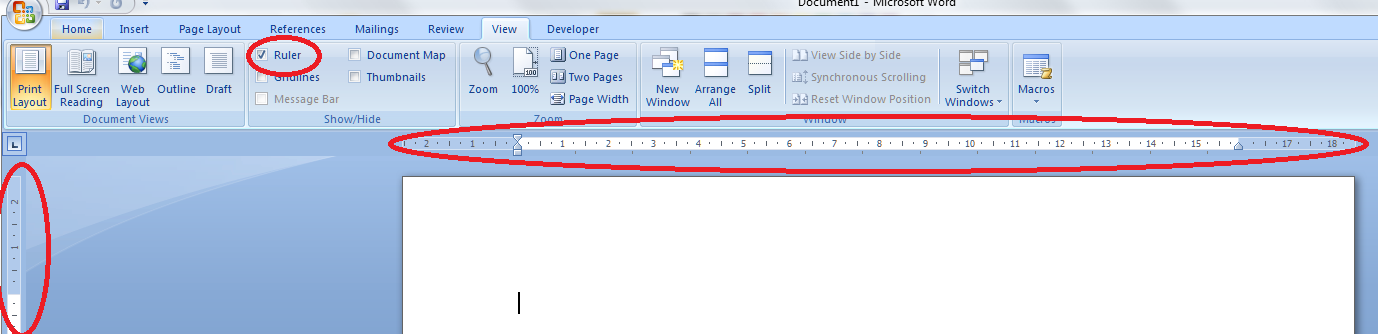
And we’re all ready to go. So, say we’ve got a little table of bird prices we want to lay out:
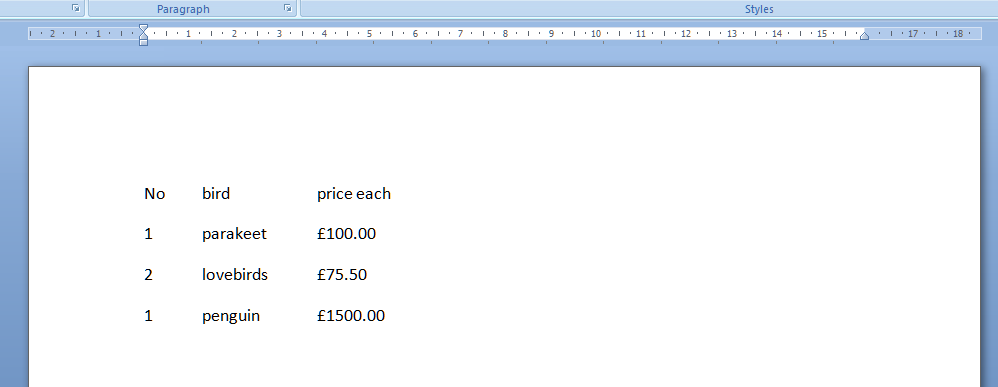
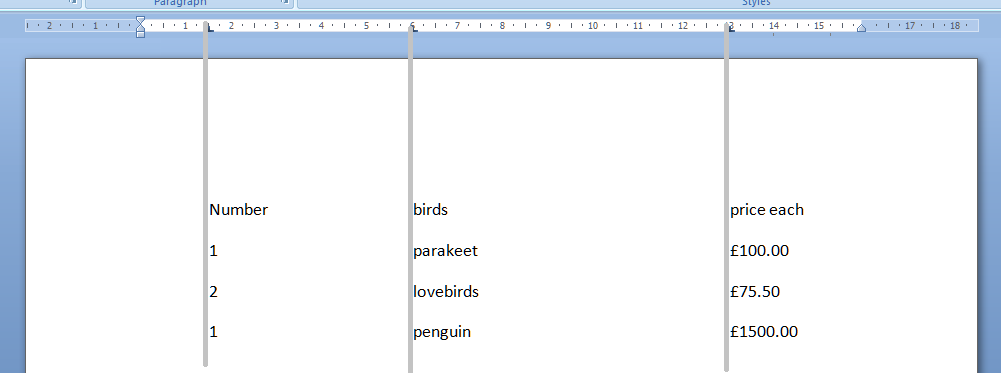
We can use the tab key to space across, but another way is to use the tab stops in the margin. Note that we need to highlight the text we want to apply tab stops to, or set up the tab stops before we type anything. Now, move the mouse pointer up to the top margin and click, just once, with the left mouse button, on the 1.5, 6 and 13 on the ruler. Just where the arrows are on the picture below. You’ll see a little L appear where you click. That’s L for left tab. Well, actually it shows which way the tab is facing, but we’ll come on to that later.

Now, when we type our text, using the tab key (remember, the one with 2 arrows on) will take us across to each of these tab positions that we have set up ourselves, rather than just going across by a set amount. The grey lines show how the text lines up with the tab stops we marked in the top ruler area.
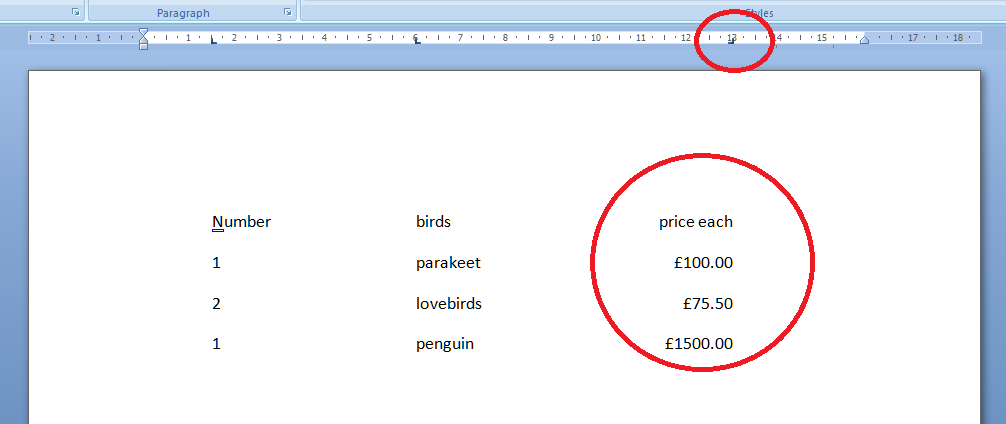
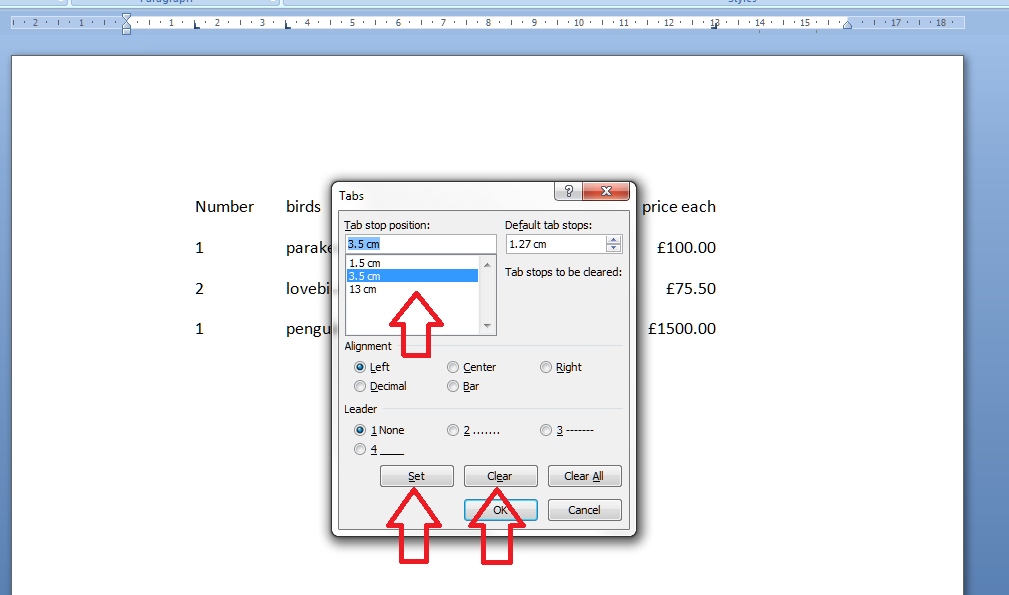
All well and good, but the prices don’t line up very neatly, do they. We can get around this, and mess around with the tab positions by highlighting the text we want to affect (remember to do this! And for this stage we want to highlight all the text so we move the column heading and the prices) and double clicking on any of the Ls we placed in the ruler. This brings up the tab dialogue box. Note: although you can click on any tab marker to bring this up, it automatically moves to working on the leftmost tab setting first, not the one you clicked on. So you can see one tab stop highlighted, and the other ones listed underneath. You can see that there are options to Clear or Set tabs. Set will set a new one at whatever position you want: if you add a third one between 6 and 13, all your text in the third column will jump across to match that. Clear will delete the tab position you have highlighted in the top box.

In order to line up those prices, we need to make the third tab a Right-handed one. This means the tab marker is at the right margin or, effectively, the end of the text you want to affect. So, click on the 13 in the box to bring that up as the active tab, click on the Right alignment radio button (circle).

This will make the right hand side of the column line up: lovely tidy figures and heading! Look at the tab stop at 13. It’s now a backwards L, showing that it’s keeping everything tidy to the right, not the left.
But I think the bird names want to move over a bit. Simply highlight the text, bring up the dialogue box, highlight 6 and Clear, and click Set and add a tab stop at 3.5.
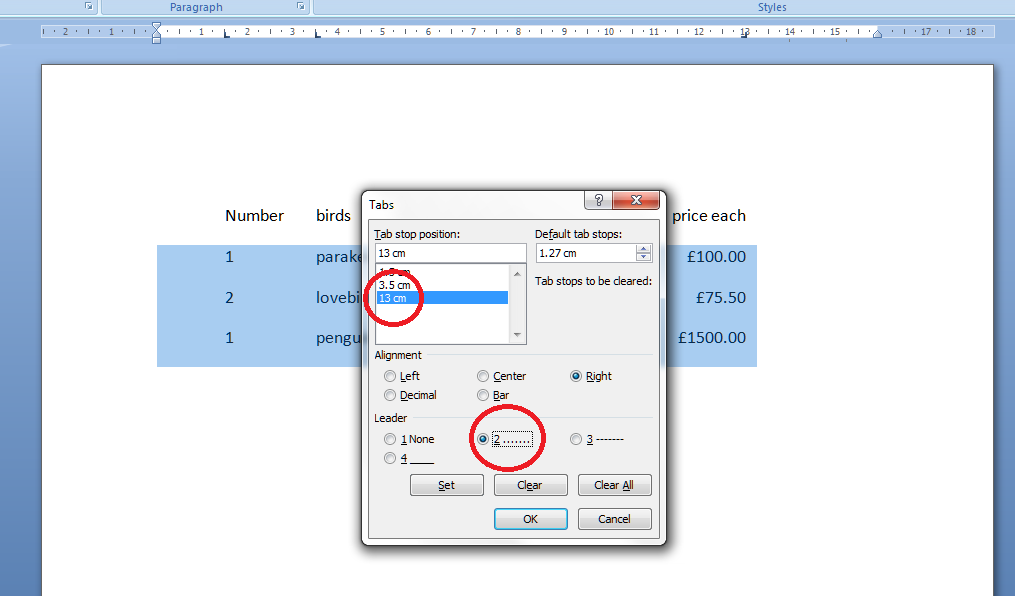
Now I fancy having a line of dots going from the name to the price. A bit odd in a list of bird prices, guaranteed, but if you want to do a quick table or a contents page (although I’ll be teaching you the proper way to do that automatically in a few weeks’ time) it works nicely and looks great. Highlight just the part that you want the dots to appear in and then double click on any of the tab stops. This time, select the 13 and choose the leader you require:
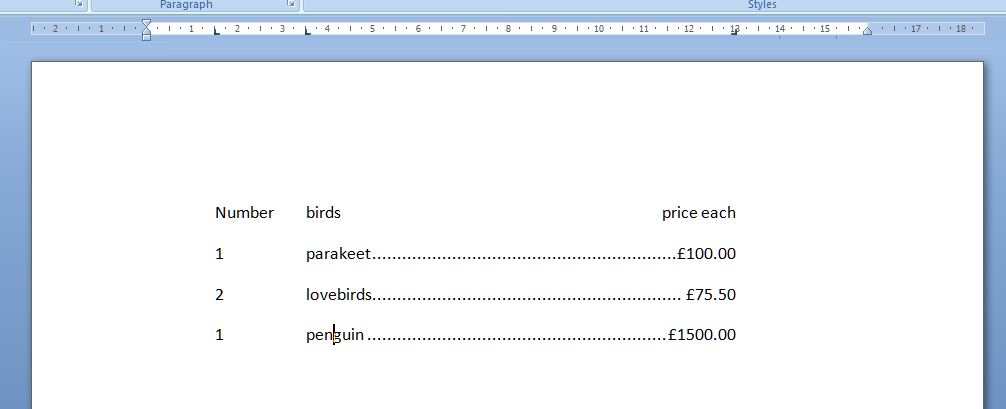
And there you go: lovely leaders between each bird name and its price. That looks tidier than scrappy columns made up of spaces and dots, now, doesn’t it!
Find my first introduction to tabs and using them to make your text nice and tidy and easy to navigate here.

Please note, these hints work with versions of Microsoft Word currently in use – Word 2003, Word 2007 and Word 2010, all for PC. Mac compatible versions of Word should have similar options. Always save a copy of your document before manipulating it. I bear no responsibility for any pickles you might get yourself into!

Find all the short cuts here

 
3 Comments

Posted by on January 19, 2012 in Copyediting, Errors, New skills, Short cuts, Word, Writing


Tags: , , , ,

My short cuts – using Tabs effectively

As promised in my original post, I’m going to write some quick guides to things you do when you’re writing documents which you think are a short cut but actually cause more trouble than they’re worth.

The idea of this series isn’t to criticise people, just to show you how to do things in a more formal way which will actually make things easier for you in the long run, particularly when you’re dealing with longer or more complicated documents.

Today we’re going to talk about using Tabs. Tabs seem to be something of a mystery, but there are easy ways to use both the tab button and tabs set in the top margin which will tidy up your document, make it easier to enter neat text in lovely columns, and reduce tension when you’re trying to line everything up.

Please note: these examples can look rather wide. I want them to be as near full-size as possible, so you can see exactly what I’m doing. If you’re looking at this post on a monitor, you should be able to scroll across to see the full image. If you’re viewing on a tablet, some of the screenshot may be cut off: hopefully you can see enough to get an idea of it, or you should be able to select the image to view it separately.

Let’s start off with using the Tab button. This is a button on your keyboard which should have two arrows on it, one facing one way and one the other. Got that? Good.

Here’s your common short cut, to start off with. You’ve got a menu you want to put on a document, with items in one column and prices in another. So you type it out, using the space bar to move along to the next column. And it looks like this:

But now you want to add another item and oh dear – it’s longer than all your other ones and puts it all out of alignment (because you’ve used the space bar to make the space between one column and the next):

How do I know you’ve used the space bar? Because I’ve used that little paragraph button on Word again which shows us all the formatting, tabs, line returns, etc.

So the way you’ve achieved this spacing is by doing this (where dots are spaces and the things like a backward P are returns):

What you should have done (my short cut) instead of using space (your short cut) was to use the tab key (remember, the one with the two arrows) to space across to a set point along the horizontal ruler at the top of the screen. These tabs are represented by arrows when you’re viewing the markup:

Now, when you want to move the prices over for all the shorter items, you just need to insert one press of the tab key at the end of each item, to get them to line up perfectly.

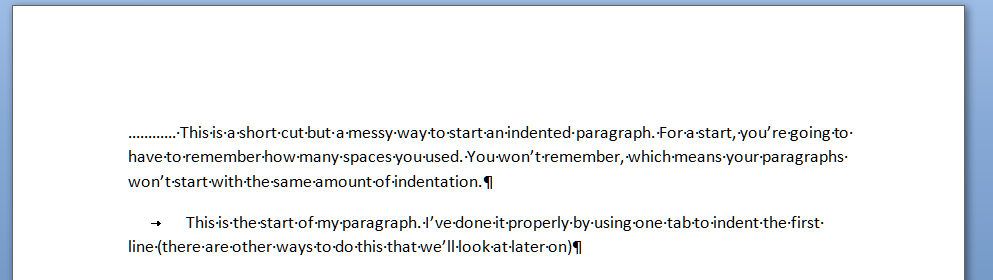
And here’s a last example. It’s very common to find people wanting to indent the first line of a paragraph, but using spaces to do so. This has its own issues – for example, you have to remember how many spaces you’ve put in and it’s likely that you’ll insert a different number each time, which will lead to indentations that don’t match. Instead, a simple press of the tab key at the beginning of your paragraph will leave everything nice and tidy

That’s enough for this session, I think. Of course, there are other ways you can format paragraphs and other indents, and you can set tab stops to wherever you want them to be across the page (and do all sorts of fancy kinds, too). But I’ll leave them for another post … (and I’ll link to them in this one when I publish them).

Please note, these hints work with versions of Microsoft Word currently in use – Word 2003, Word 2007 and Word 2010, all for PC. Mac compatible versions of Word should have similar options. Always save a copy of your document before manipulating it. I bear no responsibility for any pickles you might get yourself into!

Find all the short cuts here

 
8 Comments

Posted by on January 11, 2012 in Copyediting, Errors, New skills, Short cuts, Word, Writing


Tags: , , , ,

Liz Broomfield (now Dexter)

Welcome to Saturday Business/Freelancer Chat. And it’s with … well, me! I realised that I should have interviewed myself, plus this will be published on Christmas Eve and it didn’t seem fair to give anyone else a slot when not many people were looking at the internet; this way there will be 50 interviewees, plus me, plus a rest on New Year’s Eve! I run a company called Libro through which I do proofreading, copyediting, writing, transcriptions and localisation for companies and individuals around the world. I have some great regular customers and then do one-off jobs for people too. I’ve launched my business the way that felt comfortable to me as I went along – a “soft launch” which involved me still being supported financially while building the business. Now it’s a whole new chapter for Libro, which is very exciting!

So, I’ve been running Libro for a couple of years now, I went full-time with the business recently, and I’m enjoying that (and writing a blog about it). Here are my answers to my own questions …

What is your business called? When did you set it up?

My business is called Libro. I set it up in August 2009 when a colleague at the library where I worked at the time mentioned he had some students who needed help with dissertation proofreading. It’s blossomed from there!

What made you decide to set up your own business?

I had done writing and editing work in a lot of my previous job roles, and done (unpaid) proofreading and editing for novels and journals in the past. When I discovered a need for my services, and close at hand, I decided to go for it and register my business with the Inland Revenue, etc.

What made you decide to go into this particular business area?

I knew I was good at the work and could provide a good service. As I’ve gone along, I’ve added more services to my portfolio, mainly in response to demand, but knowing they were skills I could cover. I started off working with students, as I used to type up dissertations for people back in my own student days, and I had access to the client base via colleagues, many of whom were post-graduate students who could put up posters for me in their departments or recommend me to their friends.

Had you run your own business before?

No! And anyone who knew me before I launched would be very surprised – I am an unlikely entrepreneur!  Just because I’ve always been in the background, doing admin, setting up systems and helping people, rather than being out at the front promoting myself! I have done a lot of different jobs in several different companies, and those have come in handy.

How did you do it? Did you launch full-time, start off with a part-time or full-time job to keep you going … ?

I worked full-time at my library job from when I launched in August 2009. I went to 4 days a week at the library in January 2011, 3 days a week in May, and officially leave the library completely at the end of December 2011, although holiday owed to me and university general holidays mean that I’ve actually been full-time since December 12.

What do you wish someone had told you before you started?

That I could do it, and that I should have faith in myself.

What would you go back and tell your newly entrepreneurial self?

Go part-time – or more part-time, earlier! Enjoy the process and start a blog!

What do you wish you’d done differently?

I do wish that I’d taken the opportunity to go more part-time earlier. I could have dropped two days at the library from January 2011 but I lost my nerve at the last moment. I then had a very hectic time of it as Libro expanded to fill the space!

What are you glad you did?

Went on the HMRC “becoming self-employed” course. Started my blog – hits on my website increased hugely when I started blogging, and I really enjoy it, too! I listed Libro on a few free ads sites and joined a professional translators’ website which has brought in lots of jobs and a great return on investment. I’m also glad I’ve done it, full stop: I’m really quite proud of what I’ve achieved!

What’s your top business tip?

Trust your gut instinct. Put good systems in place including strong terms and conditions. Treat every mistake and mishap as a learning experience – you’ll get a blog post out of it, at least! And give something back, too. Sharing advice and doing bits and pieces for people I’ve met at the Entrepreneur Meetup and helping out at the Social Media Surgery has helped me stay true to who I am. Oh – and be honest – with your clients, setting expectations – and with your peers. Allow yourself to be vulnerable and seek support from those you can trust.

How has it gone since you started? Have you grown, diversified or stayed the same?
I’ve grown and diversified as I went along. I started off proofreading student dissertations, then was asked to write something; well, I’ve written plenty of procedures and newsletters so went for that. Transcription – well, it’s just audio typing! And being on the translators’ site has brought me localisation work where I can bring my experience working for a US company to bear on helping “translate” text from US to UK English. I’ve basically done anything to do with words, even copy typing. I think it’s important to have a range of services to offer. And I have clients all over the UK and in America, Canada, across Europe, India and China!

Where do you see yourself and your business in a year’s time?

Well, I’ll have been full-time with Libro for a year. Hopefully I’ll be earning enough to support myself, I’ll have taken a holiday or two, and have a good solid roster of regular clients to keep me going.

Exciting times, then, for me, and a good, if different, year ahead! Where was I in a year’s time? Here!

You’re on my website already. You can email me – and you can also find me on Twitter  and Facebook.

If you’ve enjoyed this interview, please click here for more freelancer chat, or here for information on how you can have your business featured.

 
10 Comments

Posted by on December 24, 2011 in Business, New skills, Small Business Chat


Tags: , ,

Top Time Management Tips: For Santa … and You!

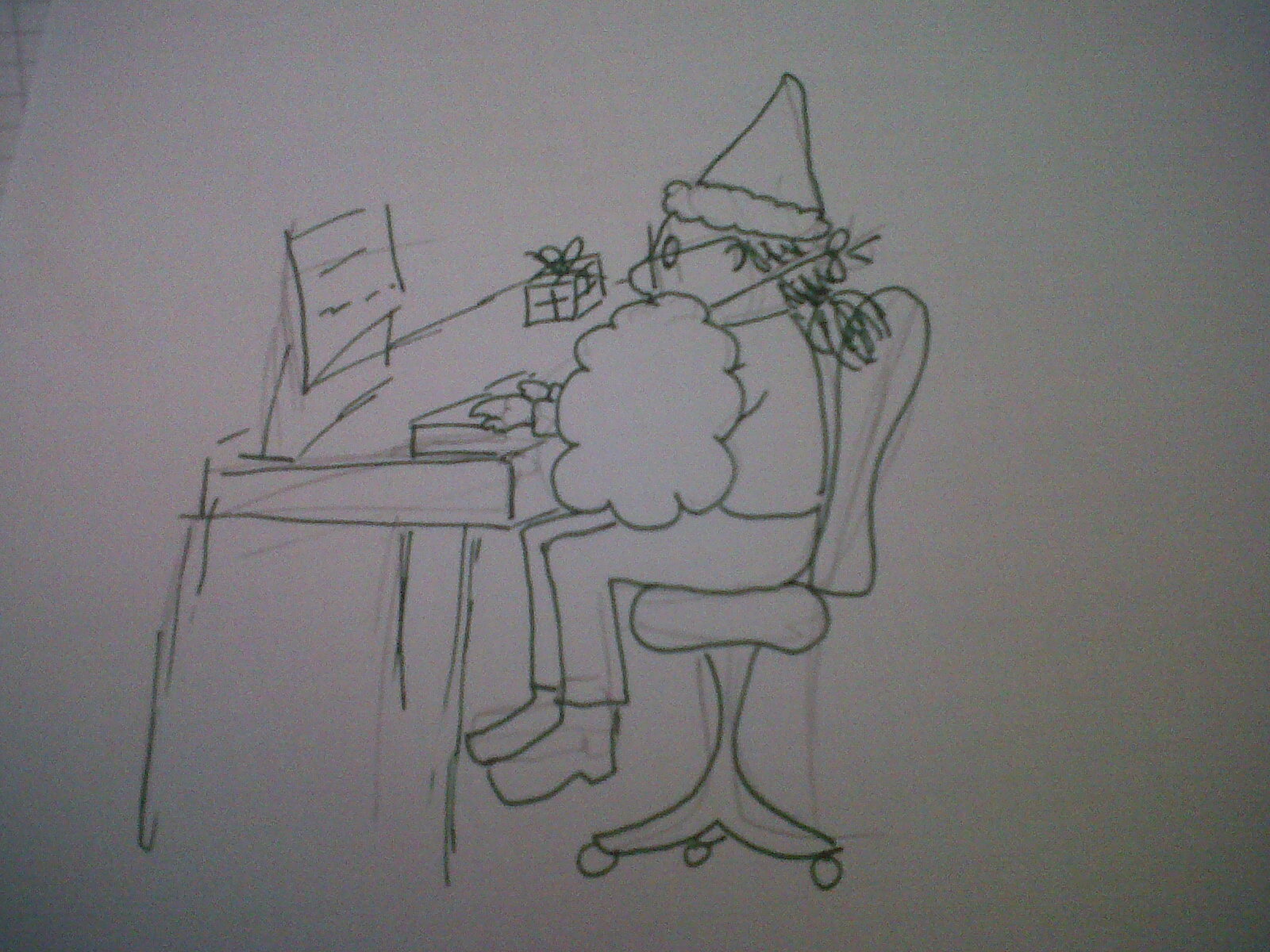
Cartoon of Liz dressed up as Santa

Liz or Santa?

This time of year is a busy one for Santa, but maybe not for you. Maybe you’re off work for the seasonal holiday now, on vacation from your studies, or your clients are on holiday so you are too, by extension. Maybe it’s time to have a bit of a think about how you’ll manage your time more successfully in the New Year. As it’s Christmas, as well as sharing some tips on time management in general, I’m going to relate them to Santa’s life, too. If you’re reading this, F. Christmas, I hope they’re helpful!

Work to your strengths

I think this and the next point are key. You should know by now when your good – and not so good – times are for concentrating and getting things done.  The key is then to arrange your day to match these peaks and troughs, aligning your work patterns to your personal patterns. This is easier when you work for yourself, but is manageable when you’re employed, too. I hope Santa’s best late at night, as his main workflow is obviously when he can zip through the dark skies! I’m best in the early mornings, so now I like to get a chunk of work done before breakfast, and when I was working, I liked to start as early as I could. I have a slight lack of concentration after breakfast, so I am scheduling in some down time or some smaller, achievable tasks for then, and I’m hopeless after lunch – but I can work fine if I have a big deadline, so I either work to a deadline there or accept it’s not a great time and do something else. People think ‘larks’ can be annoying and smug, but I’d love to be able to work late into the night. I know I will make mistakes then, as I’m not a ‘night owl’, so if I have a big project to push through, I’m more likely to get up extra early. When are your good and bad times? How can you tweak your work schedule to get the most out of them?

Blocks of time

This is the other important one, in my opinion. Say you’ve got presents to wrap, letters sent to the North Pole to read, and deliveries to make. Don’t hop from one to the other: put aside a block of time to concentrate on one thing and that thing only, whether it’s catching up with emails for half an hour, spending 15 minutes reading Twitter, or putting in an hour on that big project. When I was a training manager I learnt (from theory and experience) that people can’t concentrate for more than 45 mins to an hour at a time, so make sure you work in a 5 minute break after each hour-long block. If you have something that you don’t fancy doing, set a timer to 30 or even 15 minutes and do just that thing for at least that length of time. Often you will get into the swing of things and may be able to carry on longer.

No distractions

When you’re concentrating on one thing, don’t let the others distract you.  Santa doesn’t screech to a halt just above your chimney to answer his elf and safety hotline, and if he does, he needs to stop doing that (wear and tear on the reindeer, for a start!) There’s rarely something that won’t wait an hour. Phone calls, OK, but if you really need to concentrate, turn voicemail on, too. I keep my BlackBerry on my desk: it alerts me if an email comes in and I can very quickly check if it looks urgent without opening and reading it on my PC – works for me! Doing something wholeheartedly for that block of time will work far better than swapping to something else part way through.

Lists and priorities

It seems so obvious, but write a to-do list, either at the end of each working day, or the beginning of the next one. I split mine into work to do, work admin and other – as someone working from home there is always something like posting letters to do, and even if you work with other people you may need to pop out on an errand. As for Santa, well, his to-do list will vary according to the season, but I doubt there’s ever only one task, even on Christmas Eve (stock up on reindeer fuel, schedule toilet stops, get red suit dry-cleaned … ). I tend to write one set of lists then actually order the things for the day, with closer deadlines taking priority over more distant ones (I use a Gantt chart to record those).

Not all time is billable time

I record my billable hours in a diary every day. That’s hours I’ve worked on projects that I’m getting paid for. I can then see how much I’m making per hour, per day and per week, to make sure I’m on track with my targets. Santa needs to get a certain number of presents delivered to a certain number of houses per hour. But I’ve learnt that, just because you’re sitting at your desk for 7 hours, you’ll rarely do 7 hours of billable work (unless you’re a lawyer or suchlike and every single task is assigned a project code). You’ll have emails to answer, blog posts to write, social media to engage with, toilet breaks – and if you work at home, that mid-afternoon shower, gym session, answering the door to salespeople … Even Santa has to refuel the reindeer and restock that sleigh. So don’t beat yourself up and feel unproductive if you haven’t done 7 hours billable work in 7 hours at the desk. But do use chunks of time for the non-paid work and even take a note of it to see where you can refine the process.

Systematise

This is a posh word for putting systems in place – whether on paper or using the computer and various bits of software. Santa has a production line of elfs taking care of gift wrapping and labelling. When I do a transcription, I upload the tape into my software and create and save the Word document. Every time I finish a project, I put it on my invoice spreadsheet, generate and send the invoice (or add the line to the client’s monthly cumulative invoice) and change the colour of the red line on my Gantt chart. Morning, lunch and evening I check my bank balance and enter anything that’s come in or gone out on my spreadsheet. On the last day of the month I prepare and send my monthly invoices. If you have systems you don’t have to think about, you won’t waste time reinventing the wheel every time you come to do something.

Take advantage of other people’s peaks and troughs

I know that not many of my clients are up early, so when I’ve dealt with anything that’s come in from America or Asia overnight, I will have a good few hours without interruptions to get on with projects on which I need to concentrate. I also know that a lot of emails are likely to come in just after lunch – both from awakening North Americans and other people who seem to work hard in that hour or so. Santa, of course, needs to take advantage of his clients’ hours of sleep. So I can plan around that, and also use other phenomena, like the gym being quieter and more pleasant to visit (and more efficient to get round) in the daytime – the other Saturday I got what amounted to a free personal training session because I went early and no one else wanted the Lower Body Workshop class on the mats!  Use your knowledge and experience to take advantage of what you know about how other people work – and use it to help you be more efficient.

Build in breaks

If you’re working in an office as an employee, the Working Time Directive (or your country’s equivalent) comes into effect, telling you when to take rest breaks and how long you should work for in a day/week. If you’re a student, self-employed, or packing presents in your own Lapland factory, it’s harder to make yourself do this. But it’s vital to take breaks, to get yourself moving, get away from the screen and revitalise yourself. I recommend taking some exercise every day – be it a gym trip, a run, a walk in the park or some energetic hoovering. You’ll get a better perspective on things, too – I’ve written many blog posts while out running that I couldn’t think up in front of the computer! And get away to eat something at lunchtime, rather than snaffling a sandwich at your desk.

So, I hope these tips have helped you – and Santa – plan your time a bit more efficiently and use it more effectively. If you have any more tips, I’d love to hear about them!

 
10 Comments

Posted by on December 21, 2011 in Business, New skills, Organisation


Tags: , , ,

Networking for Newbies

A while ago I wrote a short guest post on networking for another blog but I had a lot more ideas that I wanted to fit in.  Now I’m full-time with Libro, I can hopefully go to more networking events, as they are a good way to meet new people, discuss new ideas and, well, get out of the house! And I’ve had actual, qualified success in making money from business I’ve gained, not from someone I met at a networking event, but from someone they met afterwards.  So I highly recommend popping a bit of networking into your marketing and social mix, and here are my top tips for networking …

Networking can be a scary and daunting idea. We all know we need to do it … but how, where and why do we do it, and what can we get out of it, and bring to it?  Here are 10 handy hints for making networking work for you, all tested by me, myself – and I certainly didn’t think I was a natural networker when I started out! Here are my top tips for successful networking.

Do be scared … but realise everyone else is too!
Walking into a room full of people you don’t know is daunting to all but the most extrovert of people. The key to conquering this fear is knowing that 90% of the people around you, even people who have been to the event before, are at least a little apprehensive, too.  So, first of all, be understanding if people seem a bit aggressive or over-wordy or, indeed silent. Maybe it’s just how they are when they’re nervous. And secondly, let yourself off the hook if you do the same. Take a deep calming breath, look around you calmly, and chat to someone.  Ask them about themselves – that old one, but it does really work.

Dress for success
You don’t always need to be all suited and booted, but it’s worth finding out from the event organiser what kind of outfits people normally turn up in (of course, “what you usually wear to work” isn’t always suitable if you normally work from a home office … ). Most of us feel more comfortable when we fit in with the crowd, and knowing how to pitch your outfit is part of that. It goes without saying – doesn’t it? that you should be ironed and mud-free and your hair shouldn’t be standing on end unless it’s supposed to.

Try before you buy
There’s a huge variety of networking events and organisations out there. Some of them charge a fee to be a member of their club. That’s fine – but most of them will let you try out a meeting or two before you commit to that expensive membership. Take advantage of this, try a few different local meetings before you join up, and you’ll know you’ve spent your money in the right place.

Diversify
The huge range of networking events available means that there’s one – or more – to suit everyone. From a national organisation to a hyperlocal event, from market sector-themed meetings to Women in Business, try out a few and see what you like – and try to visit a range of different ones every month. Of course, there are also online networking groups; forums, LinkedIn groups, etc. Give those a go, by all means, but do try and get out and about – especially if you work alone all day! If you’re chatting to someone at a networking event and you seem to get on and have similar views, ask them which other meetings they go to. Other ways to find out more include social networks, including meetup.com, Facebook and Twitter, notices in your local library, and articles in business magazines. People are usually fine to tell you about the other ones they go to and might even arrange to meet up with you first to take the edge off that first entrance into the room.

Go local
I recently joined my local High Street Business Association.  I’ve got a small ad on their website, a listing in their directory and I’ve already been to a breakfast meeting at a local café.  You’ve always got something to talk about when you’re all local!  And you might be able to help your local community too, with fund-raising events, Business Enterprise Zones and mentoring schemes.

Keep at it
Most networking events happen regularly and some take a while to work your way in to. Some might have different attendees every time, some might  have lots of familiar faces every month, and some might have a mix of the two. I’d suggest that you need a little time to get used to the particular group and how it works – plus repeat appearances will keep you in people’s minds.

Don’t expect to make direct sales: do expect to get recommendations
You may well not sell your services to the people you meet at a networking event. Sometimes you might even meet a rival business who – gasp – does the same as you! Just because you’re not going to get a sale doesn’t mean you shouldn’t talk to these people. You can talk about general business matters, get all sorts of tips and hints … and you don’t know who they know … I’ve won a few clients now through people I’ve met at networking events. One lady recommended me to a contact on Twitter, after I’d met her at a Social Media Café.  It’s always worth actually asking people to think of you if they come across anyone who needs whatever it is you do.

Do team up with “rivals”
I have a small network of other editors who I can rely on to pass work on to if I’ve got too much to do. Similarly, they pass work to me or recommend me if one of their clients comes to them with something in which I specialise.  So if you meet someone who’s in a similar line of business to you, don’t bristle and walk away, but think how you can benefit one another.

Connect people
Don’t just think about what you can get out of these events. If you meet enough different people, chances are that you’ll meet someone and realise you know just the person that can help them. If they’re both at the event, take the time to introduce them. They’ll both thank you for it – and remember you. At a recent networking event, a local film-maker I’ve known for a while described me (in front of a group of other people) as an “oracle” and made sure everyone knew how I was always introducing him to interesting and useful people. Great word of mouth marketing!

Follow up
You will undoubtedly come back from networking events with a fistful of business cards. Don’t just shove them in your filing cabinet, your pocket, or your handbag (or man bag!). Get them all out when you get back home, and go through them. Email everyone you met, even if you don’t think you’ll get a direct sale from them, to say that you enjoyed meeting them, and establish that contact. You never know when one of you might come in useful to the other one. My friend and fellow small business owner Alison Mead of Silicon Bullet has just published some excellent tips to use at this stage: read her blog post here.

I hope you’ve enjoyed these tips and that they prove to be useful to you. Do give networking a go – more than one go, in fact, so you can get used to how it all works. In no time, you’ll be striding confidently in to the room, greeting familiar faces, making other people feel comfortable, and making useful contacts and/or helping other people.

 
8 Comments

Posted by on December 14, 2011 in Jobs, New skills


Tags: , ,

My new blog

As I move into full-time work with Libro, I’ve decided I want to record how it all goes. I didn’t want to muddle it with the Libro blog here, which is all about business, language, social media and the like, as this will be more personal musings. It’s over here – do take a look and subscribe if you’d like to experience this new start alongside me …

 
Leave a comment

Posted by on December 1, 2011 in Blogging, Business, New skills


Tags:

An Emotional Business

I was talking with a friend the other day about “owning” and accepting your emotions, and as the conversation sloshed around in the back of my mind, it started me thinking about emotions in business.

Running a small business, especially, I assume, if you’re fairly new to the game, can be a really emotional business. There’s the high when you get that first big customer, or actually have to pay tax on your first year’s income (I’ve made enough to pay tax! Maybe that’s just me … ); the low point when work gets a bit sparse; the utter cringing horror when you make a mistake – sure, no one likes to make mistakes when they’re an employee, but it seems so much worse when it’s your own business, utterly your responsibility, your own customer who’s personally chosen you to work with …

It’s important to acknowledge these emotions rather than let them boil away unnoticed. Running a business can be stressful at the best of times – good stress or bad stress, it’s still stress – and having stuff you haven’t taken out and given the light of day can make you stuck and hold you back.

Here are a few ideas which might help deal with those emotions in a constructive way:

  • Be happy. Yes, do acknowledge those good times. Celebrate in your newsletter, Tweet about it, tell your friends (but see below). Also, make this last and cash in on it. If a customer has praised you, ask if you can quote them on your references/testimonials page. Then you’ve got that happy time forever. I also save emails with praise on them so I can revisit them in quieter moments.
  • Be decent and do the right thing. If you’ve made a mistake, instead of dwelling on it, do something. First of all, do the right thing. That means apologising, in writing or on the phone, if you’ve messed up a job for someone. Don’t bluster, excuse and hide: just state what you’ve done, honestly, how sorry you are, and what you will do to put it right. You would appreciate a supplier or other company who did that, wouldn’t you?
  • Use your mistakes constructively. Early on in my career with Libro, I didn’t have such strong Terms and Conditions as I have now. So when I “under-delivered” in a client’s opinion (I didn’t rewrite their essay, which of course I shouldn’t have done), they complained and withheld payment, criticising me fairly strongly for what I had done (or hadn’t done). I felt awful for longer than I should have. Then I used the experience to a) firm up my terms and conditions so new clients would know what to expect, and b) inspire a blog post or two!
  • When you’re at a low point, realise it’s a low point and you will come back up. I keep a record of jobs and income per month, and my billable hours per week. I can see it dips, and I can see that some weeks I don’t do so many billable hours; but then I can see, now I’ve run the business for a few years, that these dips are temporary and it always comes up again. Every business area has cycles; keeping records helps identify these and reassure you that it’s not the end of the world.
  • Have something other than the business. Yes, your friends, your partner, your kids, the lady in the supermarket are interested in your business. But do they need to live the business alongside you? Keep some other interests if you possibly can – I’ve temporarily lost my ability to read so many books, but then again most of my work involves reading of some kind: but I’ve made the effort to keep on with the gym and running; it’s kept me sane and given me something else to think about / concentrate on / talk about (but I know I’ve been bad about this at times: sorry, friends/M!)
  • Be honest with your peers. Gather a group of people around you who also run their own business / work from home / work in the same area. This is a group of people who understand the highs and lows, who you can celebrate the highs with – but also be honest about the lows – and they will be too, and you can support each other. I was most despondent about a tricky potential customer a few months ago. I went along to my usual monthly networking event, not feeling that positive about going and having to be all jolly and upbeat. I ended up talking to a few people about my problem; they gave me excellent advice and more than one opened up about issues they were struggling with.

So, be honest, be decent, try to keep your perspective, and acknowledge the highs, lows, blahs and whoo-hoos!

 
2 Comments

Posted by on November 30, 2011 in Blogging, Business, Ethics, New skills, Organisation


Tags: , ,

My short cuts – proper page breaks

As promised in my original post, I’m going to write some quick guides to things you do when you’re writing documents which you think are a short cut but actually cause more trouble than they’re worth.

The idea of this series isn’t to criticise people, just to show you how to do things in a more formal way which will actually make things easier for you in the long run, especially if you’re dealing with a larger document like a dissertation, a thesis, a funding proposal, a workbook, a technical guide …

Please note: these examples can look rather wide. I want them to be as near full-size as possible, so you can see exactly what I’m doing. If you’re looking at this post on a monitor, you should be able to scroll across to see the full image. If you’re viewing on a tablet, some of the screenshot may be cut off: hopefully you can see enough to get an idea of it, or you should be able to select the image to view it separately.

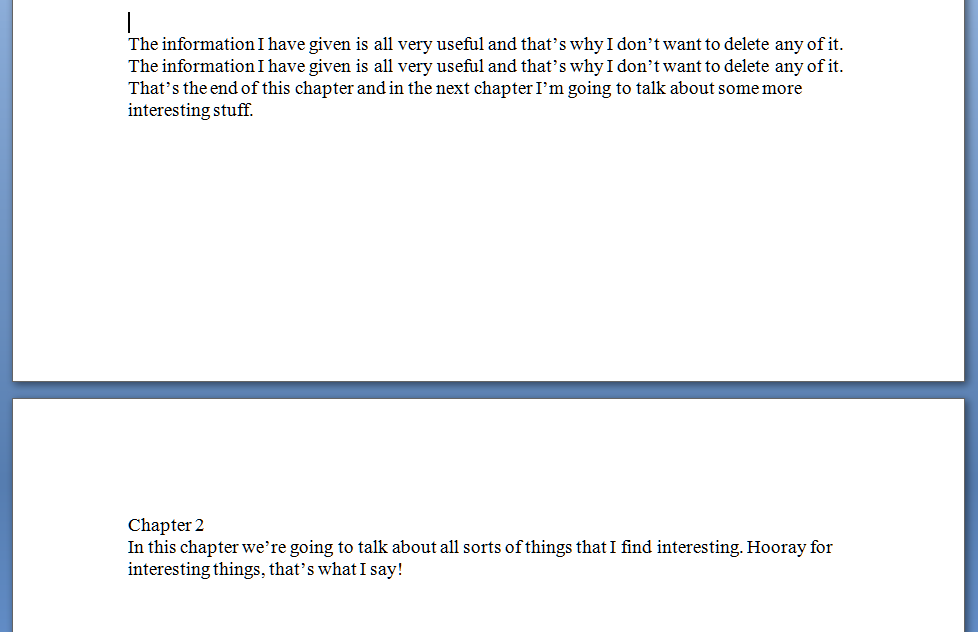
Today we’re going to talk about page breaks. If you’re writing a document that has sections, chapters, etc., you might well want to start a new chapter on a new page, and have it look something like this:

So far, so good – you’ve got your new chapter starting on a new page. But I bet you finished one section and hit the “Enter” key until you got to a new page, didn’t you? The way to tell is to hit a rather magical little button that shows all the formatting you’ve done.  In Word, you’ll find it in the Home menu; if it’s not there, play around with the display until you’ve found it and add it to the menu bar. Here it is:

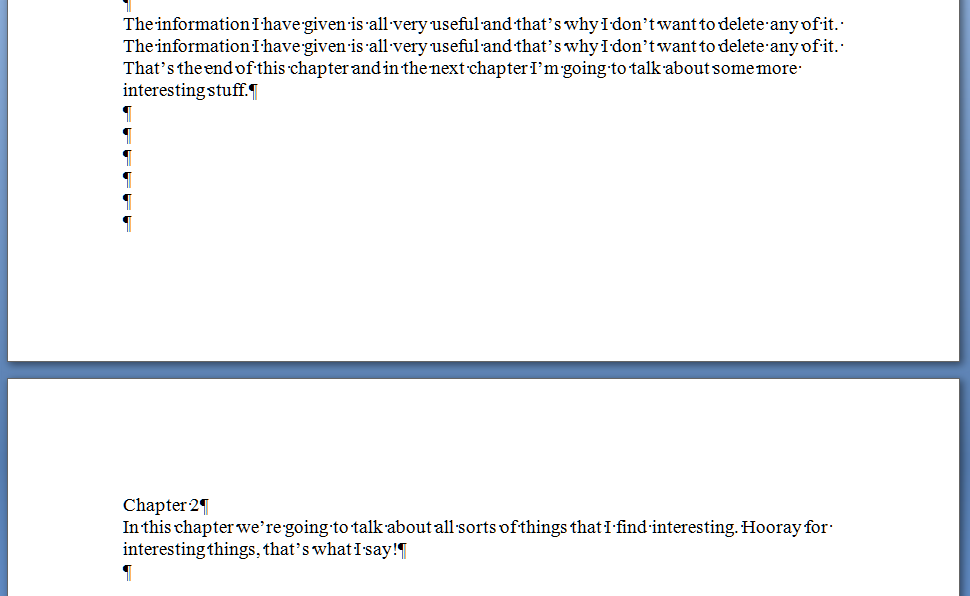
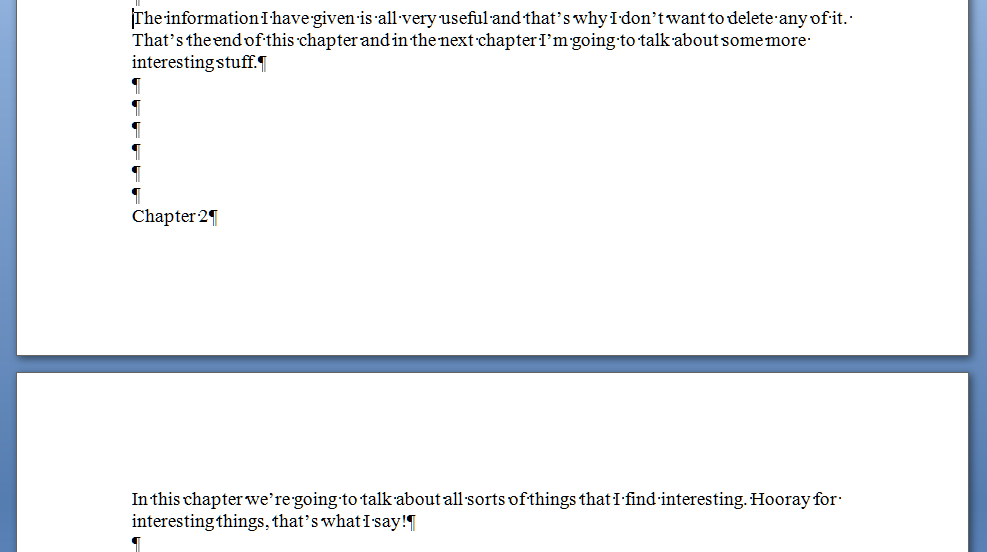
That’s actually the “paragraph” symbol or pilcrow used for centuries in manuscripts and printed books. Anyway, it’s ever so useful if you want to show what you’ve done to a document. Press it a second time if you want all the formatting marks to disappear again. So, pressing this with our document open shows the horrible truth – enter, enter, enter you’ve gone, six times, down the page …

And that’s all well and good – until you change the text above the page break. You’ve done this and it all looks nice, then you notice that repeated line on page 1. Oh, well, you can just delete that. So you delete the repeated line, and the text on page 1 is now one line shorter – one line further up the page. Below the text, you hit Enter 6 times to make Chapter 2 start on the next page. Those six lines are below your chunk of text still, but your text is one line shorter than it used to be. So what happens … ?

Disaster! Chapter 2 doesn’t begin on the next page any more! It’s crept up a line! And, similarly, if you’d added some lines of text to Chapter 1, this chapter heading would start part way down this page. Messy! And when you’ve submitted your work to an editor like me, you can bet we’ll be suggesting adding lines in or taking them away; when you get the document back the spacing will be all over the place (or I’ll have done it my way and made it tidy already … )

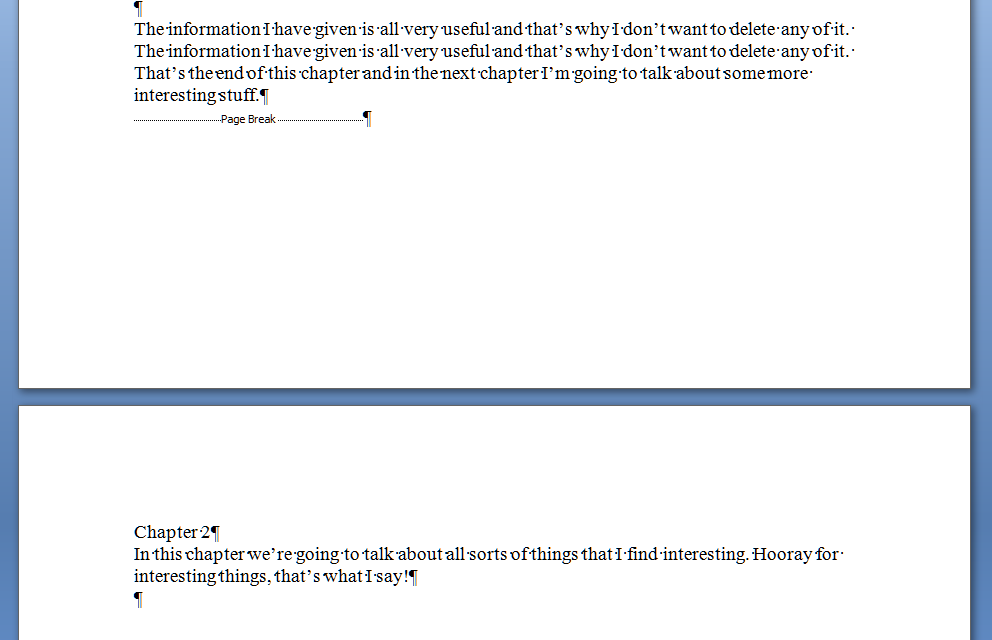
So how do you do it properly so this messiness doesn’t happen? Simple – you “force a page break”. Again, in all versions of Word, when you get to the place where you want to force a new section to start on a new page, press Control-Enter (or choose Insert – Page Break). Turning on your formatting display, and using our original text again, you’ll see this:

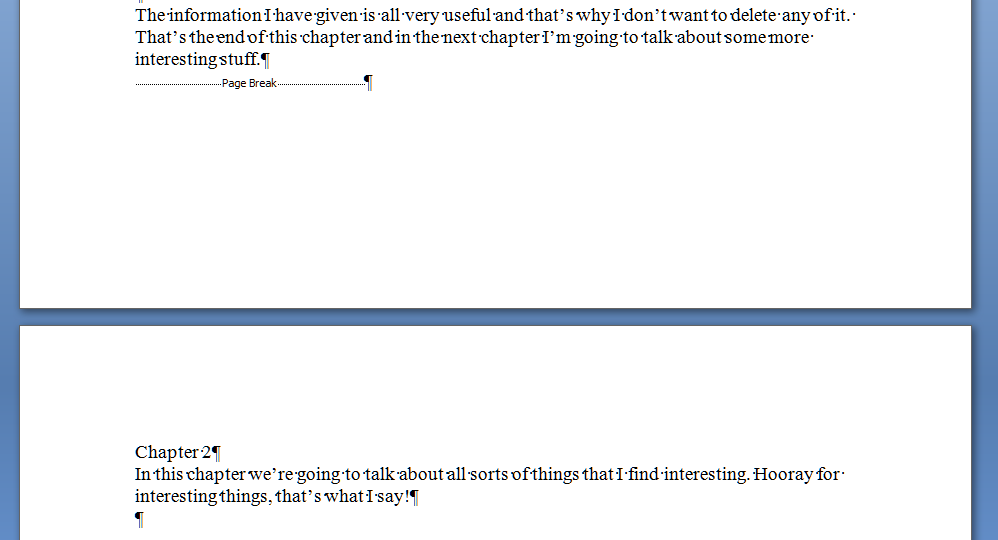
And because it’s a forced page break, it doesn’t matter what you do to the text above the break, the new text will always appear on the next page. Make the Chapter 1 text shorter again by deleting that extra line and you get this:

No hopping around – and even if you add so much to Chapter 1 that it goes onto the next page, Chapter 2 will just hop on down to the page after, automatically.

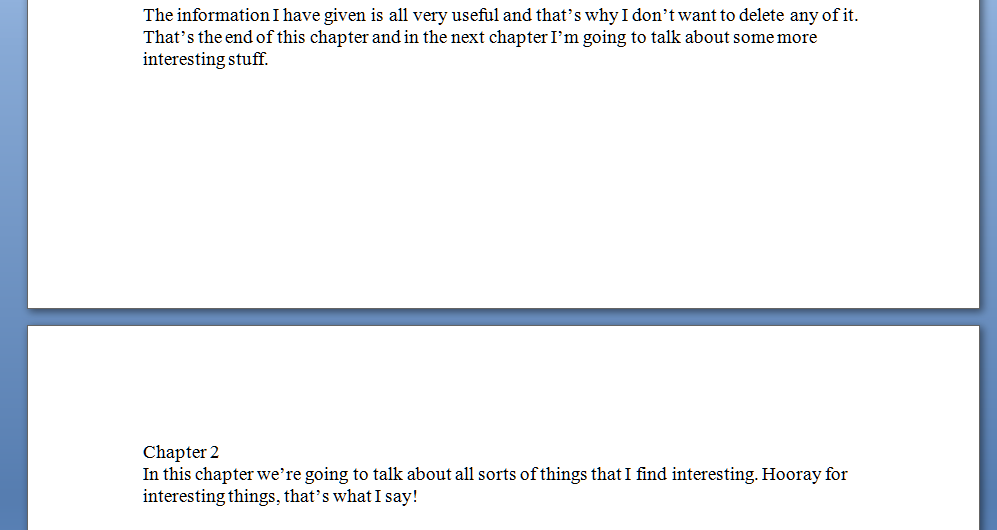
Of course, your document still looks like this:

But you’ve done it all correctly, in fewer keystrokes, and you know that whatever you do with Chapter 1, Chapter 2 will always start at the top of its new page, nice and tidy, going where you need it to go.

I hope that’s helped – it’s a very common issue, which is why I’ve tackled it first. There will be more of these posts coming over the next few months – do pop a comment on this post if I’ve helped you, and let me know if there are any other issues you’d like me to look at.

Please note, these hints work with versions of Microsoft Word currently in use – Word 2003, Word 2007 and Word 2010, all for PC. Mac compatible versions of Word should have similar options. Always save a copy of your document before manipulating it. I bear no responsibility for any pickles you might get yourself into!

Find all the short cuts here

 
10 Comments

Posted by on November 23, 2011 in Copyediting, Errors, New skills, Short cuts, Word, Writing


Tags: , , , ,

… but you still have to BUY a lottery ticket OR, making your own luck

In my time as a small business owner, and indeed, ordinary woman on the street, using social media, I’ve had a few noteworthy examples of how being in the right place, at the right time, within the world of social media such as Twitter and Facebook, can reap dividends for your business and personal development.

Of course, being in the right place at the right time is important In Real Life, too.  I picked up a few new clients at the book launch for a novelist client – because she was there, her book was there, my cards were there, and I was there. But social media runs round the clock, doesn’t involve dressing up, and doesn’t only happen at set times.

Yes, I’ve been lucky. And yes, I’ve probably missed as many opportunities as I’ve grasped – after all, who can keep up with all of the tweets by all of the people they follow? But here are some things that have happened to me in the last couple of years …

Client A tweeted one late evening (afternoon for her) that she was looking for a copyeditor. She was in the US, I’m in the UK, so the time difference was important. In fact, I found this tweet by re-running a saved search – see below. But there she was, and there I was, within 2 minutes of her tweeting. So I tweeted back. She sent me one project, then became a regular client. Then she recommended me to someone else, who I would NEVER have reached on my own, who is now another, larger, regular client.

Client B was stuck for a transcriber. She’s a journalist and interviews people regularly. Help – she needed a transcriber. Could anyone recommend one? At the time, transcription wasn’t even one of my core offerings. But I trained in audio typing and had done work with tapes over the years, so I got in touch. Again, I happened to catch her a few minutes after she’d posted, so I got in first. And, a year on, she’s another of my cherished regular clients. And has given me lovely references and recommended me on – via Twitter, of course!

And a personal one. Libro had been a bit quieter this week than it had been of late. So I had time to look at Twitter during my working day. I noticed one of my favourite running magazines was asking if people were booked in to do a particular race. And because I struck while the iron was hot, I ended up reviewing it for them!

How to create your own luck

All these three examples did depend on luck and good timing to a certain extent. But they also depended on me doing certain things to help create that luck and good timing:
–    I have a presence on social media, backed up with a website where people can find out more information about me, and linked to that website via my profile. So I’m already there, active and tweeting or updating my status, and anyone finding me for the first time can see I’m legitimate, busy and (hopefully) useful.
–    I follow people who are interesting to me and linked to my interests in some way.
–    I ran searches on Twitter in my areas of interest (“need proofreading”, “need transcriber”, etc.), saved them (did you know you could do that?) and run them regularly (even when I’m busy!). Then I contact anyone who looks like they might appreciate my help. Not aggressively or spamming, just asking politely if I can help and directing them to my website.
–    If I see an opportunity, I go for it. When I asked to review the race, I then had second thoughts, worrying that I’m not a good enough runner to review for them. But I’d already put in for it, and when I asked the contact at the magazine, she reassured me that my kind of runner was just the kind they wanted!

To win the lottery, you have to buy a ticket. Get on to social media, get them to serve your purposes, and see a whole new world of lucky chances open up! Go on … create your own luck!

Libro offers copyediting, copy writing, proofreading, transcription, typing and localisation services to other small businesses, individuals and corporations. Click on the links to find out more! Contact me via email or via my contact form.

 
4 Comments

Posted by on November 16, 2011 in Business, Jobs, New skills, Organisation


Tags: , ,

Your short cuts: my short cuts

Whether you’re using office software for work, fun, creative writing, or studying, it’s very common to not worry about learning how to do things properly, but just to launch in and start typing. How hard can it be?  That’s fine, if you’re just typing a document or making a very simple spreadsheet.  But when things get more complicated, documents need more formatting, and the right way to do things isn’t immediately obvious, it’s very tempting to fudge something together and hope it’ll work out in the long run.

Your short cut: don’t learn how to do it properly; just make up your own solutions.

You would not believe how many documents I’ve been sent where the writers have done this.  In fact, it’s so common that I usually send clients a note to congratulate them when they’ve done something the right way.

This is not just me being over-picky or trying to persuade people to pay out for my services. I once spent seven hours – that’s SEVEN HOURS (remembering my rates vary from £10 per hour upwards) sorting out the formatting and contents page of a PhD that someone had got in a mess with.  What took up most of those seven hours? Stripping out the attempts to do it right that the author had flailed around with, before calling me in.

I’m going to share some of my short cuts. They involve knowing how to do something (I’m not blowing my own trumpet here: people pay me to know how to do this stuff) and doing it properly, to save yourself time and, indeed, money.

I’m going to look at various tasks your documents need to perform (we’re mainly going to be looking at Microsoft Word here, although other wordprocessing programmes will have similar features and capabilities), how you tend to do it, so you recognise what you’re doing even if you don’t use the same words to describe the task, and then show you how to do it “properly”, i.e. the way that is most suited to the software you’re using; the way that will make it easier for you.

I might even go all daring and post some video! Not sure yet …

So, the kinds of issue I’m going to cover will include

– making a new section start on a new page

– using tabs and margins

– using heading hierarchies and creating an automatic Table of Contents

– counting particular instances in Excel

– page numbering

– saving time typing and coping with words you regularly misspell

All quite simple stuff, but you’d be truly amazed at the muddles people can get into …

I’m also planning to do a series of posts that go into more detail, for those of you who really want to know about the nuts and bolts of how to do these things. Please do get in touch if you have any issues you’ve been wrestling with that you’d like me to cover, especially any short cuts of your own that you know aren’t quite right!

Contact me via email or via my contact form.


Tags: , , ,