RSS

Tag Archives: copy writing

Bullet points – grammar and punctuation

Last week we talked about when to use bullet points and how to personalise them. This week, we’re going to have a look at the actual language of bullet points, including top tips on making them easy to understand for the reader. There are two parts to this: word forms / grammar and punctuation.

Punctuation in bullet points

Over recent years there has been a shift towards less punctuation and “cleaner” looking documents. I remember this being called “open” punctuation, and it’s the difference between typing an address as:

1, Avenue Gardens,

Brighton,

BN1 1AA.

and

1 Avenue Gardens

Brighton

BN1 1AA

Of course there is a place for punctuation, but it can get a bit messy looking, and I’m all for clean lines as long as you don’t forget your semi colons within normal runs of text!

So, here are some things not to do. We never introduce a list in a sentence with a semi colon, and we don’t introduce a bulleted or numbered list with one, either.

It used to be the case that we included semi colons and even “and”s at the end of every line. But I think that does look old-fashioned and cluttered nowadays …

Regarding the full stop at the end of the last bullet point … well, the jury is out on that one. It’s one of those style choices that don’t have a specific rule. I’ve checked in my New Oxford Style Manual and my Oxford Guide to Plain English: the former doesn’t talk about the punctuation much at all, and the latter has some general standards to consider following.

Here are my suggestions:

  • If the bullet points come in the middle of a sentence, and it is still clear when you read that sentence even though it’s got bullets in the middle, you can
    • start each bullet point with a lower case letter
    • put a full stop at the end.
  • If the bullet points are very short and don’t form a sentence, like this:
    • Start with a capital
    • Don’t add full stops
    • Use full stops sparingly
  • It is fine to add a full stop at the end of each bullet if the bullet points are long and include:
    • More than one line of text which therefore forms a solid block when you look at it on the page.
    • More than one sentence. It would look odd to have a full stop there and not here.

In summary:

But the single most important thing to do is KEEP IT CONSISTENT within each bulleted list! If you use capital letters or lower case letters to start each bullet, keep them the same throughout. If you end the first bullet with a full stop, end each of them with a full stop.

But of course, you can use different styles for different lists, as the context demands, although I’d be wary of having wildly different ones very close together, as it can look messy.

And this point on keeping it consistent brings me on to …

Grammar in bullet points

We insert bullet points into a text to make it more easy for the reader to understand. This means that the grammar within the bullet points should be consistent, so the reader doesn’t end up scratching their head and going over and over the same bit of text, trying to work it out.

Have a look at this example, and you’ll see what I mean:

Even if the reader can understand the basic sense of this, the uncomfortable disconnect between the different grammatical forms bring the reader’s attention to the form of the text and not the meaning of its content. And that’s not what good, clear writing should do. However, this is one of the most common mistakes I find in the text I proofread and edit. Especially if the bulleted list is long, the writer will lose track part way through and start going all inconsistent.

This is what that list above should look like:
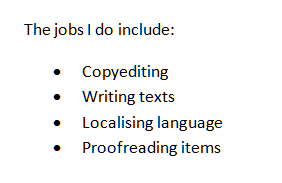
Nice and tidy: everything following the same structure.

The grammar of bullet points must be consistent and matching so that the reader is not confused. It’s a different matter with the punctuation, which is, when it comes down to it, more of a matter of choice. Personally, I prefer capital letters and no full stop in my bullet points, which is why, if you’re my client and your bullet point punctuation is a little inconsistent, you’ll find me using that as standard!

So now you know all about how to insert and customise bulleted and numbered lists, and the grammar and punctuation to use with them! I hope you have found this helpful.

This is part of my series on how to avoid time-consuming “short cuts” and use Word in the right way to maximise your time and improve the look of your documents. Find all the short cuts here

Do let me know if this has helped you – and do share with the buttons at the bottom of this article.

 
13 Comments

Posted by on November 28, 2012 in Language use, New skills, Short cuts, Writing


Tags: , , , , , , ,

Bullet points – how and when to use them

It’s Word Tips time and today I’m going to talk about bullet points – why we use them and how to use and format them. Next week, I’m going to treat you to some tips about how the language and punctuation of bullet pointed text works. But for now …

Why do we use bullet points?

Bullet points help to make what you’re saying more clear. They break up blocks of text into tidy chunks so the reader can take in what you’re saying. They present lists in a clear format so people can see it’s a list. They emphasise points you want to emphasise. They show the organisation of things. In short:

  • They’re useful
  • They’re tidy
  • They’re good at emphasising things
  • They make sure the reader knows this is a list

How do I use bullet points in Word?

In Word, you want to be in the Home Tab. Then, look at the Paragraph section and you’ll find a set of useful little buttons. One has a list of dots, one has a list of numbers, one has an indenting list of numbers, and two have paragraphs and arrows:

These are the buttons you need to make your bullet pointed lists.

So, here’s a plain list without any bullet points. To make a list bulleted, you need to highlight the areas you need to change. So in this example, we want to leave the first line alone and highlight the other ones:

Once we have the lines highlighted, we can click on the bullets button (just in the middle of the button for the time being) to make the highlighted lines into bullet points:

You can do the same but hit the number button to the right of the bullets button – now we get a numbered list:

How do I create sub-bullet points?

What if you want nested bullet points in sub-categories? That’s fine – put your list into bullets, then select just the line you want to change and click on the Increase Indent key to move it along one. You’ll see the bullet point itself (or the number) change when you do this.

There’s another way to do this (of course there is!) – get your cursor just before the first letter of the first word of the line you want to indent and hit the Tab key on your keyboard. You will get the same effect.

How do I customise my bullets and numbering?

You may not like the standard bullet points you’re given by Word. That’s fine, because you can customise them.

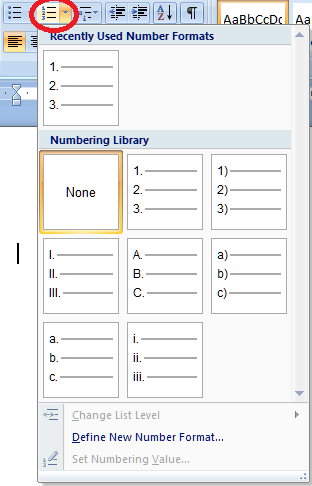
The bullet and number button each have a tiny arrow on the right-hand side of the button. Try clicking on the one on the bullet button …

… and you’ll get a choice of different bullet markers you can use. If you click on Define New Bullet, you can even upload your own images to use as bullet points: useful if you’re creating a document that needs to be on brand with the rest of your brand identity, for example.

You can do this with the numbers, too, allowing you to choose between letters, Arabic numbers and Roman numerals:

Again, you can define your own new number format if you want to.

Customising the list style

To go just that little bit deeper into customisation, you can also fully customise how the sub-bullets work and even set a new Style for this document or all future documents.

To do this, we use the Multilevel List button. This one’s a bit of a swizz, I think – it gives you a tiny arrow on the right, but it doesn’t actually matter where on the button you click; you will still get the same menu.

So this gives you the chance to choose between different multi-level list formats and to define your own.

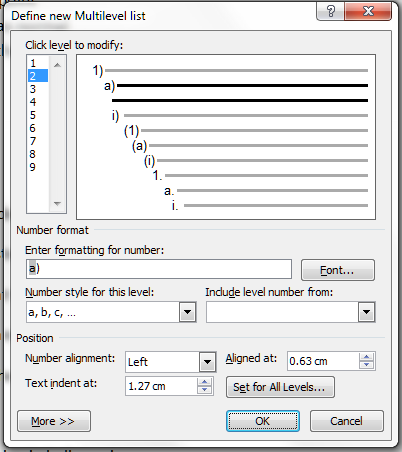
If you select Define New Mulitlevel List you will be given a new set of options. Choose this if you just want to change one list in your document.

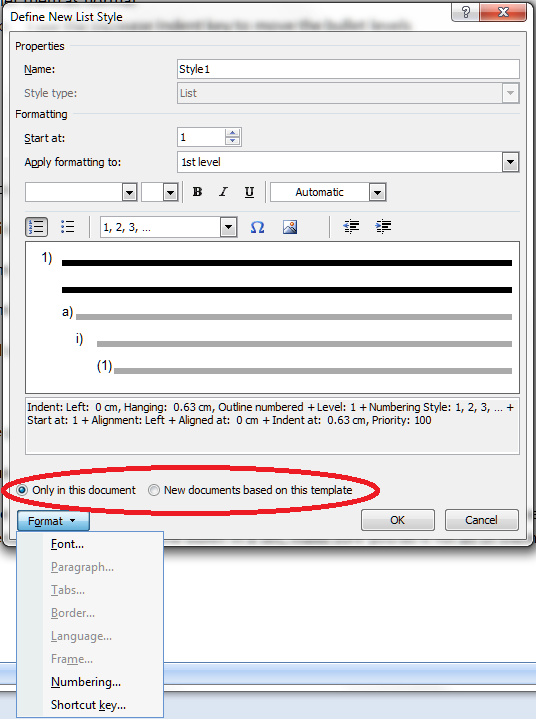
If you want to define a style for all of the lists in your document, or a new List Style to use in all documents forever, choose Define New List Style.

Then you can go ahead and crate a new list style that will appear in your Styles on your Home tab, and can be used for lists in just this document, or documents from now on.

We’ve learned how to set up and customise bulleted and numbered lists.

Next week, we’ll look at the text you write in lists and how to make sure that works clearly and appropriately.

This is part of my series on how to avoid time-consuming “short cuts” and use Word in the right way to maximise your time and improve the look of your documents. Find all the short cuts here

Do let me know if this has helped you – and do share with the buttons at the bottom of this article.

 
7 Comments

Posted by on November 21, 2012 in Copyediting, Errors, New skills, Short cuts, Word, Writing


Tags: , , , ,

My short cuts: adding shortcuts to the quick access toolbar

Do you use commands in Word that are usually buried inside a menu inside a menu inside a menu? I’m going to show you how to add these onto your Quick Access Toolbar, so you can get at them using a shortcut in just one click. And scroll to the bottom for a very quick way to do this …

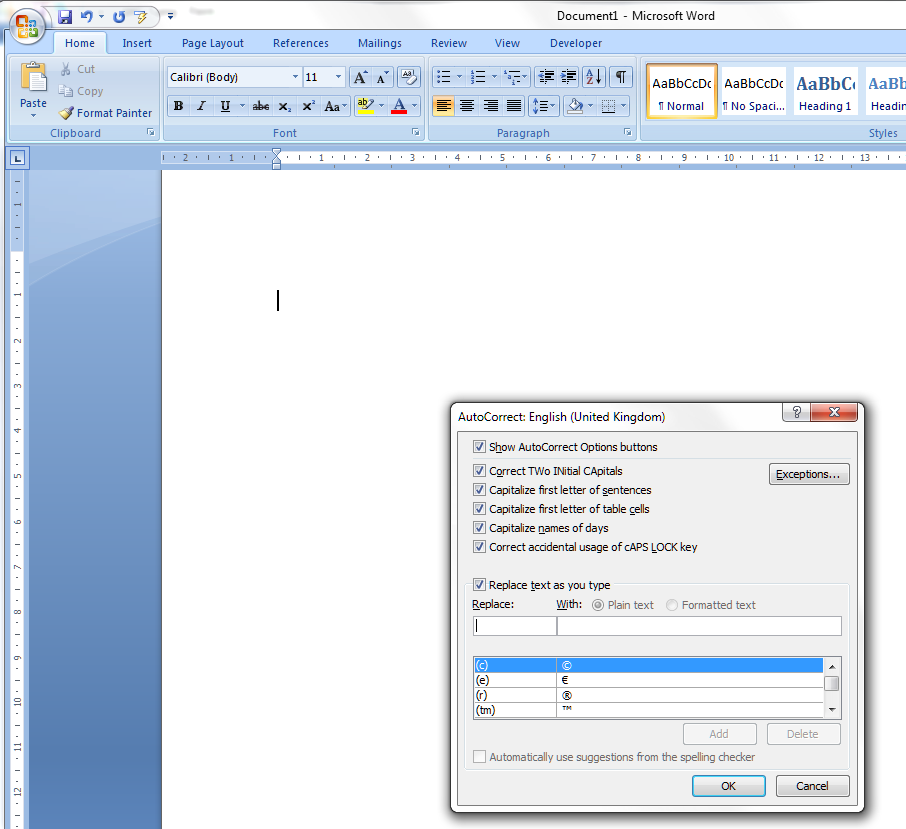
The example I’m going to use is AutoCorrect Options. I have posted about how to find and work with AutoCorrect, but it is buried within some nested menus, which means you have to click and click and click whenever you want to add a new entry, wasting time to do something in order to save time. Now, I can access the menu I want with just one click!

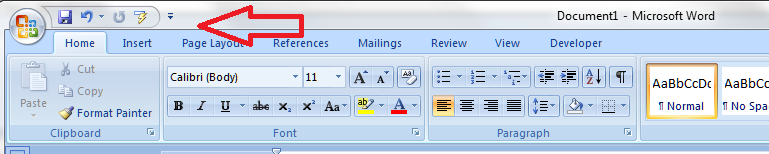
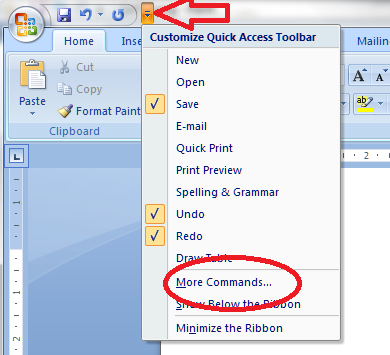
So, first of all we need to go up to the Quick Access Toolbar, right at the top of your screen in Word 2007 and Word 2010 (in Word 2003, right click on the main toolbar and customise it). Note the down arrow to the right of your standard buttons, and click it:

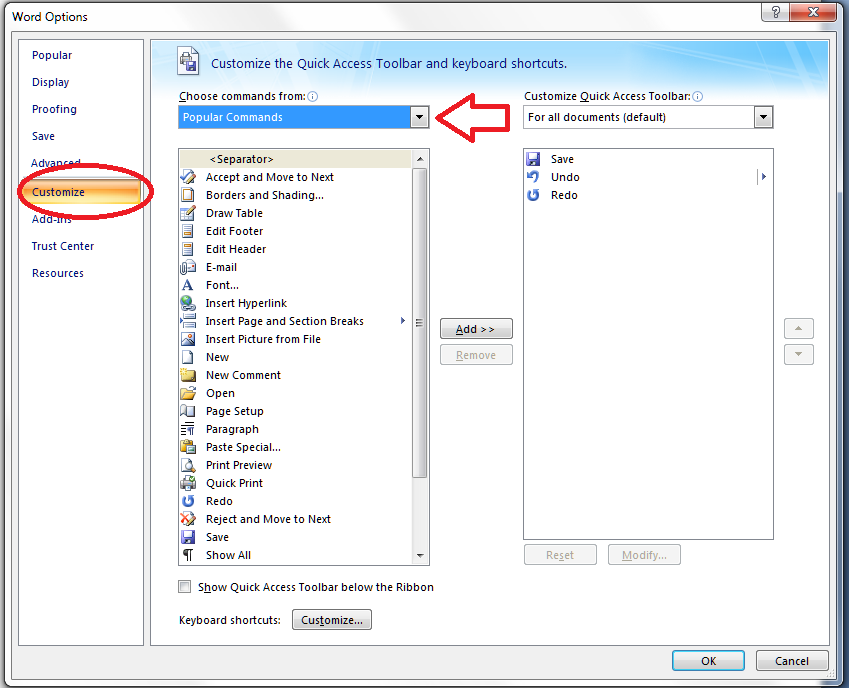
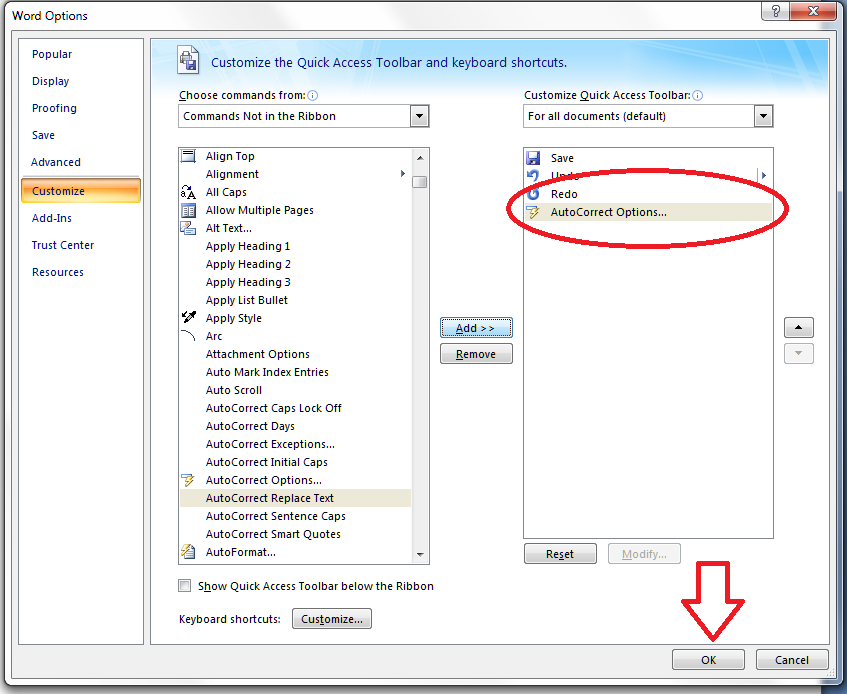
You will notice an option to choose More Commands – this is how you add more buttons to the Quick Access Toolbar. Click on that, and you’ll get a screen which allows you to customize the Quick Access Toolbar:

Note at this point that you can access this menu via Word Options – Customize, too, if you want to.

We can now see a whole load of Popular Buttons you can add on to the Quick Access Toolbar – so you can pop them on there to get at them whenever you want to. These are a few buttons that appear at the top level when you click on any of the tabs on your main ribbon.

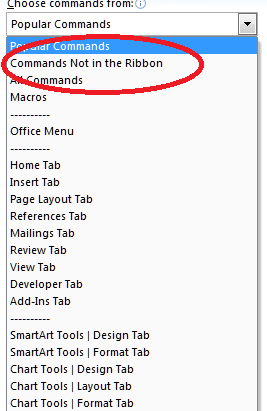
We’re going deeper, though, into buttons and commands which don’t appear on the top level of your tab menus. So click on the arrow next to Popular Commands and you’ll get a list of options:

You can choose All Commands, which will give you every command and button (with a hover-over tip to which menu they belong to so you can choose, for example, Spell Check from the Review tab rather than the Blog version, which won’t do much for you in a standard Word document. In this case, to add our deeply buried button, we want to choose Commands not on the Ribbon.

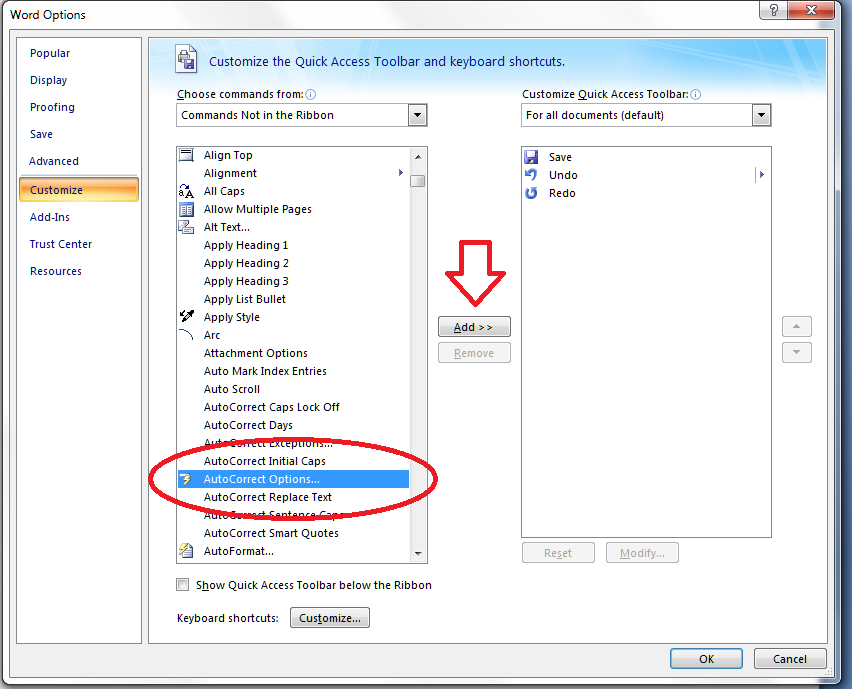
Now you have a list of every command and button that exists in Word. How handy that AutoCorrect begins with an A! Look for your button and highlight it, then click on Add >> to add it to the list on the right – which is the list of buttons that appear on your Quick Access Toolbar. At this point you can even choose when these buttons will appear, but I always leave it on All documents. When you’ve pressed Add, there it is, on the list:

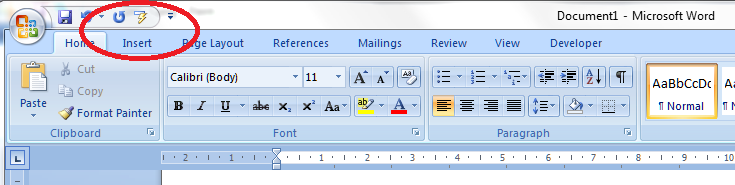
Click on OK and it will magically appear on your Quick Access Toolbar:

Want to check it’s true? Click on the little icon, and there’s our familiar AutoCorrect menu.

What a time saver! I’ve added all my very commonly used buttons from different menus onto my Quick Access Toolbar, from Bold to Spellcheck and all sorts of other things in between …

Adding items quickly to the QAT

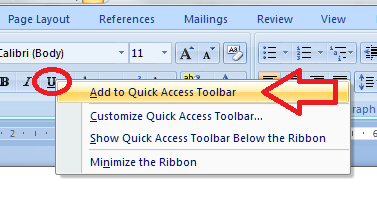
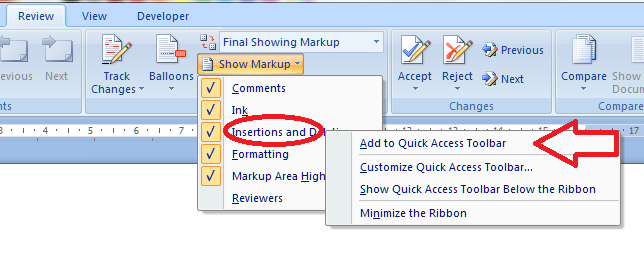
Edit to add: If you have the button you want to add to the QAT in front of you, simply right click on that button and you will get the option to add it to the quick access toolbar!

Magic! And it works however deeply buried the button is in your lists of commands – for example, you can choose something that appears in a menu within a menu:

Please note, these hints work with versions of Microsoft Word currently in use – Word 2003, Word 2007 and Word 2010, all for PC. Mac compatible versions of Word should have similar options. Always save a copy of your document before manipulating it. I bear no responsibility for any pickles you might get yourself into!

This is part of my series on how to avoid time-consuming “short cuts” and use Word in the right way to maximise your time and improve the look of your documents. Find all the short cuts here

 
24 Comments

Posted by on June 27, 2012 in Errors, New skills, Short cuts, Word


Tags: , , , , , ,

What I got up to in April

Welcome to my April round up of what I’ve been getting up to. Do you find these round-up posts interesting? Would this series be better on my Libro Full-Time Blog? Do leave a comment, click on the share buttons or share my notifications on various social media locations!

Being self-employed full time

I was pretty busy for most of April and had to abandon a few attempts to get to networking events, but I did manage to make it to the Elizabeth Taylor Day in Reading and the BookCrossing meetup in town. I’m also much better at not worrying if it’s a quiet week. If it is quiet, I make sure I get some rest, catch up with my reading or work on my research project, rather than fretting.

Editing, writing, transcribing and proofreading

I’ve been busy with a variety of projects throughout April.

I started off the month finishing a batch of transcriptions for the international organisation I work for regularly. I also helped to recruit a few more transcribers for them, as I’m ideally placed to tell people EXACTLY what it’s like and make sure their expectations are set (“so, you’re going to be typing like a maniac for 8 hours a day, listening to non-native speakers of English talking about international affairs and taking their presentations down in a way that turns them into native English …”)

I did more work with my Master’s students including some pretty intense work to get their essays finished off for the beginning of the summer term, as well as proofreading other essays and dissertations for the student proofreading company I work for. In fact, looking back, it’s been a lot about the students this month!

I didn’t do a lot of writing for clients this month, but I did manage to finish writing my e-book (How I Conquered High Cholesterol) which is now in beta-testing and will shortly be available via Amazon.

I did a fair bit of US to UK English localisation for a couple of my clients, including working on a technical manual for some medical equipment, which was unusual and interesting! I do like the intellectual challenge of working out what “we” would say in a given situation, although I have to go off and refocus my mind when swapping between the two languages!

I’ve helped one regular client start to shape some blog posts into book form by editing them for consistency and taking out all the redundant bits, and I’ll be doing more editing for her in the coming month or so.

I’ve worked with the usual translators, too, of course – most of my clients are ongoing regulars now, which I like a lot!

Blogging and tax

I would be amazed if anyone didn’t know that I’d done my tax return in April (but here’s why, including the full horror of Going On To Payment On Account). Anyway, I know where I stand and what I’ve got to pay in tax this year, that’s all set aside and I’ve given myself the balance, so all set for a slightly less constrained year.

I’ve continued adding to my series of articles about using Word and my series of interviews with fellow small businesses , and I decided to put together a resource guide to the information to be found on my blog for businesses, students and Word users.

I published another five-sentence monthly newsletter – do sign up here for a quick read!

In more sociable news, I helped at the city centre Social Media Surgery session, and attended Social Media Cafe as usual (I wouldn’t miss that for the world). Finally, over on the Libro full-time blog I’ve added a few new resolutions to my list for Home Workers!

Coming up – transcription madness

I’m booked in for more transcription from late May into June, so I’ll turn into a hermit then (but I can’t wait to find out what happens to all the ongoing projects the organisation is working on!). Until then, I’m currently working on a rather technical geology text as well as the usual ongoing student, translator and editing bits and bobs.

Libro offers copyediting, copy writing, proofreading, transcription, typing and localisation services to other small businesses, individuals and corporations. Click on the links to find out more!


Tags: , , , , , ,

New ways to navigate the resources on the Libro blog

I’ve built up loads of information on all sorts of topics on this blog over the past few years, so I thought it was time to put together a resource to help you find what’s most useful for you. I ran a poll, people said yes, so I did it!

I put this new guide together about a week ago, and it’s proved popular so I thought I’d let you know about it quickly.

I’ve put together one simple resource guide with three main sections:

  • Resources for business – these include posts on how to set up a small business, things to do to grow your business, hints on networking, motivation, etc.; then some information about tax and finally an additional link to my small business interviews (note that business formation and tax posts are relevant to the UK although the rest of it will translate anywhere)
  • Resources for students – how to write an essay or dissertation, plagiarism and quoting sources, and lots more to come
  • Resources for Word users – all sorts of tips and hints to make your documents more consistent and easy to write, change and navigate, including tabs, margins, headings, contents pages and more obscure matters like how to put text in alphabetical order. Also includes a few notes on PowerPoint and other applications,

The whole resource guide offers a good way to find out what you need to know – do have a look and a play around, and let me know if you’ve found anything particularly useful!  I’ll be adding both resources and entries to the resource guide as I go along, of course. Watch this space …

And of course, we still have the index to the Troublesome Pairs and index to all the Saturday Small Business Chat posts.

I hope you enjoy the resource guide and indexes, and the resources they guide you to!


Tags: , , , , , , , , ,

What I got up to in March

Welcome to my March round-up of what I’ve been getting up to. Do you find it useful/interesting/inspiring reading these posts about the life of an editor / writer / transcriber / small business person? Do leave a comment, click on the share buttons or share my notifications on various social media locations if you do!

Being self-employed full time

Libro continues to go from strength to strength and I’ve settled into a nice routine of enough work to keep me nicely busy (and to keep the wolf from the door) while having the flexibility to pop to a networking event or just a walk in the park with a friend.

Editing, writing, transcribing, proofreading

So, work-wise I have had a busy and interesting time.

I edited a really interesting set of EU documents for a French company that was new to me, and apart from that it was pretty well all regular customers all month.

I am working with some Master’s students through their courses, giving them feedback about their English and offering ways to improve it, as well as proofreading their essays. This is really rewarding, as I see them taking on board what I suggest and their English improving. It’s also interesting to see how their ideas for their dissertations start to take shape.

I did the usual writing for some commercial clients, including finishing off writing a library of 50 x 500 word articles for one particular client who wanted to build up a library of information on their website that would also boost their SEO (Search Engine Optimization). It’s a challenge to build up that many words on a network of inter-related subjects, including making sure there was room for plenty of linkage to help the visitor navigate through the information on offer, but I enjoyed being able to make it genuinely informative for the reader as well as useful for the client in terms of driving people to their website and keeping them there for as long as possible

I proofread a few PhDs or parts of PhDs, including some really interesting ones in the social sciences. I always tend to learn about what I’m editing, so it’s nice when it’s something I genuinely find interesting (luckily, I can find something of interest in pretty well everything I work on … otherwise I think I would probably be in the wrong job!)

I picked up a new localisation client or two and will be working with at least one of them long term: localisation is a nice intellectual challenge, as it’s not just about turning color into colour but really thinking about how British and American English work and getting right into the guts of the text.

I’ve worked with the usual translators, too, including on some interesting annual reports of companies (yes, I sign a lot of Non Disclosure Agreements) and at the end of the month I went into hermit mode as I had another big project from my main transcription clients, so typing away like a demon with headphones jammed into my ears (and then going to the gym to row out my stiff shoulders) has been the order of the day.

Networking, videos, blogging

In non-billable hours news, I featured in this video by Enterprise Nation extolling the virtues of networking and, in particular, the Twitter event #watercoolermoment, which is a gathering of home workers at 11 am on weekdays to have a chat about this and that – just like you might do in a “real” office. I also redesigned this website and blog – I really love the new look, what do you think?’

I’ve added some new posts to my series of articles about using Word, which are hopefully useful to students, writers and administrators alike, and my series of interviews with fellow small businesses is building nicely – there’s space in May if you’d like to take part!

Oh, and for a while now, my monthly newsletter has been only five sentences long so do sign up here for a quick read!

In more sociable news, I helped at the city centre and local Social Media Surgery sessions, and attended Social Media Cafe as usual (I wouldn’t miss that for the world). My local “notworking” group Kings Heath Home Workers group has a few more members and I’ve been meeting up in a cafe with a local friend once a week. I have also resolved some pressing issues around time management which I’ve talked about over on the Libro full-time blog.

Coming up – taxes and a new financial year

It’s the end of the financial year this week, and the end of mine, too. I am looking forward to getting my tax return done so I know how much of my earnings I can keep and how much is going to the taxman – although this year I will start Paying On Account, so will have to give him a lot more than usual – in fact double! Watch this space for a great guest post explaining all that later on this week. I have more transcription to do, more students to work with, more of the same – and I bet I love it as much as I did this month!

Libro offers copyediting, copy writing, proofreading, transcription, typing and localisation services to other small businesses, individuals and corporations. Click on the links to find out more!


Tags: , , , , , ,

What I got up to in February

Yes, it’s that time again when you get to find out what a busy self-employed editor/writer/transcriber gets up to. I’ll carry on writing these while people carry on letting me know they enjoy them!

I’ve had another amazing month in February. I can’t really believe it’s going so well – I have described it as like that expanding foam you put into a space in your house – pff and it’s filled up the space allowed!  My new blog has been useful as an outlet through which to express myself from time to time! So, here’s a snapshot of what I got up to …

The first part of the month was heavily devoted to transcription – the client I worked for just before Christmas came back to me with another international conference to transcribe. My experience with minuting meetings and with non-native speakers of English really helped here, as I was typing out presentations and discussions by people from all around the world. Fun and interesting work, I got to share the work with some colleagues by recommending them to the client, but, my goodness, I typed a lot – I transcribed over 20 hours of conference (remembering that each hour of speech takes several hours to transcribe) and actually wore the letters off some of the keys on my computer keyboard! I put into practice the lessons I learned about avoiding RSI from the last lot, took lots of breaks, went to the gym every day for some heavy sessions on the rowing machine, and got through it fine. I like this client a lot, too, because they always come back to me quickly if I have a query.

I also did more transcription for two other regulars; a writer teaching people about marketing and a journalist interviewing musicians. Those ones were in British English and also interesting to do.

And I did do other things, too (somehow),  writing a library of 42 short articles for one regular client, articles on medical subjects for another, and putting together marketing letters/emails and web text for another.

I edited some texts that had been translated from Polish, Finnish, Dutch and Chinese, and ones written by people with French as their first language.  I edited the Moseley B13 magazine again – I do that for free and enjoy it greatly, finding out what’s going on in my local area and using my powers for good at the same time. I also did a bit of localisation for US and other clients.

There was some of the usual academic work – bits of theses, dissertations and articles. I had some more short essays from my coaching clients, who are all progressing through their Master’s courses nicely – it’s great to see their English improving as they take on board my suggestions and tips.

So a nice busy time of it! In other news, I got back into my giving back and networking, helping at a one-off local Social Media Surgery session, and attending Social Media Cafe as usual (I wouldn’t miss that for the world) although I missed the Central SMS owing to a clash with another meeting. In response to my need to have people to talk to now and then, and after testing the waters, I’ve established a Kings Heath Home Workers group on Facebook and blogged about it.

Coming up – I have some academic work booked in and I’ll be doing more transcribing towards the end of the month. I am hoping to get some time to work on my research project, as I’ll be presenting on my research at the Iris Murdoch Society Conference in September. I’ll be going to Jelly co-working session this Friday – now I’ve been to one and know how they work, I’ll be taking along some draft blog posts to write up.  I ran a competition in my newsletter last month and I’ll be announcing the winner later on today or tomorrow – if you would like to receive a short summary of Libro goings-on and interesting facts and links, do sign up here!

Libro offers copyediting, copy writing, proofreading, transcription, typing and localisation services to other small businesses, individuals and corporations. Click on the links to find out more!


Tags: , , , , , ,

What I got up to in January

I’ve had a fantastic first month of being fully self-employed – I can’t really believe how well it’s gone. I wrote about goals last week, and I’m happy to say that I hit all my goals for January, including the hardest one. This is marvellous reassurance that I can do this and make a living out of it: I was expecting January to be a bit slow, and the Jury Service (that wasn’t – they didn’t call me up for any cases and I only ended up being there for four half-days) did knock out a bit of my first week, but I took the opportunity to have a bit of rest and relaxation that I’d missed out on over my very busy Christmas! More about how it’s all going in a more personal sense over on my new blog; I’ve been hugely enjoying writing that!

So, I’ve had a good mix of my usual tasks this past month:

I’ve proofread varying pieces of academic work for the student proofreading company I do work for, Master’s course work for a few students, three of whom have signed up to be coached through their course (I provide more detailed information on their particular issues with their written English and help them develop their writing while they’re learning about their subject – I also charge for this monthly or termly so they don’t end up paying lots of little invoices) and had one mammoth session on a PhD which had got delayed by the student’s tutor (I was glad not to have to go to the day job the morning after that 11-hour day!).

I’ve copyedited documents, magazine issues and articles for my regular clients, and checked the English for my Polish, Finnish and other European translator clients. I’ve checked over the articles and proofs for Moseley B13 Magazine (I do that for free).

I’ve transcribed two webinars for my author/entrepreneur client and also edited a downloadable guide to self-publishing for her (I’ll link to that when it’s out, for all you authors out there).

I’ve localised a whole load of email text for a new American client, using software called Across, which is mainly used by translators: I’m pleased to have got to grips with this as I think it will widen the range of clients I can work with.

And I’ve written lots of little bits of marketing material for a client who’s offering my services to their small business clients, as well as a series of blog posts about dentistry and most of the new web content for my retail shelving client, working with their SEO person to make sure the text and metadata both drive click-throughs to their site (it’s working well so far!)

So a nice busy time of it! In other news, I had a guest blog post published and was quoted in an article about the rise in numbers of self-employed people.  I got back into my giving back and networking, helping at a Social Media Surgery session (find out more via this article I wrote about it), and attending Social Media Cafe (where I wore a brooch made by fellow small business, Good Girl Designs and insisted on having a photo taken) and my first Jelly co-working session.  I’ve helped two friends set up WordPress blogs (Amy’s music blog and Ali’s book reviews blog).

Coming up: I’ve got returning clients and regular clients to look after, and I have another big transcription job coming up, similar to the one I did at Christmas. I’m pleased to say that I’ve got more time for reading and seeing my friends now I’m full time, which is what I had hoped for. I’m going on a half-day course on email and social media marketing, and I’m planning a slightly different kind of newsletter this month – including exclusive access to a fun competition and a new format for the newsletter itself – do sign up here to get a look at that when it comes out!

Libro offers copyediting, copy writing, proofreading, transcription, typing and localisation services to other small businesses, individuals and corporations. Click on the links to find out more!


Tags: , , , , , ,

What I got up to in December

In my previous years of Libro work, December has been really quiet, as people seemed to feel they needed to leave me alone for Christmas. This was usually a bit frustrating, as the University where I worked gave us a lot of time off over Christmas and I was raring to get on with stuff with nothing to get on with. This year, I knew I had Jury Service starting in early January, so I thought I’d be able to take advantage of the downtime to get a bit of rest, get some work done on my Iris Murdoch project and pre-write all the blog posts I needed to cover the time I’d be out of the office.

It didn’t quite work out like that! I’d have been even busier than this if two big writing projects hadn’t slipped back (through no fault of my own, just circumstances). I had Christmas Day off, but apart from that I worked pretty solidly. As we all know by now, I left my library job on 12 December, and I actually corresponded with a potential client the evening of my leaving do – I must have done a decent job with the good old Blackberry, as I ended up booking in the work for that week! I then went on to a mixture of pre-booked and just-in-time work for various clients, old and new …

Edited some articles for a local academic who’s a non-native speaker, including putting the documents and bibliographies into the specific format demanded by the publications for which they were written. Also edited English translations for two agencies, one in China and one in Poland, and did the usual checking for my long-term translator client and my French HR consultant who’s writing a series of blog posts.

I transcribed quite a lot this month: a long webinar for my novelist client (more of her later) and I had a large project for an agency, transcribing presentations given at an international conference by non-native speakers of English (on the whole: things got a bit faster when I got the odd British or American presenter, but it was all interesting!).

I wrote some web text and a downloadable “dos and don’ts” piece for my retail shelving client and had a chat on the phone with their new SEO people as I’ll be writing more web content for them in the New Year.

I proofread a PhD thesis and several essays and dissertations, both for my direct clients and the ones I work for via a larger student proofreading company.  I’ve got a couple of coaching clients booked in – I proofread their work but also make suggestions on how they can improve their written English, write out lists of common mistakes they make, etc., throughout their course.

Of course, that’s what we call proofreading, but isn’t really – I did also do a proper proofread on a long sectionof a big document outlining responsibilities and guidelines for the updated manual of a professional body, comparing the new version with the older one to make sure they matched but any dates were changed appropriately.

And I did a final line-edit on a novel by a successful self-published author. I had to read the first novel in the series so I could check for continuity, noticed the odd issue in that one and ended up doing an edit on that book, too, so I spent much of Christmas Eve and Boxing Day concentrating on fast-paced religious thrillers set in various catacombs and other exciting places – not traditional Christmas fare, maybe, but very interesting!

I did manage to work half days in the week between Christmas and New Year, more or less, with just some student work to get on with. And my lovely regular clients are all aware of the Jury Service and keeping things as light as possible for these two weeks.

In the end, December was a very busy and successful month, which encouraged me to think that yes, it was a good idea to leave the Library after all! I had my best month yet for income, which meant I nearly met the biggest of my three targets for the calendar year – so I set some ambitious ones for this year, too.

Things were a bit quiet on the networking front, it being the festive season, but I did have time for some socialising, and I also started my new blog, which is going to chart my experience as I take Libro full-time.

Libro offers copyediting, copy writing, proofreading, transcription, typing and localisation services to other small businesses, individuals and corporations. Click on the links to find out more!


Tags: , , , , , ,

What I’ve been up to in November

November is traditionally another quieter month, but actually I stayed pretty busy through the month and brought in more income than I did in October.  I had quite a varied month workwise, ending up doing the following …

Proofread some chapters of various PhDs and full Master’s dissertations, as well as a couple of articles which needed their bibliographies put into the format the journals required (which took longer than proofreading the text)

Copyedited a large number of documents for a client’s important project – sometimes working at very short notice and getting up very early in the morning (and getting lots of thanks and a lovely quotation for my references page, I’m happy to report!)

Did a substantive copyedit on a non-fiction/humour book – I really tore it apart, re-ordering sections and deleting chunks. There’s always the temptation to include everything you’ve researched when it’s your own book; I have no such compulsions and will rip it out if it doesn’t fit perfectly! Anyway, the author’s now going through the new version and adding references where needed, before I convert it into Kindle format and we put it up on Amazon.

Re-wrote some web text and letters for a client I “met” on Twitter.

Polished some articles for a client whose first language is French – she writes up articles about HR issues in English and I go over them for her and smooth them out into more natural English – as I do speak French, it’s useful sometimes to know what word she would have used in that language in order to express it correctly in English, so it’s a bit like translating in some respects.

Edited a Terms and Conditions document and wrote an article on overseas procurement for my retail display client.

Edited and proofread the usual Yacht Club and Moseley magazines – very different publications but with surprisingly similar issues in their layout and text!

Coached a postgraduate student who needs to get his PhD written up – we have a weekly arrangement to make sure he keeps going with it and sends me something to look at every week.

Transcribed two journalist interviews, three webinars and a corporate panel discussion – a lot of transcription this month, and a lot of keeping the heater on in my study so my fingers were warm enough to type fast!

Launched the first edition of my new Libro Newsletter; recipients told me they enjoyed it!

Attended a Social Media Cafe, where I chatted to friends old and new …

And last but not least, resigned from my part-time Library job – so I’ll be taking Libro full-time from December 13. I have started a new blog in which I’ll record what it feels like to do this – do pop along and have a read if you haven’t seen it already!

Coming up …

December is usually quiet, but I’ve got some transcribing and editing booked in already, plus I’ll be doing some work on my Iris Murdoch project. Oh, and having a rest. January sees me officially full-time with no other means of support, but I have Jury Service in the first two weeks! I’m adjusting my pricing too, and will be blogging about that in another post.

Libro offers copyediting, copy writing, proofreading, transcription, typing and localisation services to other small businesses, individuals and corporations. Click on the links to find out more!


Tags: , , , , , ,