RSS

Category Archives: Students

Why has my proofreader not edited my bibliography?

editsWhen you hire a proofreader to work on your thesis or dissertation, you can expect them to make suggestions on changes to layout, consistency in headings, capitalisation and titles, grammar, spelling, word forms and sentence structures, up to a point (past that point being considered plagiarism). But in a few cases, you will find that your proofreader has not worked on your bibliography.

I’ve written this article to explain why I might not have worked on your bibliography. Different proofreaders / editors will go to different extents to work on your content. I tend to have a light touch, because I want to protect myself – and you – from any whisper of a hint of possible wrong-doing. Passing someone else’s work off as your own is the basic definition of plagiarism (whether that’s not referencing a quotation from a source or asking someone to rewrite your text considerably), and unfortunately, some bibliographies need an amount of work which, if done by your proofreader, would constitute them doing work that you should be demonstrating you can do.

PhD theses and Master’s dissertations are not just assessed on their content and novelty. One of the things the student needs to demonstrate is that they are able to create references and a bibliography which has the requisite amount of detail and is consistent in its presentation of that detail. So, if I change too much in your bibliography, it will appear that you understand and have applied knowledge that you actually haven’t done.

We all know that bibliographies are a bit of a pain to get right. But you need to demonstrate that you can get it right, and if I get too much of it right for you, it’s not you that’s done the work at the end of the day.

It can be hard to understand the rules of creating and laying out a bibliography. Of course, it’s the last thing you want to mess about learning at the end of however many years of study and writing up. That’s why I don’t leave my clients stranded – I will tidy up 1-5 pages of the bibliography and provide guidelines on how to make the rest of it consistent, so that it’s your work that shines, and not mine.

I want to protect my clients and myself from any accusation of plagiarism, so if I find I have a very inconsistent set of entries in front of me, and I’m going to need to change something in more than about 1 in 5 entries, I will send the bibliography back to you unedited, with notes explaining why and what you need to do (and now, linking to this article). I don’t do this because I’m running out of time, or I’m lazy, but to make sure that you’re showing your abilities to your examiners in the best light possible, to make sure you get the result at the end of your postgraduate course that you deserve.

Related posts on the Libro blog: On plagiarism, Referencing, Referencing for academic writing, Resources for students


Tips for coping with writing up a PhD

mugsI have worked with many PhD students and have several friends who are in the middle of the process at the moment, or about to start off (exciting!) so here are some top tips for how to cope with the dreaded end stage: writing up, gleaned from my experience over the years.

Think of this like a chat over a cup of tea. I’m here to help, to reassure you that everyone goes through the same stuff – and that you WILL get through it.

Yes, it’s difficult, so don’t beat yourself up

Not everyone gets to do a PhD. It’s an achievement to get onto the course, it’s an achievement to gather all your data, do all your literature review stuff, grapple with statistics … and then start to write it all up.

Hopefully, nobody said it would be easy. Because it’s not. But if it was easy, everyone would be doing it! A big achievement like a doctorate isn’t worth it if there isn’t a struggle. No one’s goes smoothly, even if they say it is. I have worked with lots and lots of PhD candidates. Even the most organised and seemingly perfect person has underlying panics, lost texts, confusions, chapter sections that just won’t go right …

If you accept that it’s difficult, that it’s going to be a struggle, that it’s a major achievement you’re aiming at, you can get your head down and bite away at chunks of it until it’s done.

Everyone goes through the same stuff

I thought this one was obvious, then I realised that not many people are privileged to work with and know so many people starting off on their research career. Almost every time I tell a student that what they’re going through is what everyone else goes through, they’re incredibly relieved.

  • It’s not just you
  • Everyone gets through it
  • There is normal life at the end

It’s a bit like when I’m doing the Birmingham Half-Marathon, which I do every year. At a certain point, around Mile 10 (of 13), you start to look around and see the pain, slight sicky feeling and effort etched on everyone’s faces. But then you see the finishers walking back down the route with their medals and silver foil cloak things and you know that the end is in sight!

You will experience this

From my experience with PhD students, I can pretty well guarantee you will experience one or more of these phenomena:

  • You will get quite a lot fatter or quite a lot thinner
  • You will get paler and a bit bug-eyed. This is because
  • You will go outside less and less
  • A frown will start to etch itself on your forehead (this will go)
  • Your hair will get really long (boy or girl. Haircuts? No time! I could write a paragraph in that time!)
  • You will eat odd things
  • At odd times
  • You will get no sleep and wake up tired
  • Whenever you get a slight break (you’ve handed in a chapter!) you will sit down and fall asleep
  • You will make excuses not to see friends
  • You will see friends and end up in a frenzy of self-flagellation about not being at your desk
  • You will wake up with heavy eyes and a feeling of dread
  • Everything about the entire document will be wrong
  • You will sit down and be unable to write anything
  • You will feel like your supervisor either hates you or pities you so much – either way, they’re sending you coded messages not to continue via the comments they make (they’re not)
  • You will feel that your supervisor doesn’t care / understand (they do: they’ve seen it all before so they’re not panicking because they know you can get through it)

I can guarantee you that everyone in the whole world of research experiences many if not all of these phenomena. You are not alone!

What can you do?

This is going to sound boring, but when I tell people to do this, and they listen and do it, it does, honestly, make it better.

  • Eat as healthily as you can. Accept that offer of a casserole or a vat of soup from your housemate or friend. Take an evening to make up batches of good sauces that you can freeze and re-heat. Keep healthy snacks around.
  • Take breaks. No one can work for more than about an hour solidly without needing to refocus their eyes, get up, stretch, and think about something else for a few minutes. This will NOT eat into your writing-up time: it will make it more productive. Every hour, stand up, stretch, look out of the window.
  • Get outside – at least once a day, in the daylight. Even if you just go into the garden and jump around a bit – but preferably get off the premises and go for a walk around the block. Again, this will NOT eat into your writing-up time: it will make you more productive.
  • Take some exercise. If you are a runner or a gym bunny, keep it up, even if you have to do shorter sessions than normal. This is not the time to take up a new sport or activity, but even a good, brisk walk is great. You need to keep your body active as well as your mind. This will help you sleep better, too.
  • Give yourself a treat. Once you’ve finished a chapter or achieved something specific, have a chocolate bar, a read in the bath, an evening off. Simple things can mean a lot at this time and really help.
  • Don’t just start at one corner and work your way round. Oh, hang on: that’s ironing a shirt. Anyway, have a plan for how to write up, don’t just start at the beginning and try to write it straight through. Set up the headings and fill bits in as you go, sure, but have those headings and structures in place so you can do that (see my post on top tips for dissertations and theses for more on this).

These seem both dull and obvious, but they are obvious because they work. They work in all sorts of contexts, actually: they’re quite similar to my Home Working Rules, for example. But when you’re concentrating on a big project, you do need to be reminded of these!

No one is superhuman, no one can just sit down and write the thing, and the more you look after yourself, the more you will get done.

Get help

It’s not weak to ask for help. If you need help, ask. People will be happy to help you, and for some of this stuff, you can help yourself, too.

  • Your supervisor – if you’re really struggling or panicking, talk to your supervisor. They might act like they’ve seen it all before, but then they have. But they do care about you: they have a professional duty to you, if nothing else, and they can’t help you if you don’t tell them you’re struggling!
  • University resources – the chaplaincy, departmental support services, University support services, services for foreign students, drop in sessions at the Library – use them.
  • Proofreaders and other professionals – if you’re struggling with your writing, whether you are using assistive technology (e.g. dictating rather than typing), have issues with dyslexia, or are writing in a language that’s not your native language, there are people who can help you. If the issue is to do with your need for technology or extra support, you may be able to talk to your department about defraying part of the cost. Note: research this carefully, try to make sure you’re talking to the real person who’ll be working on your document, and get references and examples. People like me won’t look down on you: even if English is your native language, you’re fluent and have no issues it’s easy to make mistakes when you’re mashing sentences together and mixing things around. We’re here to help.

In addition, it’s worth setting up the following at the beginning of the writing up process and during the first stages.

  • Know how to use Word – I can’t say this enough – if you don’t know how to do these things as a minimum, find out before you start writing up. You do not want to be in a big pickle about this at the end of the process when you’re rushing to hand it in. I talk about lots of these in my handy Word tips blog posts and there are lots of other resources around, too.
    • Setting up headings levels
    • Automated contents pages
    • Tabs and margins
    • Page breaks and section breaks
    • Placing images in text (if you have images or figures)
    • Tables
    • Spell checking
    • Track changes (if you are going to get the document proofread)
  • Get used to saving your work regularly
    • Press that Save button all the time. Better to save too much than lose it
    • Make multiple back-ups – on a pen drive or whatever. Save the most up to date copy each time
    • Version control – if you want to keep previous drafts, number your versions so you know which is the most up to date, which has been checked by your proofreader, etc.
  • Sort out your referencing. I have a post on this for you to read. Whatever you do:
    • Keep a note of what you refer to
    • Use a notebook, Excel, Word, a specific referencing system – but keep it all in the same place
    • Record ALL the information – book publisher details; journal page numbers
    • If you’re unsure of how to reference something, do a Google search and find out how others have done it (this particularly applies when you can’t tell which is the first name and surname of an author – easily done!)
    • Find out what referencing system your department uses and learn about it now, not right at the end. You should be given information on this at the beginning of your course. If not, talk to your library rep or supervisor
  • Make a style sheet for yourself. Stick it all down on a note pad or Word document. This seems like a fussy thing to do now, but it will make everything consistent and save you having to decide each time. If you don’t use a proofreader, this will make your examiners exclaim over your tidiness and organisation. If you do use a proofreader, it will save them (and you) time.
    • Decide what kind of spellings you’re going to use (ise / ize).
    • Decide how you’re going to number figures and tables (1, 2, 3 throughout, or 1.1, 1.2, 2.1, 2.2 per chapter – I recommend the latter)
    • Decide how you’re going to number headings if you decide to do that
    • Decide how you are going to refer to common words and phrases – initials with a key at the beginning?
    • Decide what you’re going to capitalise
    • Decide if you’re going to use footnotes or in-text citations
    • Decide how you’re going to format longer quotations and make a note (e.g. 2 cm left and right margins, italics)

You can do it

If you’re at writing up stage, you will get there. I admire you, and so do lots of people. Remember …

  • It’s not easy but no one finds it easy
  • Everyone goes through the same stuff
  • Get outside
  • Seek help when you need it

Good luck!

If you’ve found this post useful, please share it using the buttons below, and/or make a comment – I love to get feedback about my posts. Also, if there’s something I haven’t covered here or a top tip for this stage, do add a comment. Thank you!

You might find these useful: Top tips for students and Word users

 
7 Comments

Posted by on December 19, 2012 in New skills, Organisation, Students, Word, Writing


Tags: ,

Changing the language in Word comment boxes

I have already published a detailed post on how to customise your comment boxes/balloons. This issue came up for me the other day, and I wanted to note down some quick instructions. Please note these instructions are for Word 2010 and upwards for Windows and may not work in other versions.

Why are my comment balloons in a different language?

In my case, I was running a final spell-check over a document when I suddenly realised that my comment balloons were in Australian English (I realised this when the spell-checker switched over to Australian English while taking exception to a word I had not, in fact, mis-typed).

Why would this be? Well, the formatting of the comment balloons comes under its own Style, separate from normal text, so at some stage this document, or the computer it came from, or the template the author was using, had come to have Australian English as the comment box language.

How did I get it back to UK English?

How do I change the comment balloon language?

Follow the normal steps for updating the comment balloon style, so get to the styles menu by

  • Pressing Control + Alt + Shift + s all at the same time
  • Making sure you’re in the Home tab and click on the little tiny arrow at the bottom right of the Styles menu

This gives you the Styles dialogue box.

Using either of these methods, you will bring up the Styles dialogue box.

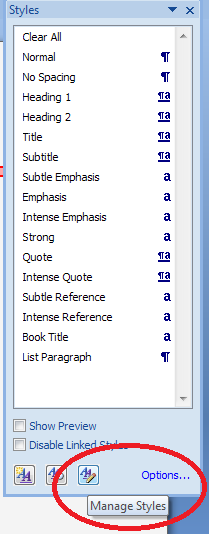
Click on the rightmost button: Manage Styles to bring up the next box: Manage Styles. To get to Comment Balloons: click on the down arrow to change As Recommended to Alphabetical:

Once you’ve got the list into alphabetical order, find Comment text, and then click on the Modify button. 

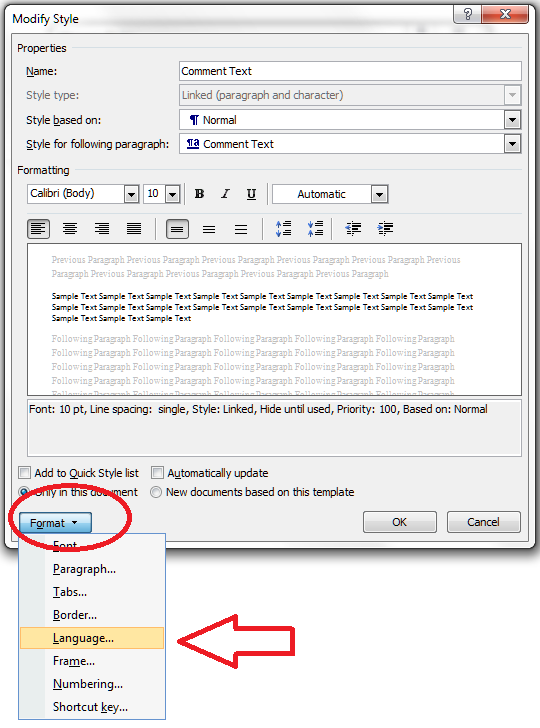
Click the Format button and choose Language

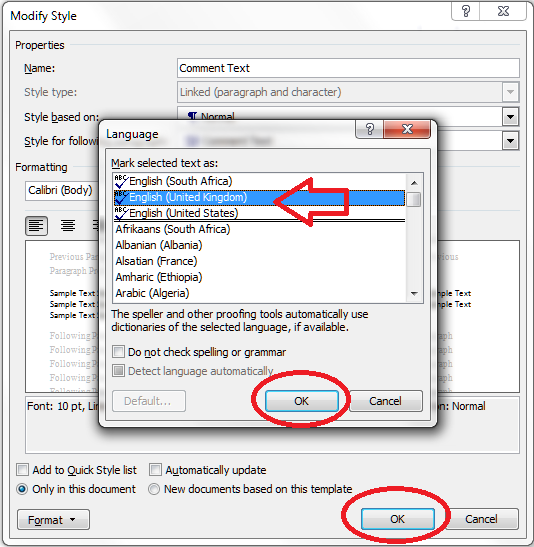
And change the language:

And then all the OK buttons to get back.

You can also choose whether this change applies only to this document, or to all documents based on this template, and add it to your Quick Styles list if you want:

Press the OK button, and carry on pressing OK buttons until you get back to your document. Now your comment box language will be whatever you asked it to be!

Why not take a look at these related topics, which should help you further?

Customising comments balloons

What to do if your comment boxes go tiny in Word

What to do if your comment boxes start running from right to left

Customising Track Changes

This is part of my series on how to avoid time-consuming “short cuts” and use Word in the right way to maximise your time and improve the look of your documents. Find all the short cuts here

Do let me know if this has helped you, saved your bacon, etc. – and do share with the buttons at the bottom of this article.

 
53 Comments

Posted by on November 7, 2012 in Copyediting, New skills, Students, Word, Writing


Tags: , , , ,

Keeping it formal – your academic writing

I’ve worked with many different academic texts, written by native and non-native speakers alike. Many issues are the same all over the world and crop up in anything from an undergraduate essay to a journal article. One of the major ones is making sure the language and style used is appropriate to the academic environment.

Here are my top tips for keeping your academic writing formal and appropriate.

No contractions

Contractions are not suitable for academic writing. That’s right, don’t do what you wouldn’t see in a textbook.

  • Change don’t to do not
  • Change there’s to there is
  • Change isn’t to is not

The only exception to this (and to all of these rules, actually) is if you’re quoting, either the literature or the direct speech of your interview participants / writing in entries to your questionnaires. Then, go ahead and use what someone else has said (but see the section on tidiness below).

Colloquialisms and slang – not cool, man

It’s very easy to be tempted to write as you speak. This includes those contractions that we’ve just talked about, of course. The classic one I see here is “lots of”; you just need to upgrade that one a little, and the same happens with “really”.

  • Instead of “Lots of researchers say this is wrong”, try “Many researchers say this is wrong”.
  • Instead of “This happened in lots of places”, try “This happened in a large number of cases”
  • Instead of “Interviewee A appeared to be really upset about this”, try “Interviewee A appeared to be very upset about this”

If you’re tempted further into slang, then think twice. Is there a way to make this sound less informal? What word would you use if you were talking in a seminar, or to your grandparents?

There is no place for the exclamation mark!

This one is more about objectivity than anything else. If you’re writing an academic text, you need not to appear partisan (even if you are) and your language needs to be very cool, calm, collected and academically rigorous. An exclamation mark is a surefire way to allow your own personal feelings to creep in.

Contrast these two examples:

  • When they were claiming expenses, senior managers would often claim for an extra meal that they did not order or eat!
  • When they were claiming expenses, senior managers would often claim for an extra meal they did not order or eat.

In the first one, we can’t help reading a value judgement – this is a bad thing, right? Well, it might be, but your job is to report the facts and then draw conclusions from them, backed up with the theory from your literature review.

Me, me, me (I)

It can be quite hard to work your own practice into the text in an appropriately formal way. It’s not usually acceptable to use the word “I” and you will need to find a way to work around this. It’s a good idea to check local practice here – some institutions favour “we”, some go for “the researcher”, and some won’t let anything personal through at all, and you’ll have to do some rather acrobatic writing to twist it all round into the passive tense.

Please note that this one can change depending on the academic discipline within which you’re working, and the agreed common practice of your institution. So check this one with your supervisor or the style guide you may have been given at the start of your course or contract, and adhere to the rules you’re given there above my rules. If you are not given any guidance, then use my suggestions to keep it as formal as possible. It’s worse to be under dressed than to be over dressed!

Here are some examples of the options:

  • I found that not all of the respondents answered every question
  • We found that not all of the respondents answered every question
  • The researcher found that not all of the respondents answered every question
  • It was found that not all of the respondents answered every question
  • Or, keeping it simple: Not all of the respondents answered every question

Eliminate sloppiness

It’s oh-so-easy to let sloppiness and inconsistency creep in, especially when you’re writing a long document with lots of sections. These are a few of the major culprits

  • Not checking the spelling of names in your references. Spell-checker won’t notice this and if you go too far wrong, your proofreader might think you’re talking about two different authors.
  • Not being consistent in your headings styles and numbering (read this article and the ones it’s linked to if you need help setting this up to be automatic)
  • Not being consistent with how you lay out new paragraphs and indented quotations (those big ones that you put in a special paragraph all on their own)
  • Not being consistent with your -ise- and -ize- spellings (organisation vs. organization)
  • Not being consistent with your capitalisation – there are rules for this which I’ll treat on the blog at some stage, but there are often choices to be made, too
  • Not being consistent with hyphenation – similar to capitalisation
  • Using abbreviations without spelling them out the first time

The editor’s solution for this? Use a style sheet. If there’s something you need to use consistently, note down your preferred way of doing it on a separate Word document, and keep it open to refer to as you need.

With abbreviations, note down each one and when you first use it (chapter and section will be enough), Keep this updated if you’re working on the chapters in an unusual order, and make sure the first instance is the one that has the words spelled out.

Keep it tidy

This is related to sloppiness, but a bit more specific. This is all about keeping the document looking nice, so how it looks doesn’t distract from what it says. I find two main culprits here:

  • Putting everything into direct quotations from interview respondents. I often find a quotation like this: “… and um the thing the thing is that, it’s not going to … work … at … all”. A much neater way to put this, which is going to get across the meaning a lot more clearly, would be “And the thing is, that it’s not going to [pause] work at all”.
  • Emphasis overload. If you’re indenting a quotation and putting it in italics, you don’t need to put quotation marks around it, too – it’s pretty obvious that it’s a quotation. If it’s a quotation in the text, just quotation marks, no need for italics except for emphasis. If you’ve got a heading, bold, underline and italics plus a colon at the end might just be too much

As a basic rule, keep it simple, keep it neat and tidy: don’t distract from the reader’s experience of the content of your writing.

Reference, reference, reference

I cover this in detail in another article, but it’s worth reminding you of these rules …

  • If you state an opinion that hasn’t come directly from your brain as an original thought, reference it: “Many people think the sky is green (Jones, 2010; Smith, 2012)”
  • If you talk about something that’s come out of your research, reference it and make sure you label your respondents: “One teacher thought this was rubbish and said so (Interviewee A2)”
  • If you state your own opinion, still back it up: “When reading the responses from the students, it struck the researcher that this needed looking into”; “As we have seen from the teacher respondents, not everyone agreed”. “We found that, contrary to Green (2011) our results suggest pupils do respect their teachers”

——-

I hope you’ve found these pointers useful. If you’re a student or a supervisor and you can suggest any more hints and tips, do please use the comments below to share them! And you might find my other resources for students and resources for Word users helpful – do take a look.

 
10 Comments

Posted by on October 31, 2012 in New skills, proofreading, Students, Word, Writing


Tags: , , , ,

Customising comment boxes in Word

A lot of people find this blog when they’re trying to sort out specific problems with their comment boxes (comment boxes suddenly going tiny, or comment box text running in the wrong direction, changing the language in your comment balloons). Here are general instructions on customising your comment boxes (or balloons, as they are officially called) in Word.

Why would I want to customise my comment balloons?

To be honest, the main reason for doing this is if something goes wrong. But the standard, default text size and layout may not be suitable for your purposes, and you might want to change it to make it more readable for someone with limited vision, etc.

You might also have preferences about which margin your comment balloons appear in, and how big they are.

The principles we are going to learn about here also apply when you want to customise the general styles in your document, which we will look in particular another time.

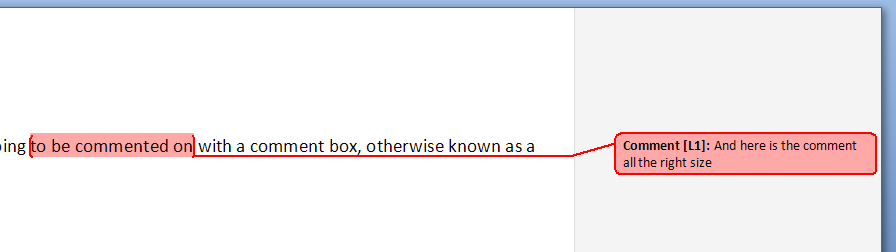
If you take a look at a document with standard comment boxes, you will see they look something like this:

Annoyingly, you will need to go to three different places to make these changes. I provide a recap at the end, but a summary might be useful here:

  • To change the location and size of balloons: Track Changes – Track Changes Options
  • To change the size, font, colour etc.of the heading (Comment M2 etc) AND/OR the size of all text in the comment balloon: Styles – Balloon text
  • To change the font and colour of the actual paragraph of text in the balloon AND/OR the size of all of the text in the comment balloon: Styles – Comment text

Note: my article on customising Track Changes will tell you how to change the colours in which the comments and corrections by different reviewers appear.

How to change where your balloons appear and their size

If you want to change which margin your balloons appear in, their size, and whether they are linked to the text by a line, you must go into the Track Changes Options menu. In the Review tab, click on the little arrow at the bottom of the Track Changes button and bring up Track Changes Options. There, at the bottom, is your balloons section:

I think this is fairly self-explanatory.

How to find the menu for customising comment balloon text

There are two ways to reach the menu you need:

  • Press Control + Alt + Shift + s all at the same time
  • Make sure you’re in the Home tab and click on the little tiny arrow at the bottom right of the Styles menu

Either of these options will bring up the full Styles dialogue box.

Using either of these methods, you will bring up the Styles dialogue box.

Now, ignore all of it except the three buttons at the bottom. Click on the rightmost button: Manage Styles to bring up the next box: Manage Styles. When you first open this window, the sort order is in what Word thinks is a useful order: As Recommendedclick on the down arrow to change it to Alphabetical:

Once you’ve got the list into alphabetical order, it’s relatively easy to find Balloon Text (note: not Comment text) and you will see that it then confirms how you have your text set up (blue circle).

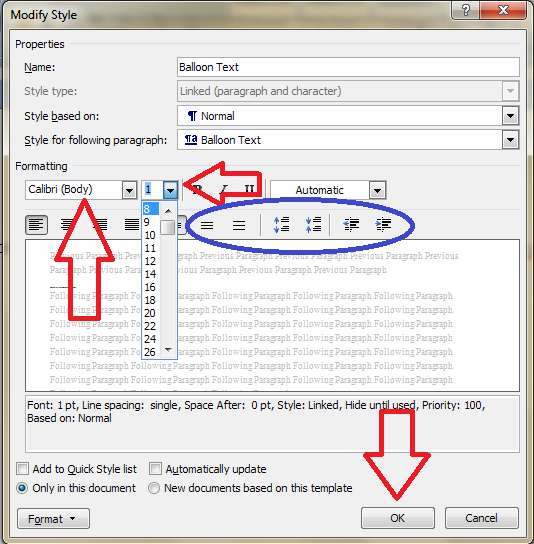
Click the Modify button … Now you can change your font and font size. You’ll notice lots of other options (blue circle) to change the spacing, etc.

I’m going to change the font size, font, orientation and colour of the comment box heading, and the size of the text:

Note: As we will see, the changes in colour, font and italics etc. only apply themselves to the heading of the comment text, where it says “Comment: L1”. Why? Because it’s Word, and we are changing, very specifically, information about the Comment Balloon itself. See below for how to change the text in the comment balloon. EXCEPT, and here we may tear our hair out a little, this IS where we change the text size in the comment box .

Note, however, (blue arrow) that this does not change the size of the text itself – that is controlled from Balloon Text, and you’re just going to have to remember that, or look at the Recap I’ve written at the bottom!

At this point in either menu option, you can also click on the Format button and change all sorts of aspects:

Now, you probably won’t want to go to this level of fancy detail with the comments balloons, but, of course, this dialogue box is not only for changing the style of comment balloons: it’s also where you set up all of the styles in your document if you want to change and customise them.

You can also choose whether this change applies only to this document, or to all documents based on this template, and add it to your Quick Styles list if you want:

Press the OK button, and carry on pressing OK buttons until you get back to your document. Now, your comment will appear in the style you have chosen. If you’ve only chosen to amend the Comment Balloon text size, only the header will have changed:

If you’ve chosen to customise the Comment Text as well, you will have made all of these changes:

Now your comment boxes have large, easy-to-read text in a useful colour. and a very fancy heading. We’ve customised your comment boxes or, as you now know to call them, your comment balloons, and the comment text

A quick recap

  • To change where the balloons appear, and their size, use the Track Changes Options section in the Review tab
  • To change the size and orientation of the comment balloon header text, and/or the size of all of the text, use the Comment Balloon option in the Manage Styles list
  • To change the colour and font of the comment balloon text, and/or the size of all of the text in the balloon, use the Comment Text option in the Manage Styles list

Why not take a look at these related topics, which should help you further?

What to do if your comment boxes go tiny in Word

What to do if your comment boxes start running from right to left

Changing the language in your comment balloons

Customising Track Changes

This is part of my series on how to avoid time-consuming “short cuts” and use Word in the right way to maximise your time and improve the look of your documents. Find all the short cuts here

Do let me know if this has helped you, saved your bacon, etc. – and do share with the buttons at the bottom of this article.

 
131 Comments

Posted by on October 19, 2012 in Copyediting, New skills, Students, Word, Writing


Tags: , , , ,

New ways to navigate the resources on the Libro blog

I’ve built up loads of information on all sorts of topics on this blog over the past few years, so I thought it was time to put together a resource to help you find what’s most useful for you. I ran a poll, people said yes, so I did it!

I put this new guide together about a week ago, and it’s proved popular so I thought I’d let you know about it quickly.

I’ve put together one simple resource guide with three main sections:

  • Resources for business – these include posts on how to set up a small business, things to do to grow your business, hints on networking, motivation, etc.; then some information about tax and finally an additional link to my small business interviews (note that business formation and tax posts are relevant to the UK although the rest of it will translate anywhere)
  • Resources for students – how to write an essay or dissertation, plagiarism and quoting sources, and lots more to come
  • Resources for Word users – all sorts of tips and hints to make your documents more consistent and easy to write, change and navigate, including tabs, margins, headings, contents pages and more obscure matters like how to put text in alphabetical order. Also includes a few notes on PowerPoint and other applications,

The whole resource guide offers a good way to find out what you need to know – do have a look and a play around, and let me know if you’ve found anything particularly useful!  I’ll be adding both resources and entries to the resource guide as I go along, of course. Watch this space …

And of course, we still have the index to the Troublesome Pairs and index to all the Saturday Small Business Chat posts.

I hope you enjoy the resource guide and indexes, and the resources they guide you to!


Tags: , , , , , , , , ,

How to quote sources without plagiarising

I work with a lot of students, and one of the things that seems to be an issue is how exactly to use your sources when you’re writing an essay. So I thought it was time to write some notes to help you.

How will this article help you?

This article will help you to avoid plagiarism. I’m going to take a text I’ve written and re-write it in some different ways. Because, and this is important, if you just take text from somewhere else and dump it into the middle of your essay … that’s plagiarism. Plagiarism is serious. It’s passing off someone else’s work as your own. And most academic departments use plagiarism detecting software. If they run your work through the software and it shows you’ve plagiarised,  you may well have marks deducted or the whole essay may be returned unmarked.

What’s wrong with just cutting and pasting stuff I’ve found?

I know that in most cases, you don’t mean to plagiarise. You’re pushed for time, you’re often not writing in your native language, and it’s easy to take that text and put it into the essay. But these are the reasons you shouldn’t do it:

  1. It’s morally wrong to plagiarise.
  2. You won’t gain an understanding of the text if you just paste it into your essay.
  3. You will get caught.

How do I use source material in the correct way?

There are two ways to use source material you’ve found in your research:

  • use direct quotations, which you’ll need to indicate using quotation marks ” … ” or ‘ … ‘
  • talk about what the author has said, but put it in your own words

So, how do we do it. Here is a passage I’ve copied from one book and some notes I’ve made from another one. These are the sources for my essay.

Using quotations to talk about your source

This is direct quotation. A simple example:

Mary says “I am going to the park”

I write: “Mary said, ‘I am going to the park'”

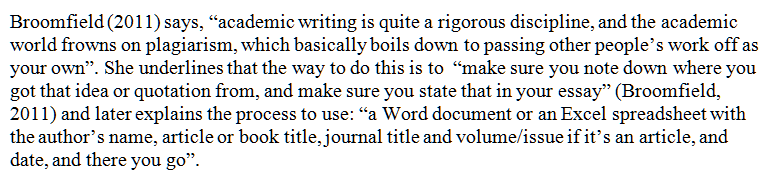
An easy way to talk about your source material is to use quotations. You don’t need to re-write what the authors say, however you do need to show you understand what you’re talking about and to link the quotations in a sensible way – you also need to make sure they’re all within quote marks and referenced properly. With the notes you’ve taken (above) you might end up with something like this:

So what I’ve done here is take sections from the text, put them in quote marks, noted where they’re from, and linked them appropriately so it’s clear I understand what I’m talking about.

Note that if you start off in the present tense, “Broomfield (2011) says that there are … ” you need to continue in the present tense; if you start off in the past “Broomfield (2011) said that there were … ” you need to stick with that. You can pop into the present tense if you are talking about a universal truth rather than something rooted in the time frame, so “Broomfield (2011) said that people are always likely to plagiarise” but “Broomfield (2011) said that the results of her study were not clear and she was not able to draw conclusions from them”.

Rewriting source text to talk about what the author is saying

This one is slightly more tricky. You need to do “indirect quoting”, or reporting what the author said. Simple example again:

Mary says “I am going to the park”.

I write: “Mary said that she was going to the park.”

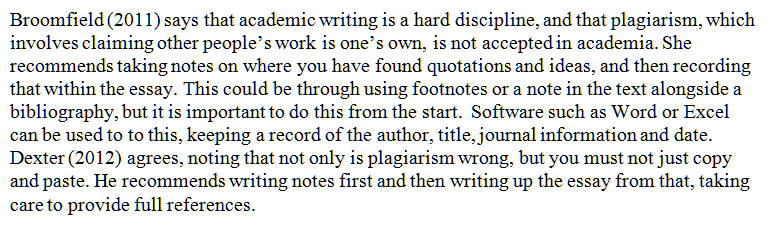
What we have to do here is retain the sense of the original, while writing it in our own words. Here’s what I came up with. Note that I can now use the notes I made on Dexter, too, as I don’t have anything in his words but can talk about what he said and I noted down:

Here I have used a number of different techniques. In no case, though, do I use more than a couple of the original source’s words exactly as they appear in the original. Instead I do this:

  • using synonyms: “hard discipline” instead of “rigorous discipline”
  • simplifying the words but getting the same sense across: “involves” instead of “basically boils down to”
  • reporting what the source said and using that to link the essay together: “she recommends using”
  • expanding on what the source says: “This could be through” rather than “you might”
  • summarising and synthesising (summing up and putting together) “Software such as Word or Excel could be used”, and “keeping a record of the author, title, journal information and date”.
  • Introducing the other research but linking it to the first idea: “Dexter (2012) agrees … “
  • Expanding notes into full sentences: the notes taken on the Dexter text.

Oh: please note here that you use “Broomfield (2011) says this is the case ” or “According to Broomfield (2011) this is the case” but never “According to Broomfield (2011) says this is the case” – I see that last one all the time.

Combining direct and indirect quotation

Of course, the best way is to combine them – some direct quotations, some reported speech or indirect quotations. This has the benefit of breaking up the text a bit, giving some interest, and allowing some use of the authors’ words to save having to rewrite everything.

Note that here I have shuffled around the order of what the first author says, too.

Rewrite, don’t copy and paste

I hope I’ve now managed to explain

  • What plagiarism is (see more in this post)
  • Why it’s not a good idea
  • Different ways to avoid it
  • Direct and indirect quotations
  • Some tips on how to rewrite text

Please do let me know if you’ve found this useful – or if there is more detail you’d like to know about. And do share using the buttons below if you’d like to tell your friends and colleagues about this information.

If you want more … here is a whole article on plagiarism, here is one on essay writing in general and one on writing dissertations and theses, and if you click on the students or writing or Word categories in the right hand column of the blog, you’ll get loads more hints and tips.

 
10 Comments

Posted by on March 28, 2012 in Ethics, New skills, Punctuation, Students, Word, Writing


Tags: , , , ,

Your short cuts: my short cuts

Whether you’re using office software for work, fun, creative writing, or studying, it’s very common to not worry about learning how to do things properly, but just to launch in and start typing. How hard can it be?  That’s fine, if you’re just typing a document or making a very simple spreadsheet.  But when things get more complicated, documents need more formatting, and the right way to do things isn’t immediately obvious, it’s very tempting to fudge something together and hope it’ll work out in the long run.

Your short cut: don’t learn how to do it properly; just make up your own solutions.

You would not believe how many documents I’ve been sent where the writers have done this.  In fact, it’s so common that I usually send clients a note to congratulate them when they’ve done something the right way.

This is not just me being over-picky or trying to persuade people to pay out for my services. I once spent seven hours – that’s SEVEN HOURS (remembering my rates vary from £10 per hour upwards) sorting out the formatting and contents page of a PhD that someone had got in a mess with.  What took up most of those seven hours? Stripping out the attempts to do it right that the author had flailed around with, before calling me in.

I’m going to share some of my short cuts. They involve knowing how to do something (I’m not blowing my own trumpet here: people pay me to know how to do this stuff) and doing it properly, to save yourself time and, indeed, money.

I’m going to look at various tasks your documents need to perform (we’re mainly going to be looking at Microsoft Word here, although other wordprocessing programmes will have similar features and capabilities), how you tend to do it, so you recognise what you’re doing even if you don’t use the same words to describe the task, and then show you how to do it “properly”, i.e. the way that is most suited to the software you’re using; the way that will make it easier for you.

I might even go all daring and post some video! Not sure yet …

So, the kinds of issue I’m going to cover will include

– making a new section start on a new page

– using tabs and margins

– using heading hierarchies and creating an automatic Table of Contents

– counting particular instances in Excel

– page numbering

– saving time typing and coping with words you regularly misspell

All quite simple stuff, but you’d be truly amazed at the muddles people can get into …

I’m also planning to do a series of posts that go into more detail, for those of you who really want to know about the nuts and bolts of how to do these things. Please do get in touch if you have any issues you’ve been wrestling with that you’d like me to cover, especially any short cuts of your own that you know aren’t quite right!

Contact me via email or via my contact form.


Tags: , , ,

What to do if your comment boxes go tiny in Word

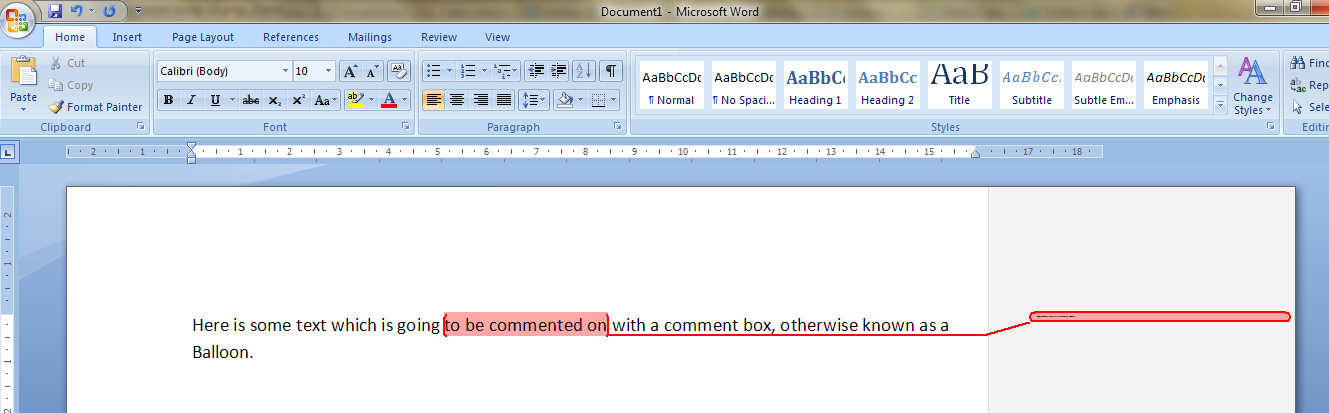
I had been editing a document for a client.  I added some comments in the margin, as always – but when my client opened it and when I re-opened it, to my horror and his, all of the text boxes containing the comments had gone TINY and unreadable. It looked like this:

It apparently happens if you’re working with a document originally created in an older version of Word which doesn’t have the requisite Styles set up for comment boxes.  You then work on it in Word 2007 or Word 2010 (this solution works for both!) and the horror happens …

It took me and Matthew longer than it should have to work out what to do, as there didn’t seem to be an easily found solution if you searched for one online – so as an aide memoire for me, for next time it happens, and as a public service for anyone else trying to work out what to do … here’s what you do (now edited to add screen shots).

Note for experts: if you’re already familiar with Styles, note that you need to change the Balloon Text.

What to do if your comment boxes go tiny in Word documents:

Let’s look at what the full horror looks like first of all:

First of all: don’t panic! The comments will have typically gone into Times at 1 point. But there is a way to make them readable again.

Open the document. Don’t highlight anything. Don’t put the cursor into a comment box.

Now you can do one of two things. Either hit Control + Alt + Shift + s all at the same time, or make sure you’re in the Home tab and click on the little tiny arrow at the bottom right of the Styles menu – this will bring up the full Styles dialogue box.

Using either of these methods, you will bring up the Styles dialogue box.

This looks like a very useful dialogue box, but for our purposes you need to ignore all of it except the three buttons at the bottom. Click on the rightmost button: Manage Styles to bring up yet another dialogue box.

We’re not there yet: the sort order shows as Recommended – but you need to click on the down arrow to change it to Alphabetical:

Once it’s in alphabetical order, it’s relatively easy to find Balloon Text (note: not Comment text) and you will see that it then confirms how you have your text set up (blue circle). Click the Modify button

Now you can change your font (which will probably have defaulted to Times) and font size (which will probably have defaulted to 1). You’ll notice lots of other options (blue circle) to change the spacing, etc. – I don’t usually worry about changing those, but this is where they are if you want them – and of course you use this menu to change the styles on headings, normal text, etc., too. Press the OK button, and carry on pressing OK buttons until you get back to your document.

And there it is, all changed:

Save document

Want even more information on customising your comment boxes? Read this article full of everything you would ever want to know!

Related topics: What to do if your comment boxes start running from right to left

Changing the language in your comment balloons

Note that these tips are primarily for Word 2007, 2010 and 2013 for PC. Most of them will work for Word for Mac, although you may find some menus in different places. This is part of my series on how to avoid time-consuming “short cuts” and use Word in the right way to maximise your time and improve the look of your documents. Find all the short cuts here

Do let me know if this has helped you, saved your bacon, etc. – and do share with the buttons at the bottom of this article.

 
343 Comments

Posted by on November 6, 2011 in Copyediting, New skills, Students, Word, Writing


Tags: , , , ,

Essay tips for new students

This time of year, rather than January, always seems like the start of a new year to me.  I suppose I was at University, then working at a University, then studying again, working in library supply where the renewal cycle was at this time of year, then back to working at a University.  I’ve also started at University twice (undergraduate and postgraduate), and my partner, Matthew, undertook a Master’s degree a few years ago.

So, I’m going to talk today about some hints and tips for new students on coping with those first essays.  I’d like to broaden this out, too – so if you have any questions on this topic that I don’t cover here, please either post a comment to this post, or contact me via email or via my contact form, and then I’ll write a follow-up post in a question and answer format.

Starting at University or College can be really daunting. You have to get to grips with a new environment, a new place to live, new people around you … and what’s likely to be a new way of doing academic work, too. I know some A-level courses encourage students to do some research in a bigger library, but I also know from running library tours at my part-time job, that many of you won’t have been in a big academic library before, and might need a few hints and tips. So, here we go!

Use all the resources you’re offered

Your library is the main place for this. At the beginning of term, you’ll have the opportunity to go on a library tour. Take that opportunity to familiarise yourself with the library, and with the staff and where to ask for help. You’ll find where the books are for your course, and how to operate the photocopier, self-issue machines and other bits and bobs of technology. If you miss the tour schedule, many libraries offer downloadable audio tours, or other ways to help you orientate yourself.  Library staff may offer training sessions and hands-on work with databases and other resources you may not have come across before.

Seek out the support and information that’s been put together to help you.  This may come from library or departmental staff.  At my university, study skills modules are available on the student portal part of the website. This is quite common and gives tried and tested advice, in far greater detail than I can go into here, on how to maximise your study skills and learn how to learn, and write those essays.

Don’t fear your essay … or your library

Your university library might look big, and you may not have used a large, academic library before, or even have been inside one – but in reality, most of your books are going to be in just one or two locations in that big building.  You’ll need to get used to the classmarks on the spines of the books – usually made up of letters and numbers, like PR 1234.A6, these are simply a way of making sure books on the same subject are shelved together. Your library should have paper or online guides to where books at a particular range of classmarks are shelved, and once you’ve looked up a book, checked its classmark and found it, you’ll find other books on the same subject shelved alongside it.  Electronic resources are ever so easy: access them online whenever, and from wherever, you want to.

Regarding your essay … the tutors are not out to trick you. They want to see you succeed, not fail. Yes, they want to push you and help you learn, but the essence of University work is finding out, following your interests – it’s far more flexible and enjoyable than all the cramming of facts into your head that you did for your A-levels. If you get stuck, ask for help (see below). If the department offers more resources about writing essays, use them. If your tutor makes lots of comments on your work, don’t be downcast, but use them to learn for next time.

Plan, plan, plan

If you’ve just done your A-levels, you’ll be more used to doing coursework than I was when, fresh from batches of 3 hour exams, but no coursework, I suddenly had to learn how to plan an essay! It’s a cliché, but don’t leave it to the last minute. You will (believe me) remember the hell of pulling a 24 hour session on an essay on Middlemarch, but you won’t remember anything about the book or what you wrote, and you’ll go right off coffee for a bit. When you get each course outline, there’ll be a note of what coursework is due and when. Note all these down once you’ve chosen your courses, and then plan time to spend on each essay.

When you’re researching and writing your essay, write a plan. Just like you did in your exams (right?).  Now it’s all on Word, type in the headings – introduction, conclusion, the bits in between. Do some mind-mapping or write out a plan, however you like to do it. But plan the essay, even make a note of how many words you need for each section, and it’ll be all broken down into bite-sized chunks that are much, much easier to face.

For more information on essay-writing, by the way, you might want to look at this post, which is mainly for those writing dissertations and theses, but has some useful points, too.

Use some different resources

When you were at school, you probably used textbooks, the texts themselves if you were studying humanities subjects, the internet (Wikipedia? Don’t use Wikipedia now, please!).  Now you have a huge wealth of information at your fingertips: books, e-books, journals, e-journals, databases of articles … Make sure you use a range of materials. Your course reading lists will probably guide you here – they should have a mix of materials on them. I didn’t really get to grips with journal articles until my post-graduate course (but then again, in my day they were all indexed in big, fat books; online searching was only just coming in) but wish I’d learned about them earlier.

It shows initiative and differentiates you if you read around your topic and search out some interesting articles, etc. to quote in your essay. Most of the electronic databases and e-journals are really easy to search (the designers put a lot of work into making them user-friendly, and there are often tutorials within the source itself, or written by library staff and available on the library or departmental website).

If you get really stuck with a particular database, and think you’ll need to use it a lot, it’s worth finding out who your Subject Advisor, Library Tutor, Learning Support Staff – whoever it is who’s paid to help students find stuff – and booking a session with them to get some more detailed help.

Record your references

Now’s the time to start recording where you found the information you’re discussing and quoting in your essays.  Academic writing is quite a rigorous discipline, and the academic world frowns on plagiarism, which basically boils down to passing other people’s work off as your own. I’ve written a separate article about this here, so I won’t go in-depth about it again, but basically, make sure you note down where you got that idea or quotation from, and make sure you state that in your essay. You might use footnotes or you might just put a note in the text and put together a bibliography, but you’ll be expected to do this from the start.  Get in the habit, and it won’t be so bad when you come to do your undergraduate dissertation or extended essay, or if you go on to postgraduate study.

You don’t need to do anything fancy – a Word document or an Excel spreadsheet with the author’s name, article or book title, journal title and volume/issue if it’s an article, and date, and there you go.  Start doing it now, and it will become a useful habit that will help later on.

If you need help, ask for it, or accept it

If you’re feeling a bit stuck or panicky when confronted with your first tranche of essays, don’t fret. Help is at hand.

For a start, as I said above, your tutors are not trying to catch you out or trick you.  You should have a personal tutor, and there will be some sort of academic support, too. Go to them – they are there to help you. No one is going to think any worse of you for seeking help. After all, in the world of work later on, the bosses will prefer it if you ask what the big red button does rather than just pressing it! And, you’re paying fees, so the university needs to help you get the best out of your education. So, ask.

If you have a particular issue, whether English isn’t your native language, you are dyslexic or need to use voice-activated software, support should be in place at your University. You might need to contact the Overseas Students office, in the first example, or Disability Services / Accessibility in the second, but there will be something in place – as far as Accessibility is concerned, there are laws to make sure that’s the case.

If you feel happier getting some private support, using an academic coach or proofreader, be very careful indeed. There are a lot of companies out there who prey on students who need their services. Obviously I’m decent and ethical, and if you feel you need some support with your essay writing, do get in touch – I can always recommend another person or company with whom I have personal experience and contact. But beware companies who charge a high fee and then just run your essay through a spell-checker (it happens). You shouldn’t pay more than about £8.00 per 1000 words for proofreading, and try to find a company or coaching service that will tell you the person’s name who you’re dealing with, and has references on their website.

——–

OK, so these are a few general hints and tips. As I said, I’m more than happy to answer questions – ask me via email or via my contact form or just pop a comment on this post, and I’ll post up the answers in a week or so.  Good luck, enjoy your course and your University life, and if you like this article, please share it using the buttons below!


Tags: , ,