RSS

Author Archives: Liz Dexter

Unknown's avatar

About Liz Dexter

Book blog is at http://www.librofulltime.wordpress.com Writer, proofreader, editor, transcriber. Also runner, gym-goer, volunteer and BookCrosser! My married name is Liz Dexter but my maiden name and the name on the books I write is Liz Broomfield.

How to customise your contents page in Word

It’s Word Tips time again and today we’re going to talk about customising your contents page.

Why do people customise their contents page?

Sometimes you have lots and lots of sub-headings in a document but you only want to show the main or main and sub-headings on the contents page, not every tiny sub-sub-heading.

In addition, you might want to change the style of your contents page or its individual font and layout. Here’s how to do it, with a worked example of changing the levels that are shown.

Reminder: how do I insert a contents page?

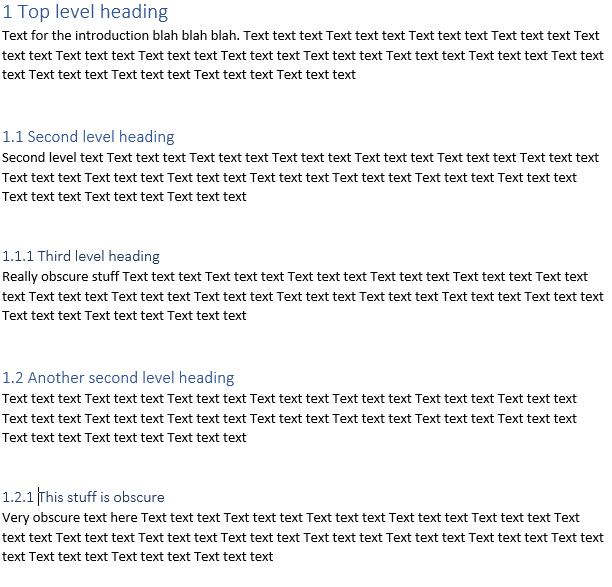
Here’s our document, with headings at H1, H2 and H3 level. I’ve marked these up with their heading levels already (see here for how to assign heading levels).

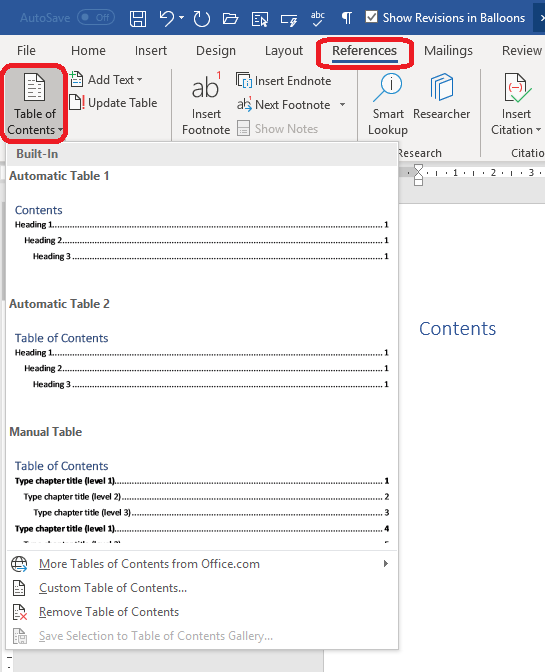
If we just follow the usual process for inserting a table of contents, we will create a blank page before this one, then go to the References tab and choose Table of Contents, then click on one of the automatic options that come up.

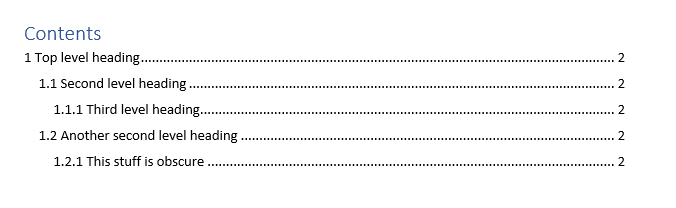
This is the result: a table of contents that includes all the headings in our original text:

How do I select which heading levels appear in my Table of Contents?

If you want to ignore all headings below level 2 (1.1, 1.2) then you need to customise the table of contents.

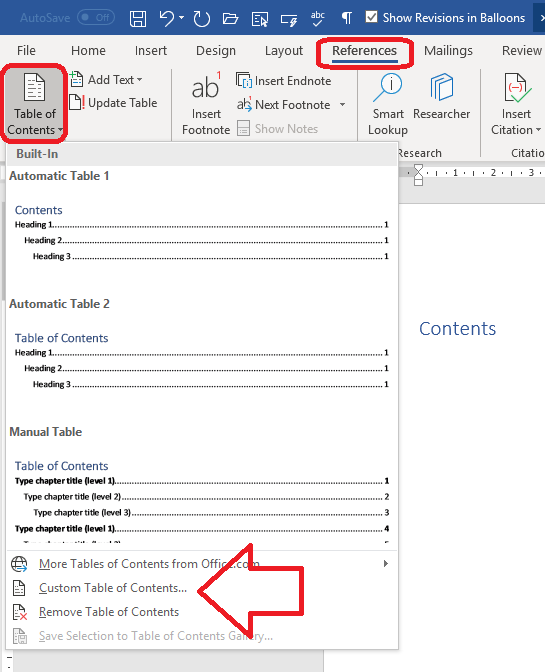
As before, select the References tab and the Table of Contents button. However, now click on Custom Table of Contents

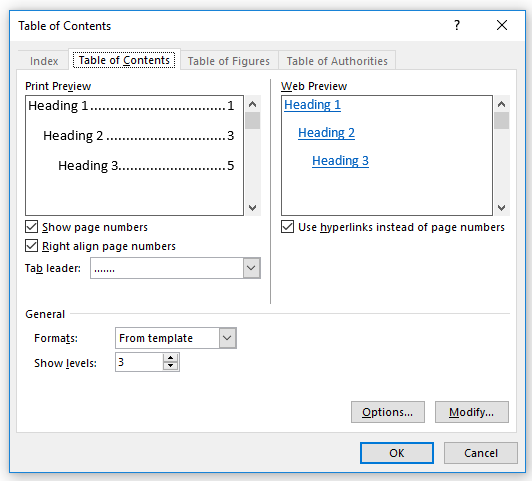
This will give you this dialogue box:

There are lots of different things you can do here. For example, you can choose to show or not show the page numbers in the table of contents, and whether or not to align them. The preview panes at the top will show you the results before you click OK.

Options allows you to choose the style for the table of contents from a set of heading styles, and Modify then Modify again allows you to completely customise the appearance of the table of contents text permanently, with underlining, different fonts, etc.

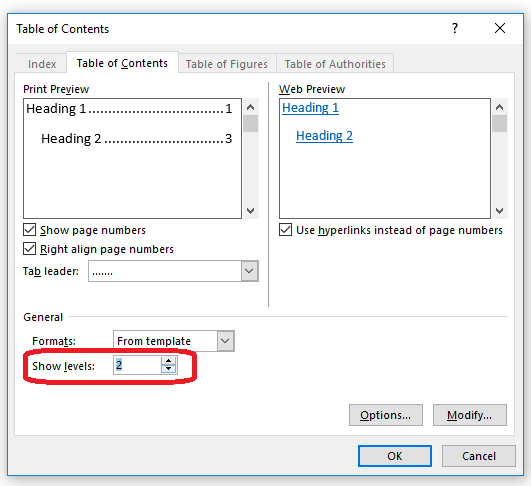
At the moment, we’re concerned with eliminating the level 3 headings from the table of contents.Click on the arrows by Show levels to adjust how many levels are displayed:

And click OK. Here we have changed the number of levels to 2, and the result is this:

Even though the text still has the same headings and levels it had before, the table of contents now just includes those headings down to Level 2

This is part of my series on how to avoid time-consuming “short cuts” and use Word in the right way to maximise your time and improve the look of your documents. Find all the short cuts here … Please note that these tips are for Word 2010 and later for Microsoft. I can’t guarantee or check they will work in Mac versions of Word.

Do let me know if this has helped you – and do share with the buttons at the bottom of this article.

Related articles on this website

How to use headings styles – make your headings clear and consistent

How to set up numbered headings – ones that automatically update themselves!

How to create a Table of Contents – read the posts on Headings first

Table of Figures and Table of Tables – how to create these tricky ones

How do I add or remove auto-captions?

Two-line caption, one-line entry in the Table of Figures: how?

How to update Tables of Contents, Figures and Tables

Tables of Contents for editors – helping the editing process run smoothly


Tags: , , , ,

What is the process once I’ve accepted your quotation?

We’ve looked in previous posts about the process of requesting a quotation from an editor in Working with an editor 1: requesting a quotation and going through the negotiation process in Working with an editor 2: negotiating and booking in. Now it’s time to look at the last part of the process – what happens once the job is confirmed and live.

All the details should have been covered off now …

  • We have agreed the price per 1,000 words or project price.
  • We have agreed the turnaround and/or deadline (if you don’t have the full project ready, I will give you a turnaround quotation, so I will complete the work within 14 days of receipt, etc. We have usually agreed a vague delivery date if not a fixed one by now.
  • If you wanted a sample edit done, I’ve done that and you’ve agreed that’s how you want to work.
  • You’ve read and accepted my terms and conditions.

What happens next?

1. You let me know about when you’ll have the full text ready for me and I’ll book you a slot. There are no obligations even then, although I do hope you will let me know if there’s any delay or you need to cancel. Lots of people have difficulty with their time scales, whether students, independent writers or journalists, so I understand and be flexible up to a point.

3. When it’s time, send me your manuscript and have a rest from it while I work on it (but be around in case I need to ask any questions).

4. I will do your edit and return the text and a style sheet detailing decisions I’ve made on anything that has different options (e.g. hyphenation, capitalisation, etc.) (see more on style sheets: What is a style sheet?)

5. You will confirm receipt and look through my changes, address those and any comments I’ve given. If you have questions or rewrites, I accept one batch of queries and 10% of the total word count in rewrites as part of the service with no additional charge.

6. I will send you my invoice and you will pay it within 30 days.

And that’s it! It all looks simple but I’m aware that if you’ve not used an editor before, this is an unknown process, and I hope I’ve made it easier for you.

Other useful articles on this website

Working with an editor 1: How do I request a quote?

Working with an editor 2: negotiating and booking in

Do I need editing or proofreading?

Working with Tracked Changes

What is a style sheet?

On completion of your edit, will my manuscript be ready for publication?

 
Leave a comment

Posted by on March 13, 2019 in Copyediting


Tags: ,

Words I have looked up – deuteragonist

Even editors (especially editors, who need to know what they don’t know more than most people) need to look things up sometimes. It could be a spelling you can never remember or the way a word is hyphenated in x style guide. Sometimes you just come across a word you don’t know at all, and this happened to me while working on a literary article.

So, what is a deuteragonist in a plot or play?

We know what a protagonist is – the main, central character. And an antagonist is the one who is against them. But the deuteragonist is the second most important person in a narrative – second to the protagonist. This could be the antagonist, but is more likely to be a secondary character, a sidekick, a faithful friend.

 
3 Comments

Posted by on March 6, 2019 in Errors, Language use


Tags:

Transcription work for ghost writers – hints and tips

Ghost writers often use transcribers to turn their taped interviews into the basic material for their book. How can we transcribers help them best?

What is a ghost writer?

A ghost writer is someone who writes a book or other materials on behalf of someone else. Celebrity autobiographies are often written in this way – just take a look at the title page for a “with John Smith” note or in the acknowledgements (some don’t acknowledge using a ghost writer). People use ghost writers when they’re not confident of their own writing ability or don’t have time to write a book. A good ghost writer will capture the style and “voice” of the celebrity so it really does sound like it has been written by the celebrity themselves (this is where we can help).

How does the ghost writing process work?

Typically, the writer will spend a set amount of time interviewing the subject. This might be done in an office, in the subject’s home or out and about with them. Sometimes, the subject will submit their own tapes they’ve dictated themselves.

The writer will send the transcriber the tapes to transcribe. These are typically quite long, as they want to get the value out of each session. They might go through the subject’s life chronologically, they might not. Sometimes they will interview other people in the subject’s life, and sometimes there will be a two-person interview. Often there will be a few interviews after the initial rush where the writer seeks to clear up issues or confusions.

Timescales can sometimes lag a bit here, as you’re working with your client, the writer, and their client, the subject, so there’s lots of room for delays. Expect these, but also tight turnaround times when the tapes do come in.

Special features of ghost-written projects

Ghost-written projects have some interesting and unique features which it’s worth knowing. When in doubt, remember that you’re there to a) help the writer, b) help represent the subject in their own words. I’m assuming you will check what the writer needs in terms of time stamping, etc., at the outset.

  • Retain the voice of the subject. The book is going to be written in “their words”, therefore the writer needs you to take down exactly what they say and how they say it. Once you’ve checked whether they want you to include all ums and ers, make sure you copy the way the subject speaks as precisely as you can. Get known for this and you will be recommended on from writer to writer (this happened to me).
  • Don’t mock the subject. If they have a very Yorkshire accent, for example, don’t go overboard with taking down their accent, all oop t’mill this and that. It will look like mockery and the writer will have to undo it all.
  • Do your research and keep a glossary. If it’s a musician, look up their band member, album and song titles. A film star, have a list of their roles and co-stars handy. I take down notes in a glossary and ask my writer if there’s something that comes up a lot that I can’t make out. They will still fact-check but make it as easy for them as possible.
  • Admit when you don’t know. Use [unclear 01:45] for something you can’t hear at all, and [? 10.45] for something you’re not sure of. Then the writer knows they need to check the tape and clarify what their subject said. If you plough on regardless, guessing what they’ve said, the writer will assume that’s what they said and might not have time to check every word.
  • Set expectations – after a few tapes you know how long an hour of this person’s voice takes you to transcribe. Don’t be a hero or offer to work all night: set sensible expectations.
  • Be discreet. You might well have to sign an NDA (non-disclosure agreement) – I have a standard one I send out anyway. Don’t tell everyone whose book you’re working on.

It’s fun working on ghost-written projects and seeing “your” book on the shelf in a few months’ time. Some ghost writers are given acknowledgements of their own and you might see your own name in there! But usually they are pretty hidden and so you’re completely hidden: no, that’s probably not fair, but that’s how it goes.

I hope you found these tips for working with ghost writers helpful.

Other transcription articles on this blog

I’ve written lots and lots of articles on transcription: here’s a list of all of them.

 
2 Comments

Posted by on February 27, 2019 in Transcription


Tags:

Mandolin or Mandoline?

Thank you to my husband Matthew for suggesting this one (he’s quite the fount of troublesome pairs, so watch out for more of his ones as we go through this new set of them), after he discovered himself that these two are in fact two different things.

So what’s the difference between a mandolin and a mandoline?

A mandolin is a musical instrument which is like a lute, with pairs of metal strings that are played using a plectrum.

A mandoline (which can also be spelled mandolin, hooray!) is that vegetable slicer thing (a flat body with adjustable slicing blades) that always looks like it will take your finger off.

“She was playing the mandolin, being careful not to hurt her fingers on the metal strings, while he cut vegetables using the mandoline, bring careful not to slice his fingers on the metal blades.”

You can find more troublesome pairs here and the index to them all so far is here.

 
3 Comments

Posted by on February 20, 2019 in Errors, Language use, Troublesome pairs, Writing


Tags: , , ,

Track changes – how do I get rid of the text box that appears when I hover over words in a Word document?

How do you get rid of document tooltips? How do you stop the little text boxes appearing when you hover over deleted or added words in Word. I had a query about this in a comment and thought that it warranted some screen shots and instructions.

What’s the problem here? What do you mean by these text boxes?

When you’ve worked with Track Changes enabled in Word, as well as showing you what your editor or collaborator has deleted or inserted into the text in red and with bubbles in the margin, you also get text boxes when you hover over the change. Here’s what that looks like:

Some people get annoyed by this, so here’s how to turn it off.

How do I turn off document tooltips aka those little text boxes that show me what I’ve deleted?

This process works for Word 2010 and later versions:

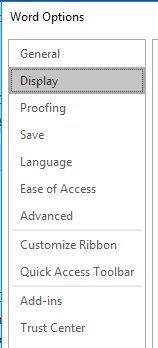
Click File on the far left of the tabs and then Options:

Once in Options, choose Display:

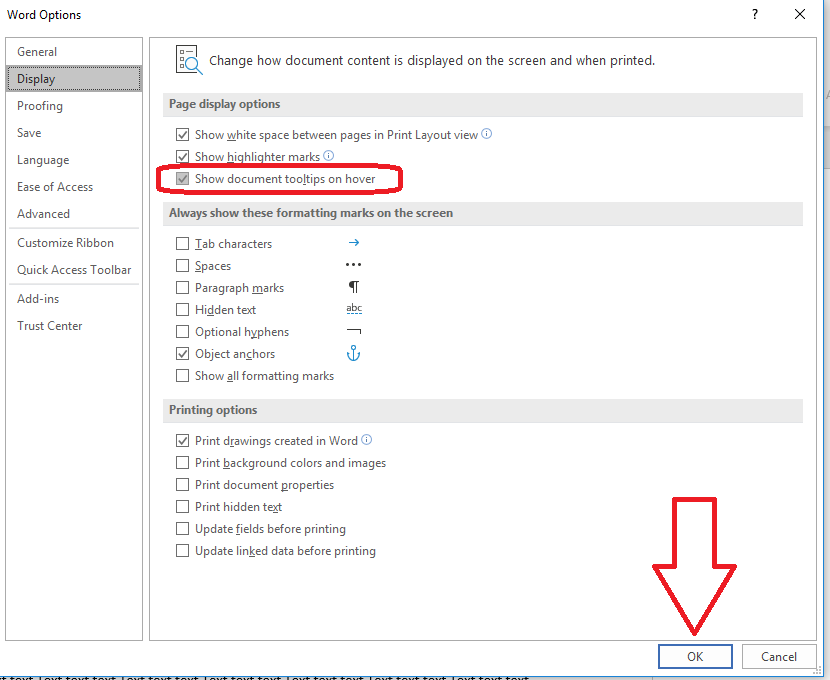
The Display dialogue box has an option to Show document tooltips on hover. Untick this by clicking in the square, then choose OK.

Now you won’t see those boxes in the document.

However, it does NOT turn off the useful tooltips in the rest of Word – so if you hover over any of the items on the Ribbon, you will still see the usual tooltips there.

If you’re using Word 2007, click the round button in the top left corner, choose Word Options at the very bottom of the dialogue box, then as above, select Display and untick Show document tooptips on hover.

Please note: these tips work for Microsoft Word version 2007 and upwards. They are not guaranteed or tested for Word for Mac.

Other track changes articles on this website

Track changes 1 – why use it, where can you find it, what can you do with it?

Track changes 2 – customising Track Changes

Track changes 3 – working with a document with tracked changes

How do I accept one reviewer’s changes?

Why are my tracked changes changing colour?

 
3 Comments

Posted by on February 13, 2019 in Copyediting, proofreading, Skillset, Word


Tags: , , , , , ,

Arc or arch?

When is an arc an arch? Is an arc ever in fact an arch?

An arc is first of all a curve that is made up of part of the circumference of a circle. So it has a particular form which may well be like that of an arch, but it’s always part of that circumference in this case. It can also be the electrical discharge that jumps from one point to another (so lightning forms an arc: not in this case a nice tidy bit out of a circumference) and finally we have the metaphorical use in a “story arc” in a fiction book, film, TV series or play (often across several episodes of a TV series) which traces the development of a plot or side plot. The verb to arc means to move with a curving trajectory, which could include arching over something.

An arch is a physical thing rather than a mathematical concept or a plot device (though you can have over-arching ideas that act as a sort of umbrella across a narrative or other story). So it’s a symmetrical curved (though that curve can be quite pointy) structure that supports a bridge, a wall, etc. It’s also the inner side of the foot, which is the same thing but in nature rather than constructed. The verb means to form an arch.

So an arc has a specific shape unless it doesn’t, and an arch is a physical thing unless it’s a metaphor. But you don’t have a story arch and most arches couldn’t be said to form part of a circumference of a circle.

You can find more troublesome pairs here, and here’s the index to them all!

 
6 Comments

Posted by on February 6, 2019 in Troublesome pairs, Writing


Tags:

How to make your transcriber happy

Many journalists, academics, writers and ghost writers use professional transcribers like me to type up their tapes of interviews into Word documents. A professional transcriber can usually type faster than average, and by outsourcing to someone like me the writer can save their own time (typically it takes me 3 hours to transcribe 1 hour of tape; it often takes non-professional typists a lot longer).

If you are working with a transcriber, here are some top tips to make that transcriber happy. Because you want to keep your transcriber happy, right?

1. Book in advance

If your transcriber is good, they probably get booked up in advance. You’re likely not to be their only customer and they have to juggle their workload. For example, in the autumn of 2018 I was working on one academic project with 50 x 1 hour interviews, two book projects with ghost writers, and various other one-off journalist pieces. If you came to me with an hour’s worth of tape you needed turning around in no time at all, I might well have said no. And I hate disappointing people, so I try not to say no.

If you’re dealing with me and you have interviews booked in but not confirmed, it’s fine to say to me, “I’ve got an interview in two weeks’ time, can I reserve your time to type it up?” Far better to do that and then move or cancel it (I can cope) than to come to me in two weeks’ time with an urgent job.

2. Set expectations and realistic deadlines

Remembering that it takes your transcriber 3 ish hours to transcribe an hour of tape, even they can’t work miracles and deliver a three-hour tape overnight (commercial transcription agencies might be able to do that: if they outsource to people in different time zones, fair enough, but I’d watch the quality). It’s fine to send three tapes and ask your transcriber to deliver them as they do them, though. And if it is urgent, let us know up front as far in advance as possible. In addition, if things changes, as they often do, let your transcriber know so they can tweak their schedule.

3. Be clear on your requirements

Some of my clients like time-stamping by each of their questions, some none. Some like their words to be in CAPITALS, some in italics. Let your transcriber know your preferences – I send a little questionnaire to new clients for them to fill in. You’d be surprised how many options there are!

4. Tell your transcriber who the interviewee is

This helps with research and gives your transcriber a clue as to what the topic will be.

5. Be sensitive to your transcriber’s sensitivities

I have some set text I send to my prospective clients asking them to let me know if there are any vivid descriptions of violence or animal cruelty on their tapes. However, I really don’t mind drink and drug references or swearing (apparently a lot of the commercial transcription agencies don’t tolerate bad language which is bad news for music journalists!). So my clients very kindly let me know if there’s stuff I’m going to find hard to work with, and allow me to skip parts of tapes with extreme content (this has only happened once in my whole career so far).

It’s worth checking in with your transcriber if there is some iffy content and working out how to handle it with them, and they will appreciate it.

6. Be precise on the length of the tape you have

Again, bearing in mind that 3 x tape length time for transcribing, if you tell your transcriber you’ve got an hour’s tape and it’s actually an hour and ten minutes, that’s an extra half-hour to find in my schedule. Which is sometimes very tricky to find! You know how long your tape is, so it’s best to be precise, then it’s easier to set appropriate deadlines.

7. Make the best recording you can

It’s always going to be harder to hear someone else rather than yourself. You might be able to make out your questions and the fascinating answers through the shrieking of fellow diners and banging of cutlery; your transcriber won’t find it so easy.

Try to set your recorder to “conversation” or “interview” rather than “meeting” or “general” if you can, put it close to the subject and try to choose a quiet place to do it in the first place.

Do listen to the recording before sending it off; we all appreciate a warning if the tape quality isn’t that great or the background noise is high, and your transcriber might need to allot more time to the project.

8. If you have more than one interviewee, differentiate them

If you’re expecting your transcriber to label different people’s speech with their name, there are a few tricks you can use:

  • if you have a couple of people round a table, have one to the left and one to the right
  • always have all interviewees identify themselves for the tape
  • try to mention their names now and then as you ask them a question; that way the transcriber knows they’ve got them the right way around
  • with a round table discussion or focus group, try to have the attendees say their name before talking
  • another idea with round tables and focus groups is to film them, then it’s clearer who is speaking

9. If there’s specific vocabulary or jargon, give your transcriber a source

I pride myself on getting terms right but sometimes it’s hard to tell. If your book is about a particular art form or you know your interviewees are going to be using for example hospital jargon, send your transcriber a list of commonly used but odd terms or point them to a glossary or resource.

10. Give your transcriber feedback

I always like to check I’m doing it right, as what I want to do is produce the best and most useful possible transcription for my client. And if there’s a word or name I’ve had to mark as unclear several times, I find it really useful to know what that word was, especially for an on-going project.

Also do confirm you’ve received the transcription: some of them are very long and can get lost in the ether, and it’s always good to know it has actually arrived.


I hope these tips will help people using a transcriber to understand what their transcriber needs and how they can help the relationship and the project run smoothly.


8 Comments

Posted by on January 30, 2019 in Transcription


Tags:

Upmost or utmost?

In this series of “Troublesome Pairs” I discuss words which people get easily confused, or where it’s not clear what the difference is between them – if indeed there is a difference. Some of these I find in my work, some out in the world at large, and some are suggested to me by friends, family and colleagues (do get in touch if you have a good one for me that I haven’t written about yet!). Some of the words are homophones (words that sound the same), some just seem to get people confused.

So today we’re looking at upmost and utmost. Words with just one letter different can be easily confused – even more so when they sound very similar. Do you confuse upmost and utmost? Here’s the difference.

Upmost is also spelled uppermost, and that might be the best one to stick with if you do mix these two words up. Uppermost means at the top, the highest in importance or rank or level.

Utmost means most extreme, the greatest amount or extent of something. That doesn’t neccessarily mean the highest of something like upmost.

“I did my utmost in training to appear on the upmost reaches of the chart showing who could lift the heaviest weight.”

You can find more troublesome pairs here, and here’s the index to them all!

 
1 Comment

Posted by on January 23, 2019 in Troublesome pairs, Writing


Tags:

How to make your transcription clients happy

Whether you’re new to transcription (read this article if you’re considering becoming a transcriber) or getting into a transcription career, these hints and tips I’ve gathered from my own work might just help you do the best job you can.

Set appropriate expectations – of yourself and for your clients

Work out how fast you transcribe (e.g. it might take you on average three hours to transcribe one hour of tape). Add some wiggle room. Remember to account for breaks. Now you know you can’t promise to transcribe a three-hour tape in six hours – or even nine – you’ll probably need ten to eleven and that includes sleep time, too. Use this to set expectations first of all of yourself, and then for your clients.

Explain up front what you will and won’t do

This should be part of any business arrangement, but there are some special features of transcription work that we need to pay attention to:

  • Do you offer specialised transcription such as legal or medical transcription (which you either need training on an official course for or you need to have been a medical or legal secretary (with the relevant courses under your belt))? If not, you need to say so and you really should turn down such work until you’re qualified to do it. At best, it will take you longer than usual to do the work; at worst you will make mistakes that might be costly to the client.
  • Do you have things you can’t handle hearing and typing about? That’s fine, but it’s better to be honest about that upfront rather than returning a transcription full of gaps or not doing it at all. I state in my initial terms and conditions that I’m not happy dealing with graphic accounts of violence and/or animal cruelty, but I don’t mind swearing and drug and alcohol references (some commercial transcription agencies won’t accept tapes with swearing, I’ve discovered. Doesn’t bother me). This leads my lovely clients to warn me about off-colour jokes or apologise on tape for using the big swears, which is lovely, but they do also warn me of bad stuff, or check I’m OK to do it.

Ask exactly what your client needs then do it

Some clients know exactly what they want: their questions in bold with a time stamp by each question. They want their questions in note form but the interviewee’s responses must be written out verbatim. They might even have a template for you to fill in (this is more common with commercial clients).

When I’m arranging to work with a client for the first time, I send them a mini questionnaire collecting their preferences. I then note this down on their record and keep a note of it and stick with that from then on, unless they ask me to change.

Other clients don’t know what they want and trust you to know. If that’s the case, I have a standard set of conventions (them in italics, time stamping every 10 minutes, interviewee’s speech tidied up of ums and ers but not too sanitised) which I lay out for them and check is OK.

Don’t surprise your client with extra charges

If your client needs you to turn round a transcription in 24 hours and you charge extra for urgent work, you need to tell them as soon as you are aware it’s urgent. That way they know what the maximum price will be and can agree that with anyone they’re claiming expenses from, etc.

Do the work on time

I know this is obvious but I did once recommend a fellow transcriber for a job who then didn’t return the work on time, which was really embarrassing for me (I tend to only recommend people I know or who come highly recommended now). I usually set a longer deadline than I need, just in case.

Do a bit of research

You don’t have to have everything picture-perfect and no client I’ve had has ever castigated me for missing looking up something, but a bit of looking up to clarify song titles, colleagues or book titles shows you’re going the extra mile and makes your client’s job that bit easier. It’s also interesting to find out a bit about your subject, and it shows your client you care.

When in doubt, don’t guess

If you can’t make something out on a tape or you’re not certain you’ve got it right, annotate it however you wish to with a time-stamp so you don’t convey guessed information to your client. They will likely know what their interviewee said or be able to piece it together and none of my clients have minded having to check the odd unclear bit of tape.

I hope this has given you a few pointers on how to do a good job for your transcription clients. If you have other suggestions, please do add a comment below!

Other transcription articles on this blog

I’ve written lots and lots of articles on transcription: here’s a list of all of them.

 
Leave a comment

Posted by on January 16, 2019 in Transcription


Tags: