RSS

Category Archives: Copyediting

What to do when you encounter plagiarism: student work

PlagiarismThis post is for editors who suspect that they might have come across deliberate or accidental plagiarism, or are concerned that they are doing “too much” and thus causing their client to unwittingly engage in plagiarism. By sharing how I approach this, and asking for comments, I hope I can gather together a resource of best practices for other editors / proofreaders.

What is plagiarism?

Plagiarism is, at its most basic, the act of passing someone else’s work off as your own. It usually involves copying someone else’s work, text, content, however you want to describe it, without pointing out that  you’ve copied it or referencing it back to the original work.

In my work, plagiarism is found most often in student work and business marketing content such as websites and blogs. This post is about student work, and I discuss business content in another post.

Plagiarism in academic work

Plagiarism is, unfortunately, rife in academic work. You can kind of understand it: students are under a lot of pressure, and overseas students in particular can have a lot of financial pressure from their funders to return home with a good degree and pick up a high-level job. With courses over-subscribed and A-levels often not preparing students for the rigours of academic work, the student may not understand that they are not supposed to use other people’s work unattributed, although universities do provide them with reams of paper and things to sign which are intended to explain and prevent plagiarism.

I tend to find two kinds of plagiarism, deliberate and accidental:

Deliberate plagiarism

I’ve come across some pretty shocking examples of deliberate plagiarism in my work. This includes sections marked in a different colour, with a note in the covering email: “Can you please rewrite the sections I’ve highlighted”. More heartrending are the examples where the author says to me, “My English is not good enough to rewrite the parts from other authors, please help me to rewrite them”. But I can’t.

Deliberate or accidental plagiarism

I often come across direct quotations used as if they are the author’s own words. Unfortunately, to the experienced editor, it becomes all-too-clear when a direct quotation is being used without being referenced. Here are some markers of the unattributed block of text that I’ve found:

  • The language changes subtly: more multi-syllable words, different kinds of linking words used
  • The standard of the English becomes markedly higher, with no corrections needed to be made (even if you miss these as you go along, the island of white in a sea of coloured corrections and highlights stands out as you look at the page)
  • The language changes from American to British English or vice versa (many students are inconsistent in their spellings, but a block of the opposite type of English is a real giveaway)
  • The font, size or colour of the text, or the indentation, line spacing or justification changes – a classic case of copy and paste

Sometimes you can give the student the benefit of the doubt here. Maybe they meant to rewrite and reference and forgot. Maybe they didn’t realise that they couldn’t use blocks of text like this. But it doesn’t mean that it can go unmarked.

Accidental plagiarism

I would count accidental plagiarism as a case where a student who has clearly rewritten ideas taken from other texts and referenced direct quotations and such ideas misses off a reference after a piece of text that is clearly from someone else. Of course, the cases above may be accidental, too, but they do still need to be addressed, as does the odd missed reference.

Plagiarism by the editor

There’s another form of plagiarism which the editor must resist themselves: rewriting so much of the text that it’s the editor who has in effect written the text, and not the student. I talk about how I avoid that below.

What to do when you encounter plagiarism in student work

It’s our duty as decent and principled editors to flag up plagiarism when we find it and help our student customers to realise how they should be referencing and when they’ve made a mistake. It is not our job to rewrite text or make so many corrections and suggestions that we have in effect written the essay ourselves. There are plenty of dodgy proofreading companies out there that will do that (and essay writing companies that will sell students ready-written essays), but as a decent editor, you should not be involved in those sorts of practices.

If you don’t flag up these problems, it is likely that the essay will be run through the university’s plagiarism software and that will flag them up to serious effect (many students know this, and that’s why they might ask us to rewrite sections for them). If you’re concerned about returning work to a student with plagiarism noted and discussed, remember that you’re saving them from possible penalties or even expulsion from their course if they continue to plagiarise and attempt to pass others’ work off as their own, even if you’re not concerned about helping people to obtain qualifications fraudulently.

Here’s what I do to avoid helping the student to commit plagiarism by passing off my own words as their own:

  • I always work with Track Changes turned on and instruct the student to check each change and accept or reject it themselves. Yes, I know they can press “Accept all changes”, but I send them instructions on how to work with Track Changes that don’t include this option.
  • I will delete, add and rearrange only if either the words are all correct but the order is incorrect, or the order is correct but the tenses are incorrect. You soon get a feel for the light touch needed to bring writing up to a clear output without rewriting.
  • If a sentence is obviously wrong in terms of content, I will insert a comment and advise the student to check the correctness of the content.
  • If a sentence is so garbled as to not make sense, I will insert a comment and ask the student to rewrite it.
  • If a sentence could mean one of two things, I will insert a comment to suggest the two opposite meanings and ask which they mean.
  • I am clear in my terms and conditions on this website and in my initial text to the student that this is how I operate.
  • When dealing with a bibliography, I will make small amendments to isolated errors in punctuation or order, usually up to about 10% of entries. If more than 10% of entries are not formatted according to the rules the student has sent me, or are completely chaotic, I stop editing the bibliography and insert a comment to remind the student that the bibliography is supposed to demonstrate their skill and knowledge, so they must work on it themselves.

Here’s what I do to stop the student plagiarising:

  • If I find the odd missed reference for a direct quotation, I will highlight the offending quotation and insert a comment reading “Reference required”.
  • If I find the odd obvious copy and paste which has not been referenced, I will highlight the offending sentences and insert a comment reading “Reference required”.
  • If I find an isolated substantial section which has clearly or even possibly been lifted from another source, I usually copy a few sentences and pop it in a Google search to see whether I can find the original. Then I will highlight the section and insert a comment along the lines of “This appears to come from another source without being referenced. Mark as a direct quotation and reference, or rewrite in your own words and reference”.
  • If I find several substantial sections like the above, I will stop editing and write to the student advising that much of the text has been lifted from other sources without being referenced, this is plagiarism and they need to address the issues.
  • If I find anything more than the odd missed reference to a direct quotation, I will mention the referencing issue in my covering email when returning the work, to ensure that the student is reminded to reference all direct and indirect quotations (thanks to Liam for his comment below reminding me that I do this).

What if the student says it’s OK to rewrite their work?

Sometimes when I return work to a student advising that it’s risking plagiarism to have me continue working on their text (usually because of the level of changes I’m having to make to the text rather than lifting work from other writers), they will come back to me to say that their supervisor / tutor says that it’s OK to do this amount of rewriting.

If they do this, I request that their tutor writes to me telling me it is OK to engage in this level of correction. I require this letter to be on headed paper, signed by the supervisor and scanned in and emailed to me. This hasn’t happened very often; when it has, I have contacted the supervisor to check, and continued with the work. I have saved the scanned letter alongside my copy of the student’s work in case of any comeback.

This article has outlined what I do when I encounter plagiarism in student work. I have resources on this website about plagiarism (listed below) which I am happy for you to reference if you need to (but not copy!). If you have other ways of overcoming this issue, please do submit a comment!

Related posts on this blog:

Plagiarism in business texts

On plagiarism

How to quote sources without plagiarising

Referencing for academic writing

Choosing a proofreader – student edition

My terms and conditions

Why has my proofreader not edited my bibliography?

On (not) crossing the line


Tags: , , , , ,

How do I change my initials in Word 2007, 2010 and 2013?

Your name and initials appear in the File Properties of your Word document, and also in any comments that you make on a document, plus in the text that appears when someone hovers over text that you’ve added or deleted. So it’s important that it’s right – usually Word pulls this over from your registration details, but you may wish to change it, for example if you want to add a general company or team name and initials rather than your own. Here’s how!

You will find the option to change your initials and name in Word Options. Word Options are accessed slightly differently in Word 2007, 2010 and 2013, so I will break this down by the version of Word that you’re using:

How do I change my initials in Word 2007?

Access Word Options by clicking the Office button at top left, then Word Options at the bottom:

1 word options 2007

Your Word Options box will open on the Popular tab and you can now change your name and initials:

1 2007

How do I change my initials in Office 2010?

Click on the File tab and select Options:

2 word options 2010

Click on Options, and you can change your name and initials:

2 2010

How do I change my initials in Word 2013?

First click on the File tab:

3a word options 2013

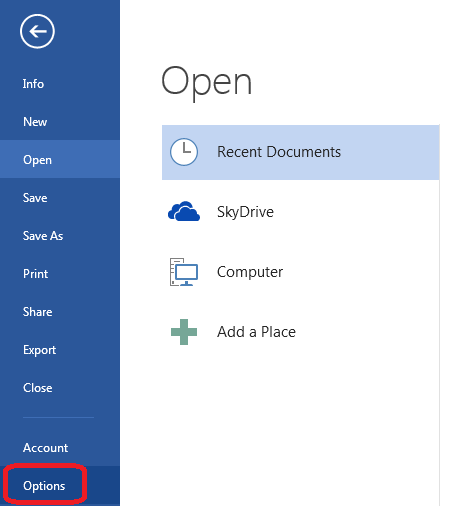
Select Options at the bottom of the list (use the arrow in a circle at the top left to get back to your document):

3b word options 2013

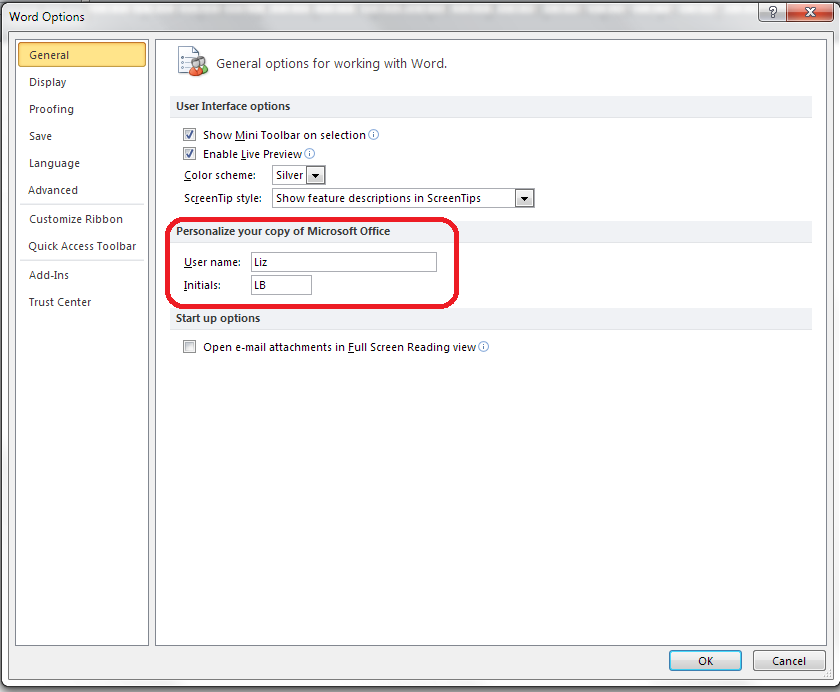
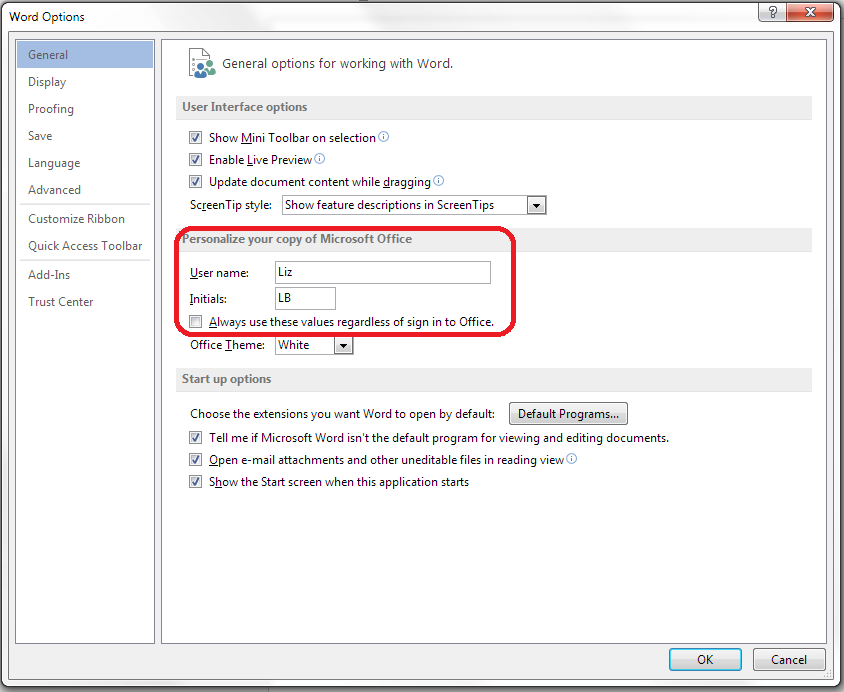
Click on Options and change your initials and name:

3 2013

This is part of my series on how to avoid time-consuming “short cuts” and use Word in the right way to maximise your time and improve the look of your documents. Find all the short cuts here

Do let me know if this has helped you – and do share with the buttons at the bottom of this article.

 
22 Comments

Posted by on November 13, 2013 in Copyediting, New skills, Students, Word, Writing


Tags: , , , , , , ,

When should I say no?

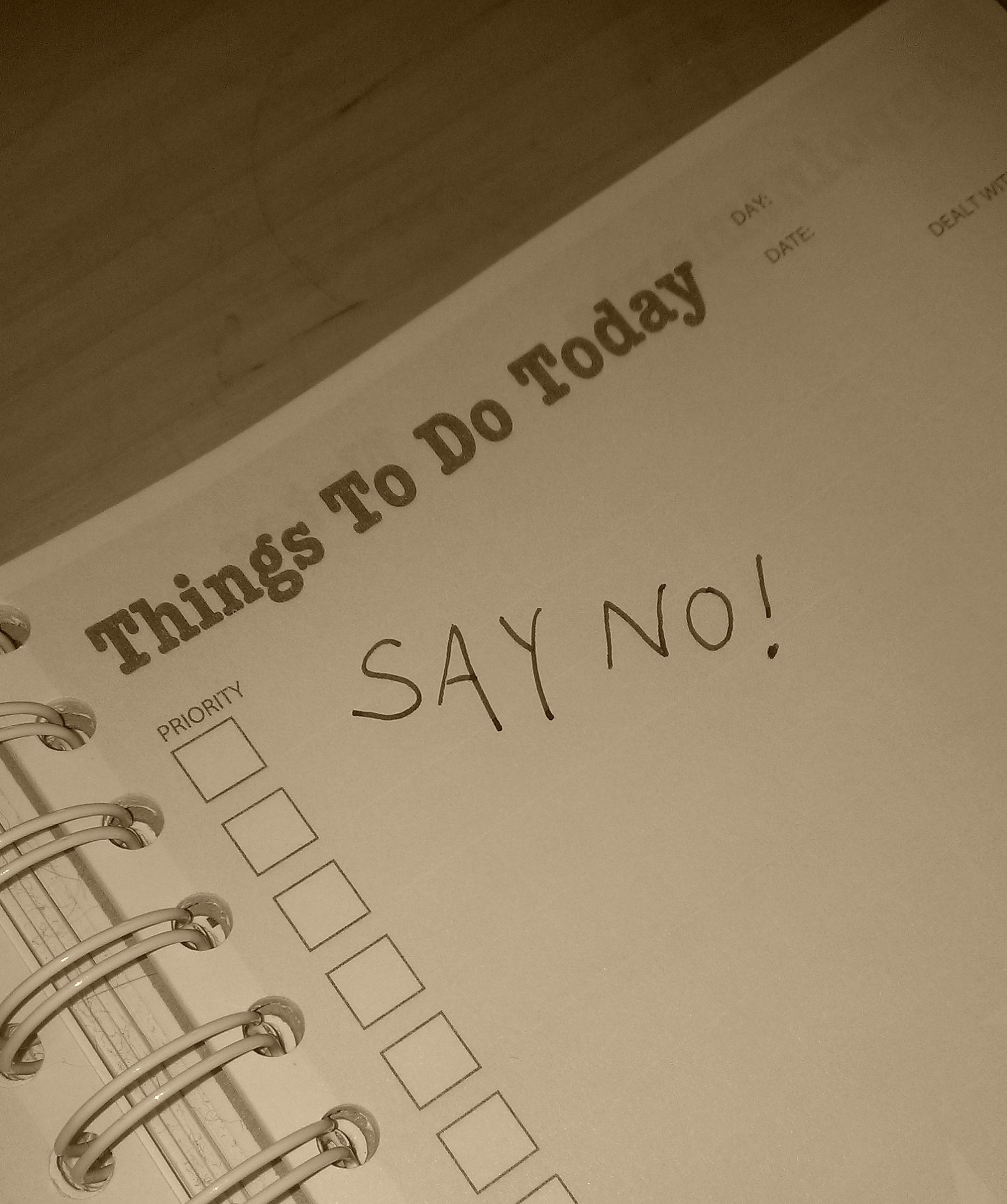
Say noWhen you work for yourself, especially when you’re starting out, it’s all too easy to say “Yes, please!” to every job that comes your way. But it’s a good idea to start saying “No, thank you” early on – not to everything, but to certain kinds of job. What you say no to depends on where you are in your career and what your schedule’s looking like, but here are my top jobs to turn down …

Note, with all of these, it’s often OK to say “yes” to one of the kind of job, just to see. But you’ll probably find yourself saying no later on!

What to say no to early in your career

  • Working for free. Caveat. If someone asks you to work for free AND they are an influencer who is likely to recommend you on AND they agree to give you a reference AND you’ve got time to do it without turning down paid work, then go for it.
  • Doing something you feel uncomfortable about. It’s good to push yourself into new areas. That’s not what I’m talking about here. I’m talking about content farms or writing essays for students, if you’re an editor (see this article for more on this kind of thing), or anything on the wrong side of your ethical line. Just because you’re just starting out and you’re a bit desperate for work doesn’t mean you should go against your own morals.
  • Doing something way outside your normal line of work. I think it’s a good idea to consolidate your reputation in one area and then branch out from there. By all means try something out, but if you don’t like doing it or it doesn’t fit, say no next time.
  • Working again with rude, pushy or unreliable clients. If someone’s rude to you on the first job you do for them, or they don’t pay when they say they will, it’s OK to say no next time. You are worth more than that, and a difficult client now will always be a difficult client. Demanding, fine; rude and pushy,  not fine. Don’t let your self-worth get undermined before you get started.

What to say no to at the mature stage of your business

  • Anything that will  overload you. If you find yourself saying, “Well, I could fit this in if I don’t sleep on Thursday night” or “Well, if person x doesn’t send me their chapter on time I could do this”, it’s probably time to say no and recommend someone else.
  • Small jobs that don’t look like they’ll turn into regular customers. Cruel but true – the smaller the job, the more noise to signal (admin to work) there will be. Pass the little ones on to your newer colleagues who need to build up their portfolio.
  • Discounts. You should be experienced enough to stand by your pricing. You will have discounts worked out for various sectors (I give them to students and individuals) but at this stage, you shouldn’t be in the business of buying work, and that’s what this is doing. If your prices are fair, don’t offer discounts except in exceptional circumstances.
  • Regular clients who don’t match your needs. Maybe they don’t pay well / on time or are difficult to deal with or have time scales that don’t match your own – sometimes it’s time to say goodbye and pass them on to another recommended practitioner.

What to say no to throughout your career

  • Any job with “danger” flags. To me, the main one here is “We’ve been through a lot of people and haven’t found the right partner yet” or “I’ve had problems with my previous editor / roofer / plumber”. By all means, check what the problem was. There are bad examples of every job out there, and you can be the one to fix the problem. However, if there’s an on-going pattern of problems, or they can’t be specific about what went wrong last time, my advice is to avoid.
  • Any job where you need to spend a lot of time learning a new system or skill UNLESS you really do have the time to do that and it’s going to be useful for lots of work in the future. I have had to turn down jobs that involve learning a new kind of translation software recently – I knew I had time to do the work, but not to learn the software. Best to tell the client up front!
  • Any job that goes against your moral code – however much of a dip or a bad patch you’re going through, however much it comes from a current client, if you feel uncomfortable doing it, don’t do it. (I had that situation a little while ago – I said no, I said why, they were fine with it and are still working with me.)
  • A client with unrealistic expectations. If someone expects me to write their book from their notes in a small space of time but call it (and charge for) proofreading services, or think you can transcribe 10 hours of tape in 12 hours, they are likely to be turned down. Setting and managing expectations is a whole nother post, of course …

——–

It’s great to say yes and it’s great to be busy – but it’s also vital to be able to say no and to be able to keep your busyness to a decent level. If you’re going through a dip in your mature business, go back to those early stage nos, and keep firm about them!

Oh, and although I do say no fairly regularly, I do almost always refer the prospect on to a recommended colleague who might have the time / capacity / skills to help them better. Which makes it a win-win-win – the client will come away with a great impression of you, your colleague will have a new prospect, and you will feel reassured that you’ve done the right thing and not left them without any support.

What do you say no to in your line of work? Have I missed any? What has been your experience of saying no to customers?

Related posts from Libro

Careers index

How do I decide who to work with?

What’s the best mix of customers?

How to make more money in your freelance business

 
14 Comments

Posted by on November 11, 2013 in Business, Copyediting, Ethics, Jobs, Organisation


Tags: , ,

How do I access Word Options in Word 2007, 2010 and 2013?

Word Options is the place where you customise the look of your Word document, how it corrects your words as you type away, the spell checker, your initials on any comments and the document properties, etc. It’s a great place to explore and enables you to customise Word and get it exactly how you want it.

However, it does work slightly differently in the three most commonly used versions of Word for PC: Word 2007, Word 2010 and Word 2013, so here’s a quick guide to how to access Word Options in these different versions of Word.

How to access the Word Options in Word 2007:

Click on the Office button in the top left of the screen, then click on Word Options at the bottom of the box:

1 word options 2007

Your Word Options box will now display:

1b word options 2007

How to access the Word Options in Office 2010:

In Word 2010, click on the File tab and then select Options, one up from the bottom of the list on the left hand side:

2 word options 2010

Once you’ve clicked on Options, your Word Options box will appear:

4 trust center

How to access Word Options in Word 2013:

In Word 2013, click on the File tab:

3a word options 2013

This has the effect of making your screen disappear, but you will get a list of things to do, out of which you select Options at the very bottom of the list (you can click that left-pointing arrow in a circle at the top left to get back to your document):

3b word options 2013

Clicking on Options will bring up the Options box:

3c word options 2013

This is part of my series on how to avoid time-consuming “short cuts” and use Word in the right way to maximise your time and improve the look of your documents. Find all the short cuts here

Do let me know if this has helped you – and do share with the buttons at the bottom of this article.

 
16 Comments

Posted by on November 6, 2013 in Copyediting, New skills, Students, Word, Writing


Tags: , , , , , , ,

Help – my Word comment box initials keep changing

comment balloonI had a query about this issue the other day and found there were no blog posts about it. Now there are.

My correspondent was busy adding comments to a document. Each time he did so, his initials appeared in the comment box, as they do (I will post soon on how to change your initials in your comment boxes). But each time he pressed Save, the initials changed back to “A”. Why?

Well, I went to look and it took me and a friend searching to find a rather obscure help forum that explained what was happening! So here’s what you do to stop the initials in your comment balloons changing by themselves in Word 2007, Word 2010 and Word 2013.

Why do the initials in my comment balloons keep changing every time I press Save?

The reason for your own initials disappearing is that Word is carefully applying a rule called “Remove personal information from file properties on save”. The properties are details attached to your document about who created and edited the document. And how do you change this?

Go into Word Options.The way into this differs for Word 2007, Word 2010 and Word 2013, although fortunately all of these routes end up in pretty well the same place, so …

Accessing Word Options in Word 2007:

Click on the Office button in the top left of the screen, then click on Word Options at the bottom of the box:

1 word options 2007

Accessing Word Options in Office 2010:

In Word 2010, click on the File tab and then select Options, one up from the bottom of the list on the left hand side:

2 word options 2010

Accessing Word Options in Word 2013:

In Word 2013, click on the File tab:

3a word options 2013

This has the effect of making your screen disappear, but you will get a list of things to do, out of which you select Options at the very bottom of the list (you can click that left-pointing arrow in a circle at the top left to get back to your document):

3b word options 2013

Accessing the Trust Center

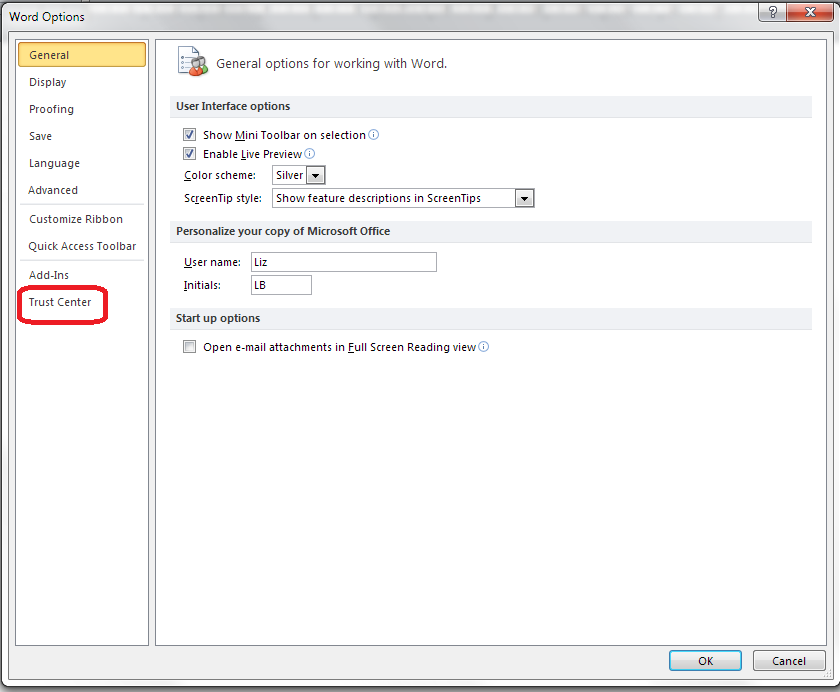
The Options screen that will now come up is very similar in Word 2007, 2010 and 2013, so I’m going to use screenshots from Word 2010 as a middle way from now on – the others differ slightly, but you will still see the same options to choose from.

4 trust center

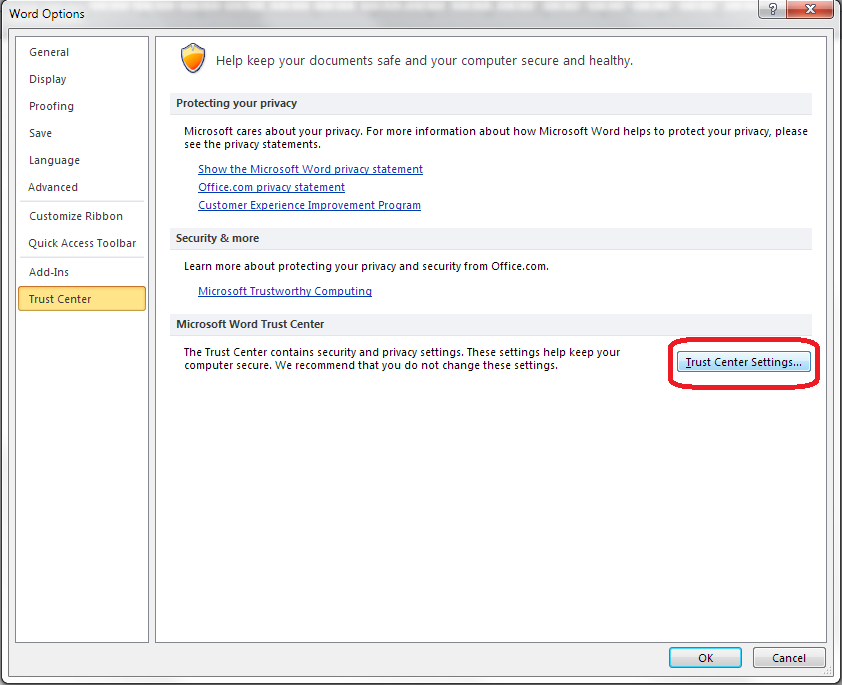
From here, click on Trust Center and then Trust Center Settings:

5 trust center settings

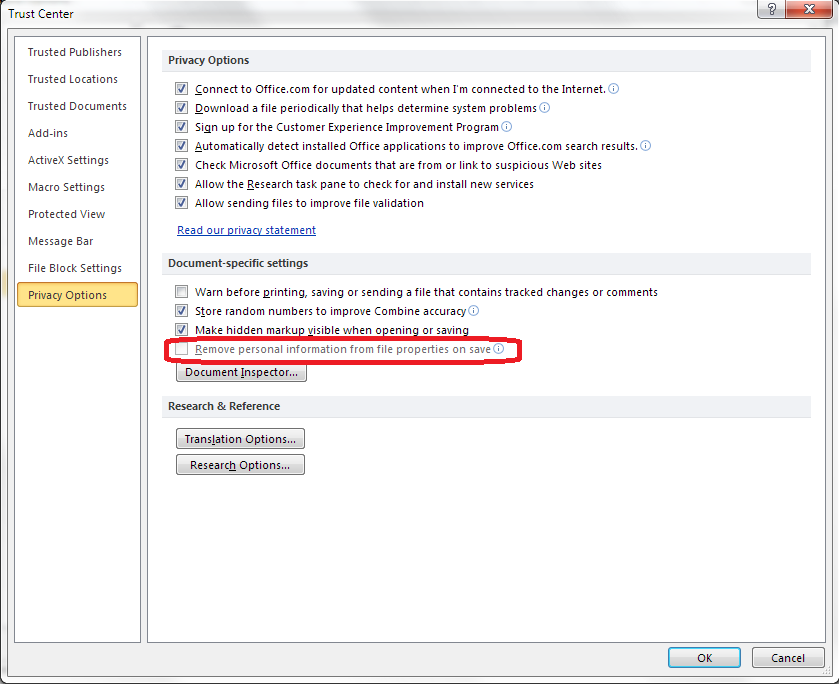
Now select Privacy Options, and you should find an option “Remove personal information from file properties on save”. Note that if this is enabled, it will be ticked and you will be able to untick it. Here, it’s greyed out, but you can see where you can find it:

6 privacy options

Once you have unticked this box, your initials will remain on your comment boxes however many times you save or close and open your document!

————————-

Why not take a look at these related topics, which should help you with any other comment box issues?

What to do if your comment boxes go tiny in Word

What to do if your comment boxes start running from right to left

Changing the language in your comment balloons

Customising Track Changes

This is part of my series on how to avoid time-consuming “short cuts” and use Word in the right way to maximise your time and improve the look of your documents. Find all the short cuts here

Do let me know if this has helped you, saved your bacon, etc. – and do share with the buttons at the bottom of this article.

 
5 Comments

Posted by on October 23, 2013 in Copyediting, New skills, Students, Word, Writing


Tags: , , , , , , ,

How do I decide who to work with?

dictionary coins watchWhen you’re new to your editing career – or any other freelance career for that matter, it’s tempting to rush around picking up every job you can. But it’s really worth evaluating the companies with whom you choose to work, from the very beginning. At the very least, you can avoid making yourself uncomfortable or making a small amount of money for a large amount of time. At the most extreme, you can avoid losing money, or even breaking the law! Read on for my hints and tips, and do add a comment if you can add any more!

Do conduct background checks

When a company contacts you to book your for a job, it’s easy to say yes without thinking. But it’s always good to do a few basic background checks.

  • If the company has found you through a professional organisation or website that has discussion boards or feedback mechanisms, check what other people have said about the company
  • Run a Google search for [company name] and phrases such as “bad payer”, “didn’t pay”, “don’t work with]
  • Ask your peers or any networks you’re in (on and offline) about whether they’ve worked with them before

I love it when a company approaches me via Proz, a jobs website I belong to, because members can see peer reviews of companies that are also members. The only time I’ve had a problem with a company that booked me through Proz was when I forgot to look at the “Blue board” and assumed they’d be OK.

Do check what they say on their website

This can tell you a lot about the company that wishes to book you. Is their website professional? Does it have terms and conditions? If it’s a middle man itself, does it seem to offer fair terms to its clients (and what’s the difference between what it charges its clients and what it’s offering to pay you – always interesting!).

You can also find massive red flags by doing this. This article was inspired by a friend, new to the editing business, who told me that they were doing tests for a company that offered student proofreading. When we had a look at their website, they were boasting that their rewriting service was able to bypass plagiarism-detecting software! Now, of course, it’s not ethical to rewrite student work – so we could see immediately that this was NOT a good company to work for. Which brings me nicely onto the next point …

(If you’re considering going into student editing / student proofreading via middlemen, it’s worth reading my Choosing a Proofreader: Student Edition article and using that to help you decide who to work with.)

Don’t do something that goes against your ethics – or the law!

Is it worth undermining your own ethics to make a bit of cash? I don’t think so, personally. One, you’re going to feel uncomfortable about what you’re doing, and two, it might come back and bite you later. I certainly wouldn’t want to work with the company I talk about in the above point, and I also wouldn’t want my name to be associated with any company I wouldn’t be proud to be associated with!

I’ve turned down jobs for companies that operate in areas I’m not personally comfortable with (someone writing a website in order to attract people in the sex industry to his professional services springs to mind), and I have certainly turned down work for SEO and linking farms, which I don’t agree with as a concept. I’ve never been asked by a company to write an essay for a client, but I know that I’d say no if I was asked. You can find articles by people who work for content farms, or write fake reviews of products for money, or write essays for people and feel they can justify it*, so it’s not black and white, but do stick with your own boundaries and don’t upset yourself by crossing them,

I have written text for marketing websites that I find to be a bit cheesy and I am not exactly hugely proud of. But they don’t tell any lies (and it was “white label” work, i.e. my name is not on it. Doesn’t mean I’d go against my ethics if my name wasn’t on something, though!).

Do go to the edge of your comfort zone; don’t cross out of it

I took on my first transcription job as a “why not?” kind of test – but I did have audio typing training, so I knew that the skills involved would be close to ones I already had (read more here about what happened next). I also once took on a job doing some audio recording for a website that needed an English accent. I didn’t really have the experience or equipment to do this, and although I did a decent job, I turned down further requests to do this kind of work. The return on investment and the professionalism of the job I was able to do didn’t match my expectations or requirements, so I ditched that idea.

So do push yourself a bit and move into new areas by all means, but don’t jump too far in one go.

Don’t do (too much) work for free

I will do a test for a company for free, but I won’t do more than one, small job for them for free. And I don’t do anything for free for a commercial company (I do do the odd bit for other start-ups or local small businesses, to help them out) nowadays.

Even if you do end up doing something “for free” for a company while you’re building your client base and establishing your reputation, make sure up front that they will supply you with a testimonial / reference with their name and company name that you can publish on your website if you do a good job for them. This does give you some sort of return for the work.

It’s also OK to do work for a ‘skills exchange’ – I wrote some marketing materials for someone who designed some graphics to use on this site. Don’t do too much of that, though, as the tax man can get quite interested in that sort of thing …

The main point is, you don’t want to end up labouring away at unpaid work and – heaven forbid- turning away paid work because you’ve got to get the project finished!

Do ask for recommendations

Hopefully you’ll have been building networks and contacts in your area of work. I have lots of colleagues who I can turn to for advice, and I have a few colleagues who are just starting out in full-time editing businesses. I’m happy to turn to them for holiday, sickness and I’m-too-busy-help cover, and I’ve also passed on some of my clients to them – as my client base has matured, I’ve had to move away from some of my clients who needed me to be able to drop everything to do work for them on a tight deadline, regularly, whereas someone starting out who might be a little less fully booked is ideal to take them on.

It’s always worth asking colleagues if they would like some holiday or sickness cover, or just establish mentoring kinds of relationships that will promote this kind of thing. Hopefully, the clients who your colleague passes to you will be decent payers and good clients (otherwise you might want to look at your choice of colleagues!) so you’re likely not to get burnt.

Do check your return on investment

When you’ve done some work for a new client, and they’ve (hopefully … eventually) paid you, then do take the time to monitor the project and check for return on investment. For example, I always think that a client who sends you several small jobs a month and always pays on time is better than one who sends you a few big jobs but always needs chasing for payment. How much time are you wasting on chasing for payment? Here’s how I tell if a client is worth working with again:

  • Were they decent and easy to deal with?
  • Did they communicate effectively with you?
  • Did they pay me on time? (the payment schedule might be a long one, but did they match it?)
  • Was the work interesting? (this can matter, although at the start and through your career, you will need to accept that sometimes it just isn’t!)
  • Am I proud to be associated with this work / client?

If you can answer yes, then they’re good at working with freelancers (see this article for more detail) and hopefully you’ve got yourself a regular client – try to keep hold of them and make sure you say thank you for their payment and express interest in working with them again.

If they …

  • Didn’t resolve any project teething problems in good time
  • Made you feel uncomfortable with what they asked you to do
  • Didn’t communicate with you and answer questions
  • Didn’t pay / paid late

… those are red flags and, even if you’re just starting out and you feel you’re desperate for clients, I’d have a good think about whether to work with them again.

Do listen to your gut feeling

On most of the occasions when I’ve had trouble with clients and have made a bad decision about working with one, I’ve found that I had a gut feeling that it wasn’t a good idea. If you get a gut feeling, by all means back it up with some of the ideas above, but do listen to it, and save yourself hassle and possibly heartbreak!

———–

When it comes down to it, we all want clients who:

  • Pay well and on time
  • Have interesting and regular work to do
  • Are likely to become regular clients

These tips and hints will hopefully help you to end up making good choices about the companies with which you work.

* Thanks to Linda Bates for alerting me to this article and this more recent one about why people work for essay writing companies. I wouldn’t do this, but it’s worth acknowledging that these things are a matter of personal preference. I do NOT recommend doing this, however!

Do share this article using the buttons below if you’ve found it interesting and useful, and do post a comment if you’ve got something to add!

More articles on careers can be found here.

Here are tips for how to turn that new customer into a regular customer.

What’s the best mix of customers to end up with?

How to make more money in your freelance business

When should I say no?


Tags: , ,

An Editor Writes: 10 Lessons I Learned When Writing My Own Book

going_itWhen I set out to write a full-length non-fiction book, I had two ideas in my head:

1. I can just stitch this together from my blog posts – easy!

2. I’m a professional editor and writer, I’m used to writing to deadlines, so I’ll get this done quickly and efficiently.

Wrong!

This article is about what happens when you go over to the other side – when editor and content writer becomes (self-)published author.

Sitting down to write

The first thing I found when writing my own book was that it’s so hard to make yourself do it! I knew towards the end of 2012 that I had amassed the blog posts that I needed to write a book about a year of self-employment. So I picked up all the posts out of my blogs, popped them in a Word document, and thought, “Oh, look: a book”.

First lesson learned: I should probably have organised the book using a software package like Scrivener. This would have made it easier to organise … and reorganise … and reorganise it.

Second lesson learned: I should have set aside time for this process in my diary, like I do for my clients. You’d think I’d have learned this from trying to slot some academic research into my schedule – apparently not!

Emotional blocks to writing

I don’t know whether it’s because when I write for my clients, it’s “white label” work, which means that my name doesn’t appear on the finished piece, and having this appearing under my own name made it feel like I was under the spotlight, but I kept getting blocked. When it’s paid work for a client, I’m as busy as can be, but somehow there were a zillion other things I could do to avoid working on the book (sound familiar)?

I was committed to it; I knew it could actually help people; people had TOLD me to write the thing, but I’d get blocked and veer away from it in my mind and physically when I tried to sit at my desk. This happened particularly at the editing stage.

Third lesson learned: Treat writing like a job. Set deadlines and stick to them. Try to sweep aside the emotions and get on with it, as you would with a job.

How to organise your book in a million easy stages

It all looked a bit messy and unbalanced, so I made some of the posts diary entries and some of them articles. Nope, still looked wrong. This is where I realised that you can’t just turn a blog into a book without some serious editorial decisions. I moved stuff around, added an introduction to each month, and stuck bigger, more general pieces in appendices at the end.

Fourth lesson learned: If you think it’s going to be easy, you’re probably doing it wrong. Nothing good comes without a struggle, right?

How to edit an editor

Like a good writer who’s learnt from others, I was all ready and eager for some beta readers. I recruited two friends initially. Each did a useful read-through for me and gave me some good comments. One of them, and I say this with the greatest appreciation and respect, edited my book like I was editing my book. She’s not a professional editor, but she’s good. She picked out typos (ouch) and weird sentences (ouch) and missing links (ouch) and repetitions (eek) and huge structural issues (argh!).

Ouch, ouch, ouch.

I’ve written in detail elsewhere about my reaction to this edit: suffice it to say that I felt wounded, winded and disconsolate. What a marvellous lesson about how my own clients feel when I edit them! It did put me off for a good while, thinking this book was rubbish, how dare I think I could publish something, let alone publish something good that people would want to read. In fact, I left it for FOUR MONTHS!

Fifth lesson learned: Editing is vital, but it does sting. I must continue to be as kind to my editing clients as I possibly can be. However kind the editor is, it still feels brutal to have your work criticised and pulled apart. I will not make it more brutal for them.

Sixth lesson learned: You can get a blog post out of anything. Mine on being edited was one of my most popular so far!

Getting round to rewriting

I mentioned emotional blocks: this was the big one. I read through the editing comments. No: I skim-read through them, muttering and sobbing. Then I closed the file and ran away from it. It sat there, taunting me. “So, you were going to publish in the first week of January, were you? It’s February already …” I just couldn’t make myself do it.

In the end, I had to force myself. I had to treat it like any other job, open up the file, and start on it. Of course, once I started, I could see a) how good the editing was, b) how to make it better. I was tough with my precious words. One of the major problems with the text was that it was repetitive – every time you write a blog post, you’re expecting new people to read it as well as subscribers, so you tend to reinvent the wheel. Put that in one document and you’re, frankly, boring people. So out came the delete key, and I honed and polished, added some bits too, but chopped thousands of words off the total, to make a much slimmer and better read.

Seventh lesson learned: Be ruthless. If it is at all expendable, out it comes. Chop out the dead wood. If you can’t see the dead wood, get someone to chop it out for you. It will come out better for it.

When it comes to your book, looks are everything

Well, not everything, but …

I was so keen to publish that I started out with a terrible home-made cover. Then a friend tweaked my original book’s cover to make a new matching one, but it still looked a bit too home-made. I then  found a book designer online and got a lovely cover done. I looked into getting the interior of my book designed professionally so I can put out a print-on-demand paper copy, but the book needs to sell some more copies first to be able to pay for that!

Eighth lesson learned: Your book really does look more professional with a professional cover; it will stand out for the right reasons. If you have more than one book, it’s worth getting an overall consistent look. My first book started to sell more when I got its cover updated to match the new one. Get this done first – it takes ages to update the cover on Amazon when you’re embarrassed about your old one!

Soft launch aka the obsession starts …

A read-through from another friend and it was ready to go! I’d already tried the process once (with a book that was much shorter and easier to write!) so I knew the mechanics of publishing for Kindle on Amazon. I’d read up about the process and I knew about the choices, and decided to go for Amazon exclusive, as I could then enrol the book in KDP Select. I get quite a few loans on my other book, and somehow I make more royalty on loans than sales on that one, per copy. I priced the book carefully – as low as I could make it while still getting the higher royalty from Amazon. I also knew to soft launch, build some sales and reviews, and then do a bigger launch.

So I published the book, and I did the social media thing, and I told people about it, and I sent out one or two review copies. And then I was reminded of the obsessive nature of authors – I’m still constantly checking for reviews, sales, likes, comments … It’s like it’s your baby and you have to watch over its every breath.

Ninth lesson learned: Reviews will come, whether you hassle people or not. I knew a few of my first readers. I put up pleas for reviews. It takes longer to read and review a full-length book, and the reviews will come in time! And if you read a book by an indie author – do review it, it means the world to them!

What next?

Once I had a few five-star reviews (finally!) I’m making more of a noise about the book. I picked up this tip from The Creative Penn and it worked with the last one – give people something to look at when they’re making their buying decision. And here it is, out there, selling and helping people (the main thing) and I’m proud of it and all the hard work.

Tenth lesson learned: Do it. At very least you will find out something about yourself and other authors. At best, you’ll have an income stream and you’ll see some lovely reviews and know you’ve helped and/or entertained people! Go for it!

Resources

The book that I’m talking about here: Going it Alone at 40 – and the book’s own web page with links to worldwide Amazon sites to buy it.

That blog post about being edited: On Being Edited

Book designer: I actually used someone on www.fiverr.com  for this, on the recommendation of a writer friend: I don’t normally like low-cost sites like this, but my designer offers lots of extras that pay them better, so I felt it was OK.

 
14 Comments

Posted by on June 12, 2013 in Blogging, Copyediting, Ebooks, New skills, Writing


Tags: , , ,

Living with the Dreaditor

I came across Tammy Salyer via Twitter and was so intrigued by the fact that she’s both an editor and a creative writer that I asked her to write a guest post for me about how this works for her. Read on to find out how she uses her “editor’s brain” (the ‘dreaditor’) to help her fiction writing …

We all know that voice. The one in our head that says, “My Godiva, woman, did you really just string five adjectives in a row to describe your character’s appearance?” Or, “What-what-what!? You do know that dangling modifier makes you sound like a complete goon, right?” We’ll call that voice “The Dreaditor”—the evil, amorphous being that skulks within the crevasses of our brains and tries at every turn to squash our creative voice into so much jumble-y pulp.

For a lot of writers, the inner editor is worse than having Spock after he’s downed ten cups of coffee quoting bad lines from Star Trek directly into our ears in a bid to create order out of our creative chaos. “Are you sure it isn’t time for a colourful metaphor?” ~ Spock,”The Voyage Home” Or, “Nowhere am I so desperately needed as among a shipload of illogical humans.” ~ Spock, “I, Mudd”).

When starting out, many of us have to work very hard to ignore that voice, which can be exhausting and stifling to our creative brains. However, in contrast to the common notion that writers must completely turn off the Dreaditor, especially in their first draft, and just let fly with whatever mental ejecta our brainmeats conjure, I’ve found incalculable benefits in my eight years of serious writing to merging the personalities of Dreaditor and writer. By bringing these two personas together, I’ve learned how to stop the Dreaditor from yucking my yum and keep the writer within from being lost down the rabbit hole of endless possibility. Let me share these benefits with you.

First, the Dreaditor does a wonderful job of helping me figure out what I’m really trying to say. It is a master at clarifying ideas and making sentences get right to the point before they get out of hand.

We’ve all done it; a brilliant idea flashes through our creative brain and we start rapping at the keyboard as if the poor tool were Hungry, Hungry, Hippo. Finally, 300 words later, we type in a period. Then reality hits. We’ve just summarized our protagonist’s inner struggle with his addiction to chocolate milk in the most babbling run-on sentence known to humankind. Already we’re loath to think about what we’re going to have to go through in the second draft to figure out what we were trying to say in the first place, then to tighten up that sentence so our readers can figure out what the heck we’re talking about. But having a well-developed Dreaditor act as a kind of babelfish by automatically taking those potentially long and quirky sentences and distilling them into writing that is both concise and comprehensible the first go round barely slows your stream-of-consciousness writing a whit.

Secondly, no one is more innately compelled to pursue the elegance of structure as an editor, and thinking with your editor brain as you create helps you write toward a stronger overall story structure sooner. It’s one thing to be writing a fabulous scene that’s going to blow your villain into a new dimension—literally—but if your story is a romance set in the Old West, this may not be the most productive use of your time (no matter how fun it is). Having part of your brain always focused on how your writing links to your story arc and anchor scenes, how best to develop your characters in all situations, and what elements of the world you’ve built can be tied into your plot and conflict keeps your forward momentum more consistent in the long run. It also mitigates the pain later of having to cut wonderfully fabulous scenes, which you’ve sweat blood over, because they just don’t fit.

The third and most obvious benefit to having the Dreaditor always on duty is the vast amounts of time and mental energy you will save on your rewrites and subsequent drafts. An editor generally values efficiency in both language and movement toward an end goal. Being diligent about keeping your writing as streamlined and error-free as possible from the outset comes in immensely handy when deadlines loom. Additionally, it saves having to make endless passes at a particular page or scene if you’ve approached it with the precision-targeting focus of an editor from the beginning.

What works for me is certainly not a universally better process for all writers. However, I can honestly say that my writing began to improve in leaps after I’d taken a few self-editing classes. Becoming a successful creative writer is a subjective path with a variety of different objectives, depending on each person’s desires. Yet, becoming a writer with polished self-editing skills can only serve to propel every author closer to whatever their personal writing goals are. Plus, how many of us haven’t secretly wanted to be that person at parties that snootily points out to others that they’ve erroneously used “which” when “whose” is the correct word?

What do you think? Does every fiction writer have a dreaditor? Can you edit as you go along? Can a good fiction writer be a good editor and vice versa? (I know I’m not good at true creative writing, although I can write marketing copy with the best of them, and I know plenty of writers who say they couldn’t edit someone else’s work).

Author bio:
Tammy Salyer is a professional writer and editor who believes the imagination is humankind’s sixth sense. Contract of Defiance is the first book in her military science fiction Spectras Arise trilogy and was released to acclaim in Spring 2012. The followup, Contract of Betrayal, came out in February. Stop by Inspired Ink Editing, her blog, or follow her on Twitter and say hi.

I did a return guest post on Tammy’s blog with ten top tips for fiction writers. Read it here!

 
16 Comments

Posted by on June 5, 2013 in Copyediting, Reading, Skillset, Writing


Tags: , , ,

What to do if your comment boxes are too big in Word

I have already published a range of posts on issues with comment boxes or comment balloons, including ones on comment boxes suddenly going tiny, or comment box text running in the wrong direction, changing the language in your comment balloons. Thanks to my colleague, Laura, I realised that I needed to post an article on what to do if your comment box size, or the general comment box area, is bigger than you want it to be.

Help! My comment box margin is too large!

This is the problem that my friend, Laura, had. Her comment box margin was somehow spreading across almost the whole page. Although it doesn’t encroach on the text area on the page, it makes your total page really wide. It looked something like this:

1 too wide

Even on my wide monitor, if the comment box margin is too wide, you get the choice of being able to see all of the text, as above, or all of the comment, as below – not very helpful!

2 too wide

How do you resolve this issue? You need to pop into Track Changes (in the Review tab) and click on the little arrow at the bottom to give you the Track Changes Options. Right at the bottom, you’ll find options for making the comment review pane / margin smaller (and moving it to the left or top if you so desire).

The default is 6.5 cm but if you like to have your page of text bigger but still see your comments, change this to a smaller size.

Note, that like everything in Track Changes, this only changes the view on your computer – whoever you are sending the document to will see it however they’ve set it up.

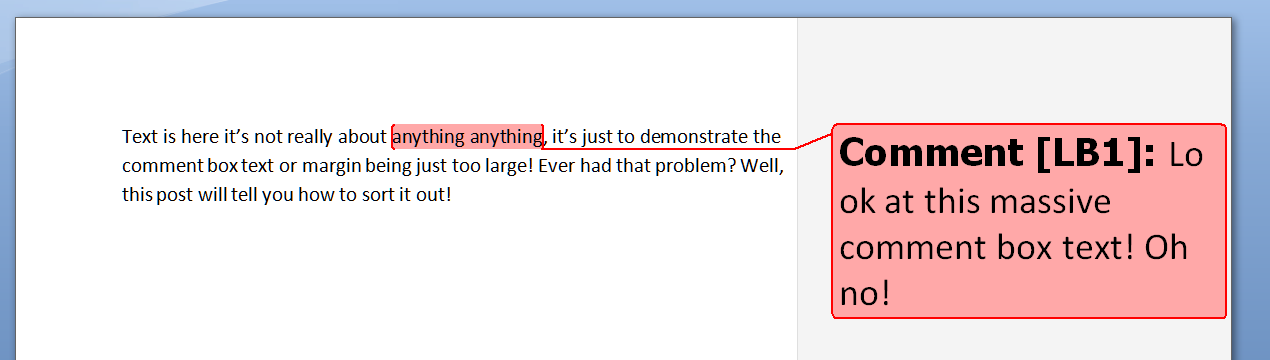
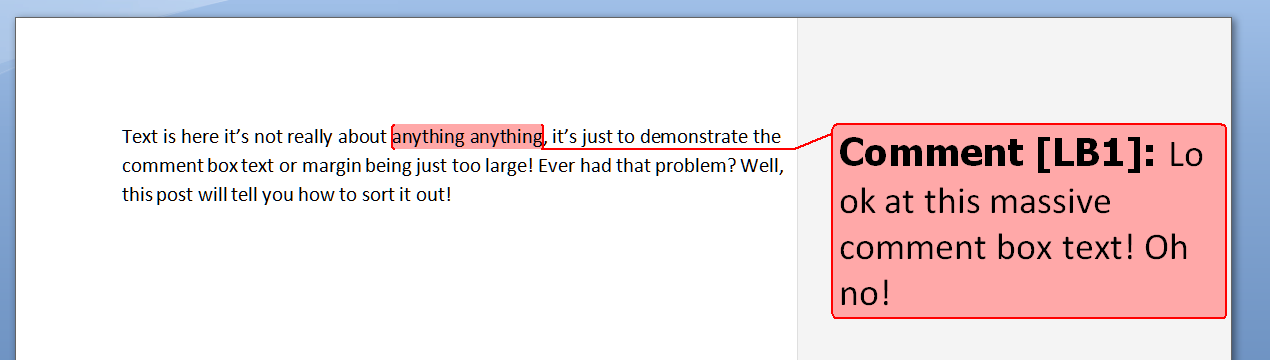
Help! My comment box text is too large!

Are you experiencing this problem:

3 too big

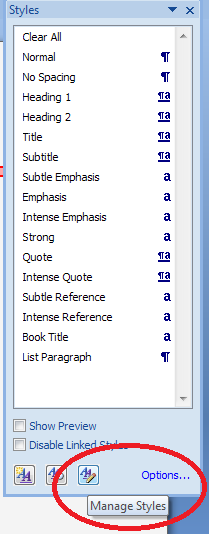
To change this to a normal size, we need to access the Styles dialogue box, by either

  • Pressing Control + Alt + Shift + s simultaneously
  • Going to the Home tab and clicking the little arrow at the bottom right of the Styles menu

This brings up the Styles dialogue box.

Click the right hand button at the bottom: Manage Styles. When you first open this next window, the sort order is As Recommendedclick on the down arrow to change it to Alphabetical:

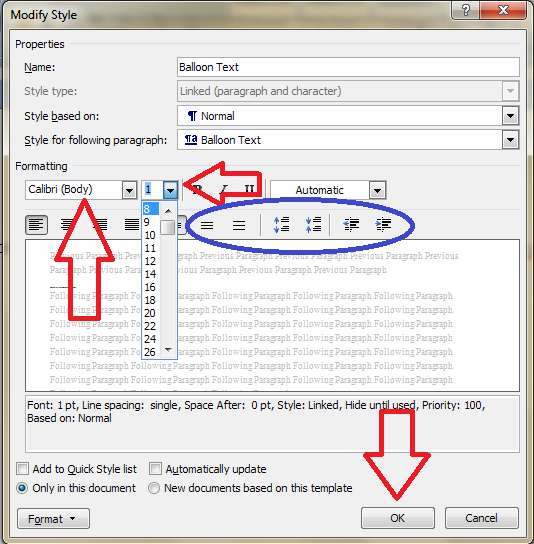
Find Balloon Text (note: not Comment text) and it confirms how you have your text set up (blue circle).

Click the Modify button … to change your font and font size. You’ll notice lots of other options (blue circle) to change the spacing, etc.

The standard size for balloon text is 8 or 10 so choose that and you’ll have a nice tidy balloon again!

Press the OK button, and carry on pressing OK buttons until you get back to your document. Now, your comment will appear in the style you have chosen.

Again, these changes will only affect your computer.

These related topics should help you further:

What to do if your comment boxes go tiny in Word

What to do if your comment boxes start running from right to left

Changing the language in your comment balloons

Customising your comment boxes – everything you need to know

Customising Track Changes

This is part of my series on how to avoid time-consuming “short cuts” and use Word in the right way to maximise your time and improve the look of your documents. Find all the short cuts here

Do let me know if this has helped you, saved your bacon, etc. – and do share with the buttons at the bottom of this article.


Tags: , , , ,

Why has my proofreader not edited my bibliography?

editsWhen you hire a proofreader to work on your thesis or dissertation, you can expect them to make suggestions on changes to layout, consistency in headings, capitalisation and titles, grammar, spelling, word forms and sentence structures, up to a point (past that point being considered plagiarism). But in a few cases, you will find that your proofreader has not worked on your bibliography.

I’ve written this article to explain why I might not have worked on your bibliography. Different proofreaders / editors will go to different extents to work on your content. I tend to have a light touch, because I want to protect myself – and you – from any whisper of a hint of possible wrong-doing. Passing someone else’s work off as your own is the basic definition of plagiarism (whether that’s not referencing a quotation from a source or asking someone to rewrite your text considerably), and unfortunately, some bibliographies need an amount of work which, if done by your proofreader, would constitute them doing work that you should be demonstrating you can do.

PhD theses and Master’s dissertations are not just assessed on their content and novelty. One of the things the student needs to demonstrate is that they are able to create references and a bibliography which has the requisite amount of detail and is consistent in its presentation of that detail. So, if I change too much in your bibliography, it will appear that you understand and have applied knowledge that you actually haven’t done.

We all know that bibliographies are a bit of a pain to get right. But you need to demonstrate that you can get it right, and if I get too much of it right for you, it’s not you that’s done the work at the end of the day.

It can be hard to understand the rules of creating and laying out a bibliography. Of course, it’s the last thing you want to mess about learning at the end of however many years of study and writing up. That’s why I don’t leave my clients stranded – I will tidy up 1-5 pages of the bibliography and provide guidelines on how to make the rest of it consistent, so that it’s your work that shines, and not mine.

I want to protect my clients and myself from any accusation of plagiarism, so if I find I have a very inconsistent set of entries in front of me, and I’m going to need to change something in more than about 1 in 5 entries, I will send the bibliography back to you unedited, with notes explaining why and what you need to do (and now, linking to this article). I don’t do this because I’m running out of time, or I’m lazy, but to make sure that you’re showing your abilities to your examiners in the best light possible, to make sure you get the result at the end of your postgraduate course that you deserve.

Related posts on the Libro blog: On plagiarism, Referencing, Referencing for academic writing, Resources for students