RSS

Tag Archives: Copyediting

My short cuts – using Tabs effectively

As promised in my original post, I’m going to write some quick guides to things you do when you’re writing documents which you think are a short cut but actually cause more trouble than they’re worth.

The idea of this series isn’t to criticise people, just to show you how to do things in a more formal way which will actually make things easier for you in the long run, particularly when you’re dealing with longer or more complicated documents.

Today we’re going to talk about using Tabs. Tabs seem to be something of a mystery, but there are easy ways to use both the tab button and tabs set in the top margin which will tidy up your document, make it easier to enter neat text in lovely columns, and reduce tension when you’re trying to line everything up.

Please note: these examples can look rather wide. I want them to be as near full-size as possible, so you can see exactly what I’m doing. If you’re looking at this post on a monitor, you should be able to scroll across to see the full image. If you’re viewing on a tablet, some of the screenshot may be cut off: hopefully you can see enough to get an idea of it, or you should be able to select the image to view it separately.

Let’s start off with using the Tab button. This is a button on your keyboard which should have two arrows on it, one facing one way and one the other. Got that? Good.

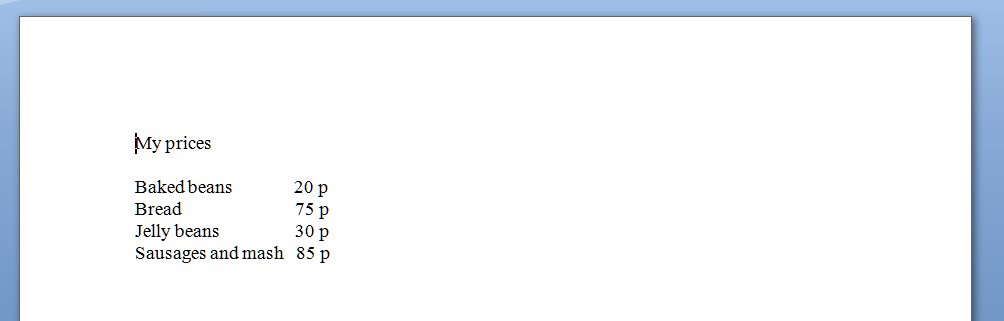
Here’s your common short cut, to start off with. You’ve got a menu you want to put on a document, with items in one column and prices in another. So you type it out, using the space bar to move along to the next column. And it looks like this:

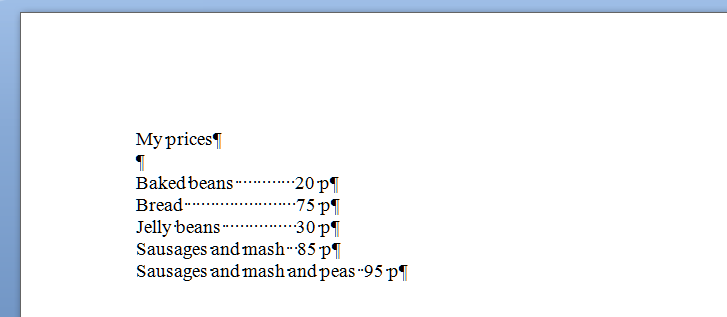
But now you want to add another item and oh dear – it’s longer than all your other ones and puts it all out of alignment (because you’ve used the space bar to make the space between one column and the next):

How do I know you’ve used the space bar? Because I’ve used that little paragraph button on Word again which shows us all the formatting, tabs, line returns, etc.

So the way you’ve achieved this spacing is by doing this (where dots are spaces and the things like a backward P are returns):

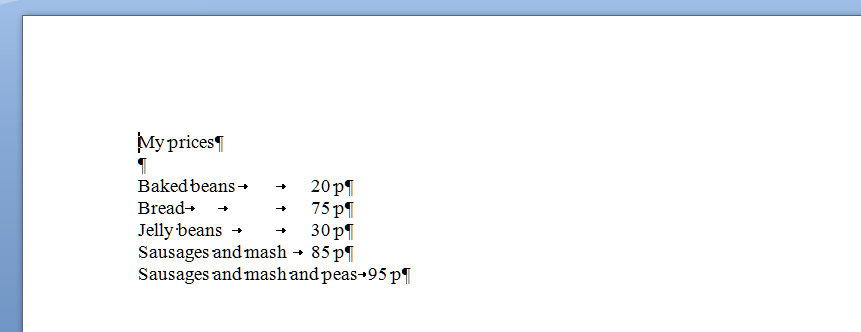
What you should have done (my short cut) instead of using space (your short cut) was to use the tab key (remember, the one with the two arrows) to space across to a set point along the horizontal ruler at the top of the screen. These tabs are represented by arrows when you’re viewing the markup:

Now, when you want to move the prices over for all the shorter items, you just need to insert one press of the tab key at the end of each item, to get them to line up perfectly.

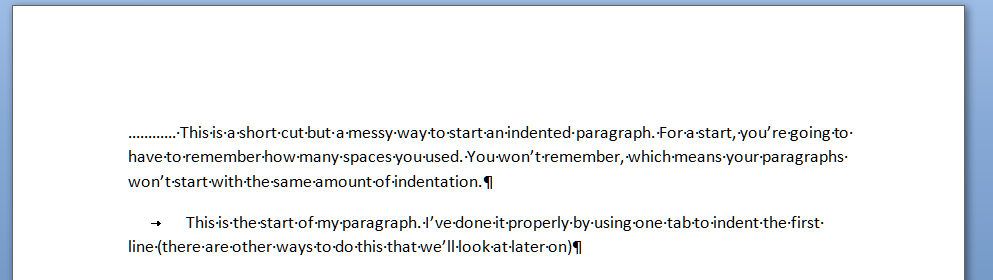
And here’s a last example. It’s very common to find people wanting to indent the first line of a paragraph, but using spaces to do so. This has its own issues – for example, you have to remember how many spaces you’ve put in and it’s likely that you’ll insert a different number each time, which will lead to indentations that don’t match. Instead, a simple press of the tab key at the beginning of your paragraph will leave everything nice and tidy

That’s enough for this session, I think. Of course, there are other ways you can format paragraphs and other indents, and you can set tab stops to wherever you want them to be across the page (and do all sorts of fancy kinds, too). But I’ll leave them for another post … (and I’ll link to them in this one when I publish them).

Please note, these hints work with versions of Microsoft Word currently in use – Word 2003, Word 2007 and Word 2010, all for PC. Mac compatible versions of Word should have similar options. Always save a copy of your document before manipulating it. I bear no responsibility for any pickles you might get yourself into!

Find all the short cuts here

 
8 Comments

Posted by on January 11, 2012 in Copyediting, Errors, New skills, Short cuts, Word, Writing


Tags: , , , ,

What I got up to in December

In my previous years of Libro work, December has been really quiet, as people seemed to feel they needed to leave me alone for Christmas. This was usually a bit frustrating, as the University where I worked gave us a lot of time off over Christmas and I was raring to get on with stuff with nothing to get on with. This year, I knew I had Jury Service starting in early January, so I thought I’d be able to take advantage of the downtime to get a bit of rest, get some work done on my Iris Murdoch project and pre-write all the blog posts I needed to cover the time I’d be out of the office.

It didn’t quite work out like that! I’d have been even busier than this if two big writing projects hadn’t slipped back (through no fault of my own, just circumstances). I had Christmas Day off, but apart from that I worked pretty solidly. As we all know by now, I left my library job on 12 December, and I actually corresponded with a potential client the evening of my leaving do – I must have done a decent job with the good old Blackberry, as I ended up booking in the work for that week! I then went on to a mixture of pre-booked and just-in-time work for various clients, old and new …

Edited some articles for a local academic who’s a non-native speaker, including putting the documents and bibliographies into the specific format demanded by the publications for which they were written. Also edited English translations for two agencies, one in China and one in Poland, and did the usual checking for my long-term translator client and my French HR consultant who’s writing a series of blog posts.

I transcribed quite a lot this month: a long webinar for my novelist client (more of her later) and I had a large project for an agency, transcribing presentations given at an international conference by non-native speakers of English (on the whole: things got a bit faster when I got the odd British or American presenter, but it was all interesting!).

I wrote some web text and a downloadable “dos and don’ts” piece for my retail shelving client and had a chat on the phone with their new SEO people as I’ll be writing more web content for them in the New Year.

I proofread a PhD thesis and several essays and dissertations, both for my direct clients and the ones I work for via a larger student proofreading company.  I’ve got a couple of coaching clients booked in – I proofread their work but also make suggestions on how they can improve their written English, write out lists of common mistakes they make, etc., throughout their course.

Of course, that’s what we call proofreading, but isn’t really – I did also do a proper proofread on a long sectionof a big document outlining responsibilities and guidelines for the updated manual of a professional body, comparing the new version with the older one to make sure they matched but any dates were changed appropriately.

And I did a final line-edit on a novel by a successful self-published author. I had to read the first novel in the series so I could check for continuity, noticed the odd issue in that one and ended up doing an edit on that book, too, so I spent much of Christmas Eve and Boxing Day concentrating on fast-paced religious thrillers set in various catacombs and other exciting places – not traditional Christmas fare, maybe, but very interesting!

I did manage to work half days in the week between Christmas and New Year, more or less, with just some student work to get on with. And my lovely regular clients are all aware of the Jury Service and keeping things as light as possible for these two weeks.

In the end, December was a very busy and successful month, which encouraged me to think that yes, it was a good idea to leave the Library after all! I had my best month yet for income, which meant I nearly met the biggest of my three targets for the calendar year – so I set some ambitious ones for this year, too.

Things were a bit quiet on the networking front, it being the festive season, but I did have time for some socialising, and I also started my new blog, which is going to chart my experience as I take Libro full-time.

Libro offers copyediting, copy writing, proofreading, transcription, typing and localisation services to other small businesses, individuals and corporations. Click on the links to find out more!


Tags: , , , , , ,

What I’ve been up to in November

November is traditionally another quieter month, but actually I stayed pretty busy through the month and brought in more income than I did in October.  I had quite a varied month workwise, ending up doing the following …

Proofread some chapters of various PhDs and full Master’s dissertations, as well as a couple of articles which needed their bibliographies put into the format the journals required (which took longer than proofreading the text)

Copyedited a large number of documents for a client’s important project – sometimes working at very short notice and getting up very early in the morning (and getting lots of thanks and a lovely quotation for my references page, I’m happy to report!)

Did a substantive copyedit on a non-fiction/humour book – I really tore it apart, re-ordering sections and deleting chunks. There’s always the temptation to include everything you’ve researched when it’s your own book; I have no such compulsions and will rip it out if it doesn’t fit perfectly! Anyway, the author’s now going through the new version and adding references where needed, before I convert it into Kindle format and we put it up on Amazon.

Re-wrote some web text and letters for a client I “met” on Twitter.

Polished some articles for a client whose first language is French – she writes up articles about HR issues in English and I go over them for her and smooth them out into more natural English – as I do speak French, it’s useful sometimes to know what word she would have used in that language in order to express it correctly in English, so it’s a bit like translating in some respects.

Edited a Terms and Conditions document and wrote an article on overseas procurement for my retail display client.

Edited and proofread the usual Yacht Club and Moseley magazines – very different publications but with surprisingly similar issues in their layout and text!

Coached a postgraduate student who needs to get his PhD written up – we have a weekly arrangement to make sure he keeps going with it and sends me something to look at every week.

Transcribed two journalist interviews, three webinars and a corporate panel discussion – a lot of transcription this month, and a lot of keeping the heater on in my study so my fingers were warm enough to type fast!

Launched the first edition of my new Libro Newsletter; recipients told me they enjoyed it!

Attended a Social Media Cafe, where I chatted to friends old and new …

And last but not least, resigned from my part-time Library job – so I’ll be taking Libro full-time from December 13. I have started a new blog in which I’ll record what it feels like to do this – do pop along and have a read if you haven’t seen it already!

Coming up …

December is usually quiet, but I’ve got some transcribing and editing booked in already, plus I’ll be doing some work on my Iris Murdoch project. Oh, and having a rest. January sees me officially full-time with no other means of support, but I have Jury Service in the first two weeks! I’m adjusting my pricing too, and will be blogging about that in another post.

Libro offers copyediting, copy writing, proofreading, transcription, typing and localisation services to other small businesses, individuals and corporations. Click on the links to find out more!


Tags: , , , , , ,

My short cuts – proper page breaks

As promised in my original post, I’m going to write some quick guides to things you do when you’re writing documents which you think are a short cut but actually cause more trouble than they’re worth.

The idea of this series isn’t to criticise people, just to show you how to do things in a more formal way which will actually make things easier for you in the long run, especially if you’re dealing with a larger document like a dissertation, a thesis, a funding proposal, a workbook, a technical guide …

Please note: these examples can look rather wide. I want them to be as near full-size as possible, so you can see exactly what I’m doing. If you’re looking at this post on a monitor, you should be able to scroll across to see the full image. If you’re viewing on a tablet, some of the screenshot may be cut off: hopefully you can see enough to get an idea of it, or you should be able to select the image to view it separately.

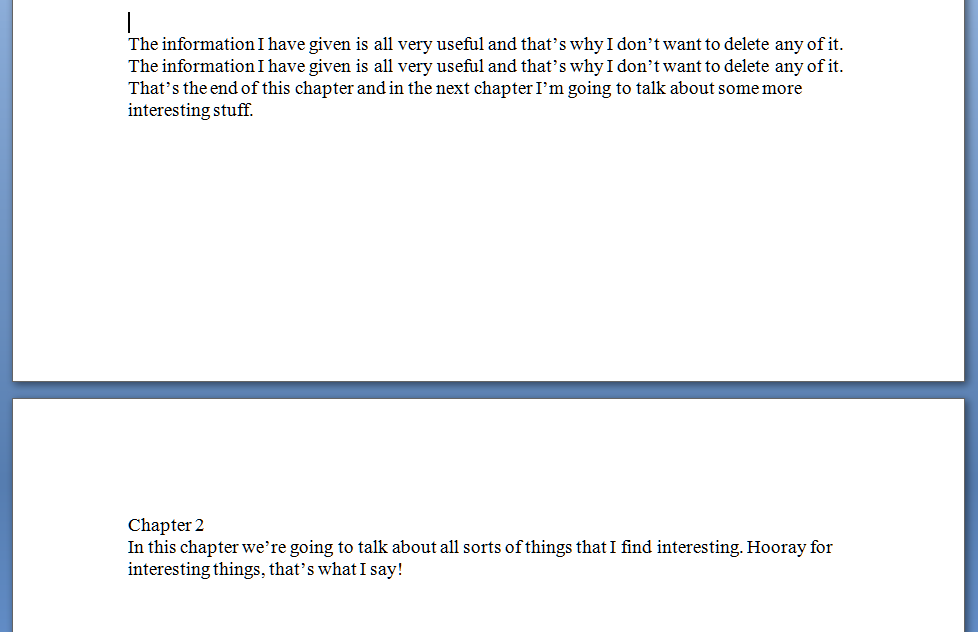
Today we’re going to talk about page breaks. If you’re writing a document that has sections, chapters, etc., you might well want to start a new chapter on a new page, and have it look something like this:

So far, so good – you’ve got your new chapter starting on a new page. But I bet you finished one section and hit the “Enter” key until you got to a new page, didn’t you? The way to tell is to hit a rather magical little button that shows all the formatting you’ve done.  In Word, you’ll find it in the Home menu; if it’s not there, play around with the display until you’ve found it and add it to the menu bar. Here it is:

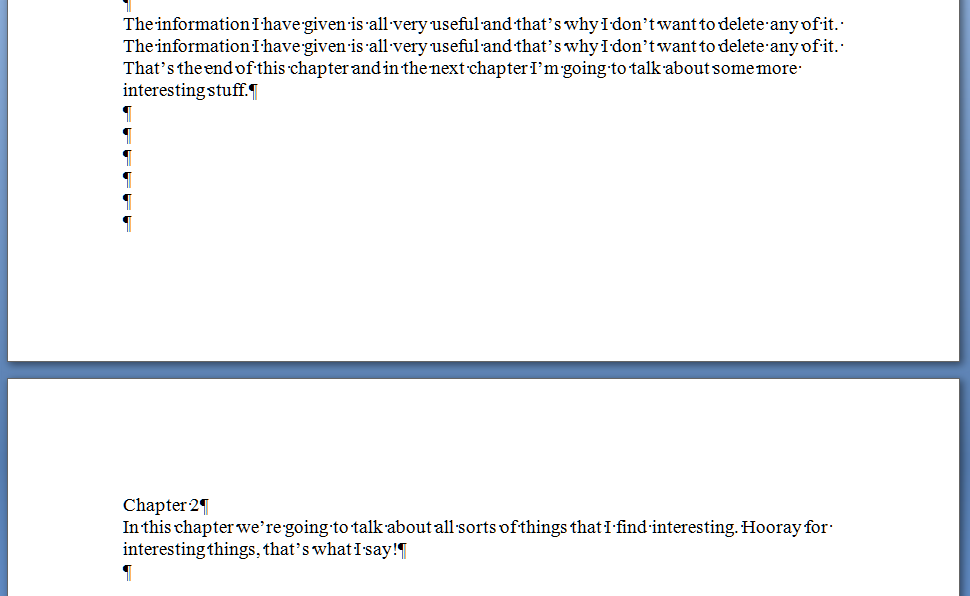
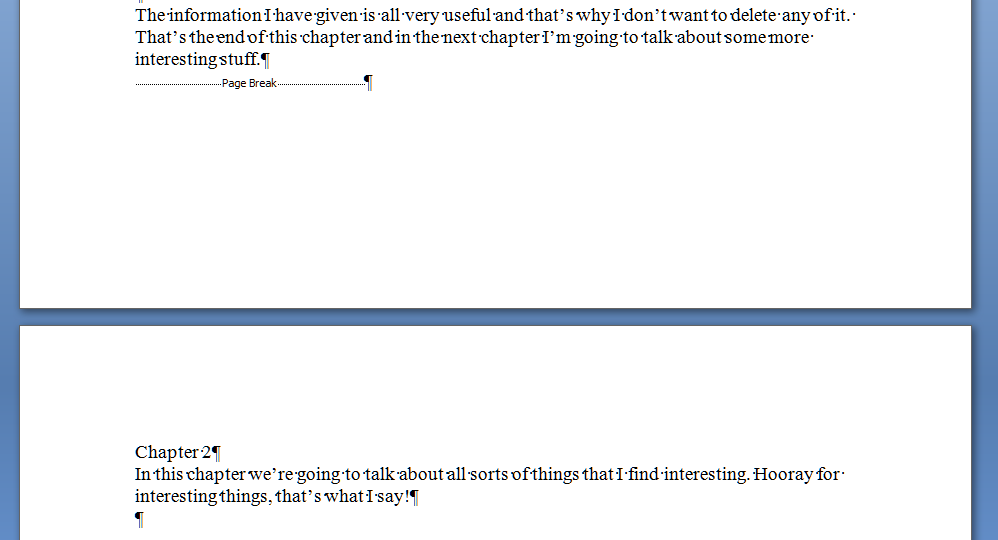
That’s actually the “paragraph” symbol or pilcrow used for centuries in manuscripts and printed books. Anyway, it’s ever so useful if you want to show what you’ve done to a document. Press it a second time if you want all the formatting marks to disappear again. So, pressing this with our document open shows the horrible truth – enter, enter, enter you’ve gone, six times, down the page …

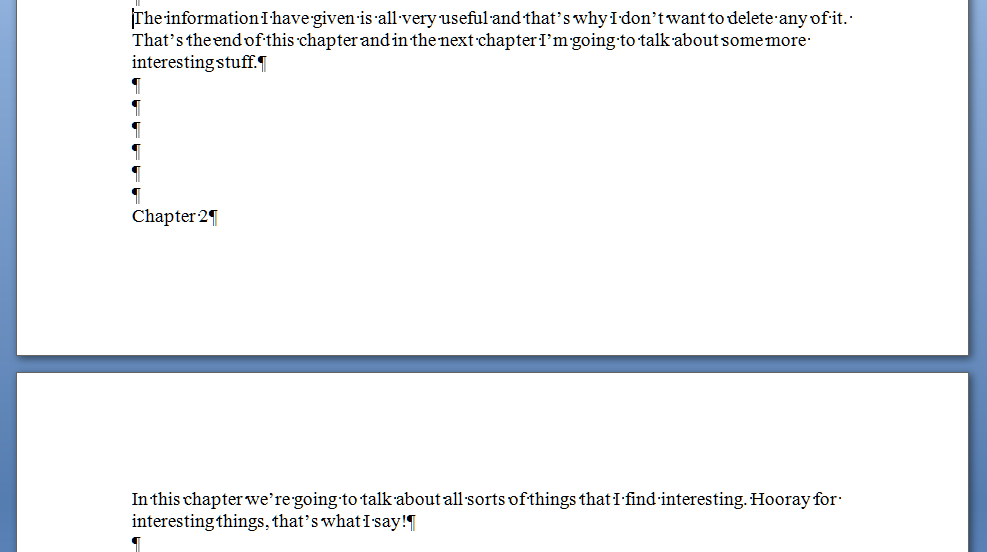
And that’s all well and good – until you change the text above the page break. You’ve done this and it all looks nice, then you notice that repeated line on page 1. Oh, well, you can just delete that. So you delete the repeated line, and the text on page 1 is now one line shorter – one line further up the page. Below the text, you hit Enter 6 times to make Chapter 2 start on the next page. Those six lines are below your chunk of text still, but your text is one line shorter than it used to be. So what happens … ?

Disaster! Chapter 2 doesn’t begin on the next page any more! It’s crept up a line! And, similarly, if you’d added some lines of text to Chapter 1, this chapter heading would start part way down this page. Messy! And when you’ve submitted your work to an editor like me, you can bet we’ll be suggesting adding lines in or taking them away; when you get the document back the spacing will be all over the place (or I’ll have done it my way and made it tidy already … )

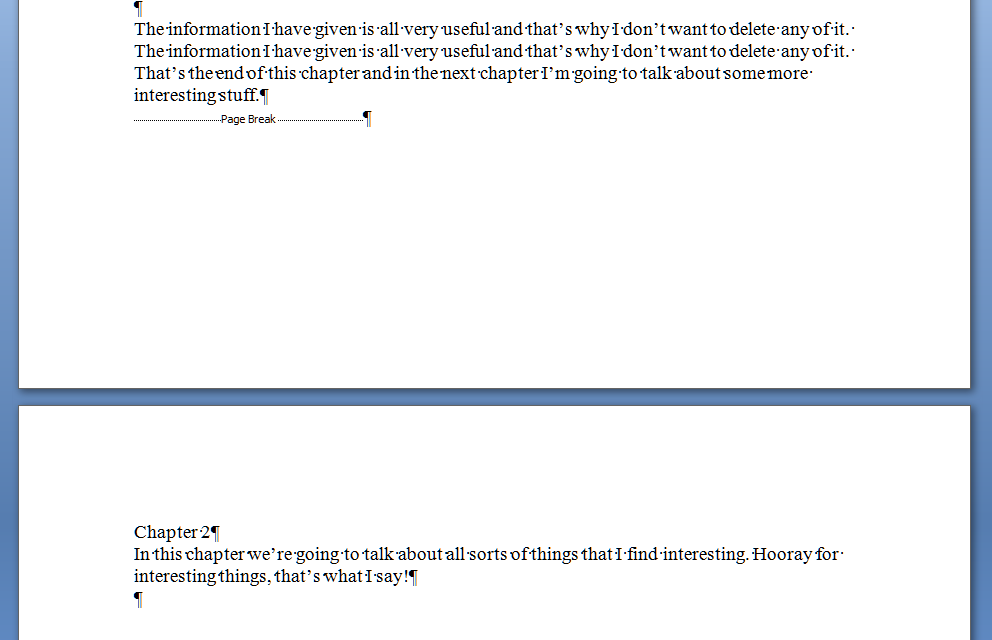
So how do you do it properly so this messiness doesn’t happen? Simple – you “force a page break”. Again, in all versions of Word, when you get to the place where you want to force a new section to start on a new page, press Control-Enter (or choose Insert – Page Break). Turning on your formatting display, and using our original text again, you’ll see this:

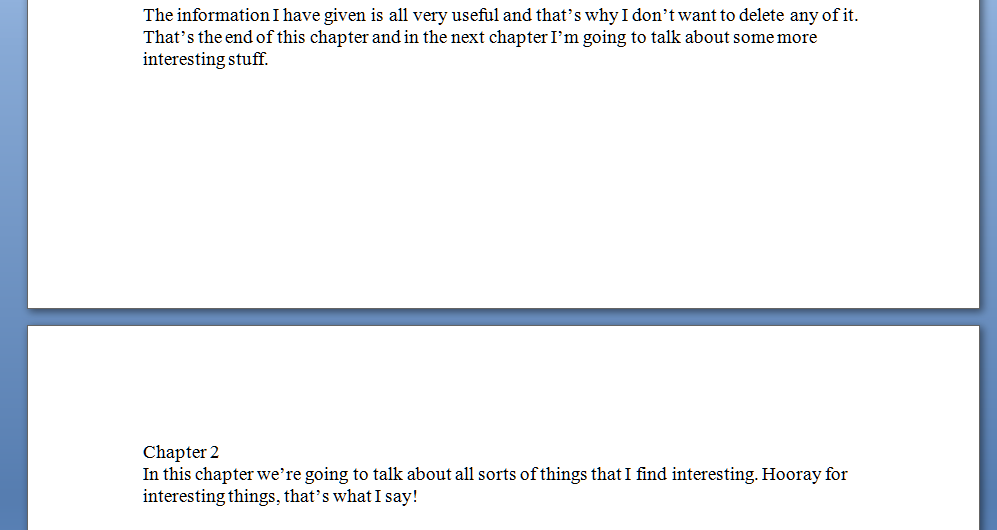
And because it’s a forced page break, it doesn’t matter what you do to the text above the break, the new text will always appear on the next page. Make the Chapter 1 text shorter again by deleting that extra line and you get this:

No hopping around – and even if you add so much to Chapter 1 that it goes onto the next page, Chapter 2 will just hop on down to the page after, automatically.

Of course, your document still looks like this:

But you’ve done it all correctly, in fewer keystrokes, and you know that whatever you do with Chapter 1, Chapter 2 will always start at the top of its new page, nice and tidy, going where you need it to go.

I hope that’s helped – it’s a very common issue, which is why I’ve tackled it first. There will be more of these posts coming over the next few months – do pop a comment on this post if I’ve helped you, and let me know if there are any other issues you’d like me to look at.

Please note, these hints work with versions of Microsoft Word currently in use – Word 2003, Word 2007 and Word 2010, all for PC. Mac compatible versions of Word should have similar options. Always save a copy of your document before manipulating it. I bear no responsibility for any pickles you might get yourself into!

Find all the short cuts here

 
10 Comments

Posted by on November 23, 2011 in Copyediting, Errors, New skills, Short cuts, Word, Writing


Tags: , , , ,

What to do if your comment boxes go tiny in Word

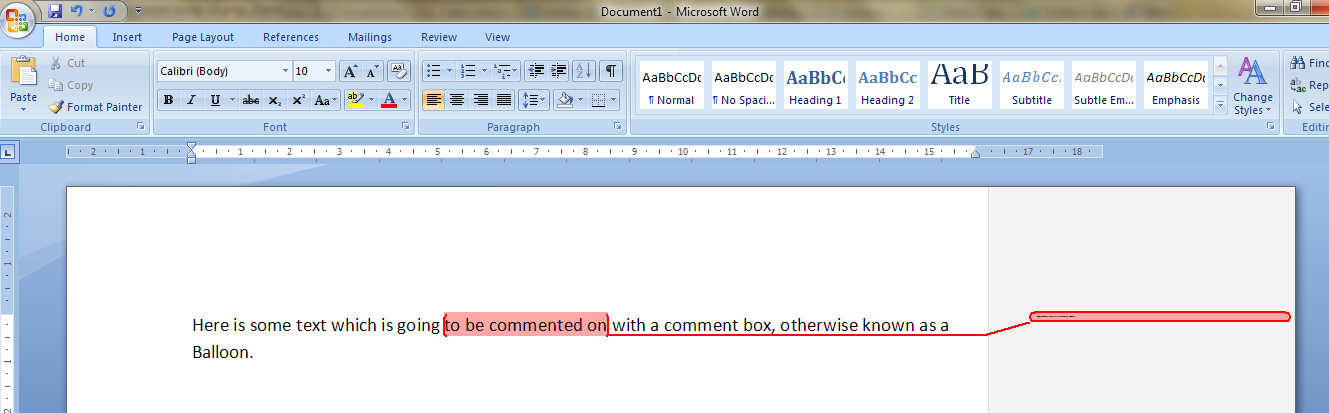
I had been editing a document for a client.  I added some comments in the margin, as always – but when my client opened it and when I re-opened it, to my horror and his, all of the text boxes containing the comments had gone TINY and unreadable. It looked like this:

It apparently happens if you’re working with a document originally created in an older version of Word which doesn’t have the requisite Styles set up for comment boxes.  You then work on it in Word 2007 or Word 2010 (this solution works for both!) and the horror happens …

It took me and Matthew longer than it should have to work out what to do, as there didn’t seem to be an easily found solution if you searched for one online – so as an aide memoire for me, for next time it happens, and as a public service for anyone else trying to work out what to do … here’s what you do (now edited to add screen shots).

Note for experts: if you’re already familiar with Styles, note that you need to change the Balloon Text.

What to do if your comment boxes go tiny in Word documents:

Let’s look at what the full horror looks like first of all:

First of all: don’t panic! The comments will have typically gone into Times at 1 point. But there is a way to make them readable again.

Open the document. Don’t highlight anything. Don’t put the cursor into a comment box.

Now you can do one of two things. Either hit Control + Alt + Shift + s all at the same time, or make sure you’re in the Home tab and click on the little tiny arrow at the bottom right of the Styles menu – this will bring up the full Styles dialogue box.

Using either of these methods, you will bring up the Styles dialogue box.

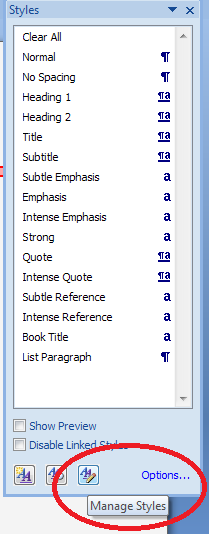
This looks like a very useful dialogue box, but for our purposes you need to ignore all of it except the three buttons at the bottom. Click on the rightmost button: Manage Styles to bring up yet another dialogue box.

We’re not there yet: the sort order shows as Recommended – but you need to click on the down arrow to change it to Alphabetical:

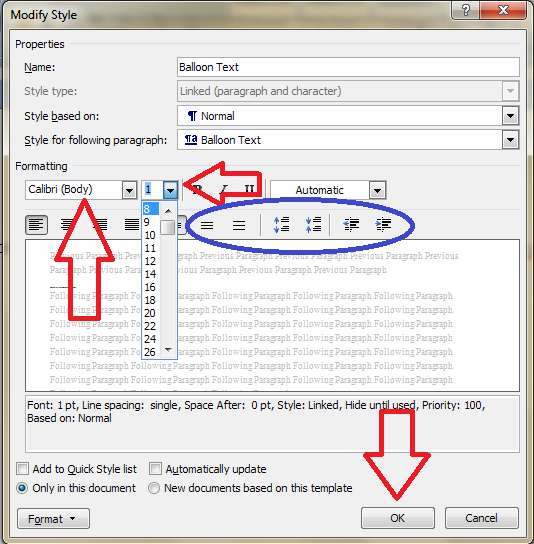
Once it’s in alphabetical order, it’s relatively easy to find Balloon Text (note: not Comment text) and you will see that it then confirms how you have your text set up (blue circle). Click the Modify button

Now you can change your font (which will probably have defaulted to Times) and font size (which will probably have defaulted to 1). You’ll notice lots of other options (blue circle) to change the spacing, etc. – I don’t usually worry about changing those, but this is where they are if you want them – and of course you use this menu to change the styles on headings, normal text, etc., too. Press the OK button, and carry on pressing OK buttons until you get back to your document.

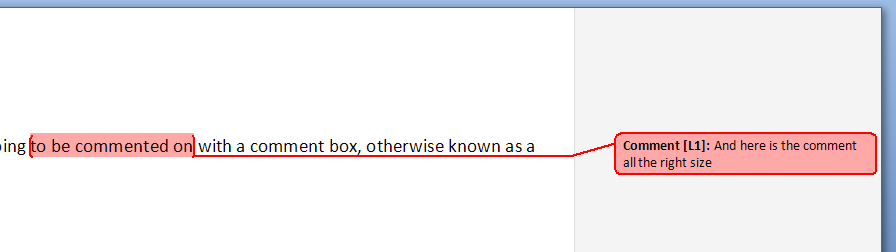
And there it is, all changed:

Save document

Want even more information on customising your comment boxes? Read this article full of everything you would ever want to know!

Related topics: What to do if your comment boxes start running from right to left

Changing the language in your comment balloons

Note that these tips are primarily for Word 2007, 2010 and 2013 for PC. Most of them will work for Word for Mac, although you may find some menus in different places. This is part of my series on how to avoid time-consuming “short cuts” and use Word in the right way to maximise your time and improve the look of your documents. Find all the short cuts here

Do let me know if this has helped you, saved your bacon, etc. – and do share with the buttons at the bottom of this article.

 
343 Comments

Posted by on November 6, 2011 in Copyediting, New skills, Students, Word, Writing


Tags: , , , ,

What I’ve been up to in October

October is traditionally a quieter month after the student Master’s dissertation rush of August and September, and I have certainly seen a slight drop-off in workflow, although it’s still kept ticking along. I’ve …

Edited some PhD theses – some ongoing, some in their entirety; some large documents and a PowerPoint presentation for one ongoing client (discovering that, even if you can’t Track Changes, you can stick sticky notes all over the slides); quite a few blog posts for a new ongoing client who is not a native English speaker (picking up a lovely reference along the way); and all sorts of business and academic writing for my translator client.

Edited and proofread my usual American magazine’s quarterly publication and the MoseleyB13 local magazine.

Edited two articles for publication, ensuring they conformed to the journal’s style guide.

Set up a coaching relationship with one PhD student, where we talk via email every week about the new work he’s completed in an effort to get his thesis written up this year.

Transcribed interviews for my journalist client, who’s got some cover stories in women’s magazines as well as the usual music magazine pieces, and a new client who presents teleseminars and interviews on writing and marketing your work (learning a lot as I go along!).

And I also …

Ran my fourth Birmingham Half Marathon, with a personal best time!

Wrote some blog posts on starting your own business, including starting a proofreading business, pre-launched my new Libro Newsletter by telling people about it and inviting them to sign up, and placed some more guest posts.

Attended a Social Media Cafe, where I talked through a business problem with my peers – very useful.  I attended the Kings Heath Business Association AGM and will hopefully be helping out on their committee in the New Year, and I went along to the Entrepreneur meetup and met some more lovely, enthusiastic people with great business ideas.

Phew! I’ve also received the 22nd questionnaire response for my Iris Murdoch research project, and this month/December I will be applying to present a paper on it at the next Iris Murdoch Conference and writing up some results!

Coming up …

The Big Decision is coming up now: when to take Libro full-time. Working part-time while running the business is getting tiring, and where I haven’t had to turn any work away, I have had to turn down a few opportunities for networking and other events which could potentially drive some new business my way. I also want to be able to be more flexible for my clients as to when I can do their work, and have time for my partner and my friends! So … it’s decision time this month!

Libro offers copyediting, copy writing, proofreading, transcription, typing and localisation services to other small businesses, individuals and corporations. Click on the links to find out more!


Tags: , , , , , ,

Proofreading as a career – some pointers

Sometimes I feel that people think “proofreading and editing” is one of those things that anyone can do, that’s a good fall-back position if you’re looking around for something to bring in a few pounds.  I think it’s a common misconception that if someone is well-read and good at spelling, that’s going to transfer into something out of which they can make a career.  There is a bit more to it than that, and as I’ve had several people ask about it, it’s got to the point where it feels useful to put something down that I can direct future enquirers to.  So, if you’re thinking about being a proofreader and you don’t know quite what it entails, read on …

Get your terms right

If you think you want to be “a proofreader” then you probably don’t know what one is.  Sorry to be blunt!  But a proofreader is a very specific kind of job, where you check materials that are just about to be published.  It’s not going through a manuscript for a novel and commenting on it (that’s copyediting) or making suggestions on changes (that’s substantive copyediting) or checking the facts in an article (that’s fact-checking) or writing up an article from bullet points (that’s copy writing).  For more on all this, see my post on proofreading and copyediting or my skill set series.   OK: so what you want to be is a copyeditor.

Get the skills

It’s not that easy correcting someone’s grammar and making their sentences work.  Sometimes, it isn’t actually that much fun.  Of course I enjoy it, but see below for why it takes a particular kind of person. And you do need to have the theory behind the practice solidly backing you up.   One way to get the knowledge is to go on a course.  Do not look at any other courses apart from those run by the Society For Editors and Proofreaders or the Publishing Training Centre.  Yes, there are lots of other courses advertised in the paper, etc.  These are the two that the industry in the UK recognises, that publishers send their editors on.  The courses and exams are quite expensive, but so are the other ones.  SfEP has a useful test on its website that might help you decide whether you’re suited for this work.

An admission: I’m not a member of SfEP and I don’t hold their qualifications.  But, and this is a route you will need to take too, I have lots and lots and lots of experience.  Most of that experience, pre-Libro, was unpaid – editing and indeed proofreading for local publications, author friends, typing theses back in the old days before everyone had a computer.  Writing.  Writing press releases and marketing material.  Working with UK and US English.  I’m nearly 40.  Most of my working life has involved this kind of stuff.  Oh, and the English Lang & Lit and Library and Information Studies degrees helped a bit, too.

If you go into this business, you will still need to take specific tests from prospective clients, even if you have qualifications.  I tend to pass these tests with flying colours, so I can get away with not having the exams.  If I was doing this again, and I didn’t have any experience, I would take those exams.  I’m going to learn Indexing one of these days.  I’m going to take the courses and exams for that: oh yes!

Are you suited for the work?

You might want to have a look at my previous post on deciding if you’re suited to freelance work at this point. In general, freelancing in whatever area you choose will have common points.  Particular to editing are the facts that: you can’t usually do it with other people around, as it’s really concentrated work; it can be a bit repetitive if you’re working on one huge text or lots of things on the same subject (if you get into student work, clients tend to recommend you on within the same course); you really don’t get to choose the subject you’re working on, and it’s fairly rare to be something that you’ll be interested in on its own merits. There are plus sides to these points, of course: if you enjoy being alone, the first is fine, and you can take your marketing work, blogging, etc., to the local cafe; it can be soothing to press on with the same thing hour after hour; and you get to learn an awful lot about an awful lot of subjects, which can be handy for pub quizzes and the like!

And you’ve got to be happy to do this, day in and day out.  You might have to miss a cinema trip with your friends.  You might be poorly – but there’s not really sick pay as such (we’re lucky to have the NHS in the UK, of course – in other countries this point is even more important). Again, these are general points. In summary from the editing side of things: you need to be good at concentrating; nit-picky; good at going for hours with no distractions; good at finding odd topics interesting enough that you’re not wandering off to Twitter every five minutes; good at keeping to deadlines (it’s often someone else’s deadline you’re affecting if you run over time).

Dealing with clients

OK, I do have great clients who come through recommendation and send me work reasonably regularly.  But I still had to prove myself to them in the first place, and I still have to send in my invoices on time and do the work when I say I will.  You will need to be able to justify what you’ve done to someone’s work, make their work demonstrably better, come in to their deadlines, keep them informed.  It’s not just a question of sitting nicely at a desk and playing with a sentence or so, just like gardening isn’t all wandering around in a big hat with a trug, snipping at a rose every now and again. You need to market yourself, be cheeky, throw business cards at all and sundry – you can’t just sit back and expect the work to come to you.  Which brings me to my next point …

Building things up

It’s over two years since I launched Libro.  Only now am I thinking of going full-time.  Much of my work comes through repeat business (hooray for repeat customers) and recommendations.  But that’s hard work in itself.  If someone is kind enough to recommend your services to a friend, you have twice the pressure: do a good job for the client and make sure you don’t ruin their trust in the original client who recommended you.  You have to do a really good job to get these recommendations, in the copyediting that you do and in the customer care and marketing that you do.

I have found myself diversifying over the years, so I now do transcription, writing, localisation from US to UK English and all sorts of other things. Do you have skills you can add in to your basic offering, that form a good portfolio (copyediting and clowning might work, but would be difficult to market, perhaps).  The other way to go is specialisation.  I’ve done this with my localisation work, building a reputation as someone who is good at turning US into UK English, and I know copyeditors who are very well-known in their field of, for example, editing medical journal articles.  But you need an outside speciality you can bring to bear on your copyediting work if you want to go down that route (for example experience in other jobs, your previous education …).

Is this for you?

So, a summary.  If you really want to make a go of a proofreading career, which we now know is actually a copyediting career, you need to:

  • enjoy working on your own
  • have a high attention span and a very high boredom threshold (I’m not saying that the work is boring: I love it; some people would be bored silly by it)
  • write a very high standard of English (oh yes, and everything else that you send out into the world has to be perfect or people will spring on it with glee!)
  • do a fairly expensive course or have demonstrably high levels of experience
  • be prepared to work very hard
  • be prepared to work on stuff you do not find interesting
  • be prepared to do all the usual freelance stuff of losing your weekends and evenings “just to turn this project round”
  • be prepared to do marketing and customer care and maths stuff as well as playing with the order of words to make the most elegant sentence
  • have other skills you can diversify into
  • or have a very particular skill you can specialise in

I don’t want to put people off, I really don’t.  But hopefully this has given you some insight into the kind of person you need to be to do this kind of work, and the kind of work it actually is.  Think of copyediting as a positive choice rather than a fall-back position, and you’ll be fine. Drift into it, and you might get some work and payments, but you might be happier somewhere else.

 

Tags: , ,

What can Libro do for you?

What can Libro do for you?

Here’s a handy list of everything that Libro can do for you, to make your life that bit easier and make your words work better …

Libro is all about making your words work, whether the words themselves need tweaking (editing what you’ve written, proofreading and polishing before publication), or writing (from your notes or a chat with you), or changing in terms of location (localisation from US to UK English or vice versa), or changing in terms of medium (turning handwritten notes or a taped interview into a typed document).

Follow the links for more information, but here’s a summary:

Editing  – making sure your words, grammar, punctuation, sentence structure and even your plots and non-fiction books don’t contain gaping holes.  Checking marketing content (leaflets, websites … ), blog posts, letters, reports …

Proofreading – checking that what you’re about to publish in print or online looks right and works as the document you expect it to be – checking page numbering, headers and footers, website links, etc.

(and for the difference between editing and proofreading, see here)

Copy writing – writing text for your book, downloadable e-book or leaflet, brochure, website, letter, press release, advertorial, advertisement, etc. from your notes or a conversation with you.  I can add in SEO keywords to build your presence in the search engines with text that potential clients will want to read, too.  I work with web designers, too – writing content for the websites they design.

Localisation – adjusting your copy to match UK or US English standards – not just the spellings but sentence structures, word usage, etc.

Transcription – saving you hours of time typing up dictations, interviews, meetings; why not produce a transcript of your webinar or training session to offer to your clients as an added extra?

Copy typing – bundles of notes and no inclination to type them up? Scan them in, send them to me and I’ll produce a nice, tidy, grammatically correct and properly spelled document.

I also offer all of these services as an add-on for virtual assistants, meaning they can offer a wider service without having to have all the skills themselves.

Contact me via email or via my contact form.


Tags: , , , , , ,

What I’ve been up to in September

September is another traditionally busy month for Libro, although again, like in August, I’ve had a good range of non-seasonal work as well as the expected deluge of Master’s dissertations. So, what has this proofreader, editor, writer, typist, transcriber and localiser been up to in the past month … ?

Copyedited at least 21 Master’s dissertations and three whole or part PhD theses (including one which was dictated into Dragon software, giving some interesting new issues to look out for!).

Copyedited several texts that have been translated into English from another language by native speakers of the other language, to make sure they flow well and conform to either British or American English standards.

Transcribed tapes for my long-term journalist client (an interview with a writer), and some new clients including a Chinese company who has outsourced transcription of tapes by American career coaches to me, and a company involved with helping writers market themselves.

Edited and written text for websites for a cleaning company and a faith-based charity.

Edited various company policies and tender applications for another long-term client.

Written some articles on retail display shelving for a fairly new regular client who has kindly been Tweeting my praises on Twitter.

Localised online content for the UK market for a football game, an exercise company and a big corporation that I can’t name because I was working for an agency on that one.

Edited and proofread the usual Yacht Club publications.

In non-paid work news, I’ve also …

Written a website (a very simple one in WordPress) for a locally based charitable organisation.

And I also

Attended a Social Media Cafe, where I was told I was an “oracle” who kept connecting people with one another! and went to my first Kings Heath Business Association breakfast.

Phew! I’ve also received the 21st questionnaire response for my Iris Murdoch research project, and I should be back on track applying to present a paper on it at the next Iris Murdoch Conference and writing up some results soon!

Coming up …

More of the same, really … well, fewer dissertations, but I’ve got some PhDs booked in to finish off and then it’s ongoing work with my regulars and hopefully picking up some more bits and pieces. And, of course, planning when and how to take Libro full-time!

Libro offers copyediting, copy writing, proofreading, transcription, typing and localisation services to other small businesses, individuals and corporations. Click on the links to find out more!


Tags: , , , , , ,

What I’ve been up to in August

August is one of Libro’s traditionally busy months, along with September, mainly owing to the looming deadlines for student undergraduate and Master’s dissertations.  But this past month, I have been busy with much more than dissertations, although those have been active too.

Deep breath! Ready … in August I have …

Copyedited 28 dissertations / theses or parts thereof (sometimes people send me them chapter by chapter, with gaps of time in between while they write the next bit).

Copyedited some documents translated into English to make sure the (British or American) English was fluent-sounding and appropriate (another long-term client who’s been concentrating on a project translated out of English over the summer – it’s good to have him back!)

Proofread a few tender applications and company policies for a regular client.

Typed up 2 inverview transcriptions for my ongoing journalist client and one set of interviews for a student’s dissertation.

Polished a freelance training expert’s web text and copyedited several blog posts for her too.  Worked on web text for a retail shelving company.

Written 2 advertorials for my retail shelving company client to be published in September in a trade magazine.  Also written 5 features on local businesses in the Black Country for a local website.

Written up Terms and Conditions for a web designer based on previous Ts & Cs for his other services (to be checked by a lawyer, of course!)

Recorded myself reading a list of English names for a website where you input a name and hear someone from their country saying the name (!).

Localised webtext for a large software company and a dealer brochure for a cult automotive company, both working from American to British English.

In non-paid work news, I’ve also …

Helped  my mentee with his webtext, social media presence and hopefully found him a mentor in his particular line of business and written some explanatory text for a student starting up a new business, that can be used for webtext or a press release.

Helped at a Social Media Cafe and attended Birmingham Entrepreneurs’ Meetup and Social Media Cafe networking events; also attempted co-working at a cafe with no wifi (more on that later when I’ve written up the review!).

Had two guest posts published on other people’s blogs – this is something I love doing (so do ask if you’d like me to write something for your blog!) and hosting (so do ask if you’d like to contribute to this blog!) and published 4 freelancer/businessperson Saturday interview features.

Phew! I’ve also received the 20th questionnaire response for my Iris Murdoch research project, although I’ve given myself study leave for August-September so I can concentrate on Libro busy times rather than trying to write up research at the same time!

Coming up … more of the same really – I’ve already written some marketing materials, worked on some dissertations, started another transcription and localised a newsletter!

Libro offers copyediting, copy writing, proofreading, transcription, typing and localisation services to other small businesses, individuals and corporations. Click on the links to find out more!


Tags: , , , , , ,