RSS

Tag Archives: writing

Using a style sheet – for editors and proofreaders

DictionariesA little while ago, I wrote an article explaining what a style sheet was, mainly for my own clients, so I could send them a link when I sent their completed work and style sheet to them.

It struck me, though, that it might be useful to write about style sheets from the perspective of the editor / proofreader as well (I’m going to use “editor” to refer to both here, for simplicity, unless I’m distinguishing between the two).

I assume this will primarily be useful for people new to editing who are picking up tips from those of us who have been in the game a little longer. But whoever you are and however long you’ve been editing, do pop a comment below if you have anything to contribute!

What is a style sheet?

A style sheet is a list which spells out how things are to be done when writing and/or editing a text, including information on spellings, hyphenation and capitalisation, referencing and special information. Its aim is to keep texts consistent.

When you’re an editor, you will encounter three types of style sheet:

  1. Style sheets you receive from someone earlier in the process or general ones prepared by particular publishers, journals, etc.
  2. Style sheets you create yourself as you work on a project
  3. Style sheets created by the previous editor when you’re taking over a job or doing the proofreading for something that’s previously been edited (this is unfortunately rare, in my experience)

All three types serve the same purpose: to record the style decisions (more on this later) that have been made in order to keep the look, feel and detail of the text or texts consistent.

When you’re creating a style sheet, it might only be for a single use, for a single client (e.g. a PhD student). When one is created by a journal or publisher, it’s usually so that their “house style” will be consistent across publications and journal issues. But the idea is the same: it’s a tool that’s used to keep things consistent.

What do you mean by “style decisions”?

English is a funny old language. Even if you’re adhering strictly to one of the major style guides, (Chicago Manual of Style, Oxford Style, etc.), you will find there is still room for choice in some aspect of your text.

An example where even Oxford didn’t tell me what to do: I was editing a set of articles which included lots and lots of words and phrases in a different language to English. Each then had the English translation in some form before or after the foreign word. Of course, the articles were all written by different people who had used different ways to express this (word in italics / non-italics / double or single quotation marks and English in parentheses or not, italics or not, quotation marks or not). I was looking to make this consistent … but after some rules on what to do, Oxford told me to choose a way I did this as long as it was consistent!

There will also often be individual names, phrases, etc. in the text you’re editing which will need to be set out in a consistent way, which might not have rules.

An example where there can’t be any rules: your client has lots of interviewees and they’ve referred to them with a code to ensure anonymity. Do they put Respondent OH1, just OH1, OH-1, (OH1), [OH1], etc., etc.?

Although a client a while ago said that his first editor “kept it all in his head”, I prefer to note all of this down so I have it to refer to and keep things consistent.

What does a style sheet look like?

I’m sharing here an example of one of my own style sheets. Note that I have a little explanatory note at the top to explain what it is.

You can see that I set out the most common things that can differ (in my experience) and need noting down – s or z spellings, how the paragraphs are set out, how the headings and figure / table titles are set out, etc.

style sheet 1

In the second half, I go on to dates and numbers, how references are laid out, and some specific things to do with the particular text I’m working on.
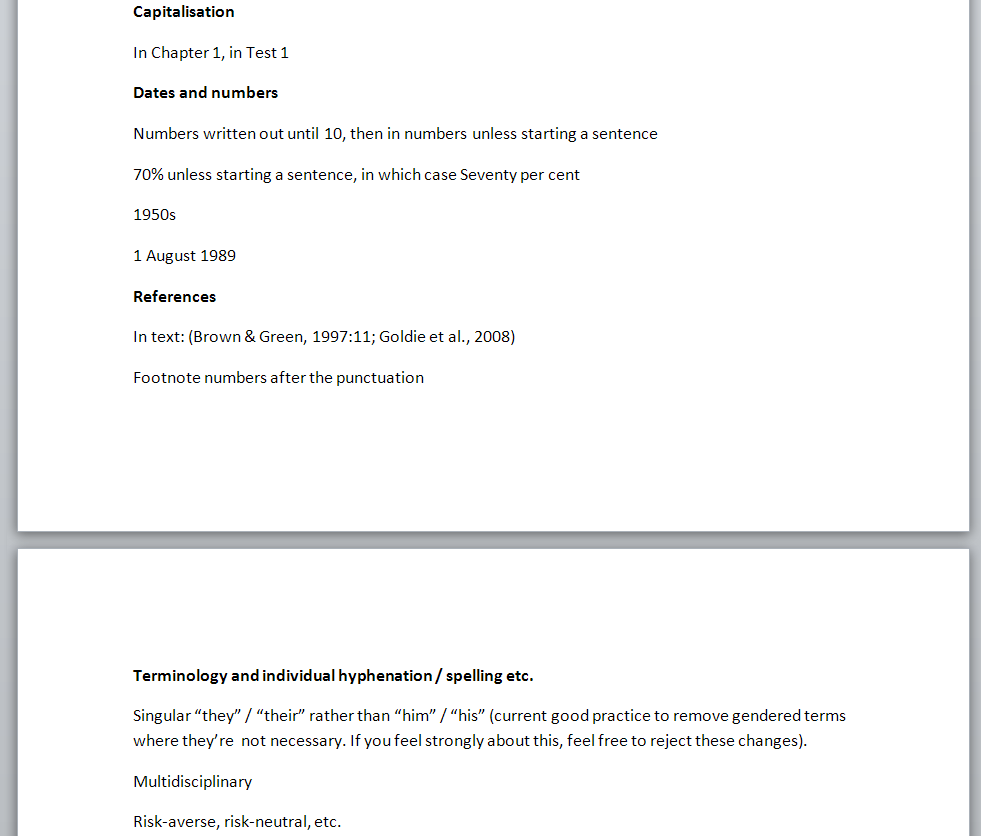
style sheet 2

I find that a publisher’s style sheet is set out in the same way, although it might sometimes be online or a pdf with links.

If I’m working on a text destined for a particular publisher or journal article, if their own style sheet is very long and my text is quite simple and doesn’t need all that detail, I’ll often summarise the parts I need on my sheet anyway.

When should I set up a style sheet?

I set up one of these for any text that …

  • Isn’t for a publisher or journal that has its own style sheet
  • Is for a publisher or journal that has its own style sheet but that sheet is very long and complex and I can use a summary
  • Is more than a few pages long
  • Is being sent to me chapter by chapter (this happens with PhDs I work on)
  • Is going to form part of a larger body of work or a series (e.g. the regular publications of an organisation
  • Is being worked on with a colleague – this is quite rare but does happen

When and why should I send a style sheet to my client?

I pretty well always send the style sheet to my client along with my completed work.

I typically send it with a note in the email directing the client to my explanatory article, as I’ve found that most of my clients haven’t come across this before (I happen to work with a lot of students and self-publishers, as well as translation agencies; your experience may differ if you mainly work with publishers).

I will send the style sheet to my client if …

  • They’ve asked me a lot of questions about grammar and wording issues before we start (I will probably pop down the standard hyphenation and capitalisation rules on it if that’s the case)
  • They are likely to add to the text (for example if I’ve pointed out gaps or missing references)
  • They are sending me their work chapter by chapter – sending the style sheet with the first chapter can often nip certain issues in the bud, the client learns from it and they’ll be more consistent in the next chapter (I’m always so happy when this happens!)
  • They plan to send me regular publications, etc. – if they didn’t have a style sheet I provide one for their writers to use, making my work easier and less time-consuming and meaning they have less to correct
  • It’s a substantial document (more than a few pages)

Hopefully, having a style sheet from me will mean that the client will keep things more consistent in the future.

I do also mention that they should send this on to their proofreader if they’re planning to use one in the next stage of publication. This saves their proofreader from busily changing all the Chapter Ones to chapter 1 (or at least it explains that it was an active, considered choice on my part, and not an error).

Making changes to a style sheet

If I send my style sheet to my client mid-way through a project, for example with their first PhD chapter, I ask them to look through it carefully and let me know if there’s anything they’d like to change or they’re not happy with. Sometimes in this case I ask them questions (e.g. “You’ve used ‘Interviewee RD1’ and ‘RD1’ in equal numbers in your text; which one would you prefer to use throughout it?”). If they give me feedback, I record that, or if they ask to change something and their change does actually defy a stated grammar rule I will explain why I can’t.

Working with an established style sheet

If the text I’m working on is destined for a publisher or journal that has a full style sheet, I will of course obey that to the letter, to make things as easy as possible for the in-house editor or designer. Even if that means leaving footnote numbers before the punctuation, something I don’t like to do (but some publishers prefer).

If I’m proofreading a text that someone else has already edited, or I’m working on for example corrections in a PhD that someone else has worked on, I will use their style sheet to guide the changes I make. Even if I don’t approve of their decisions personally, as long as they don’t defy a rule of grammar, I’ll keep it consistent (even if I have to move a footnote number to before the punctuation!). I aim to make as few changes as I can at the proofreading stage, in order to keep corrections (and the chance of new mistakes creeping in) to a minimum.

—-

I hope this post has been helpful and given you some more information about why we use style sheets, where they come from, setting up your own one and working with your style sheet with your clients. Do pop a comment at the bottom or like and share this article if you’ve found it useful and interesting!

Related posts on this blog

What is a style sheet? For people working with editors
 
9 Comments

Posted by on February 4, 2016 in Copyediting, Organisation, Word, Writing


Tags: , , , , ,

What is a style sheet? For people using editors

DictionariesIf you work with a proofreader or editor on any project, either for a publisher or working independently or as a student, you might receive a Style Sheet from them with your corrected work. This article explains what a style sheet is, the purpose of a style sheet, and what might be included on it. I’ve also written this article to send to my clients so they understand what the document I’ve sent them is – so if you’re one of my clients, hello!

To make this article easier to read, I will refer to the person who has worked on your document as your “editor” – although I might refer to proofreaders in some places, too.

If you’re an editor or proofreader who wants to find out more about style sheets, I’ve written an article just for you, too.

What is a style sheet?

A style sheet is a list setting out the decisions that your editor has made on aspects of the layout and language of your document, in order to keep the document consistent.

It might include notes on what font is used, whether the text is left or fully justified, how particular words are capitalised or hyphenated, how much indent your indented quotations have, what is put in italics, etc. We’ll have a look at an example later on, but that’s a very short summary.

Why use a style sheet?

Especially if you’ve learned English as a second or other language, you will know that the English language is not consistent, and it doesn’t even have proper rules for some things! This can be really frustrating, as two people might do things in two different ways, BOTH of which are correct.

For example, in English …

  • we can use -s- spellings or -z- spellings in words like “organisation”
  • we can capitalise or not capitalise words like Chapter 1 or experiment 2
  • we can use orient or orientate
  • we can hyphenate or not hyphenate pairs of words like policy-maker

And that’s before you get to decisions like …

  • are you going to use 20%, 20 per cent or twenty per cent?
  • are you going to describe America as America, the United States, the US, the USA, the U.S. etc. etc.?
  • are you going to use double inverted commas for quotations and single inverted commas for concepts, or vice versa?
  • are you going to refer to other research as (Brown, 2003; Green and Jones, 2005, p. 23) or (Brown 2003, Green & Jones 2005:23) or any other variant

Now, the important thing with all of these is to keep it consistent.

Some of these rules might be set down in a style guide or referencing guide (see below). But whether you and your editor are working to a style guide or not, it’s useful to have these decisions written down in one place for you both to refer to.

What’s the difference between a style guide, a referencing guide and a style sheet?

A style guide is a specific guide to how to deal with things like the above decisions – famous ones include Oxford Style in the UK, APA Style and Chicago Manual of Style and AP Stylebook in the US.

A referencing guide is a specific way of writing out references to work you are talking about in your dissertation or book – an example is Harvard referencing.

Some universities and many publishers and marketing agencies etc. will have their own guides which documents published under their name or submitted to them will have to have.

In this case, I could do without a style sheet and just refer my client to … well, a massive website or a giant book. Maybe not. In that case, I’ll note which style guide or referencing system I’ve used and still write out any important points which will impact the document in question.

Please note that I (and I imagine most editors) have favourite style decisions – I prefer orientate to orient, for example, and where there is no clear preference in the text, I will go for my preferred option. If, however, the text itself has 33 orients and 2 orientates, I will go with the majority.

This also means that some parts of the following examples might jar with any editors reading this – they are only examples!

What does a style sheet look like?

Here’s an example style sheet with some of the decisions I might make …

style sheet 1

This is a standard style sheet – I tend to go from the general (the whole layout, all quotations, the tenses used) down to the particular …

style sheet 2

What should I do with the style sheet my editor has sent to me?

Good question – now you understand why your editor has sent you a style sheet and what it’s for … well, why does it matter and what should you do with it?

Here are some important uses of the style sheet:

  1. It will help you to understand some of the changes your editor has made.
  2. If your editor has just edited one chapter, they might send you the style sheet with that chapter and ask you to look through it and check you agree with everything on it. They might even send over some queries – if it’s not clear which option my client prefers, I will highlight the choice and ask them to look at it. If you don’t agree, let them know straight away, then they might change it if it’s not a rule of grammar that can’t be flexible.
  3. If your work is going to be edited by more than one person, they will share a style sheet to make sure it is edited consistently.
  4. If you are planning to add to the document, you can make sure that any additional text you write is consistent with the text that your editor has already checked.
  5. If you have been through edits and your document is going to be proofread, send the style sheet to your proofreader, then they will know what choices the editor has made, and will be able to look out for any errors much more easily.

——-

In this article, we’ve learned what a style sheet is, why it’s used, how a style sheet is different from a style guide and referencing guide, but backs them up, and what to do with a style sheet when you’ve been sent one, as well as seeing an example of one. I hope this helps you: do comment and/or share this article using the sharing buttons below if you’ve found it useful!

Other relevant posts on this blog

Style sheets for editors and proofreaders

 
24 Comments

Posted by on January 14, 2016 in Copyediting, proofreading, Students, Writing


Tags: , , , ,

Aglet or ferrule?

DictionariesThis is a cheeky one. Of course you all know the difference between these two lovely words. But I like them, and it’s my blog, and you never know who might look things up (even “mandrel or mandrill” is quite popular).

An aglet is the little tube that you find on the end of your shoelaces, usually made of plastic but sometimes of metal. Sweetly, it apparently comes from the French for “little needle”, even though it doesn’t really look like or act like a needle in itself, but is used to help you thread the lace through the holes.

A ferrule is the little plastic or rubber cap that sits on the end of a walking stick or umbrella and prevents it from getting damaged.

You can find more troublesome pairs here and the index to them all so far is here.

 
10 Comments

Posted by on October 6, 2015 in Errors, Language use, Troublesome pairs, Writing


Tags: , , ,

Curb or kerb?

DictionariesHere’s one suggested by my friend and editing colleague, Linda Bates. As a special bonus, it has a US / UK English twist. How exciting!

A kerb is a noun meaning the stone edging of a pavement or path. There are some verbs associated with kerb, notably kerb-crawling, which is driving slowly on the lookout for a prostitute.

Curb is a noun meaning a limit or control (“I’m imposing a curb on the amount of alcohol you can drink at home”) and a verb meaning to keep in control or limit (“I’m curbing the amount of alcohol you can drink at home”). A curb is also a type of bit used in a horse’s bridle.

And, excitingly, American English uses the same word (curb) for both!

You can find more troublesome pairs here and the index to them all so far is here.

 
Leave a comment

Posted by on September 29, 2015 in Errors, Language use, Troublesome pairs, Writing


Tags: , , ,

Altar or alter?

DictionariesHooray, I seem to be doing these posts more regularly again now. They have lots of fans, so hope regular readers are pleased. Of course, if you’ve just found this post having searched for “altar or alter”, you’re going to be a bit confused by that statement, as you’re visiting from way in the future. This “Troublesome Pair” is but one of a whole series of them I’ve been posting for a few years now. Do pop to the links at the bottom of this post to find the whole alphabetical list of them!

Right, anyway … alter or altar?

Altar is a noun and refers to specifically the table in a Christian church, usually at the front, where the bread and wine are consecrated for communion, and more generally, to any flat-topped box or table that is used as the focus for some kind of religious ritual.

Bonus pair: What’s a shrine, then? A shrine is a place that’s regarded as being sacreed or holy because it’s associated with some kind of god / deity, or a reliquary or container containing holy relics. So you do religious things at an altar and a shrine keeps them safe.

Alter is a verb meaning to change (or change something or cause something to change) in appearance or character. In US and Australian English, it also means to castrate or spay an animal (so many bonuses today!)

“After she observed the seriousness of the actions performed at the altar, she altered her behaviour in church and stopped giggling during the services.”

You can find more troublesome pairs here and the index to them all so far is here.

 
Leave a comment

Posted by on September 24, 2015 in Errors, Language use, Troublesome pairs, Writing


Tags: , , ,

How do I add a link to a blog post?

This is a re-post of an older post that was attracting lots of spam comments, reposting it to see if it helps. But it is a useful post, still, so do read, enjoy and share!

Why would I add a link to a blog post?

Adding a link means that you’re putting a hyperlink to either another website or another of your blog posts in the one that you’re writing. There are many reasons for doing this: these are some of the reasons why I do it …

And did you notice that all of those bullet points were links to examples of what I was talking about?

A note about SEO and links (back-links)

One major advantage of links is in helping your Search Engine Optimisation (SEO). I’m not going to go deeply into that here, but basically, Google and the other search engines like to see your pages linked to on other people’s pages, as it shows you’re trustworthy and respected within your community enough for people to link back to you. Yes, people do try to abuse this (we’ve all had blog “comments” from spammers trying to get their URL on your list of comments and now we know why) but when used properly, reciprocal linking to content that does actually interest you and is relevant for your readers does help your fellow bloggers and will hopefully lead to them linking to you, too.

How do I add a link to my blog post?

Of course, all of the blogging platforms (WordPress, LiveJournal, Blogger and others) do it slightly differently. But the difference usually comes down to the icon that they use and how much you can do once you’ve clicked on that icon.

I’m going to use WordPress as the main example, showing all the steps to create a link, but then I’ll show you what the link button looks like in Blogger and LiveJournal and, in fact, Gmail, too. And at the end I’ll share those link images so you know what to look out for.

How do I add a link to a WordPress blog post?

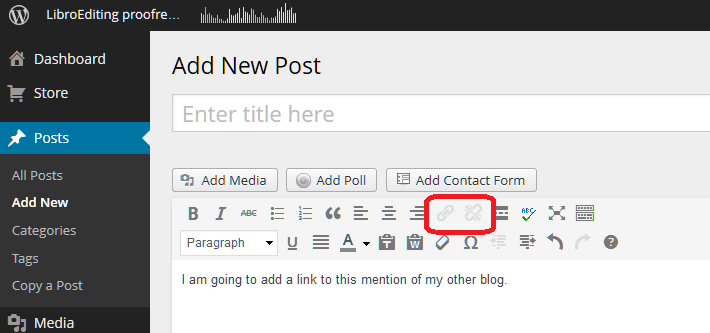
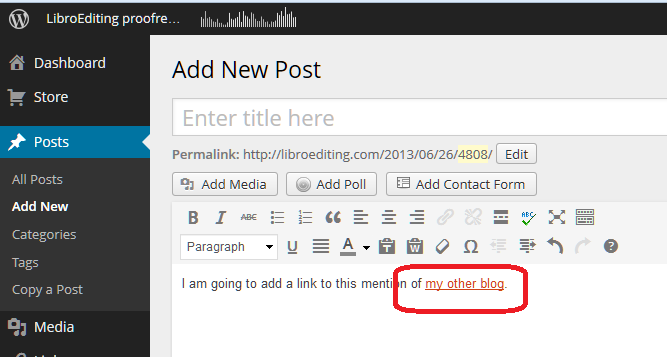
The first thing you need to do is have some text on which you want to base the link. Here I’ve typed in a few words. You can see that in the case of WordPress, there’s a little greyed-out icon that’s not clickable if you haven’t highlighted any text:

Wordpress 1

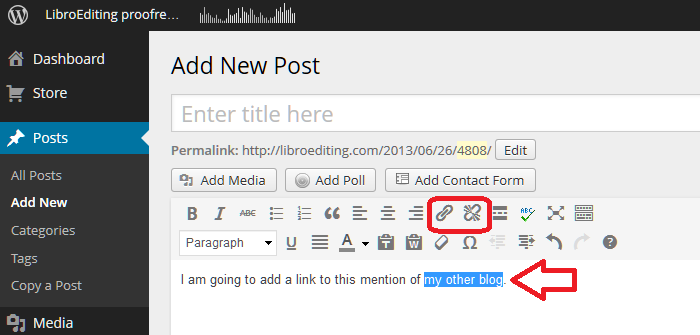
As soon as I highlight the text that I want to use as the basis of my link, the two greyed-out icons appear in all their clickable glory:

Wordpress 2

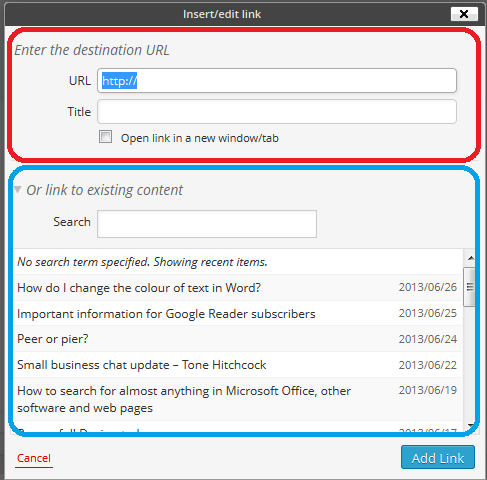
Keeping the text highlighted, click on the left-hand icon that looks a bit like a staple. Or in fact, as has been pointed out in the comments on this post, a link in a chain. This will bring up a dialogue box for inserting your link:

Wordpress 3

WordPress allows you to do two things here; you can either link to a URL for a page outside your own blog (circled in red) or you can choose one of your own previous blog posts to link to (circled in blue) – very handy.

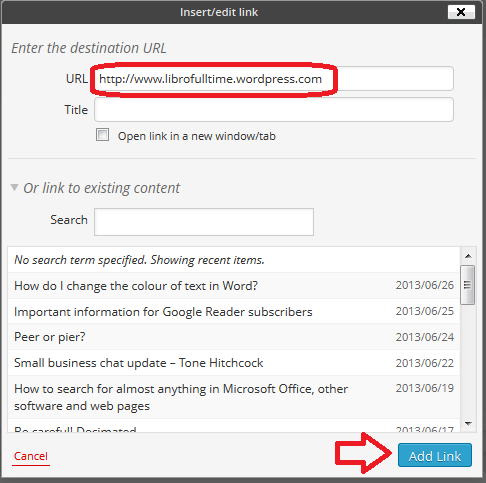
We’re going to concentrate on linking to a URL. Type in the URL you want to link to – including http:// at the beginning:

Wordpress 4

Note here that I’m read to hit Add Link and I have NOT ticked Open link in a new window/tab. This is because I used to do that and an experienced website manager I know got into a bit of a frenzy and told me that it’s not good practice and I should NOT do that. So I don’t now.

Note: if you want to open a link in a new window or tab when you’re reading a blog or web page, right-click on that link and you should get a list of options including those.

Having pressed Add Link, my text is underlined:

Wordpress 5

… and it will be a link just like the ones in the first section, above.

If you want to edit the link, highlight the underlined text and click on the same Link button – you can now change it as you wish.

If you want to delete the link, highlight the underlines text and click on the icon to the right, which is supposed to look like a link being broken (or a staple being removed).

How do I add a link to a Blogger blog post?

Thanks to my friend Linda for the screenshots for this one! (And that’s a link to the website she’s set up with background information to a book she’s just published.)

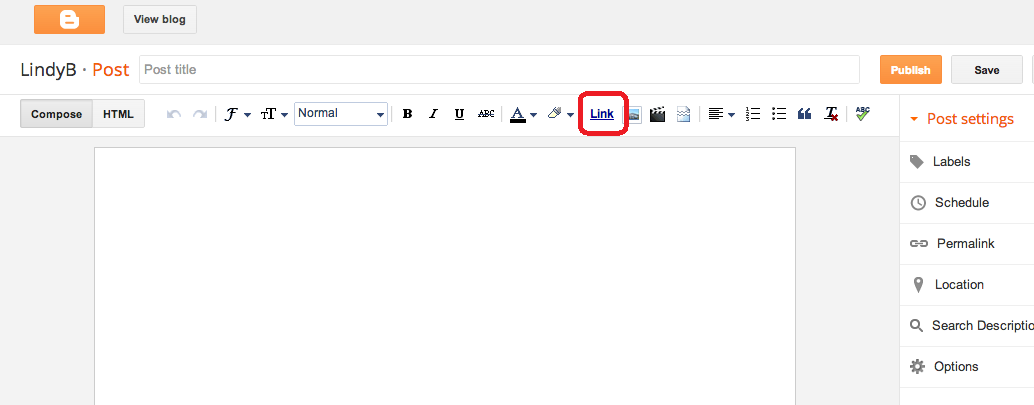
Blogger works in a similar way to WordPress, but the icon you need to use is the word Link:

Blogger 1

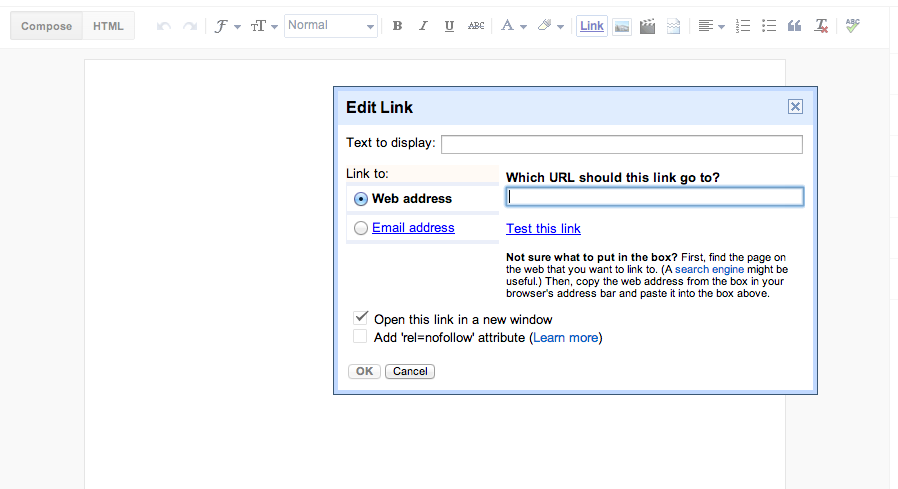
and the dialogue box doesn’t give you the option to choose a previous blog post to link to, but has the familiar URL entry field:

Blogger 2

How do I add a link to a LiveJournal blog post?

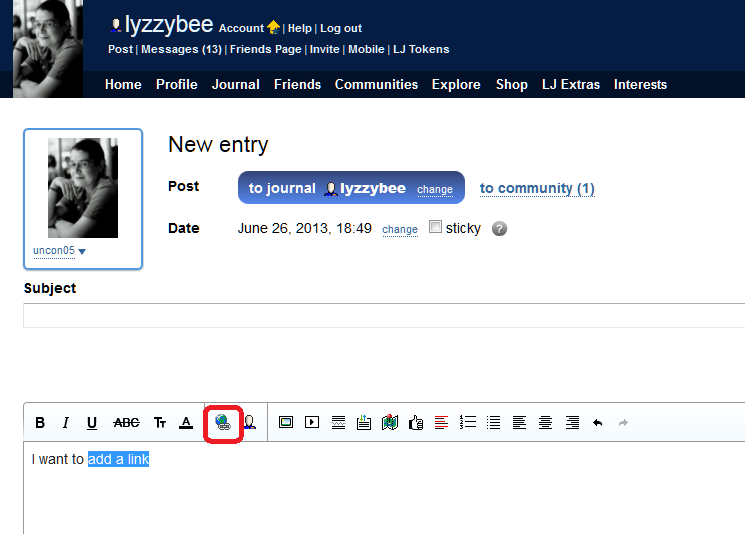
LiveJournal uses another common icon that you’ll find for a link – this is apparently a globe with a link of a chain attached …

Livejournal 1

and you’ll get a similar dialogue box when you click that icon.

How do I add a link to a Weebly blog post?

Thanks to Louise Harnby for the screenshot for this one. We encounter the link  / staple icon again for Weebly, this time in white on a black background:

weebly 1

How do I add a link to a Gmail email?

And just because it demonstrates one of the other icons that is commonly used, if you want to add a link to a Gmail email, for example to point a friend to this blog post, the icon is another chain link / staple, but a horizontal one similar to Weebly’s:

Gmail 1

Icons that represent adding a link

Here are those common icons again. If you find another one, do contact me and send me a screenshot and I’ll add it to this post!

If you want to add a link to any kind of text and you’re looking for the appropriate icon on a button, it is likely to be one of these or similar:

icon 2 stapleicon 3 wordicon 1 worldicon 2.5 another staple

I hope you found this useful. If so, please take a moment to like, share or comment, and spread the word! And feel free to use the Search function on the right hand sidebar to look for more posts about blogging …

 
9 Comments

Posted by on September 17, 2015 in Blogging, Writing


Tags: , , ,

Hanger or hangar?

DictionariesHooray, it’s time for another Troublesome Pair (for any new readers, this was a series I used to run that I’ve recently restarted). This is another one suggested by my Australian friend Matt Patten, as he spotted an example just the other day.

A hanger is something that you hang something from – a clothes hanger being the obvious example.

A hangar is the big shed that an aeroplane lives in.

Nothing more I can say, really!

You can find more troublesome pairs here and the index to them all so far is here.

 
3 Comments

Posted by on September 15, 2015 in Errors, Language use, Troublesome pairs, Writing


Tags: , , ,

Expectancy or expectation?

DictionariesFor those who’ve been following this blog for a while, you might remember the Troublesome Pairs series I used to publish regularly. They’ve been very popular, and I certainly haven’t run out of them, but I didn’t seem to get the time to do them. But I have some more coming up, and here’s the first one! This one was suggested by my Australian friend Matt Patten, who’s asked me to write about a few Troublesome Pairs recently (and not so recently) .

I have to admit that this was one of those that I had to look up to check. But there is a difference (hooray) and it’s all about the level of certainty …

Expectancy is the anticipation or hope that something will happen – and that something is usually a pleasant something. It also refers to a future prospect, as in “life expectancy”. Expectant, the adjective, as we might imagine, means anticipating or hoping that something (pleasant) will happen – so you have expectant mothers, etc.

Expectation is the strong belief that something will happen – not necessarily positive. You can expect a storm or an inheritance (and in fact, someone’s “expectations” is an old-fashioned term for their prospects of inheritance.

“It was my expectation that the expectant mother would soon be seen travelling around with a pushchair.”

Note: nobody associated with this post is expectant!

You can find more troublesome pairs here and the index to them all so far is here.


Tags: , , ,

How do I combine several Word documents into one document?

This article explains how to combine several Word documents into one document. It’s particularly useful if you’ve written a dissertation, thesis or book and need to combine all of the chapters into one file.

These instructions work for Word 2007, Word 2010 and Word 2013; I’ve used Word 2010 for the screenshots

Why would I want to combine chapters into one document?

Lots of people do their writing a chapter at a time, and have it edited a chapter at a time, too. But the time will come when you want to put it all into one book, with page numbers running throughout, rather than messing around starting the page numbers for chapter 2 at the next number on from chapter 1, etc.

What’s the incorrect way to combine my chapters?

You might be tempted to pick up the text of each chapter and copy and paste it into one document. That can lead to issues and inconsistencies. This is the correct way to do it and actually takes less time and avoids you leaving out any bits of your individual chapters.

How do I prepare to combine my documents?

It’s pretty easy to combine several documents into one, however the most important point is …

The file names must be in the order that the chapters are going to be in.

Word will combine your chapter files in alphanumerical order.

If you have called your chapter files

Chapter 1 introduction

Chapter 2 review of the literature

Chapter 3 methodology

Chapter 4 conclusion

then that’s fine, they will combine in that order.

If you have called your chapter files

Introduction

Review of the literature

Methodology

Conclusion

then Word will carefully sort them alphabetically into

Conclusion

Introduction

Methodology

Review of the literature

when it combines your documents.

The best thing to do is add a number 1, 2, 3, etc at the start of your file names BEFORE YOU START COMBINING, so you know they will come out in the correct order.

How do I combine my documents?

OK, so we’ve got, say, four documents or chapters to combine into one.

First, open a new, blank document (using the Home button, New, and choosing a blank document)

Then, click on the Insert tab and find Object in the Text area:

1 insert tab

Click on the arrow to the right of Object to get the drop-down menu, and click on Text from File:

2 insert text from file

Now navigate to your files and select the ones you want to combine.

3 find your files

Hold down the Control Key and click on all the ones you want to combine (or click on the top one, hold down Shift and click on the bottom one if you want all of them). Once you have them all highlighted, click Insert.

4 select files

Note: it doesn’t matter what order you are displaying them in or what order you click them in, it will choose them and insert them in alphabetical or numerical order, as I mentioned above.

Now you will have one big document including all of your chapters!

5 combined

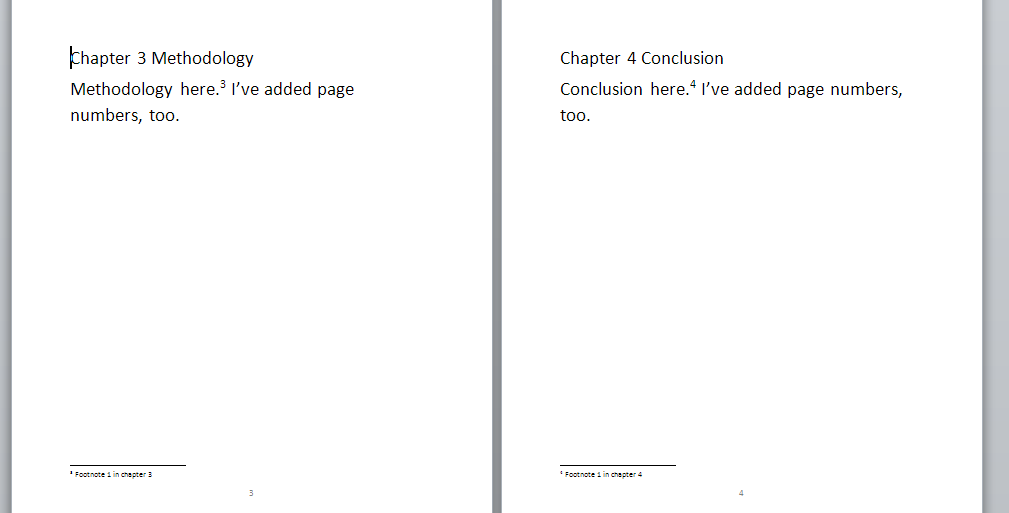
And … if you had footnotes in the documents, and had set page numbers to show, they will automatically update in the combined document to be numbered consecutively (if you want start your footnote numbering at 1 for each chapter, you’ll need to look at my posts on footnotes and endnotes).

Don’t forget to save your document!

PS: If you find you lose your formatting when combining Word documents, read this article for the solution.

—–

This is part of my series on how to avoid time-consuming “short cuts” and use Word in the right way to maximise your time and improve the look of your documents.

If you have enjoyed this post and found it useful, please click on the “share” buttons below or tell your friends and colleagues about it! Thank you!

Please note, these hints work with versions of Microsoft Word currently in use – Word 2007, Word 2010 and Word 2013, all for PC. Mac compatible versions of Word should have similar options. Always save a copy of your document before manipulating it. I bear no responsibility for any pickles you might get yourself into!

Find all the short cuts here

Other useful articles on this website

How to combine Word documents without losing the formatting

 
53 Comments

Posted by on September 3, 2015 in Errors, New skills, Word, Writing


Tags: , , , ,

2 top tips on dealing with the endless pitches for guest posts or reviews

handshakeLast week, I wrote down the 10 top tips for pitching guest posts and asking bloggers to review your product (you can read the article here). I wrote that from the point of view of somebody who receives requests to host guest posts and review stuff All The Time.

It can be time-consuming replying to these emails and messages, but if you’re anything like me, you welcome genuine and relevant content (and interesting book review requests) and don’t like to be rude, unless something’s obviously spammy (in which case, I’m only rude enough to ignore the message!). So, in this article I’m sharing the two methods I use to allow me to respond to pitches quickly, easily and politely, which also have the effect of weeding out the time-wasters.

1. Have a policy for guest posts and reviews

I’ve got a guest post and review policy on both this website (visit it here) and my book review blog (visit it here).

It’s standard practice to have a policy – it sets things out and allows you to filter out approaches you don’t want. Of course, I don’t know how many people this filters out before they contact me, but it must get rid of a few.

This is also hugely useful for when you respond to pitches. When I send my automated email (see point 2 below), I include a link to my policy in my email. This means …

a) The pitcher has to go and look at a web page before they respond (filtering out people who were blanket-bombing blogs and probably won’t be relevant to you)

b) I can change my policy once, on this page, without having to remember to update my standard pitch response email.

c) If a pitcher replies to my email and clearly hasn’t looked at the guidelines, that’s a clear indication that it’s time to terminate the conversation.

2. Create a standard automated pitch response email

Most email providers allow you to create standard replies which you can select and send out without having to type out a new email every time. In Gmail, you can set up something called Canned Responses (and you can find my instructions on how to set them up here).

This saves you loads of time responding individually to pitches for guest posts or product reviews. I tend to get more of the first category for this blog, and this is what my email says:

Thank you for your enquiry about posting your content on my blog.

Before we go any further, please read my Terms and Conditions on Guest Blog Posts and Sponsored Posts, make sure that you can answer the questions posed there, and then get back to me with your suggestions. Best wishes,

Liz

This really does cover most eventualities (and for the few that it doesn’t cover, I can easily add a bit to the email). It takes about three clicks of the mouse button to reply and send, and, to be honest, it usually puts people off! But then, that’s the idea …

—-

Using both of these methods has speeded up my response time to pitches and allowed me to sift out the wheat from the chaff, the genuine opportunities for cooperation from the spammers trying to insert their link onto every website and blog going.

I hope you’ve found this article enjoyable and useful. If you have, please take a moment to share it using the sharing buttons below, and I always appreciate relevant comments!

Relevant posts on this blog

Guest blogging 1: how to be the host with the most

Guest blogging 2: how to be the perfect guest

10 top tips for pitching your guest post or asking a blogger to review your product

 
Leave a comment

Posted by on August 5, 2015 in Blogging, Business, Marketing, Writing


Tags: , , , , ,