RSS

Author Archives: Liz Dexter

Unknown's avatar

About Liz Dexter

Book blog is at http://www.librofulltime.wordpress.com Writer, proofreader, editor, transcriber. Also runner, gym-goer, volunteer and BookCrosser! My married name is Liz Dexter but my maiden name and the name on the books I write is Liz Broomfield.

Six things that you can do to increase your website or blog’s SEO (search engine optimisation)

Graphic showing an increasing numberSEO or Search Engine Optimisation is one of those mysterious areas of knowledge – like setting up a website – that people like to keep to themselves. If you’ve been involved at all with a website or blog, you will know that people tend to almost prey on newbies, offering to increase their SEO if they work with this or that company.

The impetus for this post came from offering some help to a community organisation I’m helping out with. They don’t have the money to spend on expensive consultancy, so I’ve put together this guide for them – and you – to help clarify the myths and provide you with some advice to help you build good SEO.

What is SEO / search engine optimisation?

SEO means making sure that search engines like Google and Bing find your content and present it to people who are searching near the top of the results (just below the adverts).

Although they obviously work for a profit and want to make people advertise with them, the search engines do want to get reliable, decent and useful information to their users – otherwise those users will go elsewhere. They go to a lot of trouble to weed out spammy and dodgy sites that will put users off and don’t provide useful and relevant information (if every search you did on Google only gave you results on how to improve your SEO, when you wanted to know about Halloween outfits for dogs, you’d soon get bored and use a different search engine).

Therefore, we need to make sure our blogs and websites have the right information and content that will prove to Google that we’re legitimate sites full of useful content that it’s good to show their users.

There are various technical and writing related ways to do this and I’m going to cover the simple ones that you can do with, for example, a free WordPress.com website or blog and no coding skills.

I’ll note here that there are more detailed and technical things that you can do, to do with the coding of the actual site – this will however give you some simple tools that I’ve used to get good viewing figures and good SEO.

My blog post referrersWhy do I need SEO?

You want people to read your stuff, right? Well, although many people will find your content, services, products, etc. through social media, recommendations, blog readers, etc., the majority will find you through search engines.

Have a look at the statistics pictured. This was on a day when I published an article that was shared quite a lot on social media. Where did I get all my hits from? Search engines. So it’s really important to make sure that when people search for keywords to do with my blogs in the search engines, they find my blogs and find their way to me, so they can buy my services / be helped by my informative posts / buy my books.

How do I improve and maintain my SEO?

1. Publish useful, relevant, original and “natural” content

This is my number one top tip. The search engines are always looking for ways to stop people gaming the system and this is a clear example – we’ve all found websites which just have lists of keywords, etc.

I’ve got good results from the fact that the text on this site is useful, it’s relevant, as in it fits in to various categories and has information on those categories (Word, business, social media, etc.), it’s original (all written by me) and it’s written in natural language that looks like it’s been written by a human, not a robot or machine translator or spammer. This will always outweigh everything else.

2. Publish content regularly

Search engines like material that’s updated regularly, as it’s indicative that the site is still live and up to date. Try to post at least once, if not twice a week – it doesn’t have to be massive long articles, but something twice a week is better than five posts in one week then none for a month.

3. Use keywords wisely

There are some “rules” about the keywords that you want to use to attract readers. Here are the ones that have worked well for me, as far as I can tell:

  • Place the keyword / phrase in the title of the piece – so, here I have used “Increase your blog or website’s SEO” in the title.This automatically adds is to the “metadata”, in this case the URL of the piece. There is more you can do with metadata which is outside the range of this article.
  • Place it in an H1 or H2 level heading – here, I’ve used it in top-level headings.
  • Use it in the description of an image – the image above has the words “increase SEO” in the description field.
  • Use it early on in the text and in the final paragraph.
  • Scatter it throughout the text – but NATURALLY. A good aim is to have the keyword / phrase represent no more or less than 5% of the whole of the text (so if your text is 100 words long, you need the keyword to appear around five times.

4. Use questions in the title and headings

Many people search using questions these days – have a look at your statistics if you can and see how many question phrases appear.

So, use questions in your title (this one doesn’t have a question, but many of my blog posts do), and in your headings. These may well echo the exact phrases that people use to search, boosting you higher in the results.

5. Use categories and tags or whatever your blogging platform offers

Categories, tags, whatever your blogging platform calls them, will be searched by search engines, increase the validity of your site and improve your SEO. Use them wisely, using general (reading, writing) and specific (WordPress, copyediting) ones to help your visibility and to help your readers navigate around your site and stay on the site for a longer time.

6. Make judicious and careful use of backlinks

Search engines like to know that a site is reputable and well-respected by peers. Therefore, they put a high premium on the sites that link into your website or blog (i.e. they include your URL / website address on their own site). Of course, a good way to build these is to reference other well-known and well-respected blogs and websites on yours.

However, this is a tricky area that is used very heavily by spammers, too. So here are some dos and don’ts:

Do:

  • Place guest posts on other people’s blogs that are relevant and useful to both your audiences. You should be given the opportunity to include a link back to your website.
  • Offer people in your industry guest posts on your blog (or run interviews with them, etc.) and ask them to link back to the piece on their social media and website.
  • Get yourself in well-renowned and useful / appropriate listings – for example I’m in a Find a Proofreader listing and one for a professional discussion list I belong to.
  • Carefully comment on relevant articles and blog posts, with a relevant and useful comment. As an example of another blog, I comment on book bloggers’ review posts if I’ve read the book or have something to say about the book they’ve read, and include the URL of my own book review blog in the URL field. That way, a network of links builds up.
  • Use whatever reblogging facility you have on your platform (WordPress has a reblog button) to share interesting and relevant content on your blog (I don’t do this myself, but I’ve been reblogged a lot). This will publish a snippet of your blog and a link on the reblogger’s own page and direct readers to you and reassure the search engines that your content is useful.
  • Publicise your blog posts on social media (you can do this automatically) to increase the number of places your web address will appear.

Don’t:

  • Randomly ask to place guest posts on unconnected blogs – you might well get accepted but it’s not going to do you much good long-term.
  • Accept random and unconnected pieces to place on your blog, even if they say they’ll pay you – it’s not worth it long-term, as your readership will suspect it and anyone visiting your website for Dallas real estate and finding the rest of your articles are about crocheting will not stick around.
  • Put random comments full of your own links on people’s blogs that are not in any way connected with yours. Again, some might let these through (I delete any comments like this on my blogs) but it’s not going to look great, as many people will spot what you’re doing and it’s artificial, not natural, so may well harm you in the future.
  • Copy other people’s blog posts wholesale and paste them onto your site – search engines take a dim view of exactly duplicated content and will tend to push both examples right down the results screen. If you want to share something, share a snippet and a link to the rest of the content on the site where it was originally posted
  • Sign up with a company that offers to increase your SEO without checking very carefully whether they do this kind of thing – many of the rogue random comments and links I get on here obviously come from third parties unscrupulously throwing their customer’s URL all over the Internet

These dos and don’ts are to do with being decent, honourable and ethical. I’ve done it this way, and my blog is pretty successful. I will probably write about this in greater depth, but this should help as a handy guide.

————————–

OK, that’s six things that you can do with your next blog post to help improve your website or blog’s SEO or search engine optimisation. This article itself has been optimised following my rules, and I hope you can pick out what I’ve done now. Do let me know if you have questions or comments using the comments option below, and please share using the share buttons if you’ve found this post useful.

Other useful posts on this site

Reciprocity and Social Media – how to negotiate social media kindly and politely

10 reasons to start a blog – why you should do it now!

Is it worth having a website for my business?

WordPress 1 – the basics – joining and setting up a blog (links to all the other WordPress tutorials)

Resource guide – blogging and social media

 
7 Comments

Posted by on October 29, 2015 in Blogging, Business, SEO, Social media, WordPress


Tags: , , , , , ,

What is prosopagnosia and how does it affect the self-employed person?

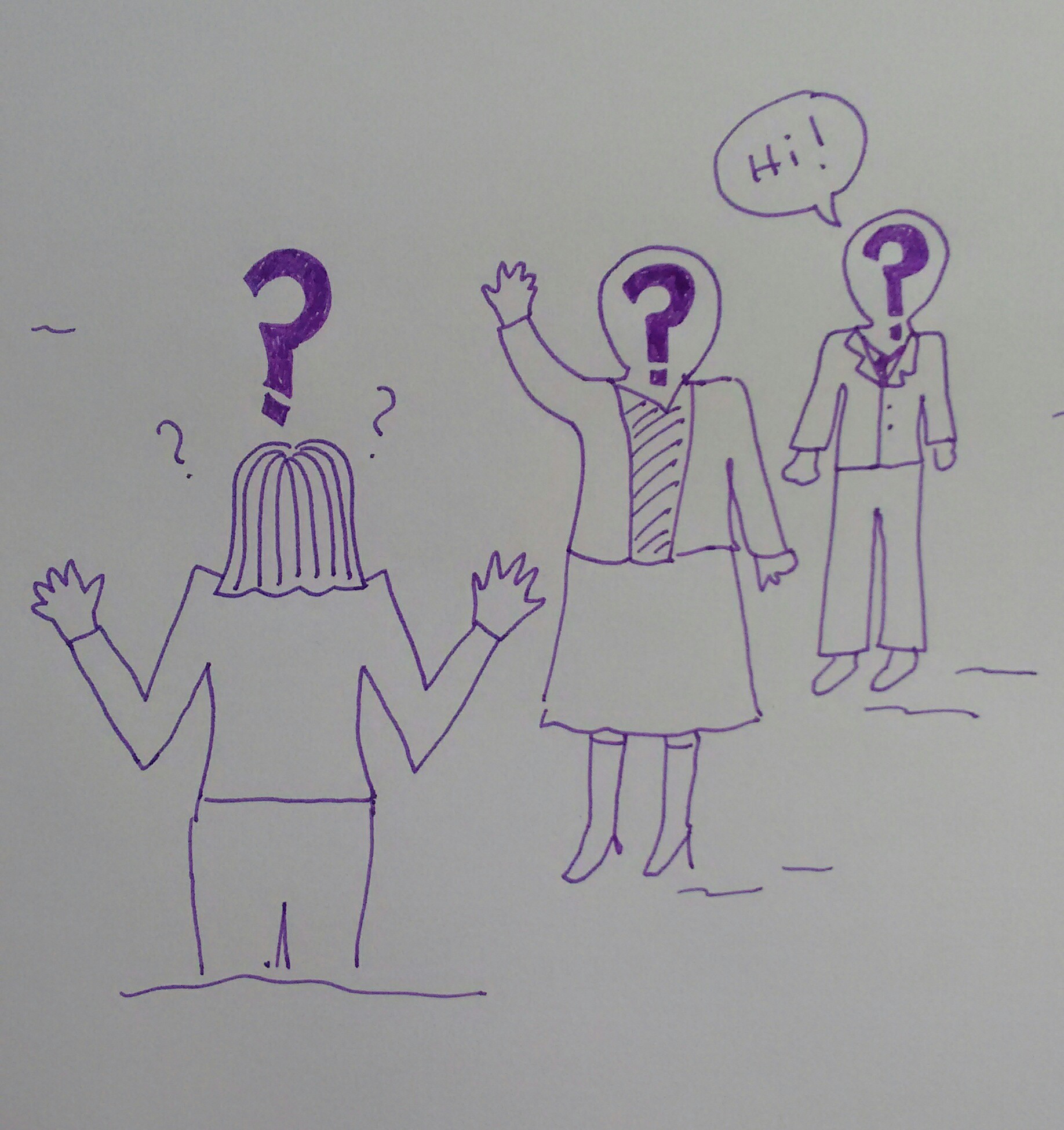
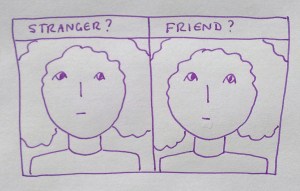
Cartoon expressing the experience of prosopagnosiaI read an interesting article in the Guardian newspaper this week about prosopagnosia (or “face blindness”).This is a condition I suffer from (not in the most severe way, but it does affect my life – and my business life), and I haven’t found much else about prosopagnosia and the businessperson. So, I thought it might be useful to share some information about what it is, how it affects me, as an example, and some coping strategies I’ve worked out for it. I would love other prosopagnosics to share their experiences and solutions, too, and I have added links to some useful resources at the end.

I know this is a long piece, but I didn’t want to be all teaser-ish and leave the coping strategies to another blog post. Feel free to jump down to those, though, if you want to!

What is prosopagnosia?

Prosopagnosia is also known as face-blindness, and this key term really explains what it is. Someone with the condition can see another person’s face OK: they can usually identify it as a face. What they can’t do is recognise who it is, tell the difference between similar-looking people, recognise familiar people in a different context, etc. In severe cases, people can even be unable to recognise their own family members, in whatever context, apart from knowing “If it’s a man in my house, it’s likely to be my husband”. Many prosopagnosics have complicated workarounds to help them to recognise people – their gait, glasses, common items of clothing – but this isn’t always fail-safe.

A side-effect of this can be an inability to distinguish expressions and emotions on people’s faces.

Where does it come from? You can pick up prosopagnosia from a brain injury or stroke, but most people acquire it as what the experts call a ‘developmental disorder’, i.e. it’s a connection that doesn’t get made at the right time when your brain is developing in early childhood.

It can be really distressing to be like this. I’m a reasonably friendly and warm person who likes to help other people. I have a horror of offending people or being rude. How horrendous to find out that you’ve repeatedly blanked someone in the street or to ask someone what they do, only to see a shocked expression and realise that they told you all about their business last time you met.

There’s lots of information and the scientific stuff on a handy University of Bournemouth website.

My experience with prosopagnosia

I didn’t know I was prosopagnosic for years – but I discovered the term in my 30s and breathed a HUGE sigh of relief. It was “A Thing”. I wasn’t just weird (well, not in that way, anyway). Other people had it!

I don’t have the most severe form of the condition. I can usually recognise family members and close friends. But it’s not like that thing where you know you know someone but can’t remember their name. I will see someone I spoke to last week – yesterday, even – and if they’ve not “taken” in my mind, I will not have any idea that I’ve ever met them before. Until they walk up to me, know my name, and know things about me, that is.

experience of prosopagnosiaSo, I have trouble recognising people or knowing that I’ve ever seen them before. I will walk past people I know quite well. I have developed coping strategies – I joke that I got together with my husband because he had a distinctive hairline (he had a widow’s peak, not some weird curlicue business) and a goatee and has a distinctive gait. This is only partly true. But I do get very discombobulated when he changes his beard, and I am well-known among my friends at parkrun for having real trouble picking him out in a crowd of runners – even if he has his special hat on.

I’m also not good when watching new TV programmes with lots of people (Strictly Come Dancing can be difficult in the early weeks), such as soaps and reality shows. This sounds funny, but it can REALLY annoy the person you’re watching with. I am known for mixing up pairs of people who I genuinely think are the same person (Matthew Broderick and John Cusack for example). They may not look identical to you, but if they have similar coloured hair and body shape, they’re the same person to me.

I don’t THINK I pick friends based on them having very definite looks or features, but I wouldn’t put it past me. I know I recognised one friend from her shoes rather than her face or hair when I saw her on the high street once (phew, got away with it).

Two things that I find particularly difficult are:

  • Changes in context. Give me someone from running club in running kit on club night or, within reason, in normal clothes and a similar hairstyle, volunteering at parkrun and I’m fine. Present them to me on the high street, in town, on a train, at the airport – not so much. I met someone in the gym the other day who recognised me from one meeting, when I scanned her barcode at parkrun a few weeks before. She knew she knew me from somewhere – not something that I’d manage to achieve!
  • Changes in look. I am constantly amazed that someone I know from said running club can recognise me not in flourescent gear and with my hair down rather than in bunches. To me, that’s a different person, someone I don’t know. How do they do that?

I’ve actually reached a point where I just explain it to new people I meet who I might meet again. I didn’t do this when I started networking for business, and I really wish I had. I certainly remember asking a “new woman I’d never met before” her name and being horrified to realise I’d met her twice before, and had quite long conversations with her. I wish I’d explained my condition then, and I will be sharing this post with her!

The good news: I do eventually get used to people and recognise them pretty well immediately – but it takes more meetings than it will for the average person. I’m also quite good at telling identical twins apart, maybe because I’m used to doing the checking of extra details that non-prosopagnosics don’t have to worry about.

Prosopagnosia and business / self-employment

Business revolves around recognising people. Even if you craftily have a job where you don’t have to deal with your clients face to face (hello, editing and transcription!), you tend to end up doing events, going to networking, etc. All of that can be a minefield. It’s all about who you know, and meeting, liking and trusting people – difficult if the person you’re speaking to seems to think they’ve never met you before when you had an in-depth conversation about widgets last time you met.

If you’re an introvert, by the way, this can make business encounters and networking even more exhausting than they already are!

I’m going to share some coping strategies that I’ve used in my business life (or should have used sooner). If you have this issue, too, I would LOVE you to share your experiences and coping strategies in the comments below!

Coping strategies for the business owner or businessperson with prosopagnosia

Tip 1: Be honest about it

I really wish I’d always done this. When I meet new people who I might meet again, I now pretty well always say, “Just to let you know, I have a condition called prosopagnosia, or face-blindness, which means that I have trouble recognising people. If you see me out and about, please come and say hello and remind me who you are!” It breaks the ice a bit, and I’ve not found anyone so far who’s reacted badly to this (why would they? Would you want to meet someone who did react badly again?)

Tip 2: Use the features of networking to your advantage

Networking events often feature badges and usually feature business cards. Hooray! You can at least make a note of people’s names and check their badges next time. I am good at recognising words and so I’ll commonly collect business cards from people I’ve met, then look out for those names next time. If you can’t read the badge from a distance, make a conversation about it: “Oops, my badge is peeling off,” “Where did you get your name badge from?” (this one only works at the beginning, obviously). Moving around the event and re-meeting people, a quick glance at the badge will reassure you as to whether you’ve met them before.

Tip 3: For one-off events with a lot of circulating, concentrate on a non-facial feature

If you’re at a one-day conference or training day, people aren’t likely to change too much. If you know you’re not good with faces, concentrate on earrings, unusual shoes, an e-watch – any clue that you can pick up that will help you to match the person to someone you know when they come around again (you probably already do this, but just in case).

Tip 4: Try to have a role at events

Weirdly, having a role that means lots of people talk to you can make it easier. They probably won’t expect you to recognise them, so if someone’s chasing up their gluten-free lunch, they’re likely to say so, meaning you can context-match and have the appropriate conversation.

Tip 5: When you’re having a meeting, turn up first

If you’re already in the meeting place, perhaps sitting down in an open and friendly position but looking at your phone or gazing calmly around you, it’s much more likely that the other person will come to you. If a different person you know, nothing to do with the meeting, just happens to come in, you’re just going to have to hope they have very different attributes (different gender, age, etc.) to the person you’re meeting – but I’ve never had a mix-up.

This one works for dates and meeting up with a new friend, too.

Tip 6: Be super-friendly

If you can manage to be super-friendly and approachable with a “Hi, how are you?” you can often pick up hints as to whether the other person already knows you from their answer.

Tip 7: Have a friend with you

If you know you’re going to be doing a regular event, volunteering session etc. there’s no shame in enlisting the help of a friend. I try to take my husband when I’m meeting people at the railway station (so many faces!) and pal up with a known person who can give me clues and cues when I can.

Tip 8: Do a job where you can hide the prosopagnosia

My job, as I mentioned above, doesn’t involve me being face to face with clients. I really do not know how I’d do that, actually. If you do have that kind of role and this condition, I really would like to know how you manage, as it will help other people (pop a comment below or get in touch if you’d rather be anonymous). You can use the tips above to work out who people are, and if you have regular customers, you will start to recognise them in time. How do waiters and teachers manage it, I wonder?

Dealing with prosopagnosics

If you meet one of us and you know (because we’ve told you) or suspect that we are prosopagnosic, please bear with us! We do not mean to be rude! Of course, I’m better at recognising (ha ha) this in other people, and I have managed to reassure and inform a couple of people that it’s not them, it is A Thing, but if someone fails to recognise you a few times, reintroduces themselves to you when you think they know who you are, or has to ask your name when they’re ticking you off a list and they’ve met you a few times before, chances are they’ll have a touch of prosopagnosia.

Top tips for dealing with someone with prosopagnosia:

  • Don’t take it personally.
  • Do introduce yourself, just “Hi, it’s Liz the slow runner, we met at the back of the pack at last week’s run” will work wonders.
  • Don’t think they’re stupid, it’s just one aspect of them. We all have blind spots. I’m really good at recognising voices, for example.
  • Don’t suddenly grow a beard or dye your hair without warning them (that’s a bit of a joke of course, but if you’re close to a prosopagnosic, it’s best to warn them of any major changes in appearance coming up, and remind them afterwards).
  • If they ask you who someone is, or to help them spot their husband in a crowd – again – don’t sigh with exasperation, just try to help.

Resources

I hope this has helped anyone with prosopagnosia feel less alone. If you want to get in touch with me about it, feel free to do so via my contact form.

The Guardian article explains things very clearly and easily, with good examples.

If you think you have prosopagnosia, the Cambridge Face Recognition Test (CFRT) is the one to take.

Face Blind UK is an organisation dedicated to raising awareness and providing support

The prosopagnosia website is a bit more formal but ever so useful, and there’s a discussion forum, too!

And as I said, if you have anything to add or any help you can give or stories to share, please comment below. And if you know anyone this article might help, please share it using the sharing buttons below. Thank you!

PS: This was quite a difficult article and image that I wanted to get right. Thank you to the people who helped me out!

 
23 Comments

Posted by on October 8, 2015 in Business, Prosopagnosia, Skillset


Tags: , ,

Aglet or ferrule?

DictionariesThis is a cheeky one. Of course you all know the difference between these two lovely words. But I like them, and it’s my blog, and you never know who might look things up (even “mandrel or mandrill” is quite popular).

An aglet is the little tube that you find on the end of your shoelaces, usually made of plastic but sometimes of metal. Sweetly, it apparently comes from the French for “little needle”, even though it doesn’t really look like or act like a needle in itself, but is used to help you thread the lace through the holes.

A ferrule is the little plastic or rubber cap that sits on the end of a walking stick or umbrella and prevents it from getting damaged.

You can find more troublesome pairs here and the index to them all so far is here.

 
10 Comments

Posted by on October 6, 2015 in Errors, Language use, Troublesome pairs, Writing


Tags: , , ,

Curb or kerb?

DictionariesHere’s one suggested by my friend and editing colleague, Linda Bates. As a special bonus, it has a US / UK English twist. How exciting!

A kerb is a noun meaning the stone edging of a pavement or path. There are some verbs associated with kerb, notably kerb-crawling, which is driving slowly on the lookout for a prostitute.

Curb is a noun meaning a limit or control (“I’m imposing a curb on the amount of alcohol you can drink at home”) and a verb meaning to keep in control or limit (“I’m curbing the amount of alcohol you can drink at home”). A curb is also a type of bit used in a horse’s bridle.

And, excitingly, American English uses the same word (curb) for both!

You can find more troublesome pairs here and the index to them all so far is here.

 
Leave a comment

Posted by on September 29, 2015 in Errors, Language use, Troublesome pairs, Writing


Tags: , , ,

Altar or alter?

DictionariesHooray, I seem to be doing these posts more regularly again now. They have lots of fans, so hope regular readers are pleased. Of course, if you’ve just found this post having searched for “altar or alter”, you’re going to be a bit confused by that statement, as you’re visiting from way in the future. This “Troublesome Pair” is but one of a whole series of them I’ve been posting for a few years now. Do pop to the links at the bottom of this post to find the whole alphabetical list of them!

Right, anyway … alter or altar?

Altar is a noun and refers to specifically the table in a Christian church, usually at the front, where the bread and wine are consecrated for communion, and more generally, to any flat-topped box or table that is used as the focus for some kind of religious ritual.

Bonus pair: What’s a shrine, then? A shrine is a place that’s regarded as being sacreed or holy because it’s associated with some kind of god / deity, or a reliquary or container containing holy relics. So you do religious things at an altar and a shrine keeps them safe.

Alter is a verb meaning to change (or change something or cause something to change) in appearance or character. In US and Australian English, it also means to castrate or spay an animal (so many bonuses today!)

“After she observed the seriousness of the actions performed at the altar, she altered her behaviour in church and stopped giggling during the services.”

You can find more troublesome pairs here and the index to them all so far is here.

 
Leave a comment

Posted by on September 24, 2015 in Errors, Language use, Troublesome pairs, Writing


Tags: , , ,

How do I add a link to a blog post?

This is a re-post of an older post that was attracting lots of spam comments, reposting it to see if it helps. But it is a useful post, still, so do read, enjoy and share!

Why would I add a link to a blog post?

Adding a link means that you’re putting a hyperlink to either another website or another of your blog posts in the one that you’re writing. There are many reasons for doing this: these are some of the reasons why I do it …

And did you notice that all of those bullet points were links to examples of what I was talking about?

A note about SEO and links (back-links)

One major advantage of links is in helping your Search Engine Optimisation (SEO). I’m not going to go deeply into that here, but basically, Google and the other search engines like to see your pages linked to on other people’s pages, as it shows you’re trustworthy and respected within your community enough for people to link back to you. Yes, people do try to abuse this (we’ve all had blog “comments” from spammers trying to get their URL on your list of comments and now we know why) but when used properly, reciprocal linking to content that does actually interest you and is relevant for your readers does help your fellow bloggers and will hopefully lead to them linking to you, too.

How do I add a link to my blog post?

Of course, all of the blogging platforms (WordPress, LiveJournal, Blogger and others) do it slightly differently. But the difference usually comes down to the icon that they use and how much you can do once you’ve clicked on that icon.

I’m going to use WordPress as the main example, showing all the steps to create a link, but then I’ll show you what the link button looks like in Blogger and LiveJournal and, in fact, Gmail, too. And at the end I’ll share those link images so you know what to look out for.

How do I add a link to a WordPress blog post?

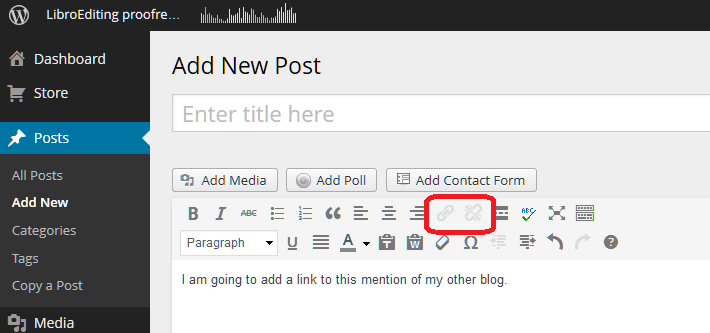
The first thing you need to do is have some text on which you want to base the link. Here I’ve typed in a few words. You can see that in the case of WordPress, there’s a little greyed-out icon that’s not clickable if you haven’t highlighted any text:

Wordpress 1

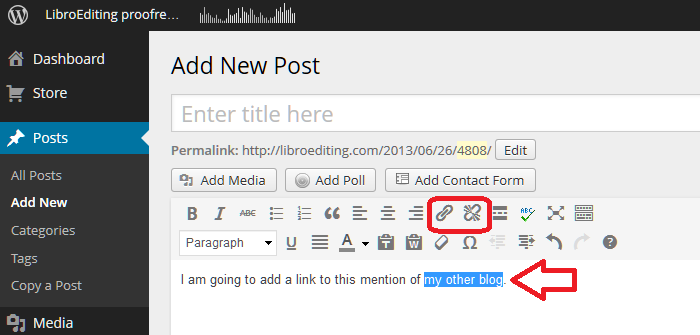
As soon as I highlight the text that I want to use as the basis of my link, the two greyed-out icons appear in all their clickable glory:

Wordpress 2

Keeping the text highlighted, click on the left-hand icon that looks a bit like a staple. Or in fact, as has been pointed out in the comments on this post, a link in a chain. This will bring up a dialogue box for inserting your link:

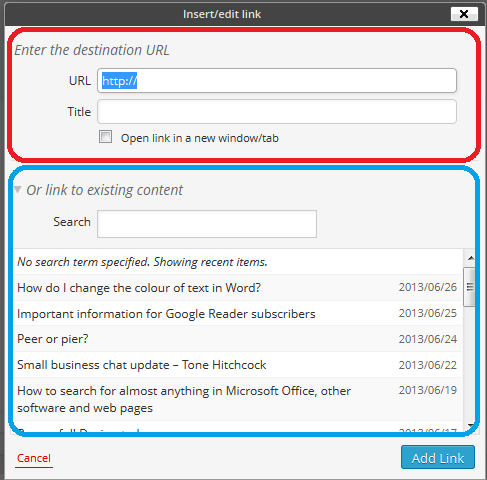
Wordpress 3

WordPress allows you to do two things here; you can either link to a URL for a page outside your own blog (circled in red) or you can choose one of your own previous blog posts to link to (circled in blue) – very handy.

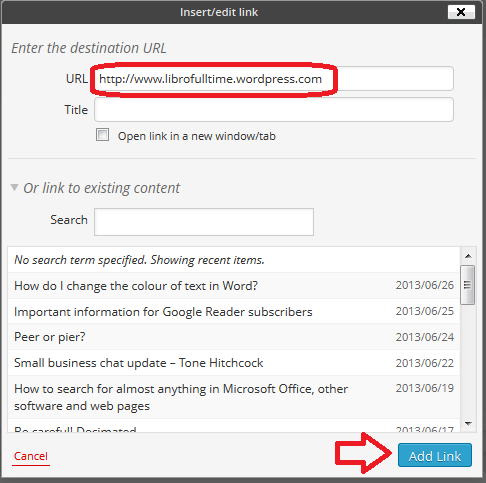
We’re going to concentrate on linking to a URL. Type in the URL you want to link to – including http:// at the beginning:

Wordpress 4

Note here that I’m read to hit Add Link and I have NOT ticked Open link in a new window/tab. This is because I used to do that and an experienced website manager I know got into a bit of a frenzy and told me that it’s not good practice and I should NOT do that. So I don’t now.

Note: if you want to open a link in a new window or tab when you’re reading a blog or web page, right-click on that link and you should get a list of options including those.

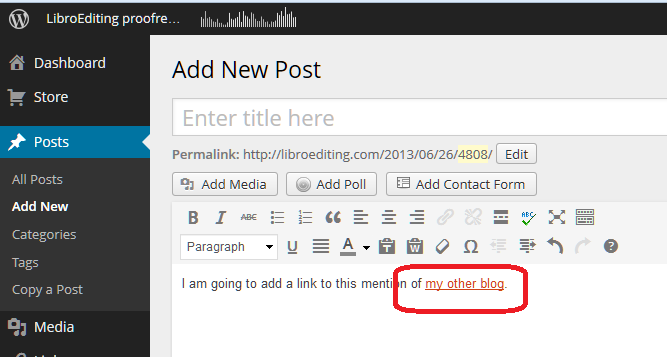
Having pressed Add Link, my text is underlined:

Wordpress 5

… and it will be a link just like the ones in the first section, above.

If you want to edit the link, highlight the underlined text and click on the same Link button – you can now change it as you wish.

If you want to delete the link, highlight the underlines text and click on the icon to the right, which is supposed to look like a link being broken (or a staple being removed).

How do I add a link to a Blogger blog post?

Thanks to my friend Linda for the screenshots for this one! (And that’s a link to the website she’s set up with background information to a book she’s just published.)

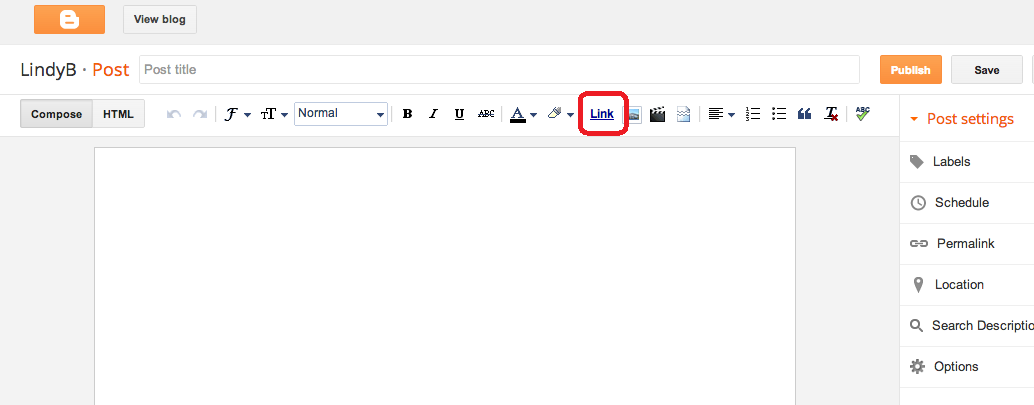
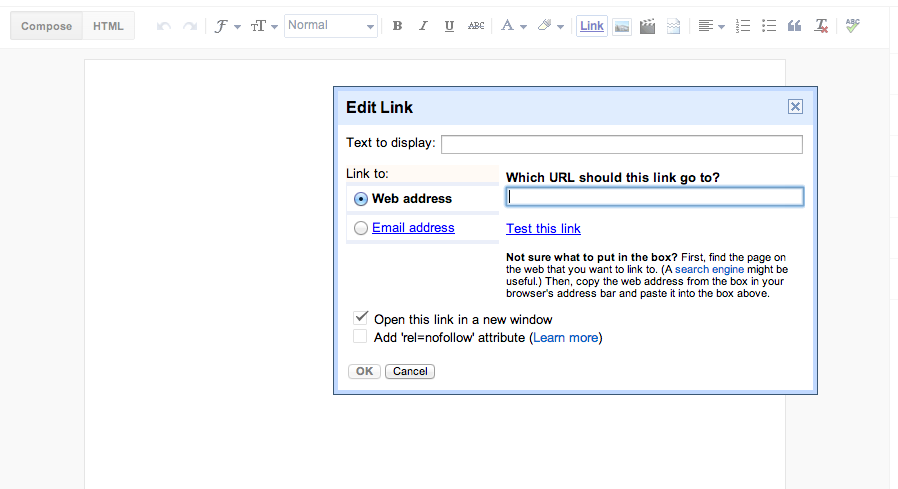
Blogger works in a similar way to WordPress, but the icon you need to use is the word Link:

Blogger 1

and the dialogue box doesn’t give you the option to choose a previous blog post to link to, but has the familiar URL entry field:

Blogger 2

How do I add a link to a LiveJournal blog post?

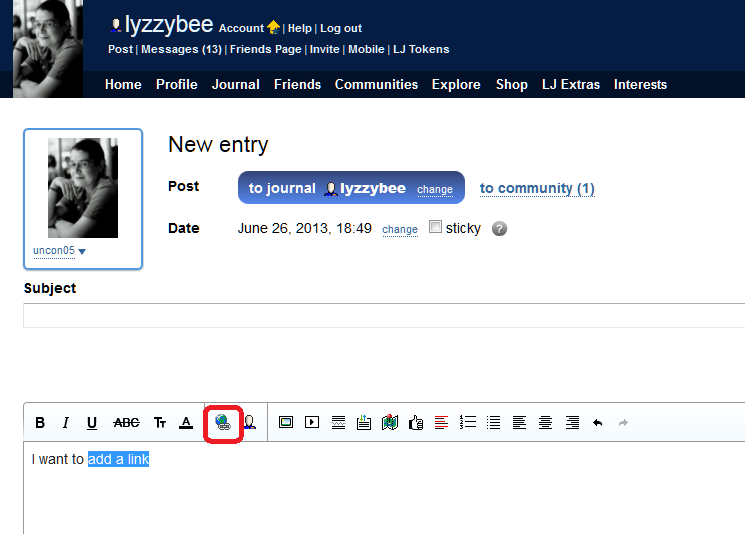
LiveJournal uses another common icon that you’ll find for a link – this is apparently a globe with a link of a chain attached …

Livejournal 1

and you’ll get a similar dialogue box when you click that icon.

How do I add a link to a Weebly blog post?

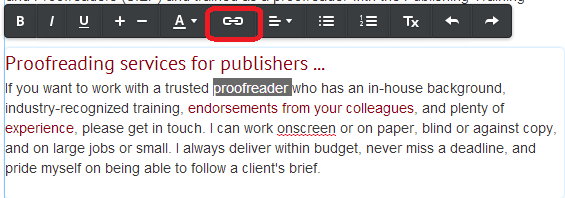
Thanks to Louise Harnby for the screenshot for this one. We encounter the link  / staple icon again for Weebly, this time in white on a black background:

weebly 1

How do I add a link to a Gmail email?

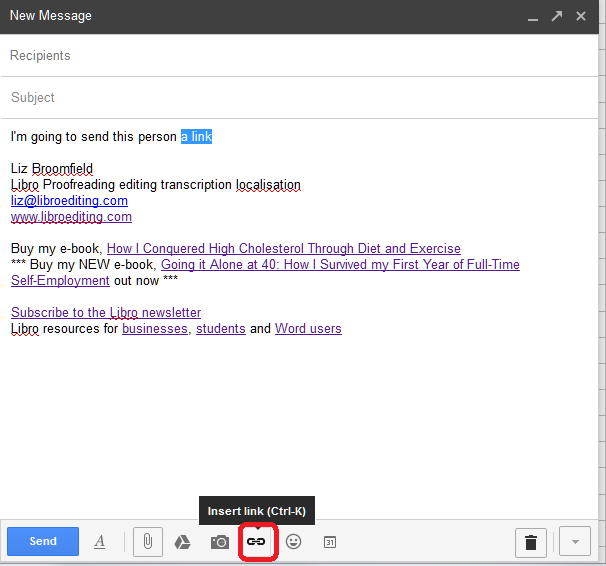
And just because it demonstrates one of the other icons that is commonly used, if you want to add a link to a Gmail email, for example to point a friend to this blog post, the icon is another chain link / staple, but a horizontal one similar to Weebly’s:

Gmail 1

Icons that represent adding a link

Here are those common icons again. If you find another one, do contact me and send me a screenshot and I’ll add it to this post!

If you want to add a link to any kind of text and you’re looking for the appropriate icon on a button, it is likely to be one of these or similar:

icon 2 stapleicon 3 wordicon 1 worldicon 2.5 another staple

I hope you found this useful. If so, please take a moment to like, share or comment, and spread the word! And feel free to use the Search function on the right hand sidebar to look for more posts about blogging …

 
9 Comments

Posted by on September 17, 2015 in Blogging, Writing


Tags: , , ,

Hanger or hangar?

DictionariesHooray, it’s time for another Troublesome Pair (for any new readers, this was a series I used to run that I’ve recently restarted). This is another one suggested by my Australian friend Matt Patten, as he spotted an example just the other day.

A hanger is something that you hang something from – a clothes hanger being the obvious example.

A hangar is the big shed that an aeroplane lives in.

Nothing more I can say, really!

You can find more troublesome pairs here and the index to them all so far is here.

 
3 Comments

Posted by on September 15, 2015 in Errors, Language use, Troublesome pairs, Writing


Tags: , , ,

How do I stop videos auto-playing in Facebook and Twitter?

There have been several examples recently, sadly, where people have seen videos that have been shared to their timelines and automatically played on their screens, maybe something they wouldn’t have chosen to see, which now they can’t “unsee”. I actually had to look up how to turn this off in Twitter, so I thought I’d share a few instructions so we all know how to stop videos auto-playing, and can choose when and whether to view them.

Please note that these instructions are for your PC or laptop, although I offer a few hints for resolving this issue on your phone and tablet at the end, too.

Note: Facebook and Twitter change how to do things all the time. Please let me know if these instructions have become outdated and I need to refresh them!

How do I stop videos auto-playing in Facebook?

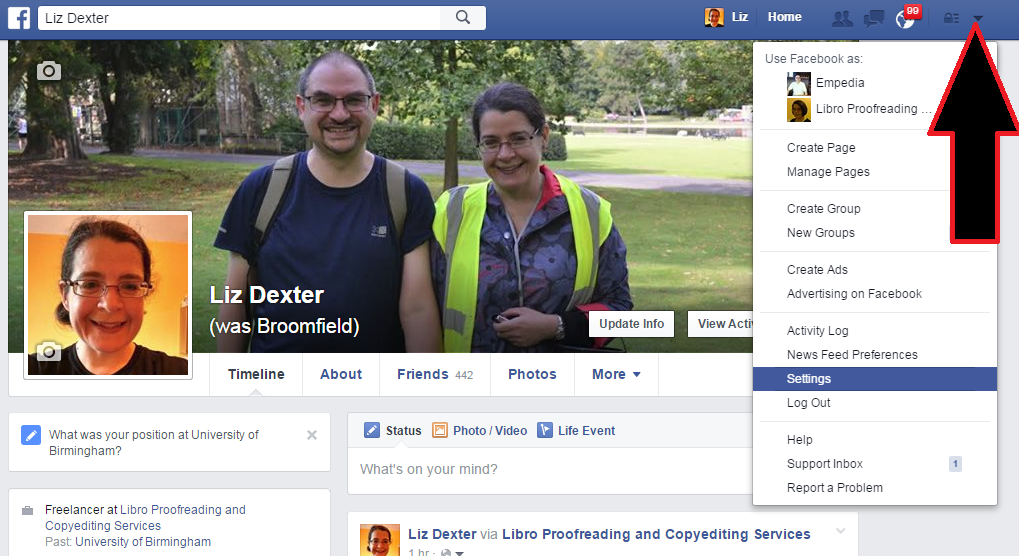
To stop videos auto-playing, you will need to go into your settings. In Facebook you can find these under the little arrow at the very top right of the Facebook screen. Click on the arrow and select Settings from the drop down menu:

1 settings

In the Settings menu, there is now a specific link for videos:

2 videos

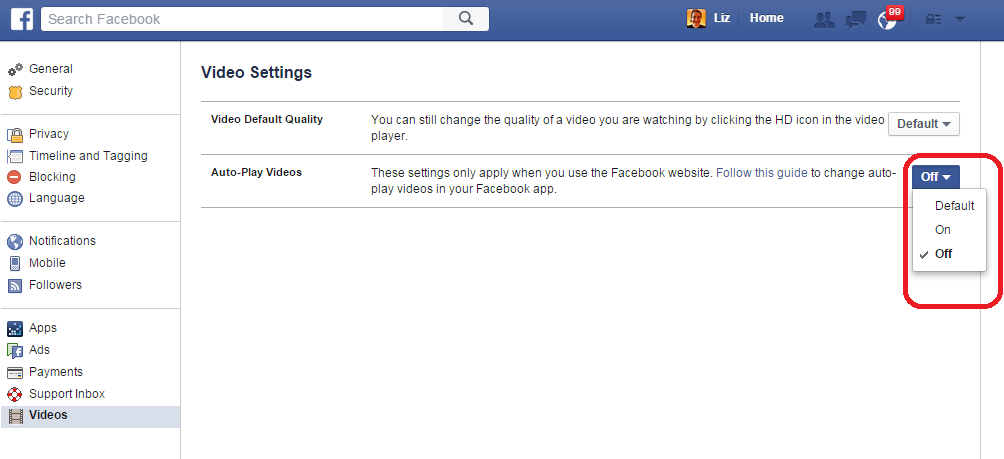
Click on Videos to access the relevant screen:

3 videos

Choose Off or On. Note that Facebook also gives you a link with advice on how to disable this option on the official Facebook app.

There’s no Save changes button, so you’re done, and videos won’t now auto-play in your Facebook timeline.

How do I stop videos auto-playing in Twitter?

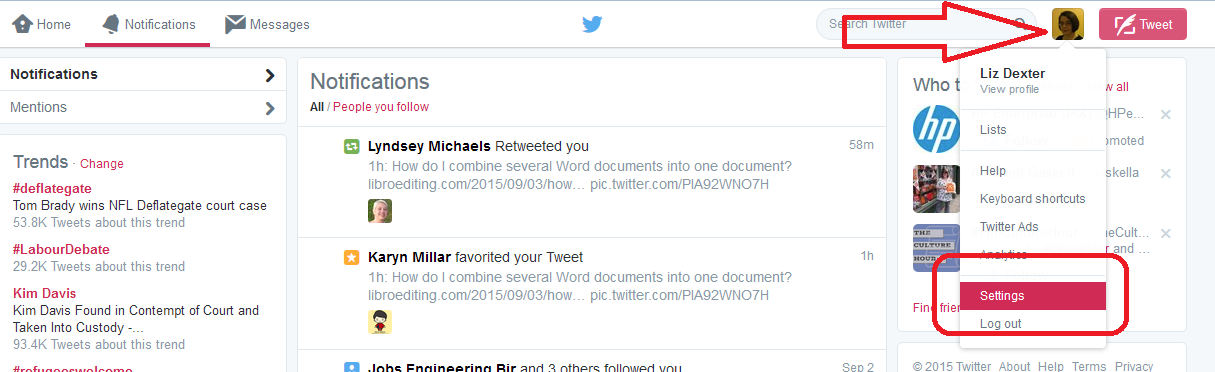
In Twitter, we follow the same principles as in Facebook – so it’s in your Settings. Settings are accessed by clicking your own icon in the Twitter screen, then selecting Settings:

4 twitter settings

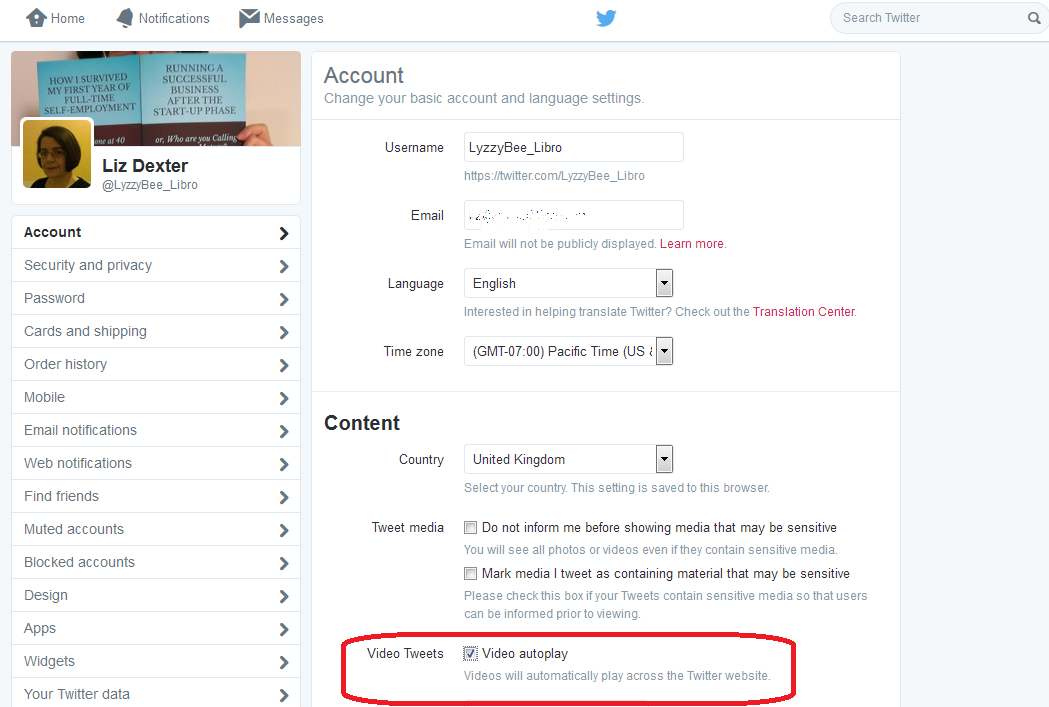
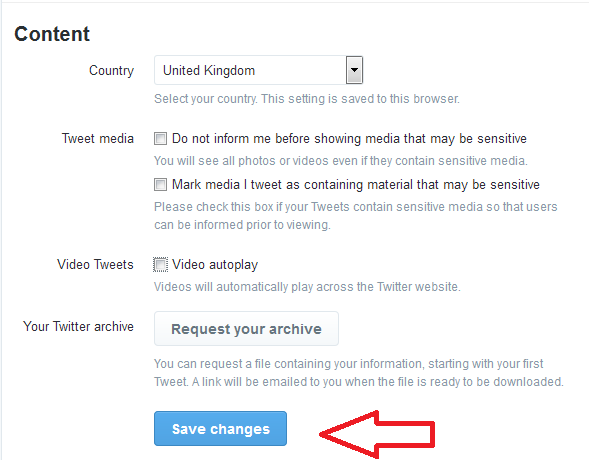
Once you’re in the Settings menu, you’ll find the video area under Content in the first, Account screen:

5 twitter settings

You can untick Video autoplay to get videos to stop auto-playing in your timeline.

It’s also worth noting the area just above this, where you can choose to be informed – or not – if you are about to view sensitive material.

Once you’ve ticked what you need to tick, scroll down and click save changes:

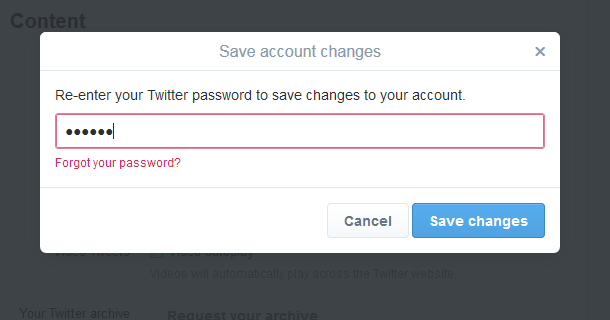
6 twitter settingsTwitter will now ask you to confirm the change by entering your password:

7 twitter settings

And now you’ve turned off auto-play on Twitter.

How do I stop videos auto-playing on my phone and tablet?

On the official Facebook app on your phone or tablet, hit those three horizontal lines that are supposed to resemble a hamburger, then scroll allllllll the way down to the bottom to Help & Settings. Click on Account Settings and you’ll see the option for Videos Play Automatically – click it to change it from On to Off.

On the official Twitter app on your phone or tablet, press the three dots in a vertical row at the top right to access Settings, then choose General and click on Video autoplay, and make sure that you select Never play videos automatically.

On third-party apps, you will need to look for three dots in a vertical row, three horizontal lines or a cog wheel, find the Setttings and take it from there.

This post has shown you how to stop videos auto-playing in Facebook and Twitter on your desktop, laptop, mobile and tablet. You can find more on social media in the Resource Guide or by using the Search box in the right-hand column.

If you’ve found this post useful, please share it using the buttons underneath!

 
7 Comments

Posted by on September 10, 2015 in Facebook, Twitter


Tags: ,

Expectancy or expectation?

DictionariesFor those who’ve been following this blog for a while, you might remember the Troublesome Pairs series I used to publish regularly. They’ve been very popular, and I certainly haven’t run out of them, but I didn’t seem to get the time to do them. But I have some more coming up, and here’s the first one! This one was suggested by my Australian friend Matt Patten, who’s asked me to write about a few Troublesome Pairs recently (and not so recently) .

I have to admit that this was one of those that I had to look up to check. But there is a difference (hooray) and it’s all about the level of certainty …

Expectancy is the anticipation or hope that something will happen – and that something is usually a pleasant something. It also refers to a future prospect, as in “life expectancy”. Expectant, the adjective, as we might imagine, means anticipating or hoping that something (pleasant) will happen – so you have expectant mothers, etc.

Expectation is the strong belief that something will happen – not necessarily positive. You can expect a storm or an inheritance (and in fact, someone’s “expectations” is an old-fashioned term for their prospects of inheritance.

“It was my expectation that the expectant mother would soon be seen travelling around with a pushchair.”

Note: nobody associated with this post is expectant!

You can find more troublesome pairs here and the index to them all so far is here.


Tags: , , ,

How do I combine several Word documents into one document?

This article explains how to combine several Word documents into one document. It’s particularly useful if you’ve written a dissertation, thesis or book and need to combine all of the chapters into one file.

These instructions work for Word 2007, Word 2010 and Word 2013; I’ve used Word 2010 for the screenshots

Why would I want to combine chapters into one document?

Lots of people do their writing a chapter at a time, and have it edited a chapter at a time, too. But the time will come when you want to put it all into one book, with page numbers running throughout, rather than messing around starting the page numbers for chapter 2 at the next number on from chapter 1, etc.

What’s the incorrect way to combine my chapters?

You might be tempted to pick up the text of each chapter and copy and paste it into one document. That can lead to issues and inconsistencies. This is the correct way to do it and actually takes less time and avoids you leaving out any bits of your individual chapters.

How do I prepare to combine my documents?

It’s pretty easy to combine several documents into one, however the most important point is …

The file names must be in the order that the chapters are going to be in.

Word will combine your chapter files in alphanumerical order.

If you have called your chapter files

Chapter 1 introduction

Chapter 2 review of the literature

Chapter 3 methodology

Chapter 4 conclusion

then that’s fine, they will combine in that order.

If you have called your chapter files

Introduction

Review of the literature

Methodology

Conclusion

then Word will carefully sort them alphabetically into

Conclusion

Introduction

Methodology

Review of the literature

when it combines your documents.

The best thing to do is add a number 1, 2, 3, etc at the start of your file names BEFORE YOU START COMBINING, so you know they will come out in the correct order.

How do I combine my documents?

OK, so we’ve got, say, four documents or chapters to combine into one.

First, open a new, blank document (using the Home button, New, and choosing a blank document)

Then, click on the Insert tab and find Object in the Text area:

1 insert tab

Click on the arrow to the right of Object to get the drop-down menu, and click on Text from File:

2 insert text from file

Now navigate to your files and select the ones you want to combine.

3 find your files

Hold down the Control Key and click on all the ones you want to combine (or click on the top one, hold down Shift and click on the bottom one if you want all of them). Once you have them all highlighted, click Insert.

4 select files

Note: it doesn’t matter what order you are displaying them in or what order you click them in, it will choose them and insert them in alphabetical or numerical order, as I mentioned above.

Now you will have one big document including all of your chapters!

5 combined

And … if you had footnotes in the documents, and had set page numbers to show, they will automatically update in the combined document to be numbered consecutively (if you want start your footnote numbering at 1 for each chapter, you’ll need to look at my posts on footnotes and endnotes).

Don’t forget to save your document!

PS: If you find you lose your formatting when combining Word documents, read this article for the solution.

—–

This is part of my series on how to avoid time-consuming “short cuts” and use Word in the right way to maximise your time and improve the look of your documents.

If you have enjoyed this post and found it useful, please click on the “share” buttons below or tell your friends and colleagues about it! Thank you!

Please note, these hints work with versions of Microsoft Word currently in use – Word 2007, Word 2010 and Word 2013, all for PC. Mac compatible versions of Word should have similar options. Always save a copy of your document before manipulating it. I bear no responsibility for any pickles you might get yourself into!

Find all the short cuts here

Other useful articles on this website

How to combine Word documents without losing the formatting

 
53 Comments

Posted by on September 3, 2015 in Errors, New skills, Word, Writing


Tags: , , , ,